lock GMC ACADIA 2020 Owners Manual
[x] Cancel search | Manufacturer: GMC, Model Year: 2020, Model line: ACADIA, Model: GMC ACADIA 2020Pages: 406, PDF Size: 6.78 MB
Page 266 of 406
GMC Acadia/Acadia Denali Owner Manual (GMNA-Localizing-U.S./Canada/
Mexico-13687875) - 2020 - CRC - 10/28/19
Vehicle Care 265
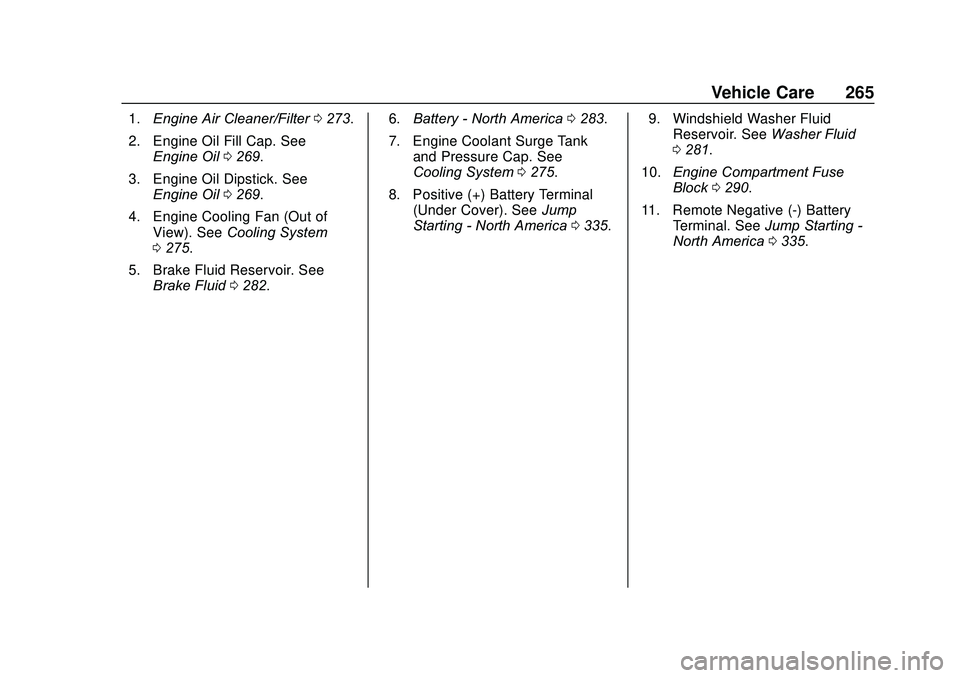
1.Engine Air Cleaner/Filter 0273.
2. Engine Oil Fill Cap. See Engine Oil 0269.
3. Engine Oil Dipstick. See Engine Oil 0269.
4. Engine Cooling Fan (Out of View). See Cooling System
0 275.
5. Brake Fluid Reservoir. See Brake Fluid 0282. 6.
Battery - North America 0283.
7. Engine Coolant Surge Tank and Pressure Cap. See
Cooling System 0275.
8. Positive (+) Battery Terminal (Under Cover). See Jump
Starting - North America 0335. 9. Windshield Washer Fluid
Reservoir. See Washer Fluid
0 281.
10. Engine Compartment Fuse
Block 0290.
11. Remote Negative (-) Battery Terminal. See Jump Starting -
North America 0335.
Page 268 of 406
GMC Acadia/Acadia Denali Owner Manual (GMNA-Localizing-U.S./Canada/
Mexico-13687875) - 2020 - CRC - 10/28/19
Vehicle Care 267
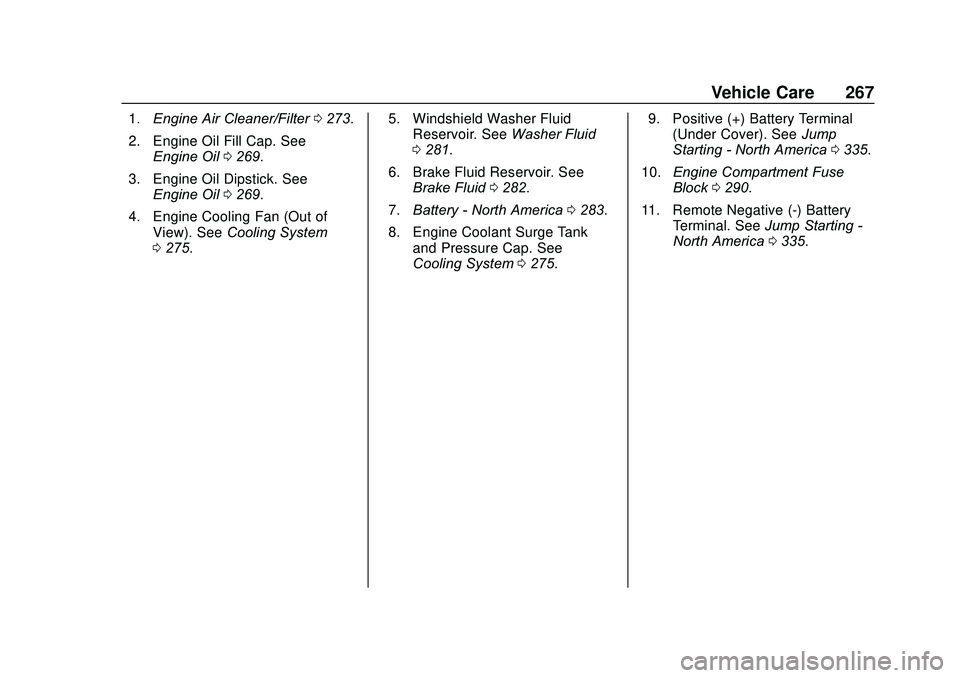
1.Engine Air Cleaner/Filter 0273.
2. Engine Oil Fill Cap. See Engine Oil 0269.
3. Engine Oil Dipstick. See Engine Oil 0269.
4. Engine Cooling Fan (Out of View). See Cooling System
0 275. 5. Windshield Washer Fluid
Reservoir. See Washer Fluid
0 281.
6. Brake Fluid Reservoir. See Brake Fluid 0282.
7. Battery - North America 0283.
8. Engine Coolant Surge Tank and Pressure Cap. See
Cooling System 0275. 9. Positive (+) Battery Terminal
(Under Cover). See Jump
Starting - North America 0335.
10. Engine Compartment Fuse
Block 0290.
11. Remote Negative (-) Battery Terminal. See Jump Starting -
North America 0335.
Page 270 of 406
GMC Acadia/Acadia Denali Owner Manual (GMNA-Localizing-U.S./Canada/
Mexico-13687875) - 2020 - CRC - 10/28/19
Vehicle Care 269
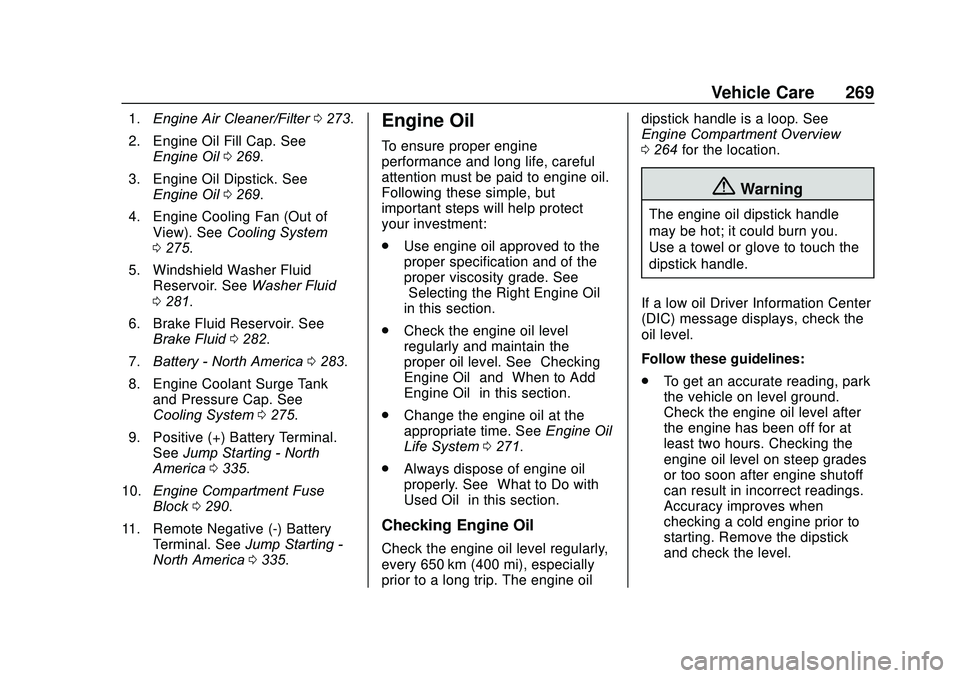
1.Engine Air Cleaner/Filter 0273.
2. Engine Oil Fill Cap. See Engine Oil 0269.
3. Engine Oil Dipstick. See Engine Oil 0269.
4. Engine Cooling Fan (Out of View). See Cooling System
0 275.
5. Windshield Washer Fluid Reservoir. See Washer Fluid
0 281.
6. Brake Fluid Reservoir. See Brake Fluid 0282.
7. Battery - North America 0283.
8. Engine Coolant Surge Tank and Pressure Cap. See
Cooling System 0275.
9. Positive (+) Battery Terminal. See Jump Starting - North
America 0335.
10. Engine Compartment Fuse
Block 0290.
11. Remote Negative (-) Battery Terminal. See Jump Starting -
North America 0335.Engine Oil
To ensure proper engine
performance and long life, careful
attention must be paid to engine oil.
Following these simple, but
important steps will help protect
your investment:
.
Use engine oil approved to the
proper specification and of the
proper viscosity grade. See
“Selecting the Right Engine Oil”
in this section.
. Check the engine oil level
regularly and maintain the
proper oil level. See “Checking
Engine Oil” and“When to Add
Engine Oil” in this section.
. Change the engine oil at the
appropriate time. See Engine Oil
Life System 0271.
. Always dispose of engine oil
properly. See “What to Do with
Used Oil” in this section.
Checking Engine Oil
Check the engine oil level regularly,
every 650 km (400 mi), especially
prior to a long trip. The engine oil dipstick handle is a loop. See
Engine Compartment Overview
0
264 for the location.
{Warning
The engine oil dipstick handle
may be hot; it could burn you.
Use a towel or glove to touch the
dipstick handle.
If a low oil Driver Information Center
(DIC) message displays, check the
oil level.
Follow these guidelines:
. To get an accurate reading, park
the vehicle on level ground.
Check the engine oil level after
the engine has been off for at
least two hours. Checking the
engine oil level on steep grades
or too soon after engine shutoff
can result in incorrect readings.
Accuracy improves when
checking a cold engine prior to
starting. Remove the dipstick
and check the level.
Page 279 of 406
GMC Acadia/Acadia Denali Owner Manual (GMNA-Localizing-U.S./Canada/
Mexico-13687875) - 2020 - CRC - 10/28/19
278 Vehicle Care
{Warning
Plain water, or other liquids such
as alcohol, can boil before the
proper coolant mixture will. With
plain water or the wrong mixture,
the engine could get too hot but
there would not be an overheat
warning. The engine could catch
fire and you or others could be
burned.
Caution
Failure to follow the specific
coolant fill procedure could cause
the engine to overheat and could
cause system damage. If coolant
is not visible in the surge tank,
contact your dealer.
If no problem is found, check to see
if coolant is visible in the coolant
surge tank. If coolant is visible but
the coolant level is not at or above
the indicated mark, add a 50/
50 mixture of clean, drinkable water and DEX-COOL coolant. Be sure
the cooling system, including the
coolant surge tank pressure cap, is
cool before you do it.
How to Add Coolant to the
Coolant Surge Tank (2.5L and
3.6L Engines Only)
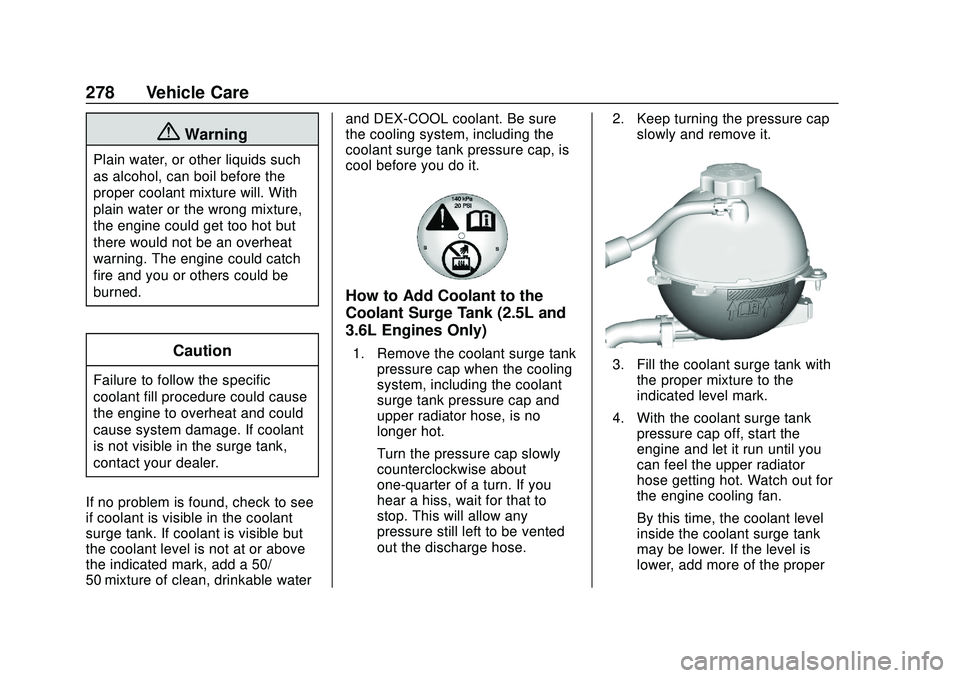
1. Remove the coolant surge tank
pressure cap when the cooling
system, including the coolant
surge tank pressure cap and
upper radiator hose, is no
longer hot.
Turn the pressure cap slowly
counterclockwise about
one-quarter of a turn. If you
hear a hiss, wait for that to
stop. This will allow any
pressure still left to be vented
out the discharge hose. 2. Keep turning the pressure cap
slowly and remove it.3. Fill the coolant surge tank withthe proper mixture to the
indicated level mark.
4. With the coolant surge tank pressure cap off, start the
engine and let it run until you
can feel the upper radiator
hose getting hot. Watch out for
the engine cooling fan.
By this time, the coolant level
inside the coolant surge tank
may be lower. If the level is
lower, add more of the proper
Page 287 of 406
GMC Acadia/Acadia Denali Owner Manual (GMNA-Localizing-U.S./Canada/
Mexico-13687875) - 2020 - CRC - 10/28/19
286 Vehicle Care
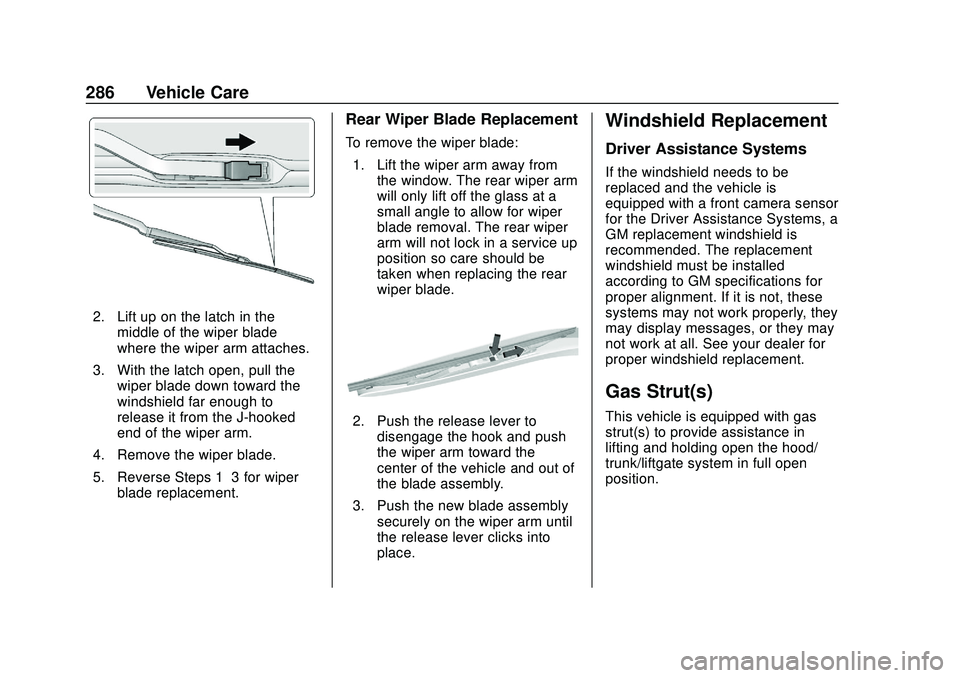
2. Lift up on the latch in themiddle of the wiper blade
where the wiper arm attaches.
3. With the latch open, pull the wiper blade down toward the
windshield far enough to
release it from the J-hooked
end of the wiper arm.
4. Remove the wiper blade.
5. Reverse Steps 1–3 for wiper blade replacement.
Rear Wiper Blade Replacement
To remove the wiper blade:
1. Lift the wiper arm away from the window. The rear wiper arm
will only lift off the glass at a
small angle to allow for wiper
blade removal. The rear wiper
arm will not lock in a service up
position so care should be
taken when replacing the rear
wiper blade.
2. Push the release lever todisengage the hook and push
the wiper arm toward the
center of the vehicle and out of
the blade assembly.
3. Push the new blade assembly securely on the wiper arm until
the release lever clicks into
place.
Windshield Replacement
Driver Assistance Systems
If the windshield needs to be
replaced and the vehicle is
equipped with a front camera sensor
for the Driver Assistance Systems, a
GM replacement windshield is
recommended. The replacement
windshield must be installed
according to GM specifications for
proper alignment. If it is not, these
systems may not work properly, they
may display messages, or they may
not work at all. See your dealer for
proper windshield replacement.
Gas Strut(s)
This vehicle is equipped with gas
strut(s) to provide assistance in
lifting and holding open the hood/
trunk/liftgate system in full open
position.
Page 291 of 406
GMC Acadia/Acadia Denali Owner Manual (GMNA-Localizing-U.S./Canada/
Mexico-13687875) - 2020 - CRC - 10/28/19
290 Vehicle Care
To check a fuse, look at the
silver-colored band inside the fuse.
If the band is broken or melted,
replace the fuse. Be sure to replace
a bad fuse with a new one of the
identical size and rating.
Fuses of the same amperage can
be temporarily borrowed from
another fuse location, if a fuse goes
out. Replace the fuse as soon as
possible.
Engine Compartment
Fuse Block
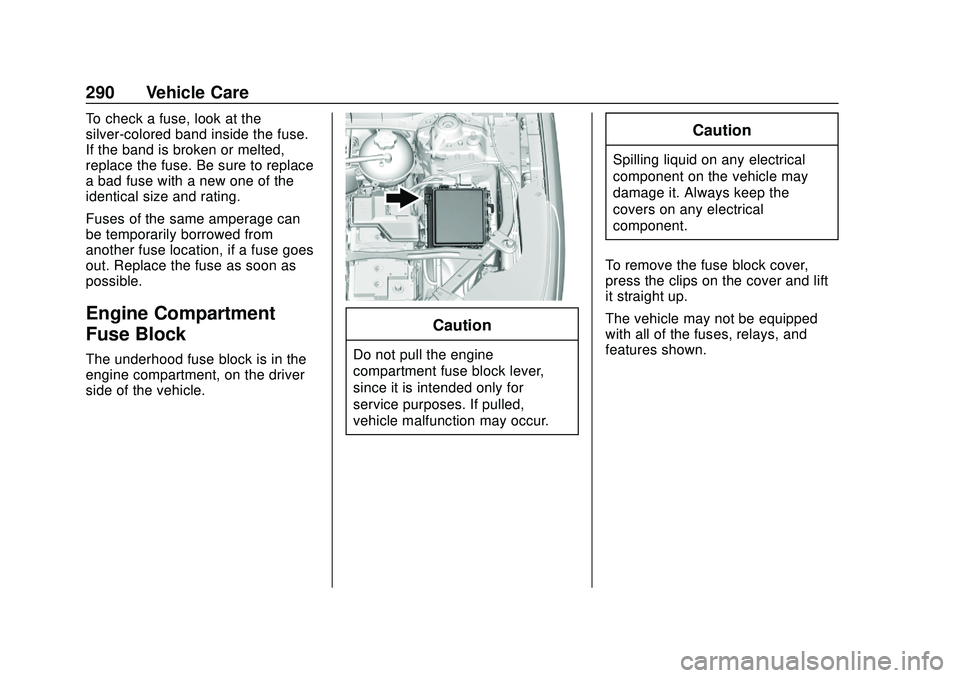
The underhood fuse block is in the
engine compartment, on the driver
side of the vehicle.
Caution
Do not pull the engine
compartment fuse block lever,
since it is intended only for
service purposes. If pulled,
vehicle malfunction may occur.
Caution
Spilling liquid on any electrical
component on the vehicle may
damage it. Always keep the
covers on any electrical
component.
To remove the fuse block cover,
press the clips on the cover and lift
it straight up.
The vehicle may not be equipped
with all of the fuses, relays, and
features shown.
Page 292 of 406
GMC Acadia/Acadia Denali Owner Manual (GMNA-Localizing-U.S./Canada/
Mexico-13687875) - 2020 - CRC - 10/28/19
Vehicle Care 291
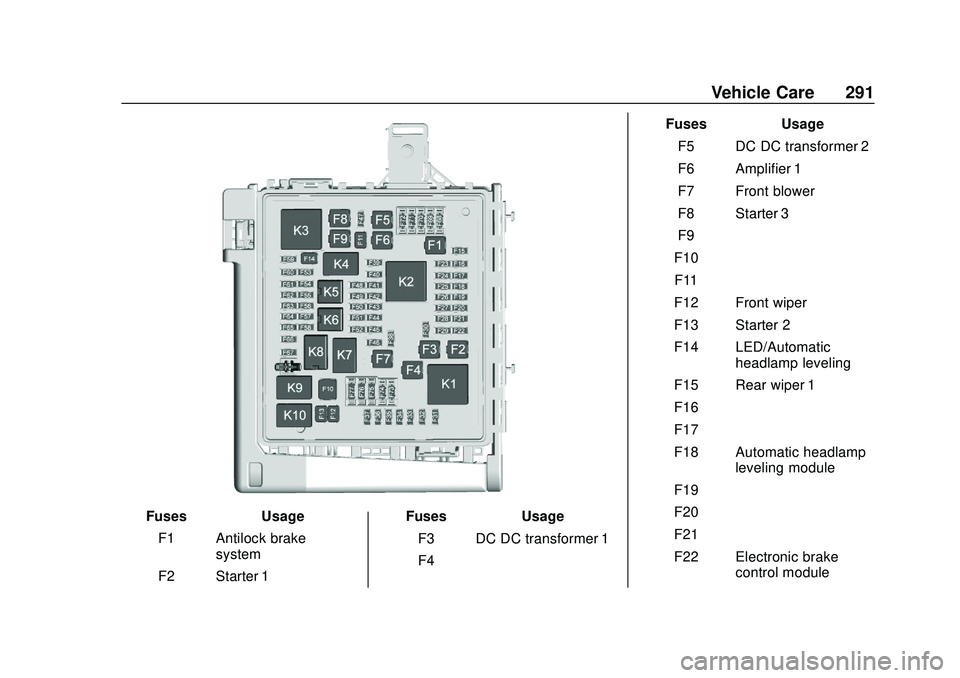
FusesUsage
F1 Antilock brake system
F2 Starter 1 Fuses
Usage
F3 DC DC transformer 1
F4 – Fuses
Usage
F5 DC DC transformer 2
F6 Amplifier 1
F7 Front blower
F8 Starter 3
F9 –
F10 –
F11 –
F12 Front wiper
F13 Starter 2
F14 LED/Automatic headlamp leveling
F15 Rear wiper 1
F16 –
F17 –
F18 Automatic headlamp leveling module
F19 –
F20 –
F21 –
F22 Electronic brake control module
Page 293 of 406
GMC Acadia/Acadia Denali Owner Manual (GMNA-Localizing-U.S./Canada/
Mexico-13687875) - 2020 - CRC - 10/28/19
292 Vehicle Care
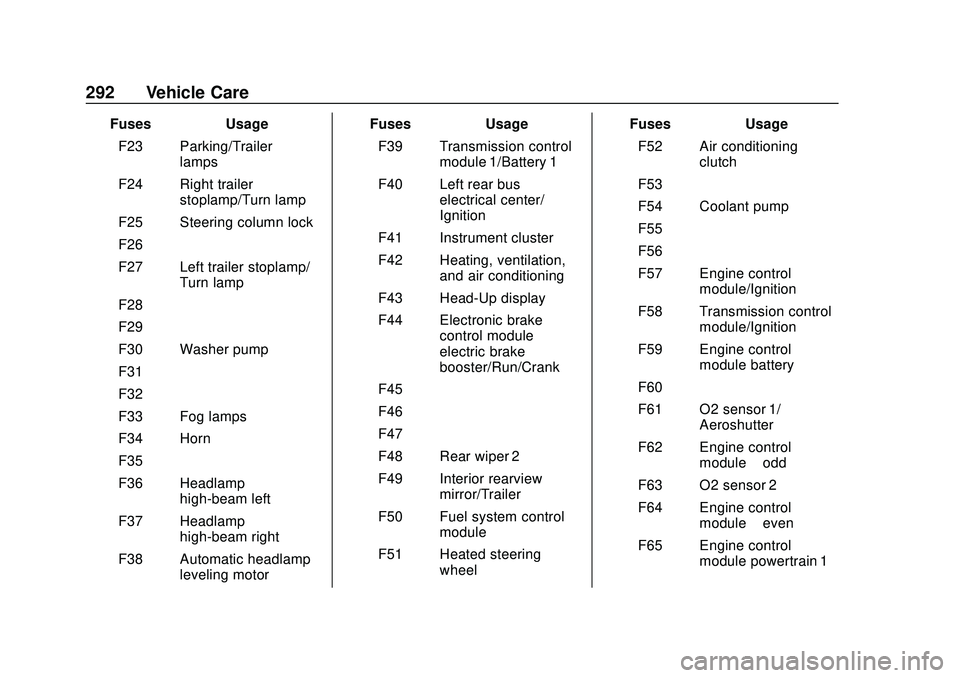
FusesUsage
F23 Parking/Trailer lamps
F24 Right trailer stoplamp/Turn lamp
F25 Steering column lock
F26 –
F27 Left trailer stoplamp/ Turn lamp
F28 –
F29 –
F30 Washer pump
F31 –
F32 –
F33 Fog lamps
F34 Horn
F35 –
F36 Headlamp high-beam left
F37 Headlamp high-beam right
F38 Automatic headlamp leveling motor Fuses
Usage
F39 Transmission control module 1/Battery 1
F40 Left rear bus electrical center/
Ignition
F41 Instrument cluster
F42 Heating, ventilation, and air conditioning
F43 Head-Up display
F44 Electronic brake control module
electric brake
booster/Run/Crank
F45 –
F46 –
F47 –
F48 Rear wiper 2
F49 Interior rearview mirror/Trailer
F50 Fuel system control module
F51 Heated steering wheel Fuses
Usage
F52 Air conditioning clutch
F53 –
F54 Coolant pump
F55 –
F56 –
F57 Engine control module/Ignition
F58 Transmission control module/Ignition
F59 Engine control module battery
F60 –
F61 O2 sensor 1/ Aeroshutter
F62 Engine control module–odd
F63 O2 sensor 2
F64 Engine control module–even
F65 Engine control module powertrain 1
Page 294 of 406
GMC Acadia/Acadia Denali Owner Manual (GMNA-Localizing-U.S./Canada/
Mexico-13687875) - 2020 - CRC - 10/28/19
Vehicle Care 293
FusesUsage
F66 Engine control module powertrain 2
F67 Engine control module powertrain 3
F68 –
F69 –
F70 –
F71 –
F72 –
F73 –
F74 –
F75 –
F76 –
F77 –
Relays Usage
K1 Starter 1
K2 Run/Crank
K3 Starter 3
K4 LED/Automatic headlamps Relays
Usage
K5 –
K6 Coolant pump
K7 Engine control module
K8 Air conditioning
K9 –
K10 Starter 2
Instrument Panel Fuse
Block
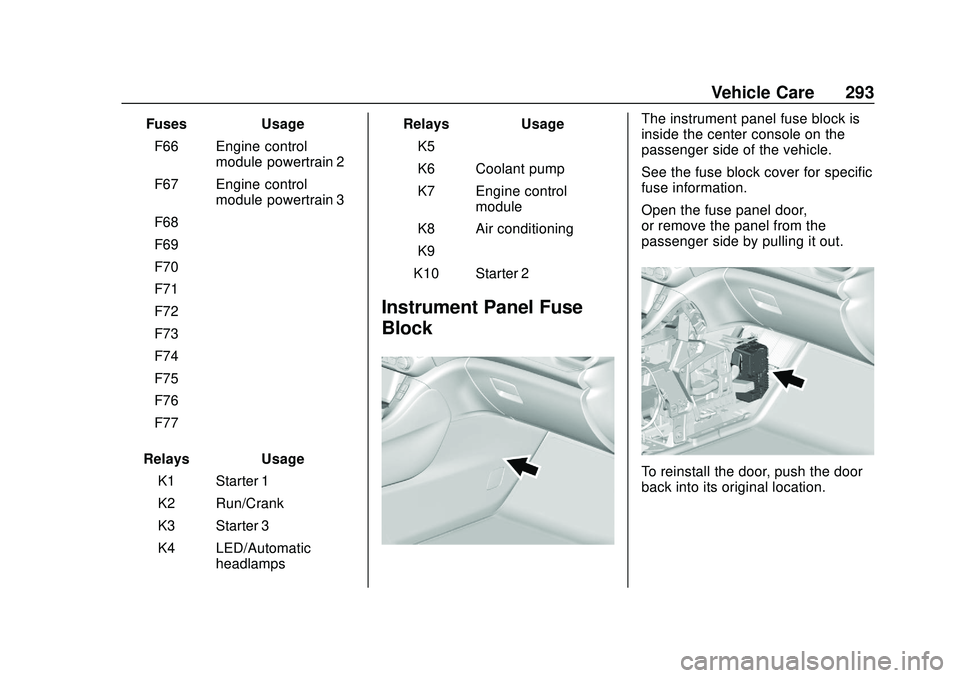
The instrument panel fuse block is
inside the center console on the
passenger side of the vehicle.
See the fuse block cover for specific
fuse information.
Open the fuse panel door,
or remove the panel from the
passenger side by pulling it out.
To reinstall the door, push the door
back into its original location.
Page 295 of 406
GMC Acadia/Acadia Denali Owner Manual (GMNA-Localizing-U.S./Canada/
Mexico-13687875) - 2020 - CRC - 10/28/19
294 Vehicle Care
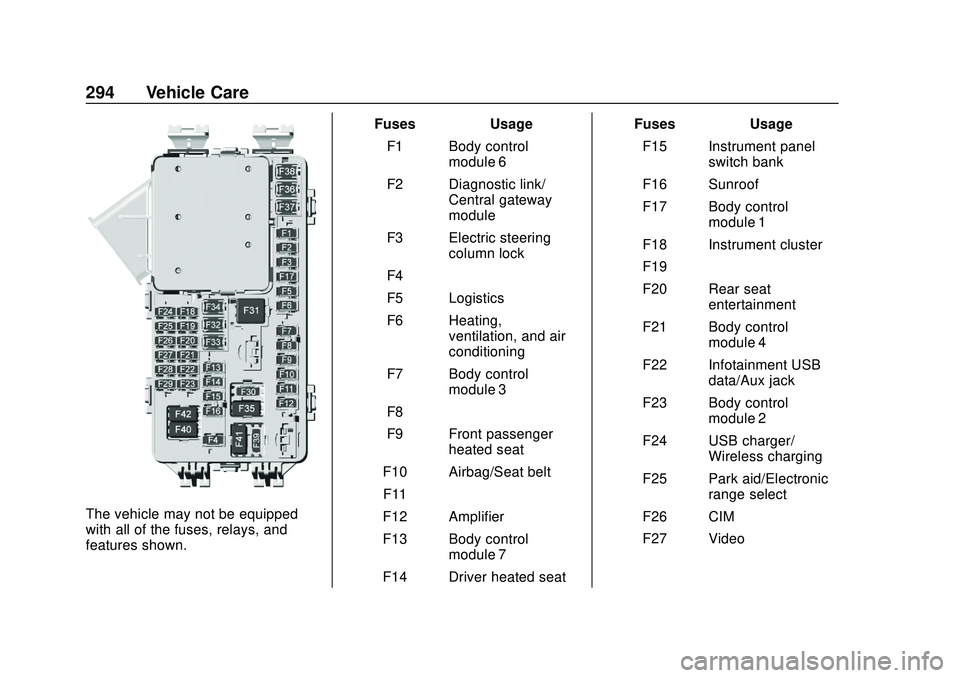
The vehicle may not be equipped
with all of the fuses, relays, and
features shown.Fuses Usage
F1 Body control module 6
F2 Diagnostic link/ Central gateway
module
F3 Electric steering column lock
F4 –
F5 Logistics
F6 Heating, ventilation, and air
conditioning
F7 Body control module 3
F8 –
F9 Front passenger heated seat
F10 Airbag/Seat belt F11 –
F12 Amplifier
F13 Body control module 7
F14 Driver heated seat Fuses Usage
F15 Instrument panel switch bank
F16 Sunroof
F17 Body control module 1
F18 Instrument cluster
F19 –
F20 Rear seat entertainment
F21 Body control module 4
F22 Infotainment USB data/Aux jack
F23 Body control module 2
F24 USB charger/ Wireless charging
F25 Park aid/Electronic range select
F26 CIM
F27 Video