lock GMC ACADIA 2021 Owners Manual
[x] Cancel search | Manufacturer: GMC, Model Year: 2021, Model line: ACADIA, Model: GMC ACADIA 2021Pages: 396, PDF Size: 7.87 MB
Page 268 of 396
GMC Acadia/Acadia Denali Owner Manual (GMNA-Localizing-U.S./Canada/
Mexico-14608671) - 2021 - CRC - 10/26/20
Vehicle Care 267
Vehicle Care
General Information
General Information . . . . . . . . . . . . . . . . . . . 268
California Proposition 65 Warning . . . . . 268
California Perchlorate MaterialsRequirements . . . . . . . . . . . . . . . . . . . . . . . 268
Accessories and Modifications . . . . . . . . . 268
Vehicle Checks
Doing Your Own Service Work . . . . . . . . 269
Hood . . . . . . . . . . . . . . . . . . . . . . . . . . . . . . . . . . 270
Engine Compartment Overview . . . . . . . . 271
Engine Oil . . . . . . . . . . . . . . . . . . . . . . . . . . . . . 276
Engine Oil Life System . . . . . . . . . . . . . . . . 278
Automatic Transmission Fluid . . . . . . . . . 279
Engine Air Filter Life System . . . . . . . . . . 279
Engine Air Cleaner/Filter . . . . . . . . . . . . . . 279
Cooling System . . . . . . . . . . . . . . . . . . . . . . . . 281
Engine Overheating . . . . . . . . . . . . . . . . . . . 285
Washer Fluid . . . . . . . . . . . . . . . . . . . . . . . . . . 286
Brakes . . . . . . . . . . . . . . . . . . . . . . . . . . . . . . . . . 287
Brake Fluid . . . . . . . . . . . . . . . . . . . . . . . . . . . . 287
Battery - North America . . . . . . . . . . . . . . . 288
All-Wheel Drive . . . . . . . . . . . . . . . . . . . . . . . 289
Park Brake and P (Park) Mechanism Check . . . . . . . . . . . . . . . . . . . . . . . . . . . . . . . 289
Wiper Blade Replacement . . . . . . . . . . . . . 290
Windshield Replacement . . . . . . . . . . . . . . 290
Gas Strut(s) . . . . . . . . . . . . . . . . . . . . . . . . . . . . 291
Headlamp Aiming
Front Headlamp Aiming . . . . . . . . . . . . . . . 292
Bulb Replacement
Bulb Replacement . . . . . . . . . . . . . . . . . . . . . 292
Halogen Bulbs . . . . . . . . . . . . . . . . . . . . . . . . . 292
LED Lighting . . . . . . . . . . . . . . . . . . . . . . . . . . . 292
Electrical System
Electrical System Overload . . . . . . . . . . . . 292
Fuses and Circuit Breakers . . . . . . . . . . . . . 293
Engine Compartment Fuse Block . . . . . . 293
Instrument Panel Fuse Block . . . . . . . . . . 296
Rear Compartment Fuse Block . . . . . . . . . 298
Wheels and Tires
Tires . . . . . . . . . . . . . . . . . . . . . . . . . . . . . . . . . . 300
All-Season Tires . . . . . . . . . . . . . . . . . . . . . . . . 301
Winter Tires . . . . . . . . . . . . . . . . . . . . . . . . . . . 301
Summer Tires . . . . . . . . . . . . . . . . . . . . . . . . . 302
All-Terrain Tires . . . . . . . . . . . . . . . . . . . . . . . 302
Tire Sidewall Labeling . . . . . . . . . . . . . . . . . 302
Tire Designations . . . . . . . . . . . . . . . . . . . . . . 304
Tire Terminology and Definitions . . . . . 304
Tire Pressure . . . . . . . . . . . . . . . . . . . . . . . . . . 307
Tire Pressure for High-Speed Operation . . . . . . . . . . . . . . . . . . . . . . . . . . . 308
Tire Pressure Monitor System . . . . . . . . . 309
Tire Pressure Monitor Operation . . . . . . . 310
Tire Inspection . . . . . . . . . . . . . . . . . . . . . . . . . 313
Tire Rotation . . . . . . . . . . . . . . . . . . . . . . . . . . . 313 When It Is Time for New Tires . . . . . . . . . 314
Buying New Tires . . . . . . . . . . . . . . . . . . . . . . 315
Different Size Tires and Wheels . . . . . . . . 316
Uniform Tire Quality Grading . . . . . . . . . . 316
Wheel Alignment and Tire Balance . . . . 318
Wheel Replacement . . . . . . . . . . . . . . . . . . . 318
Tire Chains . . . . . . . . . . . . . . . . . . . . . . . . . . . . 318
If a Tire Goes Flat . . . . . . . . . . . . . . . . . . . . . 319
Tire Sealant and Compressor Kit . . . . . . 320
Storing the Tire Sealant and
Compressor Kit . . . . . . . . . . . . . . . . . . . . . . 326
Tire Changing . . . . . . . . . . . . . . . . . . . . . . . . . 326
Compact Spare Tire . . . . . . . . . . . . . . . . . . . . 331
Jump Starting
Jump Starting - North America . . . . . . . . 332
Towing the Vehicle
Towing the Vehicle . . . . . . . . . . . . . . . . . . . . 334
Recreational Vehicle Towing . . . . . . . . . . . 335
Appearance Care
Exterior Care . . . . . . . . . . . . . . . . . . . . . . . . . . . 337
Interior Care . . . . . . . . . . . . . . . . . . . . . . . . . . . 341
Floor Mats . . . . . . . . . . . . . . . . . . . . . . . . . . . . 343
Page 269 of 396
GMC Acadia/Acadia Denali Owner Manual (GMNA-Localizing-U.S./Canada/
Mexico-14608671) - 2021 - CRC - 10/26/20
268 Vehicle Care
General Information
For service and parts needs, visit your
dealer. You will receive genuine GM parts
and GM-trained and supported service
people.
Genuine GM parts have one of these marks:
California Proposition 65 Warning
{Warning
Most motor vehicles, including this one,
as well as many of its service parts and
fluids, contain and/or emit chemicals
known to the State of California to cause
cancer and birth defects or other
reproductive harm. Engine exhaust, many
parts and systems, many fluids, and
some component wear by-products
contain and/or emit these chemicals. For
more information go to
www.P65Warnings.ca.gov/
passenger-vehicle.
See Battery - North America 0288 and
Jump Starting - North America 0332 and the
back cover.
California Perchlorate Materials
Requirements
Certain types of automotive applications,
such as airbag initiators, seat belt
pretensioners, and lithium batteries
contained in electronic keys, may contain
perchlorate materials. Perchlorate Material –
special handling may apply. See
www.dtsc.ca.gov/hazardouswaste/
perchlorate.
Accessories and Modifications
Adding non-dealer accessories or making
modifications to the vehicle can affect
vehicle performance and safety, including
such things as airbags, braking, stability,
ride and handling, emissions systems,
aerodynamics, durability, and electronic
systems like antilock brakes, traction control,
and stability control. These accessories or
modifications could even cause malfunction
or damage not covered by the vehicle
warranty.
Page 271 of 396
GMC Acadia/Acadia Denali Owner Manual (GMNA-Localizing-U.S./Canada/
Mexico-14608671) - 2021 - CRC - 10/26/20
270 Vehicle Care
Hood
{Warning
For vehicles with auto engine stop/start,
turn the vehicle off before opening the
hood. If the vehicle is on, the engine will
start when the hood is opened. You or
others could be injured.
{Warning
Components under the hood can get hot
from running the engine. To help avoid
the risk of burning unprotected skin,
never touch these components until they
have cooled, and always use a glove or
towel to avoid direct skin contact.
Clear any snow from the hood before
opening. To open the hood:
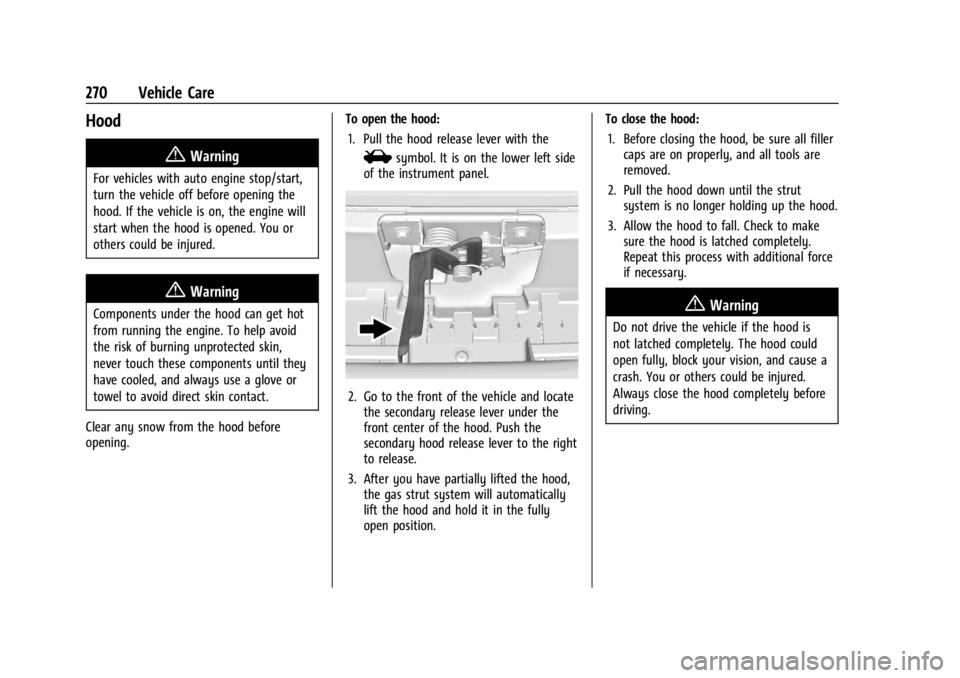
1. Pull the hood release lever with the
isymbol. It is on the lower left side
of the instrument panel.
2. Go to the front of the vehicle and locate the secondary release lever under the
front center of the hood. Push the
secondary hood release lever to the right
to release.
3. After you have partially lifted the hood, the gas strut system will automatically
lift the hood and hold it in the fully
open position. To close the hood:
1. Before closing the hood, be sure all filler caps are on properly, and all tools are
removed.
2. Pull the hood down until the strut system is no longer holding up the hood.
3. Allow the hood to fall. Check to make sure the hood is latched completely.
Repeat this process with additional force
if necessary.
{Warning
Do not drive the vehicle if the hood is
not latched completely. The hood could
open fully, block your vision, and cause a
crash. You or others could be injured.
Always close the hood completely before
driving.
Page 273 of 396

GMC Acadia/Acadia Denali Owner Manual (GMNA-Localizing-U.S./Canada/
Mexico-14608671) - 2021 - CRC - 10/26/20
272 Vehicle Care
1.Engine Air Cleaner/Filter 0279.
2. Engine Oil Fill Cap. See Engine Oil0276.
3. Engine Oil Dipstick. See Engine Oil0276.
4. Engine Cooling Fan (Out of View). See Cooling System 0281.
5. Brake Fluid Reservoir. See Brake Fluid
0 287.
6. Battery - North America 0288.
7. Engine Coolant Surge Tank and Pressure Cap. See Cooling System 0281.
8. Positive (+) Battery Terminal (Under Cover). See Jump Starting - North
America 0332.
9. Windshield Washer Fluid Reservoir. See Washer Fluid 0286.
10. Engine Compartment Fuse Block 0293.
11. Remote Negative (-) Battery Terminal. SeeJump Starting - North America 0332.
Page 275 of 396

GMC Acadia/Acadia Denali Owner Manual (GMNA-Localizing-U.S./Canada/
Mexico-14608671) - 2021 - CRC - 10/26/20
274 Vehicle Care
1.Engine Air Cleaner/Filter 0279.
2. Engine Oil Fill Cap. See Engine Oil0276.
3. Engine Oil Dipstick. See Engine Oil0276.
4. Engine Cooling Fan (Out of View). See Cooling System 0281.
5. Windshield Washer Fluid Reservoir. See Washer Fluid 0286.
6. Brake Fluid Reservoir. See Brake Fluid
0 287.
7. Battery - North America 0288.
8. Engine Coolant Surge Tank and Pressure Cap. See Cooling System 0281.
9. Positive (+) Battery Terminal (Under Cover). See Jump Starting - North
America 0332.
10. Engine Compartment Fuse Block 0293.
11. Remote Negative (-) Battery Terminal. SeeJump Starting - North America 0332.
Page 277 of 396
GMC Acadia/Acadia Denali Owner Manual (GMNA-Localizing-U.S./Canada/
Mexico-14608671) - 2021 - CRC - 10/26/20
276 Vehicle Care
1.Engine Air Cleaner/Filter 0279.
2. Engine Oil Fill Cap. See Engine Oil0276.
3. Engine Oil Dipstick. See Engine Oil0276.
4. Engine Cooling Fan (Out of View). See Cooling System 0281.
5. Windshield Washer Fluid Reservoir. See Washer Fluid 0286.
6. Brake Fluid Reservoir. See Brake Fluid
0 287.
7. Battery - North America 0288.
8. Engine Coolant Surge Tank and Pressure Cap. See Cooling System 0281.
9. Positive (+) Battery Terminal. See Jump
Starting - North America 0332.
10. Engine Compartment Fuse Block 0293.
11. Remote Negative (-) Battery Terminal. SeeJump Starting - North America 0332.Engine Oil
To ensure proper engine performance and
long life, careful attention must be paid to
engine oil. Following these simple, but
important steps will help protect your
investment:
.Use engine oil approved to the proper
specification and of the proper viscosity
grade. See “Selecting the Right Engine
Oil” in this section.
.Check the engine oil level regularly and
maintain the proper oil level. See
“Checking Engine Oil” and“When to Add
Engine Oil” in this section.
.Change the engine oil at the appropriate
time. SeeEngine Oil Life System 0278.
.Always dispose of engine oil properly. See
“What to Do with Used Oil” in this
section.
Checking Engine Oil
Check the engine oil level regularly, every
650 km (400 mi), especially prior to a long
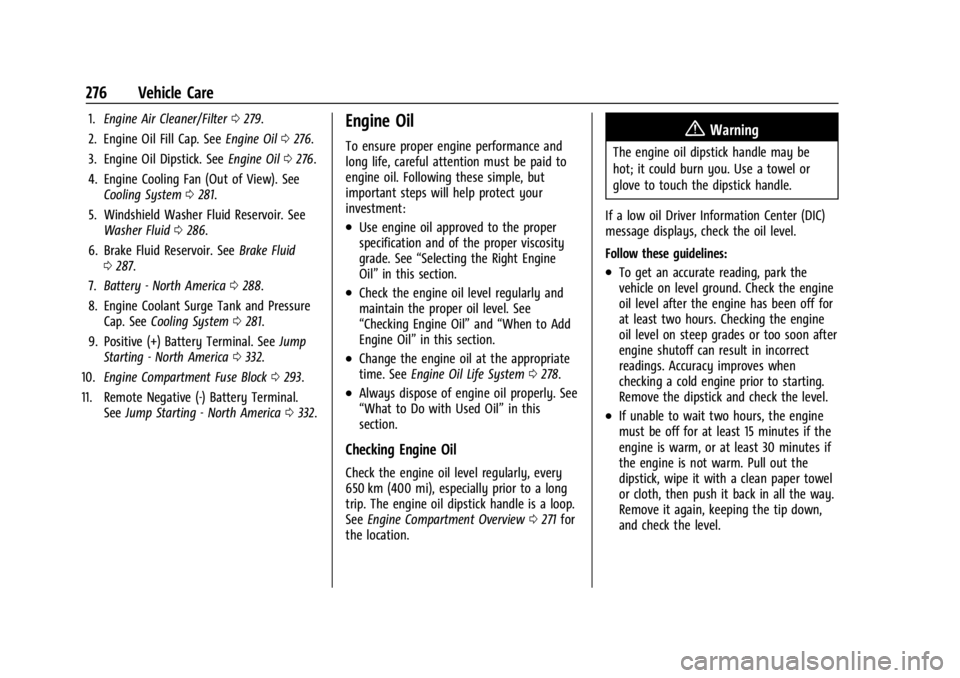
trip. The engine oil dipstick handle is a loop.
See Engine Compartment Overview 0271 for
the location.
{Warning
The engine oil dipstick handle may be
hot; it could burn you. Use a towel or
glove to touch the dipstick handle.
If a low oil Driver Information Center (DIC)
message displays, check the oil level.
Follow these guidelines:
.To get an accurate reading, park the
vehicle on level ground. Check the engine
oil level after the engine has been off for
at least two hours. Checking the engine
oil level on steep grades or too soon after
engine shutoff can result in incorrect
readings. Accuracy improves when
checking a cold engine prior to starting.
Remove the dipstick and check the level.
.If unable to wait two hours, the engine
must be off for at least 15 minutes if the
engine is warm, or at least 30 minutes if
the engine is not warm. Pull out the
dipstick, wipe it with a clean paper towel
or cloth, then push it back in all the way.
Remove it again, keeping the tip down,
and check the level.
Page 285 of 396
GMC Acadia/Acadia Denali Owner Manual (GMNA-Localizing-U.S./Canada/
Mexico-14608671) - 2021 - CRC - 10/26/20
284 Vehicle Care
{Warning
Plain water, or other liquids such as
alcohol, can boil before the proper
coolant mixture will. With plain water or
the wrong mixture, the engine could get
too hot but there would not be an
overheat warning. The engine could catch
fire and you or others could be burned.
Caution
Failure to follow the specific coolant fill
procedure could cause the engine to
overheat and could cause system
damage. If coolant is not visible in the
surge tank, contact your dealer.
If no problem is found, check to see if
coolant is visible in the coolant surge tank.
If coolant is visible but the coolant level is
not at or above the indicated mark, add a
50/50 mixture of clean, drinkable water and
DEX-COOL coolant. Be sure the cooling
system, including the coolant surge tank
pressure cap, is cool before you do it.
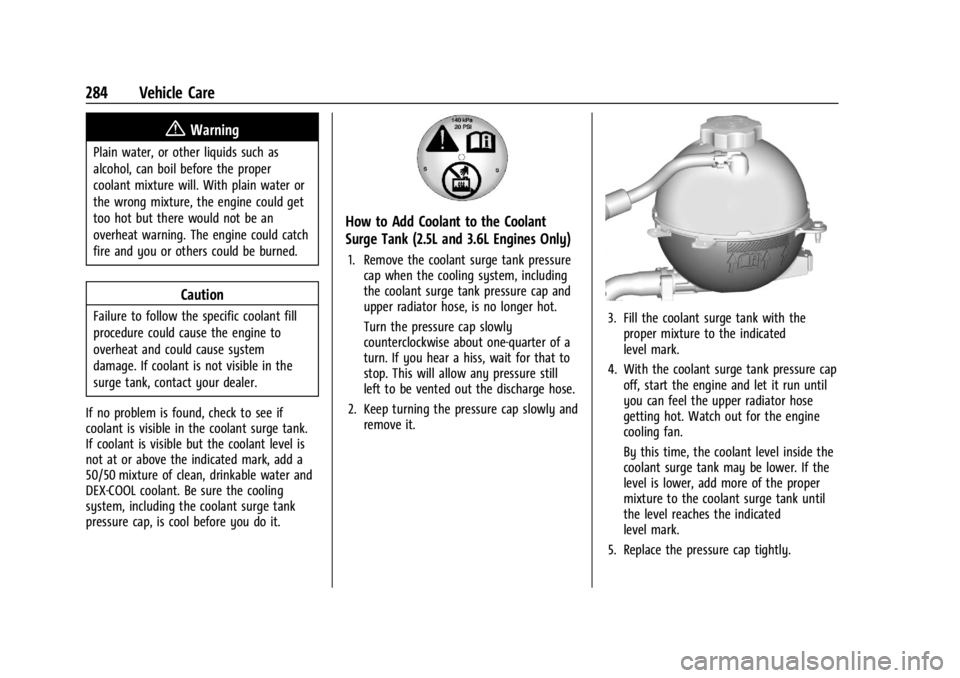
How to Add Coolant to the Coolant
Surge Tank (2.5L and 3.6L Engines Only)
1. Remove the coolant surge tank pressure cap when the cooling system, including
the coolant surge tank pressure cap and
upper radiator hose, is no longer hot.
Turn the pressure cap slowly
counterclockwise about one-quarter of a
turn. If you hear a hiss, wait for that to
stop. This will allow any pressure still
left to be vented out the discharge hose.
2. Keep turning the pressure cap slowly and remove it.
3. Fill the coolant surge tank with theproper mixture to the indicated
level mark.
4. With the coolant surge tank pressure cap off, start the engine and let it run until
you can feel the upper radiator hose
getting hot. Watch out for the engine
cooling fan.
By this time, the coolant level inside the
coolant surge tank may be lower. If the
level is lower, add more of the proper
mixture to the coolant surge tank until
the level reaches the indicated
level mark.
5. Replace the pressure cap tightly.
Page 291 of 396
GMC Acadia/Acadia Denali Owner Manual (GMNA-Localizing-U.S./Canada/
Mexico-14608671) - 2021 - CRC - 10/26/20
290 Vehicle Care
Wiper Blade Replacement
Windshield wiper blades should be inspected
for wear or cracking.
It is a good idea to clean or replace the
wiper blade assembly on a regular basis or
when worn. For proper windshield wiper
blade length and type, seeMaintenance
Replacement Parts 0355.
Caution
Allowing the wiper arm to touch the
windshield when no wiper blade is
installed could damage the windshield.
Any damage that occurs would not be
covered by the vehicle warranty. Do not
allow the wiper arm to touch the
windshield.
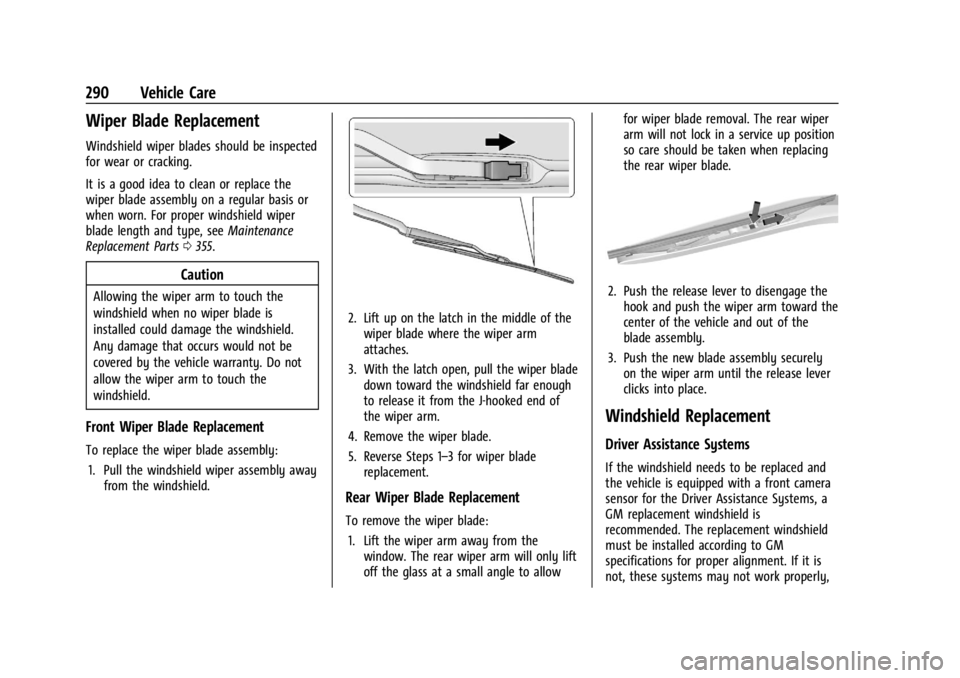
Front Wiper Blade Replacement
To replace the wiper blade assembly:
1. Pull the windshield wiper assembly away from the windshield.
2. Lift up on the latch in the middle of the
wiper blade where the wiper arm
attaches.
3. With the latch open, pull the wiper blade down toward the windshield far enough
to release it from the J-hooked end of
the wiper arm.
4. Remove the wiper blade.
5. Reverse Steps 1–3 for wiper blade replacement.
Rear Wiper Blade Replacement
To remove the wiper blade:
1. Lift the wiper arm away from the window. The rear wiper arm will only lift
off the glass at a small angle to allow for wiper blade removal. The rear wiper
arm will not lock in a service up position
so care should be taken when replacing
the rear wiper blade.
2. Push the release lever to disengage the
hook and push the wiper arm toward the
center of the vehicle and out of the
blade assembly.
3. Push the new blade assembly securely on the wiper arm until the release lever
clicks into place.
Windshield Replacement
Driver Assistance Systems
If the windshield needs to be replaced and
the vehicle is equipped with a front camera
sensor for the Driver Assistance Systems, a
GM replacement windshield is
recommended. The replacement windshield
must be installed according to GM
specifications for proper alignment. If it is
not, these systems may not work properly,
Page 294 of 396
GMC Acadia/Acadia Denali Owner Manual (GMNA-Localizing-U.S./Canada/
Mexico-14608671) - 2021 - CRC - 10/26/20
Vehicle Care 293
If the overload is caused by an electrical
problem and not snow or ice, be sure to get
it fixed.
Fuses and Circuit Breakers
The wiring circuits in the vehicle are
protected from short circuits by a
combination of fuses and circuit breakers.
This greatly reduces the chance of damage
caused by electrical problems.
{Danger
Fuses and circuit breakers are marked
with their ampere rating. Do not exceed
the specified amperage rating when
replacing fuses and circuit breakers. Use
of an oversized fuse or circuit breaker can
result in a vehicle fire. You and others
could be seriously injured or killed.
{Warning
Installation or use of fuses that do not
meet GM’s original fuse specifications is
dangerous. The fuses could fail, and result
in a fire. You or others could be injured
or killed, and the vehicle could be
damaged.
See Accessories and Modifications 0268 and
General Information 0268.
To check a fuse, look at the silver-colored
band inside the fuse. If the band is broken
or melted, replace the fuse. Be sure to
replace a bad fuse with a new one of the
identical size and rating.
Fuses of the same amperage can be
temporarily borrowed from another fuse
location, if a fuse goes out. Replace the fuse
as soon as possible.
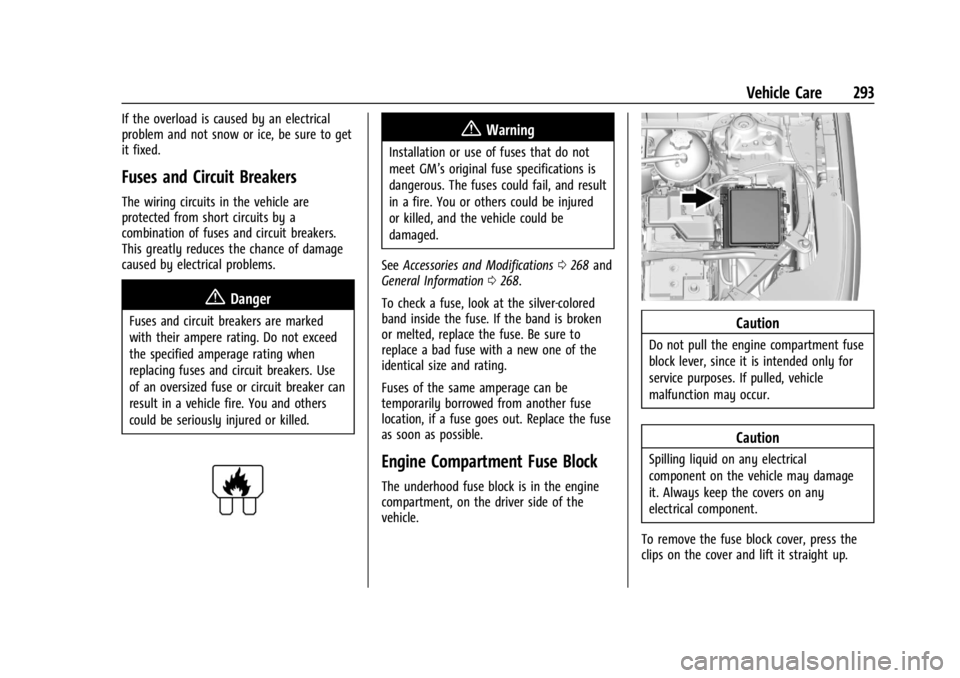
Engine Compartment Fuse Block
The underhood fuse block is in the engine
compartment, on the driver side of the
vehicle.
Caution
Do not pull the engine compartment fuse
block lever, since it is intended only for
service purposes. If pulled, vehicle
malfunction may occur.
Caution
Spilling liquid on any electrical
component on the vehicle may damage
it. Always keep the covers on any
electrical component.
To remove the fuse block cover, press the
clips on the cover and lift it straight up.
Page 295 of 396
GMC Acadia/Acadia Denali Owner Manual (GMNA-Localizing-U.S./Canada/
Mexico-14608671) - 2021 - CRC - 10/26/20
294 Vehicle Care
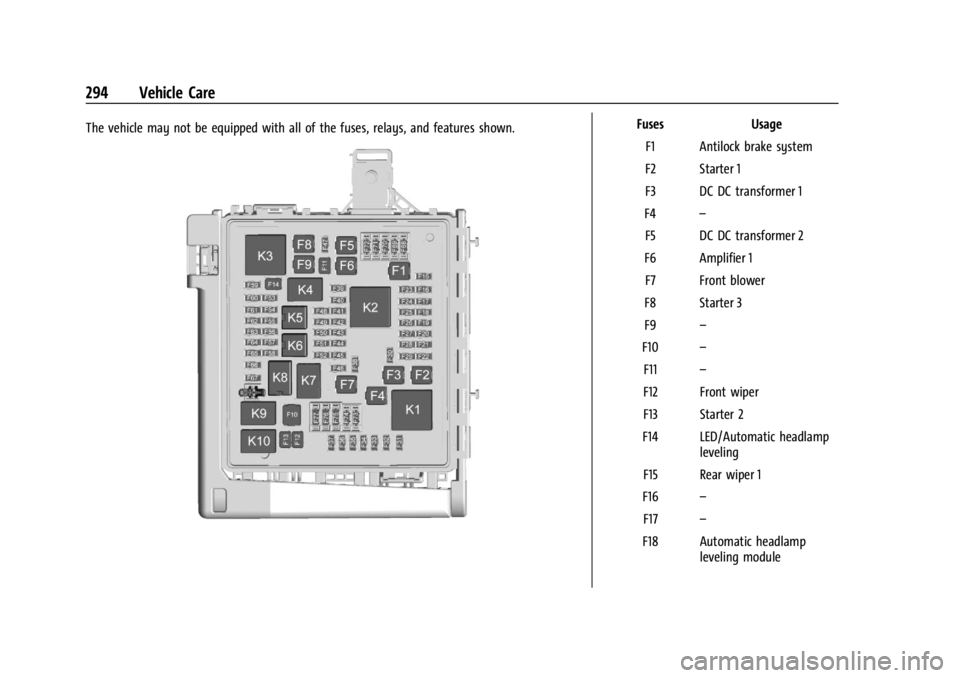
The vehicle may not be equipped with all of the fuses, relays, and features shown.FusesUsage
F1 Antilock brake system
F2 Starter 1
F3 DC DC transformer 1
F4 –
F5 DC DC transformer 2
F6 Amplifier 1 F7 Front blower
F8 Starter 3
F9 –
F10 –
F11 –
F12 Front wiper
F13 Starter 2
F14 LED/Automatic headlamp leveling
F15 Rear wiper 1
F16 –
F17 –
F18 Automatic headlamp leveling module