Remote window operation GMC ACADIA 2021 Owner's Manual
[x] Cancel search | Manufacturer: GMC, Model Year: 2021, Model line: ACADIA, Model: GMC ACADIA 2021Pages: 396, PDF Size: 7.87 MB
Page 7 of 396
GMC Acadia/Acadia Denali Owner Manual (GMNA-Localizing-U.S./Canada/
Mexico-14608671) - 2021 - CRC - 10/26/20
6 Keys, Doors, and Windows
Keys, Doors, and
Windows
Keys and Locks
Keys . . . . . . . . . . . . . . . . . . . . . . . . . . . . . . . . . . . . . 6
Remote Keyless Entry (RKE) System . . . . . 7
Remote Keyless Entry (RKE) SystemOperation . . . . . . . . . . . . . . . . . . . . . . . . . . . . . . 7
Remote Vehicle Start . . . . . . . . . . . . . . . . . . . 13
Door Locks . . . . . . . . . . . . . . . . . . . . . . . . . . . . . . 15
Power Door Locks . . . . . . . . . . . . . . . . . . . . . . . 17
Delayed Locking . . . . . . . . . . . . . . . . . . . . . . . . 17
Automatic Door Locks . . . . . . . . . . . . . . . . . . . 17
Lockout Protection . . . . . . . . . . . . . . . . . . . . . . 17
Safety Locks . . . . . . . . . . . . . . . . . . . . . . . . . . . . 18
Doors
Liftgate . . . . . . . . . . . . . . . . . . . . . . . . . . . . . . . . . 18
Vehicle Security
Vehicle Security . . . . . . . . . . . . . . . . . . . . . . . . 25
Vehicle Alarm System . . . . . . . . . . . . . . . . . . 25
Immobilizer . . . . . . . . . . . . . . . . . . . . . . . . . . . . 26
Immobilizer Operation . . . . . . . . . . . . . . . . . . 26
Exterior Mirrors
Convex Mirrors . . . . . . . . . . . . . . . . . . . . . . . . . 26
Power Mirrors . . . . . . . . . . . . . . . . . . . . . . . . . . 27
Folding Mirrors . . . . . . . . . . . . . . . . . . . . . . . . . 27
Heated Mirrors . . . . . . . . . . . . . . . . . . . . . . . . . 28
Automatic Dimming Mirror . . . . . . . . . . . . . 28
Reverse Tilt Mirrors . . . . . . . . . . . . . . . . . . . . . 28
Interior Mirrors
Interior Rearview Mirrors . . . . . . . . . . . . . . . 28
Manual Rearview Mirror . . . . . . . . . . . . . . . . 28
Automatic Dimming Rearview Mirror . . . 28
Rear Camera Mirror . . . . . . . . . . . . . . . . . . . . 28
Windows
Windows . . . . . . . . . . . . . . . . . . . . . . . . . . . . . . . 31
Power Windows . . . . . . . . . . . . . . . . . . . . . . . . 31
Sun Visors . . . . . . . . . . . . . . . . . . . . . . . . . . . . . . 33
Roof
Sunroof . . . . . . . . . . . . . . . . . . . . . . . . . . . . . . . . . 33
Keys and Locks
Keys
{Warning
Leaving children in a vehicle with a
Remote Keyless Entry (RKE) transmitter is
dangerous and children or others could
be seriously injured or killed. They could
operate the power windows or other
controls or make the vehicle move. The
windows will function with the RKE
transmitter in the vehicle, and children or
others could be caught in the path of a
closing window. Do not leave children in
a vehicle with an RKE transmitter.
Page 8 of 396
GMC Acadia/Acadia Denali Owner Manual (GMNA-Localizing-U.S./Canada/
Mexico-14608671) - 2021 - CRC - 10/26/20
Keys, Doors, and Windows 7
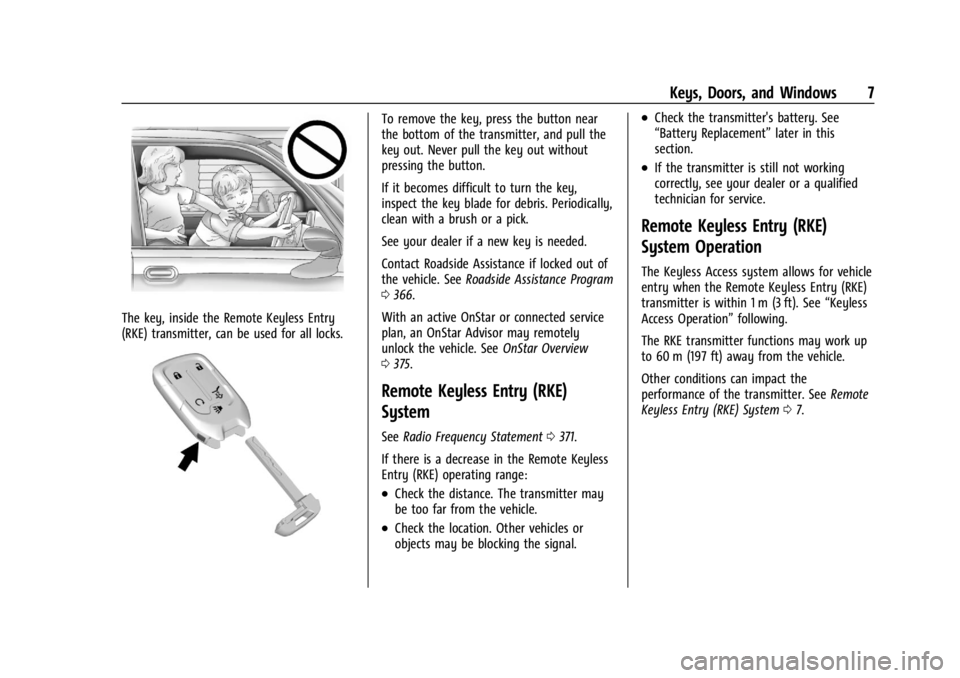
The key, inside the Remote Keyless Entry
(RKE) transmitter, can be used for all locks.
To remove the key, press the button near
the bottom of the transmitter, and pull the
key out. Never pull the key out without
pressing the button.
If it becomes difficult to turn the key,
inspect the key blade for debris. Periodically,
clean with a brush or a pick.
See your dealer if a new key is needed.
Contact Roadside Assistance if locked out of
the vehicle. SeeRoadside Assistance Program
0 366.
With an active OnStar or connected service
plan, an OnStar Advisor may remotely
unlock the vehicle. See OnStar Overview
0 375.
Remote Keyless Entry (RKE)
System
See Radio Frequency Statement 0371.
If there is a decrease in the Remote Keyless
Entry (RKE) operating range:
.Check the distance. The transmitter may
be too far from the vehicle.
.Check the location. Other vehicles or
objects may be blocking the signal.
.Check the transmitter's battery. See
“Battery Replacement” later in this
section.
.If the transmitter is still not working
correctly, see your dealer or a qualified
technician for service.
Remote Keyless Entry (RKE)
System Operation
The Keyless Access system allows for vehicle
entry when the Remote Keyless Entry (RKE)
transmitter is within 1 m (3 ft). See “Keyless
Access Operation” following.
The RKE transmitter functions may work up
to 60 m (197 ft) away from the vehicle.
Other conditions can impact the
performance of the transmitter. See Remote
Keyless Entry (RKE) System 07.
Page 9 of 396
GMC Acadia/Acadia Denali Owner Manual (GMNA-Localizing-U.S./Canada/
Mexico-14608671) - 2021 - CRC - 10/26/20
8 Keys, Doors, and Windows
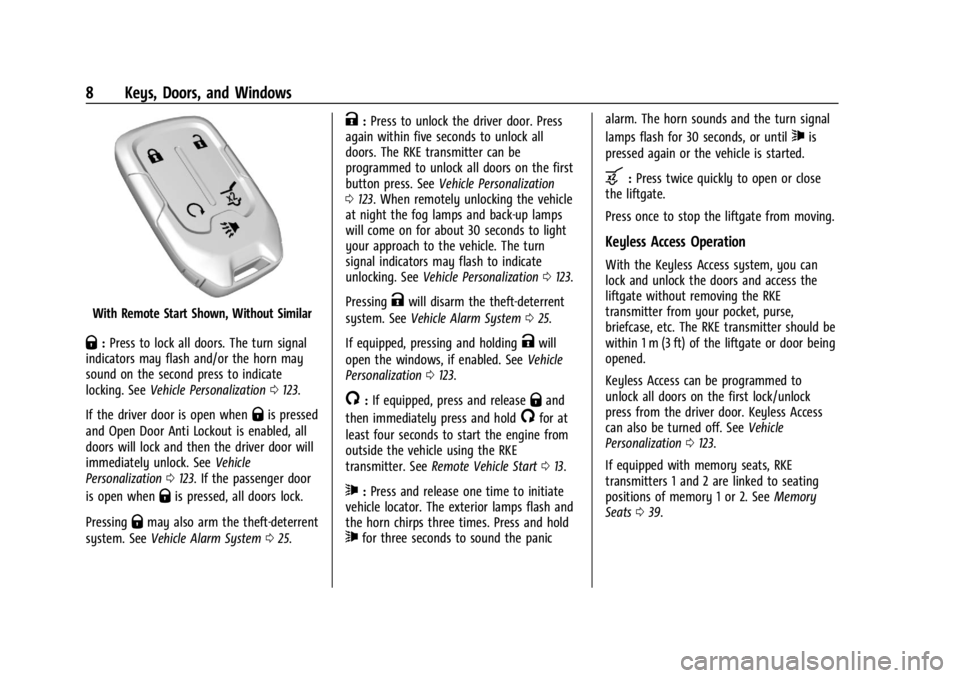
With Remote Start Shown, Without Similar
Q:Press to lock all doors. The turn signal
indicators may flash and/or the horn may
sound on the second press to indicate
locking. See Vehicle Personalization 0123.
If the driver door is open when
Qis pressed
and Open Door Anti Lockout is enabled, all
doors will lock and then the driver door will
immediately unlock. See Vehicle
Personalization 0123. If the passenger door
is open when
Qis pressed, all doors lock.
Pressing
Qmay also arm the theft-deterrent
system. See Vehicle Alarm System 025.
K:Press to unlock the driver door. Press
again within five seconds to unlock all
doors. The RKE transmitter can be
programmed to unlock all doors on the first
button press. See Vehicle Personalization
0 123. When remotely unlocking the vehicle
at night the fog lamps and back-up lamps
will come on for about 30 seconds to light
your approach to the vehicle. The turn
signal indicators may flash to indicate
unlocking. See Vehicle Personalization 0123.
Pressing
Kwill disarm the theft-deterrent
system. See Vehicle Alarm System 025.
If equipped, pressing and holding
Kwill
open the windows, if enabled. See Vehicle
Personalization 0123.
/:If equipped, press and releaseQand
then immediately press and hold
/for at
least four seconds to start the engine from
outside the vehicle using the RKE
transmitter. See Remote Vehicle Start 013.
7:Press and release one time to initiate
vehicle locator. The exterior lamps flash and
the horn chirps three times. Press and hold
7for three seconds to sound the panic alarm. The horn sounds and the turn signal
lamps flash for 30 seconds, or until
7is
pressed again or the vehicle is started.
b: Press twice quickly to open or close
the liftgate.
Press once to stop the liftgate from moving.
Keyless Access Operation
With the Keyless Access system, you can
lock and unlock the doors and access the
liftgate without removing the RKE
transmitter from your pocket, purse,
briefcase, etc. The RKE transmitter should be
within 1 m (3 ft) of the liftgate or door being
opened.
Keyless Access can be programmed to
unlock all doors on the first lock/unlock
press from the driver door. Keyless Access
can also be turned off. See Vehicle
Personalization 0123.
If equipped with memory seats, RKE
transmitters 1 and 2 are linked to seating
positions of memory 1 or 2. See Memory
Seats 039.
Page 16 of 396
GMC Acadia/Acadia Denali Owner Manual (GMNA-Localizing-U.S./Canada/
Mexico-14608671) - 2021 - CRC - 10/26/20
Keys, Doors, and Windows 15
.The engine coolant temperature is
too high.
.The oil pressure is low.
.Two remote vehicle starts or a start with
an extension have already been used.
.The vehicle is not in P (Park).
Door Locks
{Warning
Unlocked doors can be dangerous.
.Passengers, especially children, can
easily open the doors and fall out of a
moving vehicle. The doors can be
unlocked and opened while the vehicle
is moving. The chance of being thrown
out of the vehicle in a crash is
increased if the doors are not locked.
So, all passengers should wear seat
belts properly and the doors should be
locked whenever the vehicle is driven.
.Young children who get into unlocked
vehicles may be unable to get out.
A child can be overcome by extreme
heat and can suffer permanent injuries
or even death from heat stroke.
Always lock the vehicle whenever
leaving it.(Continued)
Warning (Continued)
.Outsiders can easily enter through an
unlocked door when you slow down
or stop the vehicle. Locking the doors
can help prevent this from happening.
To lock or unlock the door from the outside:
.PressQorKon the Remote Keyless
Entry (RKE) transmitter. See Remote
Keyless Entry (RKE) System Operation 07.
.Use the key in the driver door. The key
lock cylinder is covered with a cap.
To lock or unlock the door from the inside:
.PressQorKon the power door lock
switch.
.Push down on the door lock knob to lock
a door.
.Pull the door handle once to unlock the
door. Pull the handle again to unlatch it. Keyless Access
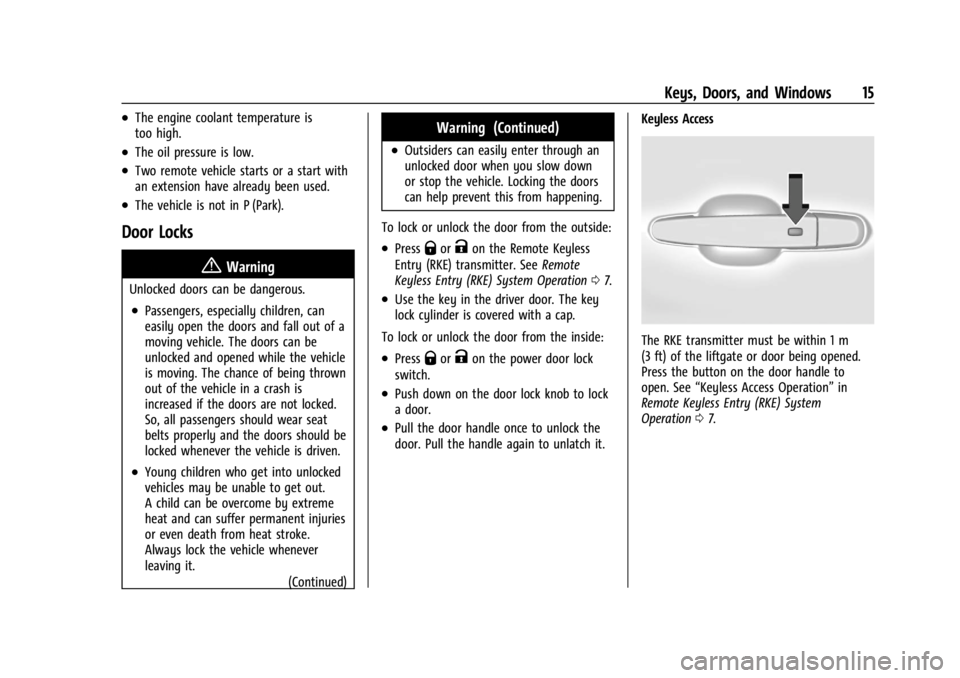
The RKE transmitter must be within 1 m
(3 ft) of the liftgate or door being opened.
Press the button on the door handle to
open. See
“Keyless Access Operation” in
Remote Keyless Entry (RKE) System
Operation 07.
Page 20 of 396
GMC Acadia/Acadia Denali Owner Manual (GMNA-Localizing-U.S./Canada/
Mexico-14608671) - 2021 - CRC - 10/26/20
Keys, Doors, and Windows 19
Warning (Continued)
.If the vehicle is equipped with a
power liftgate, disable the power
liftgate function.
See Engine Exhaust 0219.
Caution
To avoid damage to the liftgate or
liftgate glass, make sure the area above
and behind the liftgate is clear before
opening it.
Manual Liftgate
To unlock the liftgate, pressKon the
power door lock switch or press
Kon the
RKE transmitter twice within five seconds.
See Remote Keyless Entry (RKE) System
Operation 07.
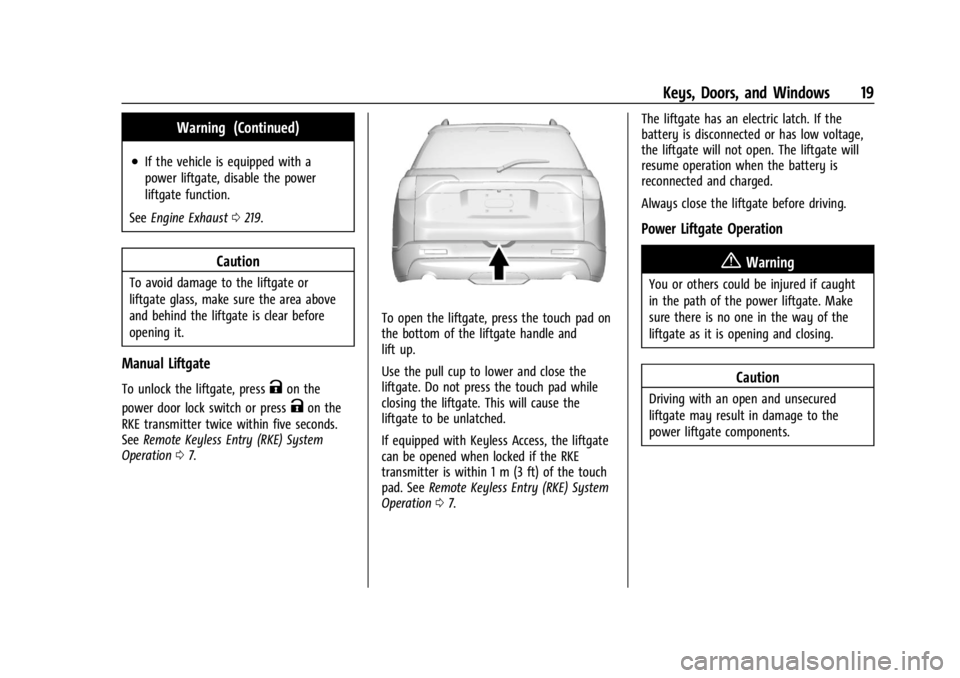
To open the liftgate, press the touch pad on
the bottom of the liftgate handle and
lift up.
Use the pull cup to lower and close the
liftgate. Do not press the touch pad while
closing the liftgate. This will cause the
liftgate to be unlatched.
If equipped with Keyless Access, the liftgate
can be opened when locked if the RKE
transmitter is within 1 m (3 ft) of the touch
pad. See Remote Keyless Entry (RKE) System
Operation 07. The liftgate has an electric latch. If the
battery is disconnected or has low voltage,
the liftgate will not open. The liftgate will
resume operation when the battery is
reconnected and charged.
Always close the liftgate before driving.
Power Liftgate Operation
{Warning
You or others could be injured if caught
in the path of the power liftgate. Make
sure there is no one in the way of the
liftgate as it is opening and closing.
Caution
Driving with an open and unsecured
liftgate may result in damage to the
power liftgate components.
Page 27 of 396

GMC Acadia/Acadia Denali Owner Manual (GMNA-Localizing-U.S./Canada/
Mexico-14608671) - 2021 - CRC - 10/26/20
26 Keys, Doors, and Windows
How to Detect a Tamper Condition
IfKis pressed and the horn chirps and the
lights flash three times, the alarm was
activated while the alarm system was
armed.
If the alarm system has been activated, a
message will appear on the Driver
Information Center (DIC).
Immobilizer
See Radio Frequency Statement 0371.
Immobilizer Operation
This vehicle has a passive theft-deterrent
system.
The system does not have to be manually
armed or disarmed.
The vehicle is automatically immobilized
when the vehicle is turned off.
The immobilization system is disarmed
when the ignition is on or in ACC/
ACCESSORY and a valid transmitter is
present in the vehicle.
The security light, in the instrument cluster,
comes on if there is a problem with arming
or disarming the theft-deterrent system.
The system has one or more RKE
transmitters matched to an immobilizer
control unit in your vehicle. Only a correctly
matched RKE transmitter will start the
vehicle. If the transmitter is ever damaged,
you may not be able to start your vehicle.
When trying to start the vehicle, the
security light may come on briefly when the
ignition is turned on.
If the engine does not start and the security
light stays on, there is a problem with the
system. Turn the ignition off and try again.
If the vehicle will not change ignition modes
(ACC/ACCESSORY, on, off), and the RKE
transmitter appears to be undamaged, try
another transmitter. Or, you may try placing
the transmitter in the transmitter pocket
located in the center console. See Remote
Keyless Entry (RKE) System Operation 07. If the ignition mode will not change with
the other transmitter or in the transmitter
pocket, your vehicle needs service. If the
ignition does change modes, the first
transmitter may be faulty. See your dealer
who can service the theft-deterrent system
and have a new RKE transmitter
programmed to the vehicle.
It is possible for the immobilizer system to
learn new or replacement RKE transmitters.
Up to eight transmitters can be
programmed for the vehicle. To program
additional transmitters, see
“Programming
Transmitters to the Vehicle” underRemote
Keyless Entry (RKE) System Operation 07.
Do not leave the transmitter or device that
disarms or deactivates the theft-deterrent
system in the vehicle.
Exterior Mirrors
Convex Mirrors
{Warning
A convex mirror can make things, like
other vehicles, look farther away than
they really are. If you cut too sharply (Continued)
Page 29 of 396

GMC Acadia/Acadia Denali Owner Manual (GMNA-Localizing-U.S./Canada/
Mexico-14608671) - 2021 - CRC - 10/26/20
28 Keys, Doors, and Windows
during the resetting of the power folding
mirrors. This sound is normal after a manual
folding operation.
Remote Mirror Folding
If equipped, press and hold
Qon the RKE
transmitter for approximately one second to
automatically fold the exterior mirrors. Press
and hold
Kon the RKE transmitter for
approximately one second to unfold. See
Remote Keyless Entry (RKE) System
Operation 07.
This feature is turned on or off through
vehicle personalization. See Vehicle
Personalization 0123.
Heated Mirrors
K:Press to heat the mirrors.
See “Rear Window Defogger” underDual
Automatic Climate Control System 0192.
Automatic Dimming Mirror
If the vehicle has the automatic dimming
mirror, the driver outside mirror
automatically adjusts for the glare of
headlamps behind you.
Reverse Tilt Mirrors
If equipped with reverse tilt mirrors and
memory seats, the passenger and/or driver
mirror tilts to a preselected position when
the vehicle is in R (Reverse). This allows the
curb to be seen when parallel parking.
The mirror(s) may move from their tilted
position when:
.The vehicle is shifted out of R (Reverse),
or remains in R (Reverse) for about
30 seconds.
.The vehicle is turned off.
.The vehicle is driven in R (Reverse) above
a set speed.
To turn this feature on or off, see Vehicle
Personalization 0123.
Interior Mirrors
Interior Rearview Mirrors
Adjust the rearview mirror for a clear view
of the area behind the vehicle.
Do not spray glass cleaner directly on the
mirror. Use a soft towel dampened with
water.
Manual Rearview Mirror
If equipped, push the tab forward for
daytime use and pull it rearward for
nighttime use to avoid glare of the
headlamps from behind.
Automatic Dimming Rearview
Mirror
If equipped, automatic dimming reduces the
glare of headlamps from behind. The
dimming feature comes on when the vehicle
is started.
Rear Camera Mirror
If equipped, this automatic dimming mirror
provides a wide angle camera view of the
area behind the vehicle.
Page 32 of 396
GMC Acadia/Acadia Denali Owner Manual (GMNA-Localizing-U.S./Canada/
Mexico-14608671) - 2021 - CRC - 10/26/20
Keys, Doors, and Windows 31
.The camera’s mounting on the vehicle has
been damaged, and/or the position or the
mounting angle of the camera has
changed.
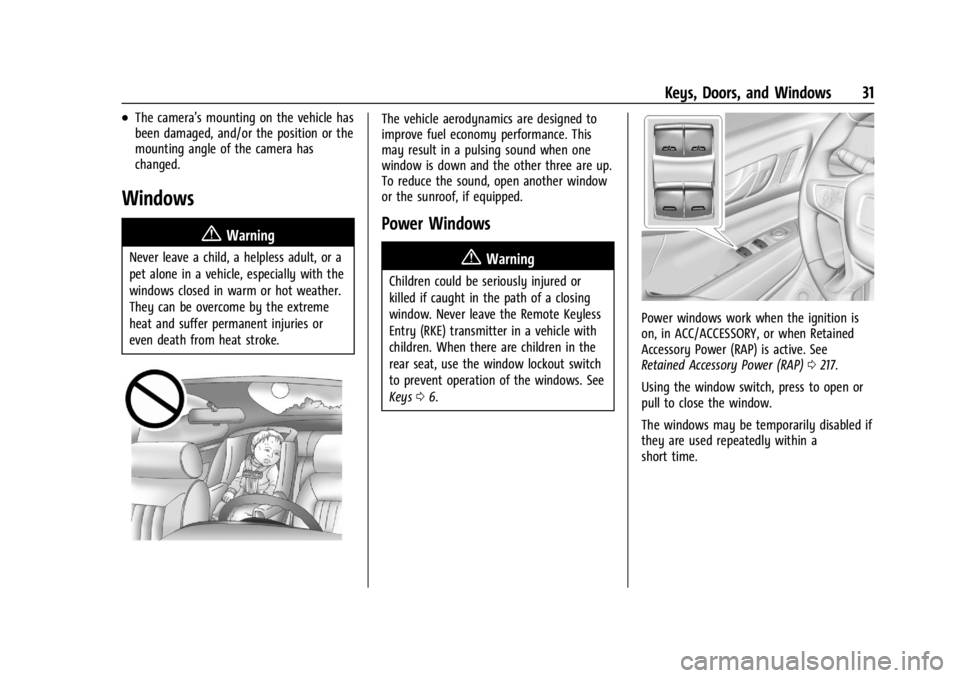
Windows{
Warning
Never leave a child, a helpless adult, or a
pet alone in a vehicle, especially with the
windows closed in warm or hot weather.
They can be overcome by the extreme
heat and suffer permanent injuries or
even death from heat stroke.
The vehicle aerodynamics are designed to
improve fuel economy performance. This
may result in a pulsing sound when one
window is down and the other three are up.
To reduce the sound, open another window
or the sunroof, if equipped.
Power Windows
{Warning
Children could be seriously injured or
killed if caught in the path of a closing
window. Never leave the Remote Keyless
Entry (RKE) transmitter in a vehicle with
children. When there are children in the
rear seat, use the window lockout switch
to prevent operation of the windows. See
Keys06.
Power windows work when the ignition is
on, in ACC/ACCESSORY, or when Retained
Accessory Power (RAP) is active. See
Retained Accessory Power (RAP) 0217.
Using the window switch, press to open or
pull to close the window.
The windows may be temporarily disabled if
they are used repeatedly within a
short time.
Page 33 of 396
GMC Acadia/Acadia Denali Owner Manual (GMNA-Localizing-U.S./Canada/
Mexico-14608671) - 2021 - CRC - 10/26/20
32 Keys, Doors, and Windows
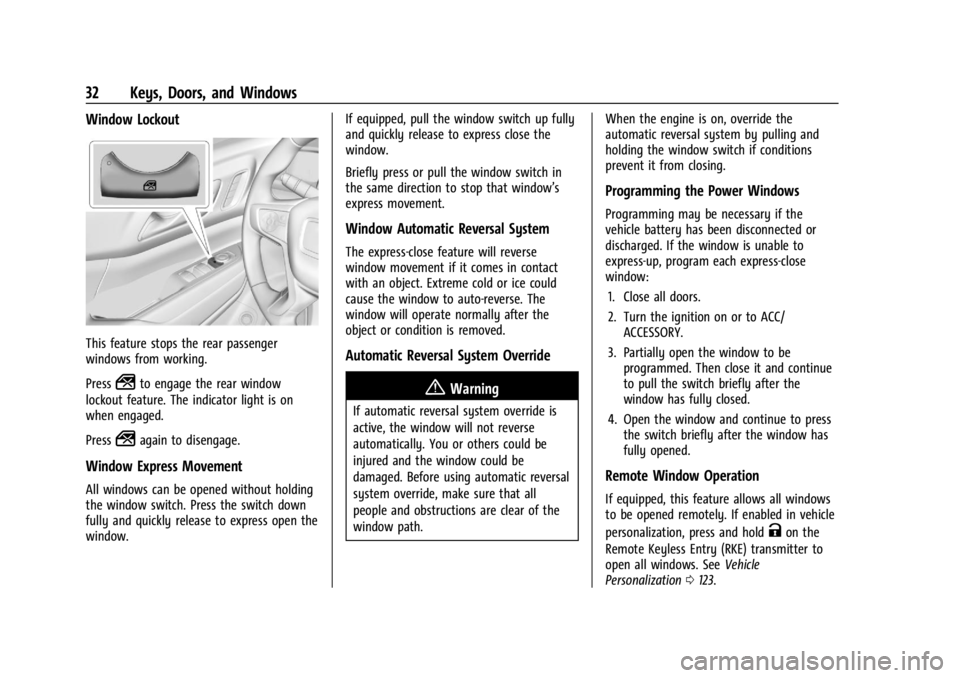
Window Lockout
This feature stops the rear passenger
windows from working.
Press
2to engage the rear window
lockout feature. The indicator light is on
when engaged.
Press
2again to disengage.
Window Express Movement
All windows can be opened without holding
the window switch. Press the switch down
fully and quickly release to express open the
window. If equipped, pull the window switch up fully
and quickly release to express close the
window.
Briefly press or pull the window switch in
the same direction to stop that window’s
express movement.
Window Automatic Reversal System
The express-close feature will reverse
window movement if it comes in contact
with an object. Extreme cold or ice could
cause the window to auto-reverse. The
window will operate normally after the
object or condition is removed.
Automatic Reversal System Override
{Warning
If automatic reversal system override is
active, the window will not reverse
automatically. You or others could be
injured and the window could be
damaged. Before using automatic reversal
system override, make sure that all
people and obstructions are clear of the
window path.
When the engine is on, override the
automatic reversal system by pulling and
holding the window switch if conditions
prevent it from closing.
Programming the Power Windows
Programming may be necessary if the
vehicle battery has been disconnected or
discharged. If the window is unable to
express-up, program each express-close
window:
1. Close all doors.
2. Turn the ignition on or to ACC/ ACCESSORY.
3. Partially open the window to be programmed. Then close it and continue
to pull the switch briefly after the
window has fully closed.
4. Open the window and continue to press the switch briefly after the window has
fully opened.
Remote Window Operation
If equipped, this feature allows all windows
to be opened remotely. If enabled in vehicle
personalization, press and hold
Kon the
Remote Keyless Entry (RKE) transmitter to
open all windows. See Vehicle
Personalization 0123.
Page 90 of 396
GMC Acadia/Acadia Denali Owner Manual (GMNA-Localizing-U.S./Canada/
Mexico-14608671) - 2021 - CRC - 10/26/20
Instruments and Controls 89
Instruments and Controls
Controls
Steering Wheel Adjustment . . . . . . . . . . . . 90
Steering Wheel Controls . . . . . . . . . . . . . . . 90
Heated Steering Wheel . . . . . . . . . . . . . . . . 90
Horn . . . . . . . . . . . . . . . . . . . . . . . . . . . . . . . . . . . . 91
Windshield Wiper/Washer . . . . . . . . . . . . . . 91
Rear Window Wiper/Washer . . . . . . . . . . . 92
Compass . . . . . . . . . . . . . . . . . . . . . . . . . . . . . . . 92
Clock . . . . . . . . . . . . . . . . . . . . . . . . . . . . . . . . . . . 93
Power Outlets . . . . . . . . . . . . . . . . . . . . . . . . . . 93
Wireless Charging . . . . . . . . . . . . . . . . . . . . . . 94
Warning Lights, Gauges, and Indicators
Warning Lights, Gauges, andIndicators . . . . . . . . . . . . . . . . . . . . . . . . . . . . 96
Instrument Cluster (Base and Midlevel) . . . . . . . . . . . . . . . . . . . . . . . . . . . . . 97
Instrument Cluster (Uplevel) . . . . . . . . . . . 100
Speedometer . . . . . . . . . . . . . . . . . . . . . . . . . . 102
Odometer . . . . . . . . . . . . . . . . . . . . . . . . . . . . . 102
Trip Odometer . . . . . . . . . . . . . . . . . . . . . . . . . 102
Tachometer . . . . . . . . . . . . . . . . . . . . . . . . . . . . 102
Fuel Gauge . . . . . . . . . . . . . . . . . . . . . . . . . . . . 102
Engine Oil Temperature Gauge . . . . . . . . 103
Engine Coolant Temperature Gauge . . . 104
Voltmeter Gauge . . . . . . . . . . . . . . . . . . . . . . 104
Seat Belt Reminders . . . . . . . . . . . . . . . . . . . 105
Airbag Readiness Light . . . . . . . . . . . . . . . . 105 Passenger Airbag Status Indicator . . . . . 106
Charging System Light . . . . . . . . . . . . . . . . . 107
Malfunction Indicator Lamp (Check
Engine Light) . . . . . . . . . . . . . . . . . . . . . . . . 107
Brake System Warning Light . . . . . . . . . . 108
Electric Parking Brake Light . . . . . . . . . . . . 109
Service Electric Parking Brake Light
(Uplevel and Midlevel
Cluster Only) . . . . . . . . . . . . . . . . . . . . . . . . 109
Antilock Brake System (ABS) Warning Light . . . . . . . . . . . . . . . . . . . . . . . . . . . . . . . . . 110
Gear Shifting Light . . . . . . . . . . . . . . . . . . . . . 110
Tow/Haul Mode Light . . . . . . . . . . . . . . . . . 110
Hill Descent Control Light . . . . . . . . . . . . . . 110
Lane Keep Assist (LKA) Light . . . . . . . . . . . 110
Vehicle Ahead Indicator . . . . . . . . . . . . . . . . 111
Pedestrian Ahead Indicator . . . . . . . . . . . . . 111
Traction Off Light . . . . . . . . . . . . . . . . . . . . . . 111
StabiliTrak OFF Light . . . . . . . . . . . . . . . . . . . 112
Traction Control System (TCS)/ StabiliTrak Light . . . . . . . . . . . . . . . . . . . . . . 112
Engine Coolant Temperature Warning Light . . . . . . . . . . . . . . . . . . . . . . . . . . . . . . . . . 112
Tire Pressure Light . . . . . . . . . . . . . . . . . . . . . 113
Engine Oil Pressure Light . . . . . . . . . . . . . . . 113
Low Fuel Warning Light . . . . . . . . . . . . . . . . 114
Security Light . . . . . . . . . . . . . . . . . . . . . . . . . . 114
High-Beam On Light . . . . . . . . . . . . . . . . . . . 114
Front Fog Lamp Light . . . . . . . . . . . . . . . . . . 114
Lamps On Reminder . . . . . . . . . . . . . . . . . . . 114 Cruise Control Light . . . . . . . . . . . . . . . . . . . . 115
Door Ajar Light . . . . . . . . . . . . . . . . . . . . . . . . . 115
Information Displays
Driver Information Center
(DIC) (Base) . . . . . . . . . . . . . . . . . . . . . . . . . . 115
Driver Information Center (DIC) (Midlevel and Uplevel) . . . . . . . . . . . . . . . 117
Head-Up Display (HUD) . . . . . . . . . . . . . . . . 119
Vehicle Messages
Vehicle Messages . . . . . . . . . . . . . . . . . . . . . . 122
Engine Power Messages . . . . . . . . . . . . . . . 123
Vehicle Speed Messages . . . . . . . . . . . . . . . 123
Vehicle Personalization
Vehicle Personalization . . . . . . . . . . . . . . . . . 123
Universal Remote System
Universal Remote System . . . . . . . . . . . . . . 127
Universal Remote System Programming . . . . . . . . . . . . . . . . . . . . . . . . 127
Universal Remote System Operation . . . 129