sport mode GMC ACADIA 2021 Owner's Manual
[x] Cancel search | Manufacturer: GMC, Model Year: 2021, Model line: ACADIA, Model: GMC ACADIA 2021Pages: 396, PDF Size: 7.87 MB
Page 229 of 396
GMC Acadia/Acadia Denali Owner Manual (GMNA-Localizing-U.S./Canada/
Mexico-14608671) - 2021 - CRC - 10/26/20
228 Driving and Operating
If TCS is limiting wheel spin whengis
pressed, the system will not turn off until
the wheels stop spinning.
To turn off both TCS and StabiliTrak/ESC,
press and hold
guntil the Traction Off light
iand StabiliTrak/ESC OFF lightgcome on
and stay on in the instrument cluster. A DIC
message may display.
To turn TCS and StabiliTrak/ESC on again,
press and release
g. The Traction Off light
iand StabiliTrak/ESC OFF lightgin the
instrument cluster turn off.
StabiliTrak will automatically turn on if the
vehicle exceeds 56 km/h (35 mph). Traction
control will remain off.
Adding accessories can affect the vehicle
performance. See Accessories and
Modifications 0268.
Hill Descent Control (HDC)
If equipped, HDC can be used when driving
downhill. It sets and maintains vehicle speed
while descending a very steep incline in a
forward or reverse gear.
The HDC switch is on the center console. Press
5to enable or disable HDC. Vehicle
speed must be below 50 km/h (31 mph).
A blinking HDC light indicates the system is
actively applying the brakes to maintain
vehicle speed.
HDC can maintain vehicle speeds between
3–22 km/h (2–14 mph) on an incline greater
than or equal to a 10% grade.
When HDC is activated, the initial HDC
speed is set to the current driving speed.
It can be increased or decreased by pressing
the RES+ or SET– steering wheel controls or
by applying the accelerator or brake pedal.
This adjusted speed becomes the new set
speed. HDC will remain enabled between
22–60 km/h (14–37 mph); however vehicle
speed cannot be set or maintained in this
range. It will automatically disable if the
vehicle speed is above 80 km/h (50 mph) or
above 60 km/h (37 mph) for at least
30 seconds. Press
5again to re-enable HDC.
Driver Mode Control
If equipped, the Driver Mode Control has the
following Modes: Tour (FWD), Sport,
All-Wheel Drive (AWD), Snow/Ice, Tow/Haul,
and Off-Road. Rotate the Driver Mode
Control knob on the center console to make
a mode selection. Continue turning the knob
through the available modes. The selected
mode’s icon will light up on the knob and
there may be additional messages in the
Driver Information Center (DIC) and
indicators in the instrument cluster.
If the vehicle is in Tour (FWD) or AWD, it
will stay in that mode through future
ignition cycles. If the vehicle is in any other
mode, it will revert back to Tour (FWD)
when the vehicle is restarted.
Page 230 of 396
GMC Acadia/Acadia Denali Owner Manual (GMNA-Localizing-U.S./Canada/
Mexico-14608671) - 2021 - CRC - 10/26/20
Driving and Operating 229
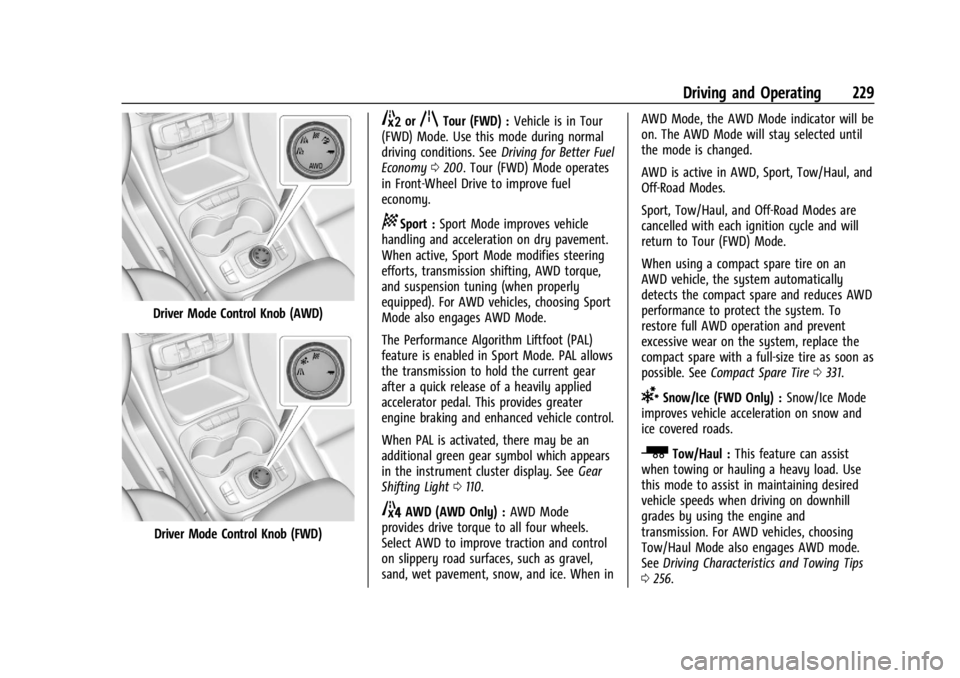
Driver Mode Control Knob (AWD)
Driver Mode Control Knob (FWD)
5orqTour (FWD) :Vehicle is in Tour
(FWD) Mode. Use this mode during normal
driving conditions. See Driving for Better Fuel
Economy 0200. Tour (FWD) Mode operates
in Front-Wheel Drive to improve fuel
economy.
8Sport : Sport Mode improves vehicle
handling and acceleration on dry pavement.
When active, Sport Mode modifies steering
efforts, transmission shifting, AWD torque,
and suspension tuning (when properly
equipped). For AWD vehicles, choosing Sport
Mode also engages AWD Mode.
The Performance Algorithm Liftfoot (PAL)
feature is enabled in Sport Mode. PAL allows
the transmission to hold the current gear
after a quick release of a heavily applied
accelerator pedal. This provides greater
engine braking and enhanced vehicle control.
When PAL is activated, there may be an
additional green gear symbol which appears
in the instrument cluster display. See Gear
Shifting Light 0110.
4AWD (AWD Only) : AWD Mode
provides drive torque to all four wheels.
Select AWD to improve traction and control
on slippery road surfaces, such as gravel,
sand, wet pavement, snow, and ice. When in AWD Mode, the AWD Mode indicator will be
on. The AWD Mode will stay selected until
the mode is changed.
AWD is active in AWD, Sport, Tow/Haul, and
Off-Road Modes.
Sport, Tow/Haul, and Off-Road Modes are
cancelled with each ignition cycle and will
return to Tour (FWD) Mode.
When using a compact spare tire on an
AWD vehicle, the system automatically
detects the compact spare and reduces AWD
performance to protect the system. To
restore full AWD operation and prevent
excessive wear on the system, replace the
compact spare with a full-size tire as soon as
possible. See
Compact Spare Tire 0331.
6Snow/Ice (FWD Only) : Snow/Ice Mode
improves vehicle acceleration on snow and
ice covered roads.
_Tow/Haul : This feature can assist
when towing or hauling a heavy load. Use
this mode to assist in maintaining desired
vehicle speeds when driving on downhill
grades by using the engine and
transmission. For AWD vehicles, choosing
Tow/Haul Mode also engages AWD mode.
See Driving Characteristics and Towing Tips
0 256.
Page 386 of 396

GMC Acadia/Acadia Denali Owner Manual (GMNA-Localizing-U.S./Canada/-
Mexico-14608671) - 2021 - CRC - 10/26/20
Index 385
Climate Control SystemsDual Automatic . . . . . . . . . . . . . . . . . . . . . . . . 192
Rear . . . . . . . . . . . . . . . . . . . . . . . . . . . . . . . . . . . 196
Clock . . . . . . . . . . . . . . . . . . . . . . . . . . . . . . . . . . . . . 93
Cluster, Instrument . . . . . . . . . . . . . . . . . . 97, 100
Collision Damage Repair . . . . . . . . . . . . . . . . . 369
Compact Spare Tire . . . . . . . . . . . . . . . . . . . . . . . 331
Compartments Storage . . . . . . . . . . . . . . . . . . . . . . . . . . . . . . . . . 83
Compass . . . . . . . . . . . . . . . . . . . . . . . . . . . . . . . . . . 92
Compressor Kit, Tire Sealant . . . . . . . . . . . . . 320
Connected Services Connections . . . . . . . . . . . . . . . . . . . . . . . . . . . 381
Diagnostics . . . . . . . . . . . . . . . . . . . . . . . . . . . . 382
Navigation . . . . . . . . . . . . . . . . . . . . . . . . . . . . . 380
Connections
Connected Services . . . . . . . . . . . . . . . . . . . . 381
Control Hill Descent . . . . . . . . . . . . . . . . . . . . . . . . . . . . 228
Traction and Electronic Stability . . . . . . . 226
Control Light
Hill Descent . . . . . . . . . . . . . . . . . . . . . . . . . . . . 110
Control of a Vehicle . . . . . . . . . . . . . . . . . . . . . 201
Controls Steering Wheel . . . . . . . . . . . . . . . . . . . . . . . . 140
Convex Mirrors . . . . . . . . . . . . . . . . . . . . . . . . . . . 26 Coolant
Engine Temperature Gauge . . . . . . . . . . . . 104
Engine Temperature Warning Light . . . . . 112
Cooling . . . . . . . . . . . . . . . . . . . . . . . . . . . . . .192, 196
Cooling System . . . . . . . . . . . . . . . . . . . . . . . . . . .281
Courtesy Lamps . . . . . . . . . . . . . . . . . . . . . . . . . . . 135
Courtesy Transportation Program . . . . . . . . 368
Coverage Explanations . . . . . . . . . . . . . . . . . . . 163
Cruise Control . . . . . . . . . . . . . . . . . . . . . . . . . . . 230 Light . . . . . . . . . . . . . . . . . . . . . . . . . . . . . . . . . . . . 115
Cruise Control, Adaptive . . . . . . . . . . . . . . . . . 232
Customer Assistance . . . . . . . . . . . . . . . . . . . . . 365
Offices . . . . . . . . . . . . . . . . . . . . . . . . . . . . . . . . . 365
Text Telephone (TTY) Users . . . . . . . . . . . . 365
Customer Information Publications Ordering Information . . . . . . 371
Customer Satisfaction Procedure . . . . . . . . . 363
Cybersecurity . . . . . . . . . . . . . . . . . . . . . . . . . . . . 373
D
Damage Repair, Collision . . . . . . . . . . . . . . . . . 369
Danger, Warning, and Caution . . . . . . . . . . . . . .2
Data Collection Infotainment System . . . . . . . . . . . . . . . . . . 374
OnStar . . . . . . . . . . . . . . . . . . . . . . . . . . . . . . . . . 374
Data Recorders, Event . . . . . . . . . . . . . . . . . . . 373
Database Coverage Explanations . . . . . . . . . 163 Daytime Running Lamps (DRL) . . . . . . . . . . . . 133
Defensive Driving . . . . . . . . . . . . . . . . . . . . . . . . 201
Delayed Locking . . . . . . . . . . . . . . . . . . . . . . . . . . . 17
Destination . . . . . . . . . . . . . . . . . . . . . . . . . . . . . . 156
Diagnostics
Connected Services . . . . . . . . . . . . . . . . . . . . 382
Distracted Driving . . . . . . . . . . . . . . . . . . . . . . . . 200
Dome Lamps . . . . . . . . . . . . . . . . . . . . . . . . . . . . . . 135
Door
Ajar Light . . . . . . . . . . . . . . . . . . . . . . . . . . . . . . . 115
Delayed Locking . . . . . . . . . . . . . . . . . . . . . . . . . 17
Locks . . . . . . . . . . . . . . . . . . . . . . . . . . . . . . . . . . . . 15
Power Locks . . . . . . . . . . . . . . . . . . . . . . . . . . . . . 17
Drive Belt Routing, Engine . . . . . . . . . . . . . . . 362
Drive Systems All-Wheel Drive . . . . . . . . . . . . . . . . . . . 224, 289
Driver Teen . . . . . . . . . . . . . . . . . . . . . . . . . . . . . . . . . . . 180
Driver Assistance Systems . . . . . . . . . . . . . . . 239
Driver Information Center (DIC) . . . . . . . 115, 117
Driver Mode Control . . . . . . . . . . . . . . . . . . . . . 228
Driving Assistance Systems . . . . . . . . . . . . . . . . . . . . 245
Better Fuel Economy . . . . . . . . . . . . . . . . . . . 200
Characteristics and Towing Tips . . . . . . . . 256
Defensive . . . . . . . . . . . . . . . . . . . . . . . . . . . . . . 201
Hill and Mountain Roads . . . . . . . . . . . . . . 207
If the Vehicle is Stuck . . . . . . . . . . . . . . . . . 209
Page 394 of 396

GMC Acadia/Acadia Denali Owner Manual (GMNA-Localizing-U.S./Canada/-
Mexico-14608671) - 2021 - CRC - 10/26/20
Index 393
Tow/Haul Mode Light . . . . . . . . . . . . . . . . . . . .110
TowingDriving Characteristics . . . . . . . . . . . . . . . . . 256
Equipment . . . . . . . . . . . . . . . . . . . . . . . . . . . . . 262
General Information . . . . . . . . . . . . . . . . . . . 256
Recreational Vehicle . . . . . . . . . . . . . . . . . . . 335
Trailer . . . . . . . . . . . . . . . . . . . . . . . . . . . . . . . . . 259
Trailer Sway Control (TSC) . . . . . . . . . . . . . 265
Vehicle . . . . . . . . . . . . . . . . . . . . . . . . . . . . . . . . 334
Traction Control System (TCS)/StabiliTrak
Light . . . . . . . . . . . . . . . . . . . . . . . . . . . . . . . . . . 112
Off Light . . . . . . . . . . . . . . . . . . . . . . . . . . . . . . . . 111
Traction Control/Electronic Stability Control . . . . . . . . . . . . . . . . . . . . . . . . . . . . . . . . . 226
Trademarks and License Agreements . . . . . .183
Trailer
Sway Control (TSC) . . . . . . . . . . . . . . . . . . . . 265
Towing . . . . . . . . . . . . . . . . . . . . . . . . . . . . . . . . 259
Transmission Automatic . . . . . . . . . . . . . . . . . . . . . . . . . . . . . 220
Fluid, Automatic . . . . . . . . . . . . . . . . . . . . . . . 279
Transportation Program, Courtesy . . . . . . . 368
Trip Odometer . . . . . . . . . . . . . . . . . . . . . . . . . . . 102
Turn and Lane-Change Signals . . . . . . . . . . . .134U
Uniform Tire Quality Grading . . . . . . . . . . . . 316
Universal Remote System . . . . . . . . . . . . . . . . . 127 Operation . . . . . . . . . . . . . . . . . . . . . . . . . . . . . . 129
Programming . . . . . . . . . . . . . . . . . . . . . . . . . . . 127
Updates Map Data . . . . . . . . . . . . . . . . . . . . . . . . . . . . . . 162
Software . . . . . . . . . . . . . . . . . . . . . . . . . . . . . . . 144
USB Port . . . . . . . . . . . . . . . . . . . . . . . . . . . . . . . . . .147
Using the Navigation System . . . . . . . . . . . . . 152
Using the System . . . . . . . . . . . . . . . . . . . . . . . . . 141
Using This Manual . . . . . . . . . . . . . . . . . . . . . . . . . .2
V
Vehicle Alarm System . . . . . . . . . . . . . . . . . . . . . . . . . . 25
Canadian Owners . . . . . . . . . . . . . . . . . . . . . . . . . 1
Control . . . . . . . . . . . . . . . . . . . . . . . . . . . . . . . . 201
Identification Number (VIN) . . . . . . . . . . . . 358
Load Limits . . . . . . . . . . . . . . . . . . . . . . . . . . . . 209
Messages . . . . . . . . . . . . . . . . . . . . . . . . . . . . . . 122
Personalization . . . . . . . . . . . . . . . . . . . . . . . . 123
Remote Start . . . . . . . . . . . . . . . . . . . . . . . . . . . . 13
Security . . . . . . . . . . . . . . . . . . . . . . . . . . . . . . . . . 25
Speed Messages . . . . . . . . . . . . . . . . . . . . . . . 123
Towing . . . . . . . . . . . . . . . . . . . . . . . . . . . . . . . . 334
Vehicle Ahead Indicator . . . . . . . . . . . . . . . . . . . 111 Vehicle Care
Storing the Tire Sealant and
Compressor Kit . . . . . . . . . . . . . . . . . . . . . . . 326
Tire Pressure . . . . . . . . . . . . . . . . . . . . . . . . . . . 307
Vehicle Data Recording and Privacy . . . . . . 372
Vehicle Positioning . . . . . . . . . . . . . . . . . . . . . . 162
Ventilation, Air . . . . . . . . . . . . . . . . . . . . . . . . . . 197
Visors . . . . . . . . . . . . . . . . . . . . . . . . . . . . . . . . . . . . . .33
Voice Recognition . . . . . . . . . . . . . . . . . . . . . . . . 163
Voltmeter Gauge . . . . . . . . . . . . . . . . . . . . . . . . 104
W
Warning Brake System Light . . . . . . . . . . . . . . . . . . . . 108
Caution and Danger . . . . . . . . . . . . . . . . . . . . . 2
Warning Lights, Gauges, and Indicators . . . . . . . . . . . . . . . . . . . . . . . . . . . . . . . 96
Warnings Hazard Flashers . . . . . . . . . . . . . . . . . . . . . . . . 134
Washer Fluid . . . . . . . . . . . . . . . . . . . . . . . . . . . . 286
Wheels Alignment and Tire Balance . . . . . . . . . . . . 318
Different Size . . . . . . . . . . . . . . . . . . . . . . . . . . 316
Replacement . . . . . . . . . . . . . . . . . . . . . . . . . . . 318
When It Is Time for New Tires . . . . . . . . . . . .314
Where to Put the Restraint . . . . . . . . . . . . . . . 69