spare wheel GMC ACADIA 2022 User Guide
[x] Cancel search | Manufacturer: GMC, Model Year: 2022, Model line: ACADIA, Model: GMC ACADIA 2022Pages: 397, PDF Size: 6.98 MB
Page 321 of 397
GMC Acadia/Acadia Denali Owner Manual (GMNA-Localizing-U.S./Canada/
Mexico-15170041) - 2022 - CRC - 10/6/21
320 Vehicle Care
Warning (Continued)
underinflated or flat. Have your dealer or
an authorized tire service center repair or
replace the flat tire as soon as possible.
{Warning
Lifting a vehicle and getting under it to
do maintenance or repairs is dangerous
without the appropriate safety equipment
and training. If a jack is provided with
the vehicle, it is designed only for
changing a flat tire. If it is used for
anything else, you or others could be
badly injured or killed if the vehicle slips
off the jack. If a jack is provided with the
vehicle, only use it for changing a
flat tire.
If a tire goes flat, avoid further tire and
wheel damage by driving slowly to a level
place, well off the road, if possible. Turn on
the hazard warning flashers. See Hazard
Warning Flashers 0135.
{Warning
Changing a tire can be dangerous. The
vehicle can slip off the jack and roll over
or fall causing injury or death. Find a
level place to change the tire. To help
prevent the vehicle from moving:
1. Set the parking brake firmly.
2. Put an automatic transmission in P (Park) or a manual transmission in
1 (First) or R (Reverse).
3. Turn off the engine and do not restart while the vehicle is raised.
4. Do not allow passengers to remain in the vehicle.
5. Place wheel blocks, if equipped, on both sides of the tire at the opposite
corner of the tire being changed.
This vehicle may come with a jack and spare
tire or a tire sealant and compressor kit. To
use the jacking equipment to change a spare
tire safely, follow the instructions below.
Then see Tire Changing 0327. To use the
tire sealant and compressor kit, see Tire
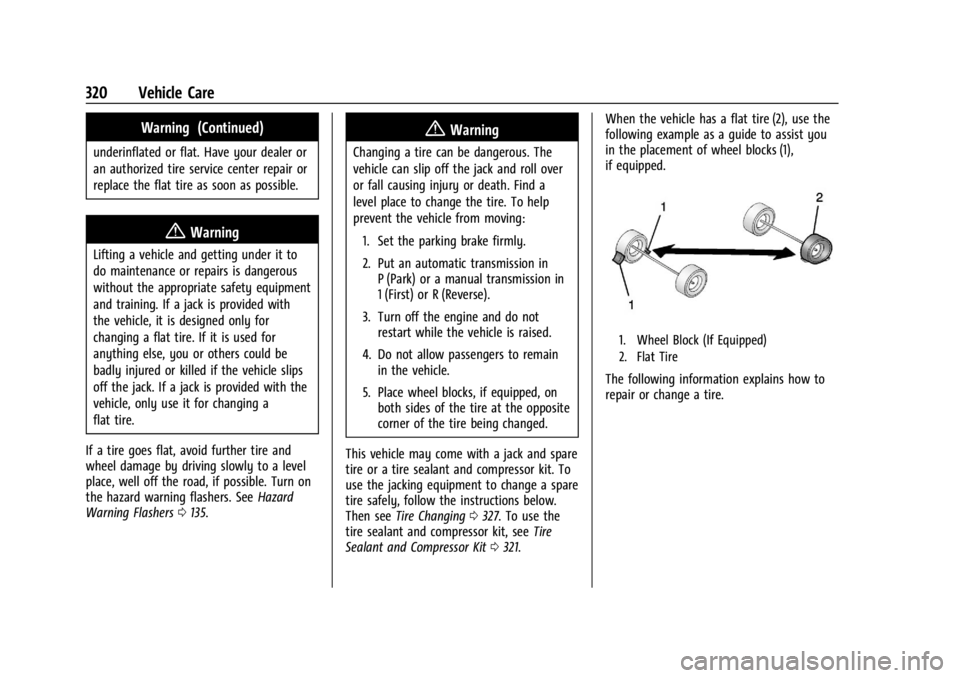
Sealant and Compressor Kit 0321. When the vehicle has a flat tire (2), use the
following example as a guide to assist you
in the placement of wheel blocks (1),
if equipped.
1. Wheel Block (If Equipped)
2. Flat Tire
The following information explains how to
repair or change a tire.
Page 322 of 397
GMC Acadia/Acadia Denali Owner Manual (GMNA-Localizing-U.S./Canada/
Mexico-15170041) - 2022 - CRC - 10/6/21
Vehicle Care 321
Tire Sealant and Compressor Kit
{Warning
Idling a vehicle in an enclosed area with
poor ventilation is dangerous. Engine
exhaust may enter the vehicle. Engine
exhaust contains carbon monoxide (CO)
which cannot be seen or smelled. It can
cause unconsciousness and even death.
Never run the engine in an enclosed area
that has no fresh air ventilation. For more
information, seeEngine Exhaust0220.
{Warning
Overinflating a tire could cause the tire
to rupture and you or others could be
injured. Be sure to read and follow the
tire sealant and compressor kit
instructions and inflate the tire to its
recommended pressure. Do not exceed
the recommended pressure.
{Warning
Storing the tire sealant and compressor
kit or other equipment in the passenger
compartment of the vehicle could cause
injury. In a sudden stop or collision, loose
equipment could strike someone. Store
the tire sealant and compressor kit in its
original location.
If this vehicle has a tire sealant and
compressor kit, there may not be a spare
tire or tire changing equipment, and on
some vehicles there may not be a place to
store a tire.
The tire sealant and compressor can be used
to temporarily seal punctures up to 6 mm
(0.25 in) in the tread area of the tire. It can
also be used to inflate an underinflated tire.
If the tire has been separated from the
wheel, has damaged sidewalls, or has a
large puncture, the tire is too severely
damaged for the tire sealant and
compressor kit to be effective. See Roadside
Assistance Program 0368.
Read and follow all of the tire sealant and
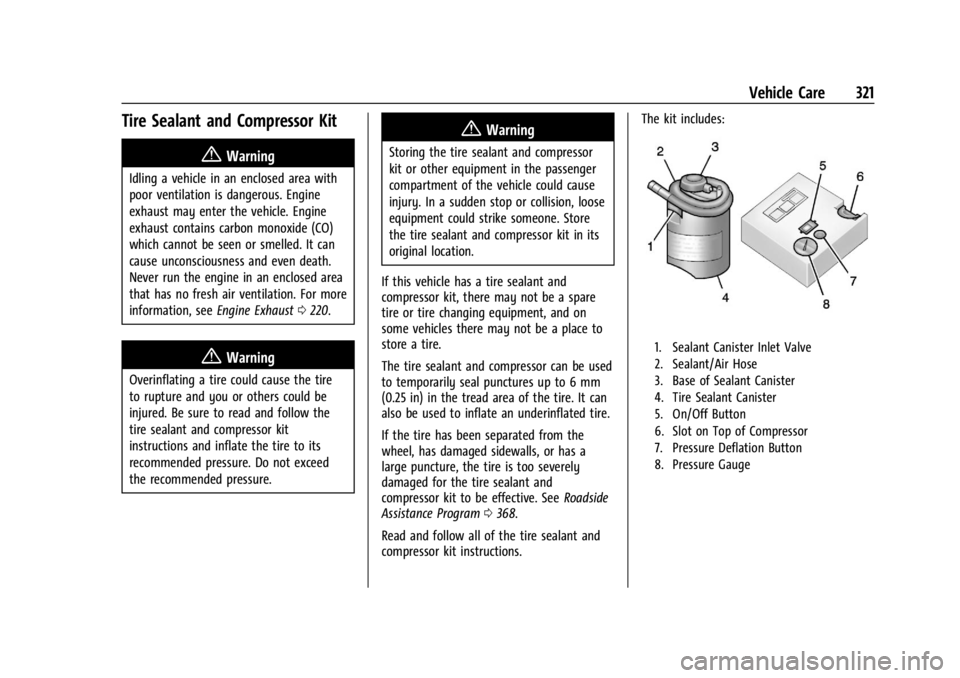
compressor kit instructions. The kit includes:
1. Sealant Canister Inlet Valve
2. Sealant/Air Hose
3. Base of Sealant Canister
4. Tire Sealant Canister
5. On/Off Button
6. Slot on Top of Compressor
7. Pressure Deflation Button
8. Pressure Gauge
Page 328 of 397
GMC Acadia/Acadia Denali Owner Manual (GMNA-Localizing-U.S./Canada/
Mexico-15170041) - 2022 - CRC - 10/6/21
Vehicle Care 327
Tire Changing
Removing the Spare Tire and Tools
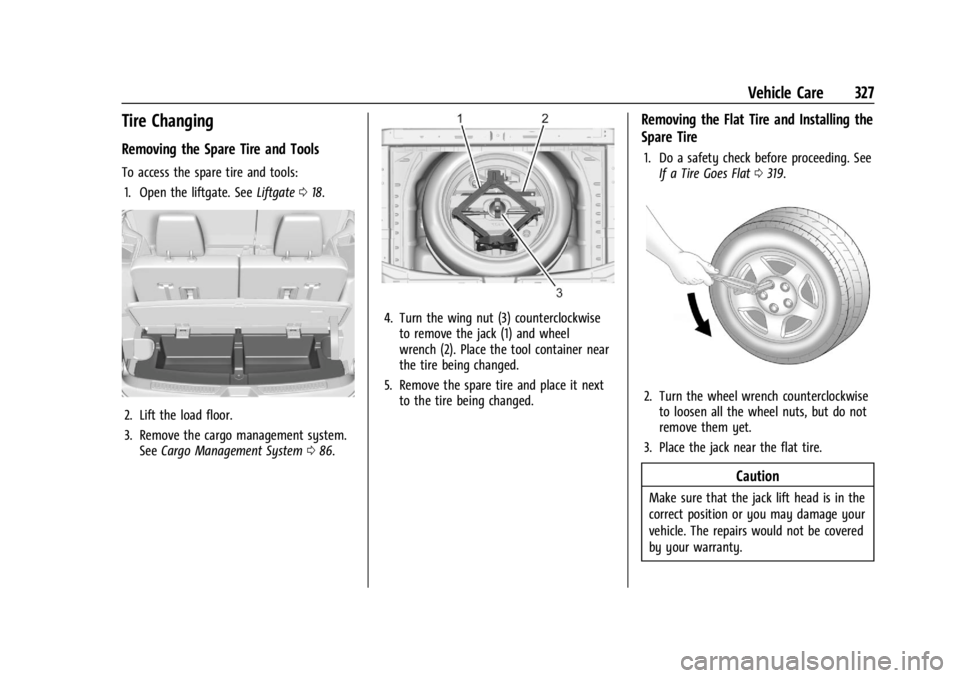
To access the spare tire and tools:1. Open the liftgate. See Liftgate018.
2. Lift the load floor.
3. Remove the cargo management system.
See Cargo Management System 086.
4. Turn the wing nut (3) counterclockwise
to remove the jack (1) and wheel
wrench (2). Place the tool container near
the tire being changed.
5. Remove the spare tire and place it next to the tire being changed.
Removing the Flat Tire and Installing the
Spare Tire
1. Do a safety check before proceeding. SeeIf a Tire Goes Flat 0319.
2. Turn the wheel wrench counterclockwise
to loosen all the wheel nuts, but do not
remove them yet.
3. Place the jack near the flat tire.
Caution
Make sure that the jack lift head is in the
correct position or you may damage your
vehicle. The repairs would not be covered
by your warranty.
Page 329 of 397
GMC Acadia/Acadia Denali Owner Manual (GMNA-Localizing-U.S./Canada/
Mexico-15170041) - 2022 - CRC - 10/6/21
328 Vehicle Care
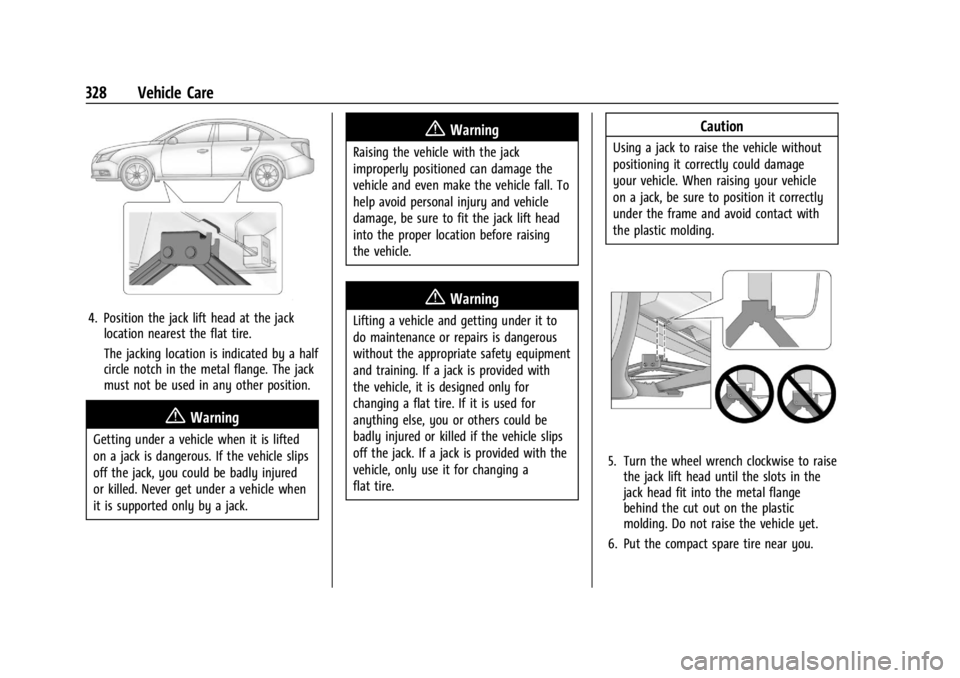
4. Position the jack lift head at the jacklocation nearest the flat tire.
The jacking location is indicated by a half
circle notch in the metal flange. The jack
must not be used in any other position.
{Warning
Getting under a vehicle when it is lifted
on a jack is dangerous. If the vehicle slips
off the jack, you could be badly injured
or killed. Never get under a vehicle when
it is supported only by a jack.
{Warning
Raising the vehicle with the jack
improperly positioned can damage the
vehicle and even make the vehicle fall. To
help avoid personal injury and vehicle
damage, be sure to fit the jack lift head
into the proper location before raising
the vehicle.
{Warning
Lifting a vehicle and getting under it to
do maintenance or repairs is dangerous
without the appropriate safety equipment
and training. If a jack is provided with
the vehicle, it is designed only for
changing a flat tire. If it is used for
anything else, you or others could be
badly injured or killed if the vehicle slips
off the jack. If a jack is provided with the
vehicle, only use it for changing a
flat tire.
Caution
Using a jack to raise the vehicle without
positioning it correctly could damage
your vehicle. When raising your vehicle
on a jack, be sure to position it correctly
under the frame and avoid contact with
the plastic molding.
5. Turn the wheel wrench clockwise to raisethe jack lift head until the slots in the
jack head fit into the metal flange
behind the cut out on the plastic
molding. Do not raise the vehicle yet.
6. Put the compact spare tire near you.
Page 330 of 397
GMC Acadia/Acadia Denali Owner Manual (GMNA-Localizing-U.S./Canada/
Mexico-15170041) - 2022 - CRC - 10/6/21
Vehicle Care 329
7. Turn the wrench clockwise in the jack toraise the vehicle. Raise the vehicle far
enough off the ground so that there is
enough room for the spare tire to fit
under the wheel well.
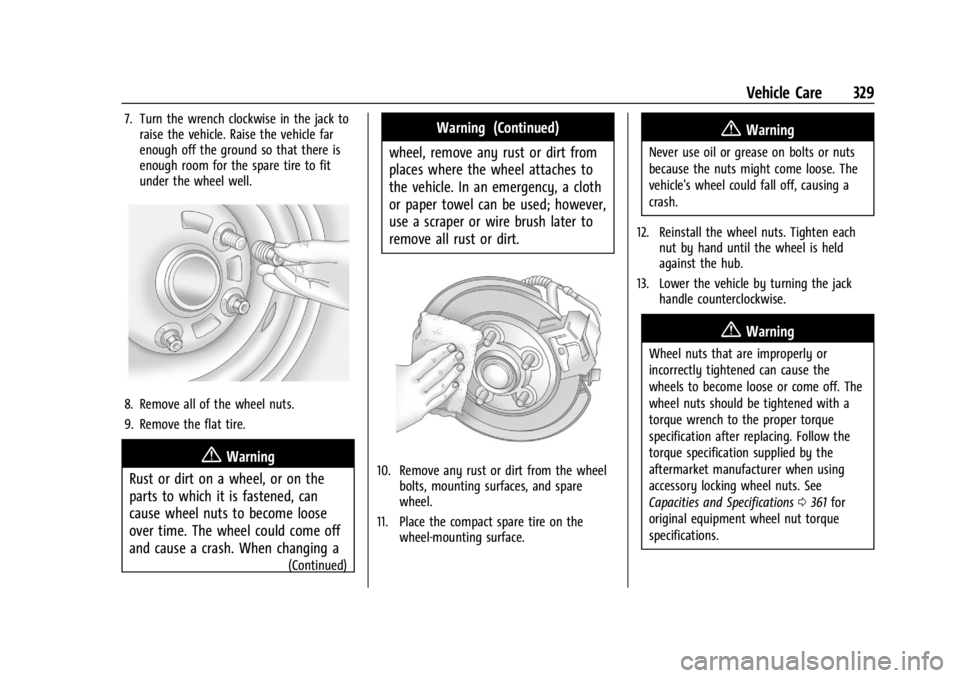
8. Remove all of the wheel nuts.
9. Remove the flat tire.
{Warning
Rust or dirt on a wheel, or on the
parts to which it is fastened, can
cause wheel nuts to become loose
over time. The wheel could come off
and cause a crash. When changing a
(Continued)
Warning (Continued)
wheel, remove any rust or dirt from
places where the wheel attaches to
the vehicle. In an emergency, a cloth
or paper towel can be used; however,
use a scraper or wire brush later to
remove all rust or dirt.
10. Remove any rust or dirt from the wheel bolts, mounting surfaces, and spare
wheel.
11. Place the compact spare tire on the wheel-mounting surface.
{Warning
Never use oil or grease on bolts or nuts
because the nuts might come loose. The
vehicle's wheel could fall off, causing a
crash.
12. Reinstall the wheel nuts. Tighten each nut by hand until the wheel is held
against the hub.
13. Lower the vehicle by turning the jack handle counterclockwise.
{Warning
Wheel nuts that are improperly or
incorrectly tightened can cause the
wheels to become loose or come off. The
wheel nuts should be tightened with a
torque wrench to the proper torque
specification after replacing. Follow the
torque specification supplied by the
aftermarket manufacturer when using
accessory locking wheel nuts. See
Capacities and Specifications 0361 for
original equipment wheel nut torque
specifications.
Page 331 of 397
GMC Acadia/Acadia Denali Owner Manual (GMNA-Localizing-U.S./Canada/
Mexico-15170041) - 2022 - CRC - 10/6/21
330 Vehicle Care
Caution
Improperly tightened wheel nuts can lead
to brake pulsation and rotor damage. To
avoid expensive brake repairs, evenly
tighten the wheel nuts in the proper
sequence and to the proper torque
specification. SeeCapacities and
Specifications 0361 for the wheel nut
torque specification.
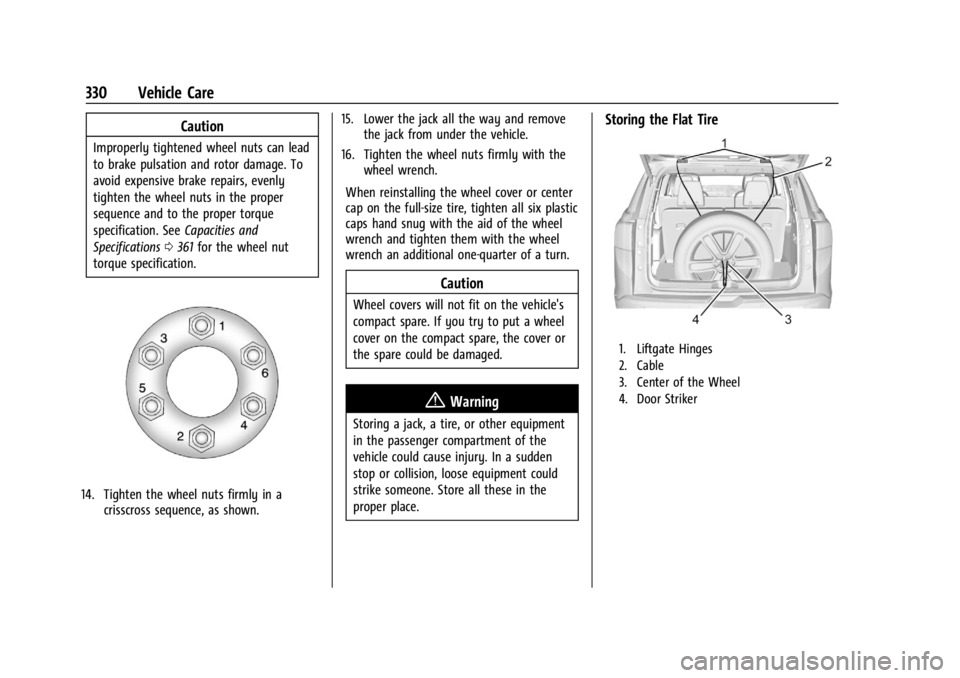
14. Tighten the wheel nuts firmly in a crisscross sequence, as shown. 15. Lower the jack all the way and remove
the jack from under the vehicle.
16. Tighten the wheel nuts firmly with the wheel wrench.
When reinstalling the wheel cover or center
cap on the full-size tire, tighten all six plastic
caps hand snug with the aid of the wheel
wrench and tighten them with the wheel
wrench an additional one-quarter of a turn.
Caution
Wheel covers will not fit on the vehicle's
compact spare. If you try to put a wheel
cover on the compact spare, the cover or
the spare could be damaged.
{Warning
Storing a jack, a tire, or other equipment
in the passenger compartment of the
vehicle could cause injury. In a sudden
stop or collision, loose equipment could
strike someone. Store all these in the
proper place.
Storing the Flat Tire
1. Liftgate Hinges
2. Cable
3. Center of the Wheel
4. Door Striker
Page 332 of 397
GMC Acadia/Acadia Denali Owner Manual (GMNA-Localizing-U.S./Canada/
Mexico-15170041) - 2022 - CRC - 10/6/21
Vehicle Care 331
To store the flat tire:
1. Remove the cable package from underthe spare tire, jack, and tools, or from
the jack container.
2. Remove the small cap by tapping the back of the cap with the extension of
the shaft, if the vehicle has aluminum
wheels.
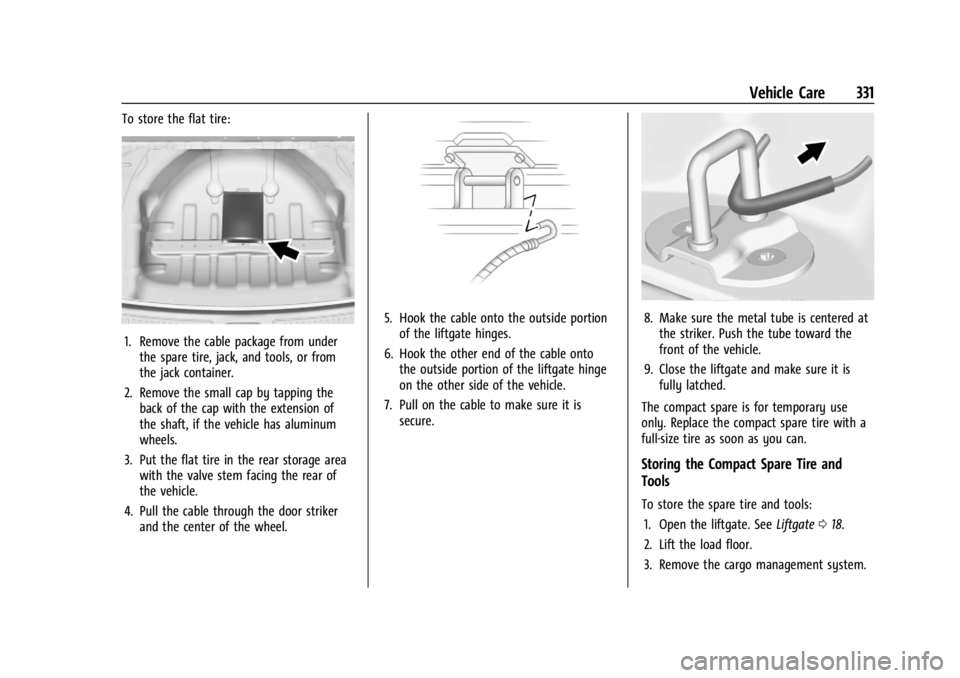
3. Put the flat tire in the rear storage area with the valve stem facing the rear of
the vehicle.
4. Pull the cable through the door striker and the center of the wheel.
5. Hook the cable onto the outside portionof the liftgate hinges.
6. Hook the other end of the cable onto the outside portion of the liftgate hinge
on the other side of the vehicle.
7. Pull on the cable to make sure it is secure.8. Make sure the metal tube is centered atthe striker. Push the tube toward the
front of the vehicle.
9. Close the liftgate and make sure it is fully latched.
The compact spare is for temporary use
only. Replace the compact spare tire with a
full-size tire as soon as you can.
Storing the Compact Spare Tire and
Tools
To store the spare tire and tools: 1. Open the liftgate. See Liftgate018.
2. Lift the load floor.
3. Remove the cargo management system.
Page 333 of 397
GMC Acadia/Acadia Denali Owner Manual (GMNA-Localizing-U.S./Canada/
Mexico-15170041) - 2022 - CRC - 10/6/21
332 Vehicle Care
4. Put back the spare tire and all tools asthey were stored in the rear storage
compartment.
5. Install the cargo management system and load floor.
The compact spare is for temporary use
only. Replace the compact spare tire with a
full-size tire as soon as you can.
Compact Spare Tire
{Warning
Driving with more than one compact
spare tire at a time could result in loss of
braking and handling. This could lead to a
crash and you or others could be injured.
Use only one compact spare tire at
a time.
If this vehicle has a compact spare tire, it
was fully inflated when new; however, it
can lose air over time. Check the inflation
pressure regularly. It should be 420 kPa
(60 psi).
Stop as soon as possible and check that the
spare tire is correctly inflated after being
installed on the vehicle. The compact spare
tire is designed for temporary use only. The vehicle will perform differently with the
spare tire installed and it is recommended
that the vehicle speed be limited to 80 km/h
(50 mph). To conserve the tread of the spare
tire, have the standard tire repaired or
replaced as soon as convenient and return
the spare tire to the storage area.
When using a compact spare tire, the AWD
(if equipped), ABS, and Traction Control
systems may engage until the spare tire is
recognized by the vehicle, especially on
slippery roads. Adjust driving to reduce
possible wheel slip.
Caution
When the compact spare is installed, do
not take the vehicle through an
automatic car wash with guide rails. The
compact spare can get caught on the rails
which can damage the tire, wheel, and
other parts of the vehicle.
Do not use the compact spare on other
vehicles.
Do not mix the compact spare tire or wheel
with other wheels or tires. They will not fit.
Keep the spare tire and its wheel together.
Caution
Tire chains will not fit the compact spare.
Using them can damage the vehicle and
the chains. Do not use tire chains on the
compact spare.
Jump Starting
Jump Starting - North America
For more information about the vehicle
battery, see Battery - North America 0287.
If the battery has run down, try to use
another vehicle and some jumper cables to
start your vehicle. Be sure to use the
following steps to do it safely.
{Warning
WARNING: Battery posts, terminals and
related accessories can expose you to
chemicals including lead and lead
compounds, which are known to the
State of California to cause cancer and
birth defects or other reproductive harm.
Wash hands after handling. For more
information go to
www.P65Warnings.ca.gov.
Page 388 of 397

GMC Acadia/Acadia Denali Owner Manual (GMNA-Localizing-U.S./Canada/-
Mexico-15170041) - 2022 - CRC - 10/6/21
Index 387
CleaningExterior Care . . . . . . . . . . . . . . . . . . . . . . . . . . . 338
Interior Care . . . . . . . . . . . . . . . . . . . . . . . . . . . 342
Climate Control Systems Dual Automatic . . . . . . . . . . . . . . . . . . . . . . . . 192
Rear . . . . . . . . . . . . . . . . . . . . . . . . . . . . . . . . . . . 196
Clock . . . . . . . . . . . . . . . . . . . . . . . . . . . . . . . . . . . . . 94
Cluster, Instrument . . . . . . . . . . . . . . . . . . . 98, 101
Collision Damage Repair . . . . . . . . . . . . . . . . . . 371
Compact Spare Tire . . . . . . . . . . . . . . . . . . . . . . 332
Compartments
Storage . . . . . . . . . . . . . . . . . . . . . . . . . . . . . . . . . 84
Compass . . . . . . . . . . . . . . . . . . . . . . . . . . . . . . . . . . 94
Compressor Kit, Tire Sealant . . . . . . . . . . . . . . 321
Connected Services Connections . . . . . . . . . . . . . . . . . . . . . . . . . . . 382
Diagnostics . . . . . . . . . . . . . . . . . . . . . . . . . . . . 384
Navigation . . . . . . . . . . . . . . . . . . . . . . . . . . . . . 382
Connections Connected Services . . . . . . . . . . . . . . . . . . . . 382
Control
Hill Descent . . . . . . . . . . . . . . . . . . . . . . . . . . . . 228
Traction and Electronic Stability . . . . . . . 227
Control Light Hill Descent . . . . . . . . . . . . . . . . . . . . . . . . . . . . . 111
Control of a Vehicle . . . . . . . . . . . . . . . . . . . . . 201
Controls Steering Wheel . . . . . . . . . . . . . . . . . . . . . . . . . 141 Convex Mirrors . . . . . . . . . . . . . . . . . . . . . . . . . . . .27
Coolant
Engine Temperature Gauge . . . . . . . . . . . . 105
Engine Temperature Warning Light . . . . . 113
Cooling . . . . . . . . . . . . . . . . . . . . . . . . . . . . . .192, 196
Cooling System . . . . . . . . . . . . . . . . . . . . . . . . . . 280
Courtesy Lamps . . . . . . . . . . . . . . . . . . . . . . . . . . 136
Courtesy Transportation Program . . . . . . . . 370
Coverage Explanations . . . . . . . . . . . . . . . . . . . 163
Cruise Control . . . . . . . . . . . . . . . . . . . . . . . . . . . 230 Light . . . . . . . . . . . . . . . . . . . . . . . . . . . . . . . . . . . . 116
Cruise Control, Adaptive . . . . . . . . . . . . . . . . . 232
Customer Assistance . . . . . . . . . . . . . . . . . . . . . 367 Offices . . . . . . . . . . . . . . . . . . . . . . . . . . . . . . . . . 367
Text Telephone (TTY) Users . . . . . . . . . . . . 367
Customer Information
Publications Ordering Information . . . . . 372
Customer Satisfaction Procedure . . . . . . . . . 365
Cybersecurity . . . . . . . . . . . . . . . . . . . . . . . . . . . . 375
D
Damage Repair, Collision . . . . . . . . . . . . . . . . . . 371
Danger, Warning, and Caution . . . . . . . . . . . . . .2
Data Collection Infotainment System . . . . . . . . . . . . . . . . . . 376
OnStar . . . . . . . . . . . . . . . . . . . . . . . . . . . . . . . . . 376
Data Recorders, Event . . . . . . . . . . . . . . . . . . . 375
Database Coverage Explanations . . . . . . . . . 163 Daytime Running Lamps (DRL) . . . . . . . . . . . .134
Defensive Driving . . . . . . . . . . . . . . . . . . . . . . . . 201
Delayed Locking . . . . . . . . . . . . . . . . . . . . . . . . . . . 17
Destination . . . . . . . . . . . . . . . . . . . . . . . . . . . . . . 156
Diagnostics
Connected Services . . . . . . . . . . . . . . . . . . . . 384
Distracted Driving . . . . . . . . . . . . . . . . . . . . . . . . 200
Dome Lamps . . . . . . . . . . . . . . . . . . . . . . . . . . . . . 136
Door
Ajar Light . . . . . . . . . . . . . . . . . . . . . . . . . . . . . . . 116
Delayed Locking . . . . . . . . . . . . . . . . . . . . . . . . . 17
Locks . . . . . . . . . . . . . . . . . . . . . . . . . . . . . . . . . . . . 15
Power Locks . . . . . . . . . . . . . . . . . . . . . . . . . . . . . 17
Drive Belt Routing, Engine . . . . . . . . . . . . . . . 364
Drive Systems All-Wheel Drive . . . . . . . . . . . . . . . . . . . 224, 287
Driver Teen . . . . . . . . . . . . . . . . . . . . . . . . . . . . . . . . . . . 180
Driver Assistance Systems . . . . . . . . . . . . . . . 240
Driver Information Center (DIC) . . . . . . 116, 118
Driver Mode Control . . . . . . . . . . . . . . . . . . . . . 229
Driver Mode Control Light . . . . . . . . . . . . . . . . 113
Driving Assistance Systems . . . . . . . . . . . . . . . . . . . . 246
Better Fuel Economy . . . . . . . . . . . . . . . . . . . 200
Characteristics and Towing Tips . . . . . . . . 258
Defensive . . . . . . . . . . . . . . . . . . . . . . . . . . . . . . 201
Hill and Mountain Roads . . . . . . . . . . . . . . 207
Page 394 of 397

GMC Acadia/Acadia Denali Owner Manual (GMNA-Localizing-U.S./Canada/-
Mexico-15170041) - 2022 - CRC - 10/6/21
Index 393
RestraintsWhere to Put . . . . . . . . . . . . . . . . . . . . . . . . . . . . 71
Retained Accessory Power (RAP) . . . . . . . . . . 217
Reverse Tilt Mirrors . . . . . . . . . . . . . . . . . . . . . . . 28
Roads Driving, Wet . . . . . . . . . . . . . . . . . . . . . . . . . . . 207
Roadside Assistance Program . . . . . . . . . . . . 368
Roof
Sunroof . . . . . . . . . . . . . . . . . . . . . . . . . . . . . . . . . 33
Roof Rack System . . . . . . . . . . . . . . . . . . . . . . . . . 89
Rotation, Tires . . . . . . . . . . . . . . . . . . . . . . . . . . . . 313
Routing, Engine Drive Belt . . . . . . . . . . . . . . . 364
Running the Vehicle While Parked . . . . . . . 220
S
Safety Defects Reporting Canadian Government . . . . . . . . . . . . . . . . . 374
General Motors . . . . . . . . . . . . . . . . . . . . . . . . 374
U.S. Government . . . . . . . . . . . . . . . . . . . . . . . 373
Safety Locks . . . . . . . . . . . . . . . . . . . . . . . . . . . . . . .18
Safety System Check . . . . . . . . . . . . . . . . . . . . . 54
Satellite Radio . . . . . . . . . . . . . . . . . . . . . . . . . . . .147
Scheduling Appointments . . . . . . . . . . . . . . . . 370
Sealant Kit, Tire . . . . . . . . . . . . . . . . . . . . . . . . . . . 321
Seat Belts . . . . . . . . . . . . . . . . . . . . . . . . . . . . . . . . . 48 Care . . . . . . . . . . . . . . . . . . . . . . . . . . . . . . . . . . . . 54
Extender . . . . . . . . . . . . . . . . . . . . . . . . . . . . . . . . 54
How to Wear Seat Belts Properly . . . . . . . 49 Seat Belts (cont'd)
Lap-Shoulder Belt . . . . . . . . . . . . . . . . . . . . . . . . 51
Reminders . . . . . . . . . . . . . . . . . . . . . . . . . . . . . 106
Replacing after a Crash . . . . . . . . . . . . . . . . . 54
Use During Pregnancy . . . . . . . . . . . . . . . . . . 53
Seats Adjustment, Front . . . . . . . . . . . . . . . . . . . . . . 37
Head Restraints . . . . . . . . . . . . . . . . . . . . . . . . . 35
Heated and Ventilated Front . . . . . . . . . . . . 42
Heated, Rear . . . . . . . . . . . . . . . . . . . . . . . . . . . . 46
Lumbar Adjustment, Front . . . . . . . . . . . . . . 39
Memory . . . . . . . . . . . . . . . . . . . . . . . . . . . . . . . . 39
Power Adjustment, Front . . . . . . . . . . . . . . . 37
Rear . . . . . . . . . . . . . . . . . . . . . . . . . . . . . . . . . . . . 43
Reclining Seatbacks . . . . . . . . . . . . . . . . . . . . . 38
Third Row Seat . . . . . . . . . . . . . . . . . . . . . . . . . 47
Securing Child Restraints . . . . . . . . . . . . . . . 79, 81
Security Light . . . . . . . . . . . . . . . . . . . . . . . . . . . . . . . . . . . . 115
OnStar . . . . . . . . . . . . . . . . . . . . . . . . . . . . . . . . . 378
Vehicle . . . . . . . . . . . . . . . . . . . . . . . . . . . . . . . . . 25
Vehicle Alarm . . . . . . . . . . . . . . . . . . . . . . . . . . . 25
Service . . . . . . . . . . . . . . . . . . . . . . . . . . . . . . . . . . . 198 Accessories and Modifications . . . . . . . . . 270
Doing Your Own Work . . . . . . . . . . . . . . . . . 270
Maintenance Records . . . . . . . . . . . . . . . . . . 359
Maintenance, General Information . . . . . 347
Parts Identification . . . . . . . . . . . . . . . . . . . . . 360 Service (cont'd)
Scheduling Appointments . . . . . . . . . . . . . . 370
Service Electric Parking Brake Light . . . . . . .110
Services Special Application . . . . . . . . . . . . . . . . . . . . . 353
Servicing System . . . . . . . . . . . . . . . . . . . . . . . . 162
Servicing the Airbag . . . . . . . . . . . . . . . . . . . . . . 64
Settings . . . . . . . . . . . . . . . . . . . . . . . . . . . . . . . . . . .174
Shifting Into Park . . . . . . . . . . . . . . . . . . . . . . . . . . . . . . 218
Out of Park . . . . . . . . . . . . . . . . . . . . . . . . . . . . 219
Side Blind Zone Alert (SBZA) . . . . . . . . . . . . . . 251
Signals, Turn and Lane-Change . . . . . . . . . . . . 135
Software Updates . . . . . . . . . . . . . . . . . . . . . . . . .145
Spare Tire Compact . . . . . . . . . . . . . . . . . . . . . . . . . . . . . . . 332
Special Application Services . . . . . . . . . . . . . . 353
Specifications and Capacities . . . . . . . . . . . . . 361
Speedometer . . . . . . . . . . . . . . . . . . . . . . . . . . . . 103
StabiliTrak OFF Light . . . . . . . . . . . . . . . . . . . . . . . . . . . . . . . 112
Start Assist, Hill . . . . . . . . . . . . . . . . . . . . . . . . . . 226
Start Vehicle, Remote . . . . . . . . . . . . . . . . . . . . . .14
Starting the Engine . . . . . . . . . . . . . . . . . . . . . . .214
Steering . . . . . . . . . . . . . . . . . . . . . . . . . . . . . . . . . 202 Heated Wheel . . . . . . . . . . . . . . . . . . . . . . . . . . 91
Wheel Adjustment . . . . . . . . . . . . . . . . . . . . . . 91
Wheel Controls . . . . . . . . . . . . . . . . . . . . . . . . . 91