horn GMC ACADIA LIMITED 2017 User Guide
[x] Cancel search | Manufacturer: GMC, Model Year: 2017, Model line: ACADIA LIMITED, Model: GMC ACADIA LIMITED 2017Pages: 339, PDF Size: 4.75 MB
Page 239 of 339
GMC Acadia Limited Owner Manual (GMNA-Localizing-U.S.-10283134) -
2017 - crc - 3/30/16
238 Vehicle Care
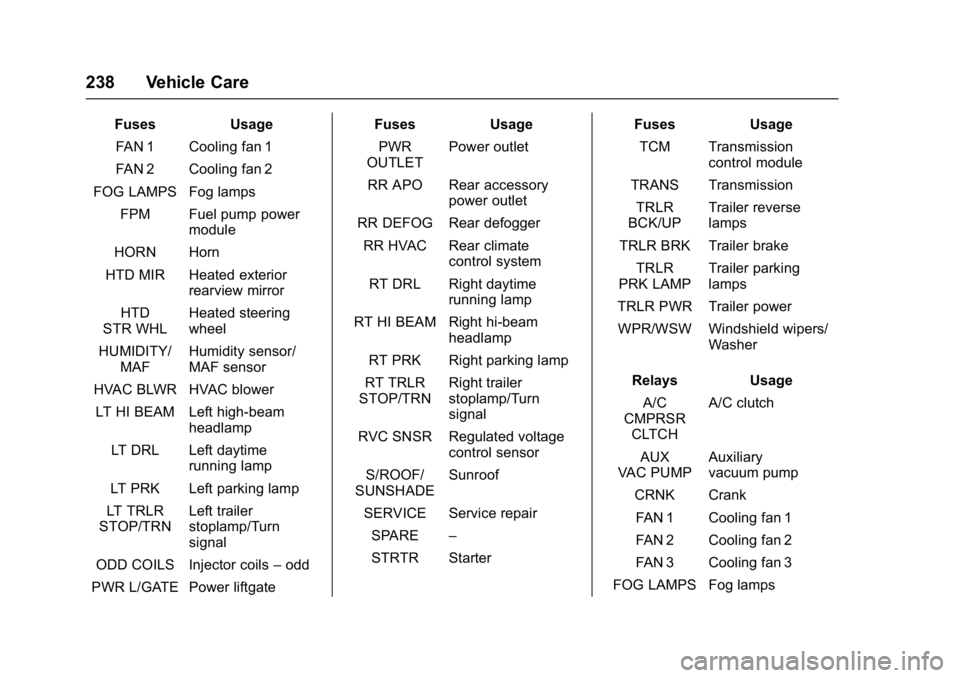
FusesUsage
FAN 1 Cooling fan 1
FAN 2 Cooling fan 2
FOG LAMPS Fog lamps FPM Fuel pump power module
HORN Horn
HTD MIR Heated exterior rearview mirror
HTD
STR WHL Heated steering
wheel
HUMIDITY/ MAF Humidity sensor/
MAF sensor
HVAC BLWR HVAC blower
LT HI BEAM Left high-beam headlamp
LT DRL Left daytime running lamp
LT PRK Left parking lamp
LT TRLR
STOP/TRN Left trailer
stoplamp/Turn
signal
ODD COILS Injector coils –odd
PWR L/GATE Power liftgate Fuses
Usage
PWR
OUTLET Power outlet
RR APO Rear accessory power outlet
RR DEFOG Rear defogger
RR HVAC Rear climate control system
RT DRL Right daytime running lamp
RT HI BEAM Right hi-beam headlamp
RT PRK Right parking lamp
RT TRLR
STOP/TRN Right trailer
stoplamp/Turn
signal
RVC SNSR Regulated voltage control sensor
S/ROOF/
SUNSHADE Sunroof
SERVICE Service repair SPARE –
STRTR Starter Fuses
Usage
TCM Transmission control module
TRANS Transmission TRLR
BCK/UP Trailer reverse
lamps
TRLR BRK Trailer brake TRLR
PRK LAMP Trailer parking
lamps
TRLR PWR Trailer power
WPR/WSW Windshield wipers/ Washer
Relays Usage
A/C
CMPRSR CLTCH A/C clutch
AUX
VAC PUMP Auxiliary
vacuum pump
CRNK Crank FAN 1 Cooling fan 1
FAN 2 Cooling fan 2
FAN 3 Cooling fan 3
FOG LAMPS Fog lamps
Page 240 of 339
GMC Acadia Limited Owner Manual (GMNA-Localizing-U.S.-10283134) -
2017 - crc - 3/30/16
Vehicle Care 239
RelaysUsage
HI BEAM High-beam headlamps
LT DRL Left daytime running lamp
HORN Horn
IGN Ignition –main
LT TRLR
STOP/TRN Left Trailer
stoplamp/Turn
signal lamp
PRK LAMP Parking lamps PWR/TRN Powertrain
RR DEFOG Rear window defogger
RT DRL Right daytime running lamp
RT TRLR
STOP/TRN Right trailer
stoplamp/Turn
signal lamp
TRLR
BCK/UP Trailer reverse
lamps
WPR Windshield wiper
WPR HI Windshield wiper –
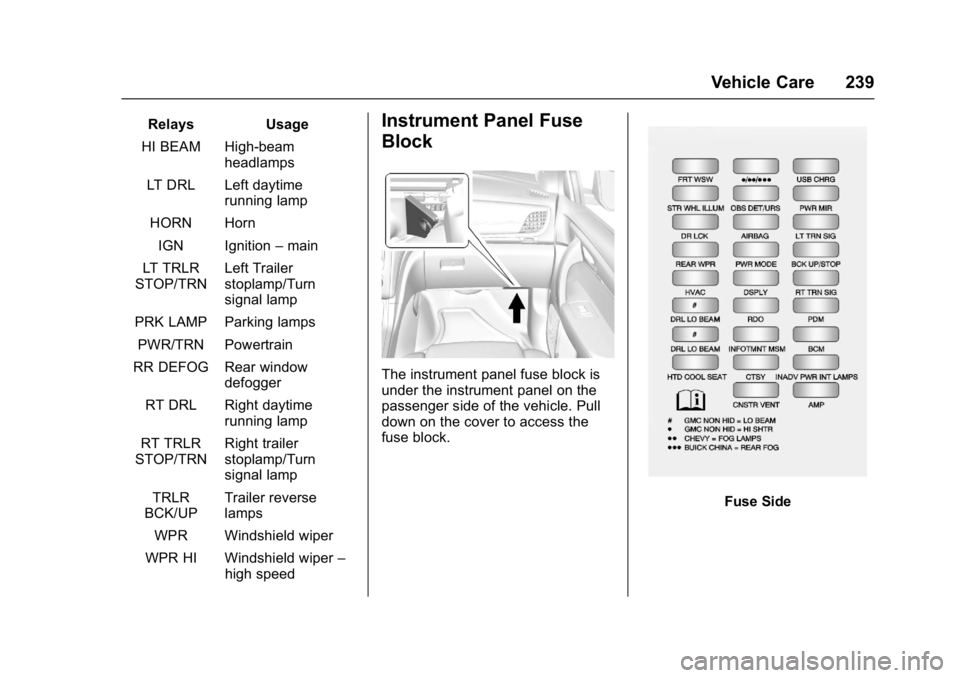
high speedInstrument Panel Fuse
Block
The instrument panel fuse block is
under the instrument panel on the
passenger side of the vehicle. Pull
down on the cover to access the
fuse block.
Fuse Side
Page 255 of 339
GMC Acadia Limited Owner Manual (GMNA-Localizing-U.S.-10283134) -
2017 - crc - 3/30/16
254 Vehicle Care
The TPMS sensor matching process
is outlined below:1. Set the parking brake.
2. Turn the ignition to ON/RUN with the engine off.
3. Press the Remote Keyless Entry (RKE) transmitter's
Q
andKbuttons at the same
time for approximately
five seconds. The horn sounds
twice to signal the receiver is in
relearn mode and TIRE
LEARNING ACTIVE message
displays on the DIC screen.
4. Start with the driver side front tire.
5. Place the relearn tool against the tire sidewall, near the valve
stem. Then press the button to
activate the TPMS sensor.
A horn chirp confirms that the
sensor identification code has
been matched to this tire and
wheel position. 6. Proceed to the passenger side
front tire, and repeat the
procedure in Step 5.
7. Proceed to the passenger side rear tire, and repeat the
procedure in Step 5.
8. Proceed to the driver side rear tire, and repeat the procedure
in Step 5. The horn sounds two
times to indicate the sensor
identification code has been
matched to the driver side rear
tire, and the TPMS sensor
matching process is no longer
active. The TIRE LEARNING
ACTIVE message on the DIC
display screen goes off.
9. Turn the ignition to LOCK/OFF.
10. Set all four tires to the recommended air pressure
level as indicated on the Tire
and Loading Information label.
11. Put the valve caps back on the valve stems.
Tire Inspection
We recommend that the tires,
including the spare tire, if the
vehicle has one, be inspected
for signs of wear or damage at
least once a month.
Replace the tire if:
.The indicators at three or
more places around the tire
can be seen.
.There is cord or fabric
showing through the tire's
rubber.
.The tread or sidewall is
cracked, cut, or snagged
deep enough to show cord or
fabric.
.The tire has a bump, bulge,
or split.
.The tire has a puncture, cut,
or other damage that cannot
be repaired well because of
the size or location of the
damage.
Page 322 of 339
GMC Acadia Limited Owner Manual (GMNA-Localizing-U.S.-10283134) -
2017 - crc - 3/30/16
OnStar 321
from each other and use a
combination of letters, numbers,
and symbols to increase the
security.
. Change the default name of the
SSID (Service Set Identifier).
This is your network’s name that
is visible to other wireless
devices. Choose a unique name
and avoid family names or
vehicle descriptions.
OnStar Wi-Fi
®Hotspot
(If Equipped)
The vehicle may have a built-in
Wi-Fi hotspot that provides access
to the Internet and web content at
4G LTE speed. Up to seven mobile
devices can be connected. A data
plan is required. Use the in-vehicle
controls only when it is safe to
do so.
1. To retrieve Wi-Fi hotspot information, press
=, wait for
the prompt, then say “Wi-Fi
settings.” On some vehicles,
touch Wi-Fi Settings on the
screen. 2. The Wi-Fi settings will display
the Wi-Fi hotspot name (SSID),
password, and on some
vehicles, the connection type
(no Internet connection, 3G,
4G, 4G LTE), and signal quality
(poor, good, excellent).
3. To change the SSID or password, press
Qor call
1-888-4ONSTAR to connect
with an Advisor.
After initial set-up, your vehicle’s
Wi-Fi hotspot will connect
automatically to your mobile
devices. Manage data usage by
turning Wi-Fi on or off on your
mobile device, using the
RemoteLink mobile app, or by
contacting an OnStar Advisor.
OnStar RemoteLink
®Mobile App
(If Equipped)
Download the OnStar RemoteLink
mobile app to select Apple
®iOS,
Android™, BlackBerry®,
or Windows®mobile devices.
OnStar Subscribers can access the
following services from a mobile
device: .
Remotely start/stop the vehicle,
if factory-equipped.
. Lock/unlock doors, if equipped
with automatic locks.
. Activate the horn and lamps.
. Check the vehicle’s fuel level, oil
life, or tire pressure,
if factory-equipped with the Tire
Pressure Monitor System.
. Send directions to the vehicle.
. Locate the vehicle on a map
(U.S. market only).
. Turn the vehicle's Wi-Fi hotspot
on/off, manage settings, and
monitor data consumption,
if equipped.
For OnStar RemoteLink information
and compatibility, see
www.onstar.com (U.S.) or
www.onstar.ca (Canada).
Remote Services
Contact an OnStar Advisor to
unlock the doors or sound the horn
and flash the lamps.
Page 333 of 339

GMC Acadia Limited Owner Manual (GMNA-Localizing-U.S.-10283134) -
2017 - crc - 3/30/16
332 Index
G
Garage Door Opener . . . . . . . . . . . 139Programming . . . . . . . . . . . . . . . . . 139
Gauges Engine Coolant
Temperature . . . . . . . . . . . . . . . . 106
Fuel . . . . . . . . . . . . . . . . . . . . . . . . . . 105
Odometer . . . . . . . . . . . . . . . . . . . . . 105
Speedometer . . . . . . . . . . . . . . . . . 105
Tachometer . . . . . . . . . . . . . . . . . . . 105
Voltmeter . . . . . . . . . . . . . . . . . . . . . 107
Warning Lights and Indicators . . . . . . . . . . . . . . . . . . . 103
General Information
Service and Maintenance . . . . . 288
Towing . . . . . . . . . . . . . . . . . . . . . . . . 200
Vehicle Care . . . . . . . . . . . . . . . . . . 209
Glove Box . . . . . . . . . . . . . . . . . . . . . . . 92
GM Mobility Reimbursement Program . . . . . . . . . . . . . . . . . . . . . . . 308
H
Hazard Warning Flashers . . . . . . . 144
Head Restraints . . . . . . . . . . . . . . . . . 44
Head-up Display . . . . . . . . . . . . . . . . 120
HeadlampsAiming . . . . . . . . . . . . . . . . . . . . . . . . 231
Bulb Replacement . . . . . . . . . . . . 231 Headlamps (cont'd)
Daytime Running Lamps/
Automatic Headlamp
System . . . . . . . . . . . . . . . . . . . . . . 144
Delayed . . . . . . . . . . . . . . . . . . . . . . 144
Flash-to-Pass . . . . . . . . . . . . . . . . . 144
High Intensity Discharge (HID) Lighting . . . . . . . . . . . . . . . 231
High-Beam On Light . . . . . . . . . . .115
High/Low Beam Changer . . . . . 143
Heated and Cooled Front Seats . . . . . . . . . . . . . . . . . . . . . . . . . . 48
Heated Mirrors . . . . . . . . . . . . . . . . . . . 37
Heater Engine . . . . . . . . . . . . . . . . . . . . . . . . 174
High Voltage Devices and Wiring . . . . . . . . . . . . . . . . . . . . . . . . . 232
High-Beam On Light . . . . . . . . . . . . 115
Hill and Mountain Roads . . . . . . . . 165
Hill Start Assist (HSA) . . . . . . . . . . 184
Hood . . . . . . . . . . . . . . . . . . . . . . . . . . . 211
Horn . . . . . . . . . . . . . . . . . . . . . . . . . . . . . 98
How to Wear Safety Belts
Properly . . . . . . . . . . . . . . . . . . . . . . . . 54
I
Ignition Positions . . . . . . . . . . . . . . . 171
Ignition Transmission LockCheck . . . . . . . . . . . . . . . . . . . . . . . . . 229
Immobilizer . . . . . . . . . . . . . . . . . . . . . . 35
Indicator
Vehicle Ahead . . . . . . . . . . . . . . . . .113
Infants and Young Children, Restraints . . . . . . . . . . . . . . . . . . . . . . 75
Infotainment . . . . . . . . . . . . . . . . . . . . 150
Infotainment System . . . . . . . . . . . . 317
Instrument Cluster . . . . . . . . . . . . . . 104
Instrument Panel Storage Area . . . . . . . . . . . . . . . . . . . 92
Interior Rearview Mirrors . . . . . . . . . 38
Introduction . . . . . . . . . . . . . . . . . . . . . . . 2
J
Jump Starting - North America . . . . . . . . . . . . . . . . . . . . . . . 271
K
Key and Lock Messages . . . . . . . . 127
Keyless EntryRemote (RKE) System . . . . . . . . . 25
Keys . . . . . . . . . . . . . . . . . . . . . . . . . . . . . 23