seats GMC ACADIA LIMITED 2017 Repair Manual
[x] Cancel search | Manufacturer: GMC, Model Year: 2017, Model line: ACADIA LIMITED, Model: GMC ACADIA LIMITED 2017Pages: 339, PDF Size: 4.75 MB
Page 139 of 339
GMC Acadia Limited Owner Manual (GMNA-Localizing-U.S.-10283134) -
2017 - crc - 3/30/16
138 Instruments and Controls
ON :The driver seat and outside
mirrors will automatically move to
the stored driving position when the
unlock button on the Remote
Keyless Entry (RKE) transmitter is
pressed. The steering column will
also move on vehicles with the
power tilt and telescopic steering
wheel feature. See Steering Wheel
Adjustment 098. See “Memory
Remote Recall” underMemory
Seats 047 for information on
matching transmitters to driver
positions.
NO CHANGE : No change will be
made to this feature. The current
setting will remain.
To select a setting, press the set/
reset button while the desired
setting is displayed on the DIC.
REMOTE START
If your vehicle has this feature, it
allows you to turn the remote start
off or on. The remote start feature
allows you to start the engine from
outside of the vehicle using the
Remote Keyless Entry (RKE)
transmitter. See Remote Vehicle
Start 027. Press the customization button until
REMOTE START appears on the
DIC display. Press the set/reset
button once to access the settings
for this feature. Then press the
customization button to scroll
through the following settings:
OFF :
The remote start feature will
be disabled.
ON (default) : The remote start
feature will be enabled.
NO CHANGE : No change will be
made to this feature. The current
setting will remain.
To select a setting, press the set/
reset button while the desired
setting is displayed on the DIC.
FACTORY SETTINGS
This feature allows you to set all of
the customization features back to
their factory default settings.
Press the customization button until
FACTORY SETTINGS appears on
the DIC display. Press the set/reset
button once to access the settings for this feature. Then press the
customization button to scroll
through the following settings:
RESTORE ALL (default) :
The
customization features will be set to
their factory default settings.
DO NOT RESTORE : The
customization features will not be
set to their factory default settings.
To select a setting, press the set/
reset button while the desired
setting is displayed on the DIC.
EXIT FEATURE SETTINGS
This feature allows you to exit the
feature settings menu.
Press the customization button until
FEATURE SETTINGS PRESS
V
TO EXIT appears in the DIC display.
Press the set/reset button once to
exit the menu.
If you do not exit, pressing the
customization button again will
return you to the beginning of the
feature settings menu.
Page 150 of 339
GMC Acadia Limited Owner Manual (GMNA-Localizing-U.S.-10283134) -
2017 - crc - 3/30/16
Lighting 149
A high electrical load occurs when
several of the following are on, such
as: headlamps, high beams, rear
window defogger, climate control fan
at high speed, heated seats, engine
cooling fans, trailer loads, and loads
plugged into accessory power
outlets.
EPM works to prevent excessive
discharge of the battery. It does this
by balancing the generator's output
and the vehicle's electrical needs.
It can increase engine idle speed to
generate more power whenever
needed. It can temporarily reduce
the power demands of some
accessories.
Normally, these actions occur in
steps or levels, without being
noticeable. In rare cases at the
highest levels of corrective action,
this action may be noticeable to the
driver. If so, a DIC battery voltage
and charging message displays, it is
recommended that the driver reduce
the electrical loads as much as
possible. SeeBattery Voltage and
Charging Messages 0124 and
Driver Information Center
(DIC) 0116.Battery Power Protection
This feature helps prevent the
battery from being drained, if the
interior courtesy lamps or reading
lamps are accidentally left on. If any
of these lamps are left on, they
automatically turn off after
10 minutes, if the ignition is off. The
lamps will not come back on again
until one of the following occurs:
.
The ignition is turned on.
. The exterior lamps control is
turned off, then on again.
The headlamps will time out after
10 minutes, if they are manually
turned on while the ignition is on
or off.
Page 157 of 339
GMC Acadia Limited Owner Manual (GMNA-Localizing-U.S.-10283134) -
2017 - crc - 3/30/16
156 Climate Controls
Rear Climate Control System
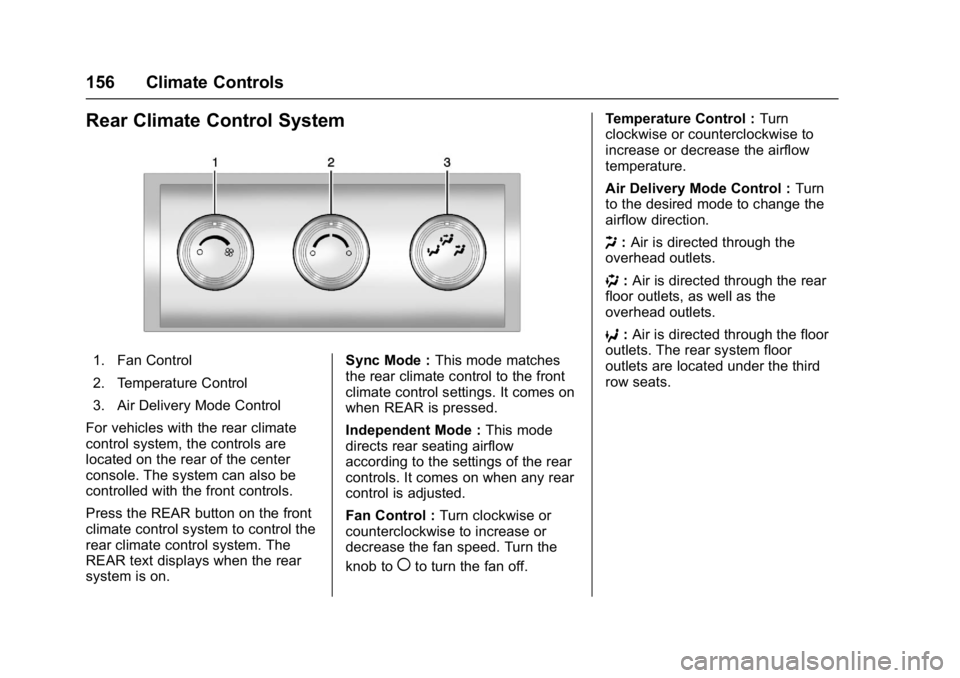
1. Fan Control
2. Temperature Control
3. Air Delivery Mode Control
For vehicles with the rear climate
control system, the controls are
located on the rear of the center
console. The system can also be
controlled with the front controls.
Press the REAR button on the front
climate control system to control the
rear climate control system. The
REAR text displays when the rear
system is on. Sync Mode :
This mode matches
the rear climate control to the front
climate control settings. It comes on
when REAR is pressed.
Independent Mode : This mode
directs rear seating airflow
according to the settings of the rear
controls. It comes on when any rear
control is adjusted.
Fan Control : Turn clockwise or
counterclockwise to increase or
decrease the fan speed. Turn the
knob to
(to turn the fan off. Temperature Control :
Turn
clockwise or counterclockwise to
increase or decrease the airflow
temperature.
Air Delivery Mode Control : Turn
to the desired mode to change the
airflow direction.
H :Air is directed through the
overhead outlets.
) :Air is directed through the rear
floor outlets, as well as the
overhead outlets.
6 :Air is directed through the floor
outlets. The rear system floor
outlets are located under the third
row seats.
Page 158 of 339
GMC Acadia Limited Owner Manual (GMNA-Localizing-U.S.-10283134) -
2017 - crc - 3/30/16
Climate Controls 157
Rear Climate Control System (with Rear Seat Audio)
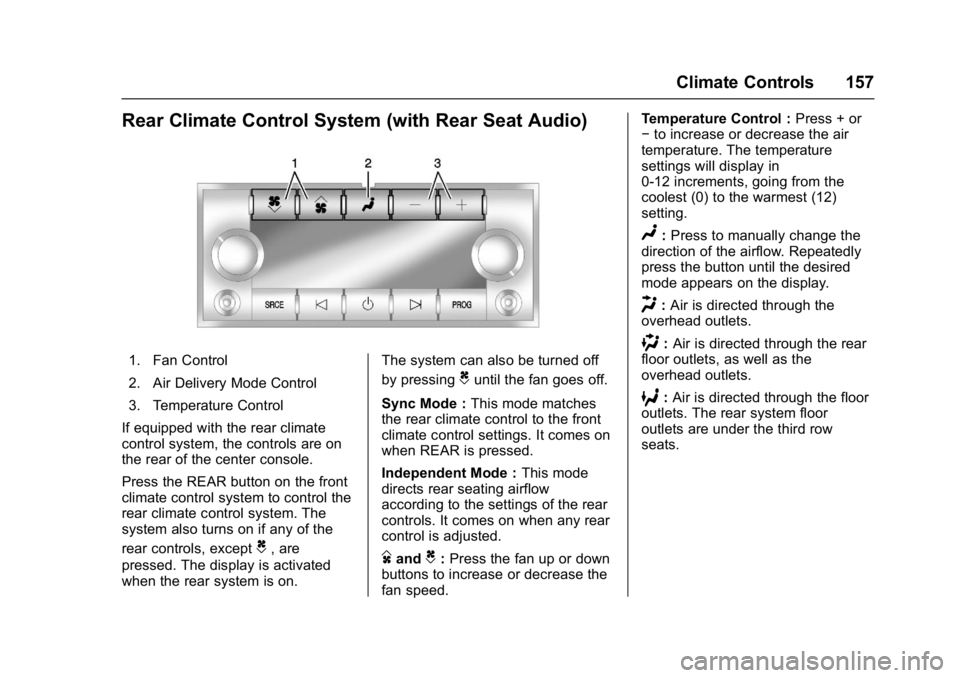
1. Fan Control
2. Air Delivery Mode Control
3. Temperature Control
If equipped with the rear climate
control system, the controls are on
the rear of the center console.
Press the REAR button on the front
climate control system to control the
rear climate control system. The
system also turns on if any of the
rear controls, except
C, are
pressed. The display is activated
when the rear system is on. The system can also be turned off
by pressing
Cuntil the fan goes off.
Sync Mode : This mode matches
the rear climate control to the front
climate control settings. It comes on
when REAR is pressed.
Independent Mode : This mode
directs rear seating airflow
according to the settings of the rear
controls. It comes on when any rear
control is adjusted.
DandC: Press the fan up or down
buttons to increase or decrease the
fan speed. Temperature Control :
Press + or
− to increase or decrease the air
temperature. The temperature
settings will display in
0-12 increments, going from the
coolest (0) to the warmest (12)
setting.
N: Press to manually change the
direction of the airflow. Repeatedly
press the button until the desired
mode appears on the display.
H: Air is directed through the
overhead outlets.
): Air is directed through the rear
floor outlets, as well as the
overhead outlets.
6: Air is directed through the floor
outlets. The rear system floor
outlets are under the third row
seats.
Page 159 of 339
GMC Acadia Limited Owner Manual (GMNA-Localizing-U.S.-10283134) -
2017 - crc - 3/30/16
158 Climate Controls
Air Vents
To adjust the center and side air
outlets on the instrument panel:
.Use the slider switch in the
center of the outlet, to change
the direction of the airflow.
. Use the thumbwheel near the
outlet to control the amount of
airflow or to shut off the airflow.
There are also outlets overhead in
the rear passenger area: adjust as
needed.
Keep all outlets open whenever
possible for best system
performance.
Operation Tips
. Clear away any ice, snow,
or leaves from the air inlets at
the base of the windshield that
can block the flow of air into the
vehicle.
. Use of non-GM approved hood
deflectors can adversely affect
the performance of the system.
. Keep the path under all seats
clear of objects to help circulate
the air inside the vehicle more
effectively.
. If fogging reoccurs while in vent
or bi-level modes with mild
temperature throughout the
vehicle, turn on the air
conditioner to reduce windshield
fogging.
Maintenance
Passenger Compartment
Air Filter
The filter reduces the dust, pollen,
and other airborne irritants from
outside air and inside air when in
recirculation mode.
The filter should be replaced as part
of routine scheduled maintenance.
See Maintenance Schedule 0289.
To find out what type of replacement
filter to use, see Maintenance
Replacement Parts 0299.
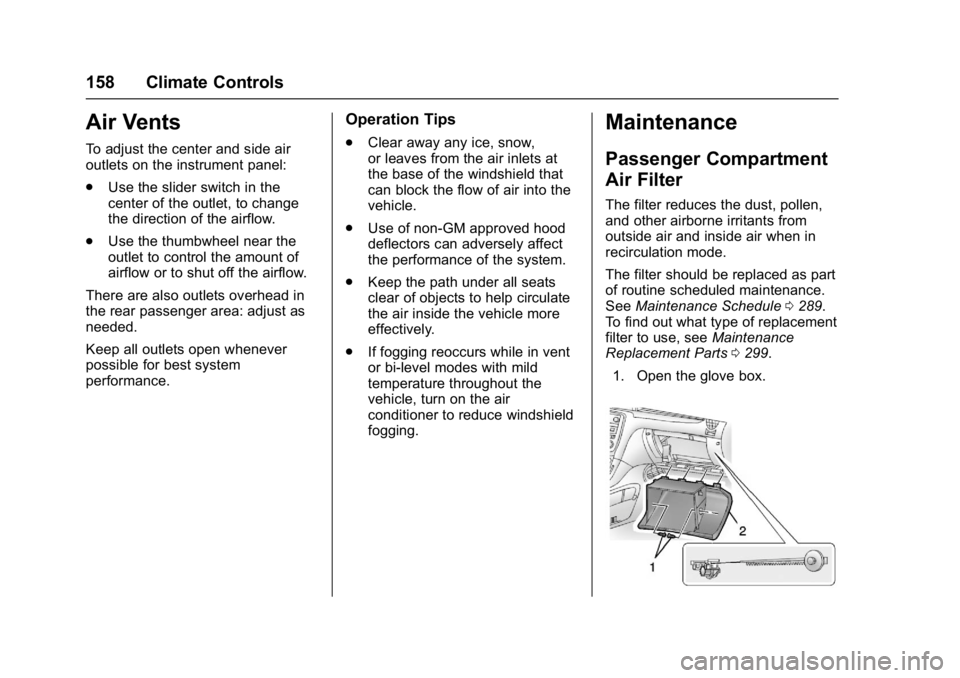
1. Open the glove box.
Page 172 of 339
GMC Acadia Limited Owner Manual (GMNA-Localizing-U.S.-10283134) -
2017 - crc - 3/31/16
Driving and Operating 171
{Warning
Things inside the vehicle can
strike and injure people in a
sudden stop or turn, or in a
crash.
.Put things in the cargo
area of the vehicle. In the
cargo area, put them as
far forward as possible.
Try to spread the weight
evenly.
.Never stack heavier
things, like suitcases,
inside the vehicle so that
some of them are above
the tops of the seats.
.Do not leave an
unsecured child restraint
in the vehicle.
.Secure loose items in the
vehicle.
.Do not leave a seat
folded down unless
needed.
Starting and
Operating
New Vehicle Break-In
Caution
The vehicle does not need an
elaborate break-in. But it will
perform better in the long run if
you follow these guidelines: . Do not drive at any one
constant speed, fast or slow,
for the first 805 km (500 mi).
Do not make full-throttle
starts. Avoid downshifting to
brake or slow the vehicle.
. Avoid making hard stops for
the first 322 km (200 mi) or
so. During this time the new
brake linings are not yet
broken in. Hard stops with
new linings can mean
premature wear and earlier
replacement. Follow this
(Continued)
Caution (Continued)
breaking-in guideline every
time you get new brake
linings.
Following break-in, engine speed
and load can be gradually
increased.
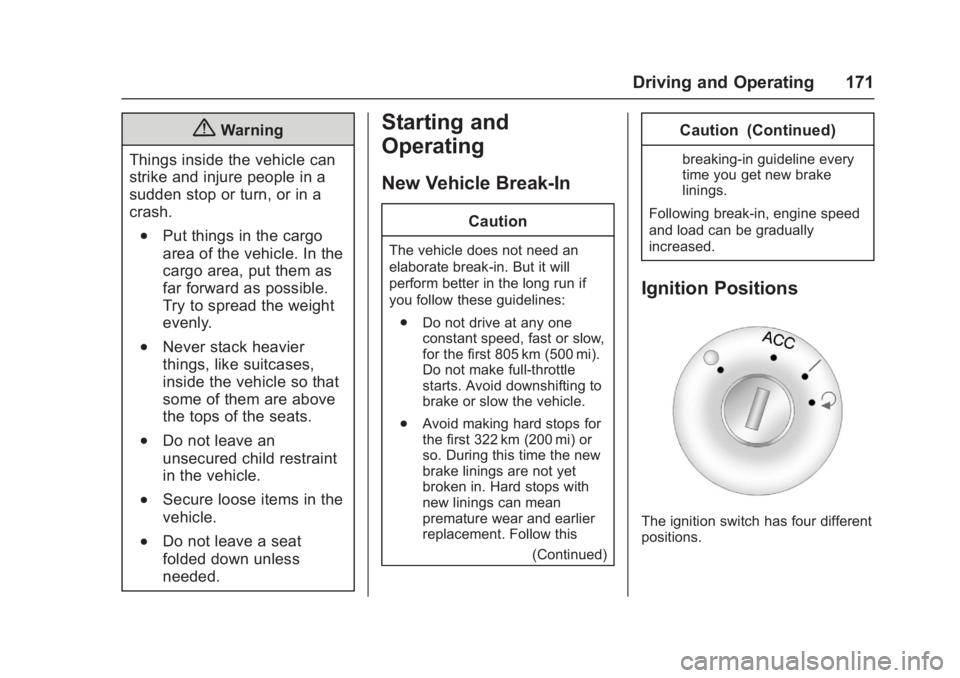
Ignition Positions
The ignition switch has four different
positions.
Page 241 of 339
GMC Acadia Limited Owner Manual (GMNA-Localizing-U.S.-10283134) -
2017 - crc - 3/30/16
240 Vehicle Care
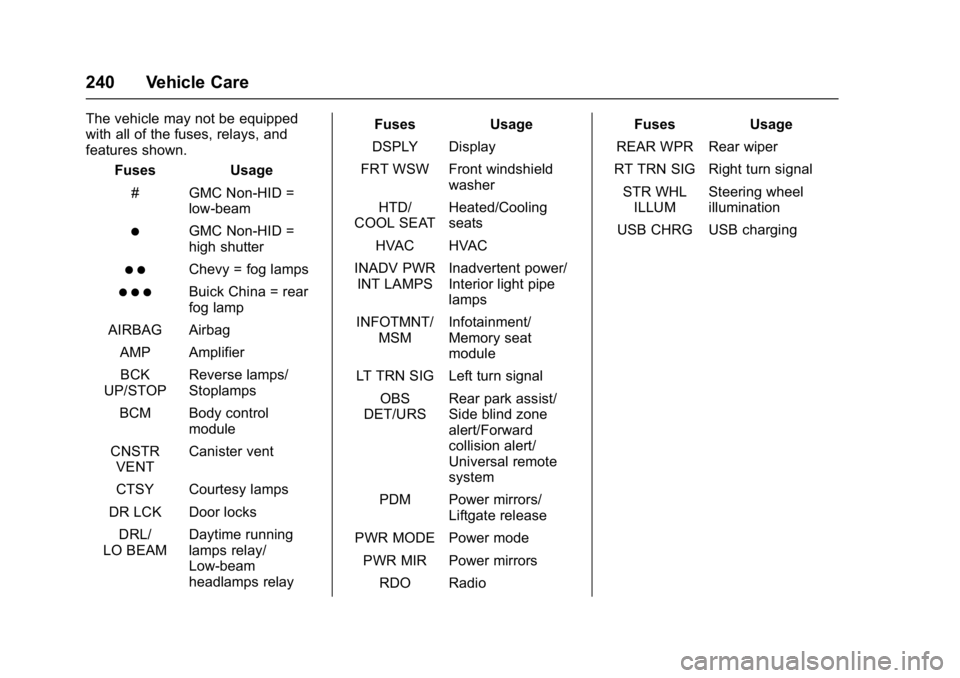
The vehicle may not be equipped
with all of the fuses, relays, and
features shown.Fuses Usage
# GMC Non-HID = low-beam
)GMC Non-HID =
high shutter
) )Chevy = fog lamps
) ) )Buick China = rear
fog lamp
AIRBAG Airbag AMP Amplifier
BCK
UP/STOP Reverse lamps/
Stoplamps
BCM Body control module
CNSTR VENT Canister vent
CTSY Courtesy lamps
DR LCK Door locks DRL/
LO BEAM Daytime running
lamps relay/
Low-beam
headlamps relay Fuses Usage
DSPLY Display
FRT WSW Front windshield washer
HTD/
COOL SEAT Heated/Cooling
seats
HVAC HVAC
INADV PWR INT LAMPS Inadvertent power/
Interior light pipe
lamps
INFOTMNT/ MSM Infotainment/
Memory seat
module
LT TRN SIG Left turn signal
OBS
DET/URS Rear park assist/
Side blind zone
alert/Forward
collision alert/
Universal remote
system
PDM Power mirrors/ Liftgate release
PWR MODE Power mode PWR MIR Power mirrors RDO Radio Fuses Usage
REAR WPR Rear wiper
RT TRN SIG Right turn signal
STR WHL ILLUM Steering wheel
illumination
USB CHRG USB charging
Page 248 of 339
GMC Acadia Limited Owner Manual (GMNA-Localizing-U.S.-10283134) -
2017 - crc - 3/30/16
Vehicle Care 247
Tire Terminology and
Definitions
Air Pressure:The amount of
air inside the tire pressing
outward on each square inch of
the tire. Air pressure is
expressed in kPa (kilopascal)
or psi (pounds per square inch).
Accessory Weight
:The
combined weight of optional
accessories. Some examples of
optional accessories are
automatic transmission, power
windows, power seats, and air
conditioning.
Aspect Ratio
:The relationship
of a tire's height to its width.
Belt
:A rubber coated layer of
cords between the plies and the
tread. Cords may be made from
steel or other reinforcing
materials. Bead
:The tire bead contains
steel wires wrapped by steel
cords that hold the tire onto
the rim.
Bias Ply Tire
:A pneumatic tire
in which the plies are laid at
alternate angles less than
90 degrees to the centerline of
the tread.
Cold Tire Pressure
:The
amount of air pressure in a tire,
measured in kPa (kilopascal)
or psi (pounds per square inch)
before a tire has built up heat
from driving. See Tire
Pressure 0249.
Curb Weight
:The weight of a
motor vehicle with standard and
optional equipment including the
maximum capacity of fuel, oil,
and coolant, but without
passengers and cargo.
DOT Markings
:A code molded
into the sidewall of a tire
signifying that the tire is in
compliance with the U.S. Department of Transportation
(DOT) Motor Vehicle Safety
Standards. The DOT code
includes the Tire Identification
Number (TIN), an alphanumeric
designator which can also
identify the tire manufacturer,
production plant, brand, and
date of production.
GVWR
:Gross Vehicle Weight
Rating. See Vehicle Load
Limits 0167.
GAWR FRT
:Gross Axle Weight
Rating for the front axle. See
Vehicle Load Limits 0167.
GAWR RR
:Gross Axle Weight
Rating for the rear axle. See
Vehicle Load Limits 0167.
Intended Outboard Sidewall
:
The side of an asymmetrical tire
that must always face outward
when mounted on a vehicle.
Kilopascal (kPa)
:The metric
unit for air pressure.
Page 329 of 339

GMC Acadia Limited Owner Manual (GMNA-Localizing-U.S.-10283134) -
2017 - crc - 3/30/16
328 Index
IndexA
Accessories andModifications . . . . . . . . . . . . . . . . . . 209
Accessory Power . . . . . . . . . . . . . . . 175
Add-On Electrical Equipment . . . 207
Additional Information OnStar
®. . . . . . . . . . . . . . . . . . . . . . 323
Additional Maintenance and Care . . . . . . . . . . . . . . . . . . . . . . 295
Adjustments
Lumbar, Front Seats . . . . . . . . . . . . 45
Air Cleaner/Filter, Engine . . . . . . . 217
Air Filter, Passenger Compartment . . . . . . . . . . . . . . . . . 158
Air Vents . . . . . . . . . . . . . . . . . . . . . . . 158
Airbag System Check . . . . . . . . . . . . . . . . . . . . . . . . . . 73
How Does an AirbagRestrain? . . . . . . . . . . . . . . . . . . . . . 66
Passenger Sensing System . . . . 68
What Makes an Airbag Inflate? . . . . . . . . . . . . . . . . . . . . . . . . 66
What Will You See after an Airbag Inflates? . . . . . . . . . . . . . . . 66
When Should an Airbag Inflate? . . . . . . . . . . . . . . . . . . . . . . . . 65
Where Are the Airbags? . . . . . . . . 63 Airbags
Adding Equipment to the
Vehicle . . . . . . . . . . . . . . . . . . . . . . . . 72
Passenger Status Indicator . . . 108
Readiness Light . . . . . . . . . . . . . . 108
Servicing Airbag-Equipped Vehicles . . . . . . . . . . . . . . . . . . . . . . . 72
System Check . . . . . . . . . . . . . . . . . . 61
Alarm Vehicle Security . . . . . . . . . . . . . . . . 34
Alert
Side Blind Zone (SBZA) . . . . . . 193
All-Season Tires . . . . . . . . . . . . . . . . 243
All-Wheel Drive . . . . . . . . . . . . 182, 228
Antilock Brake System (ABS) . . . 182 Warning Light . . . . . . . . . . . . . . . . . .112
Appearance Care Exterior . . . . . . . . . . . . . . . . . . . . . . . 278
Interior . . . . . . . . . . . . . . . . . . . . . . . . 283
Armrest Storage . . . . . . . . . . . . . . . . . 93
Assistance Program, Roadside . . . . . . . . . . . . . . . . . . . . . . 308
Automatic Dimming Mirrors . . . . . . . . . . . . . . . . 37
Door Locks . . . . . . . . . . . . . . . . . . . . . 30
Transmission . . . . . . . . . . . . . . . . . 179
Transmission Fluid . . . . . . . . . . . 216
Page 332 of 339

GMC Acadia Limited Owner Manual (GMNA-Localizing-U.S.-10283134) -
2017 - crc - 3/30/16
Index 331
Electrical System (cont'd)Fuses and Circuit Breakers . . . 233
Instrument Panel Fuse
Block . . . . . . . . . . . . . . . . . . . . . . . . 239
Overload . . . . . . . . . . . . . . . . . . . . . 232
Emergency OnStar
®. . . . . . . . . . . . . . . . . . . . . . 319
Engine Air Cleaner/Filter . . . . . . . . . . . . . 217
Check and Service Engine
Soon Light . . . . . . . . . . . . . . . . . . 109
Compartment Overview . . . . . . . 212
Coolant . . . . . . . . . . . . . . . . . . . . . . . 219
Coolant Temperature Gauge . . . . . . . . . . . . . . . . . . . . . . 106
Coolant Temperature Warning Light . . . . . . . . . . . . . . . .113
Cooling System . . . . . . . . . . . . . . . 218
Cooling System Messages . . . 125
Cover . . . . . . . . . . . . . . . . . . . . . . . . . 213
Drive Belt Routing . . . . . . . . . . . . 303
Exhaust . . . . . . . . . . . . . . . . . . . . . . 178
Heater . . . . . . . . . . . . . . . . . . . . . . . . 174
Oil Life System . . . . . . . . . . . . . . . 216
Oil Messages . . . . . . . . . . . . . . . . . 126
Oil Pressure Light . . . . . . . . . . . . .114
Overheated Protection Operating Mode . . . . . . . . . . . . . 223 Engine (cont'd)
Overheating . . . . . . . . . . . . . . . . . . 222
Power Messages . . . . . . . . . . . . . 126
Running While Parked . . . . . . . . 178
Starting . . . . . . . . . . . . . . . . . . . . . . . 173
Entry Lighting . . . . . . . . . . . . . . . . . . . 147
Equipment, Towing . . . . . . . . . . . . . 205
Event Data Recorders . . . . . . . . . . 316
Extender, Safety Belt . . . . . . . . . . . . 60
Exterior Lamp Controls . . . . . . . . . 143
F
Features Memory . . . . . . . . . . . . . . . . . . . . . . . . . 11
Filter, Engine Air Cleaner . . . . . . . . . . . 217
Flash-to-Pass . . . . . . . . . . . . . . . . . . . 144
Flashers, Hazard Warning . . . . . . 144
Flat Tire . . . . . . . . . . . . . . . . . . . . . . . . 261 Changing . . . . . . . . . . . . . . . . . . . . . 262
Floor Mats . . . . . . . . . . . . . . . . . . . . . . 286
Fluid Automatic Transmission . . . . . . 216
Brakes . . . . . . . . . . . . . . . . . . . . . . . . 226
Power Steering . . . . . . . . . . . . . . . 224
Washer . . . . . . . . . . . . . . . . . . . . . . . 224
Fog Lamps . . . . . . . . . . . . . . . . . . . . . 145
Folding Mirrors . . . . . . . . . . . . . . . . . . 37 Forward Collision Alert
(FCA) System . . . . . . . . . . . . . . . . . 192
Frequency Statement Radio . . . . . . . . . . . . . . . . . . . . . . . . . 314
Front Fog Lamp Light . . . . . . . . . . . . . . . . . . . . . . . . . . .115
Front Seats
Heated and Cooled . . . . . . . . . . . . . 48
Fuel . . . . . . . . . . . . . . . . . . . . . . . . . . . . 197 Additives . . . . . . . . . . . . . . . . . . . . . 198
Economy Driving . . . . . . . . . . . . . . . 22
Filling a Portable FuelContainer . . . . . . . . . . . . . . . . . . . 199
Filling the Tank . . . . . . . . . . . . . . . 198
Foreign Countries . . . . . . . . . . . . 198
Gauge . . . . . . . . . . . . . . . . . . . . . . . . 105
Requirements, California . . . . . 197
System Messages . . . . . . . . . . . . 126
Fuses Engine Compartment FuseBlock . . . . . . . . . . . . . . . . . . . . . . . . 233
Fuses and Circuit Breakers . . . 233
Instrument Panel Fuse Block . . . . . . . . . . . . . . . . . . . . . . . . 239