oil level GMC CANYON 2004 User Guide
[x] Cancel search | Manufacturer: GMC, Model Year: 2004, Model line: CANYON, Model: GMC CANYON 2004Pages: 420, PDF Size: 2.84 MB
Page 286 of 420
How to Add Fluid
Refer to the Maintenance Schedule to determine what
kind of transmission uid to use. SeeRecommended
Fluids and Lubricants on page 6-13.
Add uid only after checking the transmission uid while
it is hot. (A cold check is used only as a reference.)
If the uid level is low, add only enough of the proper
uid to bring the level up to the HOT area for a hot
check. It doesn’t take much uid, generally less
than one pint (0.5 L). Don’t overll.
Notice:We recommend you use only uid labeled
DEXRON
®-III, because uid with that label is made
especially for your automatic transmission. Damage
caused by uid other than DEXRON
®-III is not
covered by your new vehicle warranty.
After adding uid, recheck the uid level as
described under “How to Check” listed previously.
When the correct uid level is obtained, push the
dipstick back in all the way; then ip the handle
down to lock the dipstick in place.
Manual Transmission Fluid
When to Check
A good time to have it checked is when the engine oil is
changed. However, the uid in your manual transmission
doesn’t require changing.
How to Check
Because this operation can be a little difficult, you may
choose to have this done at your GM dealership
service department.
If you do it yourself, be sure to follow all the instructions
here, or you could get a false reading.
Notice:Too much or too little uid can damage
your transmission. Too little uid could cause
the transmission to overheat. Be sure to get an
accurate reading if you check your transmission
uid.
Check the uid level only when your engine is off, the
vehicle is parked on a level place and the transmission
is cool enough for you to rest your ngers on the
transmission case.
5-22
Page 294 of 420
If you no longer have the overheat warning, you can
drive. Just to be safe, drive slower for about 10 minutes.
If the warning doesn’t come back on, you can drive
normally.
If the warning continues, pull over, stop, and park your
vehicle right away.
If there’s still no sign of steam, idle the engine for
three minutes while you’re parked. Push down the
accelerator until the engine speed is about twice as fast
as normal idle speed for at least three minutes while
you’re parked. If you still have the warning,turn off the
engine and get everyone out of the vehicleuntil it
cools down.
You may decide not to lift the hood but to get service
help right away.Cooling System
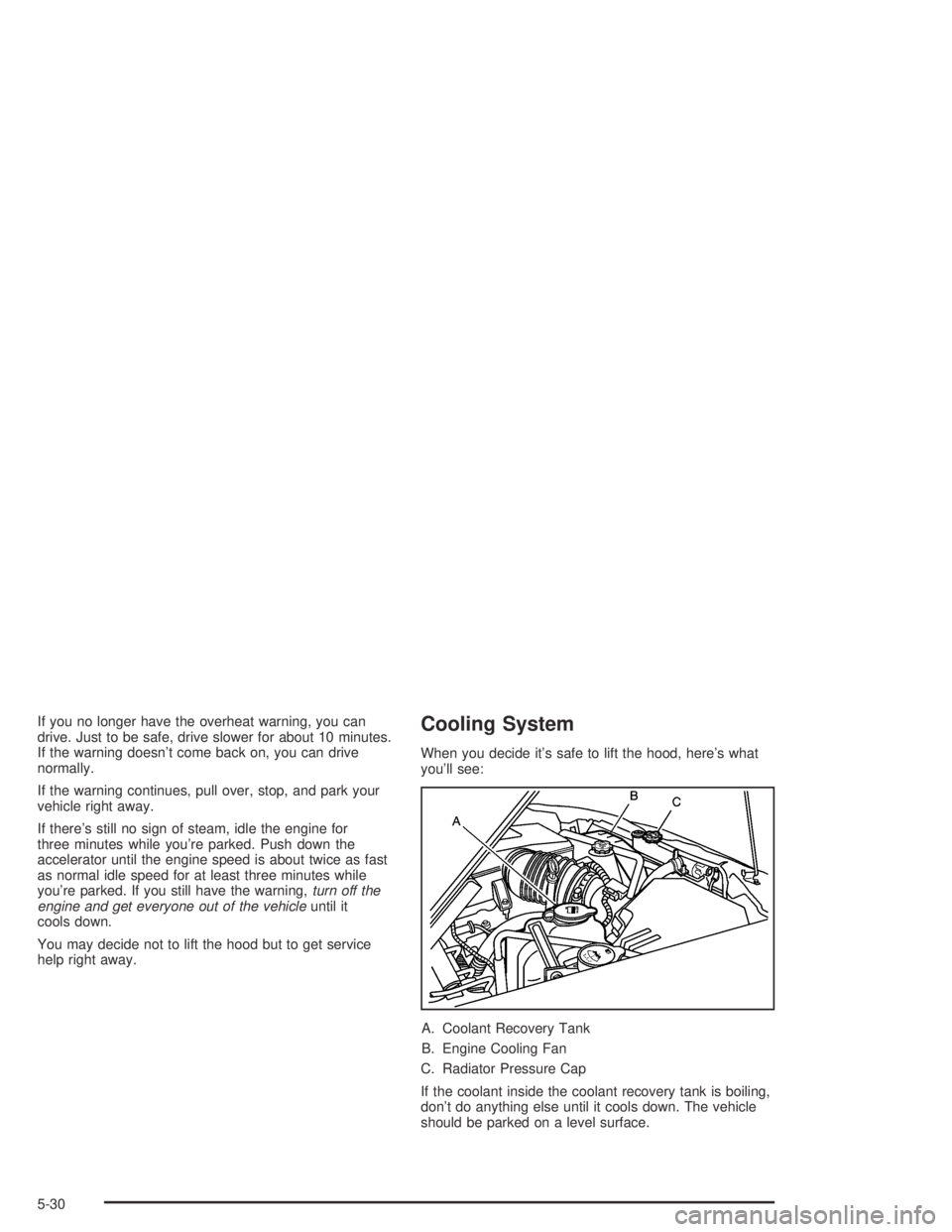
When you decide it’s safe to lift the hood, here’s what
you’ll see:
A. Coolant Recovery Tank
B. Engine Cooling Fan
C. Radiator Pressure Cap
If the coolant inside the coolant recovery tank is boiling,
don’t do anything else until it cools down. The vehicle
should be parked on a level surface.
5-30
Page 296 of 420
How to Add Coolant to the Coolant
Recovery Tank
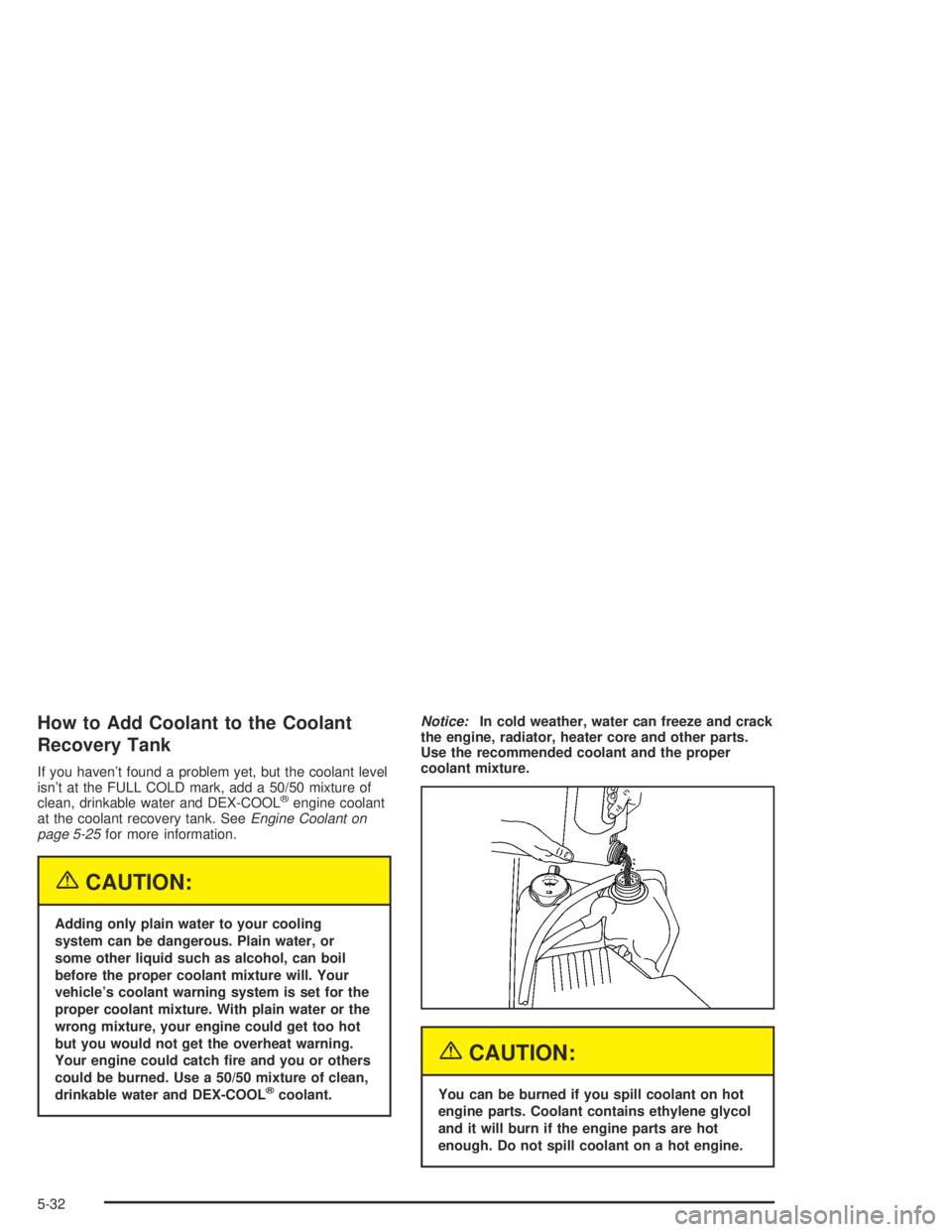
If you haven’t found a problem yet, but the coolant level
isn’t at the FULL COLD mark, add a 50/50 mixture of
clean, drinkable water and DEX-COOL
®engine coolant
at the coolant recovery tank. SeeEngine Coolant on
page 5-25for more information.
{CAUTION:
Adding only plain water to your cooling
system can be dangerous. Plain water, or
some other liquid such as alcohol, can boil
before the proper coolant mixture will. Your
vehicle’s coolant warning system is set for the
proper coolant mixture. With plain water or the
wrong mixture, your engine could get too hot
but you would not get the overheat warning.
Your engine could catch re and you or others
could be burned. Use a 50/50 mixture of clean,
drinkable water and DEX-COOL
®coolant.Notice:In cold weather, water can freeze and crack
the engine, radiator, heater core and other parts.
Use the recommended coolant and the proper
coolant mixture.
{CAUTION:
You can be burned if you spill coolant on hot
engine parts. Coolant contains ethylene glycol
and it will burn if the engine parts are hot
enough. Do not spill coolant on a hot engine.
5-32
Page 303 of 420
Checking Brake Fluid
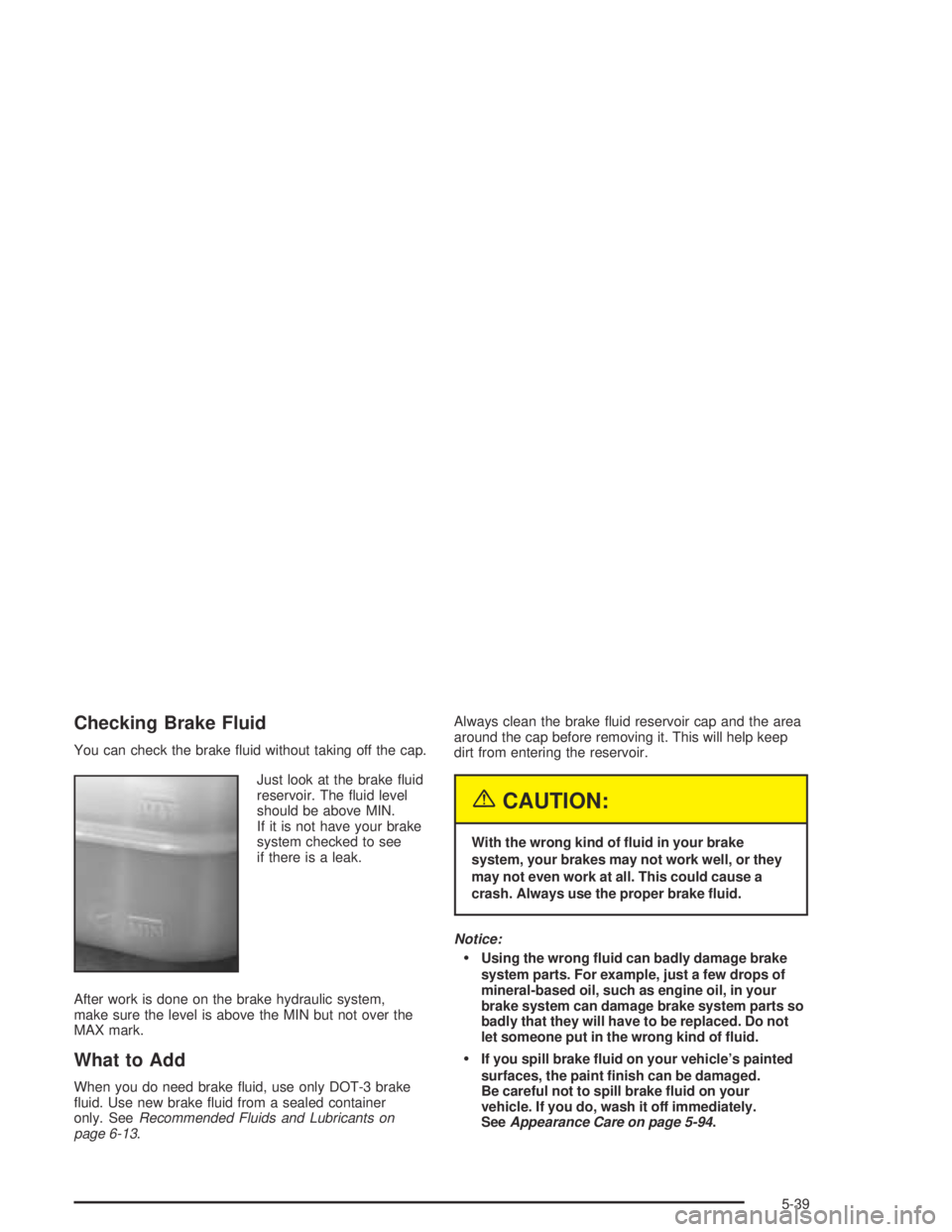
You can check the brake uid without taking off the cap.
Just look at the brake uid
reservoir. The uid level
should be above MIN.
If it is not have your brake
system checked to see
if there is a leak.
After work is done on the brake hydraulic system,
make sure the level is above the MIN but not over the
MAX mark.
What to Add
When you do need brake uid, use only DOT-3 brake
uid. Use new brake uid from a sealed container
only. SeeRecommended Fluids and Lubricants on
page 6-13.Always clean the brake uid reservoir cap and the area
around the cap before removing it. This will help keep
dirt from entering the reservoir.
{CAUTION:
With the wrong kind of uid in your brake
system, your brakes may not work well, or they
may not even work at all. This could cause a
crash. Always use the proper brake uid.
Notice:
Using the wrong uid can badly damage brake
system parts. For example, just a few drops of
mineral-based oil, such as engine oil, in your
brake system can damage brake system parts so
badly that they will have to be replaced. Do not
let someone put in the wrong kind of uid.
If you spill brake uid on your vehicle’s painted
surfaces, the paint nish can be damaged.
Be careful not to spill brake uid on your
vehicle. If you do, wash it off immediately.
SeeAppearance Care on page 5-94.
5-39
Page 376 of 420
Maintenance Schedule
Introduction
Important: Keep engine oil at the proper level and
change as recommended.
Have you purchased the GM Protection Plan? The Plan
supplements your new vehicle warranties. See your
Warranty and Owner Assistance booklet or your dealer
for details.
Maintenance Requirements
Notice:Maintenance intervals, checks, inspections,
replacement parts and recommended uids and
lubricants as prescribed in this manual are
necessary to keep your vehicle in good working
condition. Any damage caused by failure to follow
scheduled maintenance may not be covered by
warranty.
Your Vehicle and the Environment
Proper vehicle maintenance not only helps to keep your
vehicle in good working condition, but also helps the
environment. All recommended maintenance is
important. Improper vehicle maintenance can even
affect the quality of the air we breathe. Improper uid
levels or the wrong tire ination can increase the level
of emissions from your vehicle. To help protect our
environment, and to keep your vehicle in good condition,
be sure to maintain your vehicle properly.
6-2
Page 379 of 420
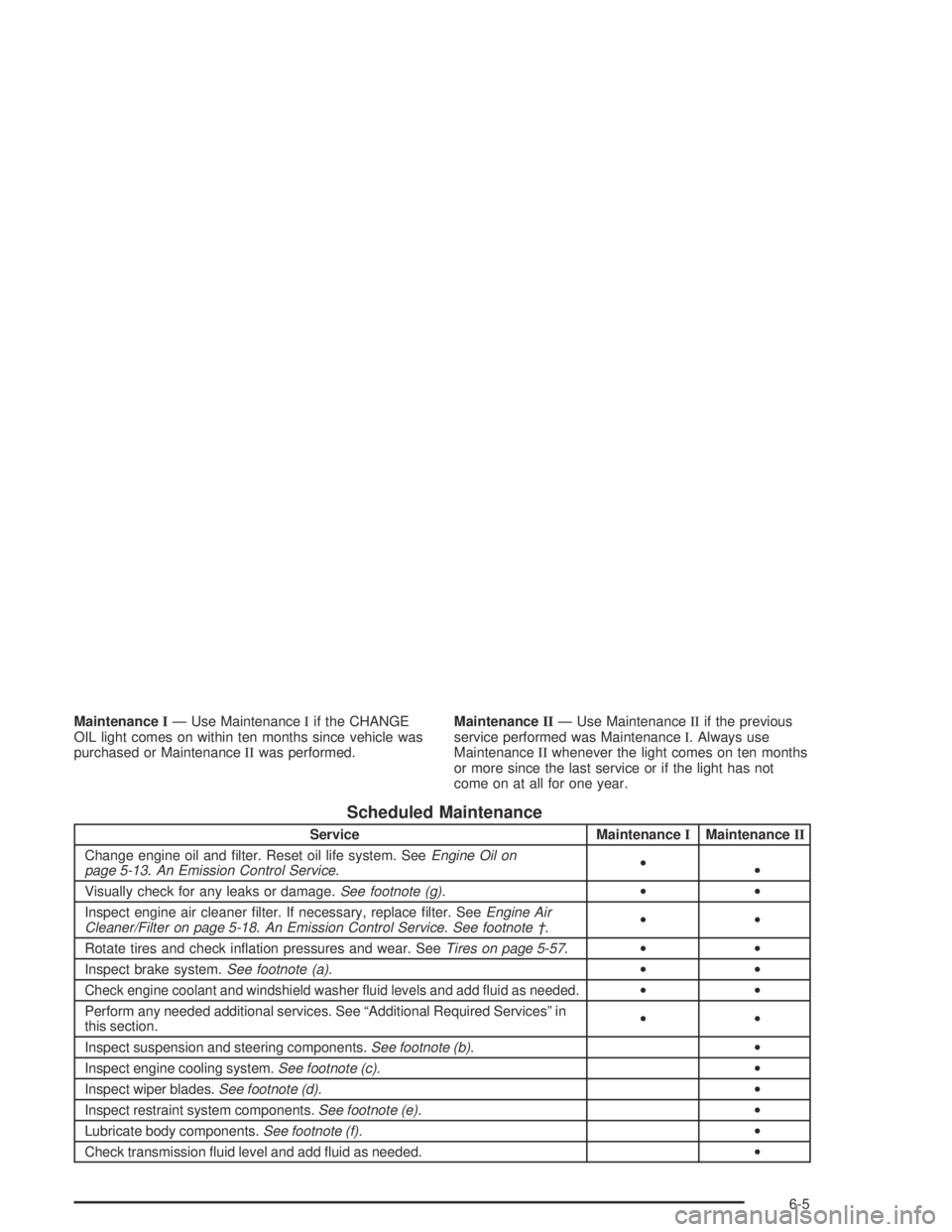
MaintenanceI— Use MaintenanceIif the CHANGE
OIL light comes on within ten months since vehicle was
purchased or MaintenanceIIwas performed.MaintenanceII— Use MaintenanceIIif the previous
service performed was MaintenanceI. Always use
MaintenanceIIwhenever the light comes on ten months
or more since the last service or if the light has not
come on at all for one year.
Scheduled Maintenance
Service MaintenanceIMaintenanceII
Change engine oil and lter. Reset oil life system. SeeEngine Oil on
page 5-13.An Emission Control Service.•
•
Visually check for any leaks or damage.See footnote (g).••
Inspect engine air cleaner lter. If necessary, replace lter. SeeEngine Air
Cleaner/Filter on page 5-18.An Emission Control Service. See footnote †.••
Rotate tires and check ination pressures and wear. SeeTires on page 5-57.••
Inspect brake system.See footnote (a).••
Check engine coolant and windshield washer uid levels and add uid as needed.••
Perform any needed additional services. See “Additional Required Services” in
this section.••
Inspect suspension and steering components.See footnote (b).•
Inspect engine cooling system.See footnote (c).•
Inspect wiper blades.See footnote (d).•
Inspect restraint system components.See footnote (e).•
Lubricate body components.See footnote (f).•
Check transmission uid level and add uid as needed.•
6-5
Page 383 of 420
Owner Checks and Services
These owner checks and services should be performed
at the intervals specied to help ensure the safety,
dependability and emission control performance of your
vehicle. Your GM Goodwrench dealer can assist you
with these checks and services.
Be sure any necessary repairs are completed at once.
Whenever any uids or lubricants are added to your
vehicle, make sure they are the proper ones, as shown
inRecommended Fluids and Lubricants on page 6-13.
At Each Fuel Fill
It is important to perform these underhood checks at
each fuel ll.
Engine Oil Level Check
Check the engine oil level and add the proper oil if
necessary. SeeEngine Oil on page 5-13for further
details.
Notice:It is important to check your oil regularly
and keep it at the proper level. Failure to keep your
engine oil at the proper level can cause damage
to your engine not covered by your warranty.
Engine Coolant Level Check
Check the engine coolant level and add
DEX-COOL®coolant mixture if necessary. SeeEngine
Coolant on page 5-25for further details.
Windshield Washer Fluid Level Check
Check the windshield washer uid level in the windshield
washer tank and add the proper uid if necessary.
At Least Once a Month
Tire Ination Check
Visually inspect your tires and make sure tires are
inated to the correct pressures. Do not forget to check
your spare tire. SeeTires on page 5-57for further
details. Check to make sure the spare tire is stored
securely. Push, pull and then try to rotate or turn
the spare tire. If it moves, tighten it. SeeChanging a
Flat Tire on page 5-74.
6-9
Page 407 of 420
Care of
Safety Belts................................................5-97
Your CD Player...........................................3-68
Your CDs ...................................................3-68
Cargo Lamps.................................................3-15
CD Messages........................................3-55, 3-67
Center Front Passenger Position,
Safety Belts................................................1-24
Center High-Mounted Stoplamp (CHMSL)...........5-53
Certication/Tire Label.....................................4-56
Chains, Tires..................................................5-72
CHANGE OIL.................................................3-40
Check
Engine Light...............................................3-30
Check Engine Light.........................................3-30
Checking Brake Fluid......................................5-39
Checking Coolant............................................5-27
Checking Engine Oil........................................5-13
Checking the Fluid Level..................................5-21
Checking Things Under the Hood......................5-10
Checking Your Restraint Systems......................1-73
Chemical Paint Spotting.................................5-101
Child Restraints
Child Restraint Systems...............................1-37
Infants and Young Children...........................1-34
Lower Anchorages and Top Tethers for
Children (LATCH System)..........................1-46
Older Children.............................................1-31Child Restraints (cont.)
Securing a Child Restraint Designed for
the LATCH System...........................1-48, 1-51
Securing a Child Restraint in a Rear
Seat Position...........................................1-51
Securing a Child Restraint in the Center
Front Seat Position...................................1-53
Securing a Child Restraint in the Right
Front Seat Position...........................1-54, 1-58
Top Strap...................................................1-42
Top Strap Anchor Location............................1-44
Where to Put the Restraint...........................1-40
Chime Level Adjustment..................................3-68
Cigarette Lighter.............................................3-17
Cleaning
Inside of Your Vehicle..................................5-95
Outside of Your Vehicle................................5-98
Underbody Maintenance.............................5-101
Weatherstrips..............................................5-97
Cleaning Aluminum Wheels............................5-100
Cleaning Exterior Lamps/Lenses.......................5-98
Cleaning Fabric/Carpet....................................5-95
Cleaning Glass Surfaces..................................5-97
Cleaning Interior Plastic Components.................5-97
Cleaning Leather............................................5-96
Cleaning the Mirror.........................................2-39
Cleaning the Top of the Instrument Panel...........5-97
Cleaning the Windshield and Wiper Blades.........5-99
3