WINDOW GMC CANYON 2005 User Guide
[x] Cancel search | Manufacturer: GMC, Model Year: 2005, Model line: CANYON, Model: GMC CANYON 2005Pages: 420, PDF Size: 2.73 MB
Page 95 of 420
Power Windows
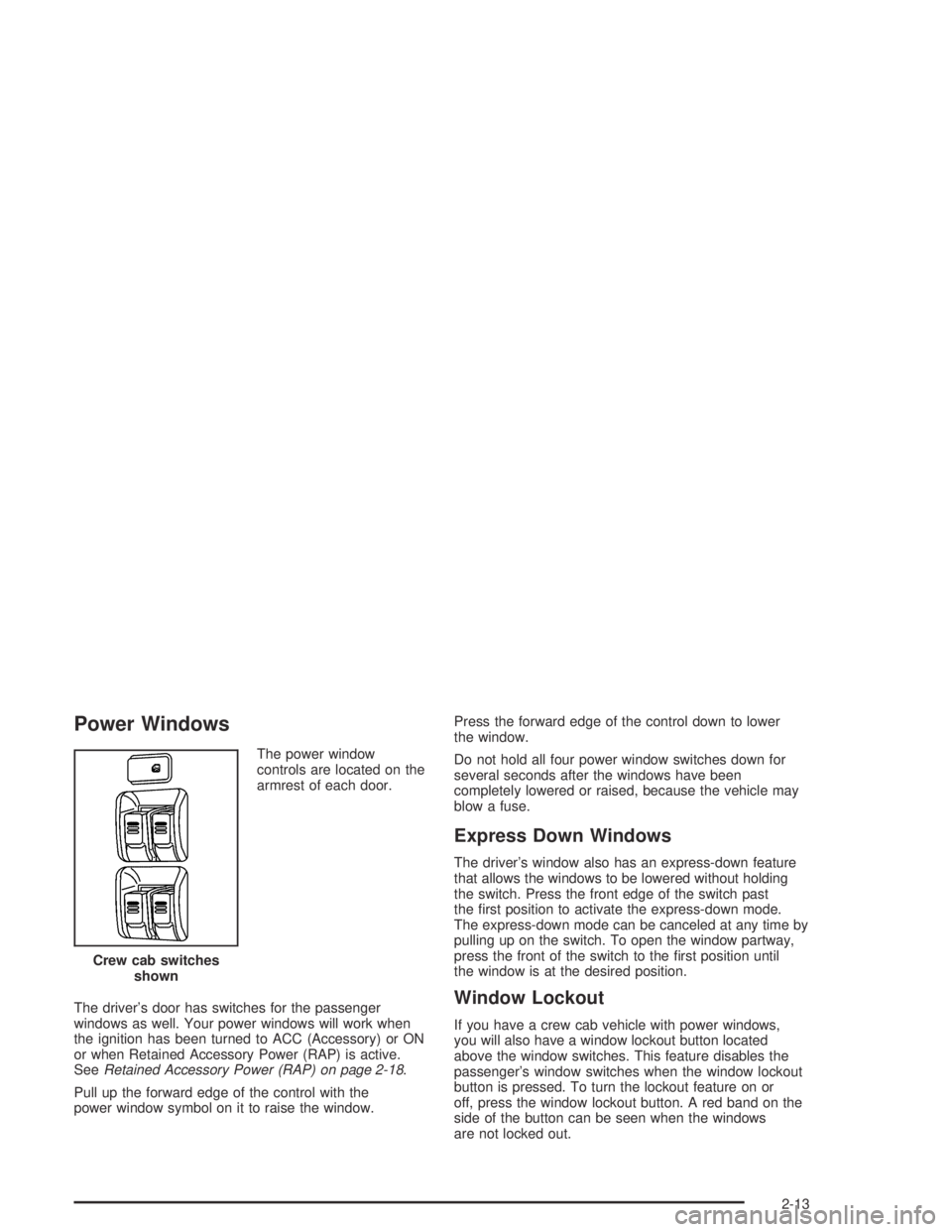
The power window
controls are located on the
armrest of each door.
The driver’s door has switches for the passenger
windows as well. Your power windows will work when
the ignition has been turned to ACC (Accessory) or ON
or when Retained Accessory Power (RAP) is active.
SeeRetained Accessory Power (RAP) on page 2-18.
Pull up the forward edge of the control with the
power window symbol on it to raise the window.Press the forward edge of the control down to lower
the window.
Do not hold all four power window switches down for
several seconds after the windows have been
completely lowered or raised, because the vehicle may
blow a fuse.
Express Down Windows
The driver’s window also has an express-down feature
that allows the windows to be lowered without holding
the switch. Press the front edge of the switch past
the rst position to activate the express-down mode.
The express-down mode can be canceled at any time by
pulling up on the switch. To open the window partway,
press the front of the switch to the rst position until
the window is at the desired position.
Window Lockout
If you have a crew cab vehicle with power windows,
you will also have a window lockout button located
above the window switches. This feature disables the
passenger’s window switches when the window lockout
button is pressed. To turn the lockout feature on or
off, press the window lockout button. A red band on the
side of the button can be seen when the windows
are not locked out. Crew cab switches
shown
2-13
Page 96 of 420
Sliding Rear Window
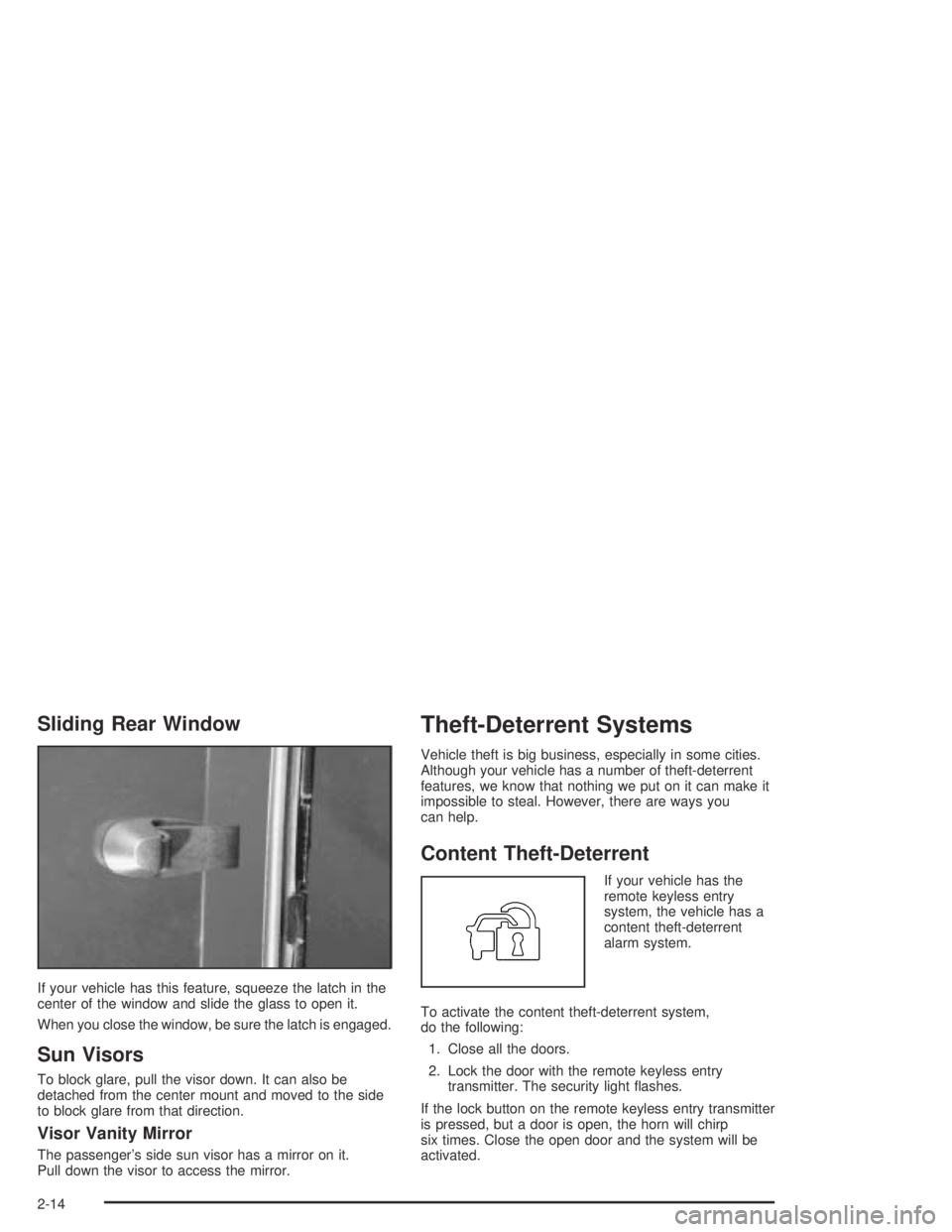
If your vehicle has this feature, squeeze the latch in the
center of the window and slide the glass to open it.
When you close the window, be sure the latch is engaged.
Sun Visors
To block glare, pull the visor down. It can also be
detached from the center mount and moved to the side
to block glare from that direction.
Visor Vanity Mirror
The passenger’s side sun visor has a mirror on it.
Pull down the visor to access the mirror.
Theft-Deterrent Systems
Vehicle theft is big business, especially in some cities.
Although your vehicle has a number of theft-deterrent
features, we know that nothing we put on it can make it
impossible to steal. However, there are ways you
can help.
Content Theft-Deterrent
If your vehicle has the
remote keyless entry
system, the vehicle has a
content theft-deterrent
alarm system.
To activate the content theft-deterrent system,
do the following:
1. Close all the doors.
2. Lock the door with the remote keyless entry
transmitter. The security light ashes.
If the lock button on the remote keyless entry transmitter
is pressed, but a door is open, the horn will chirp
six times. Close the open door and the system will be
activated.
2-14
Page 100 of 420
Retained Accessory Power (RAP)
Your vehicle is equipped with Retained Accessory
Power (RAP) which will allow certain features of your
vehicle to continue working for up to 20 minutes after the
ignition key is turned to LOCK.
Your radio and power windows will work when the
ignition key is in ON or ACC. Once the key is turned
from ON to LOCK, these features will continue to work
for up to 20 minutes or until a door is opened.
Starting Your Engine
Automatic Transmission
Move your shift lever to PARK (P) or NEUTRAL (N).
Your engine will not start in any other position — that is
a safety feature. To restart when you are already
moving, use NEUTRAL (N) only.
Notice:Do not try to shift to PARK (P) if your
vehicle is moving. If you do, you could damage the
transmission. Shift to PARK (P) only when your
vehicle is stopped.
Manual Transmission
The gear selector should be in NEUTRAL and the
parking brake engaged. Hold the clutch pedal to the
oor and start the engine. Your vehicle will not start if
the clutch pedal is not all the way down — that is a
safety feature.
Starting Your Engine
1. With your foot off the accelerator pedal, turn the
ignition key to START. When the engine starts,
let go of the key. The idle speed will go down as
your engine gets warm.
Notice:Holding your key in START for longer than
15 seconds at a time will cause your battery to
be drained much sooner. And the excessive heat
can damage your starter motor. Wait about
15 seconds between each try to help avoid draining
your battery or damaging your starter.
2. If the engine does not start within 10 seconds, push
the accelerator pedal all the way to the oor, while
you hold the ignition key in START. When the
engine starts, let go of the key and let up on the
accelerator pedal. Wait about 15 seconds between
each try.
2-18
Page 116 of 420
Engine Exhaust
{CAUTION:
Engine exhaust can kill. It contains the gas
carbon monoxide (CO), which you cannot
see or smell. It can cause unconsciousness
and death.
You might have exhaust coming in if:
Your exhaust system sounds strange or
different.
Your vehicle gets rusty underneath.
Your vehicle was damaged in a collision.
Your vehicle was damaged when driving
over high points on the road or over
road debris.
Repairs were not done correctly.
Your vehicle or exhaust system had been
modied improperly.
If you ever suspect exhaust is coming into
your vehicle:
Drive it only with all the windows down to
blow out any CO; and
Have your vehicle xed immediately.
Running Your Engine While You Are
Parked (Automatic Transmission)
It is better not to park with the engine running. But if you
ever have to, here are some things to know.
{CAUTION:
Idling the engine with the climate control
system off could allow dangerous exhaust into
your vehicle. See the earlier caution under
Engine Exhaust on page 2-34.
Also, idling in a closed-in place can let
deadly carbon monoxide (CO) into your
vehicle even if the climate control fan is at
the highest setting. One place this can happen
is a garage. Exhaust — with CO — can come
in easily. NEVER park in a garage with the
engine running.
Another closed-in place can be a blizzard.
SeeWinter Driving on page 4-38.
2-34
Page 119 of 420
Automatic Dimming Rearview
Mirror with Compass and
Temperature Display
The vehicle may have an automatic dimming rearview
mirror with a compass, temperature display, and
map lamps.
Mirror Operation
The mirror automatically changes to reduce glare from
headlamps behind you. A time delay feature prevents
rapid changing from the day to night positions while
driving under lights and through traffic.
P(On/Off):The automatic dimming feature is
automatically activated when the vehicle is started.
The automatic dimming feature is turned on or off by
pressing this button located on the lower part of
the mirror. Press and hold the button for up to three
seconds to turn this feature on or off.
T(Indicator Light):This light will turn on when the
automatic dimming feature is active.
Map Lamps
The mirror has map lamps located at the bottom of the
mirror. To manually turn the lamps on or off, press
the button next to each lamp.
Compass Operation
The mirror has an eight-point compass display in the
bottom of the mirror face.
When the ignition and the compass feature are on,
the compass will show two character boxes for
approximately two seconds. After two seconds, the
mirror will display the current compass heading.
For example, NE is displayed for north-east.
Compass Calibration
If after two seconds the display does not show a
compass heading, there may be a strong magnetic eld
interfering with the compass. Such interference may
be caused by a magnetic antenna mount, note
pad holder or similar object. If the letter C appears in
the compass window, the compass needs calibration.
The mirror compass can be calibrated by driving
the vehicle in circles at 5 mph (8 km/h) or less until the
display reads a direction.
The compass can be placed in calibration mode by
pressing and holding the left map light button until
a C appears on the compass display.
2-37
Page 120 of 420
Compass Variance
Compass variance is the difference between earth’s
magnetic north and true geographic north. If the mirror
is not adjusted for compass variance, your compass
could give false readings.
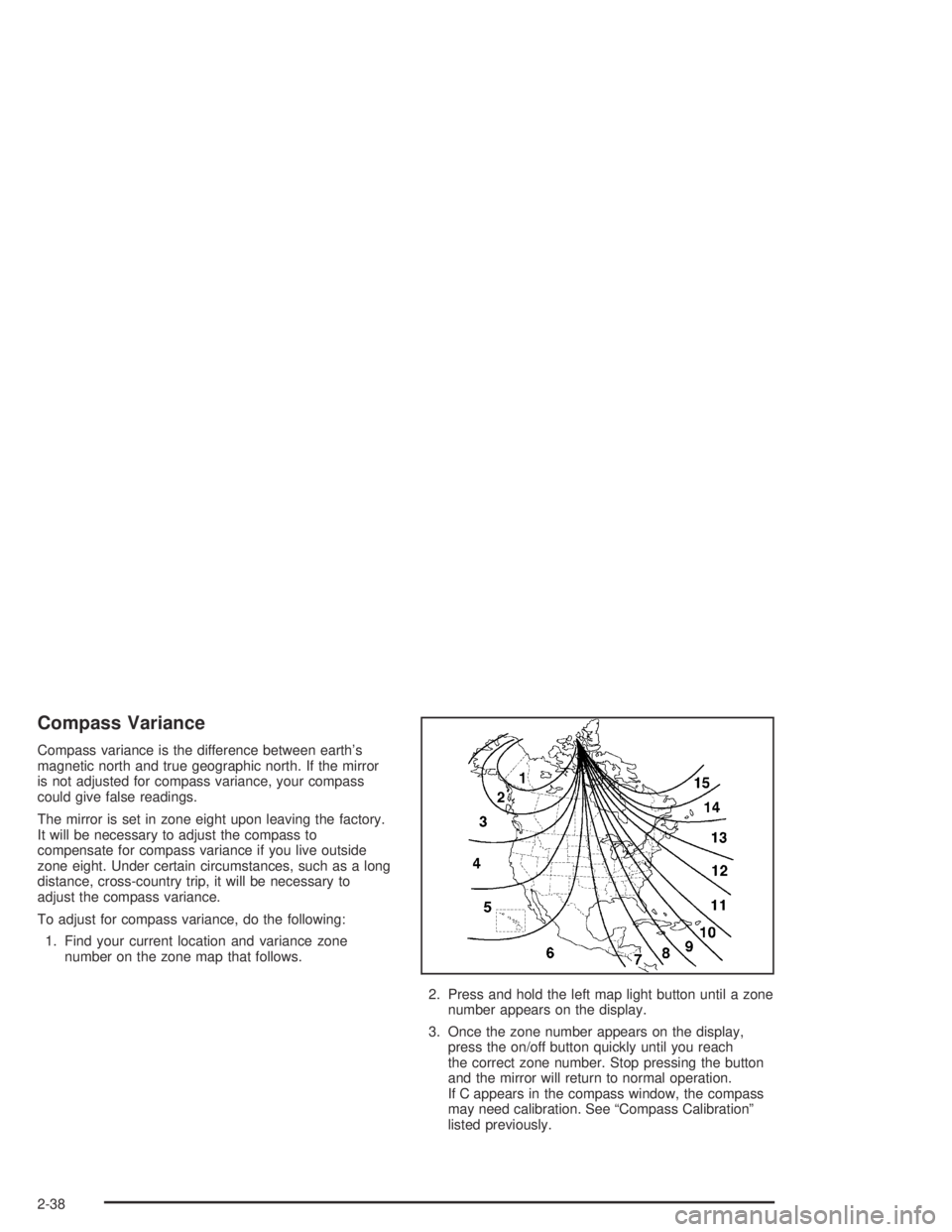
The mirror is set in zone eight upon leaving the factory.
It will be necessary to adjust the compass to
compensate for compass variance if you live outside
zone eight. Under certain circumstances, such as a long
distance, cross-country trip, it will be necessary to
adjust the compass variance.
To adjust for compass variance, do the following:
1. Find your current location and variance zone
number on the zone map that follows.
2. Press and hold the left map light button until a zone
number appears on the display.
3. Once the zone number appears on the display,
press the on/off button quickly until you reach
the correct zone number. Stop pressing the button
and the mirror will return to normal operation.
If C appears in the compass window, the compass
may need calibration. See “Compass Calibration”
listed previously.
2-38
Page 121 of 420
Temperature Display Operation
The outside air temperature is displayed in the window
located at the lower center of the mirror face.
Press and hold the far right button for four seconds and
release. This will change the temperature reading
between degrees Fahrenheit, degrees Celsius, or turn
the display off.
Cleaning the Mirror
When cleaning the mirror, use a paper towel or similar
material dampened with glass cleaner. Do not spray
glass cleaner directly on the mirror as that may cause
the liquid cleaner to enter the mirror housing.
Outside Manual Mirrors
If the vehicle has manual outside mirrors, adjust them
by hand so that the side of the vehicle can be seen while
you are sitting in a comfortable driving position.
The mirrors can be folded inward to prevent damage
when going through an automatic car wash. To fold,
push the mirror toward the vehicle. To return the mirror
to its original position, push outward. Return both
mirrors to the unfolded position before driving.
Outside Power Mirrors
If your vehicle has this
feature, the controls are
located on the driver’s
door armrest.
To adjust the power mirrors, do the following:
1. Move the selector switch to the L (left) or R (right)
to choose the driver’s or passenger’s mirror.
2. Use the arrows located on the four-way control pad
to move the mirror in the direction you want the
mirror to go.
3. Return the selector switch to the center position
once the mirrors are adjusted.
2-39
Page 136 of 420
Windshield Wipers
You control the windshield wipers by turning the band
with the wiper symbol on it.
8(Mist):For a single wiping cycle, turn the band to
mist. Hold it there until the wipers start. Then let go.
The wipers will stop after one wipe. If you want
more wipes, hold the band on mist longer.
N(Delay):You can set the wiper speed for a long or
short delay between wipes. This can be very useful
in light rain or snow. Turn the band to choose the delay
time. The closer to the top of the lever, the shorter
the delay.
6(Low Speed):For steady wiping at low speed,
turn the band away from you to the rst solid position
past the delay settings.
1(High Speed):For high-speed wiping, turn the
band to the second solid position past the delay settings.
9(Off):To stop the wipers, move the band to off.
Be sure to clear ice and snow from the wiper blades
before using them. If they’re frozen to the windshield,
carefully loosen or thaw them. If your blades do become
worn or damaged, get new blades or blade inserts.
Windshield Washer
{CAUTION:
In freezing weather, do not use your washer
until the windshield is warmed. Otherwise the
washer uid can form ice on the windshield,
blocking your vision.
QL(Washer Fluid):There is a paddle marked
with the windshield washer symbol at the top of
the multifunction lever. To spray washer uid on the
windshield, push the paddle. The wipers will clear
the window and then either stop or return to your
preset speed.
3-10
Page 146 of 420
Fan Knob
9
(Fan):The center knob on the control panel is used
to control the fan speed. Turn the knob clockwise or
counterclockwise to increase or decrease the fan speed.
If the knob is set on “0” (zero), some outside air will still
enter the vehicle and will be directed according to
the position of the mode knob.
Mode Knob
The right knob on the control panel is used to direct the
airow inside your vehicle. Turn the knob to select
one of the following modes:
H(Vent):Select this mode to direct air to the
instrument panel outlets.
\(Bi-Level):Select this mode to direct approximately
half of the air to the instrument panel outlets, and the
remaining air to the oor outlets and the defroster
and side window outlets. Cooler air is directed to the
upper outlets and warmer air to the oor outlets.
[(Floor):Select this mode to direct air to the oor
outlets. Enabling recirculation in heat mode may
cause interior window fogging under some conditions.
If this occurs, see “Defogging and Defrosting” following.
Mode Buttons
@
(Recirculation):If your vehicle has air
conditioning, you will have the recirculation feature.
This mode recirculates air inside the cabin, and prevents
outside air from coming in the vehicle. It can be used
to prevent outside odors from entering your vehicle and
cool the air inside your vehicle more quickly. Press this
button to turn the recirculation mode on or off.
An indicator light on the button will come on to let you
know the recirculation mode is activated.
Recirculation is available in the bi-level, vent and oor
(heat) modes. It should only be used while in bi-level
and vent modes. Recirculation is not available, and
the light will not come on, while in oor/defog or
defrost modes.
#(Air Conditioning):Your vehicle may have air
conditioning. Press this button to turn the air-conditioning
system on or off. An indicator light on the button will
come on to let you know the air conditioning is activated.
When the system is on, this setting cools and
dehumidies the air entering your vehicle.
The air conditioning will not function if the fan is
turned off.
You may notice a slight change in engine performance
when the air conditioning compressor shuts off and
turns on again. This is normal. The system is designed
3-20
Page 147 of 420
to make adjustments to help with fuel economy while
still maintaining the selected temperature.
The air conditioning system removes moisture from the
air, so you may sometimes notice a small amount of
water dripping underneath your vehicle while idling
or after turning off the engine. This is normal.
Defogging and Defrosting
Fog on the inside of windows is a result of high humidity
(moisture) condensing on the cool window glass.
This can be minimized if the climate control system is
used properly. There are two modes to clear fog or frost
from your windshield and side windows. Use the
defog mode to clear the windows of fog or moisture and
warm the passengers. Use the defrost mode to
remove fog or frost from the windshield more quickly.
For best results, clear all snow and ice from the
windshield before defrosting.
Turn the mode knob on the climate control panel
clockwise to select the defog or defrost modes.
/(Floor/Defog):This mode directs the air to the
windshield, the side window outlets, and to the
oor outlets. When you select this mode, the system
runs the air conditioning compressor unless the outside
temperature is near freezing or below. Recirculation
is not available in this mode.
0(Defrost):This mode directs most of the air to the
windshield, and the side window outlets. When you
select this mode, the system runs the air conditioning
compressor unless the outside temperature is near,
or below freezing. Recirculation is not available in
this mode.
Do not drive the vehicle until all the windows are clear.
Outlet Adjustment
Use the thumbwheel on the outlets to change the
direction of the air ow.
Lift up or push down on the thumbwheel located in the
center of the outlet to direct the air up or down, or
slide the thumbwheel to the left or right to direct the
airow from side-to-side.
Operation Tips
Clear away any ice, snow or leaves from the air
inlets at the base of the windshield that may
block the ow of air into your vehicle.
Use of non-GM approved hood deectors may
adversely affect the performance of the system.
Keep the path under the front seats clear of objects
to help circulate the air inside of your vehicle more
effectively.
3-21