instrument cluster GMC CANYON 2006 User Guide
[x] Cancel search | Manufacturer: GMC, Model Year: 2006, Model line: CANYON, Model: GMC CANYON 2006Pages: 434, PDF Size: 2.64 MB
Page 167 of 434
Driver Information Center (DIC)
The Driver Information Center (DIC) displays information
such as the trip odometer, personalization features,
and warning messages. The DIC display is located on
the instrument panel cluster.
DIC Controls and Displays
The Driver Information Center (DIC) comes on when the
ignition is on. After a short delay, the DIC will display
the information that was last displayed before the engine
was turned off.
If a problem is detected, a warning message will appear
on the display. Pressing and releasing the trip odometer
reset stem on the DIC will acknowledge some current
warnings or service messages. Some messages will only
clear after the required action has been taken.
The DIC has different modes which can be accessed by
pressing the trip odometer reset stem on the DIC.
These modes are explained in the following section.
The DIC trip odometer reset stem is located on
the instrument panel cluster next to the DIC display.
To scroll through the available functions, press
and release the reset stem.
Trip Information
Odometer
The odometer is automatically displayed on the DIC
when you start the vehicle. The odometer shows
the total distance the vehicle has been driven in either
miles for the United States or kilometers for Canada.
Trip Odometer
Press and release the reset stem until TRIP appears
on the DIC display. This shows the current distance
traveled since the last reset of the trip odometer in either
miles for the United States or kilometers for Canada.
Press and hold the reset stem for approximately
four seconds to reset the trip odometer.
3-39
Page 172 of 434
ENG (Engine) HOT
This message will be displayed when your engine
coolant temperature is hot. Check your engine coolant
temperature gage. SeeEngine Coolant Temperature
Gage on page 3-32for more information. You should
have your vehicle serviced by your GM dealer as soon
as possible if you suspect your engine is overheating.
SeeEngine Overheating on page 5-28for more
information.
FLUID
This message will be displayed if your brake uid is low.
Check the brake uid as soon as possible and have
your vehicle serviced by your GM dealer. SeeBrakes on
page 5-37for more information. Press the reset stem
to acknowledge the message and clear it from the DIC
display.
FUEL CAP
This message will be displayed if your vehicle’s fuel cap
is either off or loose. You should pull over and check
to see if your vehicle’s fuel cap is secure as soon
as possible. You may also see the check engine light
on the instrument panel cluster. SeeMalfunction
Indicator Lamp on page 3-32for more information.
Press the reset stem to acknowledge the message and
clear it from the display.
LOW FUEL
This message will be displayed if the level of fuel in
your vehicle is low. You should also check your
fuel gage. SeeFuel Gage on page 3-38for more
information. You should ll your vehicle’s tank as soon
as possible.
LOW TRAC (Traction)
If you have the Traction Control System (TCS), you will
see this message when a low traction condition is
detected. SeeTraction Control System (TCS) on
page 4-9for more information. Press and release the
reset stem to acknowledge the message and clear
it from the DIC display.
OIL
This message will be displayed when your oil pressure
is low. SeeOil Pressure Light on page 3-36and
Engine Oil on page 5-13for more information.
3-44
Page 285 of 434
{CAUTION:
If you spill fuel and then something ignites it,
you could be badly burned. Fuel can spray out
on you if you open the fuel cap too quickly.
This spray can happen if your tank is nearly
full, and is more likely in hot weather. Open
the fuel cap slowly and wait for any hiss noise
to stop. Then unscrew the cap all the way.
Be careful not to spill fuel. Do not top off or overll the
tank and wait a few seconds after you have nished
pumping before removing the nozzle. Clean fuel
from painted surfaces as soon as possible. See
Washing Your Vehicle on page 5-97.
When replacing the fuel cap, turn it clockwise until it
clicks. Make sure the cap is fully installed. The
diagnostic system can determine if the fuel cap has
been left off or improperly installed. This would allow fuel
to evaporate into the atmosphere. If the fuel cap is
not properly installed, the FUEL CAP message
will appear on the Driver Information Center (DIC) and
the check engine light will be lit on the instrument
panel cluster. SeeDIC Warnings and Messages on
page 3-42andMalfunction Indicator Lamp on page 3-32
for more information.
{CAUTION:
If a re starts while you are refueling, do not
remove the nozzle. Shut off the ow of fuel by
shutting off the pump or by notifying the
station attendant. Leave the area immediately.
Notice:If you need a new fuel cap, be sure to get
the right type. Your dealer can get one for you.
If you get the wrong type, it may not t properly.
This may cause your malfunction indicator lamp to
light and may damage your fuel tank and emissions
system. SeeMalfunction Indicator Lamp on
page 3-32.
5-9
Page 293 of 434
How to Reset the Engine Oil Life
System
The Engine Oil Life System calculates when to change
your engine oil and lter based on vehicle use. Anytime
your oil is changed, reset the system so it can calculate
when the next oil change is required. If a situation occurs
where you change your oil prior to a CHANGE OIL
message being turned on, reset the system.
To reset the Engine Oil Life system, do the following:
1. With the engine off, turn the ignition to ON.
2. Press and release the stem in the lower center of
the instrument cluster until the OIL LIFE message
is displayed.
3. Once the alternating OIL LIFE and RESET
messages appear, press and hold the stem
until several beeps sound. This conrms that the oil
life system has been reset.
4. Turn the key to LOCK.
If the CHANGE OIL message comes back on when you
start your vehicle, the engine oil life system has not
reset. Repeat the procedure. SeeDIC Warnings
and Messages on page 3-42.
What to Do with Used Oil
Used engine oil contains certain elements that may be
unhealthy for your skin and could even cause cancer.
Do not let used oil stay on your skin for very long. Clean
your skin and nails with soap and water, or a good
hand cleaner. Wash or properly dispose of clothing or
rags containing used engine oil. See the manufacturer’s
warnings about the use and disposal of oil products.
Used oil can be a threat to the environment. If you
change your own oil, be sure to drain all the oil from the
lter before disposal. Never dispose of oil by putting it
in the trash, pouring it on the ground, into sewers, or into
streams or bodies of water. Instead, recycle it by
taking it to a place that collects used oil. If you have a
problem properly disposing of your used oil, ask
your dealer, a service station or a local recycling center
for help.
5-17
Page 382 of 434
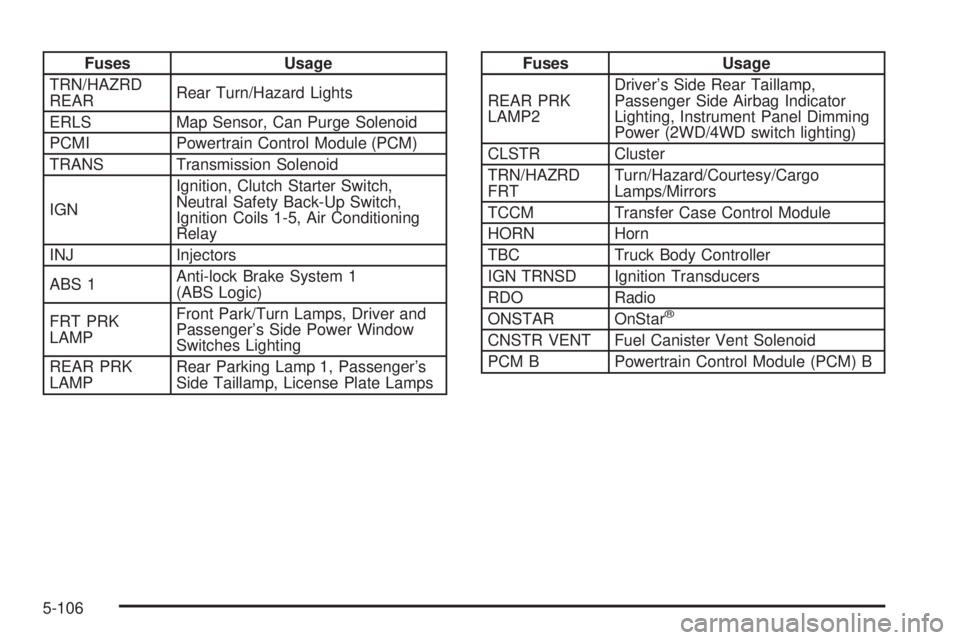
Fuses Usage
TRN/HAZRD
REARRear Turn/Hazard Lights
ERLS Map Sensor, Can Purge Solenoid
PCMI Powertrain Control Module (PCM)
TRANS Transmission Solenoid
IGNIgnition, Clutch Starter Switch,
Neutral Safety Back-Up Switch,
Ignition Coils 1-5, Air Conditioning
Relay
INJ Injectors
ABS 1Anti-lock Brake System 1
(ABS Logic)
FRT PRK
LAMPFront Park/Turn Lamps, Driver and
Passenger’s Side Power Window
Switches Lighting
REAR PRK
LAMPRear Parking Lamp 1, Passenger’s
Side Taillamp, License Plate LampsFuses Usage
REAR PRK
LAMP2Driver’s Side Rear Taillamp,
Passenger Side Airbag Indicator
Lighting, Instrument Panel Dimming
Power (2WD/4WD switch lighting)
CLSTR Cluster
TRN/HAZRD
FRTTurn/Hazard/Courtesy/Cargo
Lamps/Mirrors
TCCM Transfer Case Control Module
HORN Horn
TBC Truck Body Controller
IGN TRNSD Ignition Transducers
RDO Radio
ONSTAR OnStar
®
CNSTR VENT Fuel Canister Vent Solenoid
PCM B Powertrain Control Module (PCM) B
5-106
Page 426 of 434
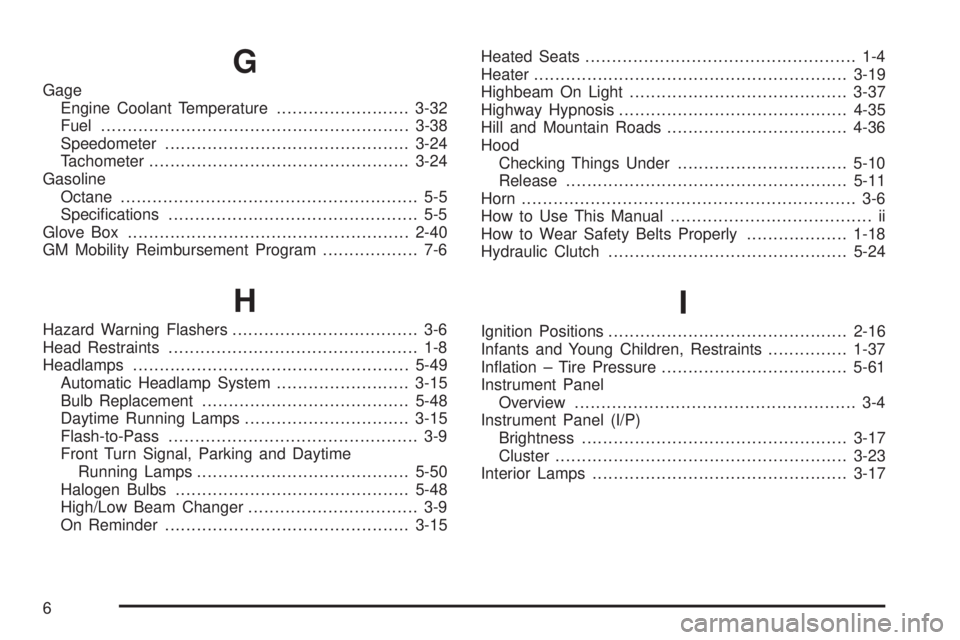
G
Gage
Engine Coolant Temperature.........................3-32
Fuel..........................................................3-38
Speedometer..............................................3-24
Tachometer.................................................3-24
Gasoline
Octane........................................................ 5-5
Specications............................................... 5-5
Glove Box.....................................................2-40
GM Mobility Reimbursement Program.................. 7-6
H
Hazard Warning Flashers................................... 3-6
Head Restraints............................................... 1-8
Headlamps....................................................5-49
Automatic Headlamp System.........................3-15
Bulb Replacement.......................................5-48
Daytime Running Lamps...............................3-15
Flash-to-Pass............................................... 3-9
Front Turn Signal, Parking and Daytime
Running Lamps........................................5-50
Halogen Bulbs............................................5-48
High/Low Beam Changer................................ 3-9
On Reminder..............................................3-15Heated Seats................................................... 1-4
Heater...........................................................3-19
Highbeam On Light.........................................3-37
Highway Hypnosis...........................................4-35
Hill and Mountain Roads..................................4-36
Hood
Checking Things Under................................5-10
Release.....................................................5-11
Horn............................................................... 3-6
How to Use This Manual...................................... ii
How to Wear Safety Belts Properly...................1-18
Hydraulic Clutch.............................................5-24
I
Ignition Positions.............................................2-16
Infants and Young Children, Restraints...............1-37
Ination – Tire Pressure...................................5-61
Instrument Panel
Overview..................................................... 3-4
Instrument Panel (I/P)
Brightness..................................................3-17
Cluster.......................................................3-23
Interior Lamps................................................3-17
6