battery GMC CANYON 2006 Owner's Guide
[x] Cancel search | Manufacturer: GMC, Model Year: 2006, Model line: CANYON, Model: GMC CANYON 2006Pages: 434, PDF Size: 2.64 MB
Page 318 of 434
Jump Starting
If your vehicle’s battery has run down, you may want to
use another vehicle and some jumper cables to start your
vehicle. Be sure to use the following steps to do it safely.
{CAUTION:
Batteries can hurt you. They can be dangerous
because:
They contain acid that can burn you.
They contain gas that can explode or
ignite.
They contain enough electricity to
burn you.
If you do not follow these steps exactly, some
or all of these things can hurt you.
Notice:Ignoring these steps could result in costly
damage to your vehicle that would not be covered
by your warranty.
Trying to start your vehicle by pushing or pulling it
will not work, and it could damage your vehicle.
1. Check the other vehicle. It must have a 12-volt
battery with a negative ground system.Notice:If the other vehicle’s system is not a 12-volt
system with a negative ground, both vehicles can
be damaged. Only use vehicles with 12-volt systems
with negative grounds to jump start your vehicle.
2. Get the vehicles close enough so the jumper cables
can reach, but be sure the vehicles are not touching
each other. If they are, it could cause a ground
connection you do not want. You would not be able
to start your vehicle, and the bad grounding
could damage the electrical systems.
To avoid the possibility of the vehicles rolling, set
the parking brake rmly on both vehicles involved in
the jump start procedure. Put an automatic
transmission in PARK (P) or a manual transmission
in NEUTRAL before setting the parking brake. If
you have a four-wheel-drive vehicle, be sure
the transfer case is not in NEUTRAL.
Notice:If you leave your radio or other accessories
on during the jump starting procedure, they could
be damaged. The repairs would not be covered
by your warranty. Always turn off your radio and
other accessories when jump starting your vehicle.
3. Turn off the ignition on both vehicles. Unplug
unnecessary accessories plugged into the cigarette
lighter or the accessory power outlets. Turn off
the radio and all lamps that are not needed. This
will avoid sparks and help save both batteries. And
it could save the radio!
5-42
Page 319 of 434
4. Open the hoods and locate the positive (+) and
negative (−) terminal locations on the other
vehicle. Your vehicle has a remote positive (+) and
a remote negative (−) jump starting terminal.
SeeEngine Compartment Overview on page 5-12
for more information on the terminal locations.
{CAUTION:
Using a match near a battery can cause battery
gas to explode. People have been hurt doing
this, and some have been blinded. Use a
ashlight if you need more light.
Be sure the batteries have enough water. You
do not need to add water to the ACDelco
®
battery (or batteries) installed in your new
vehicle. But if a battery has ller caps, be sure
the right amount of uid is there. If it is low,
add water to take care of that rst. If you do
not, explosive gas could be present.
Battery uid contains acid that can burn you.
Do not get it on you. If you accidentally get it
in your eyes or on your skin, ush the place
with water and get medical help immediately.
{CAUTION:
Fans or other moving engine parts can injure
you badly. Keep your hands away from moving
parts once the engine is running.
5. Check that the jumper cables do not have loose or
missing insulation. If they do, you could get a
shock. The vehicles could be damaged too.
Before you connect the cables, here are some
basic things you should know. Positive (+) will go to
positive (+) or to a remote positive (+) terminal if
the vehicle has one. Negative (−) will go to a heavy,
unpainted metal engine part or to a remote
negative (−) terminal if the vehicle has one.
Do not connect positive (+) to negative (−)oryou
will get a short that would damage the battery
and maybe other parts too. And do not connect the
negative (−) cable to the negative (−) terminal on
the dead battery because this can cause sparks.
5-43
Page 320 of 434
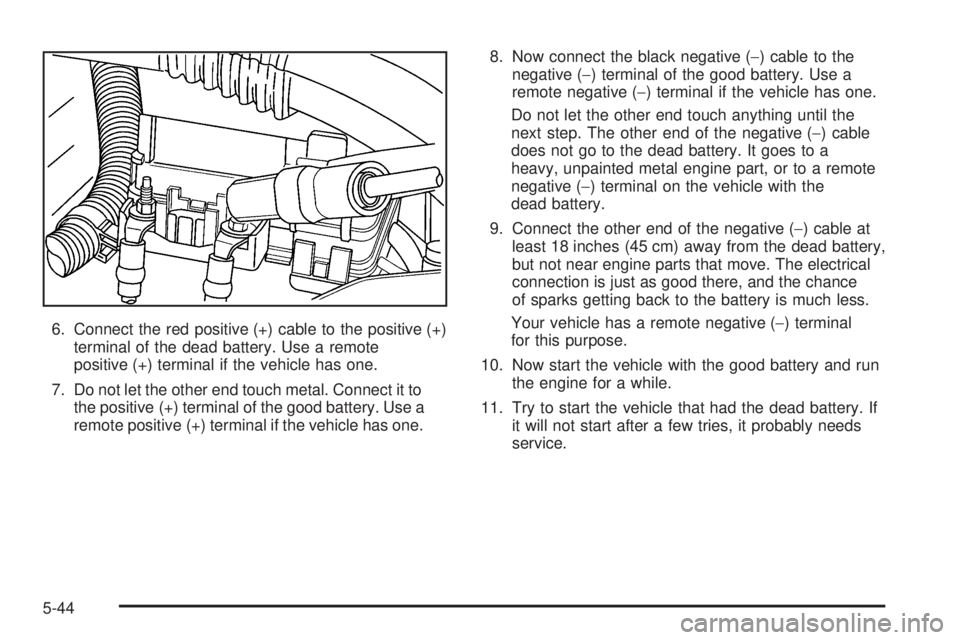
6. Connect the red positive (+) cable to the positive (+)
terminal of the dead battery. Use a remote
positive (+) terminal if the vehicle has one.
7. Do not let the other end touch metal. Connect it to
the positive (+) terminal of the good battery. Use a
remote positive (+) terminal if the vehicle has one.8. Now connect the black negative (−) cable to the
negative (−) terminal of the good battery. Use a
remote negative (−) terminal if the vehicle has one.
Do not let the other end touch anything until the
next step. The other end of the negative (−) cable
does not go to the dead battery. It goes to a
heavy, unpainted metal engine part, or to a remote
negative (−) terminal on the vehicle with the
dead battery.
9. Connect the other end of the negative (−) cable at
least 18 inches (45 cm) away from the dead battery,
but not near engine parts that move. The electrical
connection is just as good there, and the chance
of sparks getting back to the battery is much less.
Your vehicle has a remote negative (−) terminal
for this purpose.
10. Now start the vehicle with the good battery and run
the engine for a while.
11. Try to start the vehicle that had the dead battery. If
it will not start after a few tries, it probably needs
service.
5-44
Page 321 of 434
Notice:If the jumper cables are connected or
removed in the wrong order, electrical shorting may
occur and damage the vehicle. The repairs would
not be covered by your warranty. Always connect
and remove the jumper cables in the correct
order, making sure that the cables do not touch
each other or other metal.
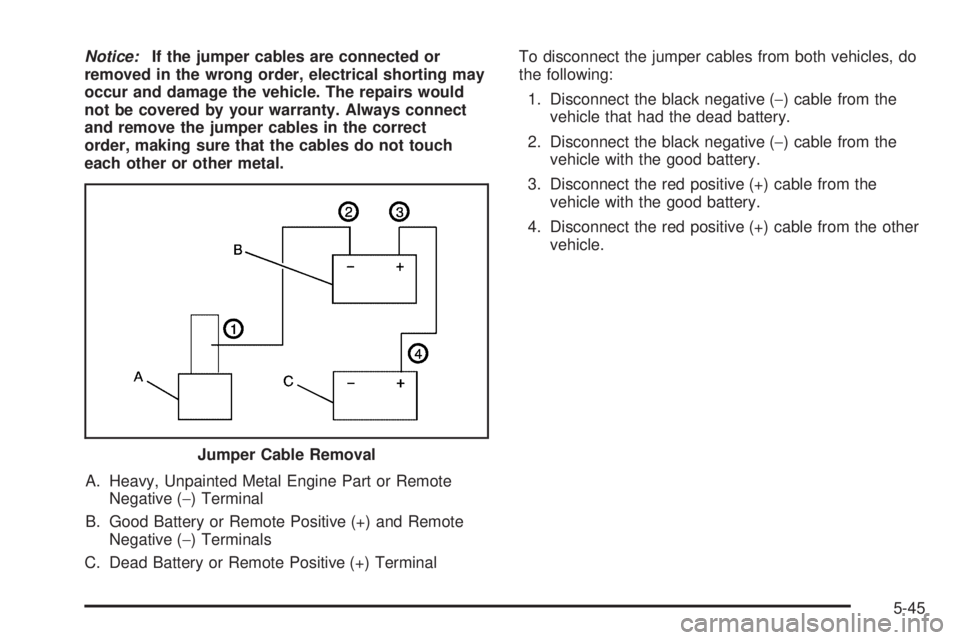
A. Heavy, Unpainted Metal Engine Part or Remote
Negative (−) Terminal
B. Good Battery or Remote Positive (+) and Remote
Negative (−) Terminals
C. Dead Battery or Remote Positive (+) TerminalTo disconnect the jumper cables from both vehicles, do
the following:
1. Disconnect the black negative (−) cable from the
vehicle that had the dead battery.
2. Disconnect the black negative (−) cable from the
vehicle with the good battery.
3. Disconnect the red positive (+) cable from the
vehicle with the good battery.
4. Disconnect the red positive (+) cable from the other
vehicle.
Jumper Cable Removal
5-45
Page 411 of 434
Flat Tire Change:Installation of a spare tire will be
covered at no charge. The customer is responsible
for the repair or replacement of the tire if not
covered by a warrantable failure.
Jump Start:No-start occurrences which require a
battery jump start will be covered at no charge.
Dealer Locator Service
Trip Routing:Your Roadside Assistance
Representative can provide you with specic
information regarding this feature.
Trip Interruption Expense Benets:Your
Roadside Assistance Representative can provide
you with specic information regarding this feature.
In many instances, mechanical failures are covered
under GMC’s Bumper-to-Bumper warranty. However,
when other services are utilized, our Roadside
Assistance Representatives will explain any payment
obligations you might incur.
For prompt and efficient assistance when calling, please
provide the following to the Roadside Assistance
Representative:
Your name, home address, and home telephone
number.
Telephone number of your location.
Location of the vehicle.
Model, year, color, and license plate number of the
vehicle.
Mileage, Vehicle Identication Number (VIN) and
delivery date of the vehicle.
Description of the problem.
While we hope you never have the occasion to use our
service, it is added security while traveling for you
and your family. Remember, we are only a phone call
away. GMC Roadside Assistance:1-800-462-8782, text
telephone (TTY) users, call1-888-889-2438.
GMC reserves the right to limit services or
reimbursement to an owner or driver when, in GMC’s
judgement, the claims become excessive in frequency or
type of occurrence.
Roadside Assistance is not part of or included in the
coverage provided by the New Vehicle Limited Warranty.
GMC reserves the right to make any changes or
discontinue the Roadside Assistance program at any
time without notication.
Canadian Roadside Assistance
Vehicles purchased in Canada have an extensive
roadside assistance program accessible from anywhere
in Canada or the United States. Please refer to the
Warranty and Owner Assistance Information book.
7-7
Page 422 of 434
Audio System(s) (cont.)
Setting the Time for Radios with Radio
Data Systems (RDS)................................3-48
Setting the Time for Radios without Radio
Data Systems (RDS)................................3-47
Theft-Deterrent Feature................................3-77
Understanding Radio Reception.....................3-78
XM™ Satellite Radio Antenna System............3-79
Automatic Headlamp System............................3-15
Automatic Transmission
Fluid..........................................................5-19
Operation...................................................2-20
B
Battery..........................................................5-41
Run-Down Protection...................................3-18
Battery Warning Light......................................3-29
Before Leaving on a Long Trip.........................4-34
Brake
Anti-Lock Brake System (ABS)........................ 4-7
Emergencies................................................ 4-8
Parking......................................................2-28
System Warning Light..................................3-30
Brakes..........................................................5-37
Braking........................................................... 4-6
Braking in Emergencies..................................... 4-8Break-In, New Vehicle.....................................2-15
Bulb Replacement...........................................5-48
Center High-Mounted Stoplamp (CHMSL)........5-51
Front Turn Signal, Parking and Daytime
Running Lamps........................................5-50
Halogen Bulbs............................................5-48
Headlamps.................................................5-49
Replacement Bulbs......................................5-52
Taillamps, Turn Signal, Stoplamps and
Back-up Lamps........................................5-51
Buying New Tires...........................................5-64
C
California Fuel.................................................. 5-6
California Proposition 65 Warning....................... 5-3
Canadian Owners................................................ ii
Capacities and Specications..........................5-108
Carbon Monoxide.....................2-9, 2-32, 4-38, 4-56
Care of
Safety Belts................................................5-96
Your CD Player...........................................3-79
Your CDs ...................................................3-78
Center Front Passenger Position, Safety Belts....1-27
Center High-Mounted Stoplamp (CHMSL)...........5-51
Chains, Tire...................................................5-70
2
Page 424 of 434
Customer Assistance Information (cont.)
Reporting Safety Defects to General Motors....7-15
Reporting Safety Defects to the Canadian
Government............................................7-14
Reporting Safety Defects to the United
States Government...................................7-14
Roadside Assistance Program......................... 7-6
Service Publications Ordering Information........7-15
D
Daytime Running Lamps..................................3-15
Daytime Running Lamps Indicator Light.............3-38
Defensive Driving............................................. 4-2
Doing Your Own Service Work........................... 5-4
Dome Lamp...................................................3-17
Dome Lamp Override......................................3-17
Door
Locks.......................................................... 2-7
Power Door Locks......................................... 2-8
Rear Door Security Locks............................... 2-8
Rear Doors.................................................. 2-9
Driver
Position, Safety Belt.....................................1-18
Driver Information Center (DIC).........................3-39
DIC Controls and Displays............................3-39
DIC Warnings and Messages........................3-42Driving
At Night.....................................................4-28
City...........................................................4-32
Defensive..................................................... 4-2
Drunken....................................................... 4-3
Freeway.....................................................4-33
Hill and Mountain Roads..............................4-36
In Rain and on Wet Roads...........................4-29
Off-Road....................................................4-15
Recovery Hooks..........................................4-43
Rocking Your Vehicle to Get it Out.................4-42
Winter........................................................4-38
E
Electrical System
Add-On Equipment.....................................5-101
Engine Compartment Fuse Block.................5-103
Fuses and Circuit Breakers.........................5-102
Power Windows and Other Power Options....5-102
Windshield Wiper Fuses.............................5-102
Engine
Air Cleaner/Filter.........................................5-18
Battery.......................................................5-41
Check and Service Engine Soon Light............3-32
Coolant......................................................5-25
Coolant Heater............................................2-19
4
Page 427 of 434
J
Jump Starting.................................................5-42
K
Keyless Entry System....................................... 2-3
Keys............................................................... 2-2
L
Labeling, Tire Sidewall.....................................5-56
Lamps
Battery Run-Down Protection.........................3-18
Dome........................................................3-17
Dome Lamp Override...................................3-17
Exterior......................................................3-14
Exterior Cargo.............................................3-17
Fog ...........................................................3-16
Interior.......................................................3-17
LATCH System
Child Restraints...........................................1-46
Latches, Seatback............................................ 1-9
Light
Airbag Readiness........................................3-26
Anti-Lock Brake System Warning...................3-31Light (cont.)
Battery Warning..........................................3-29
Brake System Warning.................................3-30
Cruise Control.............................................3-37
Daytime Running Lamps Indicator..................3-38
Highbeam On.............................................3-37
Malfunction Indicator....................................3-32
Oil Pressure...............................................3-36
Passenger Airbag Status Indicator..................3-27
Passenger Safety Belt Reminder....................3-25
Safety Belt Reminder...................................3-25
Security.....................................................3-37
Up-Shift.....................................................3-30
Lighting
Exit...........................................................3-18
Loading Your Vehicle.......................................4-44
Lockout Protection............................................ 2-9
Locks
Door........................................................... 2-7
Lockout Protection......................................... 2-9
Power Door.................................................. 2-8
Rear Door Security Locks............................... 2-8
Loss of Control...............................................4-14
Lumbar
Manual Controls............................................ 1-3
Power Controls............................................. 1-4
7