lock GMC CANYON 2007 Owner's Manual
[x] Cancel search | Manufacturer: GMC, Model Year: 2007, Model line: CANYON, Model: GMC CANYON 2007Pages: 492, PDF Size: 2.79 MB
Page 368 of 492
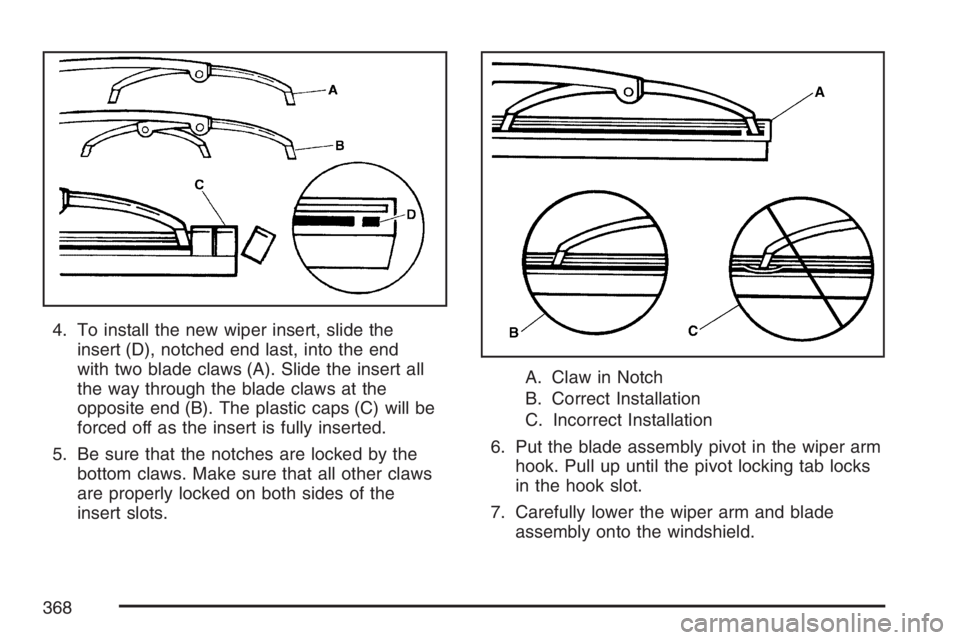
4. To install the new wiper insert, slide the
insert (D), notched end last, into the end
with two blade claws (A). Slide the insert all
the way through the blade claws at the
opposite end (B). The plastic caps (C) will be
forced off as the insert is fully inserted.
5. Be sure that the notches are locked by the
bottom claws. Make sure that all other claws
are properly locked on both sides of the
insert slots.A. Claw in Notch
B. Correct Installation
C. Incorrect Installation
6. Put the blade assembly pivot in the wiper arm
hook. Pull up until the pivot locking tab locks
in the hook slot.
7. Carefully lower the wiper arm and blade
assembly onto the windshield.
368
Page 382 of 492
5. Remove the valve cap from the valve cap
stem. Activate the TPMS sensor by
increasing or decreasing the tire’s air pressure
for 10 seconds, then stop and listen for a
single horn chirp. The single horn chirp should
sound within 15 seconds, conrming that
the sensor identication code has been
matched to this tire and wheel position. If you
do not hear the conrming single horn
chirp, turn the ignition switch to LOCK and
start over beginning with Step 2. To let
air-pressure out of a tire you can use the
pointed end of the valve cap, a pencil-style air
pressure gage, or a key.
6. Proceed to the passenger’s side front tire, and
repeat the procedure in Step 5.
7. Proceed to the passenger’s side rear tire, and
repeat the procedure in Step 5.8. Proceed to the driver’s side rear tire, and
repeat the procedure in Step 5.
9. After hearing the conrming horn chirp for the
driver side rear tire, check to see if the TPMS
low tire warning light and the DIC LOW
TIRE messages have turned off. If yes, the
TPMS sensors have been relearned. Turn the
ignition switch to LOCK.
If the low tire warning light and the DIC SERV
TPM messages are on after completing
Step 5 for the driver side rear tire, the sensor
relearn process has not been successful.
Turn the ignition switch to LOCK and repeat
the matching process beginning with Step 2.
10. Set all four tires to the recommended
air pressure level as indicated on the Tire and
Loading Information label.
11. Put the valve caps back on the valve stems.
382
Page 388 of 492
Different Size Tires and Wheels
If you add wheels or tires that are a different size
than your original equipment wheels and tires,
this may affect the way your vehicle performs,
including its braking, ride and handling
characteristics, stability, and resistance to rollover.
Additionally, if your vehicle has electronic
systems such as, anti-lock brakes, traction control,
and electronic stability control, the performance
of these systems can be affected.{CAUTION:
If you add different sized wheels, your
vehicle may not provide an acceptable
level of performance and safety if tires not
recommended for those wheels are
selected. You may increase the chance
that you will crash and suffer serious
injury. Only use GM specic wheel and
tire systems developed for your vehicle,
and have them properly installed by a GM
certied technician.
SeeBuying New Tires on page 386and
Accessories and Modications on page 316for
additional information.
388
Page 394 of 492
Changing a Flat Tire
If a tire goes at, avoid further tire and wheel
damage by driving slowly to a level place. Turn on
your hazard warning ashers. SeeHazard
Warning Flashers on page 158for more
information.
{CAUTION:
Changing a tire can be dangerous. The
vehicle can slip off the jack and roll over
or fall on you or other people. You and
they could be badly injured or even killed.
Find a level place to change your tire. To
help prevent the vehicle from moving:
1. Set the parking brake rmly.
2. Put an automatic transmission shift
lever in PARK (P), or shift a manual
transmission to FIRST (1) or
REVERSE (R).
CAUTION: (Continued)
CAUTION: (Continued)
3. If you have a four-wheel-drive vehicle,
be sure the transfer case is in a drive
gear – not in NEUTRAL.
4. Turn off the engine and do not restart
while the vehicle is raised.
5. Do not allow passengers to remain in
the vehicle.
To be even more certain the vehicle will not
move, put blocks at the front and rear of
the tire farthest away from the one being
changed. That would be the tire on the
other side, at the opposite end of the
vehicle.
394
Page 395 of 492
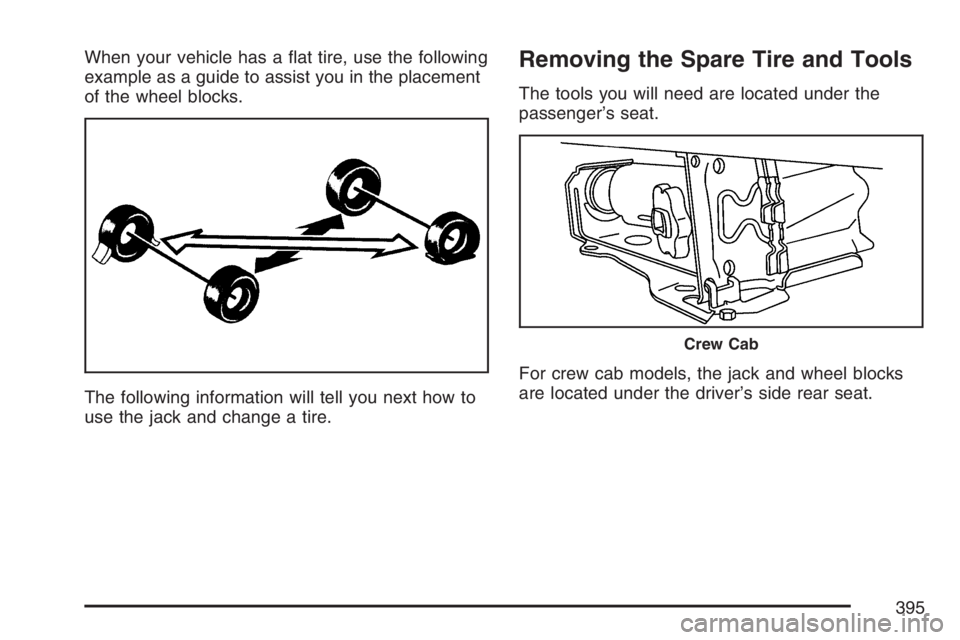
When your vehicle has a at tire, use the following
example as a guide to assist you in the placement
of the wheel blocks.
The following information will tell you next how to
use the jack and change a tire.Removing the Spare Tire and Tools
The tools you will need are located under the
passenger’s seat.
For crew cab models, the jack and wheel blocks
are located under the driver’s side rear seat.
Crew Cab
395
Page 396 of 492
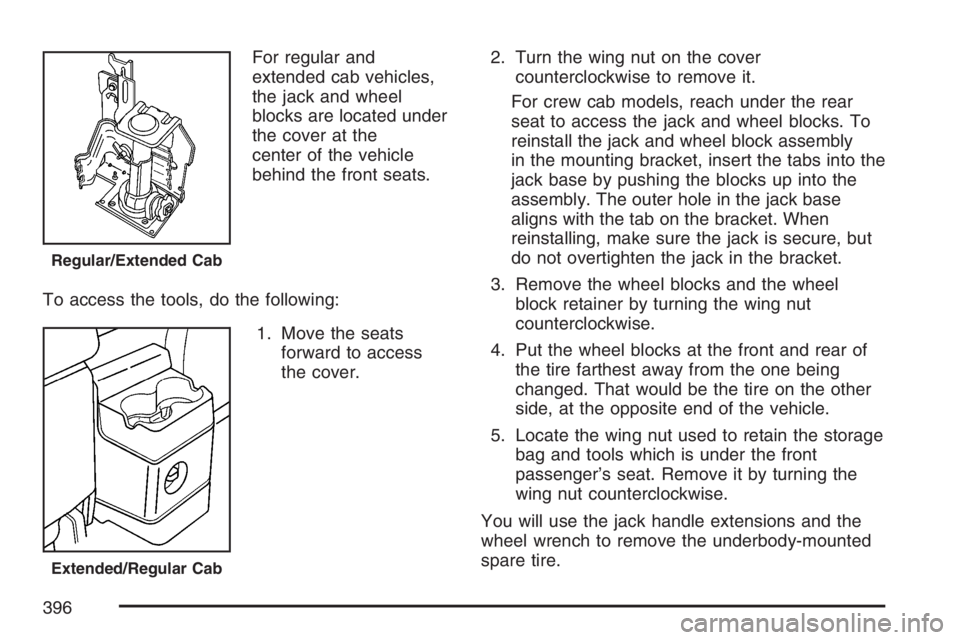
For regular and
extended cab vehicles,
the jack and wheel
blocks are located under
the cover at the
center of the vehicle
behind the front seats.
To access the tools, do the following:
1. Move the seats
forward to access
the cover.2. Turn the wing nut on the cover
counterclockwise to remove it.
For crew cab models, reach under the rear
seat to access the jack and wheel blocks. To
reinstall the jack and wheel block assembly
in the mounting bracket, insert the tabs into the
jack base by pushing the blocks up into the
assembly. The outer hole in the jack base
aligns with the tab on the bracket. When
reinstalling, make sure the jack is secure, but
do not overtighten the jack in the bracket.
3. Remove the wheel blocks and the wheel
block retainer by turning the wing nut
counterclockwise.
4. Put the wheel blocks at the front and rear of
the tire farthest away from the one being
changed. That would be the tire on the other
side, at the opposite end of the vehicle.
5. Locate the wing nut used to retain the storage
bag and tools which is under the front
passenger’s seat. Remove it by turning the
wing nut counterclockwise.
You will use the jack handle extensions and the
wheel wrench to remove the underbody-mounted
spare tire.
Regular/Extended Cab
Extended/Regular Cab
396
Page 397 of 492
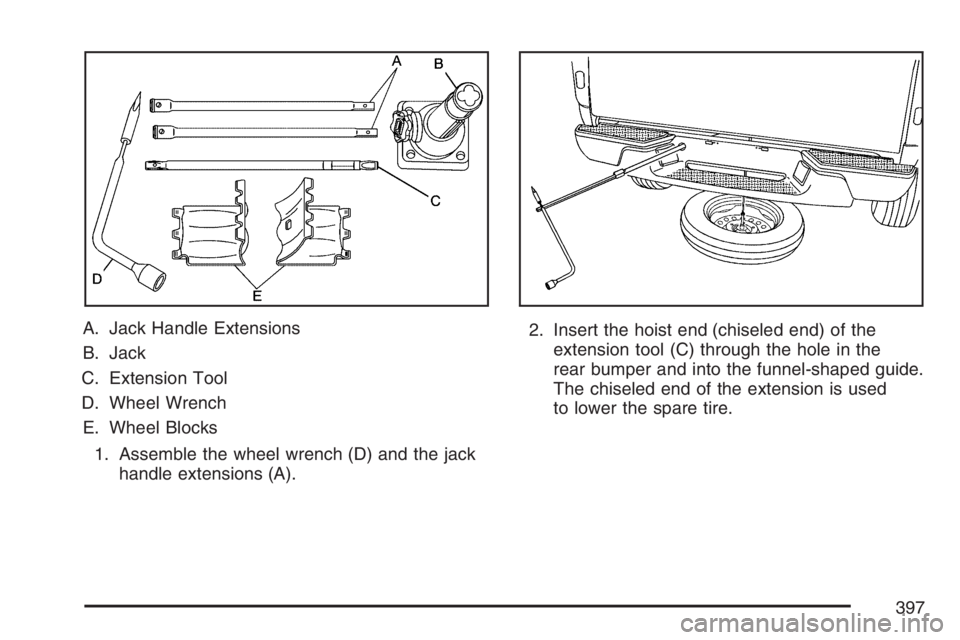
A. Jack Handle Extensions
B. Jack
C. Extension Tool
D. Wheel Wrench
E. Wheel Blocks
1. Assemble the wheel wrench (D) and the jack
handle extensions (A).2. Insert the hoist end (chiseled end) of the
extension tool (C) through the hole in the
rear bumper and into the funnel-shaped guide.
The chiseled end of the extension is used
to lower the spare tire.
397
Page 398 of 492
3. Turn the wheel wrench (D) counterclockwise
to lower the spare tire to the ground. Continue
to turn the wheel wrench until the spare tire
can be pulled out from under the vehicle.
If the spare tire does not lower to the ground,
the secondary latch is engaged causing
the tire not to lower. SeeSecondary Latch
System on page 406.
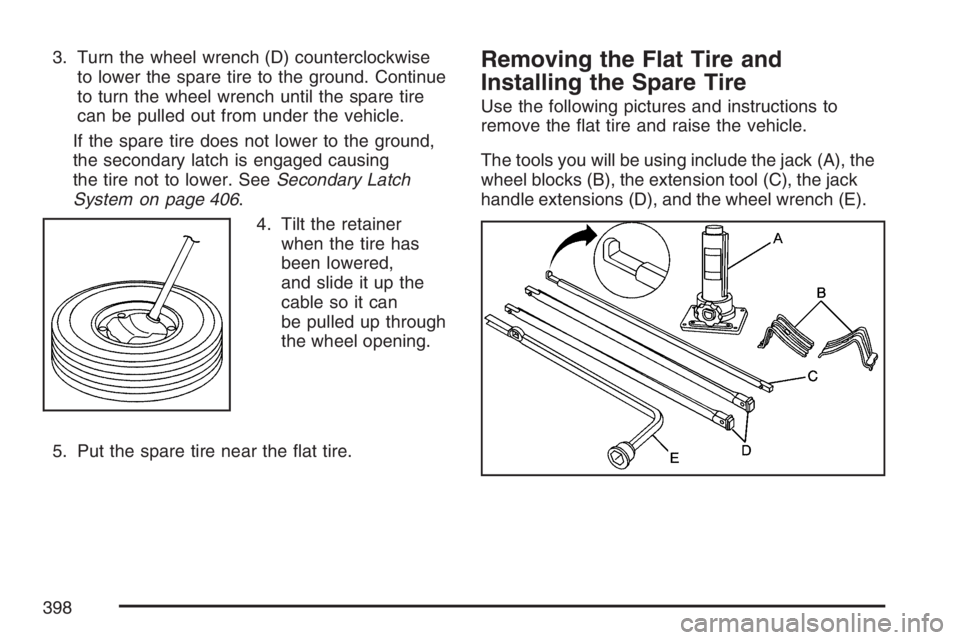
4. Tilt the retainer
when the tire has
been lowered,
and slide it up the
cable so it can
be pulled up through
the wheel opening.
5. Put the spare tire near the at tire.Removing the Flat Tire and
Installing the Spare Tire
Use the following pictures and instructions to
remove the at tire and raise the vehicle.
The tools you will be using include the jack (A), the
wheel blocks (B), the extension tool (C), the jack
handle extensions (D), and the wheel wrench (E).
398
Page 399 of 492
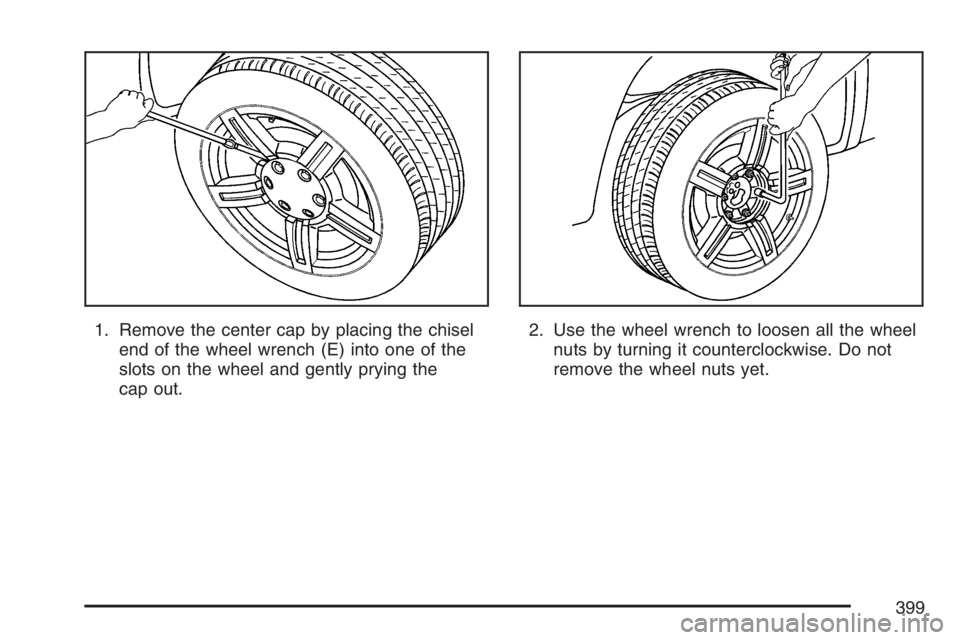
1. Remove the center cap by placing the chisel
end of the wheel wrench (E) into one of the
slots on the wheel and gently prying the
cap out.2. Use the wheel wrench to loosen all the wheel
nuts by turning it counterclockwise. Do not
remove the wheel nuts yet.
399
Page 401 of 492
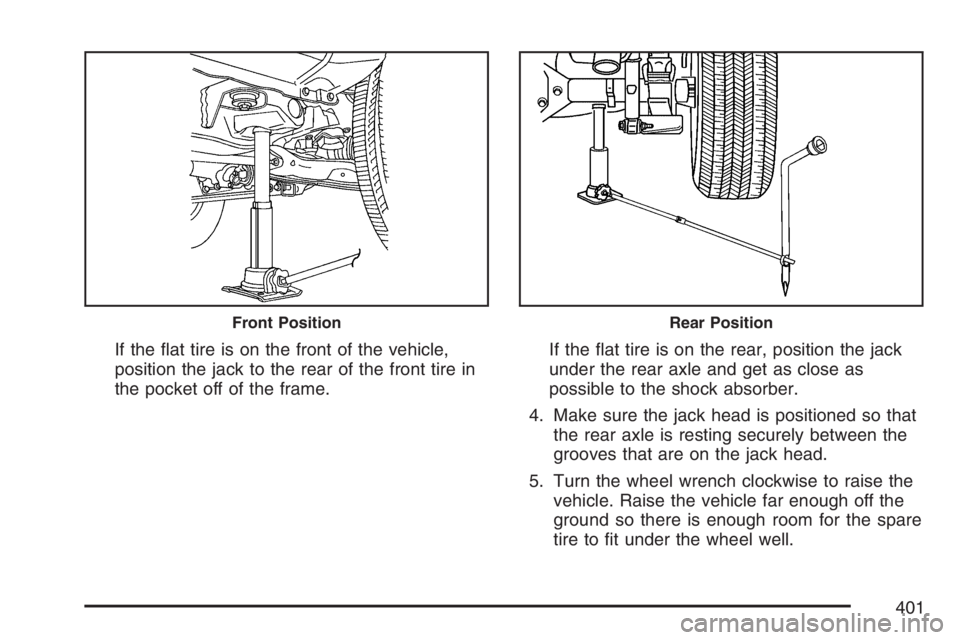
If the at tire is on the front of the vehicle,
position the jack to the rear of the front tire in
the pocket off of the frame.If the at tire is on the rear, position the jack
under the rear axle and get as close as
possible to the shock absorber.
4. Make sure the jack head is positioned so that
the rear axle is resting securely between the
grooves that are on the jack head.
5. Turn the wheel wrench clockwise to raise the
vehicle. Raise the vehicle far enough off the
ground so there is enough room for the spare
tire to t under the wheel well.
Front PositionRear Position
401