lock GMC CANYON 2007 Repair Manual
[x] Cancel search | Manufacturer: GMC, Model Year: 2007, Model line: CANYON, Model: GMC CANYON 2007Pages: 492, PDF Size: 2.79 MB
Page 198 of 492
DIC Warnings and Messages
Messages are displayed on the DIC to notify the
driver that the status of the vehicle has changed
and that some action may be needed by the driver
to correct the condition. Multiple messages may
appear one after another. The messages are
displayed for four seconds each.
Some messages may not require immediate
action, but you should press and release the trip
odometer reset stem to acknowledge that you
received the messages and to clear them from the
display. Each message must be acknowledged
individually.
Some messages cannot be cleared from the DIC
display because they are more urgent. These
messages require action before they can be
cleared. You should take any messages that
appear on the display seriously and remember
that clearing the messages will only make
the messages disappear, not correct the problem.
The following are the possible messages that can
be displayed and some information about them.
AC (Air Conditioning) OFF
This message displays when the engine coolant
temperature is too high and the air conditioning in
your vehicle needs to be turned off. SeeEngine
Overheating on page 340andClimate Control
System on page 173for more information.
This message displays along with the ENG HOT
message.
ABS (Anti-Lock Brake System) FAULT
This message displays if there is a problem
with the Anti-Lock Brake System (ABS). Check the
ABS as soon as possible and have your vehicle
serviced by your dealer. SeeBrakes on page 350
andAnti-Lock Brake System Warning Light on
page 186for more information. Press and release
the reset stem to acknowledge the message
and clear it from the display.
198
Page 204 of 492
Here are some ways in which you can help avoid
distraction while driving.
While your vehicle is parked:
Familiarize yourself with all of its controls.
Familiarize yourself with its operation.
Set up your audio system by presetting your
favorite radio stations, setting the tone, and
adjusting the speakers. Then, when driving
conditions permit, you can tune to your favorite
radio stations using the presets and steering
wheel controls if the vehicle has them.
Notice:Before adding any sound equipment
to your vehicle, such as an audio system, CD
player, CB radio, mobile telephone, or two-way
radio, make sure that it can be added by
checking with your dealer. Also, check federal
rules covering mobile radio and telephone
units. If sound equipment can be added, it is
very important to do it properly. Added sound
equipment may interfere with the operation of
your vehicle’s engine, radio, or other systems,
and even damage them. Your vehicle’s systems
may interfere with the operation of sound
equipment that has been added.Notice:The chime signals related to safety
belts, parking brake, and other functions
of your vehicle operate through the
radio/entertainment system. If that equipment
is replaced or additional equipment is added
to your vehicle, the chimes may not work. Make
sure that replacement or additional equipment
is compatible with your vehicle before
installing it. SeeAccessories and Modifications
on page 316.
Setting the Time for Radios without
Radio Data Systems (RDS)
Press and hold HR (hour) until the correct hour
appears on the display. Press and hold MIN
(minute) until the correct minute appears on the
display. There is an initial two-second delay before
the clock goes into time-set mode. Display the
time with the ignition off, by pressing RCL (recall),
HR, or MIN.
204
Page 205 of 492
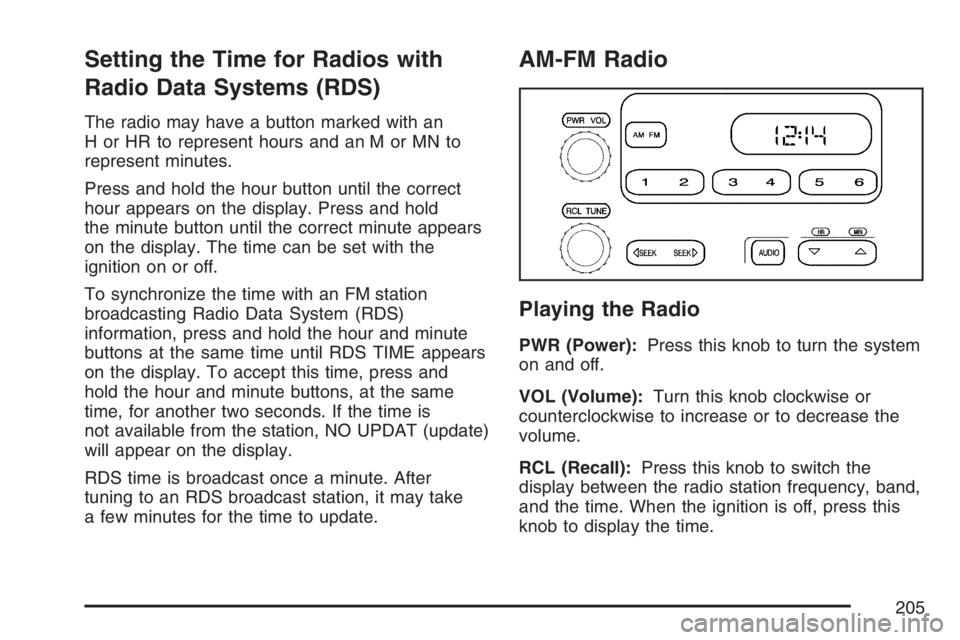
Setting the Time for Radios with
Radio Data Systems (RDS)
The radio may have a button marked with an
H or HR to represent hours and an M or MN to
represent minutes.
Press and hold the hour button until the correct
hour appears on the display. Press and hold
the minute button until the correct minute appears
on the display. The time can be set with the
ignition on or off.
To synchronize the time with an FM station
broadcasting Radio Data System (RDS)
information, press and hold the hour and minute
buttons at the same time until RDS TIME appears
on the display. To accept this time, press and
hold the hour and minute buttons, at the same
time, for another two seconds. If the time is
not available from the station, NO UPDAT (update)
will appear on the display.
RDS time is broadcast once a minute. After
tuning to an RDS broadcast station, it may take
a few minutes for the time to update.
AM-FM Radio
Playing the Radio
PWR (Power):Press this knob to turn the system
on and off.
VOL (Volume):Turn this knob clockwise or
counterclockwise to increase or to decrease the
volume.
RCL (Recall):Press this knob to switch the
display between the radio station frequency, band,
and the time. When the ignition is off, press this
knob to display the time.
205
Page 207 of 492
To adjust both tone controls and both speaker
controls to the middle position, rst exit out of audio
mode by pressing another button, causing the radio
to perform that function or wait ve seconds for the
display to return to time of day. Then press and hold
AUDIO for more than two seconds until a beep
sounds. CEN (center) displays.
Adjusting the Speakers (Balance/Fade)
AUDIO:To adjust the balance between the
right and the left speakers, press and release
AUDIO until BAL (balance) displays. Then press
and hold the up or the down arrow to move
the sound toward the right or the left speakers.
To adjust the fade between the front and the rear
speakers, press and release AUDIO until FAD
(fade) displays. Then press and hold the up or the
down arrow to move the sound toward the front
or the rear speakers.
To adjust balance or fade to the middle position,
select BAL or FAD. Then press and hold
AUDIO for more than two seconds until a beep
sounds. B (balance) and a zero or F (fade) and a
zero displays.To adjust both tone controls and both speaker
controls to the middle position, rst exit out of audio
mode by pressing another button, causing the radio
to perform that function or wait ve seconds for the
display to return to time of day. Then press and hold
AUDIO for more than two seconds until a beep
sounds. CEN (center) displays.
Fade might not be available if the vehicle is a
regular cab model.Radio Messages
CAL (Calibrated):The audio system has been
calibrated for your vehicle from the factory. If CAL
displays it means that the radio has not been
congured properly for your vehicle and must be
returned to your dealer for service.
LOC (Locked):This message is displayed when
the THEFTLOCK
®system has locked up. Take
the vehicle to your dealer for service.
If any error occurs repeatedly or if an error cannot
be corrected, contact your dealer.
207
Page 214 of 492
When a station that broadcasts traffic
announcements is found, the radio stops seeking
and TRAF appears on the display. If no station
is found that broadcasts traffic announcements,
NO TRAF appears on the display.
If TRAF is on the display, press the TRAF button
to turn off the traffic announcements.
The radio plays the traffic announcement if the
volume is low. The radio interrupts the play
of a CD if the last tuned station broadcasts traffic
announcements.
This function does not apply to XM™ Satellite
Radio Service.
Radio Messages
CAL ERR (Calibration Error):The audio system
has been calibrated for your vehicle from the
factory. If CAL ERR appears on the display
it means that the radio has not been congured
properly for your vehicle and it must be returned to
your dealer for service.
LOCKED:This message displays when the
THEFTLOCK
®system has locked up. Take your
vehicle to your dealer for service.
If any error occurs repeatedly or if an error cannot
be corrected, contact your dealer.
Radio Messages for XM™ Only
SeeXM Radio Messages on page 236later in this
section for further detail.
Playing a CD
Insert a CD partway into the slot, label side up.
The player pulls it in, and READING appears
on the display. The CD should begin playing. If you
want to insert a CD with the ignition off, rst
press the eject button or the DISPL knob.
If the ignition or radio is turned off with a CD in the
player it stays in the player. When the ignition or
radio is turned on, the CD starts to play where it
stopped, if it was the last selected audio source.
When the CD is inserted, the CD symbol appears
on the display. As each new track starts to
play, the track number appears on the display.
The CD player can play the smaller 3 inch (8 cm)
single CDs with an adapter ring. Full-size CDs and
the smaller CDs are loaded in the same manner.
If playing a CD-R, the sound quality may be
reduced due to CD-R quality, the method of
recording, the quality of the music that has been
recorded, and the way the CD-R has been handled.
214
Page 218 of 492
Radio Data System (RDS)
The audio system has a Radio Data System (RDS).
RDS features are available for use only on FM
stations that broadcast RDS information.
With RDS, the radio can do the following:
Seek to stations broadcasting the selected
type of programming
Receive announcements concerning local and
national emergencies
Display messages from radio stations
Seek to stations with traffic announcements
This system relies upon receiving specic
information from these stations and only works
when the information is available. In rare cases, a
radio station may broadcast incorrect information
that causes the radio features to work improperly.
If this happens, contact the radio station.
While the radio is tuned to an RDS station, the
station name or call letters appear on the display
instead of the frequency. RDS stations may
also provide the time of day, a program type (PTY)
for current programming, and the name of the
program being broadcast.
XM™ Satellite Radio Service
XM™ is a satellite radio service that is based in
the 48 contiguous United States and Canada.
XM™ offers a large variety of coast-to-coast
channels including music, news, sports, talk,
traffic/weather (U.S. subscribers), and children’s
programming. XM™ provides digital quality
audio and text information that includes song title
and artist name. A service fee is required in
order to receive the XM™ service. For more
information, contact XM™; In the U.S. at
www.xmradio.com or call 1-800-852-XMXM (9696)
or in Canada at www.xmradio.ca or call
1-877-GET-XMSR (438-9677).
Playing the Radio
PWR (Power):Push this knob to turn the system
on and off.
oVOLUMEp:Turn this knob clockwise or
counterclockwise to increase or to decrease the
volume.
INFO (Information) (XM™ Satellite Radio
Service and RDS Features):When the ignition
is off, press this knob to display the time.
218
Page 223 of 492
RDS Messages
INFO (Information):If the current station has a
message, INFO appears on the display. Press this
button to see the message. The message may
display the artist, song title, call in phone
numbers, etc.
If the entire message is not displayed, parts of the
message appears every three seconds. To scroll
through the message, press and release the INFO
button. A new group of words appears on the
display after every press of this button. Once the
complete message has displayed, INFO disappears
from the display until another new message is
received. The last message can be displayed by
pressing the INFO button. You can view the last
message until a new message is received or a
different station is tuned to.
When a message is not available from a station,
NO INFO appears on the display.
Radio Messages
CAL ERR (Calibration Error):The audio system
has been calibrated for your vehicle from the
factory. If CAL ERR appears on the display, it
means that the radio has not been congured
properly for the vehicle and must be returned to
your dealer for service.
LOCKED:This message is displayed when the
THEFTLOCK
®system has locked up. Take
the vehicle to your dealer for service.
If any error occurs repeatedly, or if an error cannot
be corrected, contact your dealer.
Radio Messages for XM™ Only
SeeXM Radio Messages on page 236later in this
section for further detail.
223
Page 236 of 492
XM Radio Messages
Radio Display Message Condition Action Required
XL (Explicit Language
Channels)XL on the radio display,
after the channel name,
indicates content with
explicit language.These channels, or any others, can be blocked at a
customer’s request, by calling 1-800-852-XMXM (9696).
Updating Updating encryption code The encryption code in the receiver is being updated, and
no action is required. This process should take no longer
than 30 seconds.
No Signl Loss of signal The system is functioning correctly, but the vehicle is in a
location that is blocking the XM™ signal. When the vehicle
is moved into an open area, the signal should return.
Loading Acquiring channel audio
(after 4 second delay)The radio system is acquiring and processing audio and text
data. No action is needed. This message should disappear
shortly.
Off Air Channel not in service This channel is not currently in service. Tune to another
channel.
CH Unavl Channel no longer
availableThis previously assigned channel is no longer assigned.
Tune to another station. If this station was one of the
presets, choose another station for that preset button.
No Info Artist Name/Feature
not availableNo artist information is available at this time on this channel.
The system is working properly.
No Info Song/Program Title
not availableNo song title information is available at this time on this
channel. The system is working properly.
No Info Category Name
not availableNo category information is available at this time on this
channel. The system is working properly.
236
Page 237 of 492
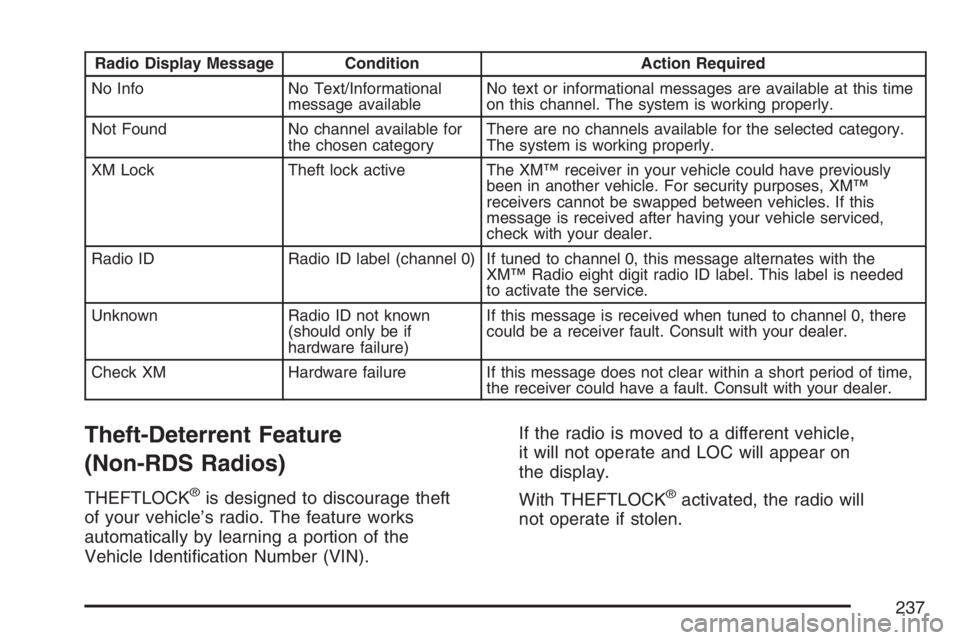
Radio Display Message Condition Action Required
No Info No Text/Informational
message availableNo text or informational messages are available at this time
on this channel. The system is working properly.
Not Found No channel available for
the chosen categoryThere are no channels available for the selected category.
The system is working properly.
XM Lock Theft lock active The XM™ receiver in your vehicle could have previously
been in another vehicle. For security purposes, XM™
receivers cannot be swapped between vehicles. If this
message is received after having your vehicle serviced,
check with your dealer.
Radio ID Radio ID label (channel 0) If tuned to channel 0, this message alternates with the
XM™ Radio eight digit radio ID label. This label is needed
to activate the service.
Unknown Radio ID not known
(should only be if
hardware failure)If this message is received when tuned to channel 0, there
could be a receiver fault. Consult with your dealer.
Check XM Hardware failure If this message does not clear within a short period of time,
the receiver could have a fault. Consult with your dealer.
Theft-Deterrent Feature
(Non-RDS Radios)
THEFTLOCK®is designed to discourage theft
of your vehicle’s radio. The feature works
automatically by learning a portion of the
Vehicle Identication Number (VIN).If the radio is moved to a different vehicle,
it will not operate and LOC will appear on
the display.
With THEFTLOCK®activated, the radio will
not operate if stolen.
237
Page 238 of 492
Theft-Deterrent Feature
(RDS Radios)
THEFTLOCK®is designed to discourage theft
of your vehicle’s radio. The feature works
automatically by learning a portion of the
Vehicle Identication Number (VIN). If the radio
is moved to a different vehicle, it will not operate
and LOCKED will appear on the display.
When the radio and vehicle are turned off, the
blinking red light indicates that THEFTLOCK
®
is armed.
With THEFTLOCK
®activated, the radio will not
operate if stolen.
Radio Reception
You may experience frequency interference and
static during normal radio reception if items
such as cellphone chargers, vehicle convenience
accessories, and external electronic devices
are plugged into the accessory power outlet.
If there is interference or static, unplug the item
from the accessory power outlet.
AM
The range for most AM stations is greater than for
FM, especially at night. The longer range can
cause station frequencies to interfere with each
other. For better radio reception, most AM
radio stations will boost the power levels during
the day, and then reduce these levels during
the night. Static can also occur when things like
storms and power lines interfere with radio
reception. When this happens, try reducing the
treble on your radio.
FM Stereo
FM stereo will give the best sound, but FM signals
will reach only about 10 to 40 miles (16 to 65 km).
Tall buildings or hills can interfere with FM
signals, causing the sound to fade in and out.
238