instrument cluster GMC CANYON 2007 User Guide
[x] Cancel search | Manufacturer: GMC, Model Year: 2007, Model line: CANYON, Model: GMC CANYON 2007Pages: 492, PDF Size: 2.79 MB
Page 170 of 492
Interior Lamps
The thumbwheel for the interior lamps is located
next to the exterior lamps control. SeeExterior
Lamps on page 166for additional information on
location.
Instrument Panel Brightness
D(Instrument Panel Lights):Turn the
thumbwheel up or down to brighten or dim the
instrument panel lights and the radio display.
The instrument panel lights, cluster, and radio
display do not dim to complete darkness.
The instrument panel light brightness control will
only work if the headlamps or parking lamps
are on. SeeExterior Lamps on page 166.
Dome Lamp
The dome lamp will come on when a door is
opened. They will shut off several seconds after
all doors are closed.
You can also turn the dome lamp on manually by
turning the interior lamps thumbwheel all the
way up. In this position, the dome lamp will remain
on whether a door is opened or closed. See
Interior Lamps on page 170for additional
information on location.
Dome Lamp Override
E(Dome Override):Press this button, located
below the exterior lamp control, to turn the
dome lamp off even when a door is opened. See
Exterior Lamps on page 166for more information
on location.
To return the lamp to automatic operation, press
the button again.
170
Page 178 of 492
Instrument Panel Cluster
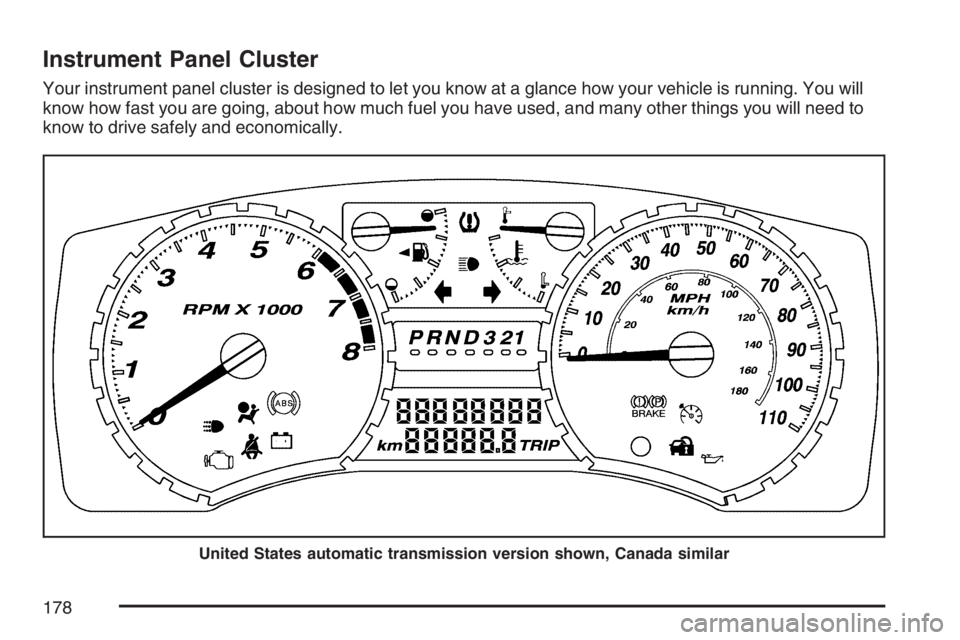
Your instrument panel cluster is designed to let you know at a glance how your vehicle is running. You will
know how fast you are going, about how much fuel you have used, and many other things you will need to
know to drive safely and economically.
United States automatic transmission version shown, Canada similar
178
Page 194 of 492
Driver Information Center (DIC)
The Driver Information Center (DIC) displays
information such as the trip odometer,
personalization features, and warning messages.
The DIC display is located on the instrument
panel cluster.
DIC Controls and Displays
The Driver Information Center (DIC) comes on
when the ignition is on.
If a problem is detected, a warning message will
appear on the display. Pressing and releasing
the trip odometer reset stem on the DIC will
acknowledge some current warnings or service
messages. Some messages will only clear
after the required action has been taken.
The DIC has different modes which can be
accessed by pressing the trip odometer reset stem
on the DIC. These modes are explained in the
following section. The DIC trip odometer reset stem
is located on the instrument panel cluster next to
the DIC display. To scroll through the available
functions, press and release the reset stem.
Trip Information
Odometer
The odometer is automatically displayed on the
DIC when you start the vehicle. The odometer
shows the total distance the vehicle has
been driven in either miles for the United States
or kilometers for Canada.
Trip Odometer
Press and release the reset stem until TRIP
appears on the DIC display. The trip odometer
shows the current distance traveled since the last
reset of the trip odometer in either miles for the
United States or kilometers for Canada.
Press and hold the reset stem for about
four seconds to reset the trip odometer.
194
Page 200 of 492
FUEL CAP
This message displays if the vehicle’s fuel cap is
either off or loose. Pull over as soon as possible
and check to see if the fuel cap is secure. You may
also see the check engine light on the instrument
panel cluster. If the check engine light does
come on when the fuel cap was loose, it may take
a few driving trips before the light turns off. See
Malfunction Indicator Lamp on page 188for more
information if the light still remains on. Press
and release the reset stem to acknowledge the
message and clear it from the display.
LOW FUEL
This message displays if the level of fuel in
the vehicle is low. Also check the fuel gage. See
Fuel Gage on page 193for more information.
Rell the fuel tank as soon as possible.
LOW TIRE
This message displays if a low tire pressure
is detected in any of the vehicle’s tires. Press
and release the reset stem to acknowledge
the message and clear it from the display.The message appears at each ignition cycle
until the tires are inated to the correct
ination pressure. SeeTires on page 369and
Ination - Tire Pressure on page 377for
more information on tires and the correct
ination pressures.
LOW TRAC (Traction)
If your vehicle has the Traction Control
System (TCS), this message displays when a
low traction condition is detected. SeeTraction
Control System (TCS) on page 249for more
information. Press and release the reset stem to
acknowledge the message and clear it from
the display.
OIL
This message displays when the oil pressure is
low. SeeOil Pressure Light on page 191and
Engine Oil on page 325for more information.
200
Page 202 of 492
SERV (Service) VEH (Vehicle)
This message displays if your vehicle needs
service. Have your vehicle serviced by your dealer
as soon as possible.
SERVICE CHARG (Charge)
SYS (System)
This message displays if there is a problem with
the battery charging system. Under certain
conditions, the battery warning light may also turn
on in the instrument panel cluster. SeeBattery
Warning Light on page 184. The battery will not be
charging at an optimal rate and the vehicle will
lose the ability to enter the fuel economy mode.
The vehicle is safe to drive, however have
the electrical system checked by your dealer.
Press and release the reset stem to acknowledge
the message and clear it from the display.
TRACTION FAULT
If your vehicle has the Traction Control
System (TCS), this message may display if
there is a problem with the TCS. Check the
TCS as soon as possible and have your vehicle
serviced by your dealer. SeeTraction Control
System (TCS) on page 249for more information.
Press and release the reset stem to acknowledge
the message and clear it from the display.
TURN SIGNAL
This message displays when the turn signal is on
for about 0.75 miles (1.2 km) of travel. Press
and release the reset stem to acknowledge the
message and clear it from the display.
202
Page 322 of 492
This would allow fuel to evaporate into the
atmosphere. If the fuel cap is not properly installed,
the FUEL CAP message will appear on the
Driver Information Center (DIC) and the check
engine light will be lit on the instrument panel
cluster. SeeDIC Warnings and Messages
on page 198andMalfunction Indicator Lamp on
page 188for more information.
{CAUTION:
If a re starts while you are refueling, do
not remove the nozzle. Shut off the ow of
fuel by shutting off the pump or by
notifying the station attendant. Leave the
area immediately.
Notice:If you need a new fuel cap, be sure to
get the right type. Your dealer can get one
for you. If you get the wrong type, it may not
t properly. This may cause your malfunction
indicator lamp to light and may damage
your fuel tank and emissions system. See
Malfunction Indicator Lamp on page 188.
Filling a Portable Fuel Container
{CAUTION:
Never ll a portable fuel container while it
is in your vehicle. Static electricity
discharge from the container can ignite the
gasoline vapor. You can be badly burned
and your vehicle damaged if this occurs.
To help avoid injury to you and others:
Dispense gasoline only into approved
containers.
Do not ll a container while it is inside a
vehicle, in a vehicle’s trunk, pickup
bed, or on any surface other than the
ground.
Bring the ll nozzle in contact with the
inside of the ll opening before
operating the nozzle. Contact should
be maintained until the lling is
complete.
Do not smoke while pumping gasoline.
322
Page 329 of 492
How to Reset the Engine Oil Life
System
The Engine Oil Life System calculates when to
change your engine oil and lter based on vehicle
use. Anytime your oil is changed, reset the
system so it can calculate when the next oil
change is required. If a situation occurs where you
change your oil prior to a CHANGE OIL message
being turned on, reset the system.
To reset the Engine Oil Life system, do the
following:
1. With the engine off, turn the ignition to ON.
2. Press and release the stem in the lower center
of the instrument cluster until the OIL LIFE
message is displayed.
3. Once the alternating OIL LIFE and RESET
messages appear, press and hold the stem
until several beeps sound. This conrms
that the oil life system has been reset.
4. Turn the key to LOCK.
If the CHANGE OIL message comes back on
when you start your vehicle, the engine oil
life system has not reset. Repeat the procedure.
SeeDIC Warnings and Messages on page 198.
What to Do with Used Oil
Used engine oil contains certain elements that
may be unhealthy for your skin and could
even cause cancer. Do not let used oil stay on
your skin for very long. Clean your skin and nails
with soap and water, or a good hand cleaner.
Wash or properly dispose of clothing or rags
containing used engine oil. See the manufacturer’s
warnings about the use and disposal of oil
products.
Used oil can be a threat to the environment. If you
change your own oil, be sure to drain all the oil
from the lter before disposal. Never dispose of oil
by putting it in the trash, pouring it on the
ground, into sewers, or into streams or bodies of
water. Instead, recycle it by taking it to a place
that collects used oil. If you have a problem
properly disposing of your used oil, ask your
dealer, a service station, or a local recycling
center for help.
329
Page 378 of 492
How to Check
Use a good quality pocket-type gage to check tire
pressure. You cannot tell if your tires are
properly inated simply by looking at them. Radial
tires may look properly inated even when they
are underinated. Check the tire’s ination
pressure when the tires are cold. Cold means your
vehicle has been sitting for at least three hours
or driven no more than 1 mile (1.6 km).
Remove the valve cap from the tire valve stem.
Press the tire gage rmly onto the valve to
get a pressure measurement. If the cold tire
ination pressure matches the recommended
pressure on the Tire and Loading Information
label, no further adjustment is necessary. If the
ination pressure is low, add air until you reach the
recommended amount.
If you overll the tire, release air by pushing on
the metal stem in the center of the tire valve.
Recheck the tire pressure with the tire gage.
Be sure to put the valve caps back on the valve
stems. They help prevent leaks by keeping out dirt
and moisture.
Tire Pressure Monitor System
Your vehicle has a Tire Pressure Monitor System
(TPMS). This system uses radio and sensor
technology to check tire pressure levels. TPMS
sensors are mounted onto each tire and wheel
assembly on your vehicle, except the spare tire.
The TPMS sensors monitor the air pressure
in your vehicle’s tires and transmit the tire pressure
readings to a receiver located in the vehicle.
When a low tire pressure condition is detected,
the TPMS will illuminate the low tire pressure
warning light located in the instrument panel
cluster, and at the same time display the LOW
TIRE warning message on the Driver Information
Center (DIC). The low tire pressure warning
light and the LOW TIRE warning message appear
at each ignition cycle until the tires are inated
to the correct ination pressure.
378
Page 429 of 492
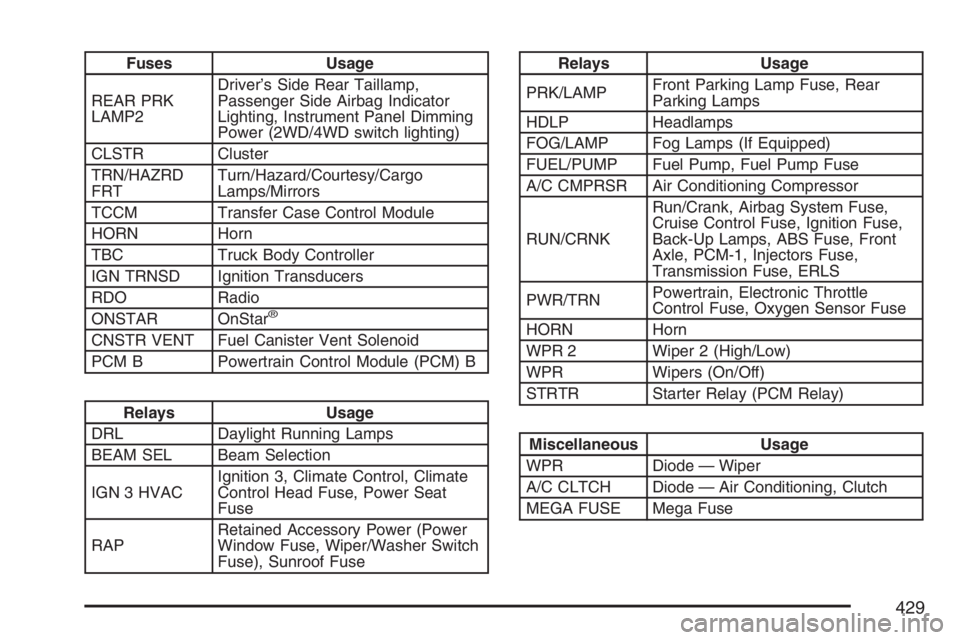
Fuses Usage
REAR PRK
LAMP2Driver’s Side Rear Taillamp,
Passenger Side Airbag Indicator
Lighting, Instrument Panel Dimming
Power (2WD/4WD switch lighting)
CLSTR Cluster
TRN/HAZRD
FRTTurn/Hazard/Courtesy/Cargo
Lamps/Mirrors
TCCM Transfer Case Control Module
HORN Horn
TBC Truck Body Controller
IGN TRNSD Ignition Transducers
RDO Radio
ONSTAR OnStar
®
CNSTR VENT Fuel Canister Vent Solenoid
PCM B Powertrain Control Module (PCM) B
Relays Usage
DRL Daylight Running Lamps
BEAM SEL Beam Selection
IGN 3 HVACIgnition 3, Climate Control, Climate
Control Head Fuse, Power Seat
Fuse
RAPRetained Accessory Power (Power
Window Fuse, Wiper/Washer Switch
Fuse), Sunroof Fuse
Relays Usage
PRK/LAMPFront Parking Lamp Fuse, Rear
Parking Lamps
HDLP Headlamps
FOG/LAMP Fog Lamps (If Equipped)
FUEL/PUMP Fuel Pump, Fuel Pump Fuse
A/C CMPRSR Air Conditioning Compressor
RUN/CRNKRun/Crank, Airbag System Fuse,
Cruise Control Fuse, Ignition Fuse,
Back-Up Lamps, ABS Fuse, Front
Axle, PCM-1, Injectors Fuse,
Transmission Fuse, ERLS
PWR/TRNPowertrain, Electronic Throttle
Control Fuse, Oxygen Sensor Fuse
HORN Horn
WPR 2 Wiper 2 (High/Low)
WPR Wipers (On/Off)
STRTR Starter Relay (PCM Relay)
Miscellaneous Usage
WPR Diode — Wiper
A/C CLTCH Diode — Air Conditioning, Clutch
MEGA FUSE Mega Fuse
429
Page 484 of 492
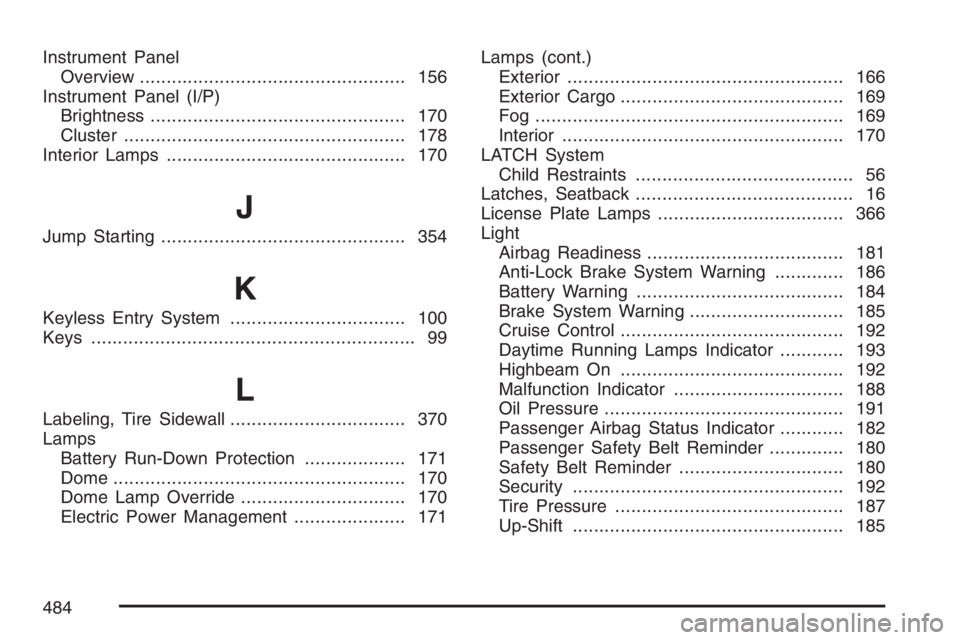
Instrument Panel
Overview.................................................. 156
Instrument Panel (I/P)
Brightness................................................ 170
Cluster..................................................... 178
Interior Lamps............................................. 170
J
Jump Starting.............................................. 354
K
Keyless Entry System................................. 100
Keys............................................................. 99
L
Labeling, Tire Sidewall................................. 370
Lamps
Battery Run-Down Protection................... 171
Dome....................................................... 170
Dome Lamp Override............................... 170
Electric Power Management..................... 171Lamps (cont.)
Exterior.................................................... 166
Exterior Cargo.......................................... 169
Fog .......................................................... 169
Interior..................................................... 170
LATCH System
Child Restraints......................................... 56
Latches, Seatback......................................... 16
License Plate Lamps................................... 366
Light
Airbag Readiness..................................... 181
Anti-Lock Brake System Warning............. 186
Battery Warning....................................... 184
Brake System Warning............................. 185
Cruise Control.......................................... 192
Daytime Running Lamps Indicator............ 193
Highbeam On.......................................... 192
Malfunction Indicator................................ 188
Oil Pressure............................................. 191
Passenger Airbag Status Indicator............ 182
Passenger Safety Belt Reminder.............. 180
Safety Belt Reminder............................... 180
Security................................................... 192
Tire Pressure........................................... 187
Up-Shift................................................... 185
484