clock GMC CANYON 2009 User Guide
[x] Cancel search | Manufacturer: GMC, Model Year: 2009, Model line: CANYON, Model: GMC CANYON 2009Pages: 414, PDF Size: 2.48 MB
Page 278 of 414
How to Add Coolant to the Radiator
{CAUTION:
An electric engine cooling fan under the hood can
start up even when the engine is not running and
can cause injury. Keep hands, clothing, and tools
away from any underhood electric fan.
{CAUTION:
Steam and scalding liquids from a hot cooling
system can blow out and burn you badly. They are
under pressure, and if you turn the surge tank
pressure cap — even a little — they can come out
at high speed. Never turn the cap when the cooling
system, including the surge tank pressure cap, is
hot. Wait for the cooling system and surge tank
pressure cap to cool if you ever have to turn the
pressure cap.If coolant is needed, add the proper mixture directly to
the radiator, but be sure the cooling system is cool
before this is done.
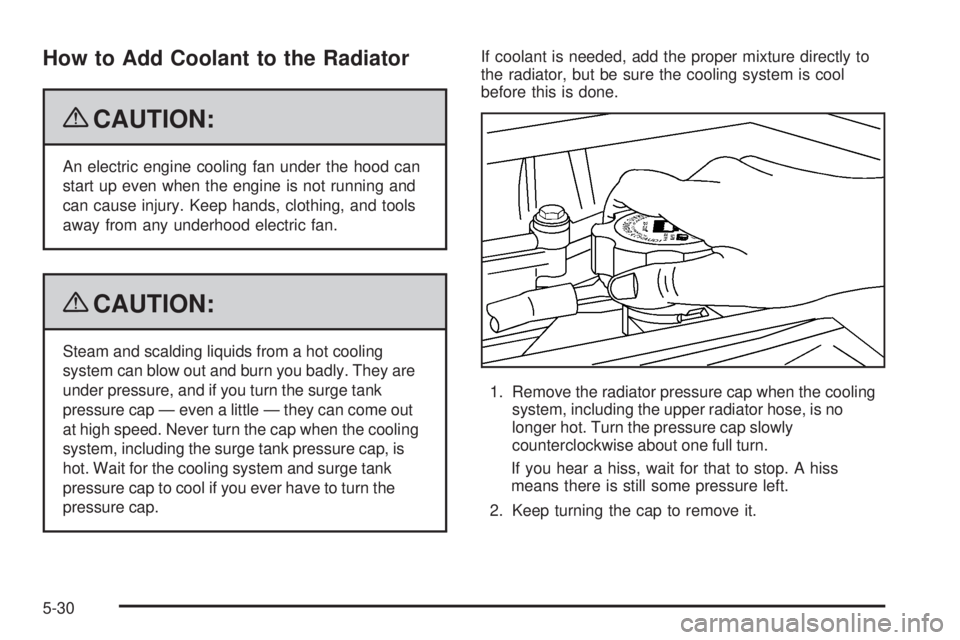
1. Remove the radiator pressure cap when the cooling
system, including the upper radiator hose, is no
longer hot. Turn the pressure cap slowly
counterclockwise about one full turn.
If you hear a hiss, wait for that to stop. A hiss
means there is still some pressure left.
2. Keep turning the cap to remove it.
5-30
Page 296 of 414
Headlamps
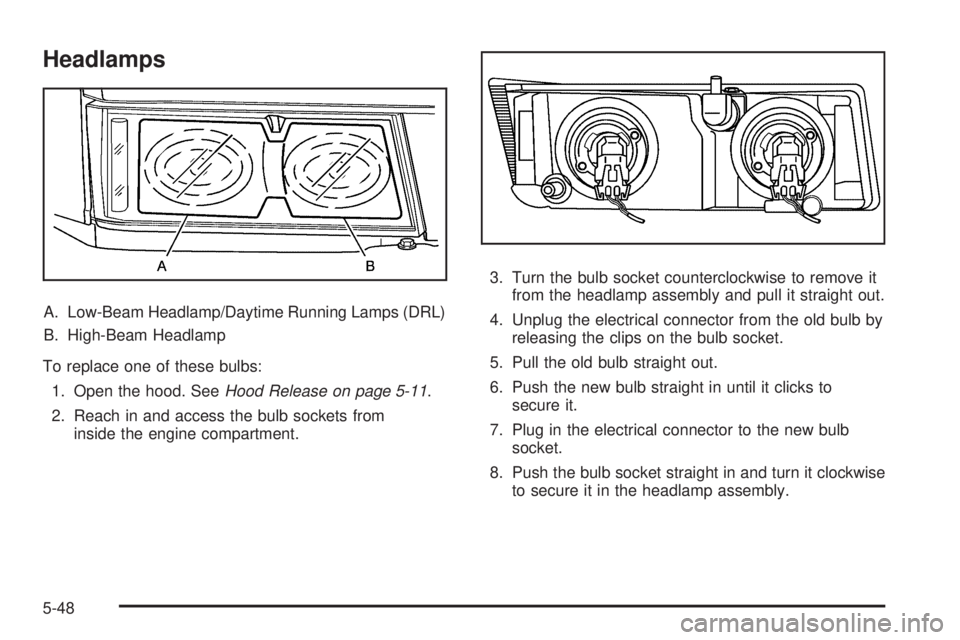
A. Low-Beam Headlamp/Daytime Running Lamps (DRL)
B. High-Beam Headlamp
To replace one of these bulbs:
1. Open the hood. SeeHood Release on page 5-11.
2. Reach in and access the bulb sockets from
inside the engine compartment.3. Turn the bulb socket counterclockwise to remove it
from the headlamp assembly and pull it straight out.
4. Unplug the electrical connector from the old bulb by
releasing the clips on the bulb socket.
5. Pull the old bulb straight out.
6. Push the new bulb straight in until it clicks to
secure it.
7. Plug in the electrical connector to the new bulb
socket.
8. Push the bulb socket straight in and turn it clockwise
to secure it in the headlamp assembly.
5-48
Page 297 of 414
Front Turn Signal, Parking and
Daytime Running Lamps (DRL)
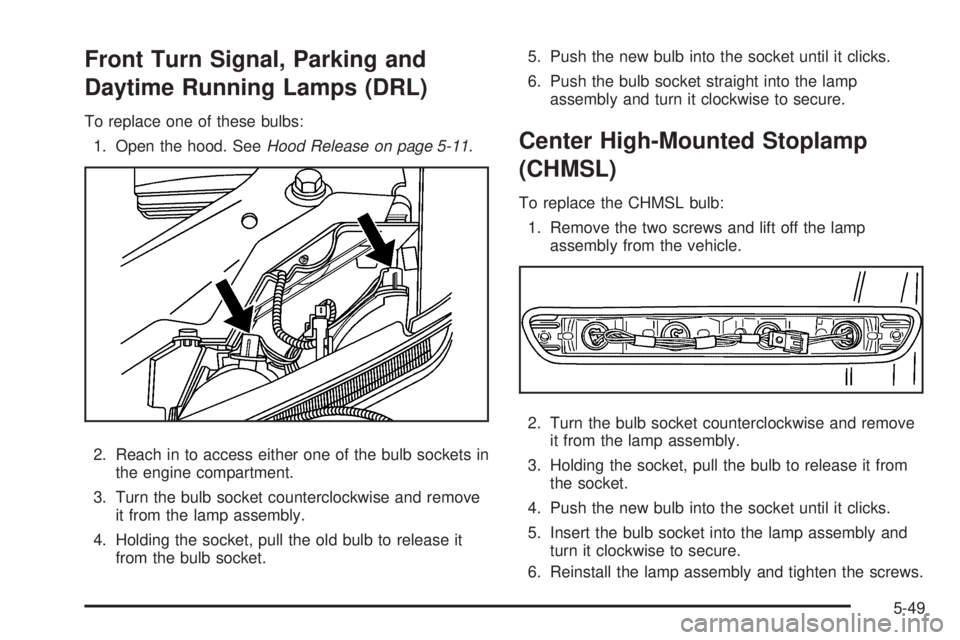
To replace one of these bulbs:
1. Open the hood. SeeHood Release on page 5-11.
2. Reach in to access either one of the bulb sockets in
the engine compartment.
3. Turn the bulb socket counterclockwise and remove
it from the lamp assembly.
4. Holding the socket, pull the old bulb to release it
from the bulb socket.5. Push the new bulb into the socket until it clicks.
6. Push the bulb socket straight into the lamp
assembly and turn it clockwise to secure.
Center High-Mounted Stoplamp
(CHMSL)
To replace the CHMSL bulb:
1. Remove the two screws and lift off the lamp
assembly from the vehicle.
2. Turn the bulb socket counterclockwise and remove
it from the lamp assembly.
3. Holding the socket, pull the bulb to release it from
the socket.
4. Push the new bulb into the socket until it clicks.
5. Insert the bulb socket into the lamp assembly and
turn it clockwise to secure.
6. Reinstall the lamp assembly and tighten the screws.
5-49
Page 298 of 414
Taillamps, Turn Signal, Stoplamps
and Back-up Lamps
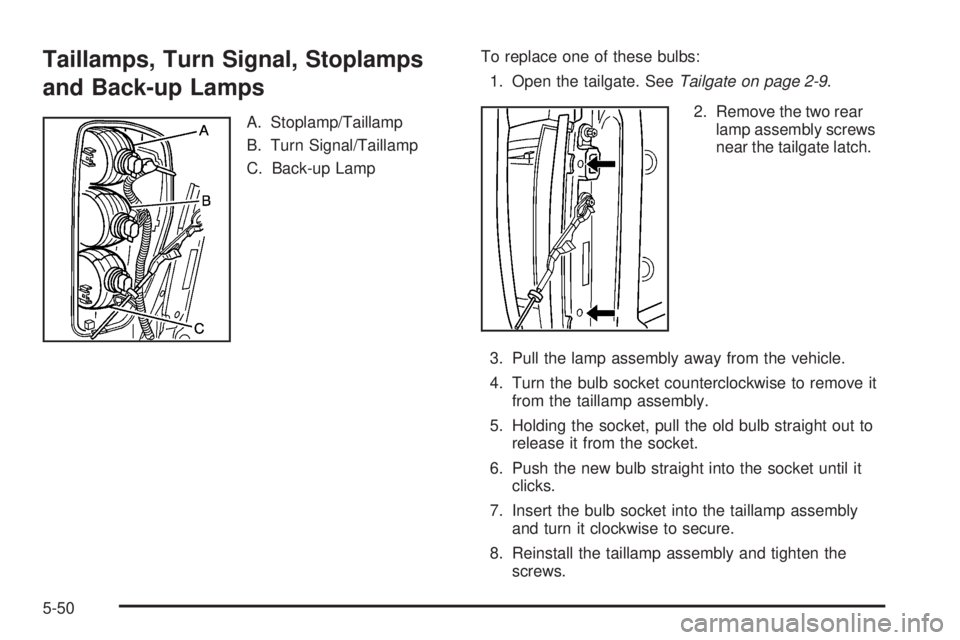
A. Stoplamp/Taillamp
B. Turn Signal/Taillamp
C. Back-up LampTo replace one of these bulbs:
1. Open the tailgate. SeeTailgate on page 2-9.
2. Remove the two rear
lamp assembly screws
near the tailgate latch.
3. Pull the lamp assembly away from the vehicle.
4. Turn the bulb socket counterclockwise to remove it
from the taillamp assembly.
5. Holding the socket, pull the old bulb straight out to
release it from the socket.
6. Push the new bulb straight into the socket until it
clicks.
7. Insert the bulb socket into the taillamp assembly
and turn it clockwise to secure.
8. Reinstall the taillamp assembly and tighten the
screws.
5-50
Page 299 of 414
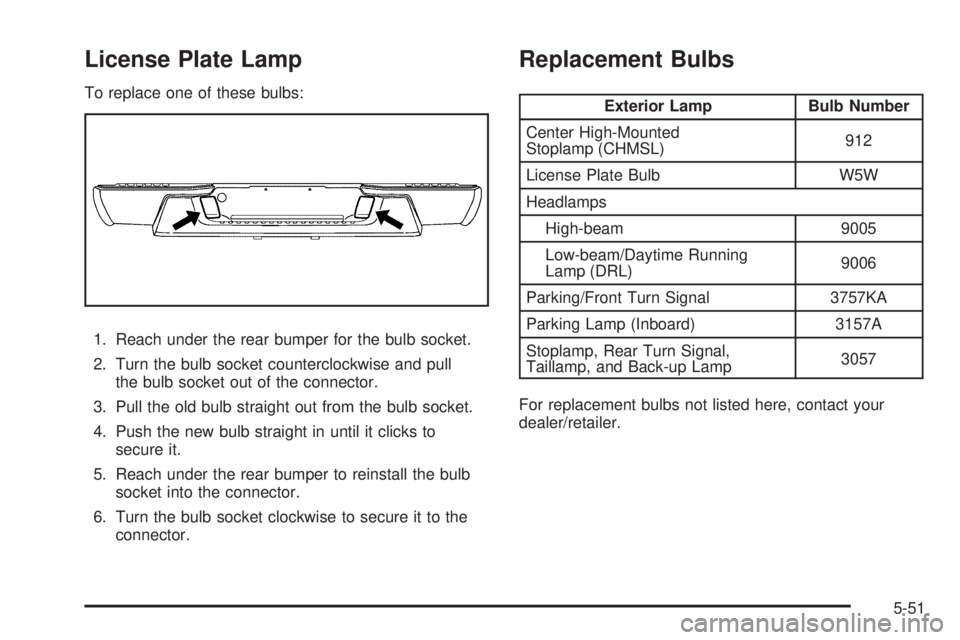
License Plate Lamp
To replace one of these bulbs:
1. Reach under the rear bumper for the bulb socket.
2. Turn the bulb socket counterclockwise and pull
the bulb socket out of the connector.
3. Pull the old bulb straight out from the bulb socket.
4. Push the new bulb straight in until it clicks to
secure it.
5. Reach under the rear bumper to reinstall the bulb
socket into the connector.
6. Turn the bulb socket clockwise to secure it to the
connector.
Replacement Bulbs
Exterior Lamp Bulb Number
Center High-Mounted
Stoplamp (CHMSL)912
License Plate Bulb W5W
Headlamps
High-beam 9005
Low-beam/Daytime Running
Lamp (DRL)9006
Parking/Front Turn Signal 3757KA
Parking Lamp (Inboard) 3157A
Stoplamp, Rear Turn Signal,
Taillamp, and Back-up Lamp3057
For replacement bulbs not listed here, contact your
dealer/retailer.
5-51
Page 327 of 414
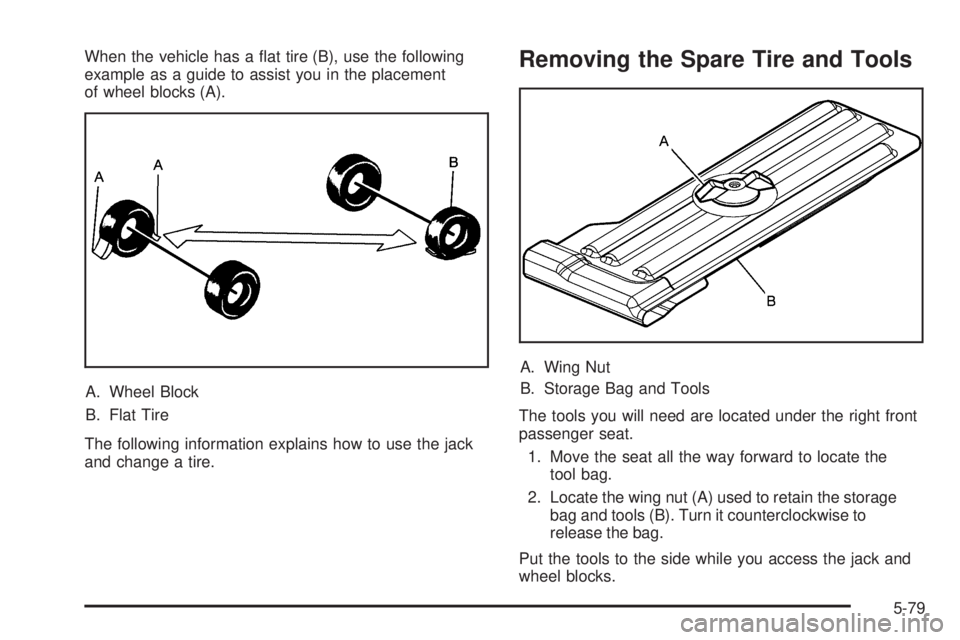
When the vehicle has a at tire (B), use the following
example as a guide to assist you in the placement
of wheel blocks (A).
A. Wheel Block
B. Flat Tire
The following information explains how to use the jack
and change a tire.Removing the Spare Tire and Tools
A. Wing Nut
B. Storage Bag and Tools
The tools you will need are located under the right front
passenger seat.
1. Move the seat all the way forward to locate the
tool bag.
2. Locate the wing nut (A) used to retain the storage
bag and tools (B). Turn it counterclockwise to
release the bag.
Put the tools to the side while you access the jack and
wheel blocks.
5-79
Page 328 of 414
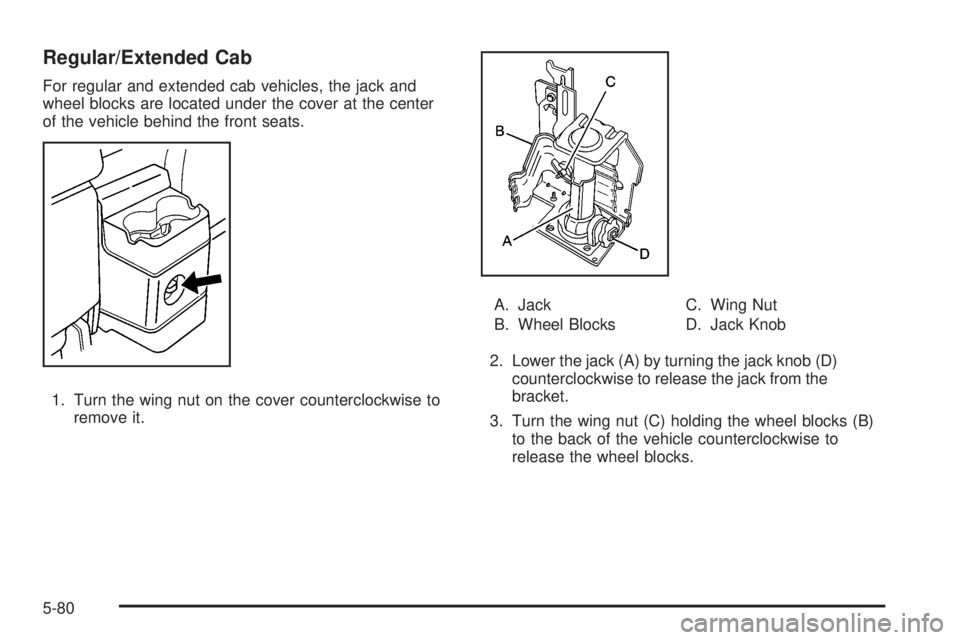
Regular/Extended Cab
For regular and extended cab vehicles, the jack and
wheel blocks are located under the cover at the center
of the vehicle behind the front seats.
1. Turn the wing nut on the cover counterclockwise to
remove it.A. Jack
B. Wheel BlocksC. Wing Nut
D. Jack Knob
2. Lower the jack (A) by turning the jack knob (D)
counterclockwise to release the jack from the
bracket.
3. Turn the wing nut (C) holding the wheel blocks (B)
to the back of the vehicle counterclockwise to
release the wheel blocks.
5-80
Page 329 of 414
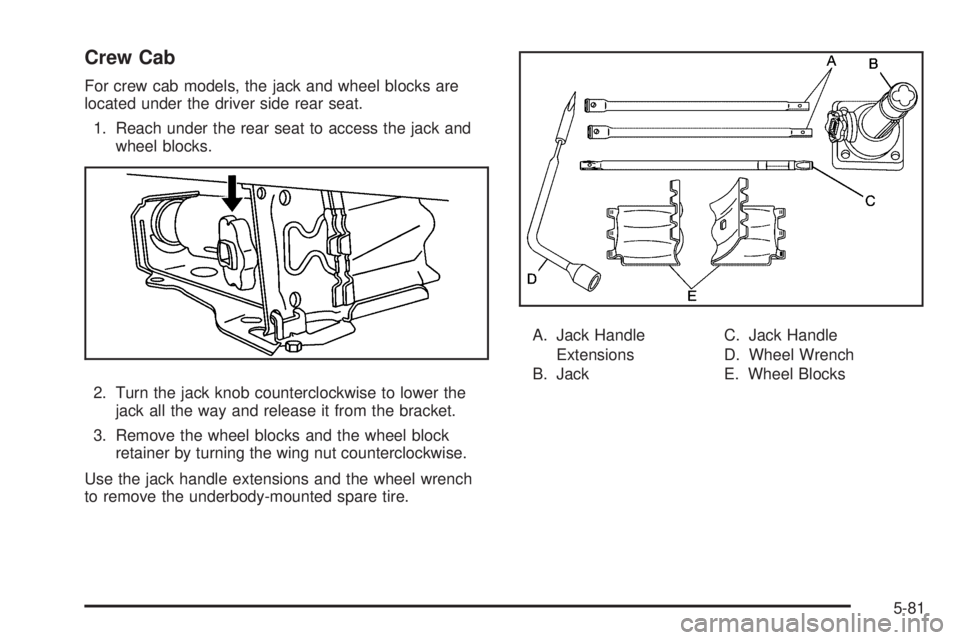
Crew Cab
For crew cab models, the jack and wheel blocks are
located under the driver side rear seat.
1. Reach under the rear seat to access the jack and
wheel blocks.
2. Turn the jack knob counterclockwise to lower the
jack all the way and release it from the bracket.
3. Remove the wheel blocks and the wheel block
retainer by turning the wing nut counterclockwise.
Use the jack handle extensions and the wheel wrench
to remove the underbody-mounted spare tire.A. Jack Handle
Extensions
B. JackC. Jack Handle
D. Wheel Wrench
E. Wheel Blocks
5-81
Page 330 of 414
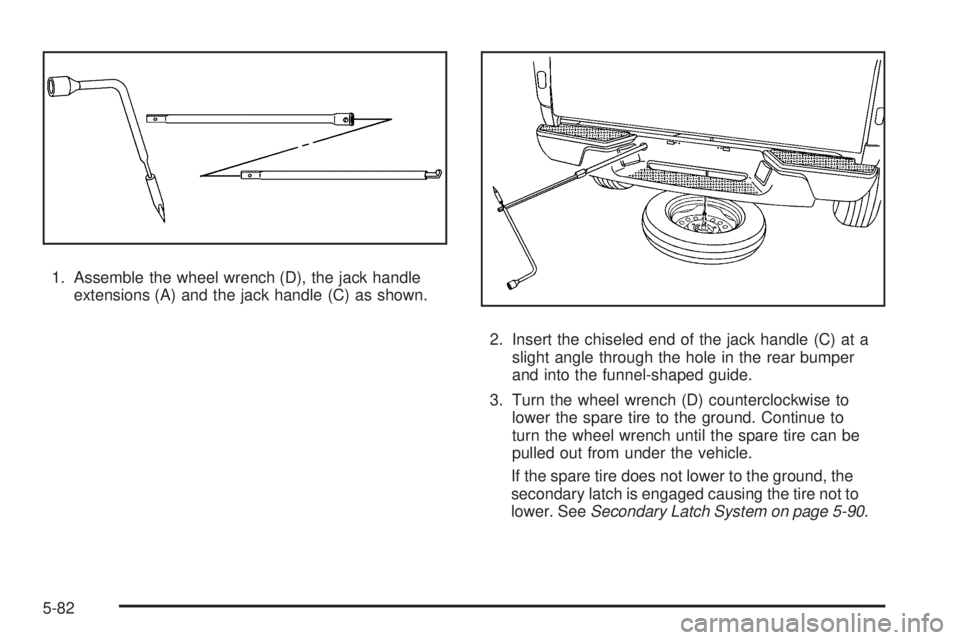
1. Assemble the wheel wrench (D), the jack handle
extensions (A) and the jack handle (C) as shown.
2. Insert the chiseled end of the jack handle (C) at a
slight angle through the hole in the rear bumper
and into the funnel-shaped guide.
3. Turn the wheel wrench (D) counterclockwise to
lower the spare tire to the ground. Continue to
turn the wheel wrench until the spare tire can be
pulled out from under the vehicle.
If the spare tire does not lower to the ground, the
secondary latch is engaged causing the tire not to
lower. SeeSecondary Latch System on page 5-90.
5-82
Page 332 of 414
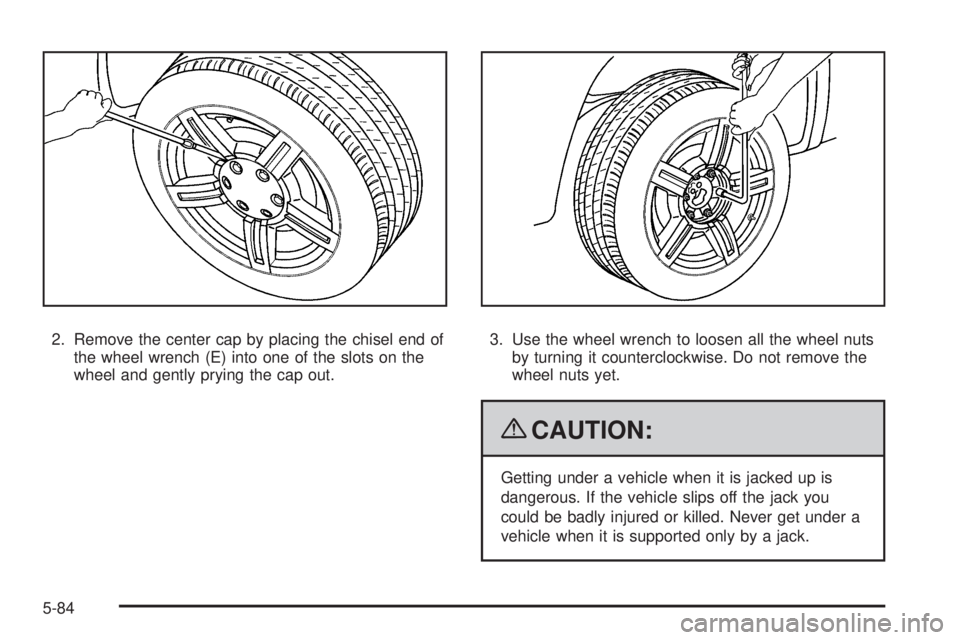
2. Remove the center cap by placing the chisel end of
the wheel wrench (E) into one of the slots on the
wheel and gently prying the cap out.3. Use the wheel wrench to loosen all the wheel nuts
by turning it counterclockwise. Do not remove the
wheel nuts yet.
{CAUTION:
Getting under a vehicle when it is jacked up is
dangerous. If the vehicle slips off the jack you
could be badly injured or killed. Never get under a
vehicle when it is supported only by a jack.
5-84