wheel GMC CANYON 2010 Owner's Guide
[x] Cancel search | Manufacturer: GMC, Model Year: 2010, Model line: CANYON, Model: GMC CANYON 2010Pages: 448, PDF Size: 2.62 MB
Page 138 of 448
Shifting from Two-Wheel High or
Four-Wheel High to Four-Wheel Low
To shift from Two-Wheel High or Four-Wheel High to
Four-Wheel Low, the vehicle must be stopped or moving
less than 3 mph (5 km/h) with the transmission in
N (Neutral) for an automatic transmission or the clutch
pedal pressed for a manual transmission. The preferred
method for shifting into Four-Wheel Low is to have
your vehicle moving 1 to 2 mph (1.6 to 3.2 km/h).
Press and release the Four-Wheel Low button.
You must wait for the Four-Wheel Low indicator light
to stop flashing and stay on before shifting the
transmission into gear or releasing the clutch pedal.
If the Four-Wheel Low button is pressed when the
vehicle is in gear and/or moving faster than 3 mph
(5 km/h), the four-wheel low indicator light will flash for
30 seconds and not complete the shift.
Shifting from Four-Wheel Low to
Two-Wheel High or Four-Wheel High
To shift from Four-Wheel Low to Two-Wheel High or
Four-Wheel High, the vehicle must be stopped or
moving less than 3 mph (5 km/h) with the transmission
in N (Neutral) for an automatic transmission or the
clutch pedal pressed for a manual transmission.The preferred method for shifting out of four-wheel
low is to have your vehicle moving 1 to 2 mph
(1.6 to 3.2 km/h).
Press and release the Four-Wheel High or Two-Wheel
High button. You must wait for the Four-Wheel High
or Two-Wheel High indicator light to stop flashing and
stay on before shifting the transmission into gear or
releasing the clutch pedal.
If the Four-Wheel High or Two-Wheel High button is
pressed when the vehicle is in gear and/or moving
faster than 3 mph (5 km/h), the Four-Wheel High or
Two Wheel High indicator light will flash for 30 seconds
but not complete the shift.
Shifting to Neutral
Use N (Neutral) when you plan to tow the vehicle.
SeeRecreational Vehicle Towing on page 5-41for towing
instructions. To shift the transfer case into N (Neutral)
do the following:
1. Set the parking brake.
2. Start the vehicle.
3. Press the regular brake pedal and shift the
transmission in N (Neutral), or press in the clutch
for vehicles with a manual transmission.
3-28
Page 139 of 448
4. Shift the transfer case to Two-Wheel High.
5. Press and hold the Two-Wheel High and
Four-Wheel Low buttons at the same time for
10 seconds. The N (Neutral) light will come on when
the transfer case shift to N (Neutral) is complete.
6. Press and hold the regular brake pedal and shift
the transmission to R (Reverse) for one second,
then shift the transmission to D (Drive) for
one second, or 1 (First) for vehicles with manual
transmissions, and let out the clutch to insure
the transfer case is in N (Neutral). If the transfer
case is not in N (Neutral), repeat this procedure
starting at Step 3.
7. Turn the engine off by turning the key to
ACC/ACCESSORY.
8. Place the transmission shift lever in P (Park),
or 1 (First) for vehicles that have a manual
transmission.
9. Turn the ignition to LOCK/OFF.Shifting Out of Neutral
After towing the vehicle, you will have to shift out of
N (Neutral) in order to drive. To shift out of N (Neutral),
do the following:
1. Set the parking brake and apply the regular brake
pedal.
2. Start a vehicle with an automatic transmission in
P (Park). Use 1 (First) for vehicles with a manual
transmission.
3. Shift the transmission to N (Neutral), or press the
clutch pedal for vehicles with a manual
transmission.
4. Press the button for the desired transfer case shift
position (Two-Wheel High, Four-Wheel High, or
Four-Wheel Low).
5. After the transfer case has shifted out of N (Neutral),
the indicator light will go out.
6. Release the parking brake.
7. Shift the transmission to the desired position.
3-29
Page 141 of 448
Shifting Into Park
(Automatic Transmission)
{WARNING:
It can be dangerous to get out of the vehicle if the
shift lever is not fully in P (Park) with the parking
brake firmly set. The vehicle can roll. If you have
left the engine running, the vehicle can move
suddenly. You or others could be injured. To be
sure the vehicle will not move, even when you are
on fairly level ground, use the steps that follow.
If you are pulling a trailer, seeTowing a Trailer on
page 5-48.
1. Hold the brake pedal down with your right foot and
set the parking brake.
SeeParking Brake on page 3-30for more
information.
{WARNING:
If you have four-wheel drive, the vehicle will be free
to roll — even if the shift lever is in P (Park) — if the
transfer case is in Neutral. So, be sure the transfer
case is in a drive gear, two-wheel high (2H) or
four-wheel high (4H) or four-wheel low (4L) — not in
Neutral.
2. Move the shift lever into P (Park) by pulling the
lever toward you and moving it up as far as it
will go.
3. Turn the ignition key to LOCK/OFF.
4. Remove the key and take it with you. If you can
leave the vehicle with the key, the vehicle is in
P (Park).
3-31
Page 145 of 448
WARNING: (Continued)
Monoxide (CO) which cannot be seen or smelled.
It can cause unconsciousness and even death.
Never run the engine in an enclosed area that has
no fresh air ventilation. For more information,
seeEngine Exhaust on page 3-34.
{WARNING:
It can be dangerous to get out of the vehicle if
the automatic transmission shift lever is not fully
in P (Park) with the parking brake firmly set.
The vehicle can roll. Do not leave the vehicle
when the engine is running unless you have to.
If you have left the engine running, the vehicle can
move suddenly. You or others could be injured.
To be sure the vehicle will not move, even when it
is on fairly level ground, always set the parking
brake and move the automatic transmission shift
lever to P (Park), or the manual transmission shift
lever to Neutral.
{WARNING:
Four-wheel drive vehicles with the transfer case
in N (Neutral) will allow the vehicle to roll, even if
the automatic transmission shift lever is in
P (Park). So, be sure the transfer case is in a
drive gear — not in N (Neutral). Always set the
parking brake.
Follow the proper steps to be sure the vehicle will not
move. SeeShifting Into Park (Automatic Transmission)
on page 3-31.
If pulling a trailer, seeTowing a Trailer on page 5-48.
3-35
Page 153 of 448
Instrument Panel Overview...............................4-3
Hazard Warning Flashers................................4-3
Horn .............................................................4-3
Tilt Wheel.....................................................4-3
Turn Signal/Multifunction Lever.........................4-4
Turn and Lane-Change Signals........................4-4
Headlamp High/Low-Beam Changer..................4-5
Flash-to-Pass.................................................4-5
Windshield Wipers..........................................4-5
Windshield Washer.........................................4-6
Cruise Control................................................4-7
Exterior Lamps.............................................4-10
Headlamps on Reminder................................4-11
Daytime Running Lamps (DRL).......................4-11
Automatic Headlamp System..........................4-12
Fog Lamps ..................................................4-12
Exterior Cargo Lamps....................................4-13
Instrument Panel Brightness...........................4-13
Dome Lamp .................................................4-13
Dome Lamp Override....................................4-14
Exit Lighting.................................................4-14
Electric Power Management...........................4-14
Battery Run-Down Protection..........................4-15
Accessory Power Outlet(s).............................4-15
Ashtray(s) and Cigarette Lighter......................4-16Climate Controls............................................4-16
Climate Control System.................................4-16
Outlet Adjustment.........................................4-18
Warning Lights, Gages, and Indicators............4-18
Instrument Panel Cluster................................4-19
Speedometer and Odometer...........................4-20
Trip Odometer..............................................4-20
Tachometer.................................................4-20
Safety Belt Reminders...................................4-21
Airbag Readiness Light.................................
.4-22
Passenger Airbag Status Indicator...................4-23
Charging System Light..................................4-24
Up-Shift Light...............................................4-24
Brake System Warning Light..........................4-25
Antilock Brake System (ABS) Warning Light.....4-26
StabiliTrak
®/Traction Control System (TCS)
Warning Light...........................................4-26
Engine Coolant Temperature Gage..................4-27
Tire Pressure Light.......................................4-28
Malfunction Indicator Lamp.............................4-28
Oil Pressure Light.........................................4-31
Security Light...............................................4-32
Cruise Control Light......................................4-32
Highbeam On Light.......................................4-32
Fuel Gage...................................................4-32
Section 4 Instrument Panel
4-1
Page 155 of 448
Instrument Panel Overview
Hazard Warning Flashers
|(Hazard Warning Flasher):Press this button
located on the instrument panel, to make the front and
rear turn signal lamps flash on and off. This warns
others that you are having trouble.
Press
|again to turn the flashers off.
The turn signals do not work while the hazard warning
flashers are on.
Horn
To sound the horn, press the horn symbol on the
steering wheel pad.
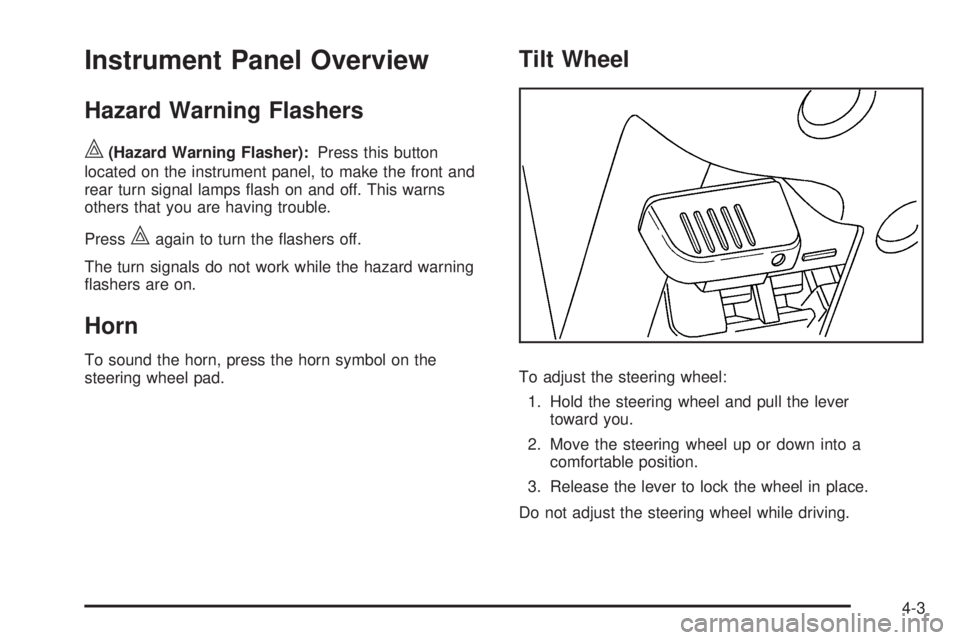
Tilt Wheel
To adjust the steering wheel:
1. Hold the steering wheel and pull the lever
toward you.
2. Move the steering wheel up or down into a
comfortable position.
3. Release the lever to lock the wheel in place.
Do not adjust the steering wheel while driving.
4-3
Page 159 of 448
Cruise Control
With cruise control, a speed of about 40 km/h (25 mph)
or more can be maintained without keeping your foot
on the accelerator. Cruise control does not work
at speeds below about 40 km/h (25 mph).
Cruise control will not work if the parking brake is set, or
if the master cylinder brake fluid level is low.
If the brakes are applied, the cruise control shuts off.
{WARNING:
Cruise control can be dangerous where you
cannot drive safely at a steady speed. So, do not
use the cruise control on winding roads or in
heavy traffic.
Cruise control can be dangerous on slippery
roads. On such roads, fast changes in tire traction
can cause excessive wheel slip, and you could
lose control. Do not use cruise control on slippery
roads.
If the vehicle’s StabiliTrak
®/Traction Control System
(TCS) begins to limit wheel spin while the cruise control
is on, the cruise control automatically disengages.SeeStabiliTrak
®System on page 5-6orTraction
Control System (TCS) on page 5-8. When road
conditions allow you to safely use it again, the
cruise control can be turned back on.
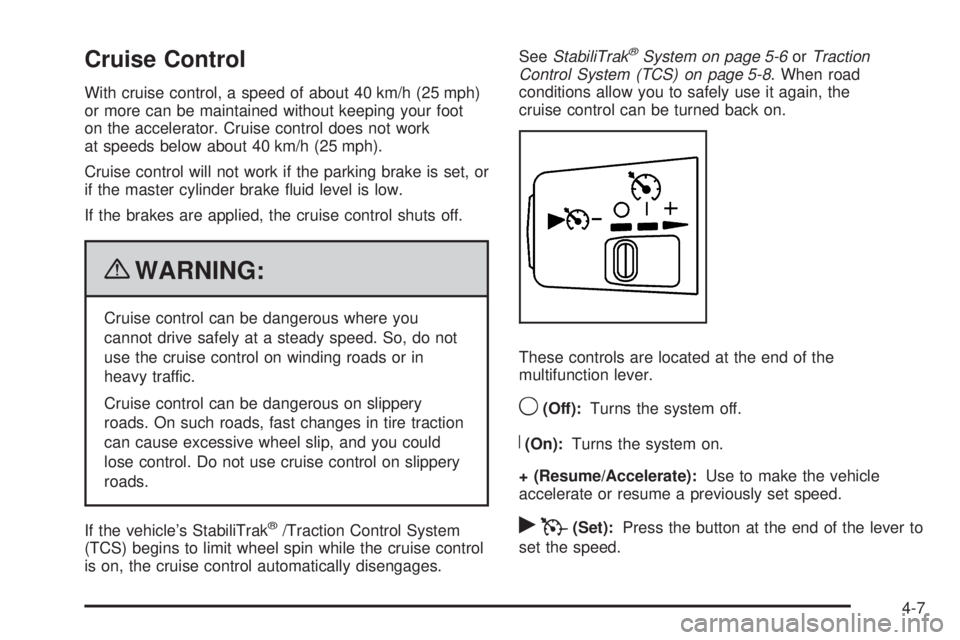
These controls are located at the end of the
multifunction lever.
9(Off):Turns the system off.
R(On):Turns the system on.
+ (Resume/Accelerate):Use to make the vehicle
accelerate or resume a previously set speed.
rT(Set):Press the button at the end of the lever to
set the speed.
4-7
Page 162 of 448
Exterior Lamps
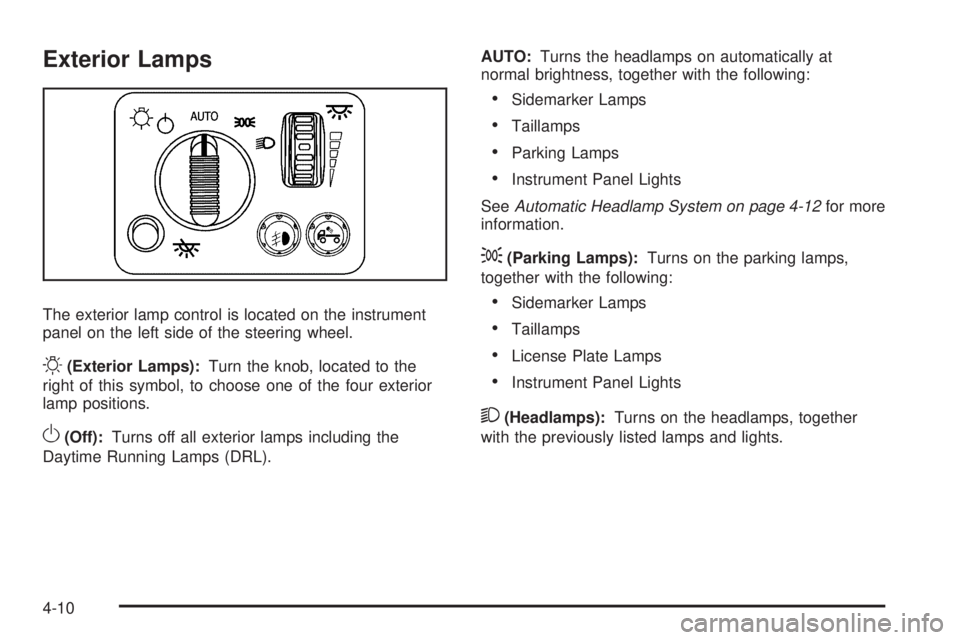
The exterior lamp control is located on the instrument
panel on the left side of the steering wheel.
O(Exterior Lamps):Turn the knob, located to the
right of this symbol, to choose one of the four exterior
lamp positions.
O(Off):Turns off all exterior lamps including the
Daytime Running Lamps (DRL).AUTO:Turns the headlamps on automatically at
normal brightness, together with the following:
•Sidemarker Lamps
•Taillamps
•Parking Lamps
•Instrument Panel Lights
SeeAutomatic Headlamp System on page 4-12for more
information.
;(Parking Lamps):Turns on the parking lamps,
together with the following:
•Sidemarker Lamps
•Taillamps
•License Plate Lamps
•Instrument Panel Lights
2(Headlamps):Turns on the headlamps, together
with the previously listed lamps and lights.
4-10
Page 165 of 448
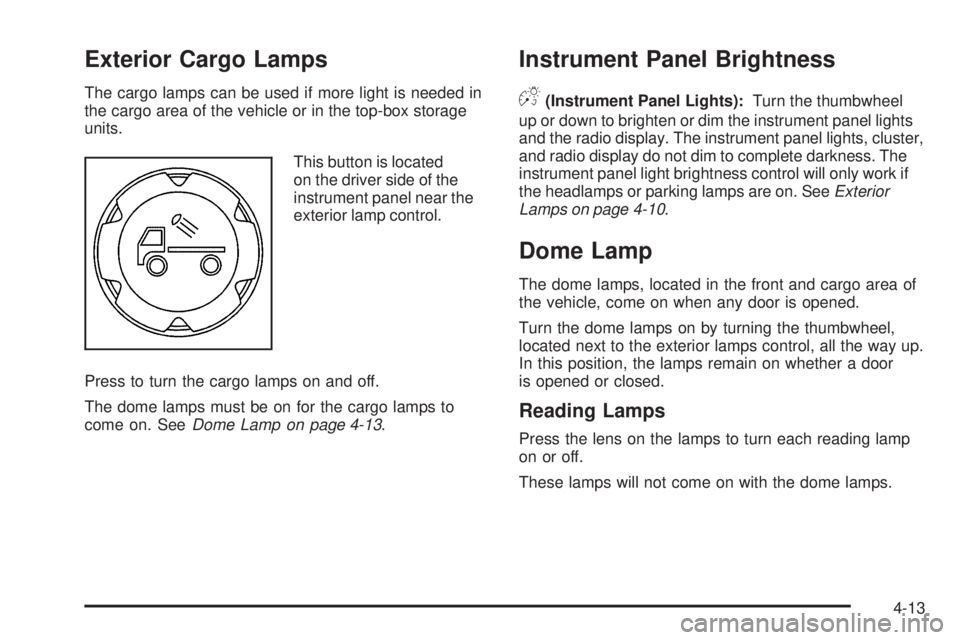
Exterior Cargo Lamps
The cargo lamps can be used if more light is needed in
the cargo area of the vehicle or in the top-box storage
units.
This button is located
on the driver side of the
instrument panel near the
exterior lamp control.
Press to turn the cargo lamps on and off.
The dome lamps must be on for the cargo lamps to
come on. SeeDome Lamp on page 4-13.
Instrument Panel Brightness
D(Instrument Panel Lights):Turn the thumbwheel
up or down to brighten or dim the instrument panel lights
and the radio display. The instrument panel lights, cluster,
and radio display do not dim to complete darkness. The
instrument panel light brightness control will only work if
the headlamps or parking lamps are on. SeeExterior
Lamps on page 4-10.
Dome Lamp
The dome lamps, located in the front and cargo area of
the vehicle, come on when any door is opened.
Turn the dome lamps on by turning the thumbwheel,
located next to the exterior lamps control, all the way up.
In this position, the lamps remain on whether a door
is opened or closed.
Reading Lamps
Press the lens on the lamps to turn each reading lamp
on or off.
These lamps will not come on with the dome lamps.
4-13
Page 170 of 448
The recirculation mode cannot be used with floor/defog,
defrost, or defogging modes. If recirculation is selected in
these modes, the indicator will flash or not come on.
Outlet Adjustment
Use the thumbwheel on the outlets to change the
direction of the air flow.
Lift up or push down on the thumbwheel located in the
center of the outlet to direct the air up or down, or
slide the thumbwheel to the left or right to direct the
airflow from side-to-side.
Operation Tips
•
Clear away any ice, snow or leaves from the air
inlets at the base of the windshield that may
block the flow of air into the vehicle.
•Use of non-GM approved hood deflectors may
adversely affect the performance of the system.
•Keep the path under the front seats clear of objects
to help circulate the air inside of the vehicle more
effectively.
Warning Lights, Gages, and
Indicators
Warning lights and gages can signal that something
is wrong before it becomes serious enough to cause
an expensive repair or replacement. Paying attention
to the warning lights and gages could prevent injury.
Warning lights come on when there might be or there
is a problem with one of the vehicle’s functions. Some
warning lights come on briefly when the engine is started
to indicate they are working.
Gages can indicate when there might be or there is a
problem with one of the vehicle’s functions. Often gages
and warning lights work together to indicate a problem
with the vehicle.
When one of the warning lights comes on and stays on
while driving, or when one of the gages shows there
could be a problem, check the section that explains
what to do. Follow this manual’s advice. Waiting to
do repairs can be costly and even dangerous.
4-18