light GMC CANYON 2010 Workshop Manual
[x] Cancel search | Manufacturer: GMC, Model Year: 2010, Model line: CANYON, Model: GMC CANYON 2010Pages: 448, PDF Size: 2.62 MB
Page 183 of 448
Emissions Inspection and Maintenance
Programs
Some state/provincial and local governments have or
might begin programs to inspect the emission control
equipment on the vehicle. Failure to pass this inspection
could prevent getting a vehicle registration.
Here are some things to know to help the vehicle pass
an inspection:
•The vehicle will not pass this inspection if the check
engine light is on with the engine running, or if the
key is in ON/RUN and the light is not on.
•The vehicle will not pass this inspection if the OBD II
(on-board diagnostic) system determines that critical
emission control systems have not been completely
diagnosed by the system. The vehicle would be
considered not ready for inspection. This can happen
if the battery has recently been replaced or if the
battery has run down. The diagnostic system is
designed to evaluate critical emission control
systems during normal driving. This can take several
days of routine driving. If this has been done and the
vehicle still does not pass the inspection for lack of
OBD II system readiness, your dealer/retailer can
prepare the vehicle for inspection.
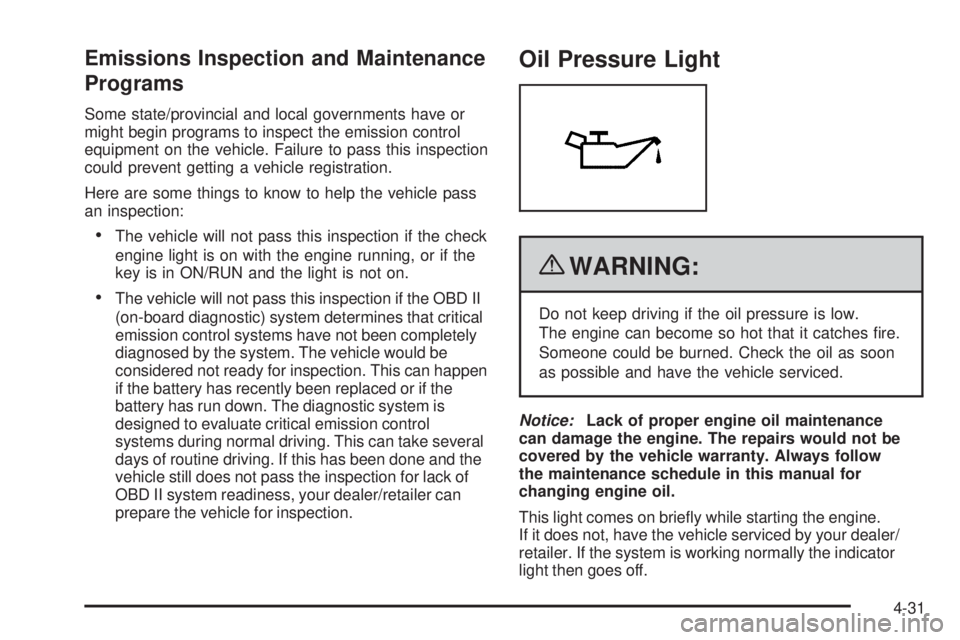
Oil Pressure Light
{WARNING:
Do not keep driving if the oil pressure is low.
The engine can become so hot that it catches fire.
Someone could be burned. Check the oil as soon
as possible and have the vehicle serviced.
Notice:Lack of proper engine oil maintenance
can damage the engine. The repairs would not be
covered by the vehicle warranty. Always follow
the maintenance schedule in this manual for
changing engine oil.
This light comes on briefly while starting the engine.
If it does not, have the vehicle serviced by your dealer/
retailer. If the system is working normally the indicator
light then goes off.
4-31
Page 184 of 448
If the light comes on and stays on, it means that oil is
not flowing through the engine properly. The vehicle
could be low on oil and it might have some other system
problem.
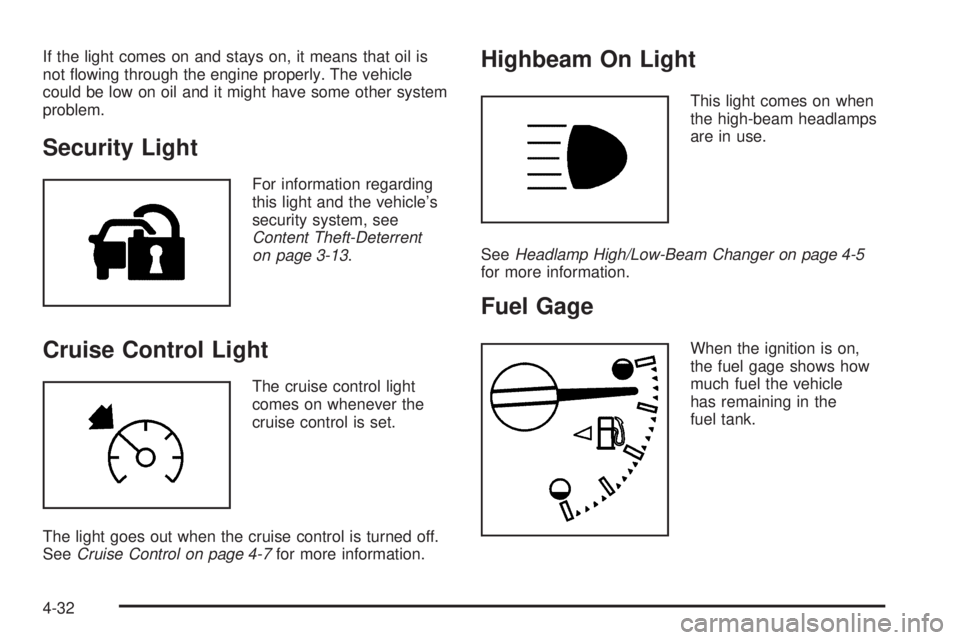
Security Light
For information regarding
this light and the vehicle’s
security system, see
Content Theft-Deterrent
on page 3-13.
Cruise Control Light
The cruise control light
comes on whenever the
cruise control is set.
The light goes out when the cruise control is turned off.
SeeCruise Control on page 4-7for more information.
Highbeam On Light
This light comes on when
the high-beam headlamps
are in use.
SeeHeadlamp High/Low-Beam Changer on page 4-5
for more information.
Fuel Gage
When the ignition is on,
the fuel gage shows how
much fuel the vehicle
has remaining in the
fuel tank.
4-32
Page 189 of 448
DIC Warnings and Messages
Messages are displayed on the DIC to notify the driver
that the status of the vehicle has changed and that some
action may be needed by the driver to correct the
condition. Multiple messages may appear one after
another. The messages are displayed for several
seconds each.
Some messages may not require immediate action, but
you should press and release the trip odometer reset
stem to acknowledge that you received the messages
and to clear them from the display. Each message must
be acknowledged individually.
Some messages cannot be cleared from the DIC
display because they are more urgent. These messages
require action before they can be cleared. You should
take any messages that appear on the display seriously
and remember that clearing the messages only makes
the messages disappear, not correct the problem.
The following are the possible messages that can be
displayed and some information about them.
AC (Air Conditioning) OFF
This message displays when the engine coolant
temperature is too high and the air conditioning in your
vehicle needs to be turned off. SeeEngine Overheating
on page 6-35andClimate Control System on page 4-16
for more information. This message displays along with
the ENG HOT message.
ABS (Antilock Brake System) FAULT
This message displays if there is a problem with the
Antilock Brake System (ABS). Check the ABS as soon as
possible and have your vehicle serviced by your dealer/
retailer. SeeBrakes on page 6-39andAntilock Brake
System (ABS) Warning Light on page 4-26for more
information. Press and release the reset stem to
acknowledge the message and clear it from the display.
4-37
Page 190 of 448
BRAKES
This message displays if there is a problem with the
brakes. Check the brakes as soon as possible and
have your vehicle serviced by your dealer/retailer.
SeeBrakes on page 6-39andBrake System Warning
Light on page 4-25for more information. Press and
release the reset stem to acknowledge the message
and clear it from the display.
CHANGE OIL
This message displays when the oil needs to be
changed. Check the oil in your vehicle as soon as
possible and have your vehicle serviced by your
dealer/retailer. SeeEngine Oil on page 6-15and
Scheduled Maintenance on page 7-3for more
information. Press and release the reset stem to
acknowledge the message and clear it from the
display.
DOORS
This message displays when one or more of the doors
is ajar. Check all the doors on your vehicle to make
sure they are closed. The message clears from
the display after all of the doors are closed.
ENG (Engine) HOT
This message displays when the engine coolant
temperature is hot. Check the engine coolant
temperature gage. SeeEngine Coolant Temperature
Gage on page 4-27. Have your vehicle serviced by your
dealer/retailer as soon as possible if you suspect the
engine is overheating. SeeEngine Overheating on
page 6-35for more information.
FLUID
This message displays if the brake fluid is low. Check
the brake fluid as soon as possible and have your
vehicle serviced by your dealer/retailer. SeeBrakes
on page 6-39for more information. Press and release
the reset stem to acknowledge the message and clear
it from the display.
4-38
Page 191 of 448
FUEL CAP
This message displays if the vehicle’s fuel cap is either off
or loose. Pull over as soon as possible and check to see
if the fuel cap is secure. You may also see the check
engine light on the instrument panel cluster. If the check
engine light does come on when the fuel cap was loose,
it may take a few driving trips before the light turns off.
SeeMalfunction Indicator Lamp on page 4-28for more
information if the light still remains on. Press and release
the reset stem to acknowledge the message and clear it
from the display.
LOW FUEL
This message displays if the level of fuel in the vehicle
is low. Also check the fuel gage. SeeFuel Gage on
page 4-32for more information. Refill the fuel tank
as soon as possible.
LOW TIRE
This message displays if a low tire pressure is detected
in any of the vehicle’s tires. Press and release the reset
stem to acknowledge the message and clear it from the
display. The message appears at each ignition cycle
until the tires are inflated to the correct inflation pressure.
SeeTires on page 6-57andInation - Tire Pressure on
page 6-64for more information on tires and the correct
inflation pressures.
OIL
This message displays when the oil pressure is low.
SeeOil Pressure Light on page 4-31andEngine Oil
on page 6-15for more information.
PARK BRK (Brake)
This message displays when the parking brake is set.
SeeParking Brake on page 3-30andBrake System
Warning Light on page 4-25for more information.
The message clears from the display after the parking
brake is released or by pressing and releasing the
reset stem.
4-39
Page 192 of 448
REDUCED POWER
This message displays when the vehicle’s engine power
is reduced. Reduced engine power can affect the
vehicle’s ability to accelerate. If this message is on, but
there is no reduction in performance, proceed to your
destination. The performance may be reduced the next
time the vehicle is driven. The vehicle may be driven at a
reduced speed while this message is on, but acceleration
and speed may be reduced. Anytime this message stays
on, the vehicle should be taken to your dealer/retailer for
service as soon as possible. Press and release the reset
stem to acknowledge the message and clear it from the
display.
SERV (Service) 4WD
(Four-Wheel Drive)
This message displays when there is a problem with the
transfer case control system. Check the transfer case on
your vehicle and have it serviced by your dealer/retailer.
SeeFour-Wheel Drive on page 3-25for more information
about the transfer case. Press and release the reset stem
to acknowledge the message and clear it from the
display.
SERV (Service) TPM
(Tire Pressure Monitor)
This message displays if a part on the Tire Pressure
Monitor System (TPMS) is not working properly. The tire
pressure light also flashes and then remains on during
the same ignition cycle. SeeTire Pressure Light on
page 4-28. Several conditions may cause this message
to appear. SeeTire Pressure Monitor Operation on
page 6-67for more information. If the warning comes on
and stays on, there may be a problem with the TPMS.
See your dealer/retailer.
SERV (Service) VEH (Vehicle)
This message displays if your vehicle needs service.
Have your vehicle serviced by your dealer/retailer
as soon as possible.
4-40
Page 193 of 448
SERVICE CHARG (Charge) SYS
(System)
This message displays if there is a problem with the
battery charging system. Under certain conditions, the
battery warning light may also turn on in the instrument
panel cluster. SeeCharging System Light on page 4-24.
The battery will not be charging at an optimal rate and
the vehicle will lose the ability to enter the fuel economy
mode. The vehicle is safe to drive, however have the
electrical system checked by your dealer/retailer. Press
and release the reset stem to acknowledge the message
and clear it from the display.
SERVICE STAB (Stability) SYS
(System)
This message displays if there is a problem with the
StabiliTrak system. Have your vehicle serviced by your
dealer/retailer. SeeStabiliTrak
®System on page 5-6
for more information.
STAB (Stability) SYS (System) OFF
This message displays when the StabiliTrak system is
turned off. SeeStabiliTrak®System on page 5-6for
more information.
TRAC (Traction) OFF
This message displays when the Traction Control
System (TCS) is turned off by pressing the StabiliTrak
button. SeeStabiliTrak
®System on page 5-6for
more information.
TRACTION FAULT
This message will display if there is a problem with the
TCS. Have your vehicle serviced by your dealer/retailer.
SeeTraction Control System (TCS) on page 5-8for
more information. Press and release the reset stem to
acknowledge the message and clear it from the display.
TURN SIGNAL
This message displays when the turn signal is on for
about 0.75 miles (1.2 km) of travel. Press and release
the reset stem to acknowledge the message and clear it
from the display.
4-41
Page 205 of 448
Care of Your CDs
If playing a CD-R, the sound quality can be reduced due
to CD-R quality, the method of recording, the quality of
the music that has been recorded, and the way the CD-R
has been handled. Handle them carefully. Store CD-R(s)
in their original cases or other protective cases and away
from direct sunlight and dust. The CD player scans the
bottom surface of the disc. If the surface of a CD is
damaged, such as cracked, broken, or scratched, the CD
does not play properly or not at all. Do not touch the
bottom side of a CD while handling it; this could damage
the surface. Pick up CDs by grasping the outer edges or
the edge of the hole and the outer edge.
If the surface of a CD is soiled, take a soft, lint free
cloth or dampen a clean, soft cloth in a mild, neutral
detergent solution mixed with water, and clean it.
Make sure the wiping process starts from the center
to the edge.
Care of Your CD Player
Do not add any label to a CD, it could get caught in the
CD player. If a CD is recorded on a personal computer
and a description label is needed, try labeling the top
of the recorded CD with a marking pen.
The use of CD lens cleaners for CDs is not advised,
due to the risk of contaminating the lens of the CD optics
with lubricants internal to the CD player mechanism.
Notice:If a label is added to a CD, or more than one
CD is inserted into the slot at a time, or an attempt
is made to play scratched or damaged CDs, the
CD player could be damaged. While using the CD
player, use only CDs in good condition without
any label, load one CD at a time, and keep the
CD player and the loading slot free of foreign
materials, liquids, and debris.
If an error displays, see “CD Messages” later in this
section.
4-53
Page 213 of 448
Radio ID:If this message is received when tuned to
channel 0, there could be a receiver fault. Consult with
your dealer/retailer.
Unknown:If this message is received when tuned to
channel 0, there could be a receiver fault. Consult
with your dealer/retailer.
Check XM:If this message does not clear within
a short period of time, the receiver could have a fault.
Consult with your dealer/retailer.
Theft-Deterrent Feature
Non-RDS Radios
THEFTLOCK®is designed to discourage theft of your
vehicle’s radio. The feature works automatically by
learning a portion of the Vehicle Identification
Number (VIN). If the radio is moved to a different
vehicle, it does not operate and LOC displays.
With THEFTLOCK
®activated, the radio does not
operate if stolen.
RDS Radios
THEFTLOCK®is designed to discourage theft of your
vehicle’s radio. The feature works automatically by
learning a portion of the Vehicle Identification
Number (VIN). If the radio is moved to a different
vehicle, it does not operate and LOCKED displays.
When the radio and vehicle are turned off, the blinking
red light indicates that THEFTLOCK
®is armed.
With THEFTLOCK
®activated, the radio does not
operate if stolen.
Radio Reception
Frequency interference and static can occur during
normal radio reception if items such as cell phone
chargers, vehicle convenience accessories, and external
electronic devices are plugged into the accessory power
outlet. If there is interference or static, unplug the item
from the accessory power outlet.
4-61
Page 215 of 448
Fixed Mast Antenna
The fixed mast antenna can withstand most car washes
without being damaged as long as it is securely attached
to the base. If the mast becomes slightly bent, straighten
it out by hand. If the mast is badly bent, replace it.
Occasionally check to make sure the antenna is
tightened to its base. If tightening is required, tighten
by hand until fully seated plus one quarter turn.
XM™ Satellite Radio Antenna
System
The XM Satellite Radio antenna is located on the roof of
the vehicle. Keep the antenna clear of obstructions for
clear radio reception.
If the vehicle has a sunroof, the performance of the
XM system may be affected if the sunroof is open.
Chime Level Adjustment
The radio is used to adjust the vehicle’s chime level.
To change the volume level of the chime, press and
hold pushbutton 6 with the ignition on and the radio
power off. The volume level will change from the normal
level to loud, and LOUD will appear on the radio display.
To change back to the default or normal setting, press
and hold pushbutton 6 again. The volume level will
change from the loud level to normal, and NORMAL will
appear on the radio display. Each time the chime volume
is changed, three chimes will sound to indicate the new
volume selected. Removing the radio and not replacing it
with a factory radio or chime module will disable vehicle
chimes.
4-63