lock GMC CANYON 2010 Repair Manual
[x] Cancel search | Manufacturer: GMC, Model Year: 2010, Model line: CANYON, Model: GMC CANYON 2010Pages: 448, PDF Size: 2.62 MB
Page 170 of 448
The recirculation mode cannot be used with floor/defog,
defrost, or defogging modes. If recirculation is selected in
these modes, the indicator will flash or not come on.
Outlet Adjustment
Use the thumbwheel on the outlets to change the
direction of the air flow.
Lift up or push down on the thumbwheel located in the
center of the outlet to direct the air up or down, or
slide the thumbwheel to the left or right to direct the
airflow from side-to-side.
Operation Tips
•
Clear away any ice, snow or leaves from the air
inlets at the base of the windshield that may
block the flow of air into the vehicle.
•Use of non-GM approved hood deflectors may
adversely affect the performance of the system.
•Keep the path under the front seats clear of objects
to help circulate the air inside of the vehicle more
effectively.
Warning Lights, Gages, and
Indicators
Warning lights and gages can signal that something
is wrong before it becomes serious enough to cause
an expensive repair or replacement. Paying attention
to the warning lights and gages could prevent injury.
Warning lights come on when there might be or there
is a problem with one of the vehicle’s functions. Some
warning lights come on briefly when the engine is started
to indicate they are working.
Gages can indicate when there might be or there is a
problem with one of the vehicle’s functions. Often gages
and warning lights work together to indicate a problem
with the vehicle.
When one of the warning lights comes on and stays on
while driving, or when one of the gages shows there
could be a problem, check the section that explains
what to do. Follow this manual’s advice. Waiting to
do repairs can be costly and even dangerous.
4-18
Page 178 of 448
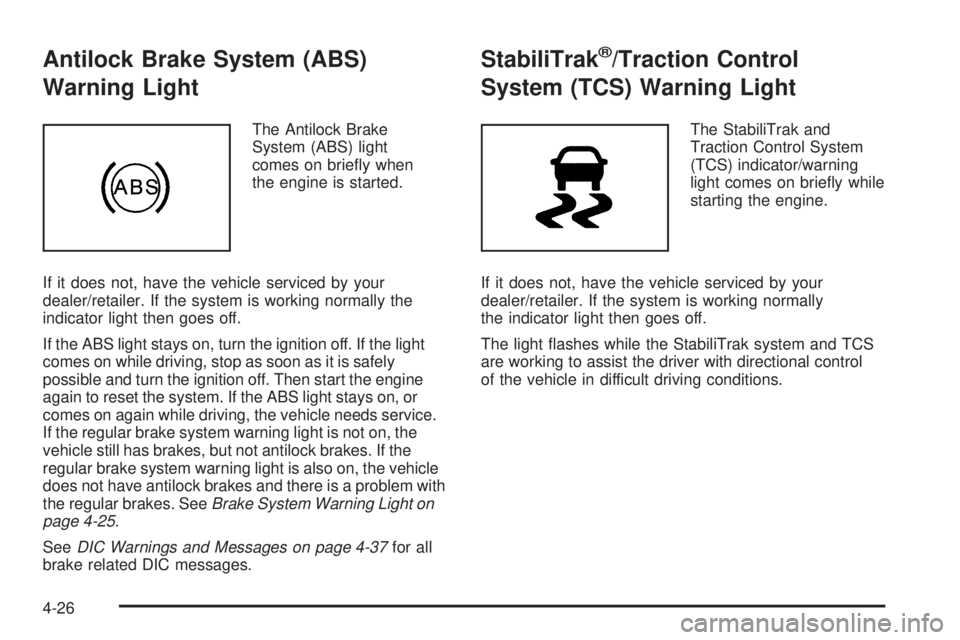
Antilock Brake System (ABS)
Warning Light
The Antilock Brake
System (ABS) light
comes on briefly when
the engine is started.
If it does not, have the vehicle serviced by your
dealer/retailer. If the system is working normally the
indicator light then goes off.
If the ABS light stays on, turn the ignition off. If the light
comes on while driving, stop as soon as it is safely
possible and turn the ignition off. Then start the engine
again to reset the system. If the ABS light stays on, or
comes on again while driving, the vehicle needs service.
If the regular brake system warning light is not on, the
vehicle still has brakes, but not antilock brakes. If the
regular brake system warning light is also on, the vehicle
does not have antilock brakes and there is a problem with
the regular brakes. SeeBrake System Warning Light on
page 4-25.
SeeDIC Warnings and Messages on page 4-37for all
brake related DIC messages.
StabiliTrak®/Traction Control
System (TCS) Warning Light
The StabiliTrak and
Traction Control System
(TCS) indicator/warning
light comes on briefly while
starting the engine.
If it does not, have the vehicle serviced by your
dealer/retailer. If the system is working normally
the indicator light then goes off.
The light flashes while the StabiliTrak system and TCS
are working to assist the driver with directional control
of the vehicle in difficult driving conditions.
4-26
Page 187 of 448
Automatic Door Locks
This feature allows you to program the door locks to a
preferred setting.
To set your choice for this feature:
1. With the engine off, turn the key to LOCK/OFF.
Do not remove the key from the ignition.
2. Press and hold the power door lock button until the
DIC display shows the current door lock mode.
3. To view the next available mode, press and hold
the reset stem until the mode appears. Release
the reset stem and press and hold again to view
the next mode.
4. Once the desired mode is shown on the DIC
display, briefly press the reset stem to set your
choice. The DIC display then clears.
The following are the available modes:
Lock 1 (default):On vehicles with an automatic
transmission, this mode locks all of the doors when
the vehicle is shifted out of P (Park) and unlocks all
of the doors when the vehicle is shifted into P (Park).On vehicles with a manual transmission, this mode
locks all of the doors when the vehicle speed is greater
than 15 mph (24 km/h) and unlocks all of the doors
when the key is removed from the ignition.
Lock 2:On vehicles with an automatic transmission,
this mode locks all of the doors when the vehicle
is shifted out of P (Park) and unlocks the driver’s
door when the vehicle is shifted into P (Park).
On vehicles with a manual transmission, this mode
locks all of the doors when the vehicle speed is greater
than 15 mph (24 km/h) and unlocks the driver’s door
when the key is removed from the ignition.
Lock 3:On vehicles with an automatic transmission,
this mode locks all of the doors when the vehicle
is shifted out of P (Park). The doors will not
automatically unlock.
On vehicles with a manual transmission, this mode
locks all of the doors when the vehicle speed is greater
than 15 mph (24 km/h). The doors will not automatically
unlock.
4-35
Page 188 of 448
Remote Keyless Entry (RKE) Feedback
This feature allows you to program the Remote Keyless
Entry (RKE) feedback to a preferred setting.
To set your choice for this feature:
1. With the engine off, turn the key to LOCK/OFF.
Do not remove the key from the ignition.
2. Press and hold the lock and unlock buttons on
the RKE transmitter at the same time. Hold both
buttons until the DIC display shows the current RKE
feedback mode.
3. To view the next available mode, press and hold
the reset stem until the mode appears. Release
the reset stem and press and hold again to view
the next mode.
4. Once the desired mode is shown on the DIC
display, briefly press the reset stem to set your
choice. The DIC display then clears.The following are the available modes:
RFA 1 (default):This mode flashes the parking lamps
when you press the lock or unlock buttons on the
RKE transmitter.
RFA 2:This mode flashes the parking lamps and
sounds the horn when you press the lock button on the
RKE transmitter. This mode also flashes the parking
lamps when you press the unlock button on the
RKE transmitter.
RFA 3:This mode flashes the parking lamps and
sounds the horn when you press the lock or unlock
buttons on the RKE transmitter.
RFA 4:This mode disables RKE feedback. There will
be no feedback when you press the lock or unlock
buttons on the RKE transmitter.
4-36
Page 189 of 448
DIC Warnings and Messages
Messages are displayed on the DIC to notify the driver
that the status of the vehicle has changed and that some
action may be needed by the driver to correct the
condition. Multiple messages may appear one after
another. The messages are displayed for several
seconds each.
Some messages may not require immediate action, but
you should press and release the trip odometer reset
stem to acknowledge that you received the messages
and to clear them from the display. Each message must
be acknowledged individually.
Some messages cannot be cleared from the DIC
display because they are more urgent. These messages
require action before they can be cleared. You should
take any messages that appear on the display seriously
and remember that clearing the messages only makes
the messages disappear, not correct the problem.
The following are the possible messages that can be
displayed and some information about them.
AC (Air Conditioning) OFF
This message displays when the engine coolant
temperature is too high and the air conditioning in your
vehicle needs to be turned off. SeeEngine Overheating
on page 6-35andClimate Control System on page 4-16
for more information. This message displays along with
the ENG HOT message.
ABS (Antilock Brake System) FAULT
This message displays if there is a problem with the
Antilock Brake System (ABS). Check the ABS as soon as
possible and have your vehicle serviced by your dealer/
retailer. SeeBrakes on page 6-39andAntilock Brake
System (ABS) Warning Light on page 4-26for more
information. Press and release the reset stem to
acknowledge the message and clear it from the display.
4-37
Page 195 of 448
Setting the Clock
AM-FM Radio
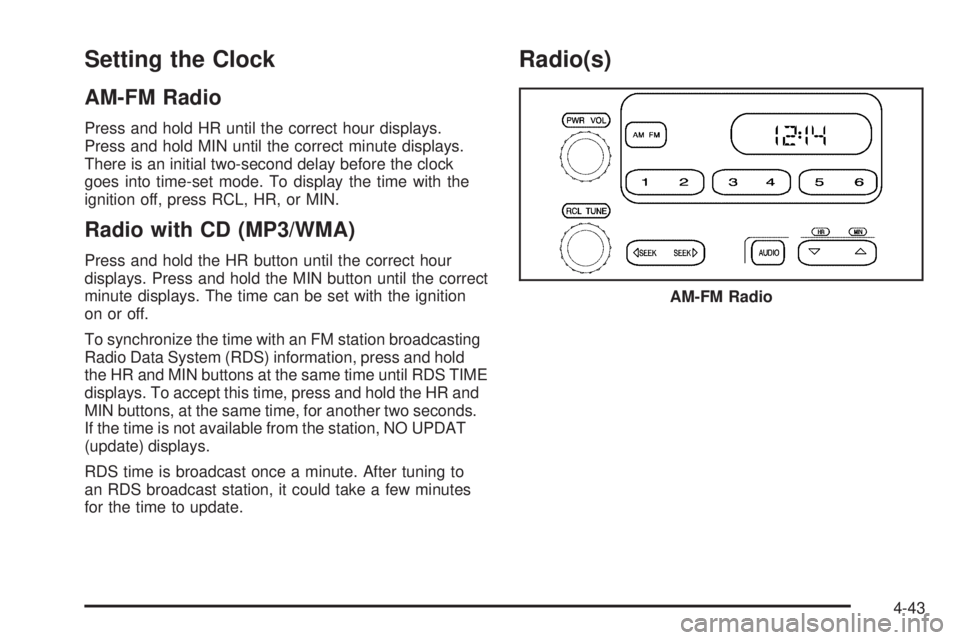
Press and hold HR until the correct hour displays.
Press and hold MIN until the correct minute displays.
There is an initial two-second delay before the clock
goes into time-set mode. To display the time with the
ignition off, press RCL, HR, or MIN.
Radio with CD (MP3/WMA)
Press and hold the HR button until the correct hour
displays. Press and hold the MIN button until the correct
minute displays. The time can be set with the ignition
on or off.
To synchronize the time with an FM station broadcasting
Radio Data System (RDS) information, press and hold
the HR and MIN buttons at the same time until RDS TIME
displays. To accept this time, press and hold the HR and
MIN buttons, at the same time, for another two seconds.
If the time is not available from the station, NO UPDAT
(update) displays.
RDS time is broadcast once a minute. After tuning to
an RDS broadcast station, it could take a few minutes
for the time to update.
Radio(s)
AM-FM Radio
4-43
Page 204 of 448
Radio Messages
CAL ERR or CAL (Calibration Error):The audio
system has been calibrated for the vehicle from the
factory. If CAL or CAL ERR displays it means that the
radio has not been configured properly for the vehicle
and it must be returned to your dealer/retailer for service.
LOC or LOCKED:This message displays when the
THEFTLOCK
®system has locked up. Take the vehicle
to your dealer/retailer for service.
If any error occurs repeatedly or if an error cannot be
corrected, contact your dealer/retailer.
XM™ Satellite Radio Service
XM is a satellite radio service that is based in the
48 contiguous United States and 10 Canadian provinces.
XM Satellite Radio has a wide variety of programming
and commercial-free music, coast-to-coast, and in
digital-quality sound. A service fee is required to receive
the XM service. For more information, contact XM at
xmradio.com or call 1-800-929-2100 in the U.S. and
xmradio.ca or call 1-877-438-9677 in Canada.
Radio Messages for XM Only
SeeXM Radio Messages on page 4-60later in this
section for further detail.
Playing a CD (Radio with Single CD
Player)
Insert a CD partway into the slot, label side up. The
player pulls it in, and READING displays. The CD should
begin playing. To insert a CD with the ignition off, first
press the
Z(eject) button or the DISPL knob.
If the ignition or radio is turned off with a CD in the
player it stays in the player. When the ignition or radio
is turned on, the CD starts to play where it stopped,
if it was the last selected audio source.
When the CD is inserted, the CD symbol displays.
As each new track starts to play, the track number
displays.
The CD player can play the smaller 3 inch (8 cm)
single CDs with an adapter ring. Full-size CDs and
the smaller CDs are loaded in the same manner.
4-52
Page 212 of 448
BAND:Press this button to listen to the radio when a
CD is playing. The inactive CD remains inside the radio
for future listening.
CD AUX (Auxiliary):Press this button to play a CD
when listening to the radio. The CD symbol illuminates
on the display when a CD is loaded.
Z(Eject):Press this button to eject a CD. Eject can
activate while either the ignition or radio is off. CDs can
be loaded with the ignition and radio off if this button is
pressed first.
XM Radio Messages
XL (Explicit Language Channels):These channels,
or any others, can be blocked at a customer’s request,
by calling 1-800-852-XMXM (9696).
Updating:The encryption code in the receiver is being
updated, and no action is required. This process
should take no longer than 30 seconds.
No Signl:The system is functioning correctly, but the
vehicle is in a location that is blocking the XM signal.
When the vehicle is moved into an open area, the signal
should return.Loading:The radio system is acquiring and processing
audio and text data. No action is needed. This message
should disappear shortly.
Off Air:This channel is not currently in service.
Tune to another channel.
CH Unavl:This previously assigned channel is no
longer assigned. Tune to another station. If this station
was one of the presets, choose another station for
that preset button.
Unauth:This channel is blocked or cannot be received
with your XM Subscription package.
No Info:No artist, song title, category, or text
information is available at this time on this channel.
The system is working properly.
NotFound:No artist, song title, category, or text
information is available at this time on this channel.
The system is working properly.
XM Lock:The XM receiver in your vehicle could
have previously been in another vehicle. For security
purposes, XM receivers cannot be swapped between
vehicles. If this message is received after having your
vehicle serviced, check with your dealer/retailer.
4-60
Page 213 of 448
Radio ID:If this message is received when tuned to
channel 0, there could be a receiver fault. Consult with
your dealer/retailer.
Unknown:If this message is received when tuned to
channel 0, there could be a receiver fault. Consult
with your dealer/retailer.
Check XM:If this message does not clear within
a short period of time, the receiver could have a fault.
Consult with your dealer/retailer.
Theft-Deterrent Feature
Non-RDS Radios
THEFTLOCK®is designed to discourage theft of your
vehicle’s radio. The feature works automatically by
learning a portion of the Vehicle Identification
Number (VIN). If the radio is moved to a different
vehicle, it does not operate and LOC displays.
With THEFTLOCK
®activated, the radio does not
operate if stolen.
RDS Radios
THEFTLOCK®is designed to discourage theft of your
vehicle’s radio. The feature works automatically by
learning a portion of the Vehicle Identification
Number (VIN). If the radio is moved to a different
vehicle, it does not operate and LOCKED displays.
When the radio and vehicle are turned off, the blinking
red light indicates that THEFTLOCK
®is armed.
With THEFTLOCK
®activated, the radio does not
operate if stolen.
Radio Reception
Frequency interference and static can occur during
normal radio reception if items such as cell phone
chargers, vehicle convenience accessories, and external
electronic devices are plugged into the accessory power
outlet. If there is interference or static, unplug the item
from the accessory power outlet.
4-61
Page 217 of 448
Your Driving, the Road, and the Vehicle............5-2
Defensive Driving...........................................5-2
Drunk Driving.................................................5-2
Control of a Vehicle........................................5-3
Braking.........................................................5-3
Antilock Brake System (ABS)...........................5-5
Braking in Emergencies...................................5-5
StabiliTrak
®System........................................5-6
Traction Control System (TCS).........................5-8
Limited-Slip Rear Axle.....................................5-9
Steering........................................................5-9
Off-Road Recovery.......................................5-11
Passing.......................................................5-11
Loss of Control.............................................5-12
Off-Road Driving...........................................5-13
Driving at Night............................................5-25
Driving in Rain and on Wet Roads..................5-26Before Leaving on a Long Trip.......................5-27
Highway Hypnosis........................................5-27
Hill and Mountain Roads................................5-28
Winter Driving..............................................5-29
If Your Vehicle is Stuck in Sand, Mud,
Ice, or Snow.............................................5-31
Rocking Your Vehicle to Get It Out.................5-32
Recovery Hooks...........................................5-32
Loading the Vehicle......................................5-33
Truck-Camper Loading Information..................5-40
Pickup Conversion to Chassis Cab..................5-40
Towing..........................................................5-41
Towing Your Vehicle.....................................5-41
Recreational Vehicle Towing...........................5-41
Towing a Trailer...........................................5-48
Trailer Recommendations...............................5-60
Section 5 Driving Your Vehicle
5-1