dead battery GMC CANYON 2010 Owner's Manual
[x] Cancel search | Manufacturer: GMC, Model Year: 2010, Model line: CANYON, Model: GMC CANYON 2010Pages: 448, PDF Size: 2.62 MB
Page 143 of 448
The shift lock control system is designed to do the
following:
•Prevent the ignition key from being removed unless
the shift lever is in P (Park).
•Prevent movement of the shift lever out of P (Park),
unless the ignition is in ON/RUN and the brake
pedal is applied.
The shift lock control system is always functional
except in the case of a dead battery or low voltage
(less than 9 V) battery.
If the vehicle has an uncharged battery or a battery with
low voltage, try charging or jump starting the battery.
SeeJump Starting on page 6-43for more information.
To shift out of P (Park) use the following:
1. Apply the brake pedal.
2. Move the shift lever to the desired position.
If you still are unable to shift out of P (Park):
1. Ease the pressure on the shift lever.
2. While holding down the brake pedal, push the shift
lever all the way into P (Park)
3. Move the shift lever to the desired position.
If you are still having a problem shifting, then have the
vehicle serviced.
Parking the Vehicle
(Manual Transmission)
If the vehicle has a manual transmission, before you get
out of the vehicle, move the shift lever into R (Reverse),
and firmly apply the parking brake. Once the shift
lever has been placed into R (Reverse) with the clutch
pedal pressed in, turn the ignition key to LOCK/OFF,
remove the key and release the clutch.
If you are parking on a hill, or if the vehicle is pulling a
trailer, seeTowing a Trailer on page 5-48.
Parking Over Things That Burn
{WARNING:
Things that can burn could touch hot exhaust
parts under the vehicle and ignite. Do not park
over papers, leaves, dry grass, or other things that
can burn.
3-33
Page 321 of 448
{WARNING:
Fans or other moving engine parts can injure you
badly. Keep your hands away from moving parts
once the engine is running.
5. Check that the jumper cables do not have loose
or missing insulation. If they do, you could get a
shock. The vehicles could be damaged too.
Before you connect the cables, here are some
basic things you should know. Positive (+) will go
to positive (+) or to a remote positive (+) terminal
if the vehicle has one. Negative (−) will go to a
heavy, unpainted metal engine part or to a remote
negative (−) terminal if the vehicle has one.
Do not connect positive (+) to negative (−)oryou
will get a short that would damage the battery
and maybe other parts too. And do not connect the
negative (−) cable to the negative (−) terminal on
the dead battery because this can cause sparks.6. Connect the red positive (+) cable to the positive (+)
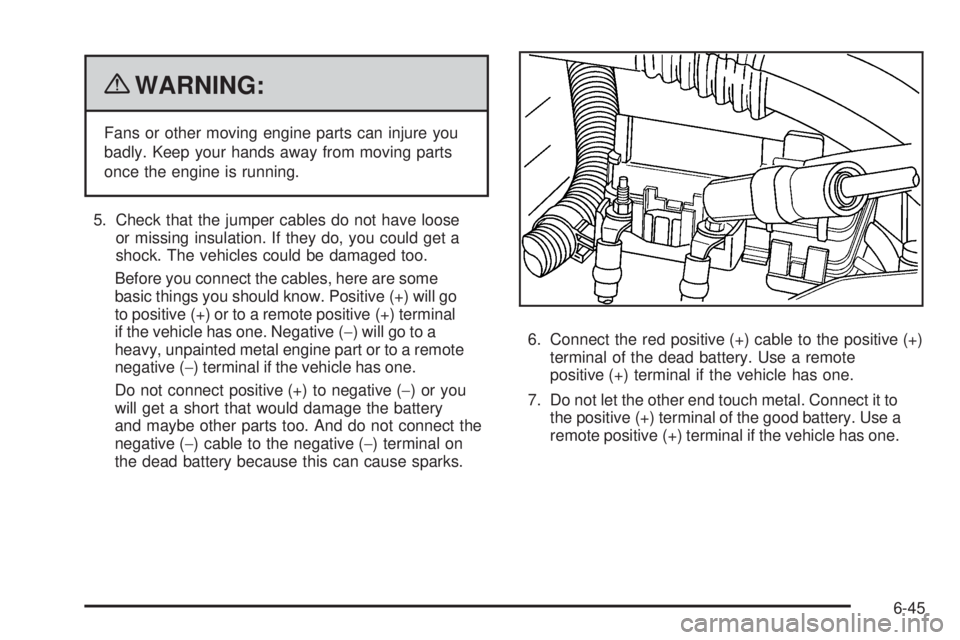
terminal of the dead battery. Use a remote
positive (+) terminal if the vehicle has one.
7. Do not let the other end touch metal. Connect it to
the positive (+) terminal of the good battery. Use a
remote positive (+) terminal if the vehicle has one.
6-45
Page 322 of 448
8. Now connect the black negative (−) cable to the
negative (−) terminal of the good battery. Use a
remote negative (−) terminal if the vehicle has one.
Do not let the other end touch anything until the
next step. The other end of the negative (−) cable
does not go to the dead battery. It goes to a heavy,
unpainted metal engine part, or to a remote
negative (−) terminal on the vehicle with the
dead battery.
9. Connect the other end of the negative (−) cable at
least 18 inches (45 cm) away from the dead battery,
but not near engine parts that move. The electrical
connection is just as good there, and the chance
of sparks getting back to the battery is much less.
Your vehicle has a remote negative (−) terminal
for this purpose.
10. Now start the vehicle with the good battery and run
the engine for a while.
11. Try to start the vehicle that had the dead battery.
If it will not start after a few tries, it probably needs
service.Notice:If the jumper cables are connected or
removed in the wrong order, electrical shorting may
occur and damage the vehicle. The repairs would
not be covered by the vehicle warranty. Always
connect and remove the jumper cables in the correct
order, making sure that the cables do not touch
each other or other metal.
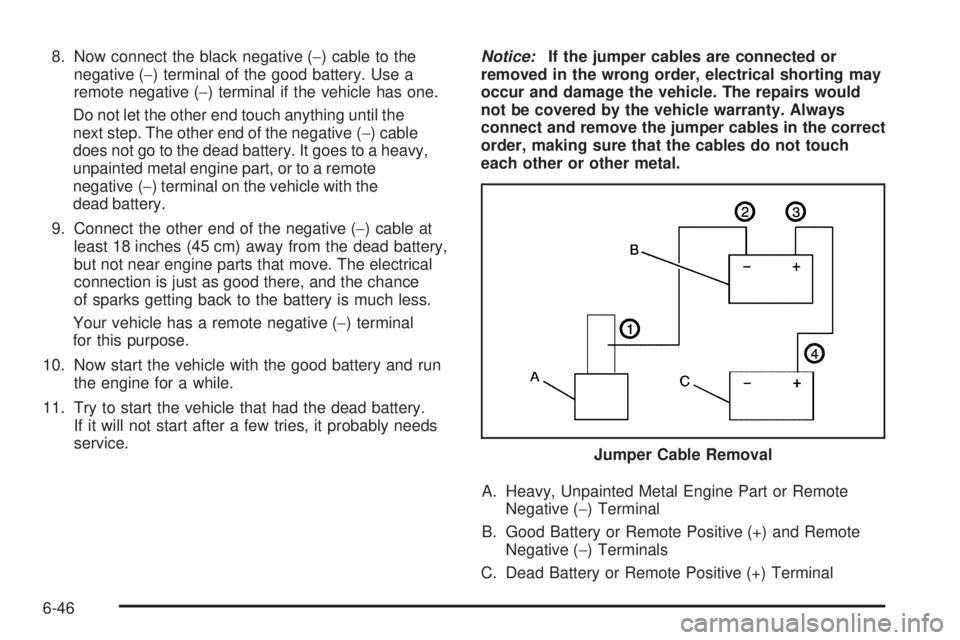
A. Heavy, Unpainted Metal Engine Part or Remote
Negative (−) Terminal
B. Good Battery or Remote Positive (+) and Remote
Negative (−) Terminals
C. Dead Battery or Remote Positive (+) TerminalJumper Cable Removal
6-46
Page 323 of 448
To disconnect the jumper cables from both vehicles, do
the following:
1. Disconnect the black negative (−) cable from the
vehicle that had the dead battery.
2. Disconnect the black negative (−) cable from the
vehicle with the good battery.
3. Disconnect the red positive (+) cable from the
vehicle with the good battery.
4. Disconnect the red positive (+) cable from the other
vehicle.
Rear Axle
When to Check and Change Lubricant
It is not necessary to regularly check rear axle fluid
unless you suspect there is a leak or you hear an
unusual noise. A fluid loss could indicate a problem.
Have it inspected and repaired.
How to Check Lubricant
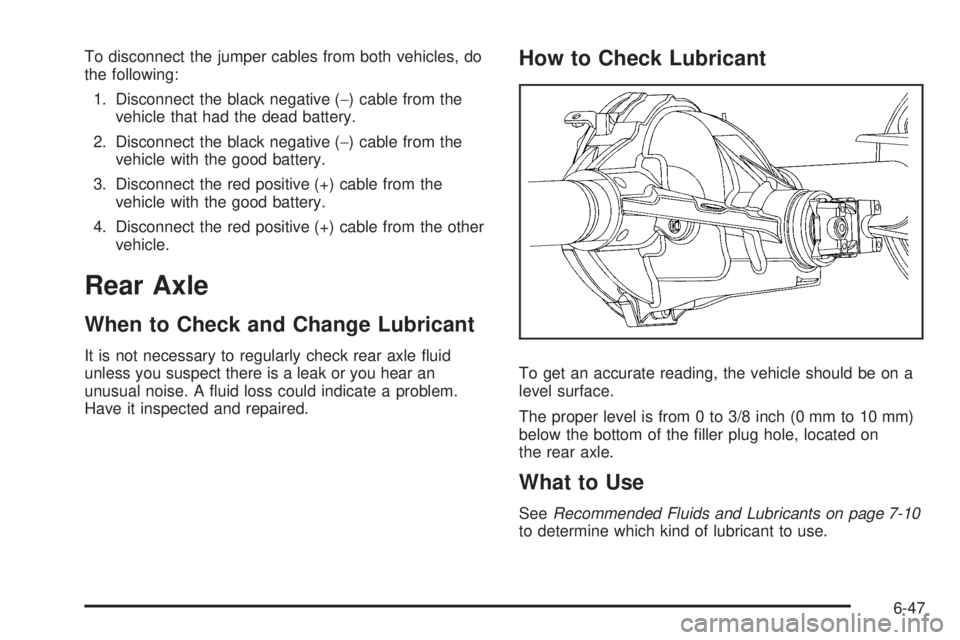
To get an accurate reading, the vehicle should be on a
level surface.
The proper level is from 0 to 3/8 inch (0 mm to 10 mm)
below the bottom of the filler plug hole, located on
the rear axle.
What to Use
SeeRecommended Fluids and Lubricants on page 7-10
to determine which kind of lubricant to use.
6-47
Page 420 of 448
Coverage
Services are provided up to 5 years/100,000 miles
(160 000 km), whichever comes first.
In the U.S., anyone driving the vehicle is covered.
In Canada, a person driving the vehicle without
permission from the owner is not covered.
Roadside Assistance is not a part of the New Vehicle
Limited Warranty. GMC and General Motors of Canada
Limited reserve the right to make any changes or
discontinue the Roadside Assistance program at any
time without notification.
GMC and General Motors of Canada Limited reserve
the right to limit services or payment to an owner
or driver if they decide the claims are made too often,
or the same type of claim is made many times.
Services Provided
•Emergency Fuel Delivery:Delivery of enough fuel
for the vehicle to get to the nearest service station.
•Lock-Out Service:Service is provided to unlock the
vehicle if you are locked out. A remote unlock may
be available if you have OnStar
®. For security
reasons, the driver must present identification
before this service is given.
•Emergency Tow From a Public Road or
Highway:Tow to the nearest GMC dealer for
warranty service, or if the vehicle was in a crash
and cannot be driven. Assistance is also given when
the vehicle is stuck in the sand, mud, or snow.
•Flat Tire Change:Service is provided to change a
flat tire with the spare tire. The spare tire, if equipped,
must be in good condition and properly inflated.
It is the owner’s responsibility for the repair or
replacement of the tire if it is not covered by the
warranty.
•Battery Jump Start:Service is provided to jump
start a dead battery.
•Trip Routing Service:Detailed maps of North
America are provided when requested either with
the most direct route or the most scenic route.
Additional travel information is also available.
Allow three weeks for delivery.
•Trip Interruption Benets and Assistance:If your
trip is interrupted due to a warranty failure, incidental
expenses may be reimbursed during the 5 years/
100,000 miles (160 000 km) Powertrain warranty
period. Items considered are hotel, meals, and
rental car.
8-8