stop start GMC CANYON 2012 User Guide
[x] Cancel search | Manufacturer: GMC, Model Year: 2012, Model line: CANYON, Model: GMC CANYON 2012Pages: 404, PDF Size: 5.25 MB
Page 163 of 404
Black plate (17,1)GMC Canyon Owner Manual - 2012
Infotainment System 7-17
If the surface of a CD is soiled, take
a soft, lint free cloth or dampen a
clean, soft cloth in a mild, neutral
detergent solution mixed with water,
and clean it. Make sure the wiping
process starts from the center to
the edge.
Playing a CD
Insert a CD partway into the slot,
label side up. The player pulls it in,
and READING displays. The CD
should begin playing. To insert a
CD with the ignition off, first press
the
Z(eject) button or the
DISPL knob.
If the ignition or radio is turned off
with a CD in the player it stays in
the player. When the ignition or
radio is turned on, the CD starts to
play where it stopped, if it was the
last selected audio source.
When the CD is inserted, the CD
symbol displays. As each new track
starts to play, the track number
displays. The CD player can play the smaller
8 cm (3 in) single CDs with an
adapter ring. Full-size CDs and the
smaller CDs are loaded in the
same manner.
3 REV (Fast Reverse):
Press and
hold to reverse quickly within a
track. Press and hold for less than
two seconds to reverse at 10 times
the normal playing speed. Press
and hold for more than two seconds
to reverse at 20 times the normal
playing speed. Release to play the
track.
4 FWD (Fast Forward): Press and
hold to advance quickly within a
track. Press and hold for less than
two seconds to advance at six times
the normal playing speed. Press
and hold for more than two seconds
to advance at 17 times the normal
playing speed. Release to play
the track.
6 RDM (Random): Press to hear
the tracks in random, rather than
sequential, order. RDM ON displays. RDM and the track number displays
when each track starts to play.
Press again to turn off random play.
RDM OFF displays.
qSEEKr:
Press the left arrow to
go to the start of the current or the
previous track. Press the right arrow
to go to the start of the next track.
Pressing either arrow for more than
two seconds scans the next tracks,
playing the first eight seconds of
each track until all of the tracks
have been previewed. Press either
arrow again to stop scanning and to
play the track.
qTUNEr: Turn to go to the
previous or next track.
DISPL (Display): Press to see how
long the current track has been
playing. ET and the elapsed time of
the track displays. To change the
default on the display (track or
elapsed time), press until you see
the desired display, then press and
hold for two seconds. The radio
beeps once. The selected display is
now the default.
Page 166 of 404
Black plate (20,1)GMC Canyon Owner Manual - 2012
7-20 Infotainment System
Preprogrammed Playlists
Preprogrammed playlists which
were created by WinAmp™,
MusicMatch™, or Real Jukebox™
software can be accessed, however,
they cannot be edited. These
playlists are treated as special
folders containing compressed
audio song files.
Playing an MP3/WMA
Insert a CD partway into the slot,
label side up. The player pulls it in,
and READING displays. The CD
should begin playing and the CD
symbol displays. If you want to
insert a CD with the ignition off,
first press the
Zbutton or the
DISPL knob.
If the ignition or radio is turned off
with a CD in the player it stays in
the player. When the ignition or
radio is turned on, the CD starts to
play where it stopped, if it was the
last selected audio source.
As each new track starts to play, the
track number displays. 1 FLD
x(Previous Folder):
Press
this button to go to the first track in
the previous folder. Pressing this
button while in folder random mode
takes you to the previous folder and
plays the tracks in random order in
that folder.
2 FLD
w(Next Folder): Press this
button to go to the first track in the
next folder. Pressing this button
while in folder random mode takes
the CD to the next folder and plays
the tracks in random order in that
folder.
3 REV (Reverse): Press and hold
this button to reverse quickly within
a track. Press and hold this button
for less than two seconds to reverse
at 10 times the normal playing
speed. Press and hold it for more
than two seconds to reverse at
20 times the normal playing
speed. Release this button to play
the track.
4 FWD (Forward): Press and hold
this button to advance quickly within
a track. Press and hold this button for less than two seconds to
advance at 10 times the normal
playing speed. Press and hold it for
more than two seconds to advance
at 20 times the normal playing
speed. Release this button to play
the track.
6 RDM (Random):
To play the
tracks in random order in the current
folder or playlist, press and release
this button. FLDR RDM (folder
random) displays. Once all of the
tracks in the current folder or playlist
have played, the system moves to
the next folder or playlist and plays
all of the tracks in random order.
To play all the tracks in random
order on the CD, press and hold this
button for two seconds. A beep
sounds and DISC RDM (disc
random) displays. This feature does
not work with playlists.
When in random, pressing and
releasing either SEEK arrow takes
the CD to the previous or to the next
random track.
Page 167 of 404
Black plate (21,1)GMC Canyon Owner Manual - 2012
Infotainment System 7-21
Press and release this button again
to turn off random play. NO RDM (no
random) displays.
qSEEKr:Press the left SEEK
arrow to go to the start of the
previous track. Press the right
SEEK arrow to go to the start of the
next track. Pressing either SEEK
arrow for more than two seconds
searches the previous or next tracks
at two tracks per second. Release
the button to stop searching and to
play the track.
qTUNEr: Turn to reverse or
advance through the tracks in all
folders or playlists. The track
number and file name displays for
each track. Turning this knob while
in random reverses or advances the
tracks in sequential order.
DISPL (Display): Press this knob
to switch between track mode,
folder/playlist mode, and time of day
mode. The display shows only
eight characters, but there can be
up to four pages of text. If there are more than
eight characters in the song,
folder, or playlist name, pressing
this knob within two seconds takes
you to the next page of text. If there
are no other pages to be shown,
pressing this knob within
two seconds takes you to the
next display mode.
.Track mode displays the current
track number and the ID3 tag
song name.
.Folder/playlist mode displays the
current folder or playlist number
and the folder/playlist name.
.Time of day mode displays the
time of day and the ID3 tag
song name.
To change the default on the
display, press the DISPL knob until
you see the desired display, then
press and hold this knob for two
two seconds. The radio produces
one beep and the selected display
is now the default. INFO (Information):
INFO displays
when a current track has ID3 tag
information. Press this button to
display the artist name and album
contained in the tag. INFO
disappears from the display when
the information in the ID3 tag has
finished being read.
BAND: Press this button to listen to
the radio when a CD is playing. The
inactive CD remains inside the radio
for future listening.
CD AUX (Auxiliary): Press this
button to play a CD when listening
to the radio. The CD symbol
illuminates on the display when a
CD is loaded.
Z(Eject): Press this button to
eject a CD. Eject can activate while
either the ignition or radio is off.
CDs can be loaded with the
ignition and radio off if this button
is pressed first.
Page 185 of 404
Black plate (5,1)GMC Canyon Owner Manual - 2012
Driving and Operating 9-5
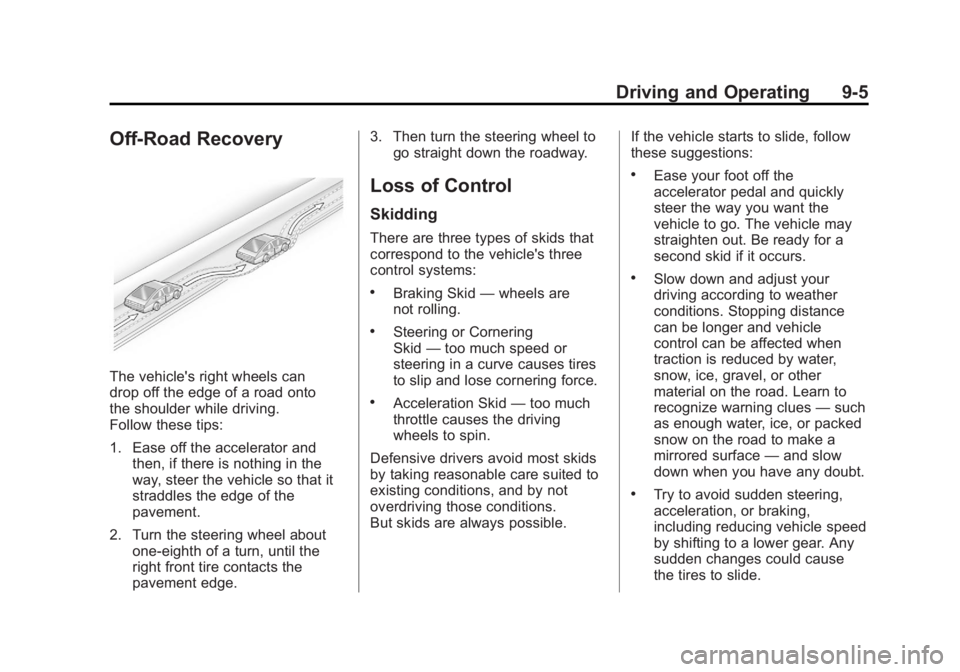
Off-Road Recovery
The vehicle's right wheels can
drop off the edge of a road onto
the shoulder while driving.
Follow these tips:
1. Ease off the accelerator andthen, if there is nothing in the
way, steer the vehicle so that it
straddles the edge of the
pavement.
2. Turn the steering wheel about one-eighth of a turn, until the
right front tire contacts the
pavement edge. 3. Then turn the steering wheel to
go straight down the roadway.
Loss of Control
Skidding
There are three types of skids that
correspond to the vehicle's three
control systems:
.Braking Skid —wheels are
not rolling.
.Steering or Cornering
Skid —too much speed or
steering in a curve causes tires
to slip and lose cornering force.
.Acceleration Skid —too much
throttle causes the driving
wheels to spin.
Defensive drivers avoid most skids
by taking reasonable care suited to
existing conditions, and by not
overdriving those conditions.
But skids are always possible. If the vehicle starts to slide, follow
these suggestions:
.Ease your foot off the
accelerator pedal and quickly
steer the way you want the
vehicle to go. The vehicle may
straighten out. Be ready for a
second skid if it occurs.
.Slow down and adjust your
driving according to weather
conditions. Stopping distance
can be longer and vehicle
control can be affected when
traction is reduced by water,
snow, ice, gravel, or other
material on the road. Learn to
recognize warning clues
—such
as enough water, ice, or packed
snow on the road to make a
mirrored surface —and slow
down when you have any doubt.
.Try to avoid sudden steering,
acceleration, or braking,
including reducing vehicle speed
by shifting to a lower gear. Any
sudden changes could cause
the tires to slide.
Page 189 of 404
Black plate (9,1)GMC Canyon Owner Manual - 2012
Driving and Operating 9-9
If the vehicle stalls on a hill:
1. Apply the brakes to stop thevehicle, and then apply the
parking brake.
2. Shift into P (Park) for an automatic transmission or
1 (First) for a manual
transmission and then
restart the engine.
.If driving uphill when the
vehicle stalls, shift to
R (Reverse), release the
parking brake, and back
straight down.
.Never try to turn the vehicle
around. If the hill is steep
enough to stall the vehicle,
it is steep enough to cause
it to roll over.
.If you cannot make it up the
hill, back straight down
the hill.
.Never back down a hill in
N (Neutral) using only
the brake.
.The vehicle can roll
backward quickly and you
could lose control.
.If driving downhill when the
vehicle stalls, shift to a
lower gear, release the
parking brake, and drive
straight down the hill.
3. If the vehicle cannot be restarted after stalling, set the parking
brake, shift an automatic
transmission into P (Park) or a
manual transmission into
1 (First), and turn the vehicle off.
3.1. Leave the vehicle and seek help. 3.2. Stay clear of the path the
vehicle would take if it
rolled downhill.
.Avoid turns that take the vehicle
across the incline of the hill.
A hill that can be driven straight
up or down might be too steep to
drive across. Driving across an
incline puts more weight on the
downhill wheels which could
cause a downhill slide or a
rollover.
.Surface conditions can
be a problem. Loose gravel,
muddy spots, or even wet grass
can cause the tires to slip
sideways, downhill. If the
vehicle slips sideways, it can hit
something that will trip it –a
rock, a rut, etc. –and roll over.
.Hidden obstacles can make the
steepness of the incline more
severe. If a rock is driven across
with the uphill wheels, or if the
downhill wheels drop into a rut
or depression, the vehicle can tilt
even more.
Page 190 of 404
Black plate (10,1)GMC Canyon Owner Manual - 2012
9-10 Driving and Operating
.If an incline must be driven
across, and the vehicle starts to
slide, turn downhill. This should
help straighten out the vehicle
and prevent the side slipping.
{WARNING
Getting out of the vehicle on the
downhill side when stopped
across an incline is dangerous.
If the vehicle rolls over, you could
be crushed or killed. Always get
out on the uphill side of the
vehicle and stay well clear of the
rollover path.
Driving in Mud, Sand, Snow,
or Ice
Use a low gear when driving in
mud–the deeper the mud, the
lower the gear. Keep the vehicle
moving to avoid getting stuck.
Traction changes when driving on
sand. On loose sand, such as on
beaches or sand dunes, the tires
tend to sink into the sand. This
affects steering, accelerating, and
braking. Drive at a reduced speed
and avoid sharp turns or abrupt
maneuvers. Traction is reduced on hard packed
snow and ice and it is easy to lose
control. Reduce vehicle speed when
driving on hard packed snow
and ice.
{WARNING
Driving on frozen lakes, ponds,
or rivers can be dangerous. Ice
conditions vary greatly and the
vehicle could fall through the ice;
you and your passengers could
drown. Drive your vehicle on safe
surfaces only.
Page 191 of 404
Black plate (11,1)GMC Canyon Owner Manual - 2012
Driving and Operating 9-11
Driving in Water
{WARNING
Driving through rushing water can
be dangerous. Deep water can
sweep your vehicle downstream
and you and your passengers
could drown. If it is only shallow
water, it can still wash away the
ground from under your tires.
Traction could be lost, and the
vehicle could roll over. Do not
drive through rushing water.Notice:
Do not drive through
standing water if it is deep
enough to cover the wheel hubs,
axles or exhaust pipe. Deep water
can damage the axle and other
vehicle parts.
If the standing water is not too deep,
drive slowly through it. At faster
speeds, water splashes on the
ignition system and the vehicle can
stall. Stalling can also occur if you
get the exhaust pipe under water.
While the exhaust pipe is under
water, you will not be able to start
the engine. When going through
water, the brakes get wet, and it
might take longer to stop. See
Driving on Wet Roads on
page 9‑12.
After Off-Road Driving
Remove any brush or debris that
has collected on the underbody,
or chassis, or under the hood.
These accumulations can be a
fire hazard.
After operation in mud or sand,
have the brake linings cleaned and
checked. These substances can
cause glazing and uneven braking.
Check the body structure, steering,
suspension, wheels, tires, and
exhaust system for damage and
check the fuel lines and cooling
system for any leakage.
More frequent maintenance
service is required. Refer to the
Maintenance Schedule on
page 11‑3 for more information.
Page 204 of 404
Black plate (24,1)GMC Canyon Owner Manual - 2012
9-24 Driving and Operating
Starting and
Operating
New Vehicle Break-In
Notice:The vehicle does not
need an elaborate break-in. But it
will perform better in the long run
if you follow these guidelines:
.Keep the vehicle speed at
88 km/h (55 mph) or less for
the first 805 km (500 miles).
.Do not drive at any one
constant speed, fast or
slow, for the first 805 km
(500 miles). Do not make
full-throttle starts. Avoid
downshifting to brake or
slow the vehicle.
.Avoid making hard stops for
the first 322 km (200 miles) or
so. During this time the new
brake linings are not yet
broken in. Hard stops with
new linings can mean
premature wear and earlier
replacement. Follow this
breaking-in guideline every
time you get new brake
linings.
.Do not tow a trailer during
break-in. See Trailer Towing
on page 9‑58 for the trailer
towing capabilities of the
vehicle and more
information.
Following break‐in, engine speed
and load can be gradually
increased.
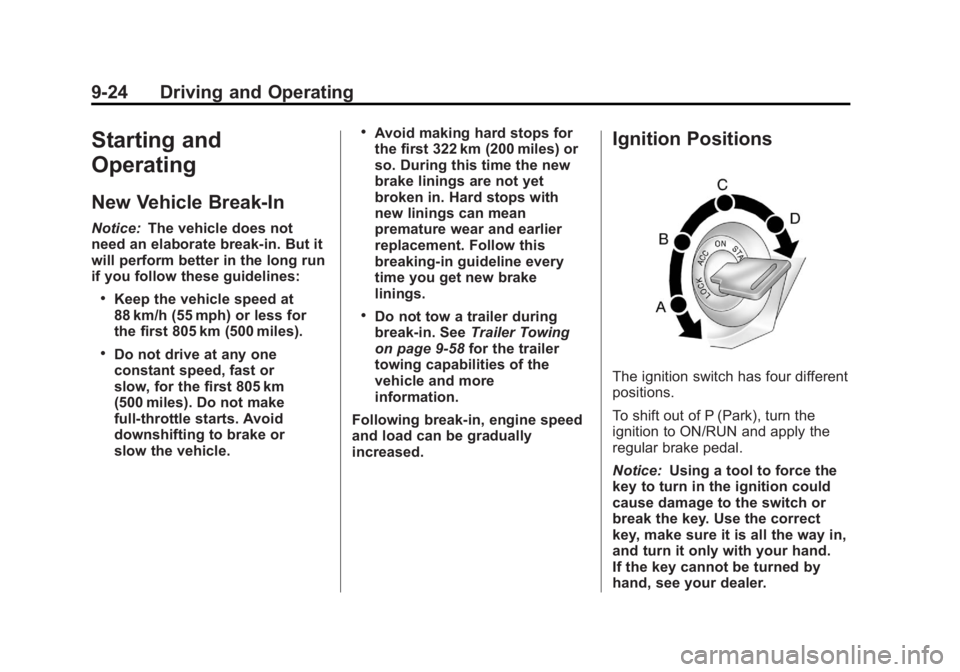
Ignition Positions
The ignition switch has four different
positions.
To shift out of P (Park), turn the
ignition to ON/RUN and apply the
regular brake pedal.
Notice: Using a tool to force the
key to turn in the ignition could
cause damage to the switch or
break the key. Use the correct
key, make sure it is all the way in,
and turn it only with your hand.
If the key cannot be turned by
hand, see your dealer.
Page 206 of 404
Black plate (26,1)GMC Canyon Owner Manual - 2012
9-26 Driving and Operating
B (ACC/ACCESSORY):This is the
position in which you can operate
the electrical accessories or items
plugged into the accessory power
outlets. On automatic transmission
vehicles, this position unlocks the
ignition. On manual transmission
vehicles, it unlocks the ignition and
steering wheel . Use this position if
the vehicle must be pushed or
towed.
C (ON/RUN): This position can be
used to operate the electrical
accessories and to display some
instrument panel cluster warning
and indicator lights. This position
can also be used for service and
diagnostics, and to verify the proper
operation of the malfunction
indicator lamp as may be required
for emission inspection purposes.
The switch stays in this position
when the engine is running. The
transmission is also unlocked in this
position on automatic transmission
vehicles. If you leave the key in the ACC/
ACCESSORY or ON/RUN position
with the engine off, the battery could
be drained. You may not be able to
start your vehicle if the battery is
allowed to drain for an extended
period of time.
D (START):
This is the position that
starts the engine. When the engine
starts, release the key. The ignition
switch returns to ON/RUN for
driving.
A warning tone will sound when the
driver door is opened, the ignition is
in ACC/ACCESSORY or LOCK/OFF
and the key is in the ignition.
Starting the Engine
Place the transmission in the
proper gear.
Automatic Transmission
Move the shift lever to P (Park) or
N (Neutral). The engine will not start
in any other position. To restart the
vehicle when it is already moving,
use N (Neutral) only. Notice:
Do not try to shift to
P (Park) if the vehicle is moving.
If you do, you could damage the
transmission. Shift to P (Park)
only when the vehicle is stopped.
Manual Transmission
The shift lever should be in
N (Neutral) and the parking brake
engaged. Hold the clutch pedal
down to the floor and start the
engine. The vehicle will not start if
the clutch pedal is not all the
way down.
Starting Procedure
1. With your foot off the accelerator
pedal, turn the ignition key to
START. When the engine starts,
let go of the key. The idle speed
will go down as the engine
warms. Do not race the engine
immediately after starting it.
Operate the engine and
transmission gently to allow the
oil to warm up and lubricate all
moving parts.
Page 207 of 404
Black plate (27,1)GMC Canyon Owner Manual - 2012
Driving and Operating 9-27
The vehicle has a
Computer-Controlled Cranking
System. This feature assists in
starting the engine and protects
components. If the ignition key is
turned to the START position,
and then released when the
engine begins cranking, the
engine will continue cranking for
a few seconds or until the
vehicle starts. If the engine does
not start and the key is held in
START for many seconds,
cranking will be stopped after
15 seconds to prevent cranking
motor damage. To prevent gear
damage, this system also
prevents cranking if the engine
is already running. Engine
cranking can be stopped by
turning the ignition switch to
ACC/ACCESSORY or
LOCK/OFF.
Notice: Cranking the engine for
long periods of time, by returning
the key to the START position
immediately after cranking has
ended, can overheat and damage the cranking motor, and drain the
battery. Wait at least 15 seconds
between each try, to let the
cranking motor cool down.
2. If the engine does not start after
5‐10 seconds, especially in very
cold weather (below 0°F or
−18°C), it could be flooded with
too much gasoline. Push the
accelerator pedal all the way to
the floor and holding it there as
you hold the key in START for a
maximum of 15 seconds. Wait at
least 15 seconds between each
try, to allow the cranking motor
to cool. When the engine starts,
let go of the key and accelerator.
If the vehicle starts briefly but
then stops again, repeat the
procedure. This clears the extra
gasoline from the engine. Do not
race the engine immediately
after starting it. Operate the
engine and transmission gently
until the oil warms up and
lubricates all moving parts. Notice:
The engine is designed to
work with the electronics in the
vehicle. If you add electrical parts
or accessories, you could change
the way the engine operates.
Before adding electrical
equipment, check with your
dealer. If you do not, the engine
might not perform properly. Any
resulting damage would not be
covered by the vehicle warranty.
Engine Heater
The engine coolant heater can
provide easier starting and better
fuel economy during engine
warm-up in cold weather conditions
at or below −18°C (0°F ). Vehicles
with an engine coolant heater
should be plugged in at least
four hours before starting. An
internal thermostat in the plug-end
of the cord may exist which will
prevent engine coolant heater
operation at temperatures above
−18°C (0°F).