ECU GMC CANYON 2012 Workshop Manual
[x] Cancel search | Manufacturer: GMC, Model Year: 2012, Model line: CANYON, Model: GMC CANYON 2012Pages: 404, PDF Size: 5.25 MB
Page 242 of 404
Black plate (62,1)GMC Canyon Owner Manual - 2012
9-62 Driving and Operating
Ask your dealer for our trailering
information or advice, or write us at
our Customer Assistance Offices.
SeeCustomer Assistance Offices
(U.S. and Canada) on page 13‑5 or
Customer Assistance Offices
(Mexico) on page 13‑6 for more
information.
Weight of the Trailer Tongue
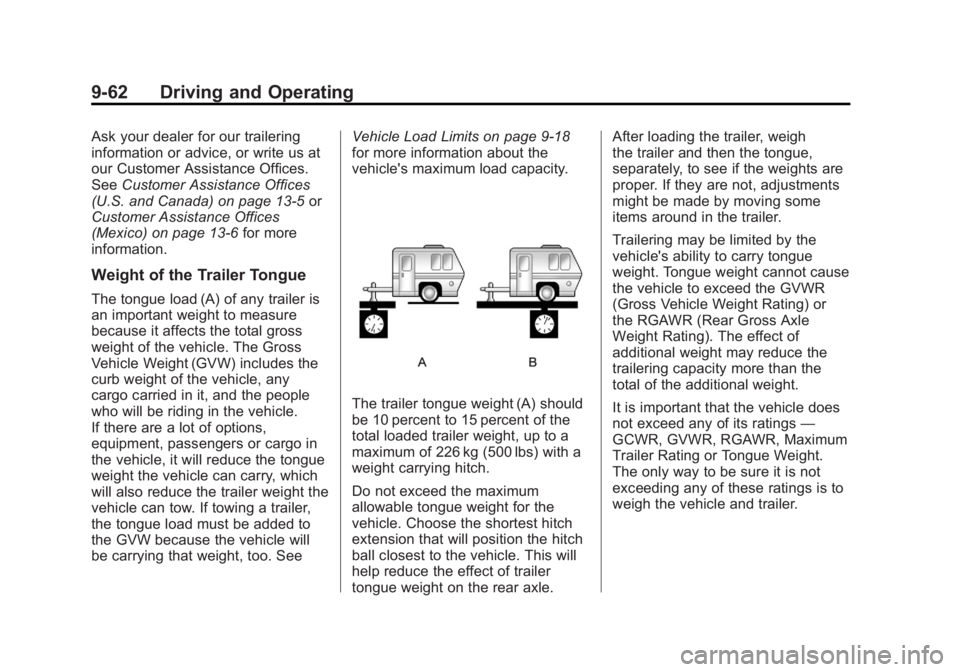
The tongue load (A) of any trailer is
an important weight to measure
because it affects the total gross
weight of the vehicle. The Gross
Vehicle Weight (GVW) includes the
curb weight of the vehicle, any
cargo carried in it, and the people
who will be riding in the vehicle.
If there are a lot of options,
equipment, passengers or cargo in
the vehicle, it will reduce the tongue
weight the vehicle can carry, which
will also reduce the trailer weight the
vehicle can tow. If towing a trailer,
the tongue load must be added to
the GVW because the vehicle will
be carrying that weight, too. See Vehicle Load Limits on page 9‑18
for more information about the
vehicle's maximum load capacity.
The trailer tongue weight (A) should
be 10 percent to 15 percent of the
total loaded trailer weight, up to a
maximum of 226 kg (500 lbs) with a
weight carrying hitch.
Do not exceed the maximum
allowable tongue weight for the
vehicle. Choose the shortest hitch
extension that will position the hitch
ball closest to the vehicle. This will
help reduce the effect of trailer
tongue weight on the rear axle.After loading the trailer, weigh
the trailer and then the tongue,
separately, to see if the weights are
proper. If they are not, adjustments
might be made by moving some
items around in the trailer.
Trailering may be limited by the
vehicle's ability to carry tongue
weight. Tongue weight cannot cause
the vehicle to exceed the GVWR
(Gross Vehicle Weight Rating) or
the RGAWR (Rear Gross Axle
Weight Rating). The effect of
additional weight may reduce the
trailering capacity more than the
total of the additional weight.
It is important that the vehicle does
not exceed any of its ratings
—
GCWR, GVWR, RGAWR, Maximum
Trailer Rating or Tongue Weight.
The only way to be sure it is not
exceeding any of these ratings is to
weigh the vehicle and trailer.
Page 267 of 404
Black plate (23,1)GMC Canyon Owner Manual - 2012
Vehicle Care 10-23
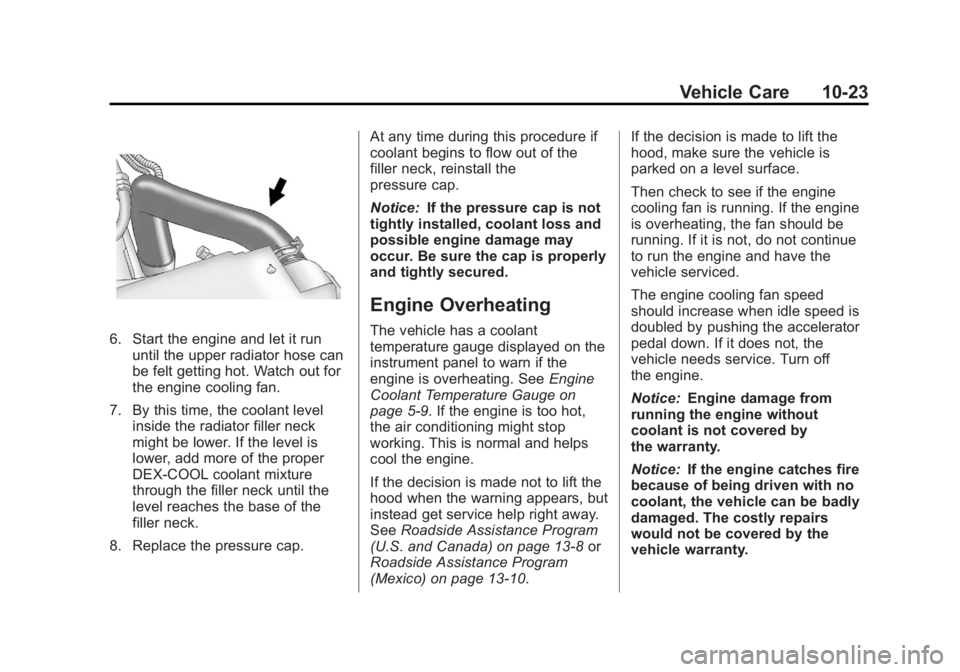
6. Start the engine and let it rununtil the upper radiator hose can
be felt getting hot. Watch out for
the engine cooling fan.
7. By this time, the coolant level inside the radiator filler neck
might be lower. If the level is
lower, add more of the proper
DEX‐COOL coolant mixture
through the filler neck until the
level reaches the base of the
filler neck.
8. Replace the pressure cap. At any time during this procedure if
coolant begins to flow out of the
filler neck, reinstall the
pressure cap.
Notice:
If the pressure cap is not
tightly installed, coolant loss and
possible engine damage may
occur. Be sure the cap is properly
and tightly secured.
Engine Overheating
The vehicle has a coolant
temperature gauge displayed on the
instrument panel to warn if the
engine is overheating. See Engine
Coolant Temperature Gauge on
page 5‑9. If the engine is too hot,
the air conditioning might stop
working. This is normal and helps
cool the engine.
If the decision is made not to lift the
hood when the warning appears, but
instead get service help right away.
See Roadside Assistance Program
(U.S. and Canada) on page 13‑8 or
Roadside Assistance Program
(Mexico) on page 13‑10. If the decision is made to lift the
hood, make sure the vehicle is
parked on a level surface.
Then check to see if the engine
cooling fan is running. If the engine
is overheating, the fan should be
running. If it is not, do not continue
to run the engine and have the
vehicle serviced.
The engine cooling fan speed
should increase when idle speed is
doubled by pushing the accelerator
pedal down. If it does not, the
vehicle needs service. Turn off
the engine.
Notice:
Engine damage from
running the engine without
coolant is not covered by
the warranty.
Notice: If the engine catches fire
because of being driven with no
coolant, the vehicle can be badly
damaged. The costly repairs
would not be covered by the
vehicle warranty.
Page 281 of 404
Black plate (37,1)GMC Canyon Owner Manual - 2012
Vehicle Care 10-37
Bulb Replacement
For the proper type of replacement
bulbs, seeReplacement Bulbs on
page 10‑39.
For any bulb‐changing procedure
not listed in this section, contact
your dealer.
Halogen Bulbs
{WARNING
Halogen bulbs have pressurized
gas inside and can burst if you
drop or scratch the bulb. You or
others could be injured. Be sure
to read and follow the instructions
on the bulb package.
Headlamps
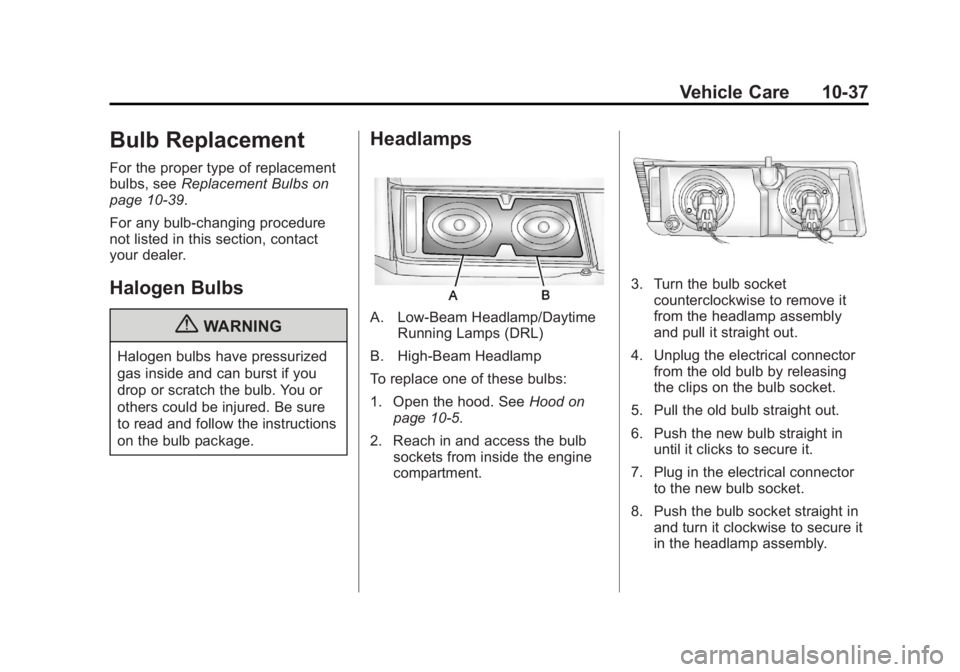
A. Low-Beam Headlamp/Daytime Running Lamps (DRL)
B. High-Beam Headlamp
To replace one of these bulbs:
1. Open the hood. See Hood on
page 10‑5.
2. Reach in and access the bulb sockets from inside the engine
compartment.
3. Turn the bulb socketcounterclockwise to remove it
from the headlamp assembly
and pull it straight out.
4. Unplug the electrical connector from the old bulb by releasing
the clips on the bulb socket.
5. Pull the old bulb straight out.
6. Push the new bulb straight in until it clicks to secure it.
7. Plug in the electrical connector to the new bulb socket.
8. Push the bulb socket straight in and turn it clockwise to secure it
in the headlamp assembly.
Page 282 of 404
Black plate (38,1)GMC Canyon Owner Manual - 2012
10-38 Vehicle Care
Taillamps, Turn Signal,
Stoplamps, and Back-Up
Lamps
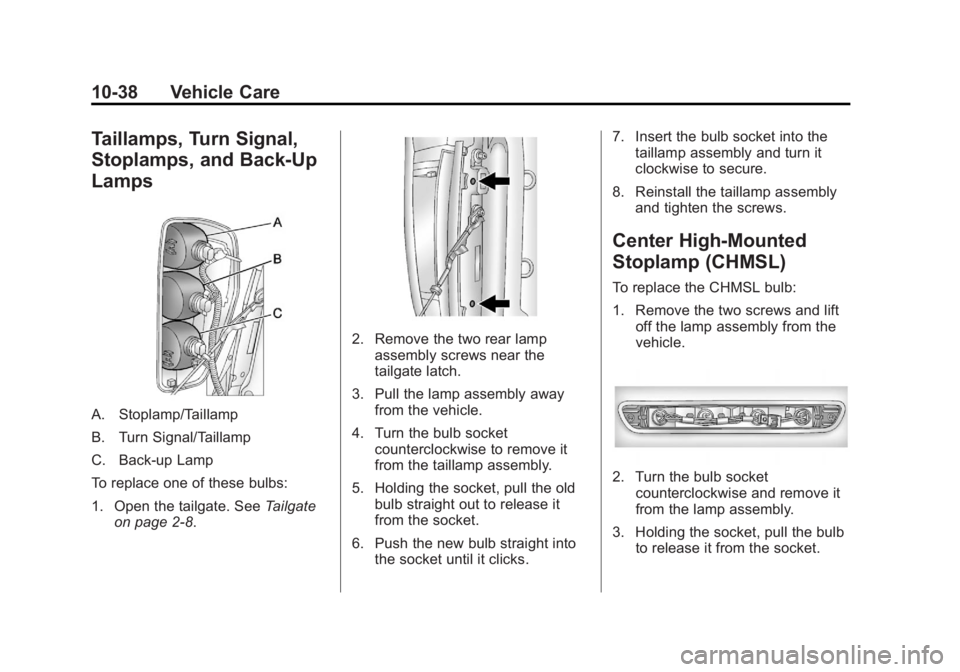
A. Stoplamp/Taillamp
B. Turn Signal/Taillamp
C. Back‐up Lamp
To replace one of these bulbs:
1. Open the tailgate. SeeTailgate
on page 2‑8.
2. Remove the two rear lamp assembly screws near the
tailgate latch.
3. Pull the lamp assembly away from the vehicle.
4. Turn the bulb socket counterclockwise to remove it
from the taillamp assembly.
5. Holding the socket, pull the old bulb straight out to release it
from the socket.
6. Push the new bulb straight into the socket until it clicks. 7. Insert the bulb socket into the
taillamp assembly and turn it
clockwise to secure.
8. Reinstall the taillamp assembly and tighten the screws.
Center High-Mounted
Stoplamp (CHMSL)
To replace the CHMSL bulb:
1. Remove the two screws and liftoff the lamp assembly from the
vehicle.
2. Turn the bulb socketcounterclockwise and remove it
from the lamp assembly.
3. Holding the socket, pull the bulb to release it from the socket.
Page 283 of 404
Black plate (39,1)GMC Canyon Owner Manual - 2012
Vehicle Care 10-39
4. Push the new bulb into thesocket until it clicks.
5. Insert the bulb socket into the lamp assembly and turn it
clockwise to secure.
6. Reinstall the lamp assembly and tighten the screws.
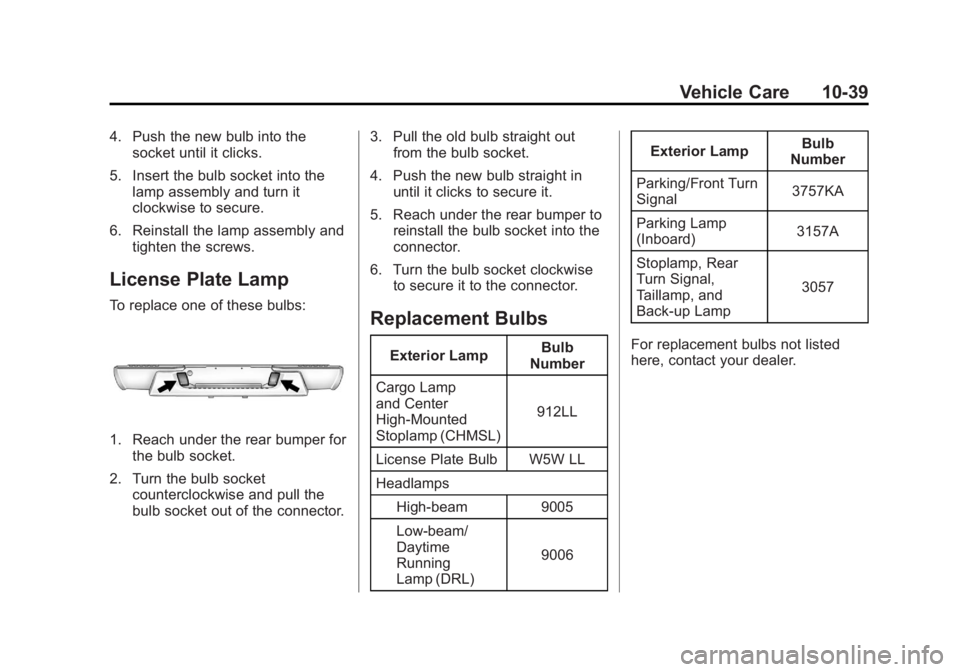
License Plate Lamp
To replace one of these bulbs:
1. Reach under the rear bumper forthe bulb socket.
2. Turn the bulb socket counterclockwise and pull the
bulb socket out of the connector. 3. Pull the old bulb straight out
from the bulb socket.
4. Push the new bulb straight in until it clicks to secure it.
5. Reach under the rear bumper to reinstall the bulb socket into the
connector.
6. Turn the bulb socket clockwise to secure it to the connector.
Replacement Bulbs
Exterior Lamp Bulb
Number
Cargo Lamp
and Center
High‐Mounted
Stoplamp (CHMSL) 912LL
License Plate Bulb W5W LL
Headlamps High-beam 9005
Low-beam/
Daytime
Running
Lamp (DRL) 9006Exterior Lamp
Bulb
Number
Parking/Front Turn
Signal 3757KA
Parking Lamp
(Inboard) 3157A
Stoplamp, Rear
Turn Signal,
Taillamp, and
Back‐up Lamp 3057
For replacement bulbs not listed
here, contact your dealer.
Page 312 of 404
Black plate (68,1)GMC Canyon Owner Manual - 2012
10-68 Vehicle Care
Tire Chains
{WARNING
If your vehicle has P215/70R16,
P235/75R16, P265/70R17, P235/
50R18, or P265/65R18 size tires,
do not use tire chains. They can
damage your vehicle because
there is not enough clearance.
Tire chains used on a vehicle
without the proper amount of
clearance can cause damage to
the brakes, suspension, or other
vehicle parts. The area damaged
by the tire chains could cause you
to lose control of your vehicle and
you or others may be injured in
a crash.(Continued)
WARNING (Continued)
Use another type of traction
device only if its manufacturer
recommends it for use on your
vehicle and tire size combination
and road conditions. Follow that
manufacturer's instructions.
To help avoid damage to your
vehicle, drive slowly, readjust,
or remove the device if it is
contacting your vehicle. Do not
spin the vehicle's wheels.
If you do find traction devices that
will fit, install them on the rear
tires. Notice:
If your vehicle has a tire
size other than P215/70R16, P235/
75R16, P265/70R17, P235/50R18,
or P265/65R18 use tire chains
only where legal and only when
you must. Use chains that are the
proper size for your tires. Install
them on the tires of the rear axle.
Do not use chains on the tires of
the front axle. Tighten them as
tightly as possible with the ends
securely fastened. Drive slowly
and follow the chain
manufacturer's instructions.
If you can hear the chains
contacting your vehicle, stop and
retighten them. If the contact
continues, slow down until it
stops. Driving too fast or
spinning the wheels with chains
on will damage your vehicle.
Page 319 of 404
Black plate (75,1)GMC Canyon Owner Manual - 2012
Vehicle Care 10-75
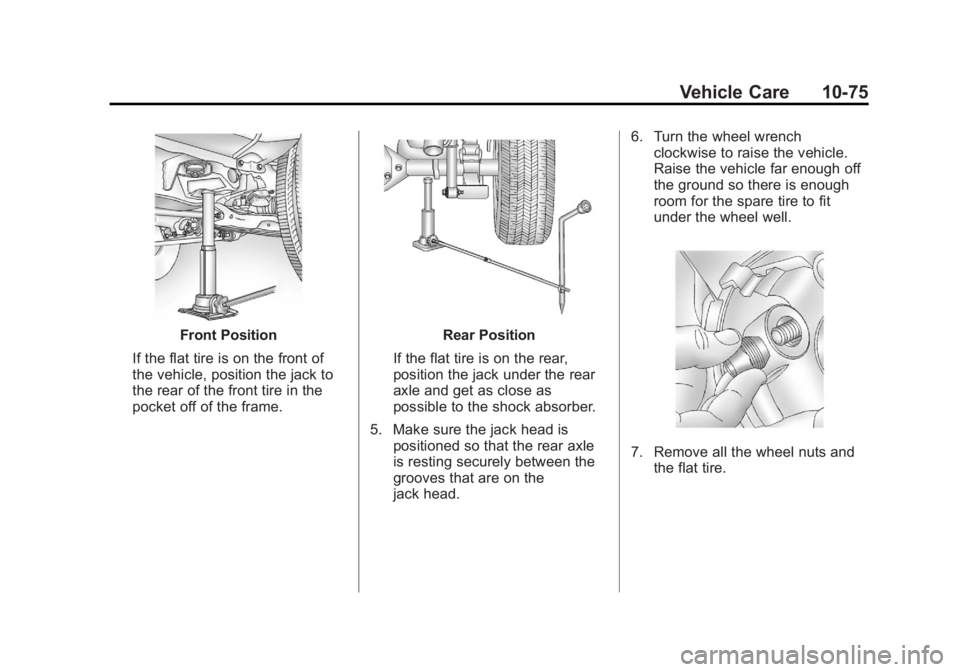
Front Position
If the flat tire is on the front of
the vehicle, position the jack to
the rear of the front tire in the
pocket off of the frame.Rear Position
If the flat tire is on the rear,
position the jack under the rear
axle and get as close as
possible to the shock absorber.
5. Make sure the jack head is positioned so that the rear axle
is resting securely between the
grooves that are on the
jack head. 6. Turn the wheel wrench
clockwise to raise the vehicle.
Raise the vehicle far enough off
the ground so there is enough
room for the spare tire to fit
under the wheel well.
7. Remove all the wheel nuts andthe flat tire.
Page 324 of 404
Black plate (80,1)GMC Canyon Owner Manual - 2012
10-80 Vehicle Care
5. Turn the wheel wrenchclockwise to raise the tire part
way up. Make sure the retainer
is seated in the wheel opening
and the valve stem is
pointed down.
Continue raising the tire, watch
to make sure it does not get
caught on anything on the
underbody. If the tire does get
caught, loosen two or three turns
and push and pull the tire and
then retighten.
Repeat this procedure as many
times as needed to ensure
proper stowage.
6. When the tire is properly seated to the underbody, continue
turning the wheel wrench
clockwise until you hear two
clicks or feel it skip twice. You
cannot overtighten the cable.
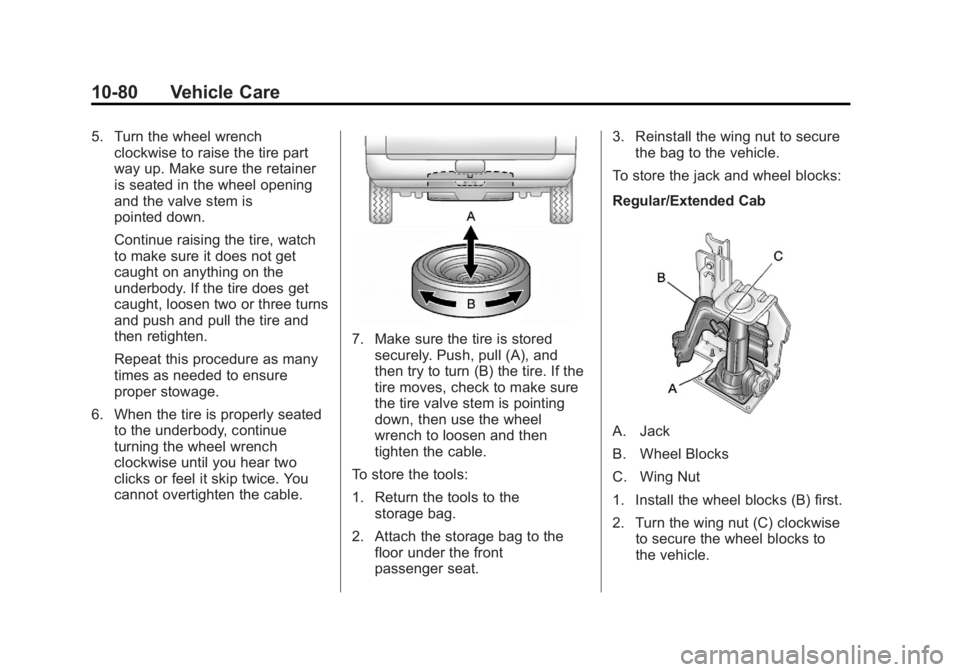
7. Make sure the tire is storedsecurely. Push, pull (A), and
then try to turn (B) the tire. If the
tire moves, check to make sure
the tire valve stem is pointing
down, then use the wheel
wrench to loosen and then
tighten the cable.
To store the tools:
1. Return the tools to the storage bag.
2. Attach the storage bag to the floor under the front
passenger seat. 3. Reinstall the wing nut to secure
the bag to the vehicle.
To store the jack and wheel blocks:
Regular/Extended Cab
A. Jack
B. Wheel Blocks
C. Wing Nut
1. Install the wheel blocks (B) first.
2. Turn the wing nut (C) clockwise to secure the wheel blocks to
the vehicle.
Page 325 of 404
Black plate (81,1)GMC Canyon Owner Manual - 2012
Vehicle Care 10-81
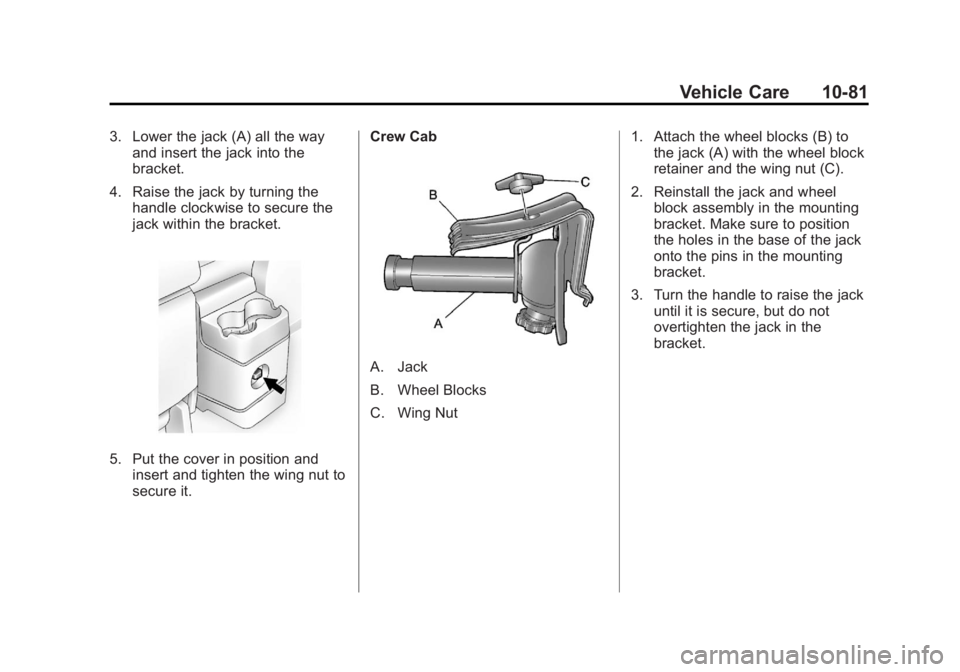
3. Lower the jack (A) all the wayand insert the jack into the
bracket.
4. Raise the jack by turning the handle clockwise to secure the
jack within the bracket.
5. Put the cover in position andinsert and tighten the wing nut to
secure it. Crew Cab
A. Jack
B. Wheel Blocks
C. Wing Nut
1. Attach the wheel blocks (B) to
the jack (A) with the wheel block
retainer and the wing nut (C).
2. Reinstall the jack and wheel block assembly in the mounting
bracket. Make sure to position
the holes in the base of the jack
onto the pins in the mounting
bracket.
3. Turn the handle to raise the jack until it is secure, but do not
overtighten the jack in the
bracket.
Page 327 of 404
Black plate (83,1)GMC Canyon Owner Manual - 2012
Vehicle Care 10-83
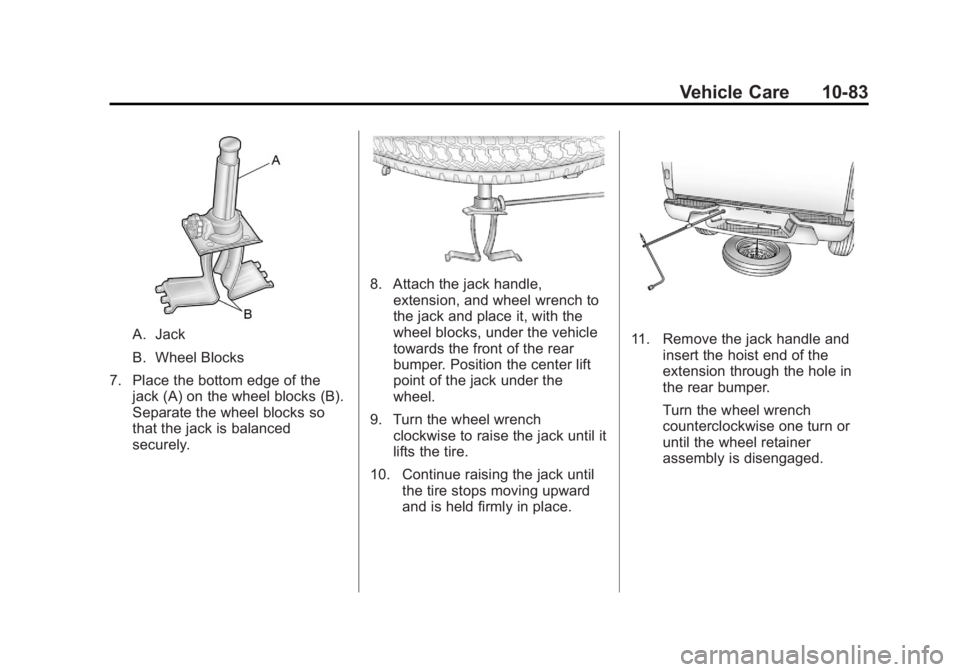
A. Jack
B. Wheel Blocks
7. Place the bottom edge of the jack (A) on the wheel blocks (B).
Separate the wheel blocks so
that the jack is balanced
securely.
8. Attach the jack handle,extension, and wheel wrench to
the jack and place it, with the
wheel blocks, under the vehicle
towards the front of the rear
bumper. Position the center lift
point of the jack under the
wheel.
9. Turn the wheel wrench clockwise to raise the jack until it
lifts the tire.
10. Continue raising the jack until the tire stops moving upward
and is held firmly in place.
11. Remove the jack handle andinsert the hoist end of the
extension through the hole in
the rear bumper.
Turn the wheel wrench
counterclockwise one turn or
until the wheel retainer
assembly is disengaged.