ignition GMC CANYON 2012 Repair Manual
[x] Cancel search | Manufacturer: GMC, Model Year: 2012, Model line: CANYON, Model: GMC CANYON 2012Pages: 404, PDF Size: 5.25 MB
Page 303 of 404
Black plate (59,1)GMC Canyon Owner Manual - 2012
Vehicle Care 10-59
TPMS Malfunction Light and
Message
The TPMS will not function properly
if one or more of the TPMS sensors
are missing or inoperable. When the
system detects a malfunction, the
low tire pressure warning light
flashes for about one minute and
then stays on for the remainder of
the ignition cycle. A DIC warning
message also displays. The
malfunction light and DIC warning
message come on at each ignition
cycle until the problem is corrected.
Some of the conditions that can
cause these to come on are:
.One of the road tires has been
replaced with the spare tire.
The spare tire does not have a
TPMS sensor. The malfunction
light and the DIC message
should go off after the road tire
is replaced and the sensor
matching process is performed
successfully. See "TPMS Sensor
Matching Process" later in this
section.
.The TPMS sensor matching
process was not done or not
completed successfully after
rotating the vehicle's tires. The
malfunction light and the DIC
message should go off once the
TPMS sensor matching process
is performed successfully.
See“TPMS Sensor Matching
Process” later in this section.
.One or more TPMS sensors are
missing or damaged. The
malfunction light and the DIC
message should go off when the
TPMS sensors are installed and
the sensor matching process is
performed successfully. See
your dealer for service.
.Replacement tires or wheels do
not match the original equipment
tires or wheels. Tires and wheels
other than those recommended
could prevent the TPMS from
functioning properly. See Buying
New Tires on page 10‑63.
.Operating electronic devices or
being near facilities using radio
wave frequencies similar to the
TPMS could cause the TPMS
sensors to malfunction.
If the TPMS is not functioning
properly, it cannot detect or signal a
low tire condition. See your dealer
for service if the TPMS malfunction
light and DIC message comes on
and stays on.
TPMS Sensor Matching
Process
Each TPMS sensor has a unique
identification code. The identification
code needs to be matched to a new
tire/wheel position after rotating the
vehicle’s tires or replacing one or
more of the TPMS sensors. Also,
the TPMS sensor matching process
should be performed after replacing
a spare tire with a road tire
containing the TPMS sensor.
Page 304 of 404
Black plate (60,1)GMC Canyon Owner Manual - 2012
10-60 Vehicle Care
The malfunction light and the DIC
message should go off at the next
ignition cycle. The sensors are
matched to the tire/wheel positions,
using a TPMS relearn tool, in the
following order: driver side front tire,
passenger side front tire, passenger
side rear tire, and driver side rear.
See your dealer for service or to
purchase a relearn tool.
There is one minute to match the
first tire/wheel position, and
five minutes overall to match all
four tire/wheel positions. If it takes
longer, the matching process stops
and must be restarted.
The TPMS sensor matching
procedure is:
1. Set the parking brake.
2. Turn the ignition to ON/RUN withthe engine off.
3. Turn the exterior lamp switch from AUTO to OFF four times
within three seconds. A double
horn chirp will sound and the
TPMS low tire warning light starts flashing. The double horn
chirp and flashing TPMS
warning light indicates the TPMS
matching process has started.
The TPMS warning light should
continue flashing throughout the
matching procedure. The LOW
TIRE message displays on the
Driver Information Center (DIC).
4. Start with the driver side front tire.
5. Place the relearn tool against the tire sidewall, near the valve
stem. Then press the button to
activate the TPMS sensor.
A horn chirp confirms that the
sensor identification code has
been matched to this tire and
wheel position.
6. Proceed to the passenger side front tire, and repeat the
procedure in Step 5.
7. Proceed to the passenger side rear tire, and repeat the
procedure in Step 5. 8. Proceed to the driver side rear
tire, and repeat the procedure in
Step 5.
9. After hearing the confirming horn chirp for the driver side rear tire,
check to see if the TPMS low tire
warning light and the DIC LOW
TIRE messages have turned off.
If yes, the TPMS sensors have
been relearned. Turn the ignition
switch to LOCK/OFF.
If the low tire warning light and
the SERV TPM message on the
DIC are on after completing
Step 5 for the driver side rear
tire, the sensor relearn process
has not been successful. Turn
the ignition to LOCK/OFF and
repeat the matching process
beginning with Step 2.
10. Set all four tires to the recommended air pressure
level as indicated on the Tire
and Loading Information label.
Page 332 of 404
Black plate (88,1)GMC Canyon Owner Manual - 2012
10-88 Vehicle Care
3. Turn off the ignition on bothvehicles. Unplug unnecessary
accessories plugged into the
cigarette lighter or the accessory
power outlets. Turn off the radio
and all lamps that are not
needed. This will avoid sparks
and help save both batteries.
And it could save the radio!
4. Open the hoods and locate the positive (+) and negative (−)
terminal locations on the other
vehicle. Your vehicle has a
remote positive (+) and a remote
negative (−) jump starting
terminal. See Engine
Compartment Overview on
page 10‑6 for more information
on the terminal locations.{WARNING
Using a match near a battery can
cause battery gas to explode.
People have been hurt doing this,
and some have been blinded.
Use a flashlight if you need
more light.
Be sure the batteries have
enough water. You do not need to
add water to the ACDelco
®
battery (or batteries) installed in
your new vehicle. But if a battery
has filler caps, be sure the right
amount of fluid is there. If it is low,
add water to take care of that
first. If you do not, explosive gas
could be present.
(Continued)
WARNING (Continued)
Battery fluid contains acid that
can burn you. Do not get it on
you. If you accidentally get it in
your eyes or on your skin, flush
the place with water and get
medical help immediately.
{WARNING
Fans or other moving engine
parts can injure you badly. Keep
your hands away from moving
parts once the engine is running.
Page 337 of 404
Black plate (93,1)GMC Canyon Owner Manual - 2012
Vehicle Care 10-93
6. Turn the ignition to LOCK/OFFand remove the key —the front
wheels will still turn.
7. Release the parking brake only after the vehicle being towed is
firmly attached to the towing
vehicle.
After towing see “Shifting Out of
N (Neutral)” underFour-Wheel Drive
on page 10‑30.
If the vehicle being towed will not be
started or driven for six weeks or
more, remove the battery cable from
the negative terminal (post) of the
battery to prevent the battery from
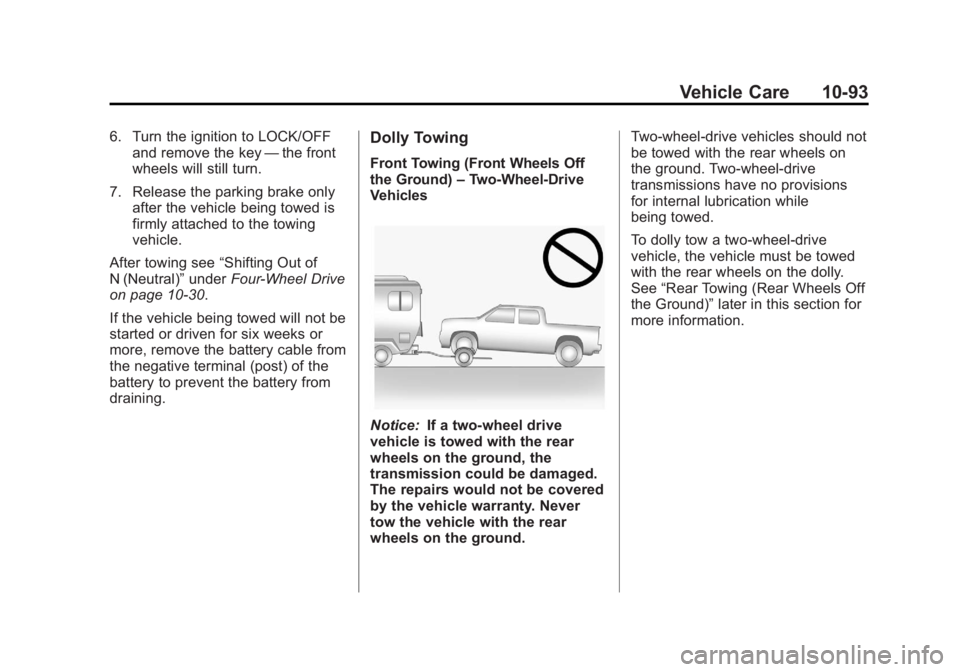
draining.Dolly Towing
Front Towing (Front Wheels Off
the Ground) –Two‐Wheel‐Drive
Vehicles
Notice: If a two-wheel drive
vehicle is towed with the rear
wheels on the ground, the
transmission could be damaged.
The repairs would not be covered
by the vehicle warranty. Never
tow the vehicle with the rear
wheels on the ground. Two-wheel-drive vehicles should not
be towed with the rear wheels on
the ground. Two-wheel-drive
transmissions have no provisions
for internal lubrication while
being towed.
To dolly tow a two‐wheel‐drive
vehicle, the vehicle must be towed
with the rear wheels on the dolly.
See
“Rear Towing (Rear Wheels Off
the Ground)” later in this section for
more information.
Page 338 of 404
Black plate (94,1)GMC Canyon Owner Manual - 2012
10-94 Vehicle Care
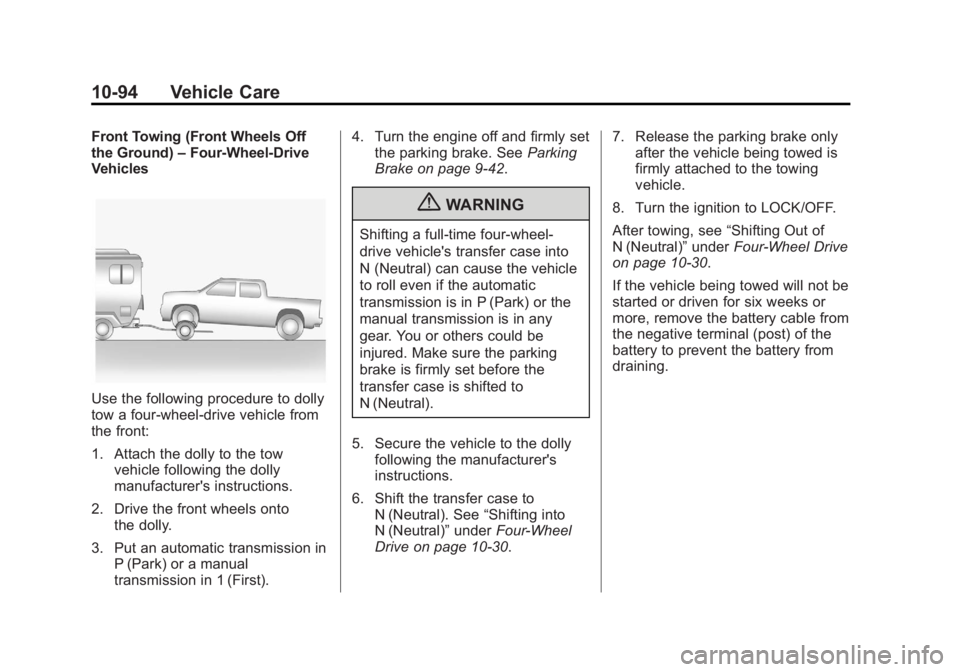
Front Towing (Front Wheels Off
the Ground)–Four-Wheel-Drive
Vehicles
Use the following procedure to dolly
tow a four-wheel-drive vehicle from
the front:
1. Attach the dolly to the tow
vehicle following the dolly
manufacturer's instructions.
2. Drive the front wheels onto the dolly.
3. Put an automatic transmission in P (Park) or a manual
transmission in 1 (First). 4. Turn the engine off and firmly set
the parking brake. See Parking
Brake on page 9‑42.
{WARNING
Shifting a full‐time four‐wheel‐
drive vehicle's transfer case into
N (Neutral) can cause the vehicle
to roll even if the automatic
transmission is in P (Park) or the
manual transmission is in any
gear. You or others could be
injured. Make sure the parking
brake is firmly set before the
transfer case is shifted to
N (Neutral).
5. Secure the vehicle to the dolly following the manufacturer's
instructions.
6. Shift the transfer case to N (Neutral). See “Shifting into
N (Neutral)” underFour-Wheel
Drive on page 10‑30. 7. Release the parking brake only
after the vehicle being towed is
firmly attached to the towing
vehicle.
8. Turn the ignition to LOCK/OFF.
After towing, see “Shifting Out of
N (Neutral)” underFour-Wheel Drive
on page 10‑30.
If the vehicle being towed will not be
started or driven for six weeks or
more, remove the battery cable from
the negative terminal (post) of the
battery to prevent the battery from
draining.
Page 339 of 404
Black plate (95,1)GMC Canyon Owner Manual - 2012
Vehicle Care 10-95
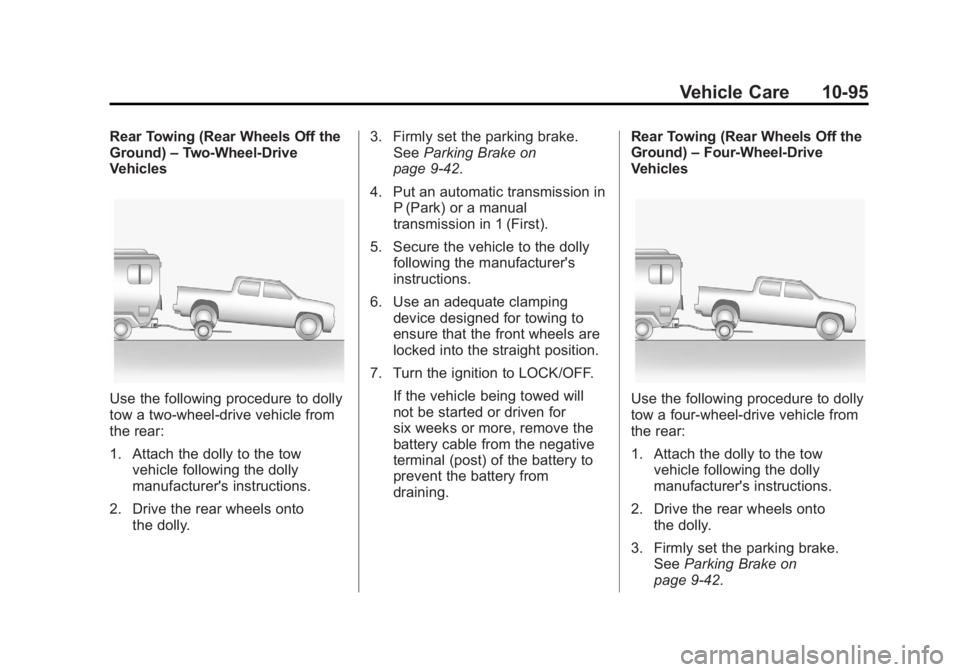
Rear Towing (Rear Wheels Off the
Ground)–Two‐Wheel‐Drive
Vehicles
Use the following procedure to dolly
tow a two-wheel-drive vehicle from
the rear:
1. Attach the dolly to the tow
vehicle following the dolly
manufacturer's instructions.
2. Drive the rear wheels onto the dolly. 3. Firmly set the parking brake.
See Parking Brake on
page 9‑42.
4. Put an automatic transmission in P (Park) or a manual
transmission in 1 (First).
5. Secure the vehicle to the dolly following the manufacturer's
instructions.
6. Use an adequate clamping device designed for towing to
ensure that the front wheels are
locked into the straight position.
7. Turn the ignition to LOCK/OFF. If the vehicle being towed will
not be started or driven for
six weeks or more, remove the
battery cable from the negative
terminal (post) of the battery to
prevent the battery from
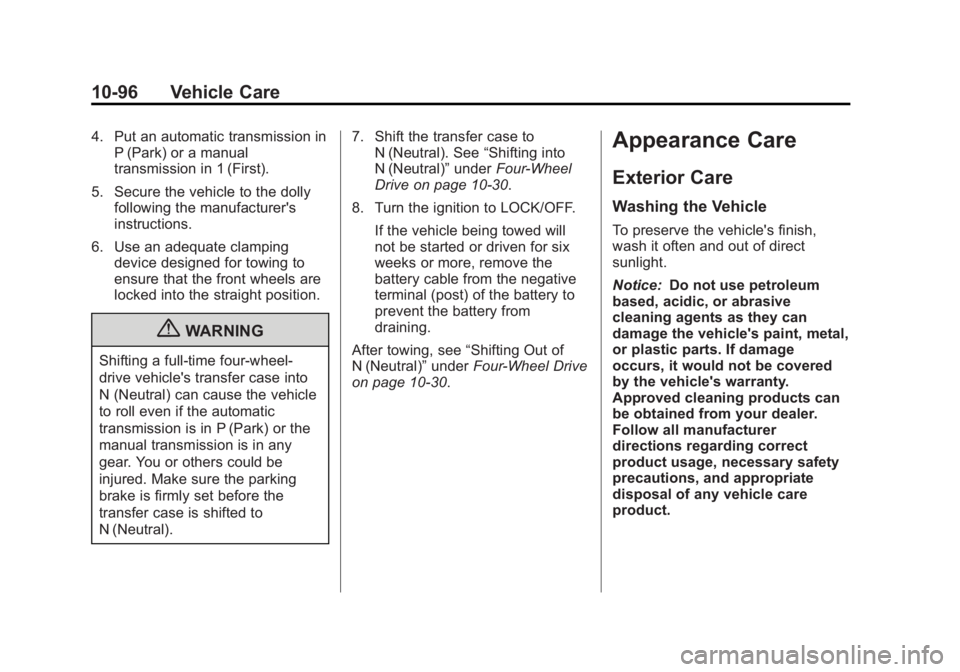
draining. Rear Towing (Rear Wheels Off the
Ground)
–Four‐Wheel‐Drive
VehiclesUse the following procedure to dolly
tow a four-wheel-drive vehicle from
the rear:
1. Attach the dolly to the tow
vehicle following the dolly
manufacturer's instructions.
2. Drive the rear wheels onto the dolly.
3. Firmly set the parking brake. See Parking Brake on
page 9‑42.
Page 340 of 404
Black plate (96,1)GMC Canyon Owner Manual - 2012
10-96 Vehicle Care
4. Put an automatic transmission inP (Park) or a manual
transmission in 1 (First).
5. Secure the vehicle to the dolly following the manufacturer's
instructions.
6. Use an adequate clamping device designed for towing to
ensure that the front wheels are
locked into the straight position.
{WARNING
Shifting a full‐time four‐wheel‐
drive vehicle's transfer case into
N (Neutral) can cause the vehicle
to roll even if the automatic
transmission is in P (Park) or the
manual transmission is in any
gear. You or others could be
injured. Make sure the parking
brake is firmly set before the
transfer case is shifted to
N (Neutral). 7. Shift the transfer case to
N (Neutral). See “Shifting into
N (Neutral)” underFour-Wheel
Drive on page 10‑30.
8. Turn the ignition to LOCK/OFF. If the vehicle being towed will
not be started or driven for six
weeks or more, remove the
battery cable from the negative
terminal (post) of the battery to
prevent the battery from
draining.
After towing, see “Shifting Out of
N (Neutral)” underFour-Wheel Drive
on page 10‑30.
Appearance Care
Exterior Care
Washing the Vehicle
To preserve the vehicle's finish,
wash it often and out of direct
sunlight.
Notice: Do not use petroleum
based, acidic, or abrasive
cleaning agents as they can
damage the vehicle's paint, metal,
or plastic parts. If damage
occurs, it would not be covered
by the vehicle's warranty.
Approved cleaning products can
be obtained from your dealer.
Follow all manufacturer
directions regarding correct
product usage, necessary safety
precautions, and appropriate
disposal of any vehicle care
product.
Page 351 of 404
Black plate (5,1)GMC Canyon Owner Manual - 2012
Service and Maintenance 11-5
.Check starter switch. SeeStarter
Switch Check on page 10‑32.
.Check automatic transmission
shift lock control function. See
Automatic Transmission Shift
Lock Control Function Check on
page 10‑33.
.Check ignition transmission lock.
See Ignition Transmission Lock
Check on page 10‑33.
.Check parking brake and
automatic transmission park
mechanism. See Park Brake and
P (Park) Mechanism Check on
page 10‑34.
.Check accelerator pedal for
damage, high effort, or binding.
Replace if needed.
.Visually inspect gas strut for
signs of wear, cracks, or other
damage. Check the hold open
ability of the strut. See your
dealer if service is required.
Page 391 of 404
Black plate (21,1)GMC Canyon Owner Manual - 2012
Customer Information 13-21
GM will not access this data or
share it with others except: with the
consent of the vehicle owner or,
if the vehicle is leased, with the
consent of the lessee; in response
to an official request by police or
similar government office; as part of
GM's defense of litigation through
the discovery process; or, as
required by law. Data that GM
collects or receives may also be
used for GM research needs or may
be made available to others for
research purposes, where a need is
shown and the data is not tied to a
specific vehicle or vehicle owner.OnStar®
If the vehicle is equipped with an
active OnStar system, that system
may also record data in crash or
near crash‐like situations. The
OnStar Terms and Conditions
provides information on data
collection and use and is available
in the OnStar glove box kit, at
www.onstar.com (U.S.) or
www.onstar.ca (Canada), or by
pressing the
Qbutton and
speaking to an advisor.
Radio Frequency
Identification (RFID)
RFID technology is used in some
vehicles for functions such as tire
pressure monitoring and ignition
system security, as well as in
connection with conveniences such
as key fobs for remote door locking/
unlocking and starting, and
in-vehicle transmitters for garage
door openers. RFID technology in
GM vehicles does not use or record
personal information or link with any
other GM system containing
personal information.
Page 394 of 404
Black plate (2,1)GMC Canyon Owner Manual - 2012
i-2 INDEX
B
Battery . . . . . . . . . . . . . . . . . . . . . . . 10-30Jump Starting . . . . . . . . . . . . . . . 10-87
Load Management . . . . . . . . . . . . . 6-8
Power Protection . . . . . . . . . . . . . . 6-8
Voltage and ChargingMessages . . . . . . . . . . . . . . . . . . . 5-23
Blade Replacement, Wiper . . . 10-34
Bluetooth . . . . . . . . . . . . . . . . . . . . . . 7-22
Brake System Warning Light . . . . . . . . 5-15
Brakes . . . . . . . . . . . . . . . . . . . . . . . . 10-27 Antilock . . . . . . . . . . . . . . . . . . . . . . . 9-41
Assist . . . . . . . . . . . . . . . . . . . . . . . . . 9-43
Fluid . . . . . . . . . . . . . . . . . . . . . . . . 10-28
Parking . . . . . . . . . . . . . . . . . . . . . . . 9-42
System Messages . . . . . . . . . . . . 5-23
Braking . . . . . . . . . . . . . . . . . . . . . . . . . 9-4
Break-In, New Vehicle . . . . . . . . . 9-24
Bulb Replacement . . . . . . . . . . . . 10-39 Center High-MountedStoplamp (CHMSL) . . . . . . . 10-38
Fog Lamps . . . . . . . . . . . . . . . . . . . . 6-6
Halogen Bulbs . . . . . . . . . . . . . . 10-37
Headlamp Aiming . . . . . . . . . . . 10-36 Bulb Replacement (cont'd)
Headlamps . . . . . . . . . . . . . . . . . 10-37
License Plate Lamps . . . . . . . 10-39
Taillamps, Turn Signal,
Stoplamps, and
Back-up Lamps . . . . . . . . . . . 10-38
Buying New Tires . . . . . . . . . . . . . 10-63
C
Calibration . . . . . . . . . . . . . . . . . . . . . . 5-3
California Fuel Requirements . . . . . . . . . . . 9-50
Perchlorate MaterialsRequirements . . . . . . . . . . . . . . . 10-3
Warning . . . . . . . . . . . . . . . . . . . . . . 10-3
Canadian Vehicle Owners . . . . . . . . iii
Capacities and
Specifications . . . . . . . . . . . . . . . . 12-2
Carbon Monoxide Engine Exhaust . . . . . . . . . . . . . . . 9-31
Tailgate . . . . . . . . . . . . . . . . . . . . . . . . 2-8
Winter Driving . . . . . . . . . . . . . . . . 9-14
Cautions, Danger, and Warnings . . . . . . . . . . . . . . . . . . . . . . . . iv
CD Player . . . . . . . . . . . . . . . . . . . . . 7-16
Center Console Storage . . . . . . . . 4-2 Center High-Mounted
Stoplamp (CHMSL) . . . . . . . . . 10-38
Chains, Tire . . . . . . . . . . . . . . . . . . 10-68
Charging System Light . . . . . . . . 5-12
Check Engine Light . . . . . . . . . . . . . . . . . . 5-12
IgnitionTransmission Lock . . . . . . . . 10-33
Child Restraints Infants and YoungChildren . . . . . . . . . . . . . . . . . . . . . 3-38
Lower Anchors and Tethers for Children . . . . . . . . . 3-44
Older Children . . . . . . . . . . . . . . . . 3-36
Securing . . . . . . . . . . 3-55, 3-57, 3-59
Systems . . . . . . . . . . . . . . . . . . . . . . 3-40
Cigarette Lighter . . . . . . . . . . . . . . . . 5-5
Circuit Breakers . . . . . . . . . . . . . . 10-41
Cleaning Exterior Care . . . . . . . . . . . . . . . 10-96
Interior Care . . . . . . . . . . . . . . . 10-100
Climate Control Systems . . . . . . . 8-1 Air Conditioning . . . . . . . . . . . . . . . 8-1
Heating . . . . . . . . . . . . . . . . . . . . . . . . 8-1
Clock . . . . . . . . . . . . . . . . . . . . . . . . . . . 5-4
Cluster, Instrument . . . . . . . . . . . . . 5-7