oil level GMC CANYON 2016 Owner's Manual
[x] Cancel search | Manufacturer: GMC, Model Year: 2016, Model line: CANYON, Model: GMC CANYON 2016Pages: 392, PDF Size: 5.31 MB
Page 6 of 392
GMC Canyon Owner Manual (GMNA-Localizing-U.S/Canada-9159361) -
2016 - crc - 8/25/15
In Brief 5
In Brief
Instrument Panel
Instrument Panel . . . . . . . . . . . . . . . . 6
Initial Drive Information
Initial Drive Information . . . . . . . . . . 8
Remote Keyless Entry (RKE)System . . . . . . . . . . . . . . . . . . . . . . . . 8
Remote Vehicle Start . . . . . . . . . . . 9
Door Locks . . . . . . . . . . . . . . . . . . . . . 9
Windows . . . . . . . . . . . . . . . . . . . . . . . . 9
Seat Adjustment . . . . . . . . . . . . . . . 10
Heated Seats . . . . . . . . . . . . . . . . . . 11
Head Restraint Adjustment . . . . 12
Safety Belts . . . . . . . . . . . . . . . . . . . . 12
Passenger Sensing System . . . 12
Mirror Adjustment . . . . . . . . . . . . . . 13
Steering Wheel Adjustment . . . . 14
Interior Lighting . . . . . . . . . . . . . . . . 14
Exterior Lighting . . . . . . . . . . . . . . . 15
Windshield Wiper/Washer . . . . . . 15
Climate Controls . . . . . . . . . . . . . . . 16
Transmission . . . . . . . . . . . . . . . . . . 17
Four-Wheel Drive . . . . . . . . . . . . . . 18
Vehicle Features
Infotainment System . . . . . . . . . . . 18
Radio(s) . . . . . . . . . . . . . . . . . . . . . . . 18
Satellite Radio . . . . . . . . . . . . . . . . . 19 Portable Audio Devices . . . . . . . . 19
Bluetooth
®. . . . . . . . . . . . . . . . . . . . . 19
Steering Wheel Controls . . . . . . . 20
Cruise Control . . . . . . . . . . . . . . . . . 20
Driver Information Center (DIC) (Base Level) . . . . . . . . . . . . . . . . . 20
Driver Information Center (DIC) (Uplevel) . . . . . . . . . . . . . . . . . . . . . 20
Forward Collision Alert (FCA) System . . . . . . . . . . . . . . . . . . . . . . . 21
Lane Departure Warning (LDW) . . . . . . . . . . . . . . . 21
Rear Vision Camera (RVC) . . . . 21
Power Outlets . . . . . . . . . . . . . . . . . 21
Performance and Maintenance
Traction Control/Electronic Stability Control . . . . . . . . . . . . . . 22
Tire Pressure Monitor . . . . . . . . . . 22
Engine Oil Life System . . . . . . . . 23
Driving for Better Fuel Economy . . . . . . . . . . . . . . . . . . . . . 23
Roadside Assistance Program . . . . . . . . . . . . . . . . . . . . . . 24
Page 24 of 392
GMC Canyon Owner Manual (GMNA-Localizing-U.S/Canada-9159361) -
2016 - crc - 8/25/15
In Brief 23
pressure shown on the Tire and
Loading Information label. See
Vehicle Load Limits0204
ii. The
warning light will remain on until the
tire pressure is corrected.
The low tire pressure warning light
may come on in cool weather when
the vehicle is first started, and then
turn off as the vehicle is driven. This
may be an early indicator that the
tire pressures are getting low and
the tires need to be inflated to the
proper pressure.
The TPMS does not replace normal
monthly tire maintenance. Maintain
the correct tire pressures.
See Tire Pressure Monitor System
0 300
ii.
Engine Oil Life System
The engine oil life system calculates
engine oil life based on vehicle use
and, on most vehicles, displays a
Driver Information Center (DIC)
message when it is necessary to
change the engine oil and filter. The
oil life system should be reset to
100% only following an oil change. Resetting the Oil Life System
To reset the engine oil life system:
1. Display OIL LIFE REMAINING on the DIC. See Driver
Information Center (DIC) (Base
Level) 0122
iior Driver
Information Center (DIC)
(Uplevel) 0125
ii. If the vehicle
does not have DIC buttons, the
vehicle must be in P (Park) to
access this display.
2. Press and hold the
Vbutton on
the DIC, or the SET/CLR
button on the turn signal lever if
the vehicle does not have DIC
buttons, for several seconds.
The oil life will change
to 100%.
The oil life system can also be reset
as follows: 1. Turn the ignition to ON/RUN with the engine off.
2. Display OIL LIFE REMAINING on the DIC. 3. Fully press the accelerator
pedal slowly three times within
five seconds. If the display
shows 100%, the system is
reset.
See Engine Oil Life System 0264
ii.
Driving for Better Fuel
Economy
Driving habits can affect fuel
mileage. Here are some driving tips
to get the best fuel economy
possible.
.
Avoid fast starts and accelerate
smoothly.
. Brake gradually and avoid
abrupt stops.
. Avoid idling the engine for long
periods of time.
. When road and weather
conditions are appropriate, use
cruise control.
. Always follow posted speed
limits or drive more slowly when
conditions require.
. Keep vehicle tires properly
inflated.
Page 101 of 392
GMC Canyon Owner Manual (GMNA-Localizing-U.S/Canada-9159361) -
2016 - crc - 8/25/15
100 Instruments and Controls
Instruments and
Controls
Controls
Steering Wheel Adjustment . . . 101
Steering Wheel Controls . . . . . . 102
Horn . . . . . . . . . . . . . . . . . . . . . . . . . . 102
Windshield Wiper/Washer . . . . 102
Compass . . . . . . . . . . . . . . . . . . . . . 103
Clock . . . . . . . . . . . . . . . . . . . . . . . . . 103
Power Outlets . . . . . . . . . . . . . . . . 104
Warning Lights, Gauges, and
Indicators
Warning Lights, Gauges, andIndicators . . . . . . . . . . . . . . . . . . . 105
Instrument Cluster (Base Level) . . . . . . . . . . . . . . . . . . . . . . . 106
Instrument Cluster (Uplevel) . . . . . . . . . . . . . . . . . . . . 108
Speedometer . . . . . . . . . . . . . . . . . 110
Odometer . . . . . . . . . . . . . . . . . . . . . 110
Trip Odometer . . . . . . . . . . . . . . . . 110
Tachometer . . . . . . . . . . . . . . . . . . . 110
Fuel Gauge . . . . . . . . . . . . . . . . . . . 110
Engine Coolant Temperature
Gauge . . . . . . . . . . . . . . . . . . . . . . . 111
Safety Belt Reminders . . . . . . . . 112
Airbag Readiness Light . . . . . . . 113 Passenger Airbag Status
Indicator . . . . . . . . . . . . . . . . . . . . . 113
Charging System Light . . . . . . . 114
Malfunction Indicator Lamp (Check Engine Light) . . . . . . . . 114
Brake System Warning Light . . . . . . . . . . . . . . . . . . . . . . . . 116
Antilock Brake System (ABS) Warning Light . . . . . . . . . . . . . . . 117
Up-Shift Light (Manual Transmission) . . . . . . . . . . . . . . . 117
Tow/Haul Mode Light . . . . . . . . . 117
Hill Descent Control Light . . . . . 117
Lane Departure Warning (LDW) Light . . . . . . . . . . . . . . . . . 118
Vehicle Ahead Indicator . . . . . . . 118
Traction Off Light . . . . . . . . . . . . . 118
StabiliTrak®OFF Light . . . . . . . . 118
Traction Control System (TCS)/ StabiliTrak
®Light . . . . . . . . . . . . 119
Tire Pressure Light . . . . . . . . . . . 119
Engine Oil Pressure Light . . . . 120
Low Fuel Warning Light (Base Level) . . . . . . . . . . . . . . . . . . . . . . . 120
Low Fuel Warning Light (Uplevel) . . . . . . . . . . . . . . . . . . . . 120
Security Light . . . . . . . . . . . . . . . . . 121
High-Beam On Light . . . . . . . . . . 121
Front Fog Lamp Light . . . . . . . . . 121
Lamps On Reminder . . . . . . . . . 121
Cruise Control Light . . . . . . . . . . 121 Door Ajar Light (Uplevel
Cluster) . . . . . . . . . . . . . . . . . . . . . 121
Information Displays
Driver Information Center (DIC)(Base Level) . . . . . . . . . . . . . . . . 122
Driver Information Center (DIC) (Uplevel) . . . . . . . . . . . . . . . . . . . . 125
Vehicle Messages
Vehicle Messages . . . . . . . . . . . . 128
Battery Voltage and ChargingMessages . . . . . . . . . . . . . . . . . . . 128
Brake System Messages . . . . . 129
Compass Messages . . . . . . . . . . 129
Door Ajar Messages . . . . . . . . . . 129
Engine Cooling System Messages . . . . . . . . . . . . . . . . . . . 130
Engine Oil Messages . . . . . . . . . 130
Engine Power Messages . . . . . 131
Fuel System Messages . . . . . . . 131
Key and Lock Messages . . . . . 131
Lamp Messages . . . . . . . . . . . . . . 131
Object Detection System Messages . . . . . . . . . . . . . . . . . . . 132
Ride Control System Messages . . . . . . . . . . . . . . . . . . . 132
Airbag System Messages . . . . 133
Security Messages . . . . . . . . . . . 133
Steering System Messages . . . . . . . . . . . . . . . . . . . 133
Page 121 of 392
GMC Canyon Owner Manual (GMNA-Localizing-U.S/Canada-9159361) -
2016 - crc - 8/25/15
120 Instruments and Controls
Engine Oil Pressure Light
Caution
Lack of proper engine oil
maintenance can damage the
engine. Driving with the engine oil
low can also damage the engine.
The repairs would not be covered
by the vehicle warranty. Check
the oil level as soon as possible.
Add oil if required, but if the oil
level is within the operating range
and the oil pressure is still low,
have the vehicle serviced. Always
follow the maintenance schedule
for changing engine oil.
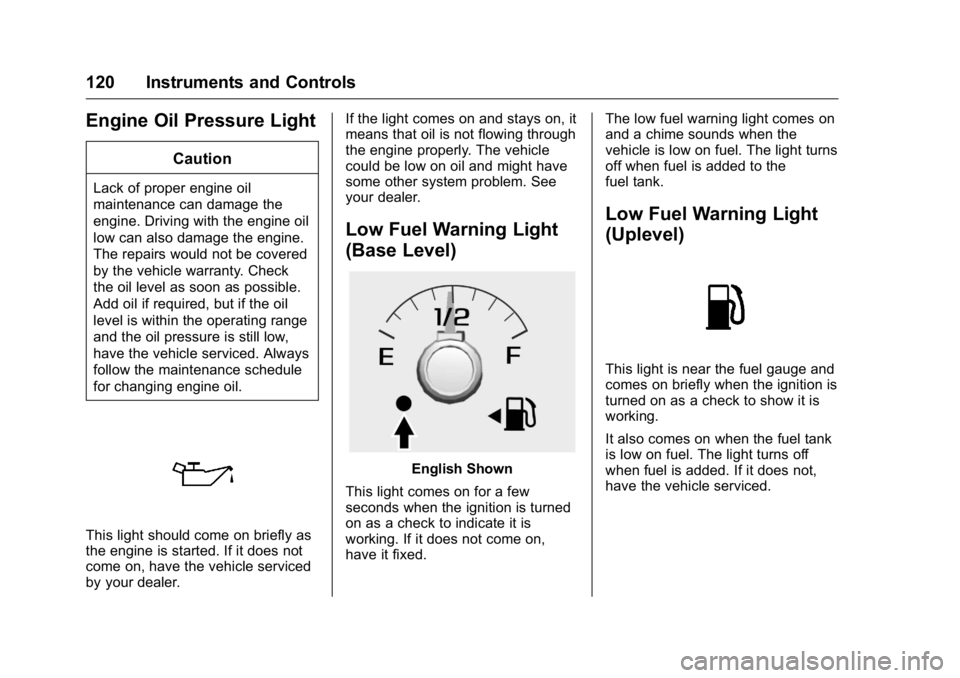
This light should come on briefly as
the engine is started. If it does not
come on, have the vehicle serviced
by your dealer.If the light comes on and stays on, it
means that oil is not flowing through
the engine properly. The vehicle
could be low on oil and might have
some other system problem. See
your dealer.
Low Fuel Warning Light
(Base Level)
English Shown
This light comes on for a few
seconds when the ignition is turned
on as a check to indicate it is
working. If it does not come on,
have it fixed. The low fuel warning light comes on
and a chime sounds when the
vehicle is low on fuel. The light turns
off when fuel is added to the
fuel tank.
Low Fuel Warning Light
(Uplevel)
This light is near the fuel gauge and
comes on briefly when the ignition is
turned on as a check to show it is
working.
It also comes on when the fuel tank
is low on fuel. The light turns off
when fuel is added. If it does not,
have the vehicle serviced.
Page 131 of 392
GMC Canyon Owner Manual (GMNA-Localizing-U.S/Canada-9159361) -
2016 - crc - 8/25/15
130 Instruments and Controls
HOOD OPEN
This message displays and a chime
may sound if the hood is not fully
closed. Stop and turn off the
vehicle, check the hood for
obstructions, and close the hood
again. Check to see if the message
still appears on the DIC.
Engine Cooling System
Messages
AIR CONDITIONING OFF
This message displays when the
engine coolant becomes hotter than
the normal operating temperature.
SeeEngine Coolant Temperature
Gauge 0111
ii. To avoid added strain
on a hot engine, the air conditioning
compressor automatically turns off.
When the coolant temperature
returns to normal, the air
conditioning compressor turns back
on. You can continue to drive your
vehicle.
If this message continues to appear,
have the system repaired by your
dealer as soon as possible to avoid
damage to the engine.
ENGINE OVERHEATING, IDLE
ENGINE
This message displays when the
engine coolant temperature is too
hot. Stop and allow the vehicle to
idle until it cools down. See Engine
Coolant Temperature Gauge 0111
ii.
When towing, use Tow/Haul Mode
to prevent damage to the engine or
transmission. See Tow/Haul Mode
0 223
ii.
ENGINE OVERHEATED STOP
ENGINE
This message displays and a chime
may sound if the engine cooling
system reaches unsafe
temperatures for operation. Stop
and turn off the vehicle as soon as it
is safe to do so to avoid severe
damage. This message clears when
the engine has cooled to a safe
operating temperature.
Engine Oil Messages
CHANGE ENGINE OIL SOON
This message displays when the
engine oil needs to be changed.
When you change the engine oil, be
sure to reset the CHANGE ENGINE
OIL SOON message. See Engine
Oil Life System 0264
iifor
information on how to reset the
message. See Engine Oil0262
iiand
Maintenance Schedule 0341ii.
ENGINE OIL LOW ADD OIL
On some vehicles, this message
displays when the engine oil level
may be too low. Check the oil level
before filling to the recommended
level. If the oil is not low and this
message remains on, take the
vehicle to your dealer for service.
See Engine Oil 0262
ii.
ENGINE OIL HOT IDLE
ENGINE
This message displays when the
engine oil becomes hotter than the
normal operating temperature. Stop
Page 132 of 392
GMC Canyon Owner Manual (GMNA-Localizing-U.S/Canada-9159361) -
2016 - crc - 8/25/15
Instruments and Controls 131
and allow the vehicle to idle until it
cools down. SeeEngine Coolant
Temperature Gauge 0111
ii.
OIL PRESSURE LOW STOP
ENGINE
This message displays if low oil
pressure levels occur. Stop the
vehicle as soon as safely possible
and do not operate it until the cause
of the low oil pressure has been
corrected. Check the oil as soon as
possible and have the vehicle
serviced by your dealer. See Engine
Oil 0262
ii.
Engine Power Messages
ENGINE POWER IS REDUCED
This message displays and a chime
may sound when the cooling system
temperature gets too hot and the
engine further enters the engine
coolant protection mode. See
Engine Overheating 0271
iifor more
information.
This message also displays when
the vehicle's engine power is
reduced. Reduced engine power
can affect the vehicle's ability to accelerate. If this message is on,
but there is no reduction in
performance, proceed to your
destination. The performance may
be reduced the next time the vehicle
is driven. The vehicle may be driven
at a reduced speed while this
message is on, but acceleration and
speed may be reduced. Anytime
this message stays on, the vehicle
should be taken to your dealer for
service as soon as possible.
Fuel System Messages
FUEL LEVEL LOW
This message displays and a chime
may sound if the fuel level is low.
Refuel as soon as possible. See
Fuel Gauge
0110
iiand Fuel 0241ii.
TIGHTEN GAS CAP
This message may display along
with the malfunction indicator lamp
on the instrument cluster if the
vehicle's fuel cap is not tightened
properly. See Malfunction Indicator
Lamp (Check Engine Light) 0114
ii.
Reinstall the fuel cap fully. See
Filling the Tank 0243
ii. The diagnostic system can determine if
the fuel cap has been left off or
improperly installed. A loose or
missing fuel cap allows fuel to
evaporate into the atmosphere.
A few driving trips with the cap
properly installed should turn this
light and message off.
Key and Lock Messages
REPLACE BATTERY IN
REMOTE KEY
This message displays if a Remote
Keyless Entry (RKE) transmitter
battery is low. The battery needs to
be replaced in the transmitter. See
“Battery Replacement”
under
Remote Keyless Entry (RKE)
System Operation 028
ii.
Lamp Messages
TURN SIGNAL ON
This message displays and a chime
sounds if a turn signal is left on for
1.2 km (0.75 mi). Move the turn
signal lever to the off position.
Page 248 of 392
GMC Canyon Owner Manual (GMNA-Localizing-U.S/Canada-9159361) -
2016 - crc - 8/25/15
Driving and Operating 247
right, move your hand to the right.
Always back up slowly and,
if possible, have someone
guide you.
Making TurnsCaution
Making very sharp turns while
trailering could cause the trailer to
come in contact with the vehicle.
The vehicle could be damaged.
Avoid making very sharp turns
while trailering.
When turning with a trailer, make
wider turns than normal. Do this so
the trailer will not strike soft
shoulders, curbs, road signs, trees,
or other objects. Avoid jerky or
sudden maneuvers. Signal well in
advance.
If the trailer turn signal bulbs burn
out, the arrows on the instrument
cluster will still flash for turns. It is
important to check occasionally to
be sure the trailer bulbs are still
working.
Driving on Grades
Reduce speed and shift to a lower
gear before starting down a long or
steep downgrade. If the
transmission is not shifted down, the
brakes might get hot and no longer
work well.
Vehicles can tow in D (Drive). Shift
the transmission to a lower gear if
the transmission shifts too often
under heavy loads and/or hilly
conditions.
The Tow/Haul Mode may be used if
the transmission shifts too often.
See Tow/Haul Mode 0223
ii.
When towing at high altitude on
steep uphill grades, consider the
following: Engine coolant will boil at
a lower temperature than at normal
altitudes. If the engine is turned off
immediately after towing at high
altitude on steep uphill grades, the
vehicle may show signs similar to
engine overheating. To avoid this,
let the engine run while parked,
preferably on level ground, with the
transmission in P (Park) for a few minutes before turning the engine
off. If the overheat warning comes
on, see
Engine Overheating 0271
ii.
Parking on Hills
{Warning
Parking the vehicle on a hill with
the trailer attached can be
dangerous. If something goes
wrong, the rig could start to move.
People can be injured, and both
the vehicle and the trailer can be
damaged. When possible, always
park the rig on a flat surface.
If parking the rig on a hill: 1. Press the brake pedal, but do not shift into P (Park) yet. Turn
the wheels into the curb if
facing downhill or into traffic if
facing uphill.
2. Have someone place chocks under the trailer wheels.
3. When the wheel chocks are in place, release the regular
brakes until the chocks absorb
the load.
Page 263 of 392
GMC Canyon Owner Manual (GMNA-Localizing-U.S/Canada-9159361) -
2016 - crc - 8/25/15
262 Vehicle Care
1. Coolant Surge Tank andPressure Cap. See Engine
Coolant 0269
ii.
2. Engine Air Cleaner/Filter
0266
ii.
3. Engine Cooling Fan (Out of View). See Cooling System
0 268
ii.
4. Engine Oil Fill Cap. See Engine Oil 0262
ii.
5. Engine Oil Dipstick. See Engine Oil 0262
ii.
6. Engine Compartment Fuse
Block 0285
ii.
7. Brake Fluid Reservoir. See Brake Fluid 0275
ii.
8. Windshield Washer Fluid Reservoir. See Washer Fluid
0 273
ii.
9. Battery - North America 0276
ii.
Engine Oil
For diesel engine vehicles, see
“Engine Oil” in the Duramax diesel
supplement. To ensure proper engine
performance and long life, careful
attention must be paid to engine oil.
Following these simple, but
important steps will help protect
your investment:
.
Use engine oil approved to the
proper specification and of the
proper viscosity grade. See
“Selecting the Right Engine Oil”
in this section.
. Check the engine oil level
regularly and maintain the
proper oil level. See “Checking
Engine Oil” and“When to Add
Engine Oil” in this section.
. Change the engine oil at the
appropriate time. See Engine Oil
Life System 0264
ii.
. Always dispose of engine oil
properly. See “What to Do with
Used Oil” in this section.
Checking Engine Oil
It is a good idea to check the engine
oil level at each fuel fill. In order to
get an accurate reading, the vehicle
must be on level ground. The
engine oil dipstick handle is a yellow loop. See
Engine Compartment
Overview 0259
iifor the location of
the engine oil dipstick.
Obtaining an accurate oil level
reading is essential:
1. If the engine has been running recently, turn off the engine and
allow several minutes for the oil
to drain back into the oil pan.
Checking the oil level too soon
after engine shutoff will not
provide an accurate oil level
reading.
2. Pull out the dipstick and wipe it with a clean paper towel or
cloth, then push it back in all
the way. Remove it again,
keeping the tip down, and
check the level.
Page 264 of 392
GMC Canyon Owner Manual (GMNA-Localizing-U.S/Canada-9159361) -
2016 - crc - 8/25/15
Vehicle Care 263
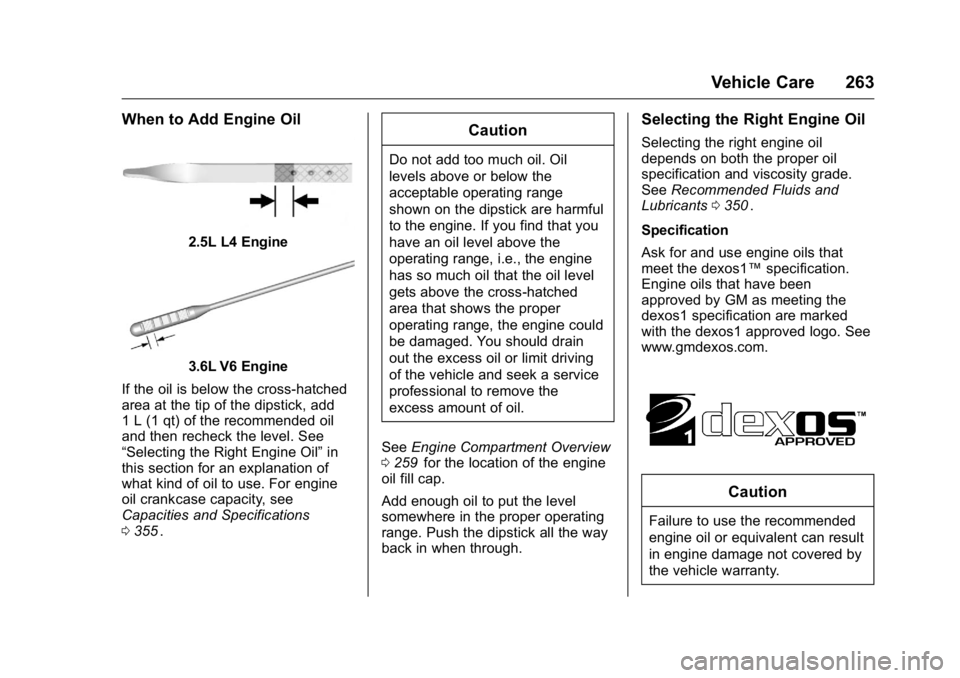
When to Add Engine Oil
2.5L L4 Engine
3.6L V6 Engine
If the oil is below the cross-hatched
area at the tip of the dipstick, add
1 L (1 qt) of the recommended oil
and then recheck the level. See
“Selecting the Right Engine Oil” in
this section for an explanation of
what kind of oil to use. For engine
oil crankcase capacity, see
Capacities and Specifications
0 355
ii.
Caution
Do not add too much oil. Oil
levels above or below the
acceptable operating range
shown on the dipstick are harmful
to the engine. If you find that you
have an oil level above the
operating range, i.e., the engine
has so much oil that the oil level
gets above the cross-hatched
area that shows the proper
operating range, the engine could
be damaged. You should drain
out the excess oil or limit driving
of the vehicle and seek a service
professional to remove the
excess amount of oil.
See Engine Compartment Overview
0 259
iifor the location of the engine
oil fill cap.
Add enough oil to put the level
somewhere in the proper operating
range. Push the dipstick all the way
back in when through.
Selecting the Right Engine Oil
Selecting the right engine oil
depends on both the proper oil
specification and viscosity grade.
See Recommended Fluids and
Lubricants 0350
ii.
Specification
Ask for and use engine oils that
meet the dexos1™ specification.
Engine oils that have been
approved by GM as meeting the
dexos1 specification are marked
with the dexos1 approved logo. See
www.gmdexos.com.
Caution
Failure to use the recommended
engine oil or equivalent can result
in engine damage not covered by
the vehicle warranty.
Page 266 of 392
GMC Canyon Owner Manual (GMNA-Localizing-U.S/Canada-9159361) -
2016 - crc - 8/25/15
Vehicle Care 265
must be reset. For vehicles without
the CHANGE ENGINE OIL SOON
message, an oil change is needed
when the OIL LIFE REMAINING
percentage is near 0%. Your dealer
has trained service people who will
perform this work and reset the
system. It is also important to check
the oil regularly over the course of
an oil drain interval and keep it at
the proper level.
If the system is ever reset
accidentally, the oil must be
changed at 5 000 km (3,000 mi)
since the last oil change.
Remember to reset the oil life
system whenever the oil is changed.
How to Reset the Engine Oil
Life System
Reset the system whenever the
engine oil is changed so that the
system can calculate the next
engine oil change. Always reset the
engine oil life to 100% after every oil
change. It will not reset itself. To
reset the engine oil life system:1. Display OIL LIFE REMAINING
on the DIC. See Driver
Information Center (DIC) (Base
Level) 0122
iior Driver
Information Center (DIC)
(Uplevel) 0125
ii. If the vehicle
does not have DIC buttons, the
vehicle must be in P (Park) to
access this display.
2. Press and hold the
Vbutton on
the DIC, or the SET/CLR
button on the turn signal lever if
the vehicle does not have DIC
buttons, for several seconds.
The oil life will change
to 100%.
The oil life system can also be reset
as follows: 1. Turn the ignition to ON/RUN with the engine off.
2. Fully press the accelerator pedal slowly three times within
five seconds.
3. Display OIL LIFE REMAINING on the DIC. If the display
shows 100%, the system is
reset. If the vehicle has a CHANGE
ENGINE OIL SOON message and it
comes back on when the vehicle is
started and/or the OIL LIFE
REMAINING is near 0%, the engine
oil life system has not been reset.
Repeat the procedure.
Automatic Transmission
Fluid
How to Check Automatic
Transmission Fluid
It is not necessary to check the
transmission fluid level.
A transmission fluid leak is the only
reason for fluid loss. If a leak
occurs, take the vehicle to your
dealer and have it repaired as soon
as possible.
There is a special procedure for
checking and changing the
transmission fluid. Because this
procedure is difficult, this should be
done at your dealer. Contact your
dealer for additional information or
the procedure can be found in the
service manual. To purchase a