lte GMC CANYON 2018 Owner's Manual
[x] Cancel search | Manufacturer: GMC, Model Year: 2018, Model line: CANYON, Model: GMC CANYON 2018Pages: 417, PDF Size: 5.47 MB
Page 25 of 417
GMC Canyon/Canyon Denali Owner Manual (GMNA-Localizing-U.S./Canada-
11354423) - 2018 - crc - 10/12/17
24 In Brief
pressure shown on the Tire and
Loading Information label. See
Vehicle Load Limits0211. The
warning light will remain on until the
tire pressure is corrected.
The low tire pressure warning light
may come on in cool weather when
the vehicle is first started, and then
turn off as the vehicle is driven. This
may be an early indicator that the
tire pressures are getting low and
the tires need to be inflated to the
proper pressure.
The TPMS does not replace normal
monthly tire maintenance. Maintain
the correct tire pressures.
See Tire Pressure Monitor System
0 318.
Fuel (Gasoline)
Regular Fuel
Use only unleaded gasoline rated
87 octane or higher in your vehicle.
Do not use gasoline with an octane
rating lower as it may result in
vehicle damage and lower fuel
economy. See Fuel0252.
Fuel (Diesel)
For diesel vehicles, do not use
gasoline. See “Fuel for Diesel
Engines” in the Duramax diesel
supplement.
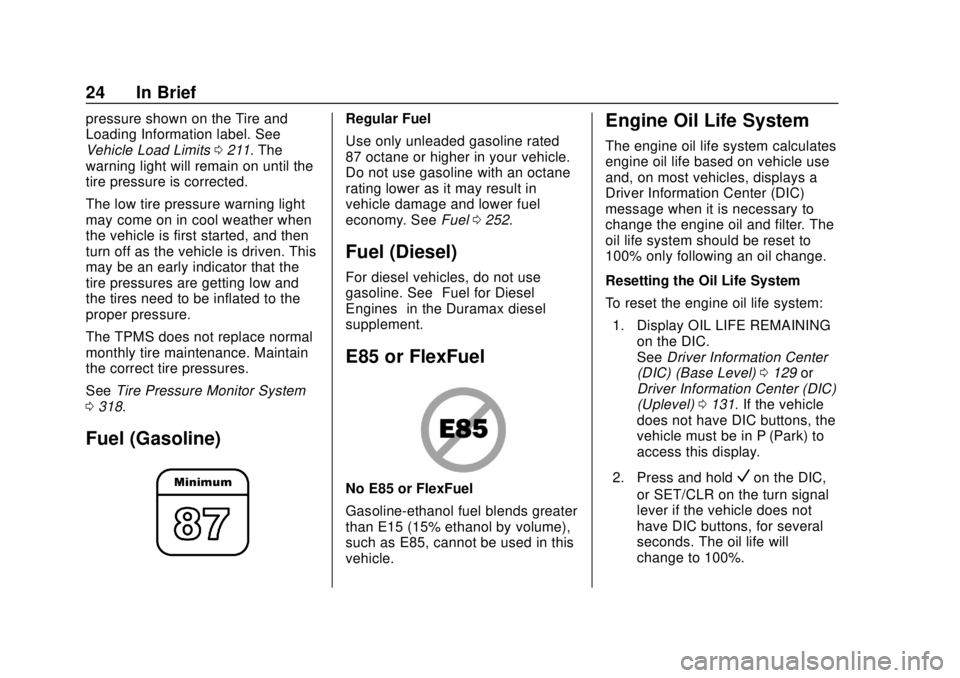
E85 or FlexFuel
No E85 or FlexFuel
Gasoline-ethanol fuel blends greater
than E15 (15% ethanol by volume),
such as E85, cannot be used in this
vehicle.
Engine Oil Life System
The engine oil life system calculates
engine oil life based on vehicle use
and, on most vehicles, displays a
Driver Information Center (DIC)
message when it is necessary to
change the engine oil and filter. The
oil life system should be reset to
100% only following an oil change.
Resetting the Oil Life System
To reset the engine oil life system:
1. Display OIL LIFE REMAINING on the DIC.
See Driver Information Center
(DIC) (Base Level) 0129 or
Driver Information Center (DIC)
(Uplevel) 0131. If the vehicle
does not have DIC buttons, the
vehicle must be in P (Park) to
access this display.
2. Press and hold
Von the DIC,
or SET/CLR on the turn signal
lever if the vehicle does not
have DIC buttons, for several
seconds. The oil life will
change to 100%.
Page 53 of 417
GMC Canyon/Canyon Denali Owner Manual (GMNA-Localizing-U.S./Canada-
11354423) - 2018 - crc - 10/12/17
52 Seats and Restraints
Seat Belts
This section describes how to use
seat belts properly, and some things
not to do.
{Warning
Do not let anyone ride where a
seat belt cannot be worn properly.
In a crash, if you or your
passenger(s) are not wearing
seat belts, injuries can be much
worse than if you are wearing
seat belts. You can be seriously
injured or killed by hitting things
inside the vehicle harder or by
being ejected from the vehicle. In
addition, anyone who is not
buckled up can strike other
passengers in the vehicle.
It is extremely dangerous to ride
in a cargo area, inside or outside
of a vehicle. In a collision,
passengers riding in these areas
are more likely to be seriously
injured or killed. Do not allow(Continued)
Warning (Continued)
passengers to ride in any area of
the vehicle that is not equipped
with seats and seat belts.
Always wear a seat belt, and
check that all passenger(s) are
restrained properly too.
This vehicle has indicators as a
reminder to buckle the seat belts.
See Seat Belt Reminders 0118.
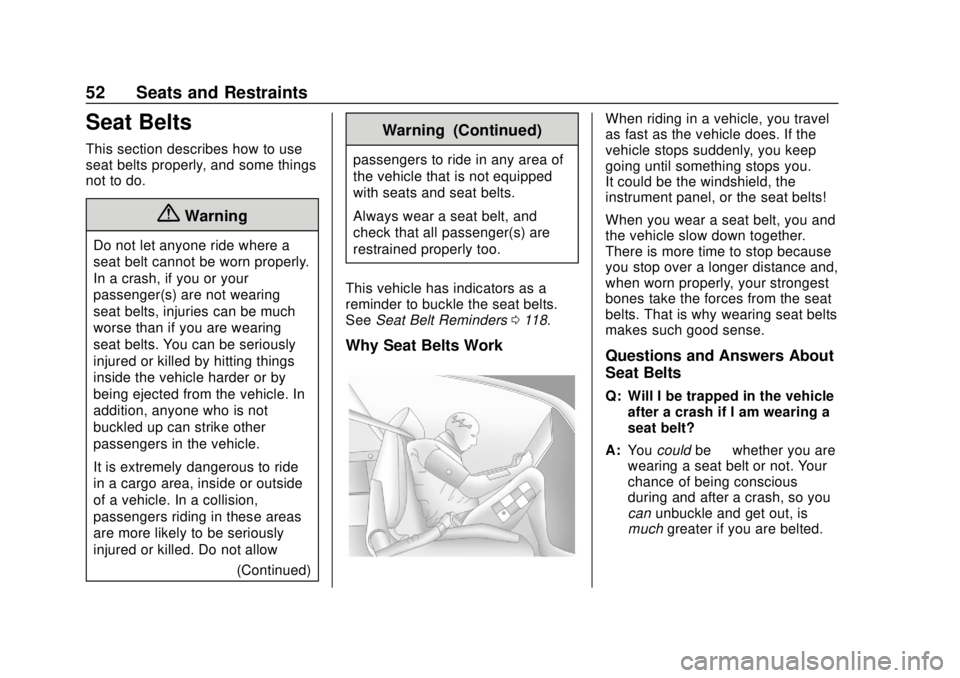
Why Seat Belts Work
When riding in a vehicle, you travel
as fast as the vehicle does. If the
vehicle stops suddenly, you keep
going until something stops you.
It could be the windshield, the
instrument panel, or the seat belts!
When you wear a seat belt, you and
the vehicle slow down together.
There is more time to stop because
you stop over a longer distance and,
when worn properly, your strongest
bones take the forces from the seat
belts. That is why wearing seat belts
makes such good sense.
Questions and Answers About
Seat Belts
Q: Will I be trapped in the vehicle
after a crash if I am wearing a
seat belt?
A: You could be—whether you are
wearing a seat belt or not. Your
chance of being conscious
during and after a crash, so you
can unbuckle and get out, is
much greater if you are belted.
Page 54 of 417
GMC Canyon/Canyon Denali Owner Manual (GMNA-Localizing-U.S./Canada-
11354423) - 2018 - crc - 10/12/17
Seats and Restraints 53
Q: If my vehicle has airbags, whyshould I have to wear seat
belts?
A: Airbags are supplemental
systems only. They work with
seat belts —not instead of them.
Whether or not an airbag is
provided, all occupants still have
to buckle up to get the most
protection.
Also, in nearly all states and in
all Canadian provinces, the law
requires wearing seat belts.
How to Wear Seat Belts
Properly
This section is only for people of
adult size.
There are special things to know
about seat belts and children, and
there are different rules for smaller
children and infants. If a child will be
riding in the vehicle, see Older
Children 071 orInfants and Young
Children 073. Follow those rules for
everyone's protection. It is very important for all occupants
to buckle up. Statistics show that
unbelted people are hurt more often
in crashes than those who are
wearing seat belts.
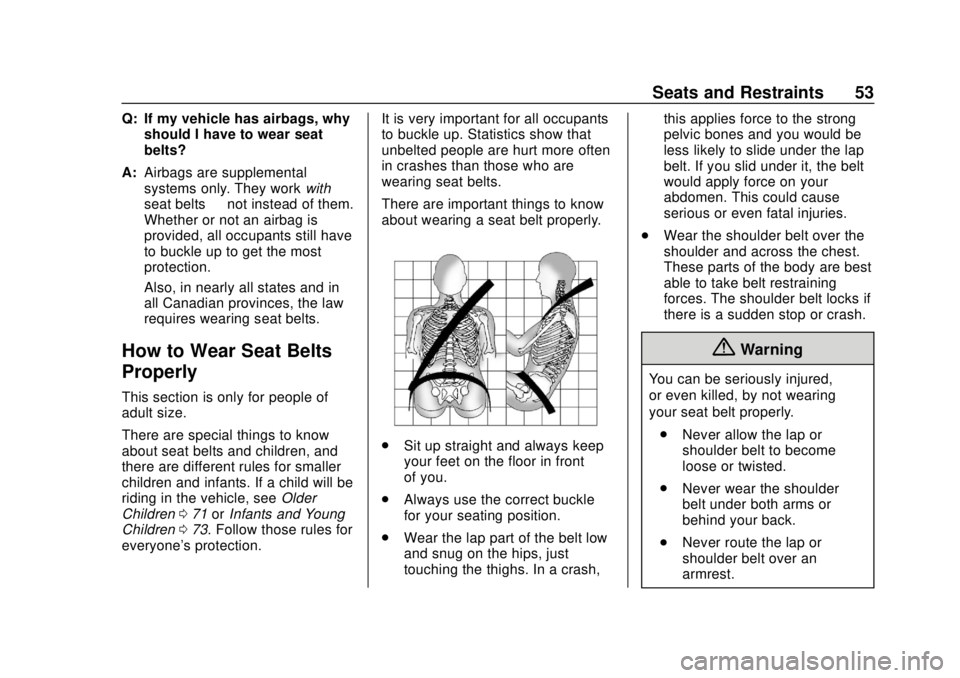
There are important things to know
about wearing a seat belt properly.
.
Sit up straight and always keep
your feet on the floor in front
of you.
. Always use the correct buckle
for your seating position.
. Wear the lap part of the belt low
and snug on the hips, just
touching the thighs. In a crash, this applies force to the strong
pelvic bones and you would be
less likely to slide under the lap
belt. If you slid under it, the belt
would apply force on your
abdomen. This could cause
serious or even fatal injuries.
. Wear the shoulder belt over the
shoulder and across the chest.
These parts of the body are best
able to take belt restraining
forces. The shoulder belt locks if
there is a sudden stop or crash.
{Warning
You can be seriously injured,
or even killed, by not wearing
your seat belt properly.
. Never allow the lap or
shoulder belt to become
loose or twisted.
. Never wear the shoulder
belt under both arms or
behind your back.
. Never route the lap or
shoulder belt over an
armrest.
Page 64 of 417
GMC Canyon/Canyon Denali Owner Manual (GMNA-Localizing-U.S./Canada-
11354423) - 2018 - crc - 10/12/17
Seats and Restraints 63
airbag causing the bag to break out
of the cover. The inflator, the airbag,
and related hardware are all part of
the airbag module.
For airbag locations, seeWhere Are
the Airbags? 060.
How Does an Airbag
Restrain?
In moderate to severe frontal or
near frontal collisions, even belted
occupants can contact the steering
wheel or the instrument panel. In
moderate to severe side collisions,
even belted occupants can contact
the inside of the vehicle.
Airbags supplement the protection
provided by seat belts by
distributing the force of the impact
more evenly over the
occupant's body.
Rollover capable roof-rail airbags
are designed to help contain the
head and chest of occupants in the
outboard seating positions in the
first and second rows. The rollover
capable roof-rail airbags are
designed to help reduce the risk of full or partial ejection in rollover
events, although no system can
prevent all such ejections.
But airbags would not help in many
types of collisions, primarily
because the occupant's motion is
not toward those airbags. See
When
Should an Airbag Inflate? 062.
Airbags should never be regarded
as anything more than a supplement
to seat belts.
What Will You See after
an Airbag Inflates?
After frontal and seat-mounted side
impact airbags inflate, they quickly
deflate, so quickly that some people
may not even realize the airbags
inflated. Roof-rail airbags may still
be at least partially inflated for some
time after they inflate. Some
components of the airbag module
may be hot for several minutes. For
location of the airbags, see Where
Are the Airbags? 060.
The parts of the airbag that come
into contact with you may be warm,
but not too hot to touch. There may be some smoke and dust coming
from the vents in the deflated
airbags. Airbag inflation does not
prevent the driver from seeing out of
the windshield or being able to steer
the vehicle, nor does it prevent
people from leaving the vehicle.
{Warning
When an airbag inflates, there
may be dust in the air. This dust
could cause breathing problems
for people with a history of
asthma or other breathing trouble.
To avoid this, everyone in the
vehicle should get out as soon as
it is safe to do so. If you have
breathing problems but cannot
get out of the vehicle after an
airbag inflates, then get fresh air
by opening a window or a door.
If you experience breathing
problems following an airbag
deployment, you should seek
medical attention.
Page 87 of 417
GMC Canyon/Canyon Denali Owner Manual (GMNA-Localizing-U.S./Canada-
11354423) - 2018 - crc - 10/12/17
86 Seats and Restraints
Warning (Continued)
forward-facing child restraint.
A child could be seriously injured
or killed in a sudden stop or
crash.
A booster seat can be used in the
left or right rear seating position if
the base of the booster seat fits
on the seat cushion and does not
extend past the front edge. If it
does, it should be installed in the
right rear seating position using
the seat cushion extension. Only
install a booster seat in either rear
seating position if it can be
properly installed according to the
child restraint manufacturer’s
instructions.
A rear-facing or forward-facing
child restraint can be installed in
the right rear seating position
using the seat cushion extension
in an extended cab model. Never
install a rear-facing or
forward-facing child restraint in
(Continued)
Warning (Continued)
the right rear seating position
without the seat cushion
extension.
{Warning
Do not let anyone ride in the front
passenger seat when a
rear-facing child restraint is
installed in the right rear seating
position. To properly fit the
rear-facing child restraint, the
front seatback will need to be
tilted forward which will not allow
a passenger to sit properly in the
front outboard passenger seat.
The passenger could be seriously
injured or killed in a sudden stop
or crash.
{Warning
Do not attach a top tether to the
loop near the top of the seatback
and directly behind the seating
position in which the child
restraint is installed in an
extended cab with rear seats. The
top tether will not be able to be
properly tightened. See
instructions below for how to
properly attach a top tether.
Extended Cab Rear Seat Cushion
Extension
The vehicle is equipped with a
headrest that is used as a seat
cushion extension for installation of
child restraints in the right rear seat.
{Warning
The right rear seat cushion
extension is designed to support
the weight of a child in a child
restraint or booster seat. It is (Continued)
Page 94 of 417

GMC Canyon/Canyon Denali Owner Manual (GMNA-Localizing-U.S./Canada-
11354423) - 2018 - crc - 10/12/17
Seats and Restraints 93
If the child restraint or vehicle seat
position does not have the LATCH
system, you will be using the seat
belt to secure the child restraint. Be
sure to follow the instructions that
came with the child restraint.
If more than one child restraint
needs to be installed in the rear
seat, be sure to readWhere to Put
the Restraint 077.
Extended Cab
{Warning
Never secure a rear-facing or
forward-facing child restraint in
the left rear seating position in an
extended cab model. This seating
position is not suitable for child
restraint installation. The seat
cushion is too short to properly
support a rear-facing or
forward-facing child restraint.
A child could be seriously injured
or killed in a sudden stop or
crash.
(Continued)
Warning (Continued)
A booster seat can be used in the
left or right rear seating position if
the base of the booster seat fits
on the seat cushion and does not
extend past the front edge. If it
does, it should be installed in the
right rear seating position using
the seat cushion extension. Only
install a booster seat in either rear
seating position if it can be
properly installed according to the
child restraint manufacturer ’s
instructions.
A rear-facing or forward-facing
child restraint can be installed in
the right rear seating position
using the seat cushion extension
in an extended cab model. Never
install a rear-facing or
forward-facing child restraint in
the right rear seating position
without the seat cushion
extension.
{Warning
Do not let anyone ride in the front
passenger seat when a
rear-facing child restraint is
installed in the right rear seating
position. To properly fit the
rear-facing child restraint, the
front seatback will need to be
tilted forward which will not allow
a passenger to sit properly in the
front outboard passenger seat.
The passenger could be seriously
injured or killed in a sudden stop
or crash.
A booster seat may be used in the
left rear seating position if the base
of the booster seat fits on the seat
cushion and does not extend past
the front edge of the seat cushion.
If the booster seat extends past the
front of the seat cushion, it should
be used in the right rear seating
position with the seat cushion
extension.
Page 151 of 417
GMC Canyon/Canyon Denali Owner Manual (GMNA-Localizing-U.S./Canada-
11354423) - 2018 - crc - 10/12/17
150 Lighting
moving up or down. This is normal.
If there is a problem, an alert will be
displayed.
The battery can be discharged at
idle if the electrical loads are very
high. This is true for all vehicles.
This is because the generator
(alternator) may not be spinning fast
enough at idle to produce all the
power that is needed for very high
electrical loads.
A high electrical load occurs when
several of the following are on, such
as: headlamps, high beams, fog
lamps, rear window defogger,
climate control fan at high speed,
heated seats, engine cooling fans,
trailer loads, and loads plugged into
accessory power outlets.
EPM works to prevent excessive
discharge of the battery. It does this
by balancing the generator's output
and the vehicle's electrical needs.
It can increase engine idle speed to
generate more power, whenever
needed. It can temporarily reduce
the power demands of some
accessories.Normally, these actions occur in
steps or levels, without being
noticeable. In rare cases at the
highest levels of corrective action,
this action may be noticeable to the
driver. If so, a DIC message might
be displayed and it is recommended
that the driver reduce the electrical
loads as much as possible.
Battery Power Protection
This feature shuts off the dome and
reading lamps, if they are left on for
more than 10 minutes after the
ignition is turned off. The cargo
lamp shuts off after 20 minutes. This
prevents the battery from
running down.
Exterior Lighting Battery
Saver
The exterior lamps turn off about
10 minutes after the ignition is
turned off, if the parking lamps or
headlamps have been manually left
on. This protects against draining
the battery. To restart the 10-minute
timer, turn the exterior lamp control
to the
Oposition and then back to
the
;or2position.
To keep the lamps on for more than
10 minutes, the ignition must be on
or in ACC/ACCESSORY.
Page 156 of 417
GMC Canyon/Canyon Denali Owner Manual (GMNA-Localizing-U.S./Canada-
11354423) - 2018 - crc - 10/12/17
Infotainment System 155
To manually check for updates,
touch SETTINGS on the Home
Page, followed by Software
Information, and then System
Update. Follow the on-screen
prompts. Steps for downloading and
installing updates may vary by
vehicle.
Downloading Over-the-Air vehicle
software updates requires Internet
connectivity, which can be accessed
through the vehicle’s built-in OnStar
4G LTE connection, if equipped and
active. If required, data plans are
provided by a third party. Optionally,
a secure Wi-Fi hotspot such as a
compatible mobile device hotspot,
home hotspot or public hotspot can
be used. Applicable data rates may
apply.
To connect the infotainment system
to a secured mobile device hotspot,
home hotspot, or a public hotspot,
touch SETTINGS on the Home
Page, followed by Wi-Fi, and then
Manage Wi-Fi Networks. Select the
appropriate Wi-Fi network, and
follow the on-screen prompts.
Download speeds may vary. On most compatible mobile devices,
activation of the Wi-Fi hotspot is in
the Settings menu under Mobile
Network Sharing, Personal Hotspot,
Mobile Hotspot or similar.
Availability of Over-the-Air vehicle
software updates varies by vehicle
and country. For more information
on this feature, see my.gmc.com/
learn.Radio
AM-FM Radio
Playing the Radio
Audio Source Menu
{:
Press to go to the Home Page.
O:Press to turn on, mute,
or unmute the system. Press and
hold to turn off the system.
Selecting a Band
Press{, then touch AUDIO,
Source, then select AM, FM,
or SXM (if equipped). The last
station that was playing starts
playing again.
System Settings
Auto Volume
This feature automatically adjusts
the radio volume to compensate for
road and wind noise.
Page 159 of 417
GMC Canyon/Canyon Denali Owner Manual (GMNA-Localizing-U.S./Canada-
11354423) - 2018 - crc - 10/12/17
158 Infotainment System
Selecting a Channel
Touchuortand the previous or
next channel will be selected.
Touch and hold
uortto jump
four channels backward or forward,
then release the button at the
desired channel.
Using the Preset Buttons
Up to seven favorites pages can be
saved, and each page can store up
to five channels.
To change a preset button, tune to
the new desired channel and hold
the button.
Listening to Preset Channels
1. Continue touching
SorTto
select the desired
favorites page.
2. Touch the preset button to listen to the channel saved to
that button.
Using the SiriusXM Menu
Operation
1. Touch MENU on the SXM infotainment display.
2. Touch the menu to select the desired item or to display the
detail menu item.
3. Touch
0to return to the
previous menu.
Channel List 1. Touch SXM Channel List from the SXM menu. The channel
list is displayed.
2. Touch
QorRto find the
desired channel. Tune to the
channel by selecting it.
Tone Settings
From the tone settings menu, the
sound features can be set up for
SiriusXM audio and each audio
player ’s functions.
1. Touch Tone Settings. The tone settings screen is displayed.
See “Tone Settings” inAM-FM
Radio 0155. 2. Touch OK.
Auto Volume 1. Touch Auto Volume. See “Auto
Volume” inAM-FM Radio
0 155.
2. Touch OK.
Categories 1. Touch Categories.
2. Touch
QorRto find the
desired category. Touch the
category to select it.
Explicit Content Filter
When on, only a filtered list of
channels will be received. When off,
all regular SXM programming
subscribed to will be received. 1. Touch SXM Explicit Filter.
2. Select On or Off.
Page 191 of 417
GMC Canyon/Canyon Denali Owner Manual (GMNA-Localizing-U.S./Canada-
11354423) - 2018 - crc - 10/12/17
190 Infotainment System
derivative works of, the Software.
You agree: (1) not to remove, cover
or alter any proprietary notices,
labels or marks in or on the
Software, and to ensure that all
copies bear any notice contained on
the original; and (2) not to export the
Product or the Software in
contravention of applicable export
control laws.
EXCEPT TO THE EXTENT
OTHERWISE REQUIRED BY
APPLICABLE LAW, QSSC AND ITS
LICENSORS PROVIDE THE
SOFTWARE ON AN "AS IS" BASIS,
WITHOUT WARRANTIES OR
CONDITIONS OF ANY KIND,
EITHER EXPRESS OR IMPLIED
INCLUDING, WITHOUT
LIMITATION, ANY WARRANTIES
OR CONDITIONS OF TITLE,
NON-INFRINGEMENT,
MERCHANTABILITY OR FITNESS
FOR A PARTICULAR PURPOSE.
ANY WARRANTIES OR OTHER
PROVISIONS OFFERED BY THE
MANUFACTURER OR ITS
DISTRIBUTOR(S) THAT DIFFER
FROM THIS LICENSE ARE
OFFERED BY THEMANUFACTURER OR ITS
DISTRIBUTOR(S) ALONE AND
NOT BY QSSC, ITS AFFILIATES
OR THEIR LICENSORS. YOU
ASSUME ANY RISKS
ASSOCIATED WITH YOUR USE
OF THE SOFTWARE UNDER THIS
LICENSE.
EXCEPT TO THE EXTENT
OTHERWISE REQUIRED BY
APPLICABLE LAW (SUCH AS IN
THE CASE OF DELIBERATE OR
GROSSLY NEGLIGENT ACTS), IN
NO EVENT SHALL QSSC, ITS
AFFILIATES OR THEIR
LICENSORS BE LIABLE TO YOU
UNDER ANY LEGAL THEORY,
WHETHER IN TORT (INCLUDING
NEGLIGENCE), CONTRACT OR
OTHERWISE, FOR DAMAGES,
INCLUDING ANY DIRECT,
INDIRECT, SPECIAL, INCIDENTAL,
OR CONSEQUENTIAL DAMAGES
OF ANY CHARACTER ARISING AS
A RESULT OF THIS LICENSE OR
OUT OF THE USE OR INABILITY
TO USE THE PRODUCT
(INCLUDING BUT NOT LIMITED
TO DAMAGES FOR LOSS OF
GOODWILL, WORK STOPPAGE,PRODUCT FAILURE OR
MALFUNCTION, OR ANY AND ALL
OTHER COMMERCIAL DAMAGES
OR LOSSES), EVEN IF QSSC, ITS
AFFILIATES OR THEIR
LICENSORS HAVE BEEN
ADVISED OF THE POSSIBILITY
OF SUCH DAMAGES.
WMA
This product is protected by certain
intellectual property rights of
Microsoft. Use or distribution of
such technology outside of this
product is prohibited without a
license from Microsoft.
For more information on the
Software, including any open source
software license terms (and
available source code) as well as
copyright attributions applicable to
the Runtime Configuration indicated
above, please contact the
Manufacturer or see
[email protected].
END USER NOTICE
The marks of companies displayed
by this product to indicate business
locations are the marks of their