Front end GMC CANYON 2019 Owner's Guide
[x] Cancel search | Manufacturer: GMC, Model Year: 2019, Model line: CANYON, Model: GMC CANYON 2019Pages: 381, PDF Size: 5.59 MB
Page 90 of 381
GMC Canyon/Canyon Denali Owner Manual (GMNA-Localizing-U.S./Canada-
12461766) - 2019 - crc - 10/2/18
Seats and Restraints 89
attachments, secure the child
restraint with the seat belts and
the top tether (if appropriate).
SeeSecuring Child Restraints
(With the Seat Belt in the Rear
Seat) 093 orSecuring Child
Restraints (With the Seat Belt
in the Front Seat) 099.
6. Tighten the top tether. The child restraint instructions will
show you how.
7. Before placing a child in the child restraint, make sure it is
securely held in place. To
check, grasp the child restraint
at the LATCH path and attempt
to move it side to side and
back and forth. There should
be no more than 2.5 cm (1 in) of
movement for proper
installation.
8. Always reinstall the headrest before the seating position is
used by another occupant. See
“Head Restraint/Headrest
Removal and Reinstallation” at
the end of this section.Extended Cab without Rear
Seats
{Warning
A child in a rear-facing child
restraint can be seriously injured
or killed if the right front
passenger airbag inflates. This is
because the back of the
rear-facing child restraint would
be very close to the inflating
airbag. A child in a forward-facing
child restraint can be seriously
injured or killed if the right front
passenger airbag inflates and the
passenger seat is in a forward
position.
Even if the passenger sensing
system has turned off the right
front passenger frontal airbag, no
system is fail-safe. No one can
guarantee that an airbag will not
deploy under some unusual
circumstance, even though it is
turned off.
(Continued)
Warning (Continued)
Since this vehicle does not have
a rear seat that will accommodate
a rear-facing child restraint, a
rear-facing child restraint should
not be installed in your vehicle,
even if the airbag is off.
SeePassenger Sensing System
0 65 for additional information.
The vehicle has a front outboard
passenger frontal airbag and a
passenger sensing system. The
passenger sensing system is
designed to turn off the front
passenger frontal airbag when an
infant in a rear-facing infant seat or
a small child in a forward-facing
child restraint or booster seat is
detected.
See Securing Child Restraints (With
the Seat Belt in the Rear Seat) 093
or Securing Child Restraints (With
the Seat Belt in the Front Seat) 099
and Passenger Sensing System
0 65 for important seat information
Page 91 of 381
GMC Canyon/Canyon Denali Owner Manual (GMNA-Localizing-U.S./Canada-
12461766) - 2019 - crc - 10/2/18
90 Seats and Restraints
and additional information on
installing a child restraint in the front
passenger position.1. Put the child restraint on the right front passenger seat.
2. If the child restraint manufacturer's instructions
recommend that the top tether
be attached, attach and tighten
the top tether hook to the top
tether anchor.
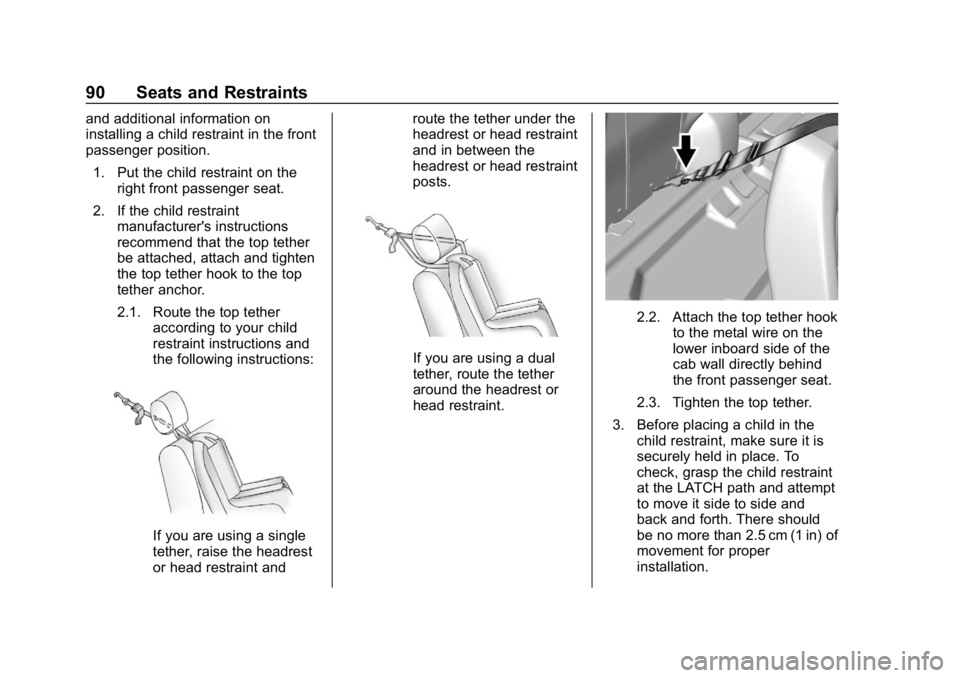
2.1. Route the top tether according to your child
restraint instructions and
the following instructions:
If you are using a single
tether, raise the headrest
or head restraint and route the tether under the
headrest or head restraint
and in between the
headrest or head restraint
posts.
If you are using a dual
tether, route the tether
around the headrest or
head restraint.
2.2. Attach the top tether hook
to the metal wire on the
lower inboard side of the
cab wall directly behind
the front passenger seat.
2.3. Tighten the top tether.
3. Before placing a child in the child restraint, make sure it is
securely held in place. To
check, grasp the child restraint
at the LATCH path and attempt
to move it side to side and
back and forth. There should
be no more than 2.5 cm (1 in) of
movement for proper
installation.
Page 93 of 381
GMC Canyon/Canyon Denali Owner Manual (GMNA-Localizing-U.S./Canada-
12461766) - 2019 - crc - 10/2/18
92 Seats and Restraints
Extended Cab
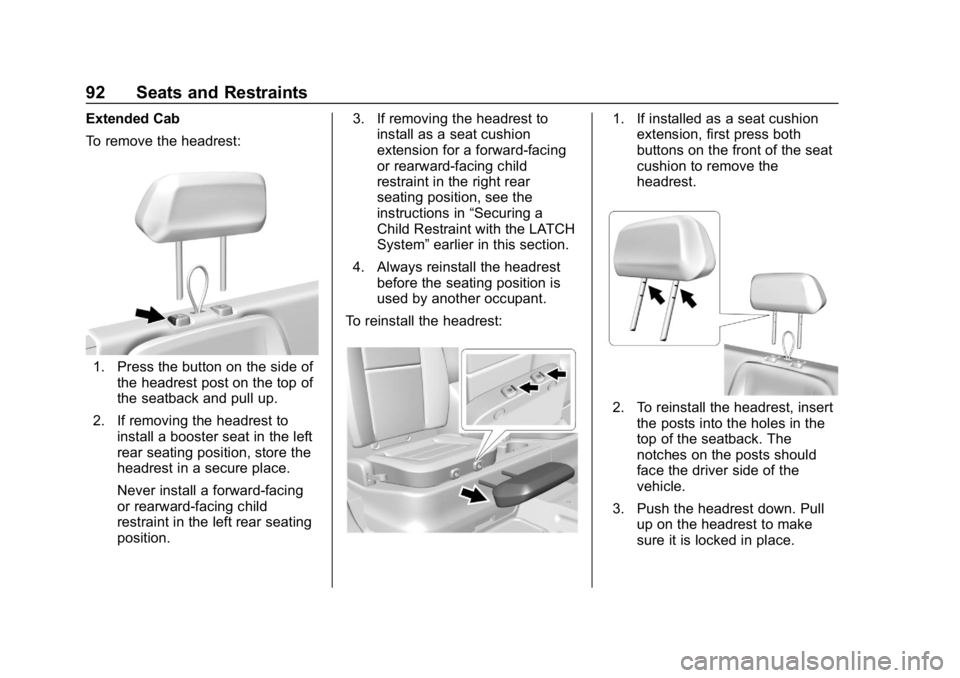
To remove the headrest:
1. Press the button on the side ofthe headrest post on the top of
the seatback and pull up.
2. If removing the headrest to install a booster seat in the left
rear seating position, store the
headrest in a secure place.
Never install a forward-facing
or rearward-facing child
restraint in the left rear seating
position. 3. If removing the headrest to
install as a seat cushion
extension for a forward-facing
or rearward-facing child
restraint in the right rear
seating position, see the
instructions in “Securing a
Child Restraint with the LATCH
System” earlier in this section.
4. Always reinstall the headrest before the seating position is
used by another occupant.
To reinstall the headrest:
1. If installed as a seat cushion extension, first press both
buttons on the front of the seat
cushion to remove the
headrest.
2. To reinstall the headrest, insert
the posts into the holes in the
top of the seatback. The
notches on the posts should
face the driver side of the
vehicle.
3. Push the headrest down. Pull up on the headrest to make
sure it is locked in place.
Page 95 of 381
GMC Canyon/Canyon Denali Owner Manual (GMNA-Localizing-U.S./Canada-
12461766) - 2019 - crc - 10/2/18
94 Seats and Restraints
Warning (Continued)
forward-facing child restraint.
A child could be seriously injured
or killed in a sudden stop or
crash.
A booster seat can be used in the
left or right rear seating position if
the base of the booster seat fits
on the seat cushion and does not
extend past the front edge. If it
does, it should be installed in the
right rear seating position using
the seat cushion extension. Only
install a booster seat in either rear
seating position if it can be
properly installed according to the
child restraint manufacturer’s
instructions.
A rear-facing or forward-facing
child restraint can be installed in
the right rear seating position
using the seat cushion extension
in an extended cab model. Never
install a rear-facing or
forward-facing child restraint in
(Continued)
Warning (Continued)
the right rear seating position
without the seat cushion
extension.
{Warning
Do not let anyone ride in the front
passenger seat when a
rear-facing child restraint is
installed in the right rear seating
position. To properly fit the
rear-facing child restraint, the
front seatback will need to be
tilted forward which will not allow
a passenger to sit properly in the
front outboard passenger seat.
The passenger could be seriously
injured or killed in a sudden stop
or crash.
A booster seat may be used in the
left rear seating position if the base
of the booster seat fits on the seat
cushion and does not extend past
the front edge of the seat cushion. If the booster seat extends past the
front of the seat cushion, it should
be used in the right rear seating
position with the seat cushion
extension.
When using the lap-shoulder belt to
secure the child restraint in this
position, follow the instructions that
came with the child restraint and the
following instructions:
1. Always install the seat cushion extension in the right rear seat
position when installing a
forward-facing or rear-facing
child restraint. Also use the
seat cushion extension for
booster seats that extend past
the front edge of the seat
cushion.
Page 96 of 381
GMC Canyon/Canyon Denali Owner Manual (GMNA-Localizing-U.S./Canada-
12461766) - 2019 - crc - 10/2/18
Seats and Restraints 95
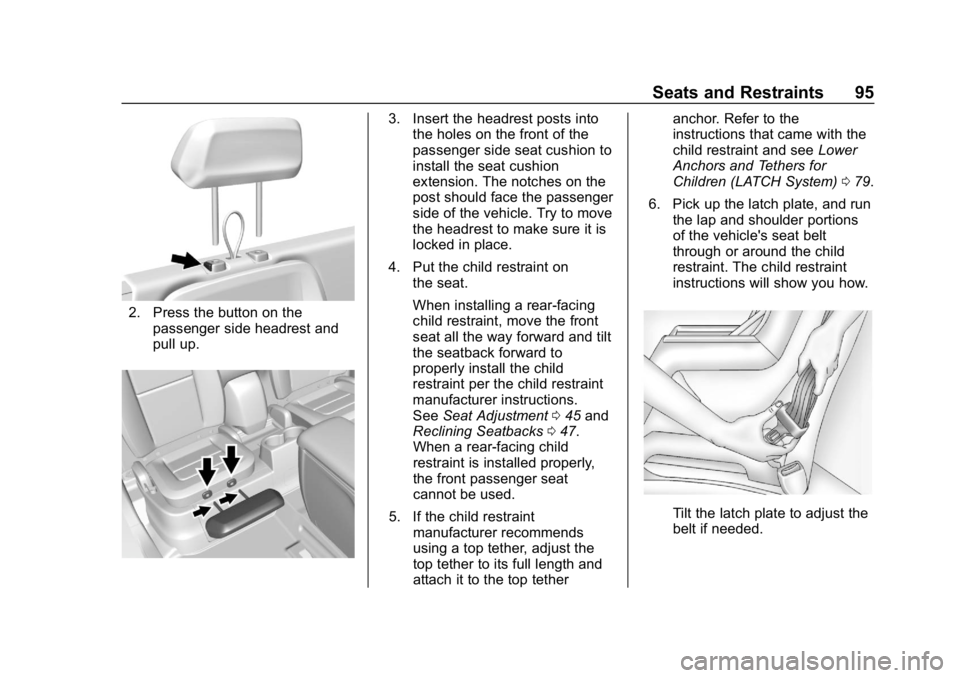
2. Press the button on thepassenger side headrest and
pull up.
3. Insert the headrest posts intothe holes on the front of the
passenger side seat cushion to
install the seat cushion
extension. The notches on the
post should face the passenger
side of the vehicle. Try to move
the headrest to make sure it is
locked in place.
4. Put the child restraint on the seat.
When installing a rear-facing
child restraint, move the front
seat all the way forward and tilt
the seatback forward to
properly install the child
restraint per the child restraint
manufacturer instructions.
See Seat Adjustment 045 and
Reclining Seatbacks 047.
When a rear-facing child
restraint is installed properly,
the front passenger seat
cannot be used.
5. If the child restraint manufacturer recommends
using a top tether, adjust the
top tether to its full length and
attach it to the top tether anchor. Refer to the
instructions that came with the
child restraint and see
Lower
Anchors and Tethers for
Children (LATCH System) 079.
6. Pick up the latch plate, and run the lap and shoulder portions
of the vehicle's seat belt
through or around the child
restraint. The child restraint
instructions will show you how.
Tilt the latch plate to adjust the
belt if needed.
Page 109 of 381
GMC Canyon/Canyon Denali Owner Manual (GMNA-Localizing-U.S./Canada-
12461766) - 2019 - crc - 10/2/18
108 Instruments and Controls
When adding electrical equipment,
be sure to follow the proper
installation instructions included with
the equipment. SeeAdd-On
Electrical Equipment 0232.
Caution
Hanging heavy equipment from
the power outlet can cause
damage not covered by the
vehicle warranty. The power
outlets are designed for
accessory power plugs only, such
as cell phone charge cords.
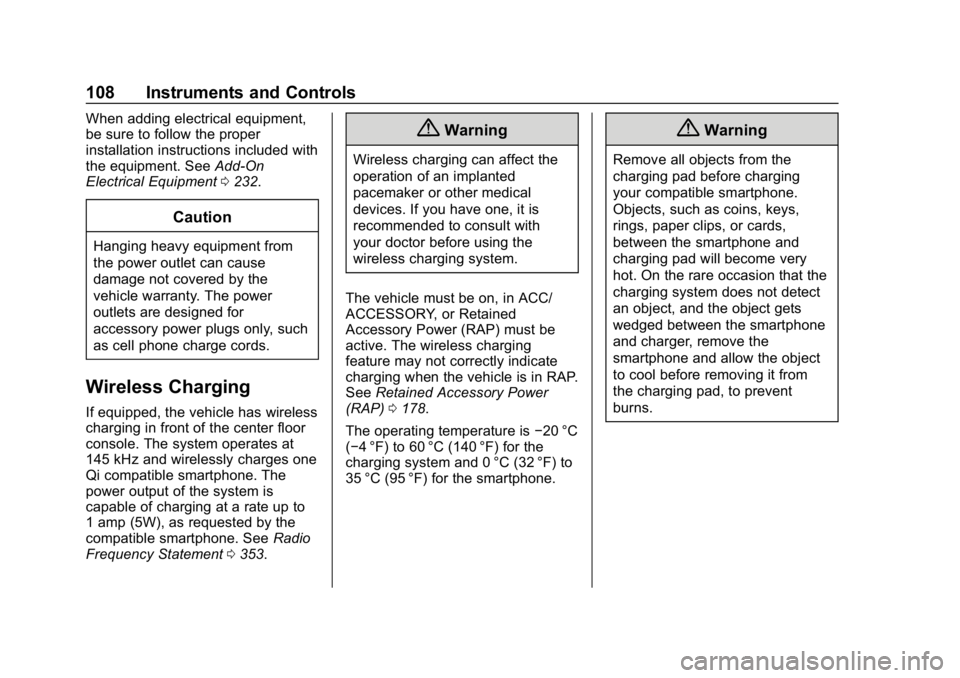
Wireless Charging
If equipped, the vehicle has wireless
charging in front of the center floor
console. The system operates at
145 kHz and wirelessly charges one
Qi compatible smartphone. The
power output of the system is
capable of charging at a rate up to
1 amp (5W), as requested by the
compatible smartphone. See Radio
Frequency Statement 0353.
{Warning
Wireless charging can affect the
operation of an implanted
pacemaker or other medical
devices. If you have one, it is
recommended to consult with
your doctor before using the
wireless charging system.
The vehicle must be on, in ACC/
ACCESSORY, or Retained
Accessory Power (RAP) must be
active. The wireless charging
feature may not correctly indicate
charging when the vehicle is in RAP.
See Retained Accessory Power
(RAP) 0178.
The operating temperature is −20 °C
(−4 °F) to 60 °C (140 °F) for the
charging system and 0 °C (32 °F) to
35 °C (95 °F) for the smartphone.
{Warning
Remove all objects from the
charging pad before charging
your compatible smartphone.
Objects, such as coins, keys,
rings, paper clips, or cards,
between the smartphone and
charging pad will become very
hot. On the rare occasion that the
charging system does not detect
an object, and the object gets
wedged between the smartphone
and charger, remove the
smartphone and allow the object
to cool before removing it from
the charging pad, to prevent
burns.
Page 118 of 381
GMC Canyon/Canyon Denali Owner Manual (GMNA-Localizing-U.S./Canada-
12461766) - 2019 - crc - 10/2/18
Instruments and Controls 117
English
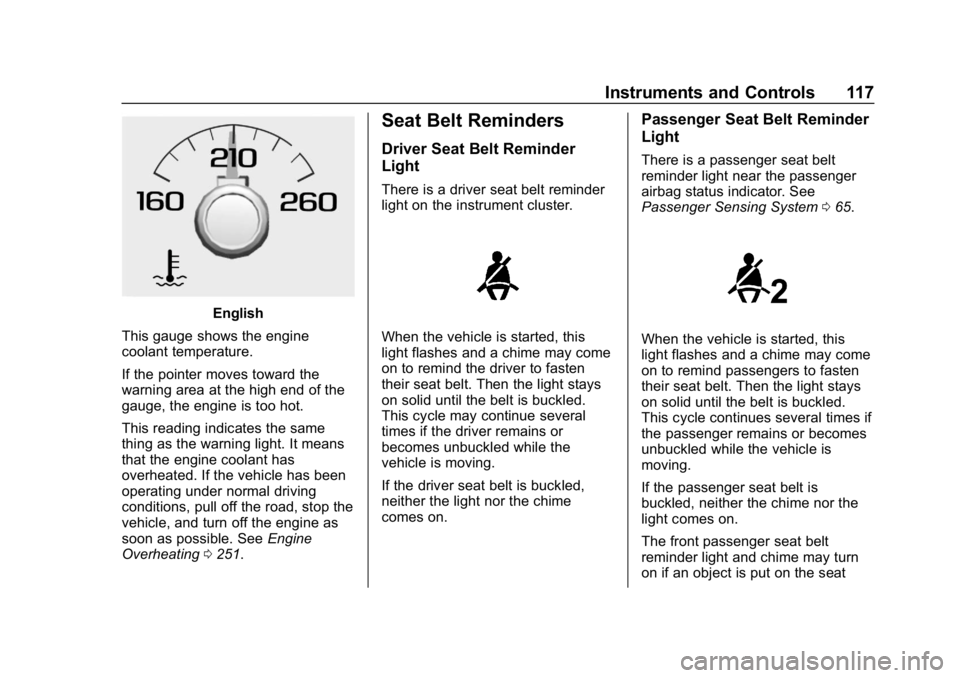
This gauge shows the engine
coolant temperature.
If the pointer moves toward the
warning area at the high end of the
gauge, the engine is too hot.
This reading indicates the same
thing as the warning light. It means
that the engine coolant has
overheated. If the vehicle has been
operating under normal driving
conditions, pull off the road, stop the
vehicle, and turn off the engine as
soon as possible. See Engine
Overheating 0251.
Seat Belt Reminders
Driver Seat Belt Reminder
Light
There is a driver seat belt reminder
light on the instrument cluster.
When the vehicle is started, this
light flashes and a chime may come
on to remind the driver to fasten
their seat belt. Then the light stays
on solid until the belt is buckled.
This cycle may continue several
times if the driver remains or
becomes unbuckled while the
vehicle is moving.
If the driver seat belt is buckled,
neither the light nor the chime
comes on.
Passenger Seat Belt Reminder
Light
There is a passenger seat belt
reminder light near the passenger
airbag status indicator. See
Passenger Sensing System 065.
When the vehicle is started, this
light flashes and a chime may come
on to remind passengers to fasten
their seat belt. Then the light stays
on solid until the belt is buckled.
This cycle continues several times if
the passenger remains or becomes
unbuckled while the vehicle is
moving.
If the passenger seat belt is
buckled, neither the chime nor the
light comes on.
The front passenger seat belt
reminder light and chime may turn
on if an object is put on the seat
Page 136 of 381
GMC Canyon/Canyon Denali Owner Manual (GMNA-Localizing-U.S./Canada-
12461766) - 2019 - crc - 10/2/18
Instruments and Controls 135
Vehicle
Personalization
The following are all possible
vehicle personalization features.
Depending on the vehicle, some
may not be available.
For System, Apps, and Personal
features and functions, see
“Settings”in the infotainment
manual.
To access the vehicle
personalization menu:
1. Touch the SETTINGS icon on the Home Page of the
infotainment display.
2. Touch Vehicle to display a list of available options.
3. Touch to select the desired feature setting.
4. Touch
9orRto turn a feature
off or on.
5. Touch
zto go to the top level
of the Settings menu. The menu may contain the
following:
Rear Seat Reminder
This allows for a chime and a
message when the rear door has
been opened before or during
operation of the vehicle.
Touch Off or On.
Climate and Air Quality
Touch and the following may
display:
.
Auto Fan Speed
. Auto Defog
. Auto Rear Defog
Auto Fan Speed
This setting specifies the amount of
airflow when the climate control fan
setting is Auto Fan.
Touch Low, Medium, or High.
Auto Defog
This setting automatically turns the
front defogger on when the engine
is started. Touch Off or On.
Auto Rear Defog
This setting automatically turns the
rear defogger on when the engine is
started.
Touch Off or On.
Collision/Detection Systems
Touch and the following may
display:
.
Park Assist
. Rear Camera Park Assist
Symbols
Park Assist
This allows the feature to be turned
on or off. See Assistance Systems
for Parking or Backing 0205.
Touch Off or On.
Rear Camera Park Assist Symbols
This setting enables the Rear
Camera Park Assist Symbols. See
Assistance Systems for Parking or
Backing 0205.
Touch Off or On.
Page 145 of 381
GMC Canyon/Canyon Denali Owner Manual (GMNA-Localizing-U.S./Canada-
12461766) - 2019 - crc - 10/2/18
144 Lighting
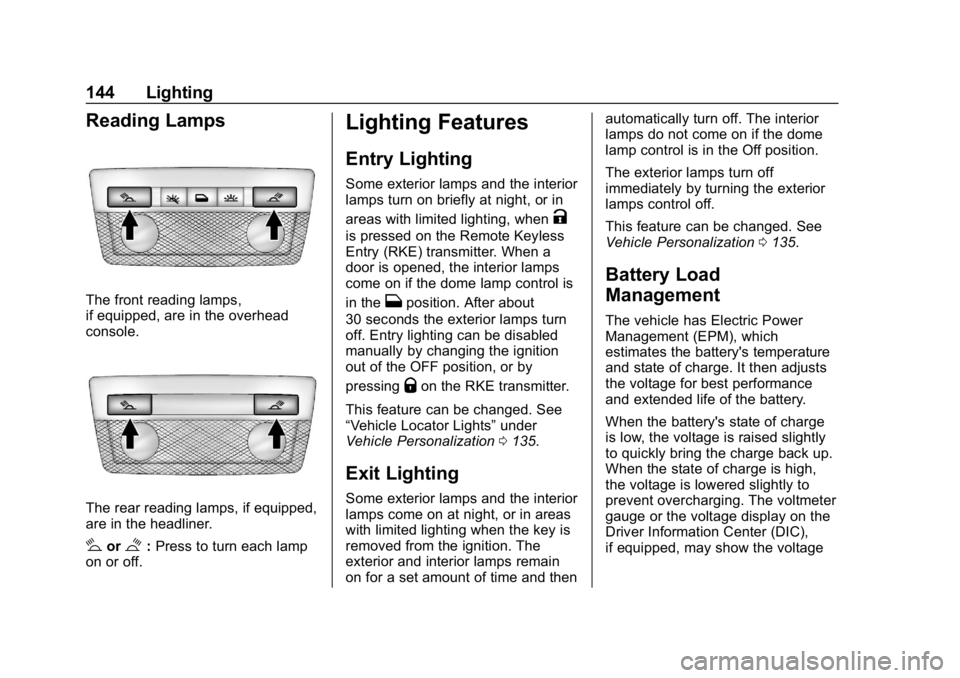
Reading Lamps
The front reading lamps,
if equipped, are in the overhead
console.
The rear reading lamps, if equipped,
are in the headliner.
#or$:Press to turn each lamp
on or off.
Lighting Features
Entry Lighting
Some exterior lamps and the interior
lamps turn on briefly at night, or in
areas with limited lighting, when
K
is pressed on the Remote Keyless
Entry (RKE) transmitter. When a
door is opened, the interior lamps
come on if the dome lamp control is
in the
Hposition. After about
30 seconds the exterior lamps turn
off. Entry lighting can be disabled
manually by changing the ignition
out of the OFF position, or by
pressing
Qon the RKE transmitter.
This feature can be changed. See
“Vehicle Locator Lights” under
Vehicle Personalization 0135.
Exit Lighting
Some exterior lamps and the interior
lamps come on at night, or in areas
with limited lighting when the key is
removed from the ignition. The
exterior and interior lamps remain
on for a set amount of time and then automatically turn off. The interior
lamps do not come on if the dome
lamp control is in the Off position.
The exterior lamps turn off
immediately by turning the exterior
lamps control off.
This feature can be changed. See
Vehicle Personalization
0135.
Battery Load
Management
The vehicle has Electric Power
Management (EPM), which
estimates the battery's temperature
and state of charge. It then adjusts
the voltage for best performance
and extended life of the battery.
When the battery's state of charge
is low, the voltage is raised slightly
to quickly bring the charge back up.
When the state of charge is high,
the voltage is lowered slightly to
prevent overcharging. The voltmeter
gauge or the voltage display on the
Driver Information Center (DIC),
if equipped, may show the voltage
Page 156 of 381
GMC Canyon/Canyon Denali Owner Manual (GMNA-Localizing-U.S./Canada-
12461766) - 2019 - crc - 10/2/18
Driving and Operating 155
Driving Characteristics andTowing Tips . . . . . . . . . . . . . . . . . 214
Trailer Towing . . . . . . . . . . . . . . . . 219
Towing Equipment . . . . . . . . . . . . 224
Trailer Sway Control (TSC) . . . 230
Conversions and Add-Ons
Add-On Electrical Equipment . . . . . . . . . . . . . . . . . . 232
Driving Information
Distracted Driving
Distraction comes in many forms
and can take your focus from the
task of driving. Exercise good
judgment and do not let other
activities divert your attention away
from the road. Many local
governments have enacted laws
regarding driver distraction. Become
familiar with the local laws in
your area.
To avoid distracted driving, keep
your eyes on the road, keep your
hands on the steering wheel, and
focus your attention on driving.
. Do not use a phone in
demanding driving situations.
Use a hands-free method to
place or receive necessary
phone calls.
. Watch the road. Do not read,
take notes, or look up
information on phones or other
electronic devices. .
Designate a front seat
passenger to handle potential
distractions.
. Become familiar with vehicle
features before driving, such as
programming favorite radio
stations and adjusting climate
control and seat settings.
Program all trip information into
any navigation device prior to
driving.
. Wait until the vehicle is parked
to retrieve items that have fallen
to the floor.
. Stop or park the vehicle to tend
to children.
. Keep pets in an appropriate
carrier or restraint.
. Avoid stressful conversations
while driving, whether with a
passenger or on a cell phone.