rear view camera GMC CANYON 2021 Owner's Manual
[x] Cancel search | Manufacturer: GMC, Model Year: 2021, Model line: CANYON, Model: GMC CANYON 2021Pages: 359, PDF Size: 7.37 MB
Page 210 of 359
GMC Canyon/Canyon Denali Owner Manual (GMNA-Localizing-U.S./Canada-
14430430) - 2021 - CRC - 9/9/20
Driving and Operating 209
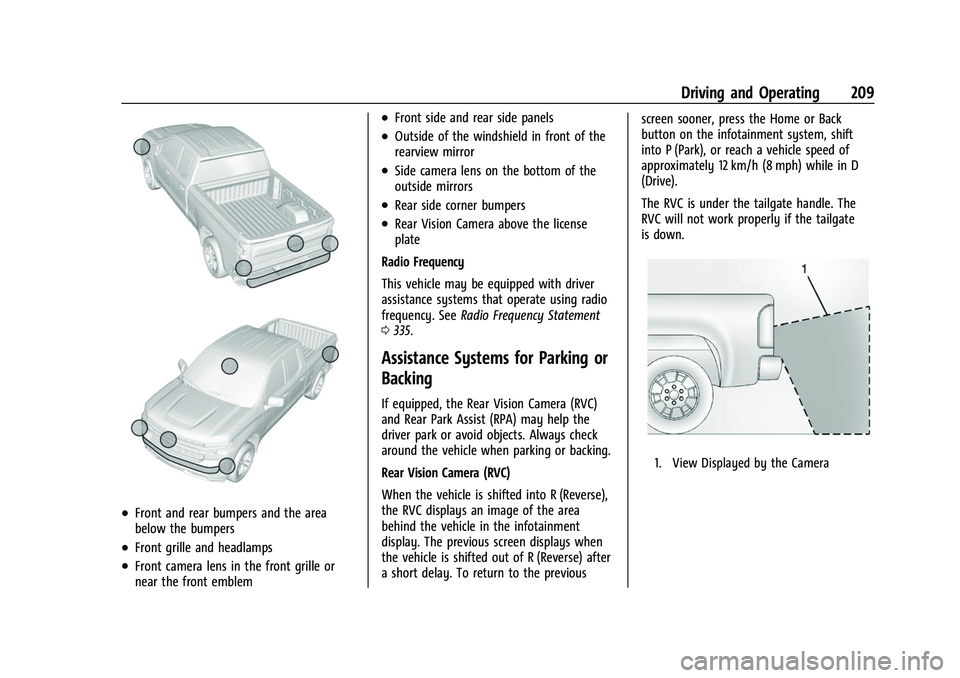
.Front and rear bumpers and the area
below the bumpers
.Front grille and headlamps
.Front camera lens in the front grille or
near the front emblem
.Front side and rear side panels
.Outside of the windshield in front of the
rearview mirror
.Side camera lens on the bottom of the
outside mirrors
.Rear side corner bumpers
.Rear Vision Camera above the license
plate
Radio Frequency
This vehicle may be equipped with driver
assistance systems that operate using radio
frequency. See Radio Frequency Statement
0 335.
Assistance Systems for Parking or
Backing
If equipped, the Rear Vision Camera (RVC)
and Rear Park Assist (RPA) may help the
driver park or avoid objects. Always check
around the vehicle when parking or backing.
Rear Vision Camera (RVC)
When the vehicle is shifted into R (Reverse),
the RVC displays an image of the area
behind the vehicle in the infotainment
display. The previous screen displays when
the vehicle is shifted out of R (Reverse) after
a short delay. To return to the previous screen sooner, press the Home or Back
button on the infotainment system, shift
into P (Park), or reach a vehicle speed of
approximately 12 km/h (8 mph) while in D
(Drive).
The RVC is under the tailgate handle. The
RVC will not work properly if the tailgate
is down.
1. View Displayed by the Camera
Page 211 of 359
GMC Canyon/Canyon Denali Owner Manual (GMNA-Localizing-U.S./Canada-
14430430) - 2021 - CRC - 9/9/20
210 Driving and Operating
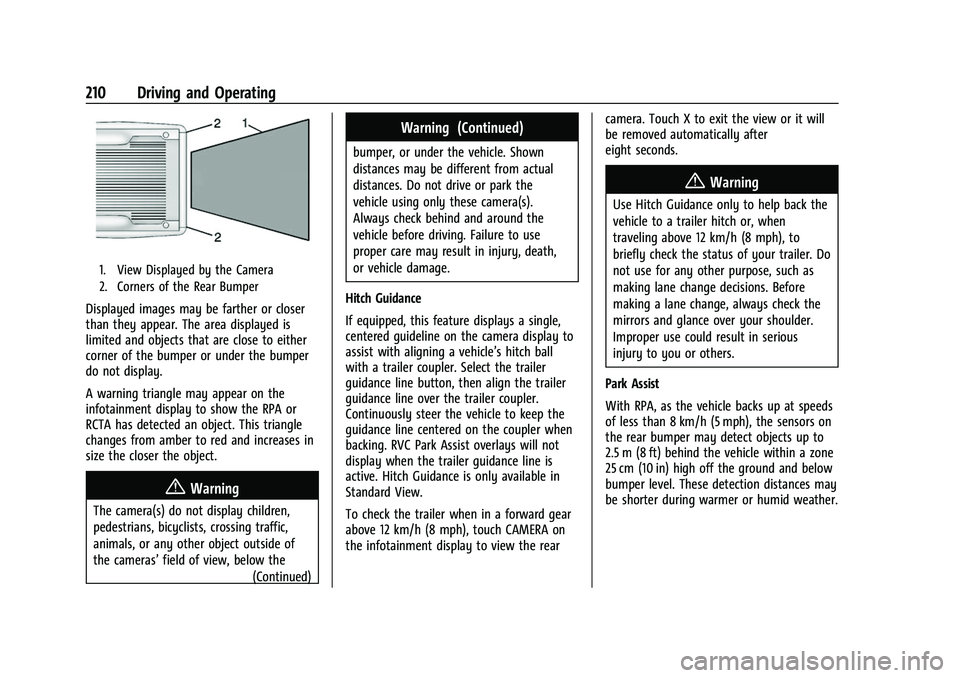
1. View Displayed by the Camera
2. Corners of the Rear Bumper
Displayed images may be farther or closer
than they appear. The area displayed is
limited and objects that are close to either
corner of the bumper or under the bumper
do not display.
A warning triangle may appear on the
infotainment display to show the RPA or
RCTA has detected an object. This triangle
changes from amber to red and increases in
size the closer the object.
{Warning
The camera(s) do not display children,
pedestrians, bicyclists, crossing traffic,
animals, or any other object outside of
the cameras’field of view, below the
(Continued)
Warning (Continued)
bumper, or under the vehicle. Shown
distances may be different from actual
distances. Do not drive or park the
vehicle using only these camera(s).
Always check behind and around the
vehicle before driving. Failure to use
proper care may result in injury, death,
or vehicle damage.
Hitch Guidance
If equipped, this feature displays a single,
centered guideline on the camera display to
assist with aligning a vehicle’s hitch ball
with a trailer coupler. Select the trailer
guidance line button, then align the trailer
guidance line over the trailer coupler.
Continuously steer the vehicle to keep the
guidance line centered on the coupler when
backing. RVC Park Assist overlays will not
display when the trailer guidance line is
active. Hitch Guidance is only available in
Standard View.
To check the trailer when in a forward gear
above 12 km/h (8 mph), touch CAMERA on
the infotainment display to view the rear camera. Touch X to exit the view or it will
be removed automatically after
eight seconds.
{Warning
Use Hitch Guidance only to help back the
vehicle to a trailer hitch or, when
traveling above 12 km/h (8 mph), to
briefly check the status of your trailer. Do
not use for any other purpose, such as
making lane change decisions. Before
making a lane change, always check the
mirrors and glance over your shoulder.
Improper use could result in serious
injury to you or others.
Park Assist
With RPA, as the vehicle backs up at speeds
of less than 8 km/h (5 mph), the sensors on
the rear bumper may detect objects up to
2.5 m (8 ft) behind the vehicle within a zone
25 cm (10 in) high off the ground and below
bumper level. These detection distances may
be shorter during warmer or humid weather.
Page 214 of 359
GMC Canyon/Canyon Denali Owner Manual (GMNA-Localizing-U.S./Canada-
14430430) - 2021 - CRC - 9/9/20
Driving and Operating 213
Cleaning the System
If the FCA system does not seem to operate
properly, this may correct the issue:
.Clean the outside of the windshield in
front of the rearview mirror.
.Clean the entire front of the vehicle.
.Clean the headlamps.
Lane Departure Warning (LDW)
If equipped, LDW may help avoid crashes
due to unintentional lane departures. It may
provide an alert if the vehicle is crossing a
lane marking without using a turn signal in
that direction. LDW uses a camera sensor to
detect the lane markings at speeds of
56 km/h (35 mph) or greater. The LDW light
will not alert if the turn signal is active in
the direction of lane departure, or if LDW
detects that you are accelerating, braking or
actively steering.
{Warning
The LDW system does not steer the
vehicle. The LDW system may not:
.Provide enough time to avoid a crash.(Continued)
Warning (Continued)
.Detect lane markings under poor
weather or visibility conditions. This
can occur if the windshield or
headlamps are blocked by dirt, snow,
or ice; if they are not in proper
condition; or if the sun shines directly
into the camera.
.Detect road edges.
.Detect lanes on winding or hilly roads.
If LDW only detects lane markings on one
side of the road, it will only warn you
when departing the lane on the side
where it has detected a lane marking.
Always keep your attention on the road
and maintain proper vehicle position
within the lane, or vehicle damage,
injury, or death could occur. Always keep
the windshield, headlamps, and camera
sensors clean and in good repair. Do not
use LDW in bad weather conditions.
How the System Works
The LDW camera sensor is on the windshield
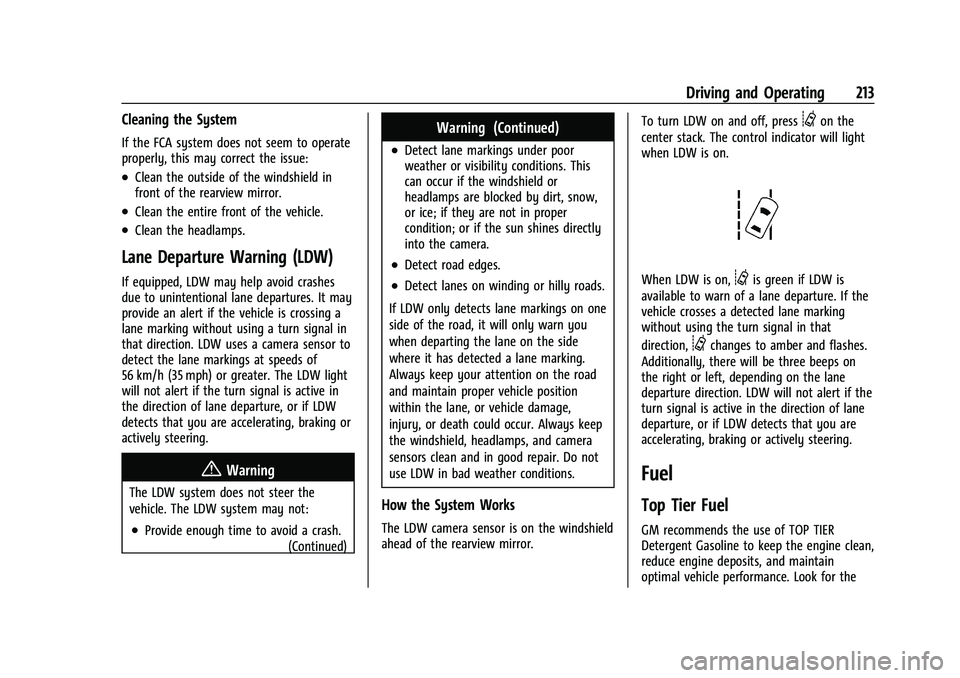
ahead of the rearview mirror. To turn LDW on and off, press
@on the
center stack. The control indicator will light
when LDW is on.
When LDW is on,@is green if LDW is
available to warn of a lane departure. If the
vehicle crosses a detected lane marking
without using the turn signal in that
direction,
@changes to amber and flashes.
Additionally, there will be three beeps on
the right or left, depending on the lane
departure direction. LDW will not alert if the
turn signal is active in the direction of lane
departure, or if LDW detects that you are
accelerating, braking or actively steering.
Fuel
Top Tier Fuel
GM recommends the use of TOP TIER
Detergent Gasoline to keep the engine clean,
reduce engine deposits, and maintain
optimal vehicle performance. Look for the
Page 266 of 359
GMC Canyon/Canyon Denali Owner Manual (GMNA-Localizing-U.S./Canada-
14430430) - 2021 - CRC - 9/9/20
Vehicle Care 265
FusesUsage
F1 Run/Crank relay control/ Horn switch/Dome lamps
F2 –
F3 –
F4 Steering wheel controls F5 Left headlamp low beam/ Front left park lamp/Left
front side marker/Left rear
side marker
F6 –
F7 –
F8 Mirror window module
F9 Instrument panel
F10 –
F11 Door latches
F12 –
F13 OnStar/HVAC
F14 Radio/Infotainment Fuses
Usage
F15 RAP accessory relay control/Shifter control/
Shifter solenoid/Wiper
relay control/Washer pump
relay control/Rear defog
relay control
F16 Communication gateway module
F17 Left rear side marker/Right front turn lamp/Left rear
stop lamp/Left front turn
lamp/Right rear stop lamp
F18 Airbag/Sensing and diagnostic module/
Automatic occupant
sensing module
F19 –
F20 Amplifier F21 –
F22 –
F23 Data link connector/USB front
F24 HVAC ignition/Auxiliary heater Fuses
Usage
F25 Driver door latch
F26 –
F27 –
F28 Instrument panel/ Automatic occupant
sensing display
F29 Rear vision camera/Transfer case control module
(4WD)/Inside rear view
mirror
F30 –
F31 Front camera/Rear park assist
F32 Steering wheel controls backlighting
F33 Heated steering wheel/ Communication gateway
module ignition
F34 Front ventilated seats F35 Park/Reverse/Neutral/ Drive/Low display/Wireless
charging module/USB rear
F36 Discrete logic ignition sensor
Page 355 of 359
GMC Canyon/Canyon Denali Owner Manual (GMNA-Localizing-U.S./Canada-
14430430) - 2021 - CRC - 9/9/20
354 Index
Proposition 65 Warning,California . . . . . . . . . . . . . . . . . . . . .234, 251, 294,
Back Cover
Publication Ordering Information . . . . . . . . 334
R
Radio HD Radio Technology . . . . . . . . . . . . . . . . . . . 117
Radio Data System (RDS) . . . . . . . . . . . . . . . . . 118
Radio Frequency Statement . . . . . . . . . . . . . . 335
Radio Reception . . . . . . . . . . . . . . . . . . . . . . . . . . 119
Radios AM-FM Radio . . . . . . . . . . . . . . . . . . . . . . . . . . . 116
Satellite . . . . . . . . . . . . . . . . . . . . . . . . . . . . . . . . . 118
Reading Lamps . . . . . . . . . . . . . . . . . . . . . . . . . . 106
Rear Axle . . . . . . . . . . . . . . . . . . . . . . . . . . . . . . . . 253
Rear Seats . . . . . . . . . . . . . . . . . . . . . . . . . . . . . . . . .25
Rear Vision Camera (RVC) . . . . . . . . . . . . . . . . 209
Rear Windows . . . . . . . . . . . . . . . . . . . . . . . . . . . . .19
Rearview Mirrors . . . . . . . . . . . . . . . . . . . . . . . . . . 17 Automatic Dimming . . . . . . . . . . . . . . . . . . . . . 17
Reclining Seatbacks . . . . . . . . . . . . . . . . . . . . . . . 24
Recognition Voice . . . . . . . . . . . . . . . . . . . . . . . . . . . . . . . . . . 136
Recommended Fuel . . . . . . . . . . . . . . . . . . . . . . . . . . . . . . . . . . . . 214
Recommended Fluids and Lubricants . . . . . 319 Records
Maintenance . . . . . . . . . . . . . . . . . . . . . . . . . . . 322
Recreational Vehicle Towing . . . . . . . . . . . . . 297
Reimbursement Program, GM Mobility . . . . . . . . . . . . . . . . . . . . . . . . . . . . . . . 330
Remote Keyless Entry (RKE) System . . . . . 8, 9
Remote Vehicle Start . . . . . . . . . . . . . . . . . . . . . . 11
Replacement Parts Airbags . . . . . . . . . . . . . . . . . . . . . . . . . . . . . . . . . 44
Maintenance . . . . . . . . . . . . . . . . . . . . . . . . . . . 320
Replacing Airbag System . . . . . . . . . . . . . . . . . . 44
Replacing LATCH System Parts after a
Crash . . . . . . . . . . . . . . . . . . . . . . . . . . . . . . . . . . . 64
Replacing Seat Belt System Parts after a Crash . . . . . . . . . . . . . . . . . . . . . . . . . . . . . . . . . 34
Reporting Safety Defects
Canadian Government . . . . . . . . . . . . . . . . . 336
General Motors . . . . . . . . . . . . . . . . . . . . . . . . 336
U.S. Government . . . . . . . . . . . . . . . . . . . . . . . 335
Restraints Where to Put . . . . . . . . . . . . . . . . . . . . . . . . . . . 49
Retained Accessory Power (RAP) . . . . . . . . . 190
Ride Control Systems Enhanced Traction System (ETS) . . . . . . . 206
Roads
Driving, Wet . . . . . . . . . . . . . . . . . . . . . . . . . . . . 177
Roadside Assistance Program . . . . . . . . . . . . 330
Rotation, Tires . . . . . . . . . . . . . . . . . . . . . . . . . . . 277 Routing, Engine Drive Belt . . . . . . . . . . . . . . . 326
Running the Vehicle While Parked . . . . . . . 192
S
Safety Defects Reporting
Canadian Government . . . . . . . . . . . . . . . . . 336
General Motors . . . . . . . . . . . . . . . . . . . . . . . . 336
U.S. Government . . . . . . . . . . . . . . . . . . . . . . . 335
Safety Locks . . . . . . . . . . . . . . . . . . . . . . . . . . . . . . . 13
Safety System Check . . . . . . . . . . . . . . . . . . . . . .33
Satellite Radio . . . . . . . . . . . . . . . . . . . . . . . . . . . . 118
Scheduling Appointments . . . . . . . . . . . . . . . . . 331
Seat Belts . . . . . . . . . . . . . . . . . . . . . . . . . . . . . . . . . .27 Buckle To Drive . . . . . . . . . . . . . . . . . . . . . . . . . 28
Care . . . . . . . . . . . . . . . . . . . . . . . . . . . . . . . . . . . . 34
Extender . . . . . . . . . . . . . . . . . . . . . . . . . . . . . . . . 33
How to Wear Seat Belts Properly . . . . . . . 28
Lap-Shoulder Belt . . . . . . . . . . . . . . . . . . . . . . . 30
Reminders . . . . . . . . . . . . . . . . . . . . . . . . . . . . . . 85
Replacing after a Crash . . . . . . . . . . . . . . . . . 34
Use During Pregnancy . . . . . . . . . . . . . . . . . . 33
Seats Adjustment, Front . . . . . . . . . . . . . . . . . . . . . . 23
Head Restraints . . . . . . . . . . . . . . . . . . . . . . . . . . 21
Heated and Ventilated Front . . . . . . . . . . . . 25
Lumbar Adjustment, Front . . . . . . . . . . . . . . 23
Power Adjustment, Front . . . . . . . . . . . . . . . 23
Rear . . . . . . . . . . . . . . . . . . . . . . . . . . . . . . . . . . . . 25