turn signal GMC CANYON 2021 Owner's Manual
[x] Cancel search | Manufacturer: GMC, Model Year: 2021, Model line: CANYON, Model: GMC CANYON 2021Pages: 359, PDF Size: 7.37 MB
Page 6 of 359
GMC Canyon/Canyon Denali Owner Manual (GMNA-Localizing-U.S./Canada-
14430430) - 2021 - CRC - 9/9/20
Introduction 5
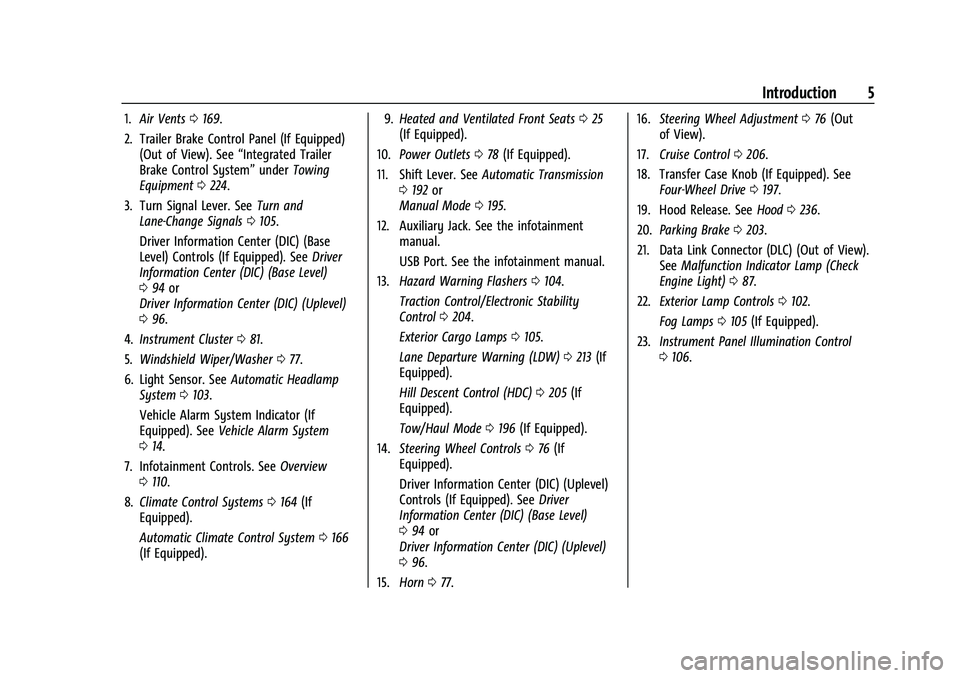
1.Air Vents 0169.
2. Trailer Brake Control Panel (If Equipped) (Out of View). See “Integrated Trailer
Brake Control System” underTowing
Equipment 0224.
3. Turn Signal Lever. See Turn and
Lane-Change Signals 0105.
Driver Information Center (DIC) (Base
Level) Controls (If Equipped). See Driver
Information Center (DIC) (Base Level)
0 94 or
Driver Information Center (DIC) (Uplevel)
0 96.
4. Instrument Cluster 081.
5. Windshield Wiper/Washer 077.
6. Light Sensor. See Automatic Headlamp
System 0103.
Vehicle Alarm System Indicator (If
Equipped). See Vehicle Alarm System
0 14.
7. Infotainment Controls. See Overview
0 110.
8. Climate Control Systems 0164 (If
Equipped).
Automatic Climate Control System 0166
(If Equipped). 9.
Heated and Ventilated Front Seats 025
(If Equipped).
10. Power Outlets 078 (If Equipped).
11. Shift Lever. See Automatic Transmission
0 192 or
Manual Mode 0195.
12. Auxiliary Jack. See the infotainment manual.
USB Port. See the infotainment manual.
13. Hazard Warning Flashers 0104.
Traction Control/Electronic Stability
Control 0204.
Exterior Cargo Lamps 0105.
Lane Departure Warning (LDW) 0213 (If
Equipped).
Hill Descent Control (HDC) 0205 (If
Equipped).
Tow/Haul Mode 0196 (If Equipped).
14. Steering Wheel Controls 076 (If
Equipped).
Driver Information Center (DIC) (Uplevel)
Controls (If Equipped). See Driver
Information Center (DIC) (Base Level)
0 94 or
Driver Information Center (DIC) (Uplevel)
0 96.
15. Horn 077. 16.
Steering Wheel Adjustment 076 (Out
of View).
17. Cruise Control 0206.
18. Transfer Case Knob (If Equipped). See Four-Wheel Drive 0197.
19. Hood Release. See Hood0236.
20. Parking Brake 0203.
21. Data Link Connector (DLC) (Out of View). SeeMalfunction Indicator Lamp (Check
Engine Light) 087.
22. Exterior Lamp Controls 0102.
Fog Lamps 0105 (If Equipped).
23. Instrument Panel Illumination Control
0106.
Page 9 of 359
GMC Canyon/Canyon Denali Owner Manual (GMNA-Localizing-U.S./Canada-
14430430) - 2021 - CRC - 9/9/20
8 Keys, Doors, and Windows
2. Turn the ignition off and removethe key.
3. Quickly, within five seconds, insert the second original already programmed key
in the ignition and turn the ignition on.
4. Turn the ignition off, and remove the key.
5. Insert the new key to be programmed and turn the ignition on within
five seconds.
The security light will turn off once the
key has been programmed.
6. Repeat Steps 1–5 if additional keys are to be programmed.
If a key is lost or damaged, see your dealer
to have a new key made.
Programming without Two Recognized Keys
Program a new key to the vehicle when a
recognized key is not available. Canadian
regulations require that owners see their
dealer.
If two currently recognized keys are not
available, follow this procedure to program
the first key. This procedure will take approximately
30 minutes to complete for the first key.
The vehicle must be off and all of the keys
you wish to program must be with you.
1. Insert the new vehicle key into the ignition.
2. Turn the ignition on. The security light will come on.
3. Wait 10 minutes until the security light turns off.
4. Turn the ignition off.
5. Repeat Steps 2–4 two more times. After the third time, turn the ignition on; the
key is learned and all previously known
keys will no longer work with the
vehicle.
6. To learn the second key, turn the ignition off. Insert the second key to be
learned and turn the ignition on.
After two keys are learned, the remaining
keys can be learned by following the
procedure in “Programming with Two
Recognized Keys.”
If it becomes difficult to turn a key, inspect
the key blade for debris. Periodically clean
with a brush or pick. See your dealer if a replacement key or
additional key is needed.
If locked out of the vehicle, see
Roadside
Assistance Program 0330.
With an active OnStar or connected service
plan, an OnStar Advisor may remotely
unlock the vehicle. See OnStar Overview
0 339.
Remote Keyless Entry (RKE)
System
See Radio Frequency Statement 0335.
If there is a decrease in the Remote Keyless
Entry (RKE) operating range:
.Check the distance. The transmitter may
be too far from the vehicle.
.Check the location. Other vehicles or
objects may be blocking the signal.
.Check the transmitter's battery. See
“Battery Replacement” later in this
section.
.If the transmitter is still not working
correctly, see your dealer or a qualified
technician for service.
Page 10 of 359
GMC Canyon/Canyon Denali Owner Manual (GMNA-Localizing-U.S./Canada-
14430430) - 2021 - CRC - 9/9/20
Keys, Doors, and Windows 9
Remote Keyless Entry (RKE)
System Operation
The RKE transmitter functions may work up
to 60 m (197 ft) away from the vehicle.
Other conditions can affect the performance
of the transmitter. SeeRemote Keyless Entry
(RKE) System 08.
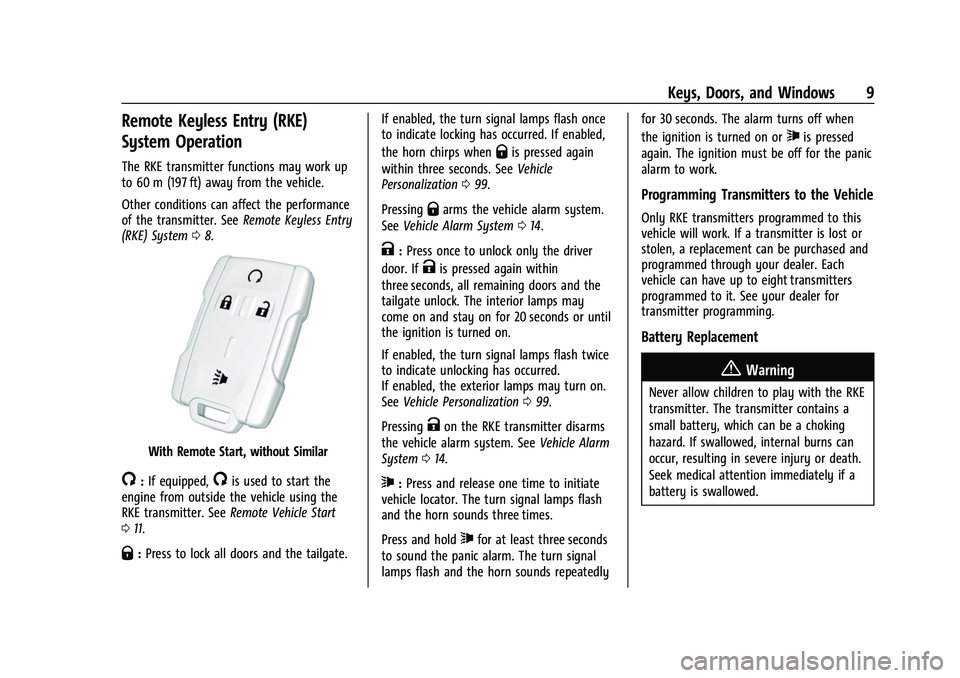
With Remote Start, without Similar
/:If equipped,/is used to start the
engine from outside the vehicle using the
RKE transmitter. See Remote Vehicle Start
0 11.
Q:Press to lock all doors and the tailgate. If enabled, the turn signal lamps flash once
to indicate locking has occurred. If enabled,
the horn chirps when
Qis pressed again
within three seconds. See Vehicle
Personalization 099.
Pressing
Qarms the vehicle alarm system.
See Vehicle Alarm System 014.
K:Press once to unlock only the driver
door. If
Kis pressed again within
three seconds, all remaining doors and the
tailgate unlock. The interior lamps may
come on and stay on for 20 seconds or until
the ignition is turned on.
If enabled, the turn signal lamps flash twice
to indicate unlocking has occurred.
If enabled, the exterior lamps may turn on.
See Vehicle Personalization 099.
Pressing
Kon the RKE transmitter disarms
the vehicle alarm system. See Vehicle Alarm
System 014.
7:Press and release one time to initiate
vehicle locator. The turn signal lamps flash
and the horn sounds three times.
Press and hold
7for at least three seconds
to sound the panic alarm. The turn signal
lamps flash and the horn sounds repeatedly for 30 seconds. The alarm turns off when
the ignition is turned on or
7is pressed
again. The ignition must be off for the panic
alarm to work.
Programming Transmitters to the Vehicle
Only RKE transmitters programmed to this
vehicle will work. If a transmitter is lost or
stolen, a replacement can be purchased and
programmed through your dealer. Each
vehicle can have up to eight transmitters
programmed to it. See your dealer for
transmitter programming.
Battery Replacement
{Warning
Never allow children to play with the RKE
transmitter. The transmitter contains a
small battery, which can be a choking
hazard. If swallowed, internal burns can
occur, resulting in severe injury or death.
Seek medical attention immediately if a
battery is swallowed.
Page 12 of 359
GMC Canyon/Canyon Denali Owner Manual (GMNA-Localizing-U.S./Canada-
14430430) - 2021 - CRC - 9/9/20
Keys, Doors, and Windows 11
Remote Vehicle Start
If equipped, the engine can be started from
outside of the vehicle. The climate controls
and rear window defogger may also
come on.
If the vehicle has heated and ventilated
seats and the feature is turned on in vehicle
personalization, the heated or ventilated
seats will turn on during cold or hot outside
temperatures and will shut off when the
ignition is turned on. SeeHeated and
Ventilated Front Seats 025.
Laws in some communities may restrict the
use of remote starters. Check local
regulations for any requirements on remote
starting of vehicles.
If your vehicle is low on fuel, do not use the
remote start feature. The vehicle may run
out of fuel.
The vehicle cannot be remote started if:
.The key is in the ignition.
.The hood is not closed.
.There is an emission control system
malfunction and the malfunction indicator
lamp is on.
.The hazard warning flashers are on.
.Two remote vehicle starts, or a single
remote start with an extension, have
already been used.
.The vehicle is not in P (Park).
The engine will turn off during a remote
vehicle start if:
.The coolant temperature gets too high.
.The oil pressure gets low.
The RKE transmitter range may be less while
the vehicle is running.
Other conditions can affect the performance
of the transmitter. See Remote Keyless Entry
(RKE) System 08or
Vehicle Personalization 099.
Starting the Engine Using Remote Start
1. Press and release
Q.
2. Immediately press and hold
/until the
turn signal lamps flash or for at least
four seconds.
When the vehicle starts, the parking
lamps will turn on. The doors will be
locked and the climate control system
may come on. The engine will continue to run for
15 minutes. Repeat the steps for one
15-minute time extension. Turn the ignition
on to operate the vehicle.
Extending Engine Run Time
The engine run time can be extended by
15 minutes, for a total of 30 minutes,
if during the first 15 minutes Steps 1 and 2
are repeated while the engine is still
running. An extension can be requested
30 seconds after starting.
A maximum of two remote starts, or a
single start with an extension, is allowed
between ignition cycles.
The ignition must be turned on and then
back off to use remote start again.
Canceling a Remote Start
To cancel a remote start, do one of the
following:
.Press and hold/until the parking lamps
turn off.
.Turn on the hazard warning flashers.
.Turn the vehicle on and then off.
Page 16 of 359

GMC Canyon/Canyon Denali Owner Manual (GMNA-Localizing-U.S./Canada-
14430430) - 2021 - CRC - 9/9/20
Keys, Doors, and Windows 15
or the door is not unlocked by pressingK
on the RKE transmitter during the 10-second
pre-alarm, the alarm will be activated.
If a door or the hood is opened without first
disarming the system, the turn signals will
flash and the horn will sound for about
30 seconds. The alarm system will then
re-arm to monitor for the next unauthorized
event.
Disarming the Alarm System
To disarm the alarm system or turn off the
alarm if it has been activated:
.PressKon the RKE transmitter.
.Start the vehicle.
To avoid setting off the alarm by accident:
.Lock the vehicle after all occupants have
left the vehicle and all doors are closed.
.Always unlock a door with the RKE
transmitter.
Unlocking the driver door with the key will
not disarm the system or turn off the alarm.
Detecting a Tamper Condition
IfKis pressed on the RKE transmitter and
the horn chirps three times, an alarm
occurred previously while the alarm system
was armed.
Immobilizer
See Radio Frequency Statement 0335.
Immobilizer Operation
This vehicle has a passive theft-deterrent
system.
The system does not have to be manually
armed or disarmed.
The vehicle is automatically immobilized
when the vehicle is turned off.
The system is automatically disarmed when
the ignition is turned from off to on.
The security light, in the instrument cluster,
comes on if there is a problem with arming
or disarming the theft-deterrent system. When trying to start the vehicle, the
security light comes on briefly when the
ignition is turned on.
If the engine does not start and the security
light stays on, there is a problem with the
system. Turn the ignition off and try again.
If the engine still does not start, and the
key appears to be undamaged, try another
ignition key. It may be necessary to check
the fuse. See
Fuses and Circuit Breakers
0 259. If the engine still does not start with
the other key, the vehicle needs service.
If the vehicle does start, the first key may
be faulty. See your dealer.
It is possible for the immobilizer system to
learn new or replacement keys. Up to eight
keys can be programmed for the vehicle. To
program additional transmitters, see Remote
Keyless Entry (RKE) System Operation 09.
Do not leave the transmitter or device that
disarms or deactivates the vehicle
theft-deterent system in the vehicle.
See your dealer to get a new key blank cut
exactly as the ignition key that operates the
system.
Page 79 of 359
GMC Canyon/Canyon Denali Owner Manual (GMNA-Localizing-U.S./Canada-
14430430) - 2021 - CRC - 9/9/20
78 Instruments and Controls
Compass
The vehicle may have a compass display on
the Driver Information Center (DIC). The
compass receives its heading and other
information from the Global Positioning
System (GPS) antenna, StabiliTrak/Electronic
Stability Control (ESC), and vehicle speed
information.
The compass system is designed to operate
for a certain number of miles or degrees of
turn before needing a signal from the GPS
satellites. When the compass display shows
CAL, drive the vehicle for a short distance in
an open area where it can receive a GPS
signal. The compass system will
automatically determine when a GPS signal
is restored and provide a heading again.
Clock
Set the time and date using the
infotainment system. See "Time / Date"
underSettings 0147.
Power Outlets
For USB charging port locations, see the
infotainment manual. Accessory power outlets can be used to plug
in electrical equipment, such as a cell phone,
MP3 player, etc.
The vehicle may have accessory power
outlets:
.On the center stack below the climate
control system, if equipped.
.On the center floor console, if equipped.
.On the rear of the center storage console.
Lift the cover to access and replace when
not in use.
{Warning
Power is supplied to the outlets when the
ignition is on. When not in use, do not
leave electrical equipment plugged in. The
vehicle could catch fire and cause injury
or death.
Caution
Leaving electrical equipment plugged in
for an extended period of time while the
vehicle is off will drain the battery.
Always unplug electrical equipment when
(Continued)
Caution (Continued)
not in use and do not plug in equipment
that exceeds the maximum 15 amp
rating.
Certain power accessory plugs may not be
compatible with the accessory power outlet
and could overload vehicle or adapter fuses.
If a problem is experienced, see your dealer.
When adding electrical equipment, be sure
to follow the proper installation instructions
included with the equipment. See Add-On
Electrical Equipment 0232.
Caution
Hanging heavy equipment from the
power outlet can cause damage not
covered by the vehicle warranty. The
power outlets are designed for accessory
power plugs only, such as cell phone
charge cords.
Wireless Charging
If equipped, the vehicle has wireless
charging in front of the center floor console.
The system operates at 145 kHz and
wirelessly charges one Qi compatible
smartphone. The power output of the
Page 81 of 359
GMC Canyon/Canyon Denali Owner Manual (GMNA-Localizing-U.S./Canada-
14430430) - 2021 - CRC - 9/9/20
80 Instruments and Controls
To reposition, remove the smartphone
from the pad, turn it 180 degrees, and
wait three seconds before placing/
aligning the smartphone on the pad
again.
The smartphone may become warm
during charging. This is normal. In
warmer temperatures, the speed of
charging may be reduced.
Software Acknowledgements
Certain Wireless Charging Module product
from LG Electronics, Inc. ("LGE") contains the
open source software detailed below. Refer
to the indicated open source licenses (as are
included following this notice) for the terms
and conditions of their use.
OSS Notice Information
To obtain the source code that is contained
in this product, please visit http://
opensource.lge.com. In addition to the
source code, all referred license terms,
warranty disclaimers and copyright notices
are available for download. LG Electronics
will also provide open source code to you
on CD-ROM for a charge covering the cost of
performing such distribution (such as the
cost of media, shipping, and handling) upon email request to [email protected]. This
offer is valid for three (3) years from the
date on which you purchased the product.
Freescale-WCT library
Copyright (c) 2012-2014 Freescale
Semiconductor, Inc.. All rights reserved.
1. Redistributions of source code must retain the above copyright notice, this
list of conditions and the following
disclaimer.
2. Redistributions in binary form must reproduce the above copyright notice,
this list of conditions and the following
disclaimer in the documentation and/or
other materials provided with the
distribution.
3. Neither the name of the copyright holder nor the names of its contributors may be
used to endorse or promote products
derived from this software without
specific prior written permission.
THIS SOFTWARE IS PROVIDED BY THE
COPYRIGHT HOLDERS AND CONTRIBUTORS
"AS IS" AND ANY EXPRESS OR IMPLIED
WARRANTIES, INCLUDING, BUT NOT LIMITED
TO, THE IMPLIED WARRANTIES OF
MERCHANTABILITY AND FITNESS FOR A
PARTICULAR PURPOSE ARE DISCLAIMED. IN NO EVENT SHALL THE COPYRIGHT HOLDER
OR CONTRIBUTORS BE LIABLE FOR ANY
DIRECT, INDIRECT, INCIDENTAL, SPECIAL,
EXEMPLARY, OR CONSEQUENTIAL DAMAGES
(INCLUDING, BUT NOT LIMITED TO,
PROCUREMENT OF SUBSTITUTE GOODS OR
SERVICES; LOSS OF USE, DATA, OR PROFITS;
OR BUSINESS INTERRUPTION) HOWEVER
CAUSED AND ON ANY THEORY OF LIABILITY,
WHETHER IN CONTRACT, STRICT LIABILITY, OR
TORT (INCLUDING NEGLIGENCE OR
OTHERWISE) ARISING IN ANY WAY OUT OF
THE USE OF THIS SOFTWARE, EVEN IF
ADVISED OF THE POSSIBILITY OF SUCH
DAMAGE.
Warning Lights, Gauges, and
Indicators
Warning lights and gauges can signal that
something is wrong before it becomes
serious enough to cause an expensive repair
or replacement. Paying attention to the
warning lights and gauges could prevent
injury.
Some warning lights come on briefly when
the engine is started to indicate they are
working. When one of the warning lights
comes on and stays on while driving,
Page 91 of 359
GMC Canyon/Canyon Denali Owner Manual (GMNA-Localizing-U.S./Canada-
14430430) - 2021 - CRC - 9/9/20
90 Instruments and Controls
The light will flash when a shift is in
progress. Once the shift is complete the
light will be steady.
If the light turns amber, there may be a
malfunction with the four-wheel-drive
system. See your dealer.
SeeFour-Wheel Drive 0197.
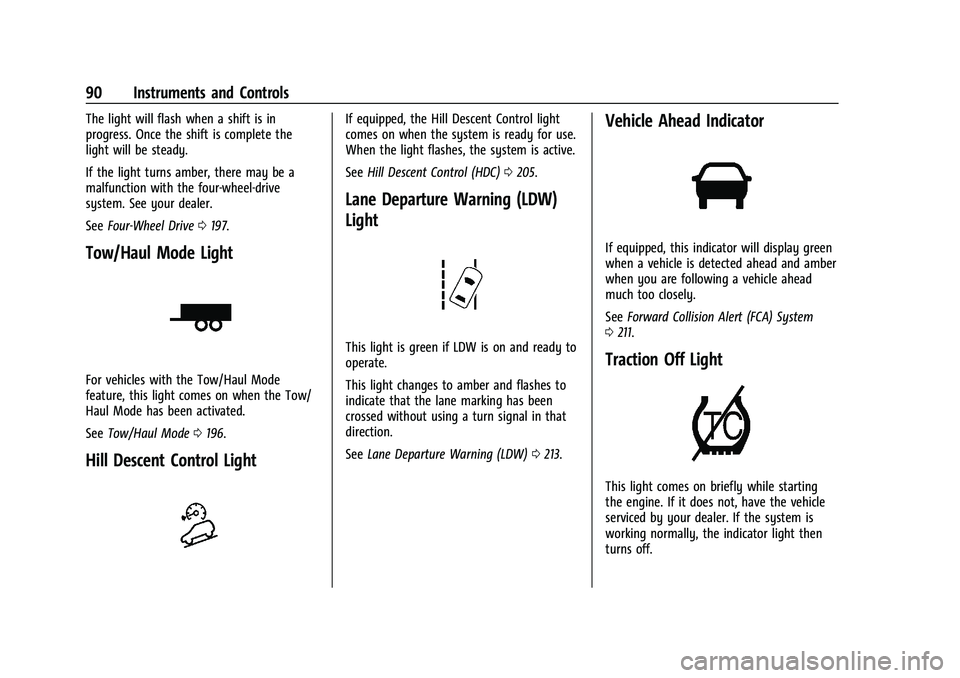
Tow/Haul Mode Light
For vehicles with the Tow/Haul Mode
feature, this light comes on when the Tow/
Haul Mode has been activated.
See Tow/Haul Mode 0196.
Hill Descent Control Light
If equipped, the Hill Descent Control light
comes on when the system is ready for use.
When the light flashes, the system is active.
See Hill Descent Control (HDC) 0205.
Lane Departure Warning (LDW)
Light
This light is green if LDW is on and ready to
operate.
This light changes to amber and flashes to
indicate that the lane marking has been
crossed without using a turn signal in that
direction.
See Lane Departure Warning (LDW) 0213.
Vehicle Ahead Indicator
If equipped, this indicator will display green
when a vehicle is detected ahead and amber
when you are following a vehicle ahead
much too closely.
See Forward Collision Alert (FCA) System
0 211.
Traction Off Light
This light comes on briefly while starting
the engine. If it does not, have the vehicle
serviced by your dealer. If the system is
working normally, the indicator light then
turns off.
Page 95 of 359
GMC Canyon/Canyon Denali Owner Manual (GMNA-Localizing-U.S./Canada-
14430430) - 2021 - CRC - 9/9/20
94 Instruments and Controls
The light goes out when the cruise control is
turned off. SeeCruise Control0206.
Door Ajar Light (Uplevel Cluster)
This light comes on when a door is open or
not securely latched. Before driving, check
that all doors are properly closed.
Information Displays
Driver Information Center (DIC)
(Base Level)
The DIC displays information about your
vehicle. It also displays warning messages if
a system problem is detected. See Vehicle
Messages 098. All messages appear in the
DIC display in the center of the instrument
cluster.
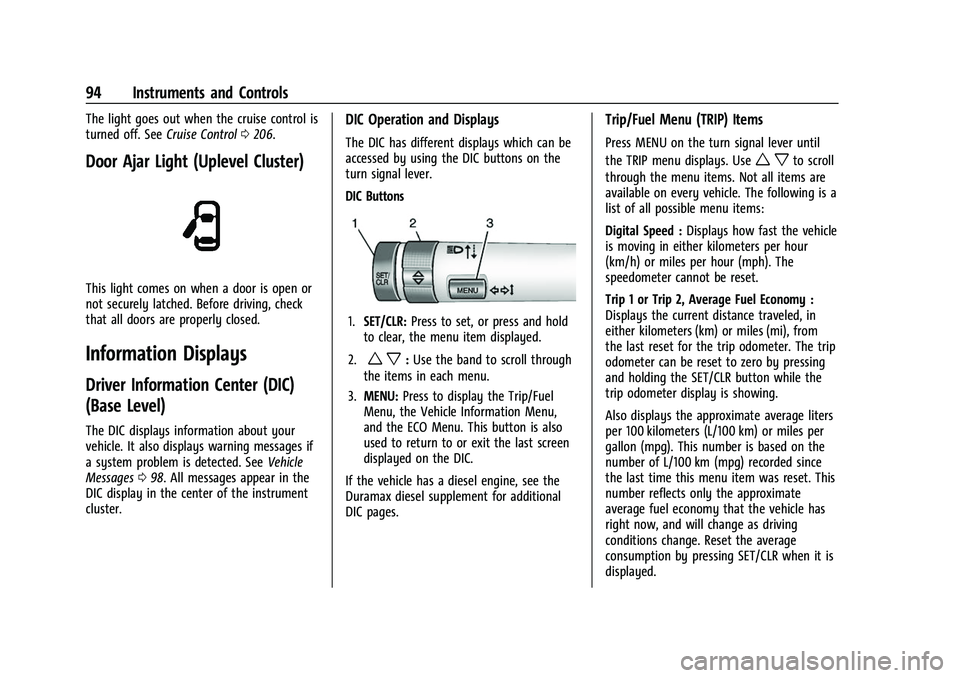
DIC Operation and Displays
The DIC has different displays which can be
accessed by using the DIC buttons on the
turn signal lever.
DIC Buttons
1. SET/CLR: Press to set, or press and hold
to clear, the menu item displayed.
2.
w x: Use the band to scroll through
the items in each menu.
3. MENU: Press to display the Trip/Fuel
Menu, the Vehicle Information Menu,
and the ECO Menu. This button is also
used to return to or exit the last screen
displayed on the DIC.
If the vehicle has a diesel engine, see the
Duramax diesel supplement for additional
DIC pages.
Trip/Fuel Menu (TRIP) Items
Press MENU on the turn signal lever until
the TRIP menu displays. Use
w xto scroll
through the menu items. Not all items are
available on every vehicle. The following is a
list of all possible menu items:
Digital Speed : Displays how fast the vehicle
is moving in either kilometers per hour
(km/h) or miles per hour (mph). The
speedometer cannot be reset.
Trip 1 or Trip 2, Average Fuel Economy :
Displays the current distance traveled, in
either kilometers (km) or miles (mi), from
the last reset for the trip odometer. The trip
odometer can be reset to zero by pressing
and holding the SET/CLR button while the
trip odometer display is showing.
Also displays the approximate average liters
per 100 kilometers (L/100 km) or miles per
gallon (mpg). This number is based on the
number of L/100 km (mpg) recorded since
the last time this menu item was reset. This
number reflects only the approximate
average fuel economy that the vehicle has
right now, and will change as driving
conditions change. Reset the average
consumption by pressing SET/CLR when it is
displayed.
Page 96 of 359
GMC Canyon/Canyon Denali Owner Manual (GMNA-Localizing-U.S./Canada-
14430430) - 2021 - CRC - 9/9/20
Instruments and Controls 95
Fuel Range :Displays the approximate
distance the vehicle can be driven without
refueling. The fuel range estimate is based
on an average of the vehicle's fuel economy
over recent driving history and the amount
of fuel remaining in the fuel tank. Fuel
range cannot be reset.
Average Vehicle Speed : Displays the
average vehicle speed of the vehicle in
kilometers per hour (km/h) or miles per
hour (mph). This average is based on the
various vehicle speeds recorded since the
last reset. Reset the average speed by
pressing SET/CLR when it is displayed.
Timer : To start the timer, press SET/CLR
while Timer is displayed. The display will
show the amount of time that has passed
since the timer was last reset, not including
time the ignition is off. Time will continue
to be counted as long as the ignition is on,
even if another display is being shown on
the DIC. The timer will record up to
99 hours, 59 minutes, and 59 seconds
(99:59:59) after which the display will return
to zero. To stop the timer, press SET/CLR
briefly while Timer is displayed. To reset the
timer to zero, press and hold SET/CLR.
Blank Display : Displays no information.Vehicle Information Menu (VEHICLE)
Items
Press MENU on the turn signal lever until
the VEHICLE menu is displayed. Use
w x
to scroll through the menu items. Not all
items are available on every vehicle. The
following is a list of all possible menu items:
Remaining Oil Life : Displays an estimate of
the oil's remaining useful life. If REMAINING
OIL LIFE 99% is displayed, that means 99%
of the current oil life remains.
When the remaining oil life is low, the
CHANGE ENGINE OIL SOON message will
appear on the display. The oil should be
changed as soon as possible. See Engine Oil
0 240. In addition to the engine oil life
system monitoring the oil life, additional
maintenance is recommended in the
Maintenance Schedule in this manual. See
Maintenance Schedule 0310.
The Oil Life display must be reset after each
oil change. Do not reset the Oil Life display
accidentally at any time other than when
the oil has just been changed. It cannot be
reset accurately until the next oil change. To
reset the engine oil life system, see Engine
Oil Life System 0242. Oil Pressure :
Oil pressure is displayed in
either kilopascal (kPa) or in pounds per
square inch (psi).
Tire Pressure : Displays a vehicle with the
approximate pressures of all four tires. Tire
pressure is displayed in either
kilopascal (kPa) or in pounds per square
inch (psi). See Tire Pressure Monitor System
0 273 and
Tire Pressure Monitor Operation 0274.
Battery Voltage : Displays the current
battery voltage, if equipped. Battery voltage
changes are normal while driving. See
Charging System Light 087. If there is a
problem with the battery charging system,
the DIC will display a message.
Engine Hours : Shows the total number of
hours the engine has run.
Transmission Fluid Temperature : Shows the
temperature of the automatic transmission
fluid in either degrees Celsius (°C) or degrees
Fahrenheit (°F).
Trailer Brake (If Equipped) : TRAILER GAIN
shows the trailer gain setting. This setting
can be adjusted from 0.0 to 10.0 with either
a trailer connected or disconnected.