driver seat adjustment GMC CANYON 2023 Owners Manual
[x] Cancel search | Manufacturer: GMC, Model Year: 2023, Model line: CANYON, Model: GMC CANYON 2023Pages: 371, PDF Size: 7.41 MB
Page 6 of 371
GMC Canyon/Canyon Denali Owner Manual (GMNA-Localizing-U.S./Canada/
Mexico-16510661) - 2023 - CRC - 11/29/22
Introduction 5
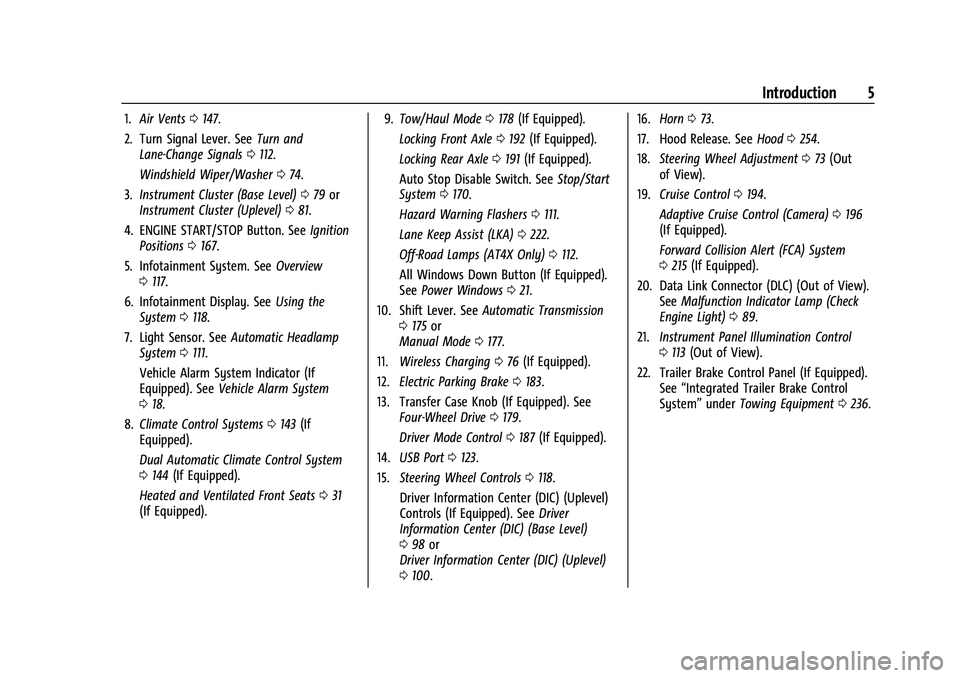
1.Air Vents 0147.
2. Turn Signal Lever. See Turn and
Lane-Change Signals 0112.
Windshield Wiper/Washer 074.
3. Instrument Cluster (Base Level) 079 or
Instrument Cluster (Uplevel) 081.
4. ENGINE START/STOP Button. See Ignition
Positions 0167.
5. Infotainment System. See Overview
0 117.
6. Infotainment Display. See Using the
System 0118.
7. Light Sensor. See Automatic Headlamp
System 0111.
Vehicle Alarm System Indicator (If
Equipped). See Vehicle Alarm System
0 18.
8. Climate Control Systems 0143 (If
Equipped).
Dual Automatic Climate Control System
0 144 (If Equipped).
Heated and Ventilated Front Seats 031
(If Equipped). 9.
Tow/Haul Mode 0178 (If Equipped).
Locking Front Axle 0192 (If Equipped).
Locking Rear Axle 0191 (If Equipped).
Auto Stop Disable Switch. See Stop/Start
System 0170.
Hazard Warning Flashers 0111.
Lane Keep Assist (LKA) 0222.
Off-Road Lamps (AT4X Only) 0112.
All Windows Down Button (If Equipped).
See Power Windows 021.
10. Shift Lever. See Automatic Transmission
0 175 or
Manual Mode 0177.
11. Wireless Charging 076 (If Equipped).
12. Electric Parking Brake 0183.
13. Transfer Case Knob (If Equipped). See Four-Wheel Drive 0179.
Driver Mode Control 0187 (If Equipped).
14. USB Port 0123.
15. Steering Wheel Controls 0118.
Driver Information Center (DIC) (Uplevel)
Controls (If Equipped). See Driver
Information Center (DIC) (Base Level)
0 98 or
Driver Information Center (DIC) (Uplevel)
0 100. 16.
Horn 073.
17. Hood Release. See Hood0254.
18. Steering Wheel Adjustment 073 (Out
of View).
19. Cruise Control 0194.
Adaptive Cruise Control (Camera) 0196
(If Equipped).
Forward Collision Alert (FCA) System
0 215 (If Equipped).
20. Data Link Connector (DLC) (Out of View). SeeMalfunction Indicator Lamp (Check
Engine Light) 089.
21. Instrument Panel Illumination Control
0113 (Out of View).
22. Trailer Brake Control Panel (If Equipped). See“Integrated Trailer Brake Control
System” underTowing Equipment 0236.
Page 26 of 371
GMC Canyon/Canyon Denali Owner Manual (GMNA-Localizing-U.S./Canada/
Mexico-16510661) - 2023 - CRC - 11/29/22
Seats and Restraints 25
Front Seats
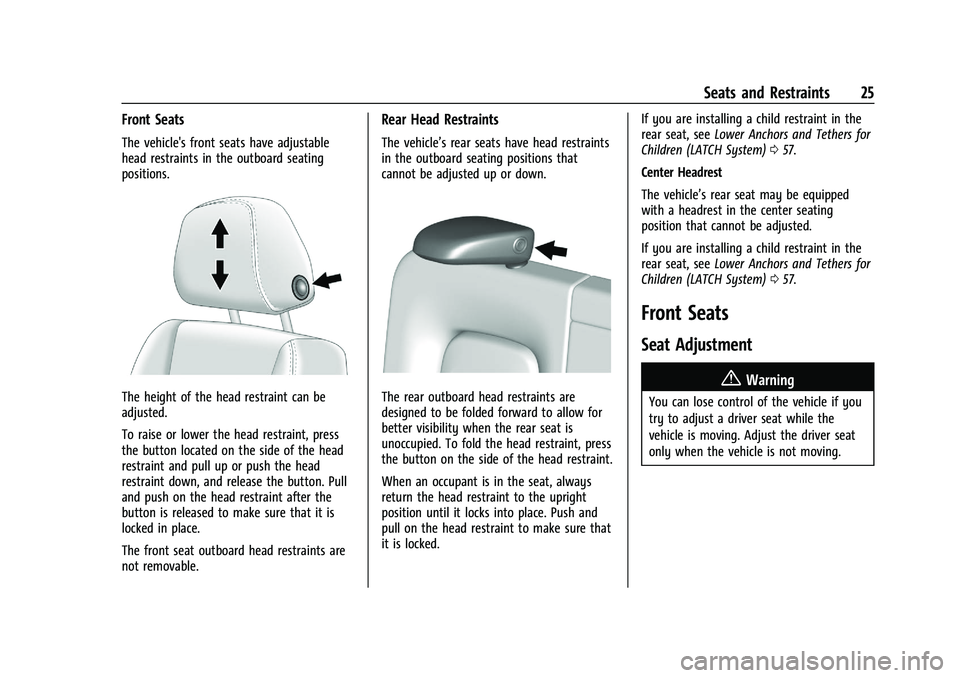
The vehicle's front seats have adjustable
head restraints in the outboard seating
positions.
The height of the head restraint can be
adjusted.
To raise or lower the head restraint, press
the button located on the side of the head
restraint and pull up or push the head
restraint down, and release the button. Pull
and push on the head restraint after the
button is released to make sure that it is
locked in place.
The front seat outboard head restraints are
not removable.
Rear Head Restraints
The vehicle’s rear seats have head restraints
in the outboard seating positions that
cannot be adjusted up or down.
The rear outboard head restraints are
designed to be folded forward to allow for
better visibility when the rear seat is
unoccupied. To fold the head restraint, press
the button on the side of the head restraint.
When an occupant is in the seat, always
return the head restraint to the upright
position until it locks into place. Push and
pull on the head restraint to make sure that
it is locked.If you are installing a child restraint in the
rear seat, see
Lower Anchors and Tethers for
Children (LATCH System) 057.
Center Headrest
The vehicle’s rear seat may be equipped
with a headrest in the center seating
position that cannot be adjusted.
If you are installing a child restraint in the
rear seat, see Lower Anchors and Tethers for
Children (LATCH System) 057.
Front Seats
Seat Adjustment
{Warning
You can lose control of the vehicle if you
try to adjust a driver seat while the
vehicle is moving. Adjust the driver seat
only when the vehicle is not moving.
Page 27 of 371
GMC Canyon/Canyon Denali Owner Manual (GMNA-Localizing-U.S./Canada/
Mexico-16510661) - 2023 - CRC - 11/29/22
26 Seats and Restraints
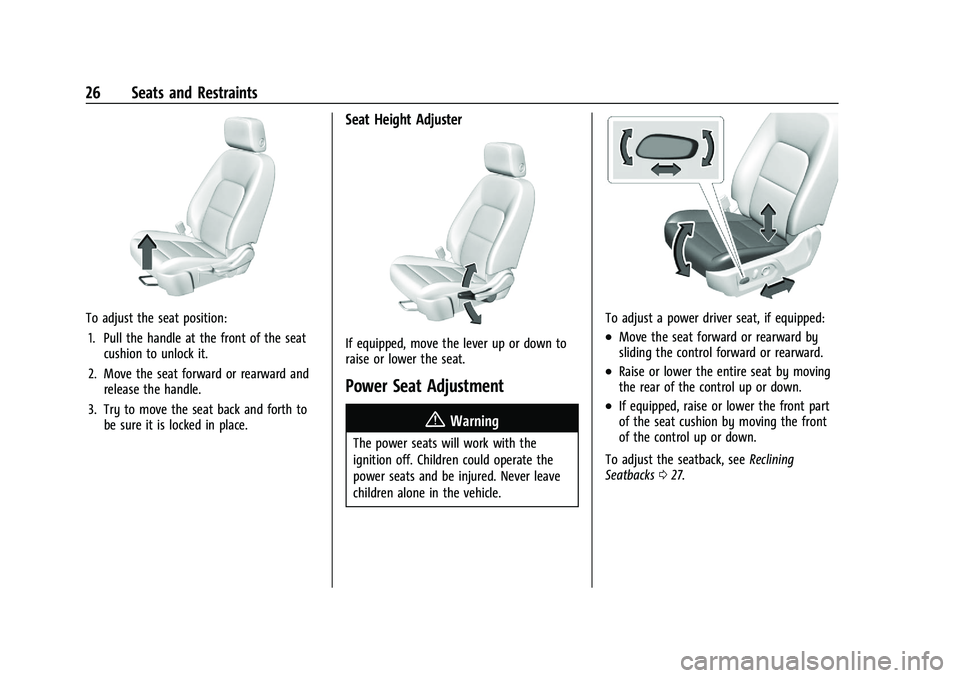
To adjust the seat position:1. Pull the handle at the front of the seat cushion to unlock it.
2. Move the seat forward or rearward and release the handle.
3. Try to move the seat back and forth to be sure it is locked in place.
Seat Height Adjuster
If equipped, move the lever up or down to
raise or lower the seat.
Power Seat Adjustment
{Warning
The power seats will work with the
ignition off. Children could operate the
power seats and be injured. Never leave
children alone in the vehicle.
To adjust a power driver seat, if equipped:
.Move the seat forward or rearward by
sliding the control forward or rearward.
.Raise or lower the entire seat by moving
the rear of the control up or down.
.If equipped, raise or lower the front part
of the seat cushion by moving the front
of the control up or down.
To adjust the seatback, see Reclining
Seatbacks 027.
Page 29 of 371
GMC Canyon/Canyon Denali Owner Manual (GMNA-Localizing-U.S./Canada/
Mexico-16510661) - 2023 - CRC - 11/29/22
28 Seats and Restraints
2. Push and pull on the seatback to makesure it is locked.
Power Reclining Seatbacks
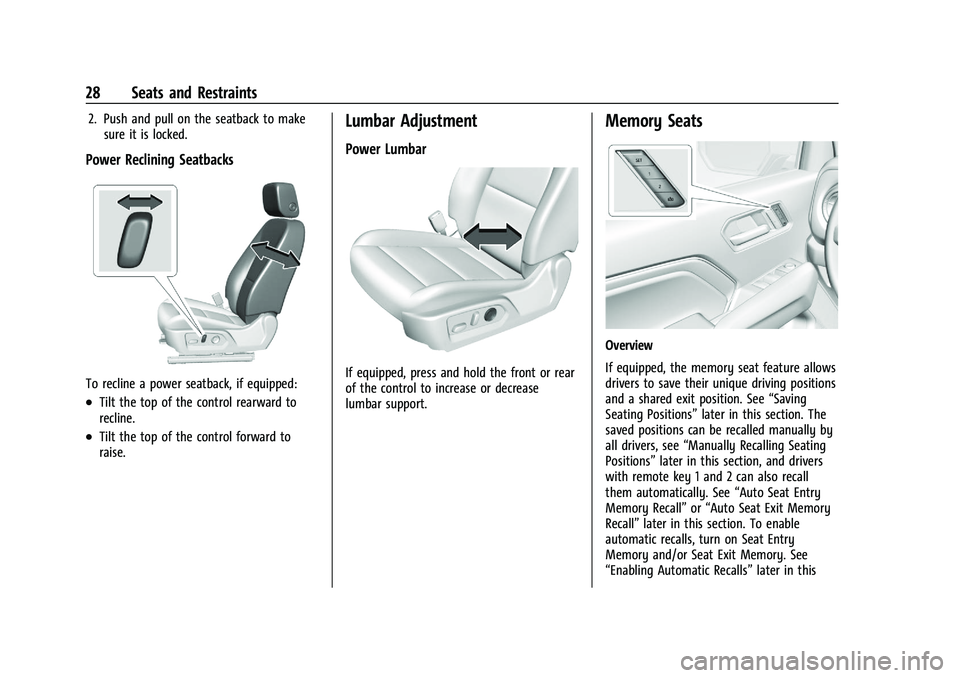
To recline a power seatback, if equipped:
.Tilt the top of the control rearward to
recline.
.Tilt the top of the control forward to
raise.
Lumbar Adjustment
Power Lumbar
If equipped, press and hold the front or rear
of the control to increase or decrease
lumbar support.
Memory Seats
Overview
If equipped, the memory seat feature allows
drivers to save their unique driving positions
and a shared exit position. See “Saving
Seating Positions” later in this section. The
saved positions can be recalled manually by
all drivers, see “Manually Recalling Seating
Positions” later in this section, and drivers
with remote key 1 and 2 can also recall
them automatically. See “Auto Seat Entry
Memory Recall” or“Auto Seat Exit Memory
Recall” later in this section. To enable
automatic recalls, turn on Seat Entry
Memory and/or Seat Exit Memory. See
“Enabling Automatic Recalls” later in this
Page 39 of 371
GMC Canyon/Canyon Denali Owner Manual (GMNA-Localizing-U.S./Canada/
Mexico-16510661) - 2023 - CRC - 11/29/22
38 Seats and Restraints
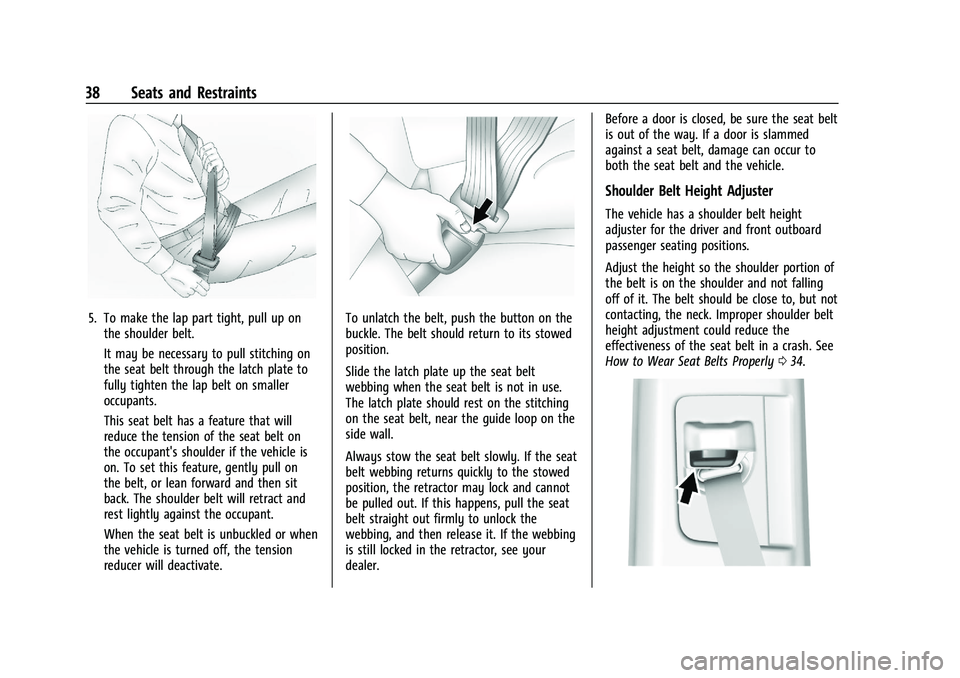
5. To make the lap part tight, pull up onthe shoulder belt.
It may be necessary to pull stitching on
the seat belt through the latch plate to
fully tighten the lap belt on smaller
occupants.
This seat belt has a feature that will
reduce the tension of the seat belt on
the occupant's shoulder if the vehicle is
on. To set this feature, gently pull on
the belt, or lean forward and then sit
back. The shoulder belt will retract and
rest lightly against the occupant.
When the seat belt is unbuckled or when
the vehicle is turned off, the tension
reducer will deactivate.To unlatch the belt, push the button on the
buckle. The belt should return to its stowed
position.
Slide the latch plate up the seat belt
webbing when the seat belt is not in use.
The latch plate should rest on the stitching
on the seat belt, near the guide loop on the
side wall.
Always stow the seat belt slowly. If the seat
belt webbing returns quickly to the stowed
position, the retractor may lock and cannot
be pulled out. If this happens, pull the seat
belt straight out firmly to unlock the
webbing, and then release it. If the webbing
is still locked in the retractor, see your
dealer. Before a door is closed, be sure the seat belt
is out of the way. If a door is slammed
against a seat belt, damage can occur to
both the seat belt and the vehicle.
Shoulder Belt Height Adjuster
The vehicle has a shoulder belt height
adjuster for the driver and front outboard
passenger seating positions.
Adjust the height so the shoulder portion of
the belt is on the shoulder and not falling
off of it. The belt should be close to, but not
contacting, the neck. Improper shoulder belt
height adjustment could reduce the
effectiveness of the seat belt in a crash. See
How to Wear Seat Belts Properly
034.
Page 73 of 371
GMC Canyon/Canyon Denali Owner Manual (GMNA-Localizing-U.S./Canada/
Mexico-16510661) - 2023 - CRC - 11/30/22
72 Instruments and Controls
Instruments and Controls
Controls
Steering Wheel Adjustment . . . . . . . . . . . . . 73
Heated Steering Wheel . . . . . . . . . . . . . . . . . 73
Horn . . . . . . . . . . . . . . . . . . . . . . . . . . . . . . . . . . . . 73
Windshield Wiper/Washer . . . . . . . . . . . . . . 74
Compass . . . . . . . . . . . . . . . . . . . . . . . . . . . . . . . . 75
Clock . . . . . . . . . . . . . . . . . . . . . . . . . . . . . . . . . . . 75
Power Outlets . . . . . . . . . . . . . . . . . . . . . . . . . . 75
Wireless Charging . . . . . . . . . . . . . . . . . . . . . . 76
Warning Lights, Gauges, and Indicators
Warning Lights, Gauges, andIndicators . . . . . . . . . . . . . . . . . . . . . . . . . . . . . 79
Instrument Cluster (Base Level) . . . . . . . . . 79
Instrument Cluster (Uplevel) . . . . . . . . . . . . 81
Speedometer . . . . . . . . . . . . . . . . . . . . . . . . . . . 82
Odometer . . . . . . . . . . . . . . . . . . . . . . . . . . . . . . 82
Trip Odometer . . . . . . . . . . . . . . . . . . . . . . . . . . 82
Tachometer . . . . . . . . . . . . . . . . . . . . . . . . . . . . 82
Fuel Gauge . . . . . . . . . . . . . . . . . . . . . . . . . . . . . 83
Engine Oil Pressure Gauge . . . . . . . . . . . . . 84
Engine Oil Temperature Gauge . . . . . . . . . 85
Engine Coolant Temperature Gauge . . . . 86
Transmission Temperature Gauge . . . . . . 86
Seat Belt Reminders . . . . . . . . . . . . . . . . . . . . 87
Airbag Readiness Light . . . . . . . . . . . . . . . . . 88
Passenger Airbag Status Indicator . . . . . . 88
Charging System Light . . . . . . . . . . . . . . . . . 89 Malfunction Indicator Lamp (Check
Engine Light) . . . . . . . . . . . . . . . . . . . . . . . . . 89
Brake System Warning Light . . . . . . . . . . . . 91
Electric Parking Brake Light . . . . . . . . . . . . . 91
Service Electric Parking Brake Light . . . . . 92
Antilock Brake System (ABS) Warning Light . . . . . . . . . . . . . . . . . . . . . . . . . . . . . . . . . . 92
Four-Wheel-Drive Light . . . . . . . . . . . . . . . . . 92
Hill Descent Control Light . . . . . . . . . . . . . . 93
Lane Keep Assist (LKA) Light . . . . . . . . . . . . 93
Automatic Emergency Braking (AEB) Disabled Light . . . . . . . . . . . . . . . . . . . . . . . . 93
Vehicle Ahead Indicator . . . . . . . . . . . . . . . . 93
Pedestrian Ahead Indicator . . . . . . . . . . . . . 94
Traction Off Light . . . . . . . . . . . . . . . . . . . . . . 94
Traction Control System (TCS)/Electronic Stability Control Light . . . . . . . . . . . . . . . . 94
Electronic Stability Control (ESC) Off Light . . . . . . . . . . . . . . . . . . . . . . . . . . . . . . . . . . 95
Engine Coolant Temperature Warning Light . . . . . . . . . . . . . . . . . . . . . . . . . . . . . . . . . . 95
Driver Mode Control Light . . . . . . . . . . . . . . 95
Tire Pressure Light . . . . . . . . . . . . . . . . . . . . . 96
Engine Oil Pressure Light . . . . . . . . . . . . . . . 96
Low Fuel Warning Light . . . . . . . . . . . . . . . . 97
Auto Stop Indicator . . . . . . . . . . . . . . . . . . . . . 97
Security Light . . . . . . . . . . . . . . . . . . . . . . . . . . 97
High-Beam On Light . . . . . . . . . . . . . . . . . . . . 97
Front Fog Lamp Light . . . . . . . . . . . . . . . . . . . 97
Lamps On Reminder . . . . . . . . . . . . . . . . . . . . 98 Cruise Control Light . . . . . . . . . . . . . . . . . . . . 98
Door Ajar Light (Uplevel Cluster) . . . . . . . 98
Information Displays
Driver Information Center (DIC) (Base
Level) . . . . . . . . . . . . . . . . . . . . . . . . . . . . . . . . . 98
Driver Information Center (DIC) (Uplevel) . . . . . . . . . . . . . . . . . . . . . . . . . . . . 100
Vehicle Status . . . . . . . . . . . . . . . . . . . . . . . . . 103
Head-Up Display (HUD) . . . . . . . . . . . . . . . . 105
Vehicle Messages
Vehicle Messages . . . . . . . . . . . . . . . . . . . . . . 107
Engine Power Messages . . . . . . . . . . . . . . . 108
Vehicle Speed Messages . . . . . . . . . . . . . . . 108
Page 136 of 371
GMC Canyon/Canyon Denali Owner Manual (GMNA-Localizing-U.S./Canada/
Mexico-16510661) - 2023 - CRC - 11/29/22
Infotainment System 135
Features are subject to change. For further
information on how to set up Android Auto
and Apple CarPlay in the vehicle, visit your
brand website. SeeOnline Account0340 for
details.
CarPlay will not support Fast Connect on
iPhones with iOS versions older than 14.0.
Android Auto is provided by Google and
is subject to Google’s terms and privacy
policy. Apple CarPlay is provided by
Apple and is subject to Apple’s terms
and privacy policy. Data plan rates apply.
For Android Auto support and to see
if your phone is compatible, see
https:/www.android.com/auto/compatability.
For Apple CarPlay support and to see if your
phone is compatible, see www.apple.com/
ios/carplay/. Apple or Google may change or
suspend availability at any time. Google,
Android, Android Auto, Google Maps, and
other marks are trademarks of Google LLC.
Apple CarPlay is a trademark of Apple Inc.
Press
{on the center stack to exit Android
Auto or Apple CarPlay. To enter back into
Android Auto or Apple CarPlay, press and
hold
{on the center stack.
Settings
To access the Settings menus:
1. Touch Settings on the Home Page on the infotainment display.
2. Touch the desired category to display a list of available options.
3. Touch to select the desired feature setting.
4. Touch the options on the infotainment display to change a setting.
5. Touch
Sto go back.
The Settings menu may contain the
following:
Connections
The menu may contain the following:
Phones
Allows connecting to a different cell phone
or mobile device source, disconnect a cell
phone or media device, or delete a cell
phone or media device.
Wi-Fi Networks
Shows connected and available Wi-Fi
networks. Wi-Fi Hotspot
Allows adjustment of different Wi-Fi
features.
Trusted Device
Allows for setting a phone as your trusted
device to establish a secure communication
channel between your phone and vehicle
that enables convenient features like instant
profile unlocking and account sign in. When
nearby, your trusted device is recognized
automatically via a unique Bluetooth
connection.
Vehicle-to-Phone Sharing
Allows authorization of projection apps like
CarPlay and Android to access your
vehicle data.Vehicle
The menu may contain the following:
Teen Driver
See
Teen Driver 0137.
Rear Seat Reminder
Allows for a chime and a message when the
rear door has been opened before or during
operation of the vehicle.
Page 137 of 371
GMC Canyon/Canyon Denali Owner Manual (GMNA-Localizing-U.S./Canada/
Mexico-16510661) - 2023 - CRC - 11/29/22
136 Infotainment System
Buckle to Drive
This feature can prevent shifting out of Park
when the driver, and if applicable the front
passenger, seat belt is not buckled.
Climate and Air Quality
Adjusts different climate settings.
Collision/Detection Systems
Adjusts different driver assistance system
settings.
Comfort and Convenience
Adjusts different comfort and convenience
settings.
Lighting
Adjusts different lighting settings.
Power Door Locks
Adjusts different door lock settings.
Remote Lock, Unlock, and Start
Adjusts different remote lock settings.
Seating Position
Adjusts different seating position settings.
Apps and Permissions
Shows a list of installed apps and the
permissions used.
Date / Time
Allows setting of the clock.
Display
Allows adjustment of the infotainment
display.
Sounds
Allows adjustment of the infotainment
system sounds.
Profiles and Accounts
Modifies the infotainment system’s profiles
and provides access to the accounts assigned
to the currently active profile.
Privacy
This menu allows adjustment of the
infotainment privacy settings.
Storage
This menu shows the storage info on the
infotainment system.
Security
This menu allows adjustment of the
infotainment security settings.
System
The menu may contain the following:
Language
This will set the display language used on
the infotainment display.
Keyboard & speech
Touch to change keyboard and speech
settings.
Units
Touch to change units settings.
Quick Startup
This allows your infotainment system to
quickly resume its last session.
Reset Options
Touch to change reset settings.
About
Touch to view the infotainment system
software information.
Legal Information
Touch to view legal and license information.
Updates
This menu allows adjustment of the vehicle
update settings.
Page 365 of 371
GMC Canyon/Canyon Denali Owner Manual (GMNA-Localizing-U.S./Cana-
da/Mexico-16510661) - 2023 - CRC - 11/29/22
364 Index
LightingEntry . . . . . . . . . . . . . . . . . . . . . . . . . . . . . . . . . . . 114
Exit . . . . . . . . . . . . . . . . . . . . . . . . . . . . . . . . . . . . . 114
Illumination Control . . . . . . . . . . . . . . . . . . . . 113
LED . . . . . . . . . . . . . . . . . . . . . . . . . . . . . . . . . . . . 273
Lights Airbag Readiness . . . . . . . . . . . . . . . . . . . . . . . 88
Antilock Brake System (ABS)
Warning . . . . . . . . . . . . . . . . . . . . . . . . . . . . . . 92
Automatic Emergency Braking (AEB) Disabled . . . . . . . . . . . . . . . . . . . . . . . . . . . . . . 93
Brake System Warning . . . . . . . . . . . . . . . . . 91
Charging System . . . . . . . . . . . . . . . . . . . . . . . 89
Check Engine (Malfunction Indicator) . . . . . . . . . . . . . . . . . . . . . . . . . . . . . 89
Cruise Control Light . . . . . . . . . . . . . . . . . . . . . 98
Door Ajar . . . . . . . . . . . . . . . . . . . . . . . . . . . . . . . 98
Driver Mode Control . . . . . . . . . . . . . . . . . . . . 95
Electric Parking Brake . . . . . . . . . . . . . . . . . . . 91
Electronic Stability Control (ESC), Off . . . 95
Engine Coolant Temperature
Warning . . . . . . . . . . . . . . . . . . . . . . . . . . . . . . 95
Engine Oil Pressure . . . . . . . . . . . . . . . . . . . . . 96
Four-Wheel-Drive . . . . . . . . . . . . . . . . . . . . . . . 92
Front Fog Lamp . . . . . . . . . . . . . . . . . . . . . . . . . 97
Gauges and Indicators . . . . . . . . . . . . . . . . . . 79
High-Beam On . . . . . . . . . . . . . . . . . . . . . . . . . . 97
Hill Descent Control . . . . . . . . . . . . . . . . . . . . 93 Lights (cont'd)
Lane Keep Assist . . . . . . . . . . . . . . . . . . . . . . . . 93
Low Fuel Warning . . . . . . . . . . . . . . . . . . . . . . 97
Seat Belt Reminders . . . . . . . . . . . . . . . . . . . . 87
Security . . . . . . . . . . . . . . . . . . . . . . . . . . . . . . . . . 97
Service Electric Parking Brake . . . . . . . . . . . 92
Tire Pressure . . . . . . . . . . . . . . . . . . . . . . . . . . . . 96
Traction Control System
(TCS)/Electronic Stability Control
Light . . . . . . . . . . . . . . . . . . . . . . . . . . . . . . . . . . 94
Traction Off . . . . . . . . . . . . . . . . . . . . . . . . . . . . . 94
Limited-Slip Differential . . . . . . . . . . . . . . . . . . . 191
Locking Front Axle . . . . . . . . . . . . . . . . . . . . . . . 192
Locking Rear Axle . . . . . . . . . . . . . . . . . . . . . . . . . 191
Locks Automatic Door . . . . . . . . . . . . . . . . . . . . . . . . . . 15
Delayed Locking . . . . . . . . . . . . . . . . . . . . . . . . 14
Door . . . . . . . . . . . . . . . . . . . . . . . . . . . . . . . . . . . . . 13
Lockout Protection . . . . . . . . . . . . . . . . . . . . . . . 15
Power Door . . . . . . . . . . . . . . . . . . . . . . . . . . . . . 14
Safety . . . . . . . . . . . . . . . . . . . . . . . . . . . . . . . . . . . 15
Loss of Control . . . . . . . . . . . . . . . . . . . . . . . . . . . 153
Low Fuel Warning Light . . . . . . . . . . . . . . . . . . 97
Lower Anchors and Tethers for Children (LATCH System) . . . . . . . . . . . . . . . . .57
Lumbar Adjustment . . . . . . . . . . . . . . . . . . . . . . . 28
Front Seats . . . . . . . . . . . . . . . . . . . . . . . . . . . . . 28M
MaintenanceRecords . . . . . . . . . . . . . . . . . . . . . . . . . . . . . . . . 334
Maintenance Schedule . . . . . . . . . . . . . . . . . . . 328 Recommended Fluids and
Lubricants . . . . . . . . . . . . . . . . . . . . . . . . . . . . 332
Malfunction Indicator Lamp . . . . . . . . . . . . . . . 89
Manual Mode . . . . . . . . . . . . . . . . . . . . . . . . . . . . . . . . . . . 177
Maps . . . . . . . . . . . . . . . . . . . . . . . . . . . . . . . . . . . . . 125
Media
Avoiding Untrusted Devices . . . . . . . . . . . . 123
Memory Seats . . . . . . . . . . . . . . . . . . . . . . . . . . . . 28
Messages Engine Power . . . . . . . . . . . . . . . . . . . . . . . . . . 108
Vehicle . . . . . . . . . . . . . . . . . . . . . . . . . . . . . . . . 107
Vehicle Speed . . . . . . . . . . . . . . . . . . . . . . . . . . 108
Mirrors Automatic Dimming Rearview . . . . . . . . . . 20
Convex . . . . . . . . . . . . . . . . . . . . . . . . . . . . . . . . . 19
Folding . . . . . . . . . . . . . . . . . . . . . . . . . . . . . . . . . 20
Heated . . . . . . . . . . . . . . . . . . . . . . . . . . . . . . . . . 20
Interior Rearview . . . . . . . . . . . . . . . . . . . . . . . 20
Manual Rearview . . . . . . . . . . . . . . . . . . . . . . . 20
Power . . . . . . . . . . . . . . . . . . . . . . . . . . . . . . . . . . 19
Mode Driver Control . . . . . . . . . . . . . . . . . . . . . . . . . 187
Monitor System, Tire Pressure . . . . . . . . . . . 291
Page 368 of 371
GMC Canyon/Canyon Denali Owner Manual (GMNA-Localizing-U.S./Cana-
da/Mexico-16510661) - 2023 - CRC - 11/29/22
Index 367
Seats (cont'd)Memory . . . . . . . . . . . . . . . . . . . . . . . . . . . . . . . . 28
Power Adjustment, Front . . . . . . . . . . . . . . . 26
Rear . . . . . . . . . . . . . . . . . . . . . . . . . . . . . . . . . . . . 32
Reclining Seatbacks . . . . . . . . . . . . . . . . . . . . . 27
Underseat Storage . . . . . . . . . . . . . . . . . . . . . . 70
Securing Child Restraints . . . . . . . . . . . . . . .65, 67
Security
Light . . . . . . . . . . . . . . . . . . . . . . . . . . . . . . . . . . . . 97
OnStar . . . . . . . . . . . . . . . . . . . . . . . . . . . . . . . . . 351
Vehicle . . . . . . . . . . . . . . . . . . . . . . . . . . . . . . . . . 18
Vehicle Alarm . . . . . . . . . . . . . . . . . . . . . . . . . . . 18
Service . . . . . . . . . . . . . . . . . . . . . . . . . . . . . . . . . . . 148 Accessories and Modifications . . . . . . . . . 253
Climate Control System . . . . . . . . . . . . . . . . 143
Doing Your Own Work . . . . . . . . . . . . . . . . . 254
Electric Parking Brake Light . . . . . . . . . . . . . 92
Maintenance Records . . . . . . . . . . . . . . . . . . 334
Maintenance, General Information . . . . . 327
Parts Identification . . . . . . . . . . . . . . . . . . . . . 335
Scheduling Appointments . . . . . . . . . . . . . . 343
Services Special Application . . . . . . . . . . . . . . . . . . . . . 331
Servicing the Airbag . . . . . . . . . . . . . . . . . . . . . . 49
Settings . . . . . . . . . . . . . . . . . . . . . . . . . . . . . . . . . . . 135
Shifting Into Park . . . . . . . . . . . . . . . . . . . . . . . . . . . . . . . 172
Out of Park . . . . . . . . . . . . . . . . . . . . . . . . . . . . . 173 Side Blind Zone Alert (SBZA) . . . . . . . . . . . . . 220
Signals, Turn and Lane-Change . . . . . . . . . . . . 112
Software Updates . . . . . . . . . . . . . . . . . . . . . . . . 120
Special Application Services . . . . . . . . . . . . . . . 331
Specifications and Capacities . . . . . . . . . . . . . 336
Speedometer . . . . . . . . . . . . . . . . . . . . . . . . . . . . . 82
Start Assist, Hill . . . . . . . . . . . . . . . . . . . . . . . . . . .185
Start Vehicle, Remote . . . . . . . . . . . . . . . . . . . . . . 12
Starting the Engine . . . . . . . . . . . . . . . . . . . . . . 169
Status
Vehicle . . . . . . . . . . . . . . . . . . . . . . . . . . . . . . . . 103
Steering . . . . . . . . . . . . . . . . . . . . . . . . . . . . . . . . . . 152 Assist, Blind Zone (BZSA) . . . . . . . . . . . . . . 222
Heated Wheel . . . . . . . . . . . . . . . . . . . . . . . . . . 73
Wheel Adjustment . . . . . . . . . . . . . . . . . . . . . . 73
Wheel Controls . . . . . . . . . . . . . . . . . . . . . . . . . 118
Stop/Start System . . . . . . . . . . . . . . . . . . . . . . . 170
Stoplamps and Back-up Lamps Bulb Replacement . . . . . . . . . . . . . . . . . . . . . . 274
Storage Center Console . . . . . . . . . . . . . . . . . . . . . . . . . . 71
Compartments . . . . . . . . . . . . . . . . . . . . . . . . . . 70
Cupholders . . . . . . . . . . . . . . . . . . . . . . . . . . . . . 70
Glove Box . . . . . . . . . . . . . . . . . . . . . . . . . . . . . . 70
Tailgate . . . . . . . . . . . . . . . . . . . . . . . . . . . . . . . . . 70
Underseat . . . . . . . . . . . . . . . . . . . . . . . . . . . . . . 70
Struts Gas . . . . . . . . . . . . . . . . . . . . . . . . . . . . . . . . . . . . 272 Stuck Vehicle . . . . . . . . . . . . . . . . . . . . . . . . . . . . . 161
Sun Visors . . . . . . . . . . . . . . . . . . . . . . . . . . . . . . . . .22
Sunroof . . . . . . . . . . . . . . . . . . . . . . . . . . . . . . . . . . . .23
Surround Vision System . . . . . . . . . . . . . . . . . 209
Symbols . . . . . . . . . . . . . . . . . . . . . . . . . . . . . . . . . . . .3
Navigation . . . . . . . . . . . . . . . . . . . . . . . . . . . . . 125
System
Airbag . . . . . . . . . . . . . . . . . . . . . . . . . . . . . . . . . . 41
Brake Pad Life . . . . . . . . . . . . . . . . . . . . . . . . . 267
Driver Assistance . . . . . . . . . . . . . . . . . . . . . . 206
Engine Air Filter Life . . . . . . . . . . . . . . . . . . . 260
Forward Collision Alert (FCA) . . . . . . . . . . . 215
Global Positioning . . . . . . . . . . . . . . . . . . . . . 126
Infotainment . . . . . . . . . . . . . . . . . . . . . . . . . . . 349
Rear Cross Traffic Alert . . . . . . . . . . . . . . . . 214
Surround Vision . . . . . . . . . . . . . . . . . . . . . . . . 209
T
Tachometer . . . . . . . . . . . . . . . . . . . . . . . . . . . . . . . 82
Tailgate . . . . . . . . . . . . . . . . . . . . . . . . . . . . . . . . . . . .16Storage . . . . . . . . . . . . . . . . . . . . . . . . . . . . . . . . . 70
Taillamps Bulb Replacement . . . . . . . . . . . . . . . . . . . . . . 274
Teen Driver . . . . . . . . . . . . . . . . . . . . . . . . . . . . . . . 137
Text Telephone (TTY) Users . . . . . . . . . . . . . . 340
Theft-Deterrent Systems . . . . . . . . . . . . . . . . . . .19 Immobilizer . . . . . . . . . . . . . . . . . . . . . . . . . . . . . 19
Time . . . . . . . . . . . . . . . . . . . . . . . . . . . . . . . . . . . . . . .75