mileage GMC CANYON 2023 Owners Manual
[x] Cancel search | Manufacturer: GMC, Model Year: 2023, Model line: CANYON, Model: GMC CANYON 2023Pages: 371, PDF Size: 7.41 MB
Page 151 of 371
GMC Canyon/Canyon Denali Owner Manual (GMNA-Localizing-U.S./Canada/
Mexico-16510661) - 2023 - CRC - 11/29/22
150 Driving and Operating
Filling the Tank . . . . . . . . . . . . . . . . . . . . . . . . 225
Filling a Portable Fuel Container . . . . . . . 227
Trailer Towing
General Towing Information . . . . . . . . . . . 227
Driving Characteristics andTowing Tips . . . . . . . . . . . . . . . . . . . . . . . . . . 227
Trailer Towing . . . . . . . . . . . . . . . . . . . . . . . . . 231
Towing Equipment . . . . . . . . . . . . . . . . . . . . 236
Trailer Sway Control (TSC) . . . . . . . . . . . . . 242
Trailering App . . . . . . . . . . . . . . . . . . . . . . . . . 243
Conversions and Add-Ons
Add-On Electrical Equipment . . . . . . . . . . . 251
Driving Information
Driving for Better Fuel Economy
Driving habits can affect fuel mileage. Here
are some driving tips to get the best fuel
economy possible:
.Set the climate controls to the desired
temperature after the engine is started,
or turn them off when not required.
.Avoid fast starts and accelerate smoothly.
.Brake gradually and avoid abrupt stops.
.Avoid idling the engine for long periods
of time.
.When road and weather conditions are
appropriate, use cruise control.
.Always follow posted speed limits or
drive more slowly when conditions
require.
.Keep vehicle tires properly inflated.
.Combine several trips into a single trip.
.Replace the vehicle's tires with the same
TPC Spec number molded into the tire's
sidewall near the size.
.Follow recommended scheduled
maintenance.
Distracted Driving
Distraction comes in many forms and can
take your focus from the task of driving.
Exercise good judgment and do not let other
activities divert your attention away from
the road. Many local governments have
enacted laws regarding driver distraction.
Become familiar with the local laws in
your area.
To avoid distracted driving, keep your eyes
on the road, keep your hands on the
steering wheel, and focus your attention on
driving.
.Do not use a phone in demanding driving
situations. Use a hands-free method to
place or receive necessary phone calls.
.Watch the road. Do not read, take notes,
or look up information on phones or
other electronic devices.
.Designate a front seat passenger to
handle potential distractions.
.Become familiar with vehicle features
before driving, such as programming
favorite radio stations and adjusting
climate control and seat settings. Program
all trip information into any navigation
device prior to driving.
Page 246 of 371
GMC Canyon/Canyon Denali Owner Manual (GMNA-Localizing-U.S./Canada/
Mexico-16510661) - 2023 - CRC - 11/29/22
Driving and Operating 245
After a Trailer Profile has been created and
the trailer is electrically connected, the
trailer detection pop-up appears with a list
of all of the custom Trailer Profiles stored
on the vehicle. To load an existing Trailer
Profile, select one of the Trailer Profiles
listed or load the Guest Trailer Profile by
selecting GUEST TRAILER. Selecting Accessory
as the active Trailer Profile dismisses the
pop-up. Shifting the vehicle from P (Park)
selects Guest Trailer as the active Trailer
Profile and dismisses the pop-up.
Create a Trailer Profile
Touch Add Trailer on the trailer detection
pop-up or touch + Add New Trailer in the
Trailering App.
After a profile is created, set up for
additional trailer features may become
available through the sections shown in the
Status View. See“Status View”below.
Import a Trailer Profile
Touch Import on the trailer detection pop-up
or touch Import in the Trailering App.
Follow on-screen instructions to import a
profile. After a profile is imported, it can be selected
from the trailer list. If equipped, the Tow/
Haul Mode reminder and Brake Gain Setting
do not import.
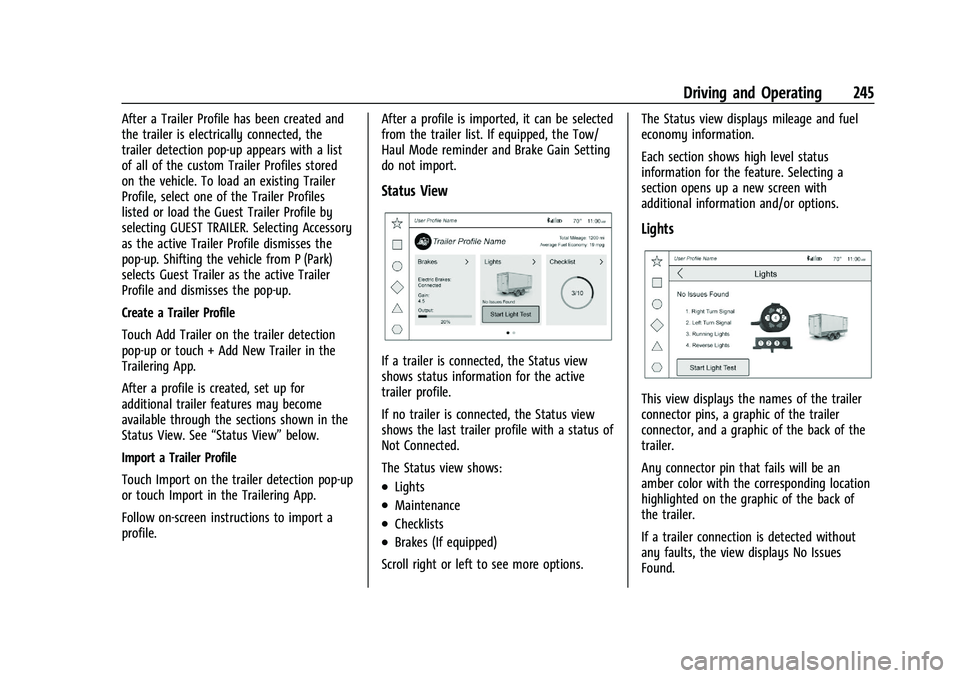
Status View
If a trailer is connected, the Status view
shows status information for the active
trailer profile.
If no trailer is connected, the Status view
shows the last trailer profile with a status of
Not Connected.
The Status view shows:
.Lights
.Maintenance
.Checklists
.Brakes (If equipped)
Scroll right or left to see more options. The Status view displays mileage and fuel
economy information.
Each section shows high level status
information for the feature. Selecting a
section opens up a new screen with
additional information and/or options.
Lights
This view displays the names of the trailer
connector pins, a graphic of the trailer
connector, and a graphic of the back of the
trailer.
Any connector pin that fails will be an
amber color with the corresponding location
highlighted on the graphic of the back of
the trailer.
If a trailer connection is detected without
any faults, the view displays No Issues
Found.
Page 248 of 371
GMC Canyon/Canyon Denali Owner Manual (GMNA-Localizing-U.S./Canada/
Mexico-16510661) - 2023 - CRC - 11/29/22
Driving and Operating 247
Maintenance
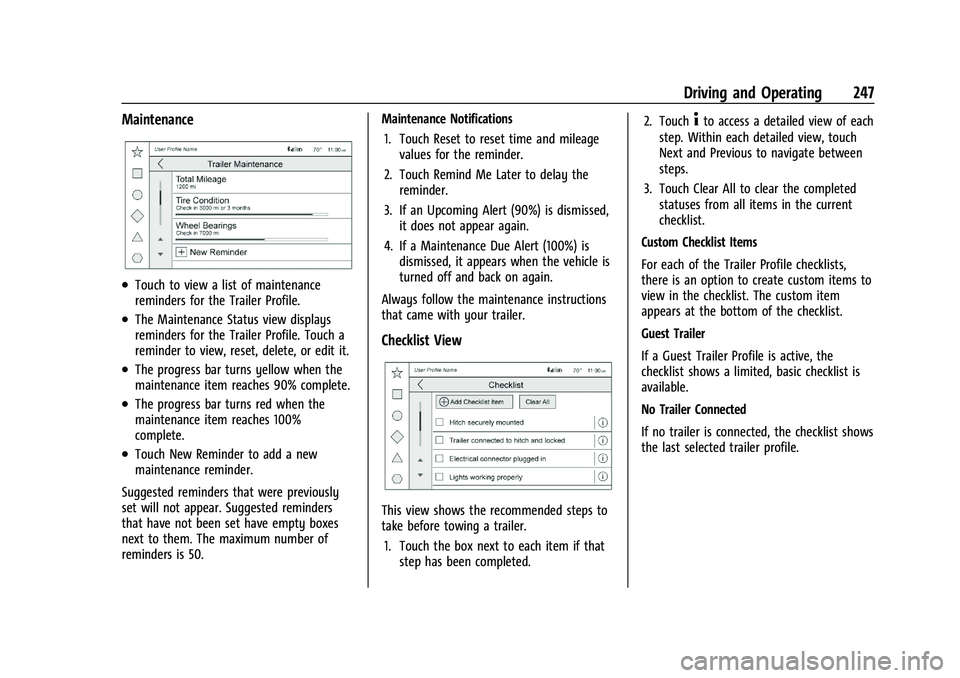
.Touch to view a list of maintenance
reminders for the Trailer Profile.
.The Maintenance Status view displays
reminders for the Trailer Profile. Touch a
reminder to view, reset, delete, or edit it.
.The progress bar turns yellow when the
maintenance item reaches 90% complete.
.The progress bar turns red when the
maintenance item reaches 100%
complete.
.Touch New Reminder to add a new
maintenance reminder.
Suggested reminders that were previously
set will not appear. Suggested reminders
that have not been set have empty boxes
next to them. The maximum number of
reminders is 50. Maintenance Notifications
1. Touch Reset to reset time and mileage values for the reminder.
2. Touch Remind Me Later to delay the reminder.
3. If an Upcoming Alert (90%) is dismissed, it does not appear again.
4. If a Maintenance Due Alert (100%) is dismissed, it appears when the vehicle is
turned off and back on again.
Always follow the maintenance instructions
that came with your trailer.
Checklist View
This view shows the recommended steps to
take before towing a trailer. 1. Touch the box next to each item if that step has been completed. 2. Touch
4to access a detailed view of each
step. Within each detailed view, touch
Next and Previous to navigate between
steps.
3. Touch Clear All to clear the completed statuses from all items in the current
checklist.
Custom Checklist Items
For each of the Trailer Profile checklists,
there is an option to create custom items to
view in the checklist. The custom item
appears at the bottom of the checklist.
Guest Trailer
If a Guest Trailer Profile is active, the
checklist shows a limited, basic checklist is
available.
No Trailer Connected
If no trailer is connected, the checklist shows
the last selected trailer profile.
Page 249 of 371
GMC Canyon/Canyon Denali Owner Manual (GMNA-Localizing-U.S./Canada/
Mexico-16510661) - 2023 - CRC - 11/29/22
248 Driving and Operating
Brakes
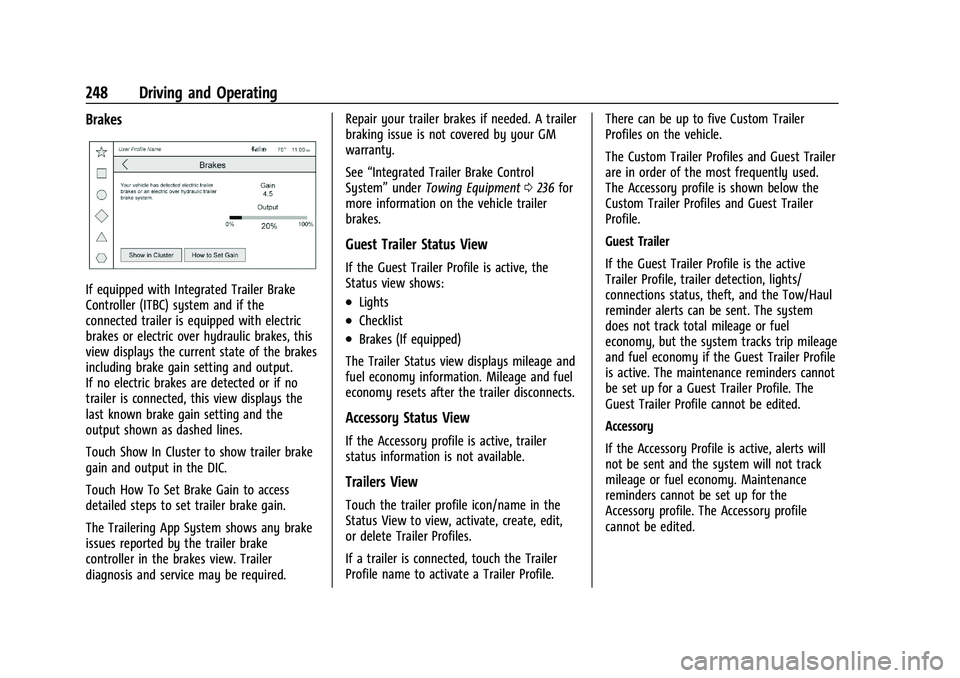
If equipped with Integrated Trailer Brake
Controller (ITBC) system and if the
connected trailer is equipped with electric
brakes or electric over hydraulic brakes, this
view displays the current state of the brakes
including brake gain setting and output.
If no electric brakes are detected or if no
trailer is connected, this view displays the
last known brake gain setting and the
output shown as dashed lines.
Touch Show In Cluster to show trailer brake
gain and output in the DIC.
Touch How To Set Brake Gain to access
detailed steps to set trailer brake gain.
The Trailering App System shows any brake
issues reported by the trailer brake
controller in the brakes view. Trailer
diagnosis and service may be required.Repair your trailer brakes if needed. A trailer
braking issue is not covered by your GM
warranty.
See
“Integrated Trailer Brake Control
System” underTowing Equipment 0236 for
more information on the vehicle trailer
brakes.
Guest Trailer Status View
If the Guest Trailer Profile is active, the
Status view shows:
.Lights
.Checklist
.Brakes (If equipped)
The Trailer Status view displays mileage and
fuel economy information. Mileage and fuel
economy resets after the trailer disconnects.
Accessory Status View
If the Accessory profile is active, trailer
status information is not available.
Trailers View
Touch the trailer profile icon/name in the
Status View to view, activate, create, edit,
or delete Trailer Profiles.
If a trailer is connected, touch the Trailer
Profile name to activate a Trailer Profile. There can be up to five Custom Trailer
Profiles on the vehicle.
The Custom Trailer Profiles and Guest Trailer
are in order of the most frequently used.
The Accessory profile is shown below the
Custom Trailer Profiles and Guest Trailer
Profile.
Guest Trailer
If the Guest Trailer Profile is the active
Trailer Profile, trailer detection, lights/
connections status, theft, and the Tow/Haul
reminder alerts can be sent. The system
does not track total mileage or fuel
economy, but the system tracks trip mileage
and fuel economy if the Guest Trailer Profile
is active. The maintenance reminders cannot
be set up for a Guest Trailer Profile. The
Guest Trailer Profile cannot be edited.
Accessory
If the Accessory Profile is active, alerts will
not be sent and the system will not track
mileage or fuel economy. Maintenance
reminders cannot be set up for the
Accessory profile. The Accessory profile
cannot be edited.
Page 250 of 371
GMC Canyon/Canyon Denali Owner Manual (GMNA-Localizing-U.S./Canada/
Mexico-16510661) - 2023 - CRC - 11/29/22
Driving and Operating 249
Trailer Brake Gain Memory
The system can store the brake gain setting
of a Trailer Profile or a Guest Trailer Profile.
When a Trailer Profile or Guest Trailer Profile
is selected, and a brake gain setting is set
for that Trailer Profile, the system will recall
the stored brake gain value.
If a Trailer Profile is already active and the
brake gain setting has been set for that
Trailer Profile, the system will recall the
brake gain value whenever the vehicle is
turned on.
If there is an error in setting the brake gain
for a Trailer Profile, a pop-up displays. If the
Guest Trailer Profile is active or there is no
trailer connected, the pop-up does not
appear.
Trailer brake gain should be set for a specific
trailering condition and must be adjusted
anytime vehicle loading, trailer loading,
or road surface conditions change.Editing a Trailer Profile
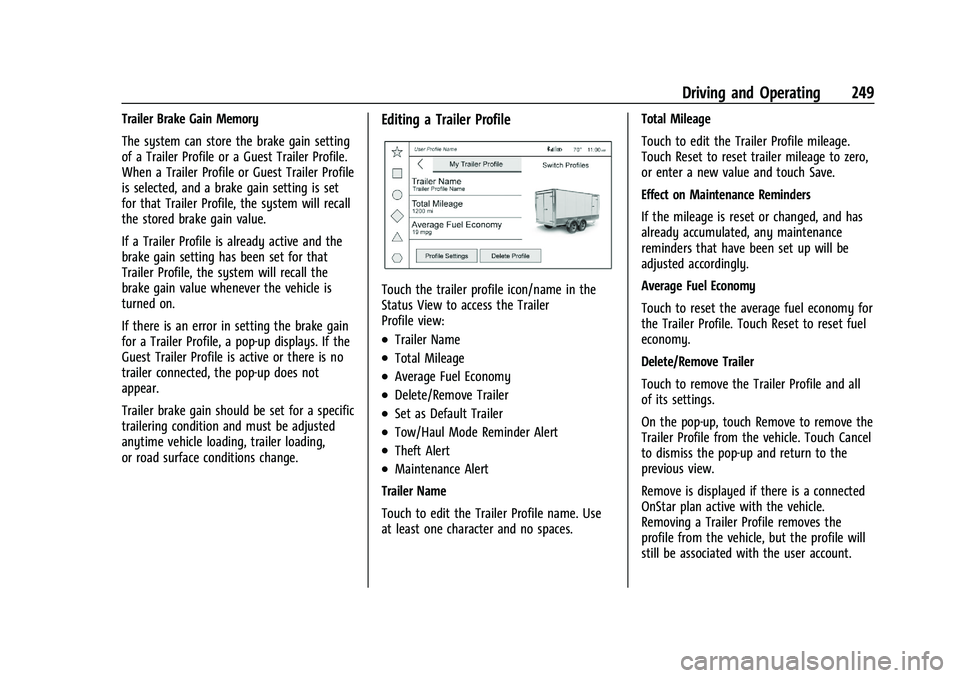
Touch the trailer profile icon/name in the
Status View to access the Trailer
Profile view:
.Trailer Name
.Total Mileage
.Average Fuel Economy
.Delete/Remove Trailer
.Set as Default Trailer
.Tow/Haul Mode Reminder Alert
.Theft Alert
.Maintenance Alert
Trailer Name
Touch to edit the Trailer Profile name. Use
at least one character and no spaces. Total Mileage
Touch to edit the Trailer Profile mileage.
Touch Reset to reset trailer mileage to zero,
or enter a new value and touch Save.
Effect on Maintenance Reminders
If the mileage is reset or changed, and has
already accumulated, any maintenance
reminders that have been set up will be
adjusted accordingly.
Average Fuel Economy
Touch to reset the average fuel economy for
the Trailer Profile. Touch Reset to reset fuel
economy.
Delete/Remove Trailer
Touch to remove the Trailer Profile and all
of its settings.
On the pop-up, touch Remove to remove the
Trailer Profile from the vehicle. Touch Cancel
to dismiss the pop-up and return to the
previous view.
Remove is displayed if there is a connected
OnStar plan active with the vehicle.
Removing a Trailer Profile removes the
profile from the vehicle, but the profile will
still be associated with the user account.
Page 255 of 371
GMC Canyon/Canyon Denali Owner Manual (GMNA-Localizing-U.S./Canada/
Mexico-16510661) - 2023 - CRC - 11/29/22
254 Vehicle Care
Vehicle Checks
Doing Your Own Service Work
{Warning
It can be dangerous to work on your
vehicle if you do not have the proper
knowledge, service manual, tools,
or parts. Always follow owner’s manual
procedures and consult the service
manual for your vehicle before doing any
service work.
If doing some of your own service work, use
the proper service manual. It tells you much
more about how to service the vehicle than
this manual can. To order the proper service
manual, see Publication Ordering
Information 0345.
This vehicle has an airbag system. Before
attempting to do your own service work,
see Servicing the Airbag-Equipped Vehicle
0 49. If equipped with remote vehicle start, open
the hood before performing any service
work to prevent remote starting the vehicle
accidentally. See
Remote Vehicle Start 012.
Keep a record with all parts receipts and list
the mileage and the date of any service
work performed. See Maintenance Records
0 334.
Caution
Even small amounts of contamination can
cause damage to vehicle systems. Do not
allow contaminants to contact the fluids,
reservoir caps, or dipsticks.
Hood
{Warning
Turn the vehicle off before opening the
hood. If the engine is running with the
hood open, you or others could be
injured.
{Warning
Components under the hood can get hot
from running the engine. To help avoid
the risk of burning unprotected skin,
never touch these components until they
have cooled, and always use a glove or
towel to avoid direct skin contact.
Clear any snow from the hood before
opening.
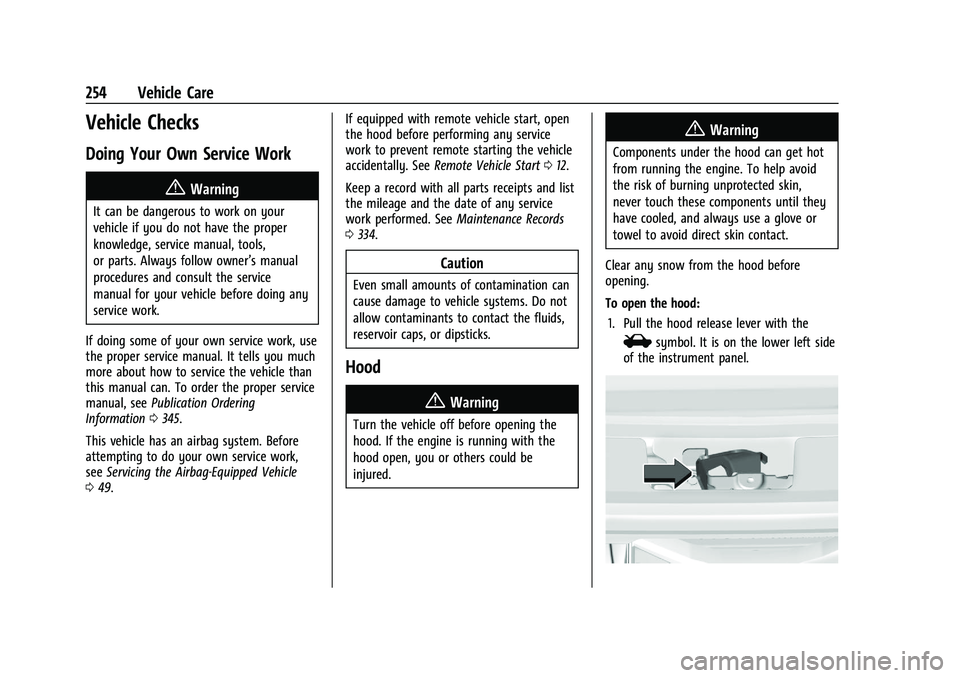
To open the hood: 1. Pull the hood release lever with the
isymbol. It is on the lower left side
of the instrument panel.
Page 260 of 371
GMC Canyon/Canyon Denali Owner Manual (GMNA-Localizing-U.S./Canada/
Mexico-16510661) - 2023 - CRC - 11/29/22
Vehicle Care 259
Engine Oil Additives/Engine Oil Flushes
Do not add anything to the oil. The
recommended oils meeting the dexos1
specification are all that is needed for good
performance and engine protection.
Engine oil system flushes are not
recommended and could cause engine
damage not covered by the vehicle
warranty.
What to Do with Used Oil
Used engine oil contains certain elements
that can be unhealthy for your skin and
could even cause cancer. Do not let used oil
stay on your skin for very long. Clean your
skin and nails with soap and water, or a
good hand cleaner. Wash or properly
dispose of clothing or rags containing used
engine oil. See the manufacturer's warnings
about the use and disposal of oil products.
Used oil can be a threat to the environment.
If you change your own oil, be sure to drain
all the oil from the filter before disposal.
Never dispose of oil by putting it in the
trash or pouring it on the ground, into
sewers, or into streams or bodies of water.
Recycle it by taking it to a place that
collects used oil.
Engine Oil Life System
When to Change Engine Oil
This vehicle has a computer system that
indicates when to change the engine oil and
filter. This is based on a combination of
factors which include engine revolutions,
engine temperature, and miles driven. Based
on driving conditions, the mileage at which
an oil change is indicated can vary
considerably. For the oil life system to work
properly, the system must be reset every
time the oil is changed.
On some vehicles, when the system has
calculated that oil life has been diminished,
a CHANGE ENGINE OIL SOON message comes
on to indicate that an oil change is
necessary. Change the oil as soon as
possible within the next 1 000 km (600 mi).
It is possible that, if driving under the best
conditions, the oil life system might indicate
that an oil change is not necessary for up to
a year. The engine oil and filter must be
changed at least once a year and, at this
time, the system must be reset. For vehicles
without the CHANGE ENGINE OIL SOON
message, an oil change is needed when the
OIL LIFE REMAINING percentage is near 0%.
Your dealer has trained service people whowill perform this work and reset the system.
It is also important to check the oil regularly
over the course of an oil drain interval and
keep it at the proper level.
If the system is ever reset accidentally, the
oil must be changed at 5 000 km (3,000 mi)
since the last oil change. Remember to reset
the oil life system whenever the oil is
changed.
How to Reset the Engine Oil Life System
Reset the system whenever the engine oil is
changed so that the system can calculate
the next engine oil change. Always reset the
engine oil life to 100% after every oil
change. It will not reset itself. To reset the
engine oil life system:
1. Display OIL LIFE REMAINING on the DIC. See Driver Information Center (DIC) (Base
Level) 098 or
Driver Information Center (DIC) (Uplevel)
0 100. If the vehicle does not have DIC
buttons, the vehicle must be in P (Park)
to access this display.
2. Press and hold
Von the DIC, or SET/CLR
on the turn signal lever if the vehicle
does not have DIC buttons, for several
seconds. The oil life will change to 100%.
Page 268 of 371
GMC Canyon/Canyon Denali Owner Manual (GMNA-Localizing-U.S./Canada/
Mexico-16510661) - 2023 - CRC - 11/29/22
Vehicle Care 267
{Warning
The brake wear warning sound means
that soon the brakes will not work well.
That could lead to a crash. When the
brake wear warning sound is heard, have
the vehicle serviced.
Caution
Continuing to drive with worn-out brake
linings could result in costly brake
repairs.
Some driving conditions or climates can
cause a brake squeal when the brakes are
first applied, clearing up following several
applications. This does not mean something
is wrong with the brakes.
Properly torqued wheel nuts are necessary
to help prevent brake pulsation. When tires
are rotated, inspect brake linings for wear
and evenly tighten wheel nuts in the proper
sequence to torque specifications. See
Capacities and Specifications 0336.
Brake pads should be replaced as complete
axle sets.
Brake Pedal Travel
See your dealer if the brake pedal does not
return to normal height, or if there is a
rapid increase in pedal travel. This could be
a sign that brake service may be required.
Replacing Brake System Parts
Always replace brake system parts with
new, approved replacement parts. If this is
not done, the brakes may not work
properly. The braking performance can
change in many ways if the wrong brake
parts are installed or if parts are improperly
installed.
Brake Pad Life System
When to Change Brake Pads
This vehicle has a system that estimates the
remaining life of the front and rear brake
pads. Brake pad life is displayed in the
Driver Information Center (DIC), along with
a percentage for each axle. The system must
be reset every time the brake pads are
changed.
When the system has determined that the
brake pads need to be replaced, a message
will display, which may include mileage
remaining. Brake pads should always be replaced as
complete axle sets.
How to Reset the Brake Pad Life System
The system will automatically detect when
significantly worn brake pads are replaced.
When the ignition is turned on after new
pads and wear sensors are installed, a
message will display. Follow the prompts to
reset the system.
The brake pad life system can also be
manually reset:
1. Display Brake Pad Life on the DIC. See Driver Information Center (DIC) (Base
Level) 098 or
Driver Information Center (DIC) (Uplevel)
0 100.
2. Press the thumbwheel or the trip odometer reset stem if the vehicle does
not have DIC buttons. Select front or rear
pads as appropriate.
3. Select YES on the confirmation message, or press the trip odometer reset stem on
a base level DIC. Repeat for pads on the
other axle if they were also replaced.
Page 340 of 371
GMC Canyon/Canyon Denali Owner Manual (GMNA-Localizing-U.S./Canada/
Mexico-16510661) - 2023 - CRC - 11/29/22
Customer Information 339
We encourage you to call the toll-free
number in order to give your inquiry
prompt attention. Have the following
information available to give the Customer
Assistance representative:
.Vehicle Identification Number (VIN). This is
available from the vehicle registration or
title, or the plate at the top left of the
instrument panel and visible through the
windshield.
.Dealership name and location.
.Vehicle delivery date and present mileage.
When contacting GMC, remember that your
concern will likely be resolved at a dealer's
facility. That is why we suggest following
Step One first.
STEP THREE —U.S. Owners : Both General
Motors and your dealer are committed to
making sure you are completely satisfied
with your new vehicle. However, if you
continue to remain unsatisfied after
following the procedure outlined in
Steps One and Two, you can file with the
Better Business Bureau (BBB) AUTO LINE
Program to enforce your rights. The BBB AUTO LINE Program is an
out-of-court program administered by the
BBB National Programs, Inc. to settle
automotive disputes regarding vehicle
repairs or the interpretation of the New
Vehicle Limited Warranty. Although you
may be required to resort to this informal
dispute resolution program prior to filing a
court action, use of the program is free of
charge and your case will generally be heard
within 40 days. If you do not agree with the
decision given in your case, you may reject
it and proceed with any other venue for
relief available to you.
You may contact the BBB AUTO LINE
Program using the toll-free telephone
number or write them at the following
address:
BBB Auto Line a Division of
BBB National Programs, Inc.
1676 International Drive
Suite 550
McLean, VA 22102
Telephone: 1-800-955-5100
www.bbbautoline.org
This program is available in all 50 states and
the District of Columbia. Eligibility is limited
by vehicle age, mileage, and other factors.
General Motors reserves the right to change
eligibility limitations and/or discontinue its
participation in this program.
STEP THREE
—Canadian Owners : In the
event that you do not feel your concerns
have been addressed after following the
procedure outlined in Steps One and Two,
General Motors of Canada Company wants
you to be aware of its participation in a
no-charge Mediation/Arbitration Program.
General Motors of Canada Company has
committed to binding arbitration of owner
disputes involving factory-related vehicle
service claims. The program provides for the
review of the facts involved by an impartial
third party arbiter, and may include an
informal hearing before the arbiter. The
program is designed so that the entire
dispute settlement process, from the time
you file your complaint to the final decision,
should be completed in about 70 days. We
believe our impartial program offers
advantages over courts in most jurisdictions
because it is informal, quick, and free of
charge.
Page 344 of 371
GMC Canyon/Canyon Denali Owner Manual (GMNA-Localizing-U.S./Canada/
Mexico-16510661) - 2023 - CRC - 11/29/22
Customer Information 343
covered, however any cost for parts and
labor for repairs not covered by the
warranty are the owner’s responsibility.
Scheduling Service Appointments
When the vehicle requires warranty service,
contact your dealer and request an
appointment. By scheduling a service
appointment and advising the service
consultant of your transportation needs,
your dealer can help minimize your
inconvenience.
If the vehicle cannot be scheduled into the
service department immediately, keep
driving it until it can be scheduled for
service, unless, of course, the problem is
safety related. If it is, please call your
dealership, let them know this, and ask for
instructions.
If your dealer requests you to bring the
vehicle for service, you are urged to do so
as early in the work day as possible to
allow for same-day repair.
Courtesy Transportation Program
To enhance your ownership experience, we
and our participating dealers are proud to
offer Courtesy Transportation, a customer
support program for vehicles with theBumper-to-Bumper (Base Warranty Coverage
period in Canada), Federal Emission,
Extended Powertrain or Electric specific
warranties in both the U.S. and Canada.
Several Courtesy Transportation options are
available to assist in reducing inconvenience
when warranty repairs are required.
Courtesy Transportation is not a part of the
New Vehicle Limited Warranty. A separate
manual entitled
“Limited Warranty and
Owner Assistance Information” produced for
new vehicles provides detailed warranty
coverage information.
Transportation Options
Warranty service can generally be
completed while you wait. However, if you
are unable to do so, your dealer may offer
the following transportation options:
Shuttle Service
This includes one-way or round-trip shuttle
service within reasonable time and distance
parameters of your dealer's area.
Public Transportation or Fuel Reimbursement
If overnight warranty repairs are needed,
and public transportation is used, the
expense must be supported by original
receipts and within the maximum amount allowed by GM. If U.S. customers arrange
their own transportation, limited
reimbursement for reasonable fuel expenses
may be available. Claim amounts should
reflect actual costs and be supported by
original receipts. See your dealer for
information.
Courtesy Rental Vehicle
For an overnight warranty repair, the dealer
may provide an available courtesy rental
vehicle or provide for reimbursement of a
rental vehicle. Reimbursement is limited and
must be supported by original receipts as
well as a signed and completed rental
agreement and meet state/provincial, local,
and rental vehicle provider requirements.
Requirements vary and may include
minimum age requirements, insurance
coverage, credit card, etc. Additional fees
such as fuel, rental vehicle insurance, taxes,
levies, usage fees, excessive mileage,
or rental usage beyond the completion of
the repair are also your responsibility.
It may not be possible to provide a like
vehicle as a courtesy rental.