check oil GMC ENVOY 2003 User Guide
[x] Cancel search | Manufacturer: GMC, Model Year: 2003, Model line: ENVOY, Model: GMC ENVOY 2003Pages: 442, PDF Size: 3.1 MB
Page 298 of 442

Checking Things Under
the Hood
{CAUTION:
Things that burn can get on hot engine parts
and start a ®re. These include liquids like fuel,
oil, coolant, brake ¯uid, windshield washer and
other ¯uids, and plastic or rubber. You or
others could be burned. Be careful not to drop
or spill things that will burn onto a hot engine.
Hood Release
1. To open the hood, ®rst
pull the handle located
inside the vehicle
on the lower driver's
side of the instrument
panel.
5-10
Page 303 of 442
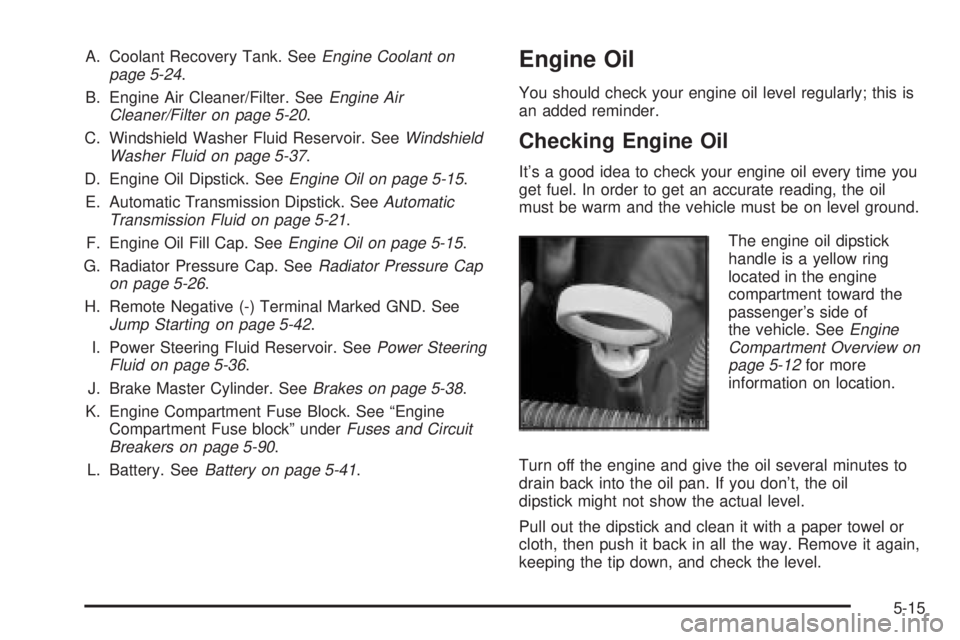
A. Coolant Recovery Tank. SeeEngine Coolant on
page 5-24.
B. Engine Air Cleaner/Filter. See
Engine Air
Cleaner/Filter on page 5-20.
C. Windshield Washer Fluid Reservoir. See
Windshield
Washer Fluid on page 5-37.
D. Engine Oil Dipstick. See
Engine Oil on page 5-15.
E. Automatic Transmission Dipstick. See
Automatic
Transmission Fluid on page 5-21.
F. Engine Oil Fill Cap. See
Engine Oil on page 5-15.
G. Radiator Pressure Cap. See
Radiator Pressure Cap
on page 5-26.
H. Remote Negative (-) Terminal Marked GND. See
Jump Starting on page 5-42.
I. Power Steering Fluid Reservoir. See
Power Steering
Fluid on page 5-36.
J. Brake Master Cylinder. See
Brakes on page 5-38.
K. Engine Compartment Fuse Block. See ªEngine
Compartment Fuse blockº under
Fuses and Circuit
Breakers on page 5-90.
L. Battery. See
Battery on page 5-41.
Engine Oil
You should check your engine oil level regularly; this is
an added reminder.
Checking Engine Oil
It's a good idea to check your engine oil every time you
get fuel. In order to get an accurate reading, the oil
must be warm and the vehicle must be on level ground.
The engine oil dipstick
handle is a yellow ring
located in the engine
compartment toward the
passenger's side of
the vehicle. See
Engine
Compartment Overview on
page 5-12
for more
information on location.
Turn off the engine and give the oil several minutes to
drain back into the oil pan. If you don't, the oil
dipstick might not show the actual level.
Pull out the dipstick and clean it with a paper towel or
cloth, then push it back in all the way. Remove it again,
keeping the tip down, and check the level.
5-15
Page 307 of 442

However, your engine oil and ®lter must be changed at
least once a year and at this time the system must be
reset. It is also important to check your oil regularly and
keep it at the proper level.
If the system is ever reset accidentally, you must
change your oil at 3,000 miles (5 000 km) since your
last oil change. Remember to reset the oil life system
whenever the oil is changed.
How to Reset the CHANGE ENG OIL Light
The GM Oil Life System calculates when to change
your engine oil and ®lter based on vehicle use. Anytime
your oil is changed, reset the system so it can
calculate when the next oil change is required. If a
situation occurs where you change your oil prior to a
CHANGE ENG OIL light being turned on, reset the
system.
To reset the CHANGE ENG OIL light, do the following:
1. Turn the ignition key to RUN with the
engine off.
2. Fully press and release the accelerator pedal three
times within ®ve seconds.
For vehicles with the Driver Information Center, see
Driver Information Center (DIC) on page 3-50to reset
the system.
What to Do with Used Oil
Used engine oil contains certain elements that may be
unhealthy for your skin and could even cause cancer.
Don't let used oil stay on your skin for very long. Clean
your skin and nails with soap and water, or a good
hand cleaner. Wash or properly dispose of clothing or
rags containing used engine oil. See the manufacturer's
warnings about the use and disposal of oil products.
Used oil can be a threat to the environment. If you
change your own oil, be sure to drain all the oil from the
®lter before disposal. Never dispose of oil by putting it
in the trash, pouring it on the ground, into sewers, or into
streams or bodies of water. Instead, recycle it by
taking it to a place that collects used oil. If you have a
problem properly disposing of your used oil, ask
your dealer, a service station or a local recycling center
for help.
5-19
Page 309 of 442

To inspect or replace the ®lter and reset the indicator (if
equipped), do the following:
1. Remove the screws on the engine cleaner/®lter and
lift off the cover.
2. Remove the air cleaner/®lter from the housing. Care
should be taken to dislodge as little dirt as possible.
3. Install the new engine air cleaner/®lter.
4. Reinstall the cover and tighten the screws.
{CAUTION:
Operating the engine with the air cleaner/®lter
off can cause you or others to be burned. The
air cleaner not only cleans the air, it helps to
stop ¯ame if the engine back®res. If it isn't there
and the engine back®res, you could be burned.
Don't drive with it off, and be careful working on
the engine with the air cleaner/®lter off.
Notice:If the air cleaner/®lter is off, a back®re can
cause a damaging engine ®re. And, dirt can
easily get into your engine, which will damage it.
Always have the air cleaner/®lter in place when
you're driving.
Automatic Transmission Fluid
When to Check and Change
A good time to check your automatic transmission ¯uid
level is when the engine oil is changed.
Change both the ¯uid and ®lter every 50,000 miles
(83 000 km) if the vehicle is mainly driven under one or
more of these conditions:
·In heavy city traffic where the outside temperature
regularly reaches 90ÉF (32ÉC) or higher.
·In hilly or mountainous terrain.
·When doing frequent trailer towing.
·Uses such as found in taxi, police or delivery
service.
If you do not use your vehicle under any of these
conditions, change the ¯uid and ®lter every
100,000 miles (166 000 km).
5-21
Page 313 of 442

{CAUTION:
Adding only plain water to your cooling
system can be dangerous. Plain water, or
some other liquid such as alcohol, can boil
before the proper coolant mixture will. Your
vehicle's coolant warning system is set for the
proper coolant mixture. With plain water or the
wrong mixture, your engine could get too hot
but you wouldn't get the overheat warning.
Your engine could catch ®re and you or others
could be burned. Use a 50/50 mixture of clean,
drinkable water and DEX-COOL
žcoolant.
Notice:If you use an improper coolant mixture,
your engine could overheat and be badly damaged.
The repair cost wouldn't be covered by your
warranty. Too much water in the mixture can freeze
and crack the engine, radiator, heater core and
other parts.If you have to add coolant more than four times a year,
have your dealer check your cooling system.
Notice:If you use the proper coolant, you don't
have to add extra inhibitors or additives which claim
to improve the system. These can be harmful.
Checking Coolant
The engine coolant
recovery tank is in the
engine compartment
on the passenger's side of
the vehicle. See
Engine
Compartment Overview on
page 5-12
for more
information on location.
The vehicle must be on a level surface. When your
engine is cold, the coolant level should be at FULL
COLD, or a little higher.
5-25
Page 327 of 442

Checking Brake Fluid
You can check the brake ¯uid without taking off the cap.
Just look at the brake ¯uid
reservoir. The ¯uid level
should be above MIN. If it
isn't have your brake
system checked to see if
there is a leak.
After work is done on the brake hydraulic system,
make sure the level is above the MIN but not over the
MAX mark.
What to Add
When you do need brake ¯uid, use only DOT-3 brake
¯uid. Use new brake ¯uid from a sealed container
only. See
Part D: Recommended Fluids and Lubricants
on page 6-18.Always clean the brake ¯uid reservoir cap and the area
around the cap before removing it. This will help
keep dirt from entering the reservoir.
{CAUTION:
With the wrong kind of ¯uid in your brake
system, your brakes may not work well, or
they may not even work at all. This could
cause a crash. Always use the proper
brake ¯uid.
Notice:
·Using the wrong ¯uid can badly damage brake
system parts. For example, just a few drops of
mineral-based oil, such as engine oil, in your
brake system can damage brake system
parts so badly that they'll have to be replaced.
Don't let someone put in the wrong kind of ¯uid.
·If you spill brake ¯uid on your vehicle's painted
surfaces, the paint ®nish can be damaged. Be
careful not to spill brake ¯uid on your vehicle. If
you do, wash it off immediately. See
ªAppearance Careº in the Index.
5-39
Page 394 of 442
Maintenance Schedule
Introduction
Important: Keep engine oil at the proper level and
change as recommended.
Have you purchased the GM Protection Plan? The Plan
supplements your new vehicle warranties. See your
Warranty and Owner Assistance booklet or your dealer
for details.
Your Vehicle and the Environment
Proper vehicle maintenance not only helps to keep your
vehicle in good working condition, but also helps the
environment. Improper vehicle maintenance can
even affect the quality of the air we breathe. Improper
¯uid levels or the wrong tire in¯ation can increase
the level of emissions from your vehicle. To help protect
our environment, and to keep your vehicle in good
condition, be sure to maintain your vehicle properly.
Maintenance Requirements
Maintenance intervals, checks, inspections and
recommended ¯uids and lubricants as prescribed in this
manual are necessary to keep your vehicle in good
working condition. Any damage caused by failure
to follow scheduled maintenance may not be covered by
warranty.
6-2
Page 396 of 442
Part A: Scheduled Maintenance
Services
This part contains engine oil scheduled maintenance
which explains the engine oil life system and how
it indicates when to change the engine oil and ®lter.
Also, listed are scheduled maintenance services which
are to be performed at the mileage intervals speci®ed.
Using Your Maintenance Schedule
We at General Motors want to help you keep your
vehicle in good working condition. But we don't know
exactly how you'll drive it. You may drive very short
distances only a few times a week. Or you may drive
long distances all the time in very hot, dusty weather.
You may use your vehicle in making deliveries. Or
you may drive it to work, to do errands or in many
other ways.
Because of all the different ways people use their
vehicles, maintenance needs vary. You may need more
frequent checks and replacements. So please read
the following and note how you drive. If you have any
questions on how to keep your vehicle in good condition,
see your dealer.This part tells you the maintenance services you should
have done and when to schedule them.
When you go to your dealer for your service needs,
you'll know that GM-trained and supported service
people will perform the work using genuine GM parts.
The proper ¯uids and lubricants to use are listed in Part
D. Make sure whoever services your vehicle uses
these. All parts should be replaced and all necessary
repairs done before you or anyone else drives the
vehicle.
This schedule is for vehicles that:·carry passengers and cargo within recommended
limits. You will ®nd these limits on your vehicle's
Certi®cation/Tire label. See
Loading Your Vehicle on
page 4-47.
·are driven on reasonable road surfaces within legal
driving limits.
·are driven off-road in the recommended manner.
See
Off-Road Driving with Your Four-Wheel-Drive
Vehicle on page 4-15.
·use the recommended fuel. SeeGasoline Octane
on page 5-4
.
6-4
Page 397 of 442

Scheduled Maintenance
The services shown in this schedule up to 100,000 miles
(166 000 km) should be repeated after 100,000 miles
(166 000 km) at the same intervals for the life of
this vehicle. The services shown at 150,000 miles
(240 000 km) should be repeated at the same interval
after 150,000 miles (240 000 km) for the life of this
vehicle.
See
Part B: Owner Checks and Services on page 6-11andPart C: Periodic MaintenanceInspections on
page 6-16.
Footnotes
²The U.S. Environmental Protection Agency or the
California Air Resources Board has determined that the
failure to perform this maintenance item will not nullify
the emission warranty or limit recall liability prior to
the completion of the vehicle's useful life. We, however,
urge that all recommended maintenance services be
performed at the indicated intervals and the
maintenance be recorded.
+A good time to check your brakes is during tire
rotation. See Brake System Inspection on page 6-17.
Engine Oil Scheduled Maintenance
Change engine oil and ®lter as indicated by the GM
Oil Life System (or every 12 months, whichever
occurs ®rst). Reset the system.
Your vehicle has a computer system that lets you know
when to change the engine oil and ®lter. This is
based on engine revolutions and engine temperature,
and not on mileage. Based on driving conditions,
the mileage at which an oil change will be indicated can
vary considerably. For the oil life system to work
properly, you must reset the system every time the oil is
changed.
When the system has calculated that oil life has been
diminished, it will indicate that an oil change is
necessary. A CHANGE ENGINE OIL light will come on.
Change your oil as soon as possible within the next
two times you stop for fuel. It is possible that, if you are
driving under the best conditions, the oil life system
may not indicate that an oil change is necessary for over
a year. However, your engine oil and ®lter must be
changed at least once a year and at this time the system
must be reset. Your dealer has GM-trained service
people who will perform this work using genuine GM
parts and reset the system.
It is also important to check your oil regularly and keep
it at the proper level.
6-5
Page 398 of 442

If the system is ever reset accidentally, you must
change your oil at 3,000 miles (5 000 km) since your
last oil change. Remember to reset the oil life system
whenever the oil is changed. See
Engine Oil on
page 5-15for information on resetting the system.
An Emission Control Service.
See the mileage intervals following for additional
services that may be performed with an engine oil
change. After the services are performed, record the
date, odometer reading and who performed the service
on the maintenance record pages in Part E of this
schedule.
7,500 Miles (12 500 km)
qCheck rear/front axle ¯uid level and add ¯uid as
needed. Check constant velocity joints and axle seals
for leaking.
qRotate tires. See
Tire Inspection and Rotation on
page 5-55for proper rotation pattern and additional
information.(See footnote +.)
15,000 Miles (25 000 km)
qInspect engine air cleaner ®lter or change indicator (if
equipped). If necessary, replace the ®lter. If vehicle is
driven in dusty/dirty conditions, inspect ®lter or
change indicator (if equipped) at every engine oil
change. See
Engine Air Cleaner/Filter on page 5-20for more information.An Emission Control Service.
(See footnote ².)
qCheck rear/front axle ¯uid level and add ¯uid as
needed. Check constant velocity joints and axle seals
for leaking.
qRotate tires. See
Tire Inspection and Rotation on
page 5-55for proper rotation pattern and additional
information.(See footnote +.)
22,500 Miles (37 500 km)
qCheck rear/front axle ¯uid level and add ¯uid as
needed. Check constant velocity joints and axle seals
for leaking.
qRotate tires. See
Tire Inspection and Rotation on
page 5-55for proper rotation pattern and additional
information.(See footnote +.)
6-6