ABS GMC ENVOY 2006 User Guide
[x] Cancel search | Manufacturer: GMC, Model Year: 2006, Model line: ENVOY, Model: GMC ENVOY 2006Pages: 524, PDF Size: 3.36 MB
Page 408 of 524
Back-Up Lamps
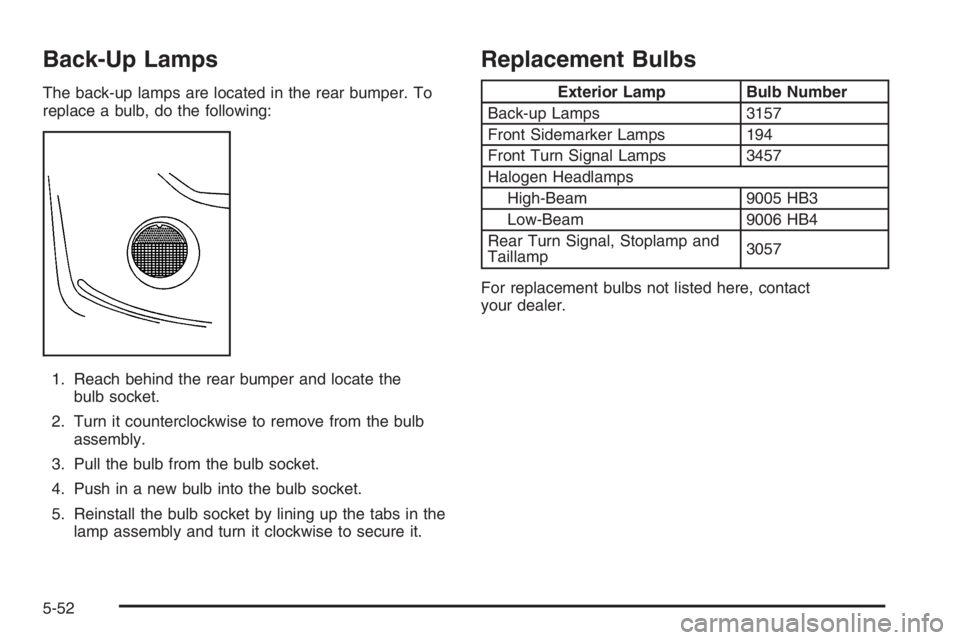
The back-up lamps are located in the rear bumper. To
replace a bulb, do the following:
1. Reach behind the rear bumper and locate the
bulb socket.
2. Turn it counterclockwise to remove from the bulb
assembly.
3. Pull the bulb from the bulb socket.
4. Push in a new bulb into the bulb socket.
5. Reinstall the bulb socket by lining up the tabs in the
lamp assembly and turn it clockwise to secure it.
Replacement Bulbs
Exterior Lamp Bulb Number
Back-up Lamps 3157
Front Sidemarker Lamps 194
Front Turn Signal Lamps 3457
Halogen Headlamps
High-Beam 9005 HB3
Low-Beam 9006 HB4
Rear Turn Signal, Stoplamp and
Taillamp3057
For replacement bulbs not listed here, contact
your dealer.
5-52
Page 428 of 524
You may have an air inator kit that is located in the
glove compartment. It includes a 22 ft (6.7 m) hose with
three nozzle adapters.
To use the accessory inator, do the following:
1. Attach the appropriate nozzle adapter to the end of
the hose, if required.
{CAUTION:
Inating something too much can make it
explode, and you or others could be injured.
Be sure to read the inator instructions, and
inate any object only to its recommended
pressure.
2. Attach that end of the hose to the object you wish
to inate.
3. Attach the other end of the hose to the outlet.4. Press and release the switch to turn the air inator
on. The indicator light will remain on when the
inator is running.
The system has an internal clock to prevent the
system from overheating. The system will allow
about ve minutes of running time, then the
compressor will stop. The indicator light will then
begin to ash. When the indicator is off, the inator
can be started again by pressing the switch. If
the compressor is still hot, it may only run for a short
time before shutting off again.
5. Press and release the switch to turn the inator off.
Place the inator kit tools in the pouch and store it in
its proper location. Remove the inator hose from
the outlet during loading and unloading. Load leveling
will not function with the inator hose attached to
the inator outlet. SeeElectronically Controlled Air
Suspension System on page 4-55for more information.
To reinstall the cover, line up the tabs at the back of
the cover, put it in place and latch the tabs.
A continuous ashing indicator light may also indicate a
malfunction in the air suspension system. See
Electronically Controlled Air Suspension System on
page 4-55for more information.
5-72
Page 450 of 524
Fabric/Carpet
Use a vacuum cleaner with a soft brush attachment
frequently to remove dust and loose dirt. A canister
vacuum with a beater bar in the nozzle may only
be used on oor carpet and carpeted oor mats. For
soils, always try to remove them rst with plain water or
club soda. Before cleaning, gently remove as much
of the soil as possible using one of the following
techniques:
For liquids: gently blot the remaining soil with a
paper towel. Allow the soil to absorb into the
paper towel until no more can be removed.
For solid dry soils: remove as much as possible
and then vacuum.
To clean, use the following instructions:
1. Saturate a lint-free, clean white cloth with water or
club soda.
2. Wring the cloth to remove excess moisture.
3. Start on the outside edge of the soil and gently rub
toward the center. Continue cleaning, using a clean
area of the cloth each time it becomes soiled.
4. Continue to gently rub the soiled area until the
cleaning cloth remains clean.
5. If the soil is not completely removed, use a mild
soap solution and repeat the cleaning process
that was used with plain water.If any of the soil remains, a commercial fabric cleaner or
spot lifter may be necessary. When a commercial
upholstery cleaner or spot lifter is to be used, test a
small hidden area for colorfastness rst. If the locally
cleaned area gives any impression that a ring formation
may result, clean the entire surface.
After the cleaning process has been completed, a paper
towel can be used to blot excess moisture from the
fabric or carpet.
Leather
A soft cloth dampened with water may be used to
remove dust. If a more thorough cleaning is necessary,
a soft cloth dampened with a mild soap solution can
be used. Allow the leather to dry naturally. Do not use
heat to dry. Never use steam to clean leather. Never
use spot lifters or spot removers on leather. Many
commercial leather cleaners and coatings that are sold
to preserve and protect leather may permanently
change the appearance and feel of your leather and are
not recommended. Do not use silicone or wax-based
products, or those containing organic solvents to clean
your vehicle’s interior because they can alter the
appearance by increasing the gloss in a non-uniform
manner. Never use shoe polish on your leather.
5-94
Page 459 of 524

Fuses and Circuit Breakers
The wiring circuits in your vehicle are protected from
short circuits by a combination of fuses and circuit
breakers. This greatly reduces the chance of res
caused by electrical problems.
Look at the silver-colored band inside the fuse. If the
band is broken or melted, replace the fuse. Be sure you
replace a bad fuse with a new one of the identical
size and rating.
If you ever have a problem on the road and don’t have
a spare fuse, you can borrow one that has the same
amperage. Just pick some feature of your vehicle
that you can get along without — like the radio or
cigarette lighter — and use its fuse, if it is the correct
amperage. Replace it as soon as you can.
Engine Compartment Fuse Block
The fuse block is located under the hood in the engine
compartment on the driver’s side of the vehicle. See
Engine Compartment Overview on page 5-12for more
information on location.
Remove the primary cover by pressing the two locking
tabs. Remove the secondary cover by snapping off
while lifting. To reinstall the fuse panel cover, reverse
the sequence.
5-103
Page 462 of 524

Fuses Usage
24Instrument Panel Cluster, Driver
Information Center
25Automatic Shift Lock
Control System
26 Engine 1
27 Backup
28 Powertrain Control Module 1
29 Oxygen Sensor
30 Air Conditioning
31 Truck Body Controller
32 Trailer
33 Anti-Lock Brakes (ABS)Fuses Usage
34 Ignition A
35 Blower Motor
36 Ignition B
50 Passenger’s Side Trailer Turn
51 Driver’s Side Trailer Turn
52 Hazard Flashers
53 Headlamp Driver Module
54Air Injection Reactor (AIR)
Solenoid
56 Air Injection Reactor (AIR) Pump
58Vehicle Stability Enhancement
System (StabiliTrak
®)
5-106
Page 466 of 524

Fuses Usage
24Instrument Panel Cluster, Driver
Information Center
25Automatic Shift Lock
Control System
26 Engine 1
27 Backup
28 Powertrain Control Module 1
29 Powertrain Control Module
30 Air Conditioning
31 Injector Bank A
32 Trailer
33 Anti-Lock Brakes (ABS)
34 Ignition AFuses Usage
35 Blower Motor
36 Ignition B
50 Passenger’s Side Trailer Turn
51 Driver’s Side Trailer Turn
52 Hazard Flashers
53 Transmission
54 Oxygen Sensor Bank B
55 Oxygen Sensor Bank A
56 Injector Bank B
57 Headlamp Driver Module
58 Truck Body Controller 1
59 Electric Adjustable Pedal
5-110
Page 511 of 524

A
Accessories and Modications............................ 5-3
Accessory Inator...........................................5-71
Accessory Power Outlet(s)...............................3-19
Adding a Snow Plow or Similar Equipment.........4-50
Adding Equipment to Your Airbag-Equipped
Vehicle.......................................................1-72
Additives, Fuel................................................. 5-6
Add-On Electrical Equipment...........................5-102
Adjustable Throttle and Brake Pedal..................2-22
Air Cleaner/Filter, Engine.................................5-21
Air Conditioning......................................3-20, 3-23
Air Suspension...............................................4-55
Airbag
Passenger Status Indicator...........................3-36
Readiness Light..........................................3-35
Airbag Sensing and Diagnostic Module (SDM).......7-10
Airbag System................................................1-58
Adding Equipment to Your Airbag-Equipped
Vehicle...................................................1-72
How Does an Airbag Restrain?......................1-65
Passenger Sensing System...........................1-67
Servicing Your Airbag-Equipped Vehicle..........1-71
What Makes an Airbag Inate?......................1-65
What Will You See After an Airbag Inates?....1-66
When Should an Airbag Inate?....................1-63
Where Are the Airbags?...............................1-61
Antenna, Fixed Mast......................................3-143Antenna, XM™ Satellite Radio Antenna
System.....................................................3-143
Anti-Lock Brake System (ABS)........................... 4-7
Anti-Lock Brake, System Warning Light..............3-40
Appearance Care
Aluminum Wheels........................................5-98
Care of Safety Belts....................................5-95
Chemical Paint Spotting...............................5-99
Cleaning Exterior Lamps/Lenses....................5-96
Cleaning the Inside of Your Vehicle................5-92
Fabric/Carpet..............................................5-94
Finish Care.................................................5-96
Finish Damage............................................5-99
Instrument Panel, Vinyl, and Other
Plastic Surfaces.......................................5-95
Leather......................................................5-94
Sheet Metal Damage...................................5-99
Tires..........................................................5-98
Underbody Maintenance...............................5-99
Vehicle Care/Appearance Materials...............5-100
Washing Your Vehicle...................................5-96
Weatherstrips..............................................5-95
Windshield, Backglass, and Wiper Blades.......5-97
Ashtray(s)......................................................3-20
Audio System(s).............................................3-66
Audio Steering Wheel Controls....................3-139
Care of Your Cassette Tape Player...............3-141
Care of Your CD and DVD Player................3-142
Care of Your CDs and DVDs .......................3-142
1
Page 512 of 524
Audio System(s) (cont.)
Chime Level Adjustment.............................3-143
Fixed Mast Antenna...................................3-143
Navigation/Radio System, see
Navigation Manual..................................3-124
Radio with Cassette and CD.........................3-96
Radio with CD....................................3-68, 3-80
Radio with Six-Disc CD..............................3-110
Rear Seat Audio (RSA)...............................3-137
Setting the Time..........................................3-68
Theft-Deterrent Feature...............................3-139
Understanding Radio Reception...................3-140
XM™ Satellite Radio Antenna System...........3-143
Automatic Headlamp System............................3-16
Automatic Transmission
Fluid..........................................................5-23
Operation...................................................2-24
B
Battery..........................................................5-41
Run-Down Protection...................................3-19
Before Leaving on a Long Trip.........................4-37
Brake
Anti-Lock Brake System (ABS)........................ 4-7
Emergencies................................................ 4-9
Parking......................................................2-31
System Warning Light..................................3-39
Brake Pedal, Throttle.......................................2-22Brakes..........................................................5-38
Braking........................................................... 4-6
Braking in Emergencies..................................... 4-9
Break-In, New Vehicle.....................................2-19
Bulb Replacement...........................................5-50
Back-Up Lamps...........................................5-52
Halogen Bulbs............................................5-50
Headlamps, Front Turn Signal, Sidemarker,
and Parking Lamps..................................5-50
Replacement Bulbs......................................5-52
Taillamps, Turn Signal, and Stoplamps............5-51
Buying New Tires...........................................5-66
C
Calibration.............................2-39, 2-40, 2-43, 2-44
California Fuel.................................................. 5-6
California Proposition 65 Warning....................... 5-3
Canadian Owners................................................ ii
Capacities and Specications..........................5-119
Carbon Monoxide...................2-13, 2-34, 4-40, 4-56
Care of
Safety Belts................................................5-95
Your Cassette Tape Player..........................3-141
Your CD and DVD Player...........................3-142
Your CDs and DVDs ..................................3-142
Cargo Cover..................................................2-61
Cargo Tie Downs............................................2-61
Center Console Storage Area...........................2-56
2