door locks GMC ENVOY 2006 User Guide
[x] Cancel search | Manufacturer: GMC, Model Year: 2006, Model line: ENVOY, Model: GMC ENVOY 2006Pages: 524, PDF Size: 3.36 MB
Page 205 of 524
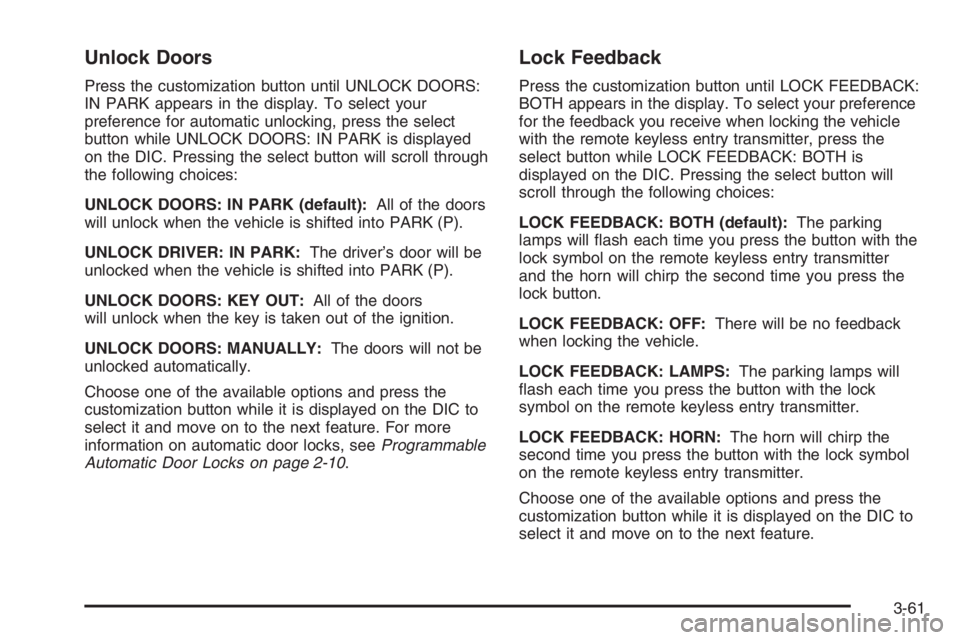
Unlock Doors
Press the customization button until UNLOCK DOORS:
IN PARK appears in the display. To select your
preference for automatic unlocking, press the select
button while UNLOCK DOORS: IN PARK is displayed
on the DIC. Pressing the select button will scroll through
the following choices:
UNLOCK DOORS: IN PARK (default):All of the doors
will unlock when the vehicle is shifted into PARK (P).
UNLOCK DRIVER: IN PARK:The driver’s door will be
unlocked when the vehicle is shifted into PARK (P).
UNLOCK DOORS: KEY OUT:All of the doors
will unlock when the key is taken out of the ignition.
UNLOCK DOORS: MANUALLY:The doors will not be
unlocked automatically.
Choose one of the available options and press the
customization button while it is displayed on the DIC to
select it and move on to the next feature. For more
information on automatic door locks, seeProgrammable
Automatic Door Locks on page 2-10.
Lock Feedback
Press the customization button until LOCK FEEDBACK:
BOTH appears in the display. To select your preference
for the feedback you receive when locking the vehicle
with the remote keyless entry transmitter, press the
select button while LOCK FEEDBACK: BOTH is
displayed on the DIC. Pressing the select button will
scroll through the following choices:
LOCK FEEDBACK: BOTH (default):The parking
lamps will ash each time you press the button with the
lock symbol on the remote keyless entry transmitter
and the horn will chirp the second time you press the
lock button.
LOCK FEEDBACK: OFF:There will be no feedback
when locking the vehicle.
LOCK FEEDBACK: LAMPS:The parking lamps will
ash each time you press the button with the lock
symbol on the remote keyless entry transmitter.
LOCK FEEDBACK: HORN:The horn will chirp the
second time you press the button with the lock symbol
on the remote keyless entry transmitter.
Choose one of the available options and press the
customization button while it is displayed on the DIC to
select it and move on to the next feature.
3-61
Page 469 of 524
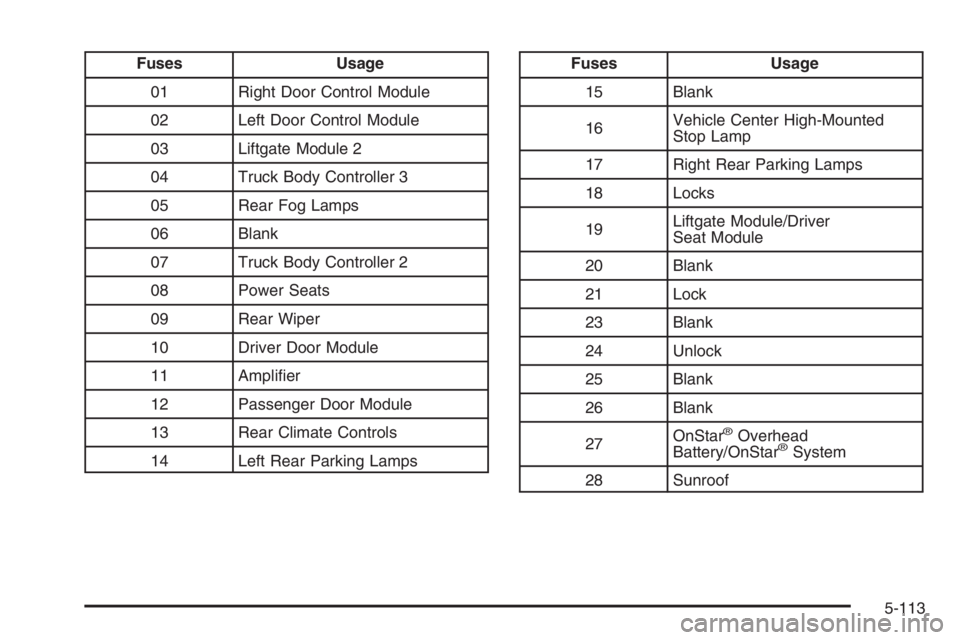
Fuses Usage
01 Right Door Control Module
02 Left Door Control Module
03 Liftgate Module 2
04 Truck Body Controller 3
05 Rear Fog Lamps
06 Blank
07 Truck Body Controller 2
08 Power Seats
09 Rear Wiper
10 Driver Door Module
11 Amplier
12 Passenger Door Module
13 Rear Climate Controls
14 Left Rear Parking LampsFuses Usage
15 Blank
16Vehicle Center High-Mounted
Stop Lamp
17 Right Rear Parking Lamps
18 Locks
19Liftgate Module/Driver
Seat Module
20 Blank
21 Lock
23 Blank
24 Unlock
25 Blank
26 Blank
27OnStar
®Overhead
Battery/OnStar®System
28 Sunroof
5-113
Page 473 of 524
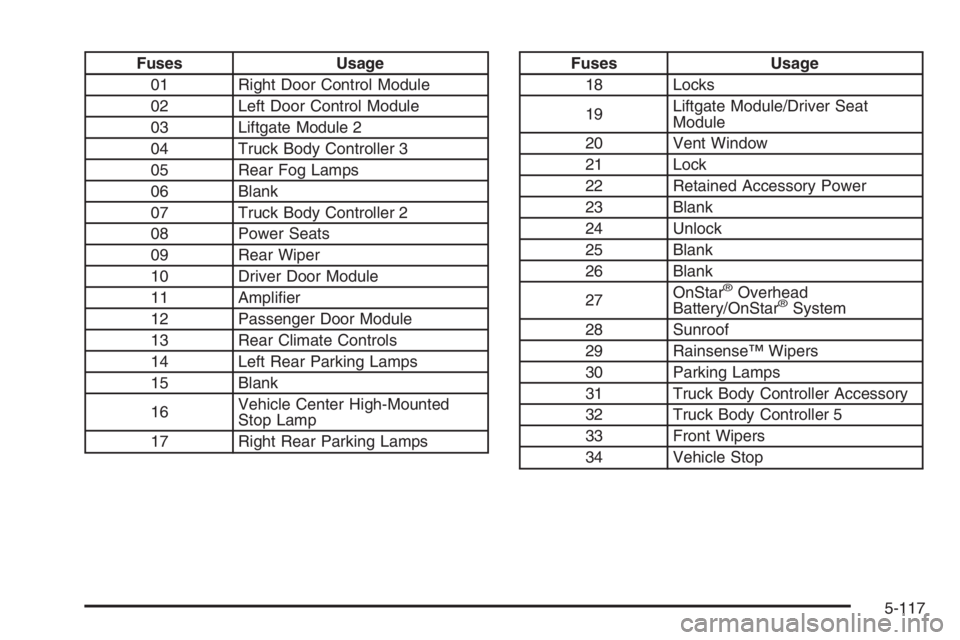
Fuses Usage
01 Right Door Control Module
02 Left Door Control Module
03 Liftgate Module 2
04 Truck Body Controller 3
05 Rear Fog Lamps
06 Blank
07 Truck Body Controller 2
08 Power Seats
09 Rear Wiper
10 Driver Door Module
11 Amplier
12 Passenger Door Module
13 Rear Climate Controls
14 Left Rear Parking Lamps
15 Blank
16Vehicle Center High-Mounted
Stop Lamp
17 Right Rear Parking LampsFuses Usage
18 Locks
19Liftgate Module/Driver Seat
Module
20 Vent Window
21 Lock
22 Retained Accessory Power
23 Blank
24 Unlock
25 Blank
26 Blank
27OnStar
®Overhead
Battery/OnStar®System
28 Sunroof
29 Rainsense™ Wipers
30 Parking Lamps
31 Truck Body Controller Accessory
32 Truck Body Controller 5
33 Front Wipers
34 Vehicle Stop
5-117
Page 484 of 524

(e)Make sure the safety belt reminder light and all your
belts, buckles, latch plates, retractors, and anchorages
are working properly. Look for any other loose or
damaged safety belt system parts. If you see anything
that might keep a safety belt system from doing its
job, have it repaired. Have any torn or frayed safety belts
replaced. Also look for any opened or broken airbag
coverings, and have them repaired or replaced.
The airbag system does not need regular maintenance.
(f)Lubricate all key lock cylinders, hood latch
assembly, secondary latch, pivots, spring anchor,
release pawl, rear compartment hinges, outer liftgate
handle pivot points, rear door detent link, roller
mechanism, liftgate handle pivot points, latch bolt, fuel
door hinge, cargo door hinge, locks, and folding
seat hardware. More frequent lubrication may be
required when exposed to a corrosive environment.
Applying silicone grease on weatherstrips with a clean
cloth will make them last longer, seal better and not stick
or squeak.
(g)Inspect hoses for cracks, chang, leaks, kinks, and
proper installation.(h)Change automatic transmission uid and lter if the
vehicle is mainly driven under one or more of these
conditions:
In heavy city traffic where the outside temperature
regularly reaches 90°F (32°C) or higher.
In hilly or mountainous terrain.
When doing frequent trailer towing.
Uses such as found in taxi, police, or delivery
service.
(i)Drain, ush, and rell cooling system. This service
can be complex; you should have your dealer perform
this service. See Engine Coolant on page 5-25for
what to use. Inspect hoses. Clean radiator, condenser,
pressure cap, and ller neck. Pressure test the
cooling system and pressure cap.
(j)A uid loss in any vehicle system could indicate a
problem. Have the system inspected and repaired and
the uid level checked. Add uid if needed.
(k)If you drive regularly under dusty conditions, inspect
the lter at each engine oil change.
(l)Visually inspect belt for fraying, excessive cracks, or
obvious damage. Replace belt if necessary.
6-8
Page 514 of 524

Customer Assistance Information (cont.)
GM Mobility Reimbursement Program............... 7-5
Reporting Safety Defects to
General Motors........................................7-15
Reporting Safety Defects to the
Canadian Government..............................7-14
Reporting Safety Defects to the
United States Government.........................7-14
Roadside Assistance Program......................... 7-6
Service Publications Ordering Information........7-15
D
Daytime Running Lamps..................................3-15
Defensive Driving............................................. 4-2
Delayed Locking............................................... 2-9
Displacement on Demand™ (DoD™).................2-23
Doing Your Own Service Work........................... 5-4
Dome Lamp Override......................................3-18
Dome Lamps .................................................3-17
Door
Delayed Locking........................................... 2-9
Locks.......................................................... 2-8
Power Door Locks......................................... 2-9
Programmable Automatic Door Locks.............2-10
Rear Door Security Locks.............................2-12
Driver
Position, Safety Belt.....................................1-19Driver Information Center (DIC).........................3-50
DIC Operation and Displays..........................3-51
DIC Vehicle Customization............................3-60
DIC Warnings and Messages........................3-54
Driving
At Night.....................................................4-32
City ...........................................................4-35
Defensive..................................................... 4-2
Drunken....................................................... 4-3
Freeway.....................................................4-36
Hill and Mountain Roads..............................4-38
In Rain and on Wet Roads...........................4-33
Off-Road ....................................................4-19
Rocking Your Vehicle to Get it Out.................4-44
Winter........................................................4-40
Dual Automatic Climate Control System.............3-23
Dual Climate Control System............................3-20
DVD
Rear Seat Entertainment System..................3-124
E
Electrical System
Add-On Equipment.....................................5-102
Engine Compartment Fuse Block.................5-103
Fuses and Circuit Breakers.........................5-103
Headlamps...............................................5-102
Power Windows and Other Power Options....5-102
4
Page 518 of 524

Locking Rear Axle............................................ 4-9
Lockout Protection..........................................2-12
Locks
Delayed Locking........................................... 2-9
Door ........................................................... 2-8
Lockout Protection.......................................2-12
Power Door .................................................. 2-9
Programmable Automatic Door Locks.............2-10
Rear Door Security Locks.............................2-12
Loss of Control...............................................4-18
Low Fuel Warning Light...................................3-49
Luggage Carrier..............................................2-57
Lumbar
Manual Controls............................................ 1-3
Power Controls............................................. 1-4
MMaintenance Schedule
Additional Required Services........................... 6-6
At Each Fuel Fill........................................... 6-9
At Least Once a Month.................................. 6-9
At Least Once a Year..................................6-10
Introduction.................................................. 6-2
Maintenance Footnotes.................................. 6-7
Maintenance Record....................................6-15
Maintenance Requirements............................. 6-2
Normal Maintenance Replacement Parts.........6-14
Owner Checks and Services........................... 6-9Maintenance Schedule (cont.)
Recommended Fluids and Lubricants.............6-12
Scheduled Maintenance................................. 6-4
Using.......................................................... 6-2
Your Vehicle and the Environment................... 6-2
Malfunction Indicator Light................................3-42
Manual Lumbar Controls.................................... 1-3
Manual Seats................................................... 1-2
Memory Seat.................................................2-62
Message
DIC Warnings and Messages........................3-54
Mirrors
Automatic Dimming Rearview with Compass....2-43
Automatic Dimming Rearview with Compass
and Temperature Display...........................2-44
Automatic Dimming Rearview with OnStar
®
and Compass..........................................2-39
Automatic Dimming Rearview with OnStar®,
Compass and Temperature Display.............2-40
Manual Rearview Mirror................................2-36
Manual Rearview Mirror with OnStar
®.............2-36
Manual Rearview Mirror with OnStar®,
Compass, and Temperature Display............2-37
Outside Convex Mirror.................................2-48
Outside Curb View Assist Mirror....................2-48
Outside Heated Mirrors................................2-48
Outside Manual Mirrors................................2-47
Outside Power Mirrors..................................2-47
MyGMLink.com................................................ 7-3
8
Page 519 of 524
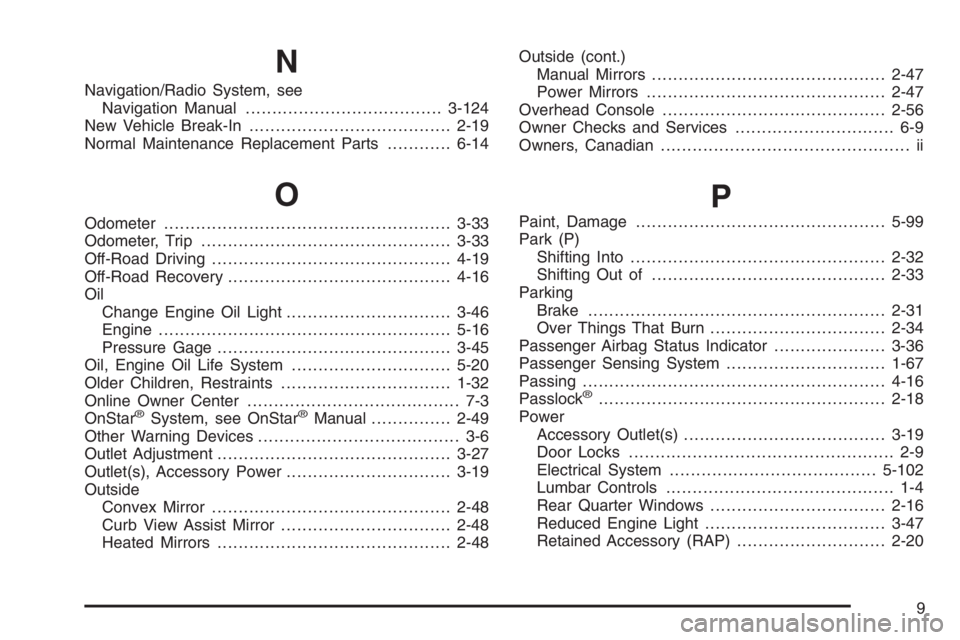
N
Navigation/Radio System, see
Navigation Manual.....................................3-124
New Vehicle Break-In......................................2-19
Normal Maintenance Replacement Parts............6-14
O
Odometer......................................................3-33
Odometer, Trip...............................................3-33
Off-Road Driving.............................................4-19
Off-Road Recovery..........................................4-16
Oil
Change Engine Oil Light...............................3-46
Engine.......................................................5-16
Pressure Gage............................................3-45
Oil, Engine Oil Life System..............................5-20
Older Children, Restraints................................1-32
Online Owner Center........................................ 7-3
OnStar
®System, see OnStar®Manual...............2-49
Other Warning Devices...................................... 3-6
Outlet Adjustment............................................3-27
Outlet(s), Accessory Power...............................3-19
Outside
Convex Mirror.............................................2-48
Curb View Assist Mirror................................2-48
Heated Mirrors............................................2-48Outside (cont.)
Manual Mirrors............................................2-47
Power Mirrors.............................................2-47
Overhead Console..........................................2-56
Owner Checks and Services.............................. 6-9
Owners, Canadian............................................... ii
P
Paint, Damage...............................................5-99
Park (P)
Shifting Into................................................2-32
Shifting Out of............................................2-33
Parking
Brake........................................................2-31
Over Things That Burn.................................2-34
Passenger Airbag Status Indicator.....................3-36
Passenger Sensing System..............................1-67
Passing.........................................................4-16
Passlock
®......................................................2-18
Power
Accessory Outlet(s)......................................3-19
Door Locks.................................................. 2-9
Electrical System.......................................5-102
Lumbar Controls........................................... 1-4
Rear Quarter Windows.................................2-16
Reduced Engine Light..................................3-47
Retained Accessory (RAP)............................2-20
9
Page 520 of 524

Power (cont.)
Seat ............................................................ 1-3
Steering Fluid.............................................5-36
Windows....................................................2-15
Pretensioners, Safety Belt................................1-31
Programmable Automatic Door Locks.................2-10
Q
Questions and Answers About Safety Belts.........1-18
R
Radiator Pressure Cap....................................5-28
Radios..........................................................3-66
Care of Your Cassette Tape Player...............3-141
Care of Your CD and DVD Player................3-142
Care of Your CDs and DVDs .......................3-142
Navigation/Radio System, see
Navigation Manual..................................3-124
Radio with Cassette and CD.........................3-96
Radio with CD....................................3-68, 3-80
Radio with Six-Disc CD..............................3-110
Rear Seat Audio........................................3-137
Setting the Time..........................................3-68
Theft-Deterrent..........................................3-139
Understanding Reception............................3-140
Rainsense™ Wipers.......................................... 3-9
Reading Lamps..............................................3-18Rear Axle......................................................5-47
Locking........................................................ 4-9
Rear Climate Control System............................3-28
Rear Compartment Storage Panel/Cover............2-58
Rear Door Security Locks................................2-12
Rear Floor Storage Lid....................................2-60
Rear Safety Belt Comfort Guides......................1-28
Rear Seat Audio (RSA)..................................3-137
Rear Seat Entertainment System.....................3-124
Rear Seat Operation......................................... 1-9
Rear Seat Passengers, Safety Belts..................1-26
Rear Windshield Washer/Wiper.........................3-10
Rearview Mirror, Automatic Dimming
with Compass.............................................2-43
Rearview Mirror, Automatic Dimming with
Compass and Temperature Display................2-44
Rearview Mirror, Automatic Dimming with
OnStar
®and Compass.................................2-39
Rearview Mirror, Automatic Dimming with
OnStar
®, Compass and Temperature Display.....2-40
Rearview Mirror with OnStar®...........................2-36
Rearview Mirror with OnStar®, Compass,
and Temperature Display..............................2-37
Rearview Mirrors.............................................2-36
Reclining Seatbacks.......................................... 1-5
Recommended Fluids and Lubricants.................6-12
Recreational Vehicle Towing.............................4-50
Reduced Engine Power Light............................3-47
Remote Keyless Entry System............................ 2-5
Remote Keyless Entry System, Operation............ 2-6
10