ECO GMC ENVOY DENALI 2007 Owner's Guide
[x] Cancel search | Manufacturer: GMC, Model Year: 2007, Model line: ENVOY DENALI, Model: GMC ENVOY DENALI 2007Pages: 562, PDF Size: 2.87 MB
Page 125 of 562
If the knob is turned to Four Wheel-High, Auto
Four-Wheel Drive, or Two-Wheel High when your
vehicle is in gear and/or moving, the Four-Wheel
High, Auto Four-Wheel Drive, or Two-Wheel
High indicator light will ash for 30 seconds. It will
not complete the shift unless your vehicle is
moving less than 2 mph (3.2 km/h) with the
transmission in NEUTRAL (N).
Shifting into NEUTRAL
Before shifting the transfer case to NEUTRAL, rst
make sure the vehicle is parked so that it will
not roll.
1. Set the parking brake.
2. Start the vehicle.
3. Put the transmission in NEUTRAL (N).
4. Shift the transfer case to Two-Wheel High.
5. Turn the transfer case knob all of the way past
Four-Wheel Low and hold it there for a
minimum of 10 seconds. The neutral indicator
light will come on.
6. With the engine running, shift the transmission
to REVERSE (R) for one second, then shift the
transmission to DRIVE (D) for one second, to
ensure that the transfer case is in NEUTRAL.7. Turn the engine off, by turning the key to
ACCESSORY.
8. Place the transmission shift lever in PARK (P).
9. Turn the ignition to LOCK.
Shifting Out of NEUTRAL
To shift the transfer case out of NEUTRAL, do the
following:
1. Set the parking brake and apply the regular
brake pedal.
2. Turn the ignition to RUN with the engine off.
3. Put the transmission in NEUTRAL (N).
4. Turn the transfer case knob to the desired
position (Two-Wheel High, Four-Wheel
High, or Auto Four-Wheel Drive).
5. After the transfer case has shifted out of
NEUTRAL, the indicator light will go out.
6. Release the parking brake.
7. Start the engine and shift the transmission to
the desired position.
125
Page 135 of 562
Compass Calibration
Press and hold the on/off button to activate the
compass calibration mode. CAL will be displayed
in the compass window on the mirror.
The compass can be calibrated by driving the
vehicle in circles at 5 mph (8 km/h) or less until the
display reads a direction.
Compass Variance
Compass variance is the difference between
earth’s magnetic north and true geographic north.
The mirror is set to zone eight upon leaving
the factory. It will be necessary to adjust the
compass to compensate for compass variance if
you live outside zone eight. Under certain
circumstances, such as during a long distance
cross-country trip, it will be necessary to adjust for
compass variance. If not adjusted to account
for compass variance, your compass could give
false readings.
To adjust for compass variance, do the following:
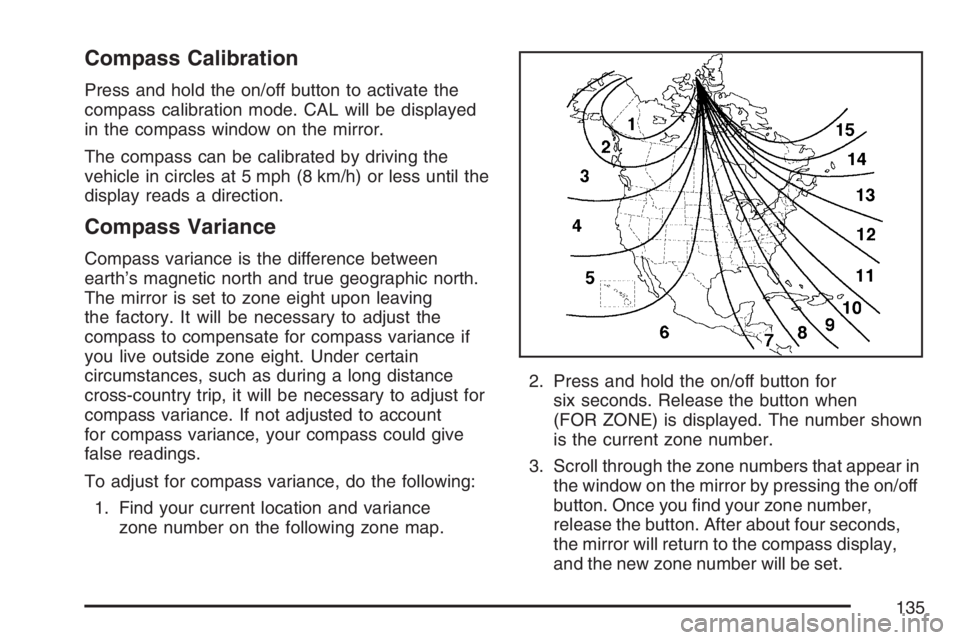
1. Find your current location and variance
zone number on the following zone map.2. Press and hold the on/off button for
six seconds. Release the button when
(FOR ZONE) is displayed. The number shown
is the current zone number.
3. Scroll through the zone numbers that appear in
the window on the mirror by pressing the on/off
button. Once you nd your zone number,
release the button. After about four seconds,
the mirror will return to the compass display,
and the new zone number will be set.
135
Page 136 of 562
Automatic Dimming Rearview Mirror
with OnStar
®, Compass and
Temperature Display
Your vehicle may have this feature. When on, an
automatic dimming mirror automatically dims
to the proper level to minimize glare from lights
behind you after dark.
The mirror also includes a dual display in the
upper right corner of the mirror face. The compass
reading and the outside temperature will both
appear in the display at the same time.
P(On/Off):This is the on/off button.
Automatic Dimming Mirror Operation
The automatic dimming mirror function is turned on
automatically each time the ignition is started.
To operate the automatic dimming mirror, do the
following:
1. Make sure the green indicator light, located to
the left of the on/off button, is lit. If it’s not,
press and hold the on/off button until the green
light comes on, indicating that the mirror is
in automatic dimming mode.2. Turn off the automatic dimming mirror function
by pressing and holding the on/off button until
the green indicator light turns off.
Temperature and Compass Display
Press the on/off button, located to the far
left, briey to turn the compass/temperature
display on or off.
If the display reads CAL, you will need to calibrate
the compass. For more information on calibration,
see below.
To adjust between Fahrenheit and Celsius, do the
following:
1. Press and hold the on/off button until either a
ashing F or C appears.
2. Press the button again to change the display
to the desired unit of measurement. After
approximately four seconds of inactivity, the
new unit will be locked in and the display
will return.
If an abnormal temperature reading is displayed
for an extended period of time, please consult your
dealer. Under certain circumstances, a delay in
updating the temperature is normal.
136
Page 137 of 562
Compass Variance
The mirror is set in zone eight upon leaving the
factory. It will be necessary to adjust the compass
to compensate for compass variance if you live
outside of zone eight. Under certain
circumstances, as during a long distance
cross-country trip, it will be necessary to adjust for
compass variance. Compass variance is the
difference between earth’s magnetic north and true
geographic north. If not adjusted to account for
compass variance, your compass could give false
readings.
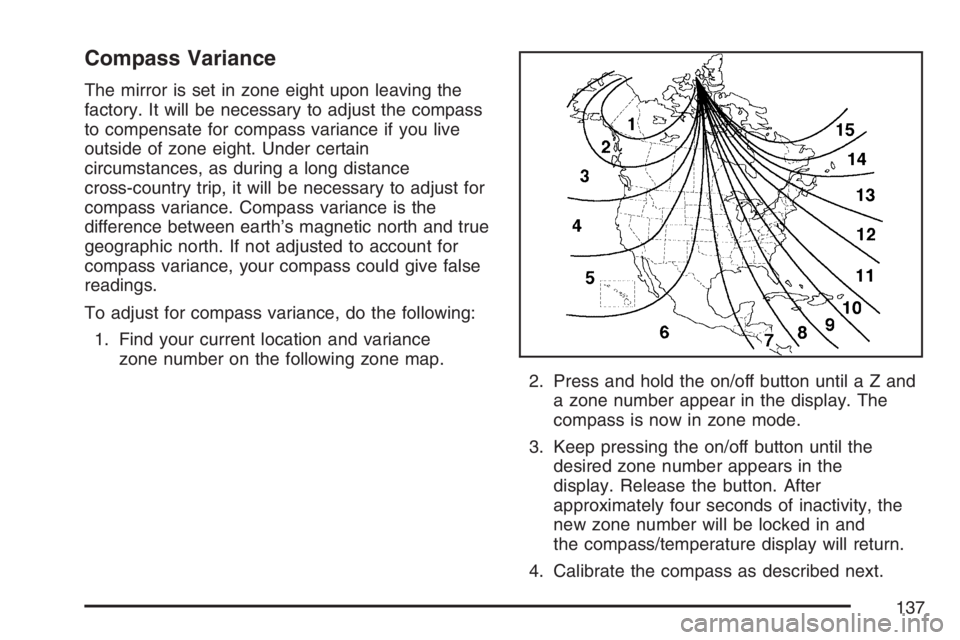
To adjust for compass variance, do the following:
1. Find your current location and variance
zone number on the following zone map.
2. Press and hold the on/off button untilaZand
a zone number appear in the display. The
compass is now in zone mode.
3. Keep pressing the on/off button until the
desired zone number appears in the
display. Release the button. After
approximately four seconds of inactivity, the
new zone number will be locked in and
the compass/temperature display will return.
4. Calibrate the compass as described next.
137
Page 138 of 562
Compass Calibration
The compass may need calibration if one of the
following occurs:
After approximately ve seconds, the display
does not show a compass heading (N for
North, for example), there may be a strong
magnetic eld interfering with the compass.
Such interference may be caused by a
magnetic antenna mount, magnetic note pad
holder or a similar magnetic item.
The compass does not display the correct
heading and the compass zone variance
is set correctly.
In order to calibrate, CAL must be displayed in the
mirror compass windows. If CAL is not displayed,
press and hold the on/off button until CAL is
displayed.
The compass can be calibrated by driving the
vehicle in circles at 5 mph (8 km/h) or less until the
display reads a direction.
Passenger Airbag Indicator
The vehicle may be equipped with a passenger
airbag indicator, on the mirror glass, just above the
buttons. If the vehicle has this feature, the
mirror will display the word ON, or an airbag
symbol in Canada, when the passenger airbag is
enabled. For more information, seePassenger
Sensing System on page 82.
Cleaning the Mirror
When cleaning the mirror, use a paper towel or
similar material dampened with glass cleaner.
Do not spray glass cleaner directly on the mirror
as that may cause the liquid cleaner to enter
the mirror housing.
Automatic Dimming Rearview Mirror
with Compass
Your vehicle may have an automatic-dimming
rearview mirror with a compass.
O(On/Off):This is the on/off button for the
automatic dimming feature and compass.
138
Page 140 of 562
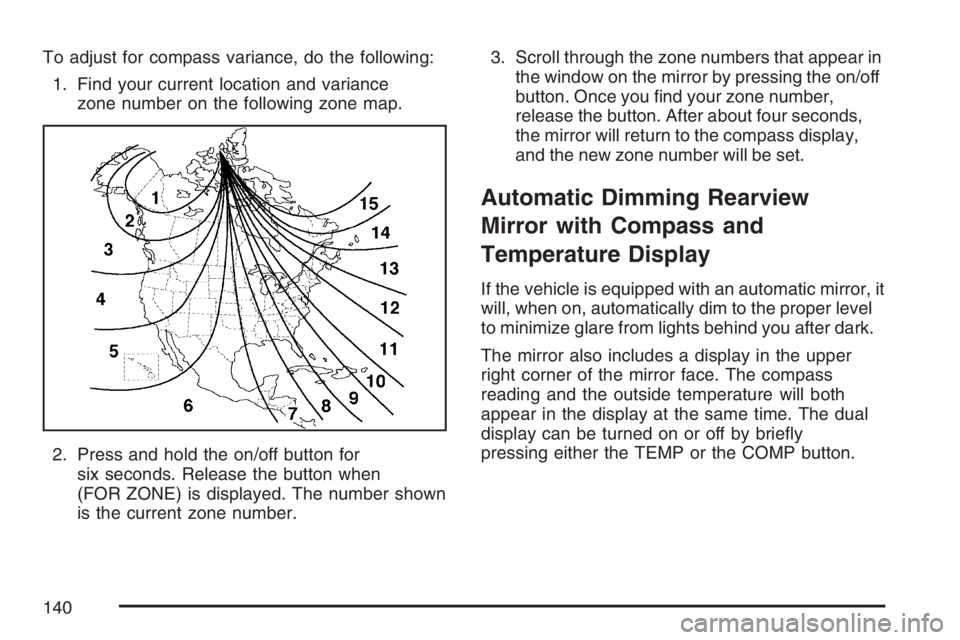
To adjust for compass variance, do the following:
1. Find your current location and variance
zone number on the following zone map.
2. Press and hold the on/off button for
six seconds. Release the button when
(FOR ZONE) is displayed. The number shown
is the current zone number.3. Scroll through the zone numbers that appear in
the window on the mirror by pressing the on/off
button. Once you nd your zone number,
release the button. After about four seconds,
the mirror will return to the compass display,
and the new zone number will be set.
Automatic Dimming Rearview
Mirror with Compass and
Temperature Display
If the vehicle is equipped with an automatic mirror, it
will, when on, automatically dim to the proper level
to minimize glare from lights behind you after dark.
The mirror also includes a display in the upper
right corner of the mirror face. The compass
reading and the outside temperature will both
appear in the display at the same time. The dual
display can be turned on or off by briey
pressing either the TEMP or the COMP button.
140
Page 141 of 562
Automatic Dimming Mirror Operation
The automatic dimming mirror function is turned on
automatically each time the ignition is started.
To operate the automatic dimming mirror, do the
following:
1. Make sure the green indicator light, located to
the left of the on/off button, is lit. If it’s not,
press and hold the on/off button until the green
light comes on, indicating that the mirror is
in automatic dimming mode.
2. Turn off the automatic dimming mirror function
by pressing and holding the on/off button until
the green indicator light turns off.
Temperature Display
The temperature can be displayed by pressing the
TEMP button. Pressing the TEMP button once
briey, will toggle the temperature reading on and
off. To alternate the temperature reading between
Fahrenheit and Celsius, press and hold the TEMP
button until the display blinks F and C. Press
and release the TEMP button to toggle between
the Fahrenheit and Celsius readings. After
approximately four seconds of inactivity, the
display will stop blinking and display the last
selection made.
If an abnormal reading is displayed, for an
extended period of time, please consult your
dealer. Under certain circumstances, a delay in
updating the temperature is normal.
Compass Operation
Press the COMP button once briey to turn the
compass on or off.
When the ignition and the compass feature are
on, the compass will show two character boxes for
approximately two seconds. After two seconds,
the mirror will display the compass heading.
141
Page 142 of 562
Compass Calibration
The compass may need calibration if one of the
following occurs:
If CAL is displayed while driving in the vehicle.
After approximately ve seconds, the display
does not show a compass heading (N for
North, for example), there may be a strong
magnetic eld interfering with the compass.
Such interference may be caused by a
magnetic antenna mount, magnetic note pad
holder or a similar magnetic item.
The compass does not display the correct
heading and the compass zone variance
is set correctly.
In order to calibrate, CAL must be displayed in the
mirror compass windows. If CAL is not displayed,
press and hold the COMP button until CAL is
displayed.
The compass can be calibrated by driving the
vehicle in circles at 5 mph (8 km/h) or less until the
display reads a direction.
Compass Variance
The mirror is set in zone eight upon leaving the
factory. It will be necessary to adjust the compass
to compensate for compass variance if you live
outside zone eight. Under certain circumstances,
as during a long distance cross-country trip, it
will be necessary to adjust for compass variance.
Compass variance is the difference between
earth’s magnetic north and true geographic north.
If not adjusted to account for compass variance,
your compass could give false readings.
To adjust for compass variance, do the following:
1. Find your current location and variance
zone number on the following zone map.
2. Press and hold the COMP button until a zone
number appears in the display.
142
Page 143 of 562
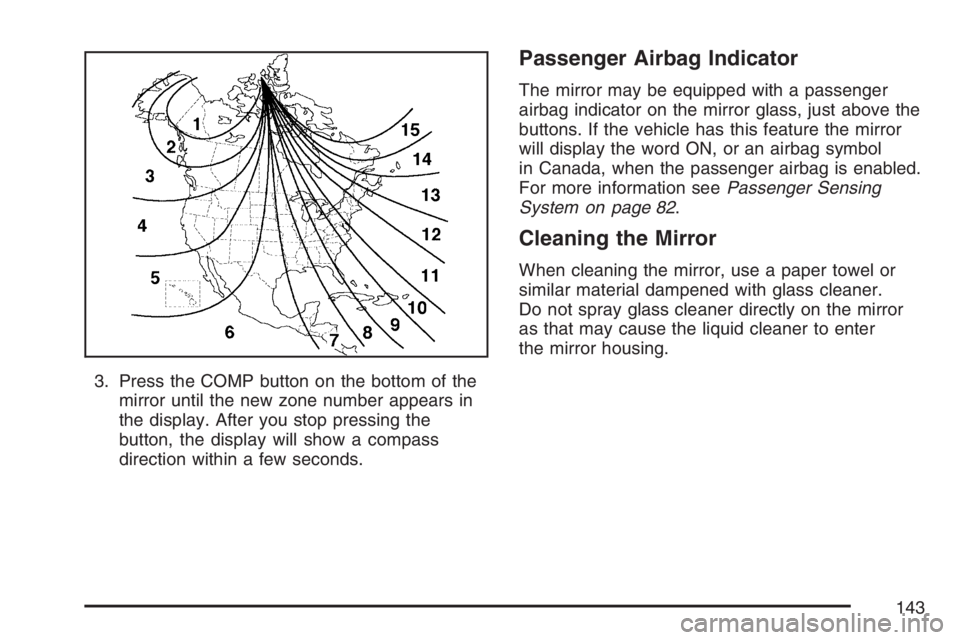
3. Press the COMP button on the bottom of the
mirror until the new zone number appears in
the display. After you stop pressing the
button, the display will show a compass
direction within a few seconds.
Passenger Airbag Indicator
The mirror may be equipped with a passenger
airbag indicator on the mirror glass, just above the
buttons. If the vehicle has this feature the mirror
will display the word ON, or an airbag symbol
in Canada, when the passenger airbag is enabled.
For more information seePassenger Sensing
System on page 82.
Cleaning the Mirror
When cleaning the mirror, use a paper towel or
similar material dampened with glass cleaner.
Do not spray glass cleaner directly on the mirror
as that may cause the liquid cleaner to enter
the mirror housing.
143
Page 148 of 562
OnStar®Steering Wheel Controls
Your vehicle may have a Talk/Mute button that
can be used to interact with OnStar®Hands-Free
Calling. SeeAudio Steering Wheel Controls on
page 297for more information.
On some vehicles, you may have to hold the
button for a few seconds and give the command
“ONSTAR” in order to activate the OnStar
®
Hands-Free Calling feature.
On some vehicles, the mute button can be used to
dial numbers into voicemail systems, or to dial
phone extensions. See the OnStar
®Owner’s
Guide for more information.
How OnStar®Service Works
In order to provide you with OnStar®services,
your vehicle’s OnStar®system has the capability
of recording and transmitting vehicle information.
This information is automatically sent to an
OnStar
®Call Center at the time of an OnStar®
button press, Emergency button press or if
your airbags or AACN system deploys. The vehicle
information usually includes your GPS location
and, in the event of a crash, additional information
regarding the accident that your vehicle has
been involved in (e.g. the direction from which
your vehicle was hit). When you use the Virtual
Advisor feature of OnStar
®Hands-Free Calling,
your vehicle also sends OnStar®your GPS
location so that we can provide you with
location-based services.
148