parking GMC ENVOY DENALI 2009 User Guide
[x] Cancel search | Manufacturer: GMC, Model Year: 2009, Model line: ENVOY DENALI, Model: GMC ENVOY DENALI 2009Pages: 474, PDF Size: 2.54 MB
Page 112 of 474
Shifting Out of Park
The vehicle has an electronic shift lock release system.
The shift lock release is designed to:
Prevent ignition key removal unless the shift lever
is in P (Park) with the shift lever button fully
released, and
Prevent movement of the shift lever out of P (Park),
unless the ignition is in ON/RUN and the regular
brake pedal is applied.
The shift lock release is always functional except in the
case of an uncharged or low voltage (less than 9 volt)
battery.
If the vehicle has an uncharged battery or a battery with
low voltage, try charging or jump starting the battery.
SeeJump Starting on page 5-39for more information.
To shift out of P (Park) use the following:
1. Apply the brake pedal.
2. Press the shift lever button.
3. Move the shift lever to the desired position.If you still are unable to shift out of P (Park):
1. Fully release the shift lever button.
2. Hold the brake pedal down and press the shift lever
button again.
3. Move the shift lever to the desired position.
If you still cannot move the shift lever from P (Park),
consult your dealer/retailer or a professional towing
service.
Parking Over Things That Burn
{CAUTION:
Things that can burn could touch hot exhaust
parts under the vehicle and ignite. Do not park
over papers, leaves, dry grass, or other things that
can burn.
2-36
Page 113 of 474
Engine Exhaust
{CAUTION:
Engine exhaust contains Carbon Monoxide (CO)
which cannot be seen or smelled. Exposure to CO
can cause unconsciousness and even death.
Exhaust may enter the vehicle if:
The vehicle idles in areas with poor ventilation
(parking garages, tunnels, deep snow that
may block underbody airow or tail pipes).
The exhaust smells or sounds strange or
different.
The exhaust system leaks due to corrosion or
damage.
CAUTION: (Continued)
CAUTION: (Continued)
The vehicle’s exhaust system has been
modied, damaged or improperly repaired.
There are holes or openings in the vehicle
body from damage or after-market
modications that are not completely sealed.
If unusual fumes are detected or if it is suspected
that exhaust is coming into the vehicle:
Drive it only with the windows
completely down.
Have the vehicle repaired immediately.
Never park the vehicle with the engine running in
an enclosed area such as a garage or a building
that has no fresh air ventilation.
2-37
Page 114 of 474
Running the Vehicle While Parked
It is better not to park with the engine running. But if you
ever have to, here are some things to know.
{CAUTION:
Idling a vehicle in an enclosed area with poor
ventilation is dangerous. Engine exhaust may
enter the vehicle. Engine exhaust contains Carbon
Monoxide (CO) which cannot be seen or smelled.
It can cause unconsciousness and even death.
Never run the engine in an enclosed area that has
no fresh air ventilation. For more information, see
Engine Exhaust on page 2-37.
{CAUTION:
It can be dangerous to get out of the vehicle if the
automatic transmission shift lever is not fully in
P (Park) with the parking brake rmly set. The
CAUTION: (Continued)
CAUTION: (Continued)
vehicle can roll. Do not leave the vehicle when the
engine is running unless you have to. If you have
left the engine running, the vehicle can move
suddenly. You or others could be injured. To be
sure the vehicle will not move, even when you are
on fairly level ground, always set the parking
brake and move the shift lever to P (Park).
{CAUTION:
If the vehicle has four-wheel drive, it will be free to
roll — even if the shift lever is in P (Park) — if the
transfer case is in N (Neutral). So be sure the
transfer case is in a drive gear — not in N (Neutral).
SeeFour-Wheel Drive on page 2-28.
Follow the proper steps to be sure the vehicle will not
move. SeeShifting Into Park on page 2-34.
If pulling a trailer, seeTowing a Trailer on page 4-46.
2-38
Page 137 of 474
The main components of the instrument panel are the following:
A.Headlamps on page 3-13.Dome Lamp Override
on page 3-16.Instrument Panel Brightness on
page 3-16.Fog Lamps on page 3-15(If Equipped).
B.Outlet Adjustment on page 3-26.
C.Turn Signal/Multifunction Lever on page 3-7.
D. OnStar
®and Audio Steering Wheel Controls.
SeeAudio Steering Wheel Controls on page 3-110.
E.Instrument Panel Cluster on page 3-28.
F.Audio Steering Wheel Controls on page 3-110.
G.Ignition Positions on page 2-21.
H.Audio System(s) on page 3-62.
I.Dual Climate Control System on page 3-19.
J.Hood Release on page 5-11.
K. Driver Information Center (DIC) Steering Wheel
Controls. SeeDriver Information Center (DIC)
on page 3-47.L. Transfer Case Controls. See “Automatic Transfer
Case” underFour-Wheel Drive on page 2-28.
M. Shift Lever and StabiliTrak
®(If Equipped) Button.
SeeShifting Into Park on page 2-34andStabiliTrak®
System on page 4-6.
N. Lighter. SeeAshtray(s) and Cigarette Lighter on
page 3-19.
O.Accessory Power Outlet(s) on page 3-18.
P.Parking Brake on page 2-33.
Q. Rear Window Washer/Wiper. SeeWindshield
Washer on page 3-9.
R. Rear Window Defogger. SeeDual Climate Control
System on page 3-19andDual Automatic Climate
Control System on page 3-22.
S.Glove Box on page 2-51.
3-5
Page 145 of 474
Ending Cruise Control
There are three ways to turn off the cruise control:
Step lightly on the brake pedal.
Move the cruise switch to9.
Shift the transmission to N (Neutral).
Erasing Speed Memory
The cruise control set speed memory is erased when
the cruise control or the ignition is turned off.
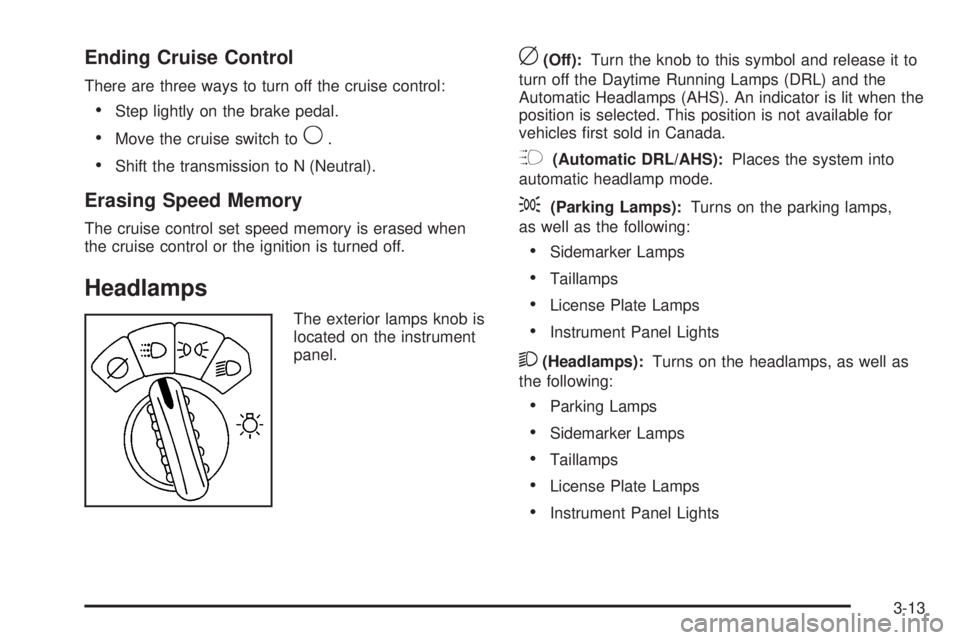
Headlamps
The exterior lamps knob is
located on the instrument
panel.
c(Off):Turn the knob to this symbol and release it to
turn off the Daytime Running Lamps (DRL) and the
Automatic Headlamps (AHS). An indicator is lit when the
position is selected. This position is not available for
vehicles rst sold in Canada.
?(Automatic DRL/AHS):Places the system into
automatic headlamp mode.
;(Parking Lamps):Turns on the parking lamps,
as well as the following:
Sidemarker Lamps
Taillamps
License Plate Lamps
Instrument Panel Lights
2(Headlamps):Turns on the headlamps, as well as
the following:
Parking Lamps
Sidemarker Lamps
Taillamps
License Plate Lamps
Instrument Panel Lights
3-13
Page 146 of 474
Headlamps on Reminder
A reminder tone sounds when the headlamps or
parking lamps are manually turned on, if the driver’s
door is open and the ignition is in LOCK/OFF or
ACC/ACCESSORY. To turn the tone off, turn the knob
all the way counterclockwise.
In the automatic mode, the headlamps turn off once the
ignition key is in LOCK/OFF.
Daytime Running Lamps (DRL)
Daytime Running Lamps (DRL) can make it easier for
others to see the front of your vehicle during the day.
Fully functional DRL are required on all vehicles
rst sold in Canada.
The DRL system makes the headlamps come on at
reduced brightness when the following conditions
are met:
The ignition is on.
The exterior lamps knob is in automatic
headlamp mode.
The light sensor detects daytime light.
The transmission is not in P (Park).When the DRL are on, only the headlamps will be on.
The taillamps, sidemarker, instrument panel lights
and other lamps will not be on.
When it begins to get dark, the headlamps automatically
switch from DRL to the regular headlamps.
Automatic Headlamp System
When it is dark enough outside, the Automatic
Headlamp System turns on the headlamps when
the vehicle is started and after the transmission
has been shifted out of the P (Park) position.
The headlamps, taillamps, sidemarker, and parking
lamps will come on. The instrument panel lights
and radio lights will also turn on at normal brightness.
Once on, the system remains on during these conditions
even if the vehicle is shifted back into P (Park).
The vehicle has a light sensor on the top of the
instrument panel. Do not cover the sensor or the system
may come on whenever the ignition is on and the
vehicle is shifted out of the P (Park) position.
The system could also turn on the lamps when driving
through a parking garage, heavy overcast weather
or a tunnel. This is normal.
3-14
Page 150 of 474
Battery Run-Down Protection
This feature shuts off the dome, courtesy, and vanity
lamps if they are left on for more than 20 minutes when
the ignition is off. This helps to keep the battery from
running down.
If the battery run-down protection shuts off the interior
lamps, it may be necessary to do one of the following to
return to normal operation:
Shut off all lamps and close all doors.
Turn the ignition key to ON/RUN.
This feature also turns off the parking lamps and
headlamps under most circumstances, if they
are left on. Turn the exterior lamps knob to turn
them back on.
Accessory Power Outlet(s)
Accessory power outlets let you plug in auxiliary
electrical equipment, such as a cellular telephone.
The vehicle has three accessory power outlets.
There are two outlets located below the climate
controls and one outlet is on the rear of the center oor
console.Remove the cover from the outlet to use the outlet.
Be sure to put the cover back on when not using the
accessory power outlet.
Certain electrical accessories may not be compatible
with the accessory power outlet and could result
in blown vehicle or adaptor fuses. If you experience a
problem, see your dealer/retailer for additional
information on the accessory power outlets.
Notice:Adding any electrical equipment to the
vehicle can damage it or keep other components
from working as they should. The repairs would not
be covered by the vehicle warranty. Do not use
equipment exceeding maximum amperage rating of
20 amperes. Check with your dealer/retailer before
adding electrical equipment.
When adding electrical equipment, be sure to follow
the proper installation instructions included with
the equipment.
Notice:Improper use of the power outlet can cause
damage not covered by the warranty. Do not hang
any type of accessory or accessory bracket from the
plug because the power outlets are designed for
accessory power plugs only.
3-18
Page 167 of 474
Brake System Warning Light
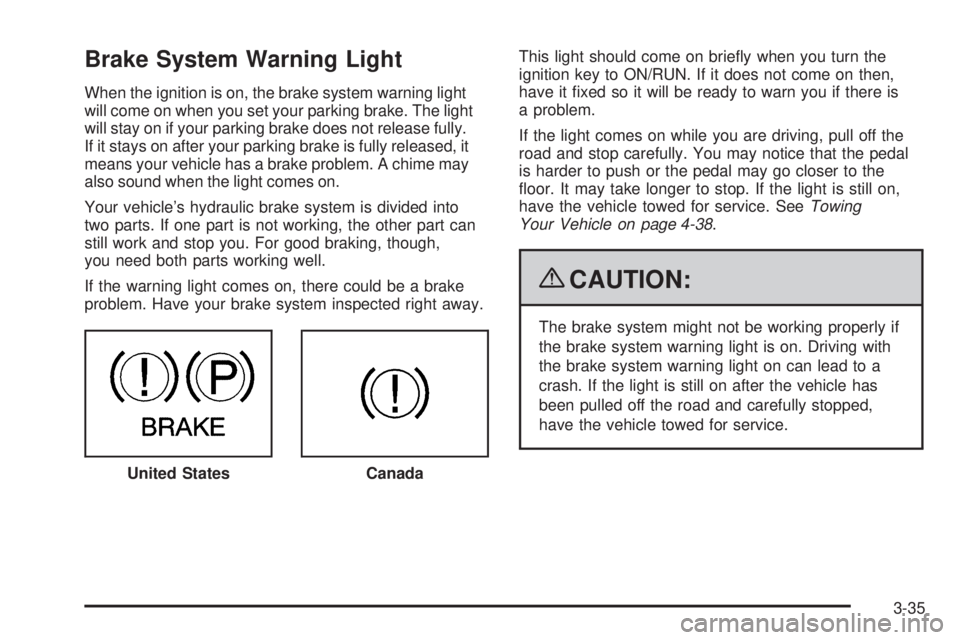
When the ignition is on, the brake system warning light
will come on when you set your parking brake. The light
will stay on if your parking brake does not release fully.
If it stays on after your parking brake is fully released, it
means your vehicle has a brake problem. A chime may
also sound when the light comes on.
Your vehicle’s hydraulic brake system is divided into
two parts. If one part is not working, the other part can
still work and stop you. For good braking, though,
you need both parts working well.
If the warning light comes on, there could be a brake
problem. Have your brake system inspected right away.This light should come on briey when you turn the
ignition key to ON/RUN. If it does not come on then,
have it xed so it will be ready to warn you if there is
a problem.
If the light comes on while you are driving, pull off the
road and stop carefully. You may notice that the pedal
is harder to push or the pedal may go closer to the
oor. It may take longer to stop. If the light is still on,
have the vehicle towed for service. SeeTowing
Your Vehicle on page 4-38.
{CAUTION:
The brake system might not be working properly if
the brake system warning light is on. Driving with
the brake system warning light on can lead to a
crash. If the light is still on after the vehicle has
been pulled off the road and carefully stopped,
have the vehicle towed for service.
United States
Canada
3-35
Page 190 of 474
Lock Feedback
Press4until LOCK FEEDBACK: BOTH appears in the
display. To select your preference for the feedback
you receive when locking the vehicle with the Remote
Keyless Entry (RKE) transmitter, press
rwhile
LOCK FEEDBACK: BOTH is displayed on the DIC.
Pressing
rwill scroll through the following settings:
LOCK FEEDBACK: BOTH (default):The parking
lamps will ash each time you press the button with the
lock symbol on the RKE transmitter and the horn will
chirp the second time you press the lock button.
LOCK FEEDBACK: OFF:There will be no feedback
when locking the vehicle.
LOCK FEEDBACK: LAMPS:The parking lamps will
ash each time you press the button with the lock
symbol on the RKE transmitter.
LOCK FEEDBACK: HORN:The horn will chirp the
second time you press the button with the lock symbol
on the RKE transmitter.
To select a setting and move on to the next feature,
press
4while the desired setting is displayed on the DIC.
Unlock Feedback
Press4until UNLOCK FEEDBACK: LAMPS appears in
the display. To select your preference for the feedback
you will receive when unlocking the vehicle with the
Remote Keyless Entry (RKE) transmitter, press
r
while UNLOCK FEEDBACK: LAMPS is displayed on
the DIC. Pressing
rwill scroll through the following
settings:
UNLOCK FEEDBACK: LAMPS (default):The parking
lamps will ash each time you press the button with
the unlock symbol on the RKE transmitter.
UNLOCK FEEDBACK: HORN:The horn will chirp the
second time you press the button with the unlock
symbol on the RKE transmitter.
UNLOCK FEEDBACK: BOTH:The parking lamps will
ash each time you press the button with the unlock
symbol on the RKE transmitter and the horn will
chirp the second time you press the unlock button.
UNLOCK FEEDBACK: OFF:There will be no feedback
when unlocking the vehicle.
To select a setting and move on to the next feature,
press
4while the desired setting is displayed on the DIC.
3-58
Page 195 of 474
Notice:Contact your dealer/retailer before adding
any equipment.
Adding audio or communication equipment could
interfere with the operation of the vehicle’s engine,
radio, or other systems, and could damage them.
Follow federal rules covering mobile radio and
telephone equipment.
Notice:The chime signals related to safety belts,
parking brake, and other functions of your vehicle
operate through the radio/entertainment system.
If that equipment is replaced or additional equipment
is added to your vehicle, the chimes may not
work. Make sure that replacement or additional
equipment is compatible with your vehicle before
installing it. SeeAccessories and Modifications
on page 5-3.
The vehicle has Retained Accessory Power (RAP).
With RAP, the audio system can be played even after
the ignition is turned off. SeeRetained Accessory Power
(RAP) on page 2-22for more information.Setting the Clock
The clock can be set with the ignition on or off.
The radio may have a button marked with an H or HR to
represent hours and an M or MN to represent minutes.
Press and hold the hour button until the correct hour
displays. AM or PM displays for morning or evening
hours. Press and hold the minute button until the correct
minute displays.
To synchronize the time with an FM station broadcasting
Radio Data System (RDS) information, press and hold
the hour and minute buttons at the same time until
UPDATED and the clock symbol appear on the
display. If the time is not available from the station,
NO UPDATE or NO UPDAT will appear on the display.
RDS time is broadcast once a minute. After tuning
to an RDS broadcast station, it could take a few minutes
for the time to update.
3-63