tailgate GMC ENVOY XUV 2005 User Guide
[x] Cancel search | Manufacturer: GMC, Model Year: 2005, Model line: ENVOY XUV, Model: GMC ENVOY XUV 2005Pages: 474, PDF Size: 2.67 MB
Page 93 of 474

Ignition Positions
Use the key to turn the ignition switch to four different
positions.
A (Lock):This position locks the ignition and
transmission. It is a theft-deterrent feature. You will only
be able to remove the key when the ignition is turned
to LOCK.
Notice:Using a tool to force the key from the
ignition switch could cause damage or break the key.
Use the correct key and turn the key only with your
hand. Make sure the key is in all the way. If none of
this works, then your vehicle needs service.B (Accessory):This position lets you use things
like the radio and the windshield wipers when the
engine is off.
Notice:Lengthy operation of features such as
the radio in the accessory ignition position may
drain the battery and prevent your vehicle from
starting. Do not operate your vehicle in the
accessory ignition position for a long period
of time.
C (Run):This is the position for driving.
D (Start):This position starts the engine.
Retained Accessory Power (RAP)
Your vehicle is equipped with a Retained Accessory
Power (RAP) feature which will allow certain features of
your vehicle to continue to work up to 20 minutes
after the ignition key is turned to LOCK.
Your radio, power windows, sunroof (option) and
overhead console (including tailgate glass and power
roof) will work when the ignition key is in RUN or
ACCESSORY. Once the key is turned from RUN to
LOCK, these features will continue to work for up
to 20 minutes or until a door is opened.
2-25
Page 126 of 474
Reprogramming a Single
HomeLink®Button
To program a device to HomeLink®using a HomeLink®
button previously trained, follow these steps:
1. Press and hold the desired HomeLink
®button.
Do not release the button.
2. The indicator light will begin to ash after
20 seconds. While still holding the HomeLink
®
button, proceed with Step 2 under “Programming
HomeLink®” shown earlier in this section.
Resetting Defaults
To reset HomeLink®to default settings do the following:
1. Hold down the two outside buttons for about
20 seconds until the indicator light begins to ash.
2. Continue to hold both buttons until the HomeLink
®
indicator light turns off.
3. Release both buttons.
For questions or comments, contact HomeLink
®
at 1-800-355-3515, or on the Internet at
www.homelink.com.
Storage Areas
Glove Box
Open the glove box by pulling the side of the handle
towards the driver’s side.
Overhead Console
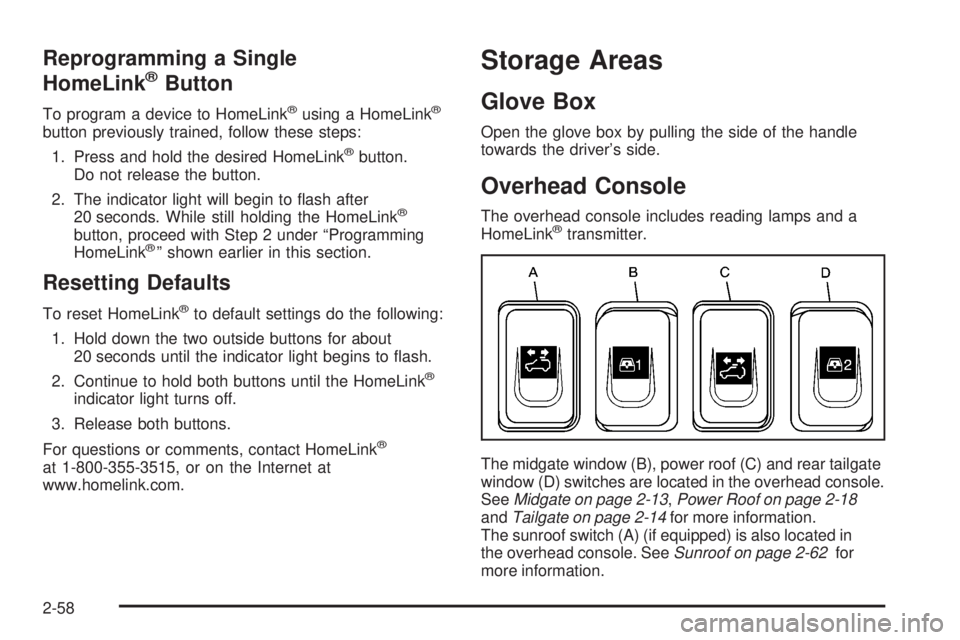
The overhead console includes reading lamps and a
HomeLink®transmitter.
The midgate window (B), power roof (C) and rear tailgate
window (D) switches are located in the overhead console.
SeeMidgate on page 2-13,Power Roof on page 2-18
andTailgate on page 2-14for more information.
The sunroof switch (A) (if equipped) is also located in
the overhead console. SeeSunroof on page 2-62for
more information.
2-58
Page 127 of 474
Center Console Storage Area
If your vehicle has this console compartment, squeeze
the front lever while lifting the top to open it.
Your vehicle’s console will be equipped with cupholders
located on the front and rear of the storage compartment.
The console may also contain one or more of the
following components:
Rear Seat Audio Controls
Rear Seat Accessory Power Outlets
Rear Climate Control
If your vehicle has the center armrest compartment,
lift the cover by pulling up on the latch handle located
underneath the front edge of the armrest. The storage
area includes slots for cassettes or compact discs.
Assist Handles
A handle above each door can be used when getting
out of your vehicle.
All-Weather Cargo Area
Your vehicle has the ability to operate in many different
congurations (midgate up or down, rear glass up or
down, tailgate up or down, power roof open or closed),
allowing the cargo and passenger area to be open
to the environment. To allow the vehicle to operate
in these congurations, it is equipped with different
features to help it resist the elements and protect
cargo inside the cargo area. Some of the features that
help with this are the cargo area oor drains and
the cargo mat. These are designed to quickly direct
water out of the cargo box.
2-59
Page 143 of 474

To wash the rear window, press the washer symbol
located in the center of the control.
The rear window washer/wiper can only be activated if
the tailgate window is fully closed. The Driver Information
Center (DIC) will display a TAILGATE GLASS DOWN
message to indicate that the rear washer/wiper has been
disabled because the window is not fully closed. SeeDIC
Warnings and Messages on page 3-52.
The rear window washer uses the same uid bottle as
the windshield washer. However, the rear window
washer will run out of uid before the windshield washer.
If you can wash your windshield but not your rear
window, check the uid level.Headlamp Washer
Your vehicle may be
equipped with a headlamp
washer system. The
button to operate this
feature is located on the
instrument panel and
functions separately from
your other washer
systems.
To wash your headlamps, press the headlamp washer
button briey and release to activate the system.
3-11
Page 154 of 474

Defogging and Defrosting
Fog on the inside of windows is a result of high humidity
(moisture) condensing on the cool window glass.
This can be minimized if the climate control system is
used properly. There are two modes to choose from
to clear fog or frost from your windshield. Use the defog
mode to clear the windows of fog or moisture and
warm the passengers. Use the defrost mode to remove
fog or frost from the windshield more quickly.
Turn the right knob clockwise or counterclockwise to
select one of the following modes:
-(Defog):This mode directs the air to the oor outlets,
windshield and side window outlets. The recirculation
button cannot be selected while in defog mode.
1(Defrost):This mode directs most of the air to the
windshield and the side window outlets, with only a
little air directed to the oor outlets. The air conditioning
compressor may run to dehumidify the air to prevent
window fogging. The recirculation button cannot
be selected while in defrost mode. Do not drive the
vehicle until all the windows are clear.
Rear Window Defogger
The lines you see on the rear window warm the glass.
<(Rear):Press this button to turn the rear window
defogger on or off. The rear window defogger can
only be activated if the tailgate window is fully closed.
The Driver Information Center will display “Tailgate
Glass Down” to indicate that the rear window defogger
has been disabled because the window is not fully
closed. An indicator light in the button will come on to
let you know that the rear window defogger is active.
The rear window defogger will automatically turn
off approximately ten minutes after the button is pressed.
If your vehicle is equipped with heated mirrors, this
button will activate them.
Notice:Don’t use anything sharp on the inside of
the rear window. If you do, you could cut or damage
the warming grid, and the repairs wouldn’t be
covered by your warranty. Do not attach a temporary
vehicle license, tape, a decal or anything similar
to the defogger grid.
3-22
Page 185 of 474

CLOSE THE ROOF
The roof must be closed to enable future roof and/or
tailgate operations. SeePower Roof on page 2-18
for more information.
CLOSE THE TAILGATE
The tailgate must be closed to operate the tailgate
glass. SeeTailgate on page 2-14.
CURB VIEW ACTIVATED
The curb view activated message is displayed when the
passenger outside rearview mirror moves into the
curb view position. SeeOutside Curb View Assist Mirror
on page 2-51for more information.
DRIVER DOOR AJAR
If the driver’s door is not fully closed, this message will
appear on the display and you will hear a chime.
Stop and turn off the vehicle, check the door for
obstacles, and close the door again. Check to see if the
message still appears on the DIC. Pressing the select
button will acknowledge this message and clear it
from the DIC display.
ENGINE COOLANT HOT/ENGINE
OVERHEATED
If the cooling system temperature gets hot, this message
will appear in the DIC and you will hear a chime.
SeeEngine Overheating on page 5-28for the proper
course of action. This message will clear when the
coolant temperature drops to a safe operating
temperature.
FUEL LEVEL LOW
If the fuel level is low in the vehicle’s gas tank this
message will appear on the DIC and you will hear a
chime. Refuel as soon as possible. Pressing the select
button will acknowledge this message and clear it
from the DIC display. SeeLow Fuel Warning Light on
page 3-47,Filling Your Tank on page 5-8andFuel
on page 5-5for more information.
ICE POSSIBLE
If the outside temperature reaches a level where ice
could form on the roadway, this message may appear
on the DIC. If the temperature rises to a safe level,
the message will clear. Pressing the select button will
acknowledge this message and clear it from the
DIC display.
3-53
Page 186 of 474
KEY FOB # BATTERY LOW
If a remote keyless entry transmitter battery is low,
this message will appear on the DIC. The battery
needs to be replaced in the transmitter. See “Battery
Replacement” underRemote Keyless Entry System
Operation on page 2-6. Pressing the select button will
acknowledge this message and clear it from the
DIC display.
LEFT REAR DOOR AJAR
If the driver’s side rear door is not fully closed this
message will appear on the display and you will hear a
chime. Stop and turn off the vehicle, check the door
for obstacles, and close the door again. Check to see if
the message still appears on the DIC. Pressing the
select button will acknowledge this message and clear it
from the DIC display.
OIL PRESSURE LOW/STOP ENGINE
If low oil pressure levels occur, this message will
be displayed on the DIC. Stop the vehicle as soon as
safely possible and do not operate it until the cause
of the low oil pressure has been corrected. Check your
oil as soon as possible and have your vehicle serviced
by your GM dealer. SeeEngine Oil on page 5-16.Notice:If you drive your vehicle while the engine
oil pressure is low, severe engine damage may
occur. If a low oil pressure warning appears on the
Driver Information Center (DIC), stop the vehicle
as soon as possible. Do not drive the vehicle until
the cause of the low oil pressure is corrected.
SeeEngine Oil on page 5-16for more information.
OPEN THE ROOF
The roof must be opened to enable future roof and/or
tailgate operations. SeePower Roof on page 2-18
andTailgate on page 2-14.
PARK TO OPERATE ROOF
Stop the vehicle and shift into PARK (P) to operate the
roof. SeePower Roof on page 2-18.
PASSENGER DOOR AJAR
If the passenger’s door is not fully closed, this message
will appear on the display and you will hear a chime.
Stop and turn off the vehicle, check the door for
obstacles, and close the door again. Check to see if the
message still appears on the DIC. Pressing the select
button will acknowledge this message and clear it
from the DIC display.
3-54
Page 187 of 474

REAR WIPER OBSTRUCTION
Check the rear wiper. An object is preventing it from
moving to the off position. Tailgate glass operations
cannot be performed if the rear wiper is not in the off
position. SeeWindshield Wiper Blade Replacement
on page 5-53.
RIGHT REAR DOOR AJAR
If the passenger’s side rear door is not fully closed this
message will appear on the display and you will hear
a chime. Stop and turn off the vehicle, check the door for
obstacles, and close the door again. Check to see if
the message still appears on the DIC. Pressing
the select button will acknowledge this message and
clear it from the DIC display.
ROOF CLOSED
The roof is closed and latched. SeePower Roof on
page 2-18for more information.
ROOF IS CLOSING
The roof is moving in the closed direction. SeePower
Roof on page 2-18for more information.
ROOF IS OPENING
The roof is moving in the opened direction. SeePower
Roof on page 2-18for more information.
ROOF OPENED
The roof is opened and stowed. SeePower Roof on
page 2-18for more information.
SERVICE AIR BAG
If there is a problem with the airbag system this
message will be displayed on the DIC. Have your
GM dealer inspect the system for problems. SeeAirbag
Readiness Light on page 3-34andAirbag System on
page 1-46for more information. Pressing the select
button will acknowledge this message and clear it from
the DIC display.
SERVICE BRAKE SYSTEM
If a problem occurs with the brake system this message
will appear on the DIC. If this message appears, stop
as soon as possible and turn off the vehicle. Restart the
vehicle and check for the message on the DIC display.
If the message is still displayed, or appears again when
you begin driving, the brake system needs service.
See your GM dealer.
3-55
Page 188 of 474

TAILGATE AJAR
The tailgate is ajar and should be closed before moving
the vehicle. SeeTailgate on page 2-14for more
information.
TAILGATE GLASS DOWN
The rear wiper/defog request cannot be performed
because the tailgate glass is down. SeeTailgate
on page 2-14andWindshield Washer on page 3-10
for more information.
TAILGATE OPEN
The tailgate is in drop mode. Operate the vehicle with
caution. SeeTailgate on page 2-14for more information.
TAILGATE–SEE MANUAL
The window position needs to be reset. Activate the
tailgate window up switch and continue to hold it for two
seconds after the window is fully closed. Then activate
the tailgate window down switch and continue to
hold it for two seconds after the window is fully open.
SeeTailgate on page 2-14. If this process does not
restore the tailgate function, see your GM dealer
for service.
TIGHTEN FUEL CAP
If the vehicle’s fuel cap is not tightened properly, this
message may appear on the DIC and a chime will
sound. Fully reinstall the fuel cap. SeeFilling Your Tank
on page 5-8. The diagnostic system can determine if
the fuel cap has been left off or improperly installed.
A loose or missing fuel cap will allow fuel to evaporate
into the atmosphere. The DIC message will remain
on until the message is cancelled with the return button
on the steering wheel. The DIC message will also be
cancelled if the ignition is turned off.
The DIC message and the Service Engine Soon light
may come on again during a second trip if the fuel cap is
still not tightened properly. SeeMalfunction Indicator
Lamp on page 3-40for more information.
TURN SIGNAL ON
If a turn signal is left on for 3/4 of a mile (1.2 km), this
message will appear on the display and you will hear a
chime. Move the turn signal/multifunction lever to the off
position. Pressing the select button will acknowledge this
message and clear it from the DIC display.
3-56
Page 371 of 474
Taillamps, Turn Signal, and
Stoplamps
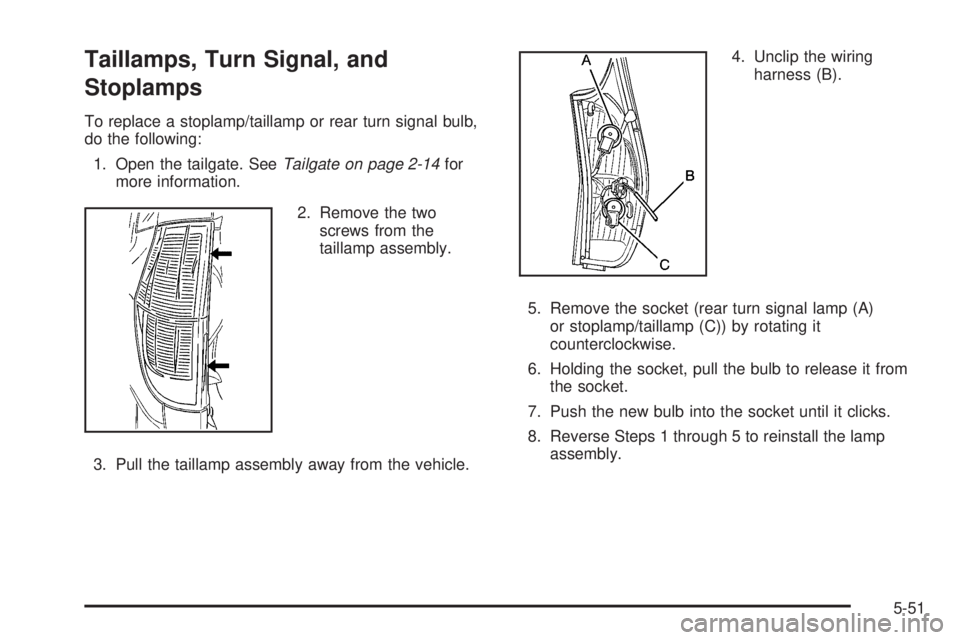
To replace a stoplamp/taillamp or rear turn signal bulb,
do the following:
1. Open the tailgate. SeeTailgate on page 2-14for
more information.
2. Remove the two
screws from the
taillamp assembly.
3. Pull the taillamp assembly away from the vehicle.4. Unclip the wiring
harness (B).
5. Remove the socket (rear turn signal lamp (A)
or stoplamp/taillamp (C)) by rotating it
counterclockwise.
6. Holding the socket, pull the bulb to release it from
the socket.
7. Push the new bulb into the socket until it clicks.
8. Reverse Steps 1 through 5 to reinstall the lamp
assembly.
5-51