lock GMC ENVOY XUV 2005 Owner's Guide
[x] Cancel search | Manufacturer: GMC, Model Year: 2005, Model line: ENVOY XUV, Model: GMC ENVOY XUV 2005Pages: 474, PDF Size: 2.67 MB
Page 77 of 474

Power Door Locks
The power door lock
switches are located on
the driver’s and front
passenger’s armrests.
Remove the ignition key and press the lock symbol to
lock all of the doors at once. To unlock the doors, press
the other side of the switch.
Delayed Locking
This feature delays the locking of the doors and the
tailgate when using the power lock or the remote keyless
entry system.
The rst time you attempt to lock the doors with the
driver’s door open, three chimes will signal that delayed
locking is being used. This can be performed by usingeither the power lock switch or the remote keyless entry
transmitter. All doors and the liftgate can be reopened for
up to ve seconds from the time the last door is closed.
Five seconds after the last door is closed, all the doors
will lock. You can lock the doors immediately by
using the power door lock switch or by pressing the lock
button on the optional remote keyless entry transmitter
a second time.
If the key is inserted in the ignition, this feature will not
lock the doors. The lockout prevention feature will
operate instead.
You can enable or disable the delayed locking feature.
If the feature is disabled, the doors will lock immediately
when a power door lock switch or remote keyless
entry transmitter lock button is pressed.
Programming Delayed Locking
To turn the delayed locking feature on or off, do the
following:
1. Press and hold the power door lock switch on the
driver’s door in the lock position.
2. Press the remote keyless entry transmitter unlock
button twice.
If the delayed locking feature was on, it will now be off.
If the feature was off, it will now be on.
2-9
Page 78 of 474

Programmable Automatic
Door Locks
Your vehicle is equipped with an automatic lock/unlock
feature which enables you to program your vehicle’s
power door locks. You can program this feature through
the Driver Information Center (DIC), or by the following
method. SeeDIC Vehicle Customization on page 3-57.
Programmable Locking Feature
Following are the two locking modes that can be
programmed:
Mode 1:All doors lock when the transmission is shifted
out of PARK (P).
Mode 2:All doors lock when the vehicle speed is
greater than 8 mph (13 km/h).
The automatic door locks were pre-programmed at the
factory to lock all the doors when the transmission
is shifted into gear. The following instructions detail how
to program your door locks differently than the factory
setting. Choose one of the two programming options
listed above before entering the program mode.To enter the program mode, do the following:
1. Begin with the ignition off. Then pull the turn
signal/multifunction lever toward you and hold
it there while you perform the next step.
2. Turn the key to RUN and LOCK twice. Then, with the
key in LOCK, release the turn signal/multifunction
lever. Once you do this, you will hear the lock switch
lock and unlock, the horn will chirp twice, and a
30 second program timer will begin.
3. You are now ready to program the automatic door
locks. Select one of the two programming options
listed above, and press the lock side of the power
door lock switch to cycle through the lock options.
You will have 30 seconds to begin programming.
If you exceed the 30 second limit, the locks will
automatically lock and unlock and the horn will chirp
twice to indicate that you have left the program
mode. If this occurs, repeat the procedure beginning
with Step 1 to re-enter the programming mode.
You can exit the program mode any time by turning the
ignition to RUN. The locks will automatically lock and
unlock and the horn will chirp twice to indicate that you
are leaving the program mode. If the lock/unlock switches
are not pressed while in the programming mode,
the current auto lock/unlock setting will not be modied.
See your dealer for more information.
2-10
Page 79 of 474

Programmable Unlocking Feature
The following is the list of available programming options:
Mode 1:All doors unlock when the transmission is
shifted into PARK (P).
Mode 2:Driver’s door unlocks when the transmission is
shifted into PARK (P).
Mode 3:All doors unlock when the key is removed
from the ignition.
Mode 4:No automatic door unlock.
The automatic door locks were pre-programmed at the
factory to unlock all doors once the transmission is shifted
to PARK (P). The following instructions detail how to
program your door locks differently than the factory
setting. Choose one of the four programming options
listed above before entering the program mode.
To enter the program mode you need to do the
following:
1. Begin with the ignition off. Then pull the turn
signal/multifunction lever toward you and hold
it there while you perform the next step.2. Turn the key to RUN and LOCK twice. Then, with the
key in LOCK, release the turn signal/multifunction
lever. Once you do this, you will hear the lock switch
lock and unlock, the horn will chirp twice, and a
30 second program timer will begin.
3. You are now ready to program the automatic door
locks. Select one of the four programming options
listed above, and press the unlock side of the
power door lock switch to cycle through the
unlocking options. You will have 30 seconds to
begin programming. If you exceed the 30 second
limit, the locks will automatically lock and unlock and
the horn will chirp twice to indicate that you have
left the program mode. If this occurs, repeat the
procedure beginning with Step 1 to re-enter
the programming mode.
You can exit the program mode any time by turning the
ignition to RUN. The locks will automatically lock and
unlock and the horn will chirp twice to indicate that you
are leaving the program mode. If the lock/unlock switches
are not pressed while in the programming mode, the
current auto lock/unlock setting will not be modied.
See your dealer for more information.
2-11
Page 80 of 474

Rear Door Security Locks
Your vehicle may have this feature. You can lock the
rear doors so they can’t be opened from the inside by
passengers. To use one of these locks do the following:
1. Open one of the rear doors. You will nd a security
lock lever located on the inside edge of each
rear door.
2. Move the lever down
to engage the safety
lock. Move the lever
up to disengage
the safety lock.
3. Close the door.The rear doors of your vehicle cannot be opened from
the inside while this feature is in use. If you want to open
the rear door while the security lock is on, unlock the
door and open the door from the outside.
Lockout Protection
This feature stops the power door locks from locking
when the key is in the ignition and a door is open
to protect you from locking your key in the vehicle.
If the power lock switch is pressed when a door is open
and the key is in the ignition, all the doors will lock
and then the driver’s door will unlock.
2-12
Page 82 of 474

3. Clip the second row safety belts into the retainers.
They are mounted on the pillars below where the
safety belt passes through the trim panel. This
prevents the safety belt from being tangled in the
midgate when opening or closing the midgate.
4. Press the midgate release button located on the
driver’s side of the midgate while pulling the
release handle.
5. Lower the midgate and secure it in the down
position by engaging the midgate to the oor
support. The latch for the oor support is found on
the driver’s side of the vehicle.
Raising the Midgate
To return the midgate to its normal position, release the
midgate by pulling up on the lever found on the
driver’s side midgate support. Reverse the steps for
lowering the midgate listed previously. The midgate
must be fully latched on both sides before the midgate
glass can be raised.
Tailgate
Your vehicle is equipped with a tailgate which can be
swung out or opened at. It can be locked and unlocked
with the driver or passenger door power lock button
or the remote keyless entry transmitter. The tailgate has
power rear glass. The glass must be fully lowered to
open the tailgate to its at position.
The power roof and tailgate must both be fully closed to
raise the rear glass. If the roof or tailgate are not fully
closed, the words CLOSE THE ROOF or CLOSE
THE TAILGATE will appear on the DIC when you try
to raise the rear glass.
If the tailgate drop/swing, power roof, rear wiper and
rear window defogger functions are inoperative, or
SEE MANUAL– TAILGATE is displayed on the Driver
Information Center, the tailgate window position needs to
be reset. To reset the window position, activate the
tailgate window up switch and continue to hold it
for two seconds after the window is fully closed.
Then activate the tailgate window down switch and
continue to hold it for two seconds after the window is
fully open. If this process does not restore function,
see your dealer for service.
2-14
Page 83 of 474

Using the Overhead Console Switch to
Operate the Tailgate Rear Glass
To operate the tailgate glass using the overhead
console roof switch, the ignition must be in RUN or
ACCESSORY or Retained Accessory Power (RAP)
must be active.
E(Tailgate glass): Press and hold this switch to
fully open the tailgate glass.
To open the tailgate glass slightly, lightly press the
front of the tailgate glass switch. To close the tailgate
glass, press and hold the rear of the tailgate glass switch.
Using the Tailgate Key Cylinder to
Operate Tailgate Glass
To open the tailgate glass, rotate the tailgate key
clockwise. If the power roof is not fully closed, a
counterclockwise rotation of the key will rst close
the roof. Return the key to neutral, then rotate it
counterclockwise to close the tailgate glass after the
roof has been closed.
Using the Cargo Area Window Button
Press and release the
button located in the
cargo area on the driver’s
side of the vehicle to
fully lower the glass in
an express mode.
The cargo area button will only lower the tailgate glass
when the vehicle is in PARK (P).
Using the Remote Keyless Entry
Transmitter
Press the tailgate glass button twice on the remote
keyless entry transmitter to fully lower the glass in an
express mode.
2-15
Page 84 of 474

Opening the Tailgate
To open the tailgate, the vehicle must be in PARK (P)
and the doors must be unlocked. To open the tailgate to
a at position, the tailgate glass must rst be fully
lowered. Once the tailgate glass has been fully lowered,
open the tailgate by grasping its handle near the
middle and pulling the gate toward you.
To close the tailgate, use the integrated pocket at the
top of the tailgate. Firmly push the tailgate upward
until it latches. Do not grab the wiper arm/blade to close
the tailgate.
Notice:Closing the tailgate using the wiper
arm/blade may damage the vehicle. Close the
tailgate using only the pocket.
To swing the tailgate out, grasp the tailgate by its handle
near the driver’s side. If the tailgate glass is fully
closed, it will rst drop slightly to clear the upper roof
seal. The tailgate may then be swung out. If you release
the handle before the tailgate opens, the glass will
return to the fully closed position.
To close the tailgate, rmly push it toward the vehicle
until it latches. If the tailgate glass was fully closed when
you opened the tailgate, it will return to a fully closed
position when you close the tailgate.The tailgate is equipped with a prop rod to aid in
supporting heavy loads and to support four foot by
eight foot building material when placed in the
secondary position. In the secondary position, the
tailgate is raised approximately six degrees. With the
tailgate in the at position, remove the prop rod from the
retaining clip on the driver’s side. Rotate the rod forward
and engage the end of the slotted stud on the side of
the vehicle opening. Push down to lock the rod in place.
Two slotted studs on the vehicle provide two positions
for the tailgate. The prop rod must be in the stowed
position and secured in the retaining clip before closing
the tailgate.Tailgate Prop Rod
2-16
Page 87 of 474
When a roof operation is halted because of an
obstruction such as ice, snow or an object in the
opening, the words CLEAR ROOF OBSTRUCTION will
appear on the DIC. Clear the roof obstruction and
then operate the roof.
Notice:If you attempt to operate the power roof
when it is frozen or blocked by ice or snow, you may
damage the power roof mechanism. Do not attempt
to operate the power roof when it is frozen or
blocked by ice or snow.
For information on cleaning the roof track, seeCleaning
the Roof Track on page 5-89.
Using the Tailgate Key Cylinder
To operate the power roof using the tailgate key
cylinder, the rear glass must be fully lowered. Turn and
hold the key clockwise to lower the rear glass. Once
the glass is completely lowered, the roof may be opened
by returning the key to the neutral (vertical) position
and then turning and holding the key clockwise again.
The roof may be closed by turning and holding the
key counterclockwise. Maintain the key in the
counterclockwise position until the roof is fully closed.
Resetting the Roof Position
The words OPEN THE ROOF may appear on the DIC.
This indicates a need to reset the roof position.
When this message appears, place the vehicle in
PARK (P) and the ignition in RUN or ACCESSORY.
Open the power roof using the power roof switch in
the overhead console. When the roof has fully opened,
the words CLOSE THE ROOF will appear and a
chime will sound. This completes the rst step of the
roof reset process.
With the vehicle still in PARK (P) and the ignition in
RUN or ACCESSORY, close the power roof using the
power roof switch in the overhead console until the
words ROOF IS CLOSED appear and a chime sounds.
If the words ROOF IS CLOSED do not appear within
one minute or the roof does not operate after this reset
process, see your dealer for service.
Resetting the Rear Glass Position
The words TAILGATE — SEE MANUAL may appear
on the DIC after the rear glass has been fully lowered
and the roof has not moved. Although this message
may appear when you attempt to operate the roof,
it indicates a need to reset the rear glass position.
2-19
Page 89 of 474
Power Windows
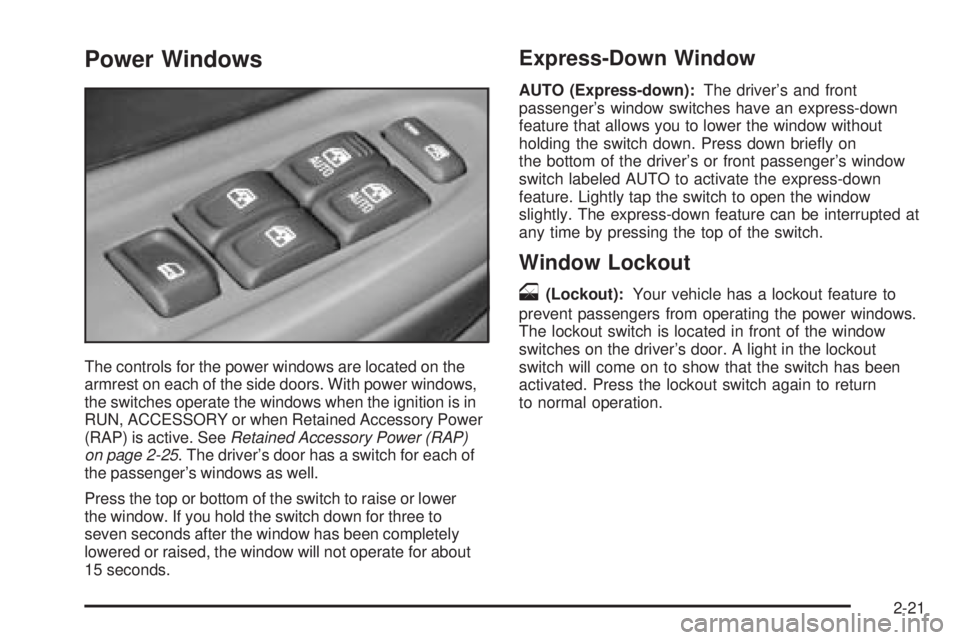
The controls for the power windows are located on the
armrest on each of the side doors. With power windows,
the switches operate the windows when the ignition is in
RUN, ACCESSORY or when Retained Accessory Power
(RAP) is active. SeeRetained Accessory Power (RAP)
on page 2-25. The driver’s door has a switch for each of
the passenger’s windows as well.
Press the top or bottom of the switch to raise or lower
the window. If you hold the switch down for three to
seven seconds after the window has been completely
lowered or raised, the window will not operate for about
15 seconds.
Express-Down Window
AUTO (Express-down):The driver’s and front
passenger’s window switches have an express-down
feature that allows you to lower the window without
holding the switch down. Press down briey on
the bottom of the driver’s or front passenger’s window
switch labeled AUTO to activate the express-down
feature. Lightly tap the switch to open the window
slightly. The express-down feature can be interrupted at
any time by pressing the top of the switch.
Window Lockout
o
(Lockout):Your vehicle has a lockout feature to
prevent passengers from operating the power windows.
The lockout switch is located in front of the window
switches on the driver’s door. A light in the lockout
switch will come on to show that the switch has been
activated. Press the lockout switch again to return
to normal operation.
2-21
Page 90 of 474
Sun Visors
To block out glare, you can pull the visor down. You can
also slide the visor along the rod from side-to-side to
cover the driver or passenger front window.
Visor Vanity Mirror
Pull the sun visor down to expose the vanity mirror.
Lighted Visor Vanity Mirror
Your vehicle may have this feature. Pull the sun visor
down and lift the mirror cover to turn on the lamps.
The lamps will turn off when the cover is closed.
Theft-Deterrent Systems
Vehicle theft is big business, especially in some cities.
Although your vehicle has a number of theft-deterrent
features, we know that nothing we put on it can make it
impossible to steal.
Content Theft-Deterrent
Your vehicle may be
equipped with a content
theft-deterrent alarm
system. If so, this security
light will appear on the
instrument panel cluster.
Here’s how to operate the system:
1. Open the door.
2. Lock the door with the power door lock switch or
the remote keyless entry transmitter. The security
light should come on and stay on.
3. Close all doors. The security light should turn off
after approximately 30 seconds. The alarm is not
armed until the security light turns off.
2-22