fog light GMC ENVOY XUV 2005 Owner's Manual
[x] Cancel search | Manufacturer: GMC, Model Year: 2005, Model line: ENVOY XUV, Model: GMC ENVOY XUV 2005Pages: 474, PDF Size: 2.67 MB
Page 133 of 474
Instrument Panel Overview...............................3-4
Hazard Warning Flashers................................3-6
Other Warning Devices...................................3-6
Horn.............................................................3-6
Tilt Wheel.....................................................3-6
Turn Signal/Multifunction Lever.........................3-7
Turn and Lane-Change Signals........................3-7
Headlamp High/Low-Beam Changer..................3-8
Flash-to-Pass.................................................3-8
Windshield Wipers..........................................3-9
Rainsense™ Wipers.......................................3-9
Windshield Washer.......................................3-10
Headlamp Washer........................................3-11
Cruise Control..............................................3-12
Headlamps..................................................3-15
Daytime Running Lamps (DRL).......................3-16
Automatic Headlamp System..........................3-16
Fog Lamps..................................................3-17
Instrument Panel Brightness...........................3-17
Dome Lamps...............................................3-17
Dome Lamp Override....................................3-18
Entry Lighting...............................................3-18
Exit Lighting.................................................3-18
Reading Lamps............................................3-18
Battery Run-Down Protection..........................3-19
Accessory Power Outlets...............................3-19
Ashtrays and Cigarette Lighter........................3-20Climate Controls............................................3-20
Dual Climate Control System..........................3-20
Dual Automatic Climate Control System...........3-23
Outlet Adjustment.........................................3-27
Rear Climate Control System.........................3-28
Climate Controls Personalization.....................3-29
Warning Lights, Gages, and Indicators............3-30
Instrument Panel Cluster................................3-31
Speedometer and Odometer...........................3-32
Trip Odometer..............................................3-32
Tachometer.................................................3-32
Safety Belt Reminder Light.............................3-33
Passenger Safety Belt Reminder Light.............3-33
Airbag Readiness Light..................................3-34
Passenger Airbag Status Indicator...................3-35
Charging System Light..................................3-36
Voltmeter Gage............................................3-37
Brake System Warning Light..........................3-38
Anti-Lock Brake System Warning Light.............3-39
Engine Coolant Temperature Gage..................3-39
Malfunction Indicator Lamp.............................3-40
Oil Pressure Gage........................................3-43
Change Engine Oil Light................................3-44
Security Light...............................................3-44
Cruise Control Light......................................3-45
Reduced Engine Power Light.........................3-45
Section 3 Instrument Panel
3-1
Page 137 of 474
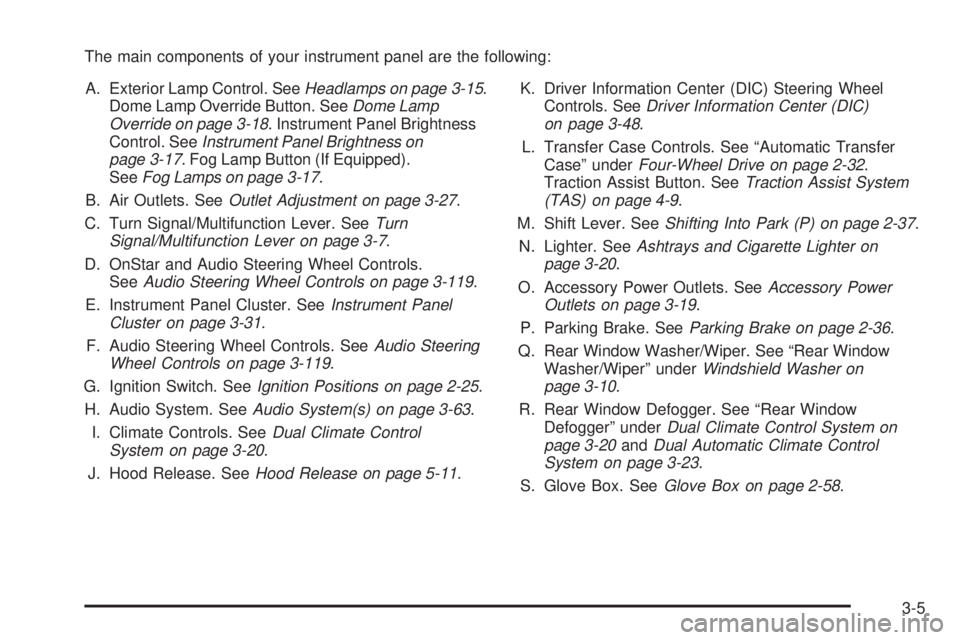
The main components of your instrument panel are the following:
A. Exterior Lamp Control. SeeHeadlamps on page 3-15.
Dome Lamp Override Button. SeeDome Lamp
Override on page 3-18. Instrument Panel Brightness
Control. SeeInstrument Panel Brightness on
page 3-17. Fog Lamp Button (If Equipped).
SeeFog Lamps on page 3-17.
B. Air Outlets. SeeOutlet Adjustment on page 3-27.
C. Turn Signal/Multifunction Lever. SeeTurn
Signal/Multifunction Lever on page 3-7.
D. OnStar and Audio Steering Wheel Controls.
SeeAudio Steering Wheel Controls on page 3-119.
E. Instrument Panel Cluster. SeeInstrument Panel
Cluster on page 3-31.
F. Audio Steering Wheel Controls. SeeAudio Steering
Wheel Controls on page 3-119.
G. Ignition Switch. SeeIgnition Positions on page 2-25.
H. Audio System. SeeAudio System(s) on page 3-63.
I. Climate Controls. SeeDual Climate Control
System on page 3-20.
J. Hood Release. SeeHood Release on page 5-11.K. Driver Information Center (DIC) Steering Wheel
Controls. SeeDriver Information Center (DIC)
on page 3-48.
L. Transfer Case Controls. See “Automatic Transfer
Case” underFour-Wheel Drive on page 2-32.
Traction Assist Button. SeeTraction Assist System
(TAS) on page 4-9.
M. Shift Lever. SeeShifting Into Park (P) on page 2-37.
N. Lighter. SeeAshtrays and Cigarette Lighter on
page 3-20.
O. Accessory Power Outlets. SeeAccessory Power
Outlets on page 3-19.
P. Parking Brake. SeeParking Brake on page 2-36.
Q. Rear Window Washer/Wiper. See “Rear Window
Washer/Wiper” underWindshield Washer on
page 3-10.
R. Rear Window Defogger. See “Rear Window
Defogger” underDual Climate Control System on
page 3-20andDual Automatic Climate Control
System on page 3-23.
S. Glove Box. SeeGlove Box on page 2-58.
3-5
Page 149 of 474

To idle your vehicle with the automatic headlamp system
off, set the parking brake while the ignition is off. Then
start your vehicle. The automatic headlamp system will
stay off until you release the parking brake, shift out of
park or turn the exterior lamp control to the off position as
described in “Exterior Lamps” listed previously.
Fog Lamps
Your vehicle may have this feature. Use your fog lamps
for better vision in foggy or misty conditions. Your
ignition must be in RUN for your fog lamps to work.
The fog lamp button is
located on the instrument
panel to the right of
the exterior lamps knob.
Press the button to turn the fog lamps on. Press the
button again to turn them off. A light will glow near the
button while the fog lamps are on. Fog lamps will
turn off whenever your high-beam headlamps are on.
Instrument Panel Brightness
Press the knob located
next to the exterior lamps
knob to extend it.
Turn the knob to adjust the instrument panel lights.
Turn the knob all the way up to turn on the interior
lamps. Press the knob back into its stored position
when you’re not using it.
Dome Lamps
The dome lamps will come on when you open a door
unless the dome lamp override is pressed in.
You can also turn the dome lamps on by turning the
thumbwheel, located next to the exterior lamps
knob, all the way up to the top detent position. In this
position, the dome lamps will remain on until they
are turned off.
3-17
Page 153 of 474

To change the current mode, select one of the following:
H(Vent):This mode directs air to the instrument
panel outlets.
)(Bi-Level):This mode directs about half of the air
to the instrument panel outlets; then directs most of
the remaining air to the oor outlets. A little air is
directed toward the windshield and the side window
outlets. Cooler air is directed to the upper vents
and warmer air to the oor outlets.
6(Floor):This mode directs most of the air to the
oor outlets with a little air directed to the windshield
and the side window outlets. The recirculation button
cannot be selected while in oor mode.
h(Recirculation):Recirculation mode is used to
recirculate the air inside of your vehicle. When this
button is pressed, an indicator light in the button
will come on to let you know that it is active. Use this
mode to help prevent outside odors and/or dust
from entering your vehicle or to help cool the air inside
of your vehicle more quickly. The air conditioning
compressor will also come on when this mode is
activated. While in recirculation mode, the windows
may fog when the weather is cold and damp. To clear
the fog, select either the defog or defrost mode and
increase fan speed.Driver’s Side Temperature Knob:The lever on the
left side of the climate control panel is used to raise or
lower the temperature on the driver’s side of the
vehicle. Slide the lever up or down to adjust the
temperature.
Passenger’s Side Temperature Knob:The lever on
the right side of the climate control panel is used to raise
or lower the temperature on the passenger’s side of
the vehicle. Slide the lever up or down to adjust
the temperature. This lever also adjusts the temperature
to the rear seat outlets.
When the temperature outside is 0°F (–18°C) or lower,
use the engine coolant heater, if equipped, to provide
warmer air, faster to your vehicle.#(Air Conditioning):Press this button to turn the
air-conditioning system on or off. When the button is
pressed, an indicator light will come on and the system
will begin to cool and dehumidify the air inside of
your vehicle. You may notice a slight change in engine
performance when the air conditioning compressor
shuts off and turns on again. This is normal.
3-21
Page 154 of 474

Defogging and Defrosting
Fog on the inside of windows is a result of high humidity
(moisture) condensing on the cool window glass.
This can be minimized if the climate control system is
used properly. There are two modes to choose from
to clear fog or frost from your windshield. Use the defog
mode to clear the windows of fog or moisture and
warm the passengers. Use the defrost mode to remove
fog or frost from the windshield more quickly.
Turn the right knob clockwise or counterclockwise to
select one of the following modes:
-(Defog):This mode directs the air to the oor outlets,
windshield and side window outlets. The recirculation
button cannot be selected while in defog mode.
1(Defrost):This mode directs most of the air to the
windshield and the side window outlets, with only a
little air directed to the oor outlets. The air conditioning
compressor may run to dehumidify the air to prevent
window fogging. The recirculation button cannot
be selected while in defrost mode. Do not drive the
vehicle until all the windows are clear.
Rear Window Defogger
The lines you see on the rear window warm the glass.
<(Rear):Press this button to turn the rear window
defogger on or off. The rear window defogger can
only be activated if the tailgate window is fully closed.
The Driver Information Center will display “Tailgate
Glass Down” to indicate that the rear window defogger
has been disabled because the window is not fully
closed. An indicator light in the button will come on to
let you know that the rear window defogger is active.
The rear window defogger will automatically turn
off approximately ten minutes after the button is pressed.
If your vehicle is equipped with heated mirrors, this
button will activate them.
Notice:Don’t use anything sharp on the inside of
the rear window. If you do, you could cut or damage
the warming grid, and the repairs wouldn’t be
covered by your warranty. Do not attach a temporary
vehicle license, tape, a decal or anything similar
to the defogger grid.
3-22
Page 157 of 474

Manual Operation
To change the current setting, select one of the
following:
w9x(Fan):This button allows you to manually
adjust the fan speed. Press the up arrow to increase
fan speed and the down arrow to decrease fan speed.
The display will change to show you the selected
fan speed and the driver’s side temperature setting
for ve seconds.
C(Mode):Press this button to manually change the
direction of the airow in your vehicle. Keep pressing the
button until the desired mode appears on the display.
The display will change to show you the selected
air delivery mode and the driver’s temperature setting
for ve seconds.
H(Vent):This mode directs air to the instrument
panel outlets.
)(Bi-Level):This mode directs approximately half of
the air to the instrument panel outlets, then directs
the remaining air to the oor outlets. A little air is
directed toward the windshield and the side window
outlets. Cooler air is directed to the upper outlets and
warmer air to the oor outlets.
6(Floor):This mode directs most of the air to the
oor outlets. Some air also comes out of the defroster
and side window outlets. The recirculation button cannot
be selected in oor mode.
h(Recirculation):Press this button to turn
recirculation mode on or off. When this button is
pressed, an indicator light in the button will also come
on to let you know that it is activated. Recirculation
mode is used to recirculate the air inside of your vehicle.
Use this mode to help prevent outside odors and/or
dust from entering your vehicle or to help cool the air
inside of your vehicle more quickly. Recirculation
mode can be used with vent and bi-level modes, but it
cannot be used with oor, defog or defrost modes.
See “Defogging and Defrosting” later in this section.
You may also notice that the air conditioning compressor
will run while in recirculation mode. This is normal
and will help to prevent fogging.
If the weather is cold and damp, the system may cause
the windows to fog while using recirculation mode. If the
windows do start to fog, select defog or defrost mode.
Recirculation mode, if selected, will be cleared when the
engine is turned off.
3-25
Page 158 of 474

#A/C (Air Conditioning):Press this button to
manually turn the air conditioning system on or off.
When the system is on, the system will automatically
begin to cool and dehumidify the air inside of your
vehicle. The air conditioning symbol will appear on the
display when the air conditioning is on and will turn
off when the air conditioning is off.
If you select turn the air conditioning off while in front
defrost or defog mode, the air conditioning symbol
will turn off, however, the A/C compressor will remain
on to help de-humidify the air inside the vehicle. If one of
the other modes is selected the compressor will then
turn the A/C off until it is selected again or the
AUTO button is pressed.
You may notice a slight change in engine performance
when the air conditioning compressor shuts off and
turns on again. This is normal.Defogging and Defrosting
Fog on the inside of windows is a result of high humidity
(moisture) condensing on the cool window glass.
This can be minimized if the climate control system is
used properly. You can use either defog or front defrost
to clear fog or frost from your windshield.
-(Defog):Use this setting to clear the windows of
fog or moisture. This setting will deliver air to the
oor and windshield outlets.
0(Defrost):Press the front defrost button to clear
the windshield and side windows of frost or fog quickly.
The system will automatically control the fan speed if
you select defrost from AUTO mode. If the outside
temperature is 40°F (4°C) or warmer, your air
conditioning compressor will automatically run to help
dehumidify the air and dry the windshield. Do not
drive the vehicle until all the windows are clear.
3-26
Page 159 of 474
Rear Window Defogger
The rear window defogger uses a warming grid to
remove fog from the rear window.
<(Rear):Press this button to turn the rear window
defogger on or off.
An indicator light in the button will come on to let you
know that the rear window defogger is activated.
The rear window defogger will turn off approximately
10 minutes after the button is pressed. If you need
additional warming time, press the button again.
If equipped, your heated mirrors will also come on when
you press this button.
Notice:Using a razor blade or sharp object to
clear the inside rear window may damage the rear
window defogger. Repairs would not be covered
by your warranty. Do not clear the inside of the rear
window with sharp objects.
Outlet Adjustment
Use the air outlets located in the center and on the side
of your instrument panel to direct the airow.
Operation Tips
Keep the hood and front air inlets free of ice, snow,
or any other obstruction (such as leaves). The
heater and defroster will work far better, reducing
the chance of fogging the inside of your windows.
When you enter a vehicle in cold weather, turn the
fan knob all the way to the right for a few moments
before driving. This helps clear the intake ducts
of snow and moisture, and reduces the chance of
fogging the inside of your window.
Keep the air path under the front seats clear of
objects. This helps air to circulate throughout
your vehicle.
Adding outside equipment to the front of your
vehicle, such as hood-air deectors, may affect the
performance of the heating and air conditioning
system. Check with your dealer before adding
equipment to the outside of your vehicle.
3-27
Page 188 of 474

TAILGATE AJAR
The tailgate is ajar and should be closed before moving
the vehicle. SeeTailgate on page 2-14for more
information.
TAILGATE GLASS DOWN
The rear wiper/defog request cannot be performed
because the tailgate glass is down. SeeTailgate
on page 2-14andWindshield Washer on page 3-10
for more information.
TAILGATE OPEN
The tailgate is in drop mode. Operate the vehicle with
caution. SeeTailgate on page 2-14for more information.
TAILGATE–SEE MANUAL
The window position needs to be reset. Activate the
tailgate window up switch and continue to hold it for two
seconds after the window is fully closed. Then activate
the tailgate window down switch and continue to
hold it for two seconds after the window is fully open.
SeeTailgate on page 2-14. If this process does not
restore the tailgate function, see your GM dealer
for service.
TIGHTEN FUEL CAP
If the vehicle’s fuel cap is not tightened properly, this
message may appear on the DIC and a chime will
sound. Fully reinstall the fuel cap. SeeFilling Your Tank
on page 5-8. The diagnostic system can determine if
the fuel cap has been left off or improperly installed.
A loose or missing fuel cap will allow fuel to evaporate
into the atmosphere. The DIC message will remain
on until the message is cancelled with the return button
on the steering wheel. The DIC message will also be
cancelled if the ignition is turned off.
The DIC message and the Service Engine Soon light
may come on again during a second trip if the fuel cap is
still not tightened properly. SeeMalfunction Indicator
Lamp on page 3-40for more information.
TURN SIGNAL ON
If a turn signal is left on for 3/4 of a mile (1.2 km), this
message will appear on the display and you will hear a
chime. Move the turn signal/multifunction lever to the off
position. Pressing the select button will acknowledge this
message and clear it from the DIC display.
3-56
Page 419 of 474

Fuses Usage
1Electrically-Controlled Air
Suspension
2Passenger’s Side High-Beam
Headlamp
3Passenger’s Side Low-Beam
Headlamp
4 Back-Up-Trailer Lamps
5Driver’s Side High-Beam
Headlamp
6Driver’s Side Low-Beam
Headlamp
7 Rear Window Washer
8 Automatic Transfer CaseFuses Usage
9 Windshield Washer
10 Powertrain Control Module B
11 Fog Lamps
12 Stop Lamp
13 Cigarette Lighter
14 Ignition Coils
15 Electric Adjustable Pedal
16 Body Controller, Ignition 1
17 Crank
18 Airbag
19 Trailer Electric Brake
5-99