back up lights GMC JIMMY 2005 Owner's Manual
[x] Cancel search | Manufacturer: GMC, Model Year: 2005, Model line: JIMMY, Model: GMC JIMMY 2005Pages: 432, PDF Size: 2.65 MB
Page 106 of 432

{CAUTION:
If you have four-wheel drive, your vehicle will
be free to roll — even if your shift lever is in
PARK (P) — if your transfer case is in
NEUTRAL. So be sure the transfer case is in a
drive gear — not in NEUTRAL. SeeFour-Wheel
Drive on page 2-30.
Follow the proper steps to be sure your vehicle will not
move. SeeShifting Into Park (P) (Automatic
Transmission) on page 2-37.
If you are pulling a trailer, seeTowing a Trailer on
page 4-57.
Mirrors
Manual Rearview Mirror
Pull the tab under the mirror toward you to reduce the
glare from headlamps behind you after dark. Push
the tab away from you for normal daytime operation.
Automatic Dimming Rearview Mirror
If your vehicle has this feature, the mirror automatically
changes to reduce glare from headlamps behind
you. A photocell on the back of the mirror senses when
it is becoming dark outside. Another photocell built
into the mirror surface senses when headlamps
are behind you.
At night, when the glare is too high, the mirror will
gradually darken to reduce glare. This change may take
a few seconds. The mirror will return to its clear
daytime state when the vehicle is put into REVERSE (R)
or when the glare is reduced.
AUTO (Automatic Dimming):This button is located at
the base of the mirror. Use it to turn on the automatic
feature. The button has an indicator light to show it is on.
OFF:Press this button to turn the automatic feature off.
Time Delay
The automatic mirror has a time delay feature which
prevents unnecessary switching from the night back to
the day position. This delay prevents rapid changing
of the mirror as you drive under lights and through traffic.
2-42
Page 140 of 432

The following does not apply to vehicles sold in Canada.
When necessary, you may turn off the automatic
headlamp system and the Daytime Running Lamps
(DRL) feature by following the steps below:
1. Turn the ignition to RUN.
2. Press the DOME OVERRIDE button four times
within six seconds. After the fourth press of the
button, a chime will sound informing you that
the system is off. The system will revert back to the
automatic on mode when the ignition is turned to
OFF and then to RUN again.
3. To return to the automatic mode, push the DOME
OVERRIDE button four times within six seconds
(a chime will sound), or turn the ignition to OFF and
then to RUN again.
As with any vehicle, you should turn on the regular
headlamp system when you need it.Automatic Headlamp System
When it is dark enough outside, your automatic
headlamp system will turn on your headlamps at the
normal brightness along with other lamps such as
the taillamps, sidemarker, parking lamps and the
instrument panel lights. The radio lights will also be dim.
Your vehicle is equipped with a light sensor on the
top of the instrument panel under the radio speaker grill.
Be sure it is not covered or the system will be on
whenever the ignition is on.
The system may also turn on your headlamps when
driving through a parking garage, heavy overcast
weather or a tunnel. This is normal.
There is a delay in the transition between the daytime
and nighttime operation of the Daytime Running
Lamps (DRL) and the automatic headlamp systems so
that driving under bridges or bright overhead street
lights does not affect the system. The DRL and
automatic headlamp system will only be affected when
the light sensor sees a change in lighting lasting
longer than the delay.
3-16
Page 431 of 432
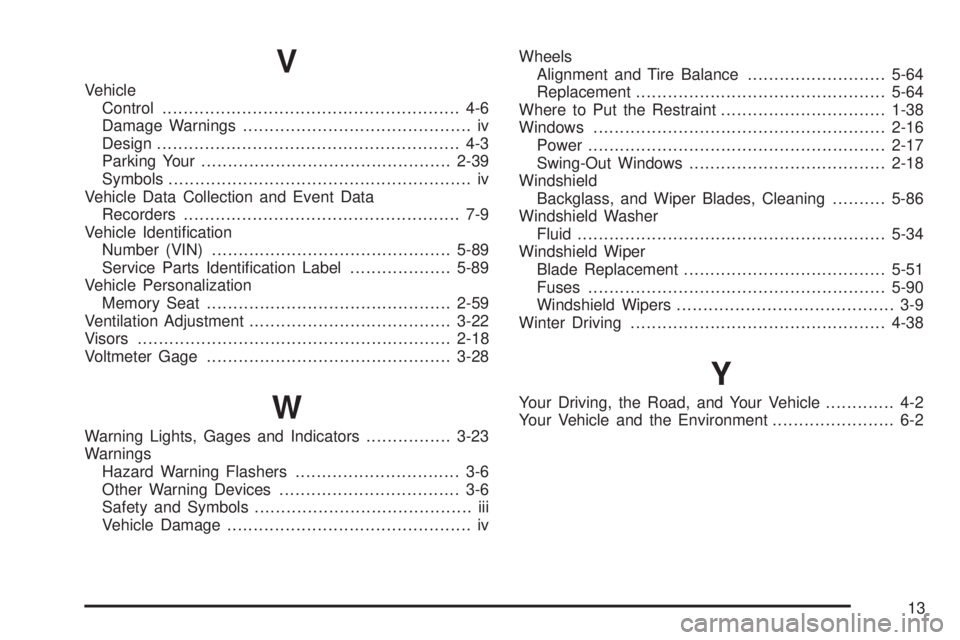
V
Vehicle
Control........................................................ 4-6
Damage Warnings........................................... iv
Design......................................................... 4-3
Parking Your...............................................2-39
Symbols......................................................... iv
Vehicle Data Collection and Event Data
Recorders.................................................... 7-9
Vehicle Identication
Number (VIN).............................................5-89
Service Parts Identication Label...................5-89
Vehicle Personalization
Memory Seat..............................................2-59
Ventilation Adjustment......................................3-22
Visors...........................................................2-18
Voltmeter Gage..............................................3-28
W
Warning Lights, Gages and Indicators................3-23
Warnings
Hazard Warning Flashers............................... 3-6
Other Warning Devices.................................. 3-6
Safety and Symbols......................................... iii
Vehicle Damage.............................................. ivWheels
Alignment and Tire Balance..........................5-64
Replacement...............................................5-64
Where to Put the Restraint...............................1-38
Windows.......................................................2-16
Power........................................................2-17
Swing-Out Windows.....................................2-18
Windshield
Backglass, and Wiper Blades, Cleaning..........5-86
Windshield Washer
Fluid..........................................................5-34
Windshield Wiper
Blade Replacement......................................5-51
Fuses........................................................5-90
Windshield Wipers......................................... 3-9
Winter Driving................................................4-38
Y
Your Driving, the Road, and Your Vehicle............. 4-2
Your Vehicle and the Environment....................... 6-2
13