audio GMC SAVANA 2003 User Guide
[x] Cancel search | Manufacturer: GMC, Model Year: 2003, Model line: SAVANA, Model: GMC SAVANA 2003Pages: 392, PDF Size: 2.34 MB
Page 167 of 392
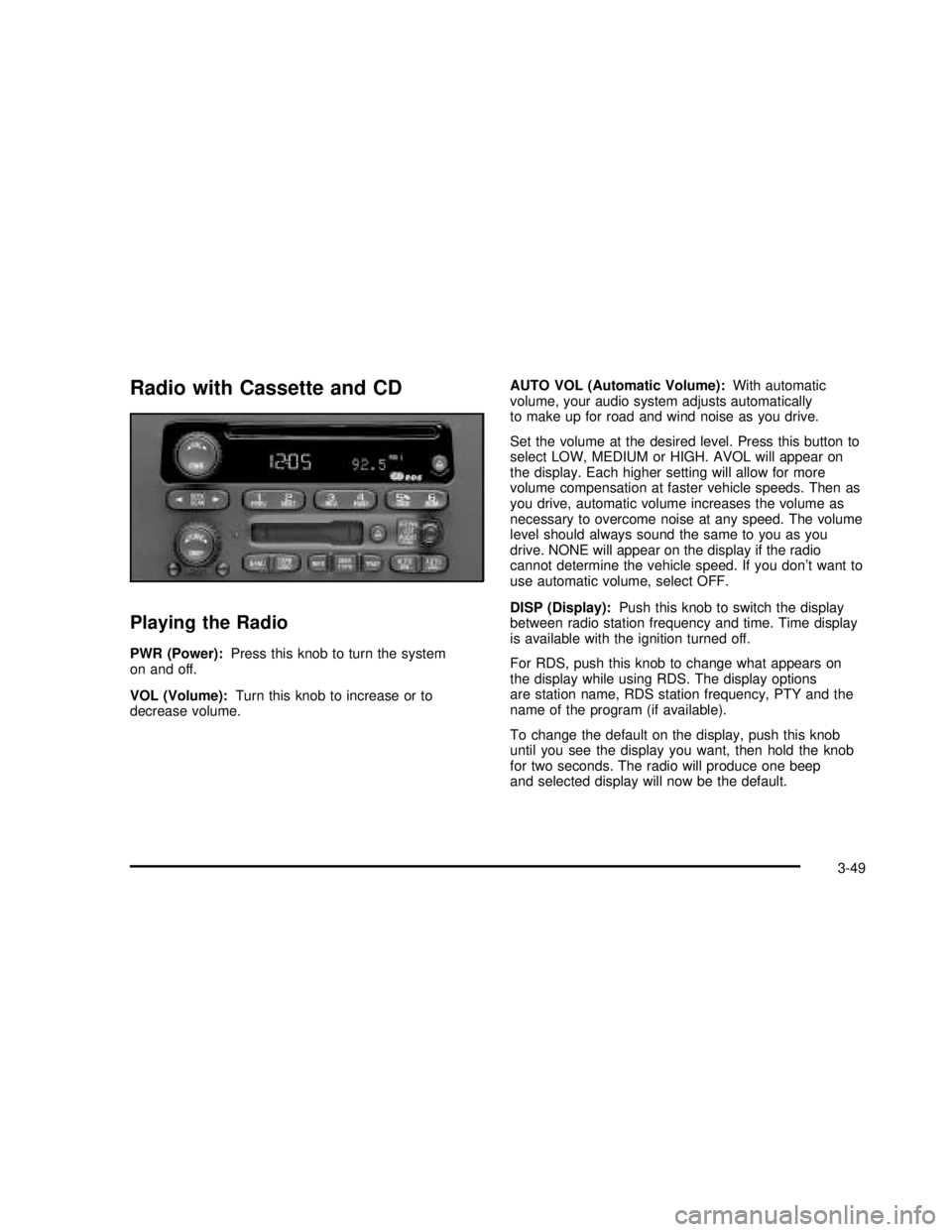
Radio with Cassette and CD
Playing the Radio
PWR (Power):Press this knob to turn the system
on and off.
VOL (Volume):Turn this knob to increase or to
decrease volume.AUTO VOL (Automatic Volume):With automatic
volume, your audio system adjusts automatically
to make up for road and wind noise as you drive.
Set the volume at the desired level. Press this button to
select LOW, MEDIUM or HIGH. AVOL will appear on
the display. Each higher setting will allow for more
volume compensation at faster vehicle speeds. Then as
you drive, automatic volume increases the volume as
necessary to overcome noise at any speed. The volume
level should always sound the same to you as you
drive. NONE will appear on the display if the radio
cannot determine the vehicle speed. If you don’t want to
use automatic volume, select OFF.
DISP (Display):Push this knob to switch the display
between radio station frequency and time. Time display
is available with the ignition turned off.
For RDS, push this knob to change what appears on
the display while using RDS. The display options
are station name, RDS station frequency, PTY and the
name of the program (if available).
To change the default on the display, push this knob
until you see the display you want, then hold the knob
for two seconds. The radio will produce one beep
and selected display will now be the default.
3-49
2003 - Savana OM
Page 169 of 392

Setting the Tone (Bass/Treble)
AUDIO:Press and release the AUDIO knob until
BASS, MID, or TREB appears on the display. Turn the
knob to increase or to decrease. The display will show
the bass, midrange, or treble level. If a station is weak or
noisy, you may want to decrease the treble.
To adjust the bass, midrange, and treble to the
middle position, push the AUDIO knob. The radio will
produce one beep and adjust the display level to
the middle position.
To adjust all tone and speaker controls to the middle
position, push and hold the AUDIO knob when no tone
or speaker control is displayed. The radio will produce
one beep and display CENTERED.
AUTO EQ (Automatic Equalization):Press this button
to choose bass and treble equalization settings designed
for country/western, jazz, talk, pop, rock and classical
stations.
To return the bass and treble to the custom mode, press
and release the AUDIO knob, until CUSTOM appears.
Adjusting the Speakers (Balance/Fade)
AUDIO:To adjust the balance to the right and the
left speakers, push and release the AUDIO knob until
BAL appears on the display. Turn the knob to move the
sound toward the right or the left speakers.
To adjust the fade to the front and the rear speakers,
push and release the AUDIO knob until FADE appears
on the display. Turn the knob to move the sound
toward the front or the rear speakers.
To adjust the balance and fade to the middle position,
push and hold the AUDIO knob. The radio will produce
one beep and adjust the display level to the middle
position.
To adjust all tone and speaker controls to the middle
position, push and hold the AUDIO knob when no tone
or speaker control is displayed. The radio will produce
one beep and display CENTERED.
3-51
2003 - Savana OM
Page 170 of 392

Using RDS
Your audio system is equipped with a Radio Data
System (RDS). RDS features are available for use only
on FM stations that broadcast RDS information.
•Seek to stations broadcasting the selected type of
programming,
•receive announcements concerning local and
national emergencies,
•display messages from radio stations, and
•seek to stations with traffic announcements.
This system relies upon receiving specific information
from these stations and will only work when the
information is available. In rare cases, a radio station
may broadcast incorrect information that will cause
the radio features to work improperly. If this happens,
contact the radio station.
While you are tuned to an RDS station, the station
name or the call letters will appear on the display instead
of the frequency. RDS stations may also provide the
time of day, a program type (PTY) for current
programming and the name of the program being
broadcast.
Finding a PTY Station
To select andfind a desired PTY perform the following:
1. Turn the P-TYPE LIST knob. TYPE and a PTY
will appear on the display.
2. Select a category by turning the P-TYPE LIST knob.
3. Once the desired category is displayed, press the
SEEK TYPE button or one of the SEEK arrows to
take you to the category’sfirst station.
4. If you want to go to another station within that
category and the category is displayed, press
the SEEK TYPE button once. If the category is not
displayed, press the SEEK TYPE button twice
to display the category and then to go to another
station.
If the radio cannotfind the desired program type, NONE
will appear on the display and the radio will return to
the last station you were listening to.
3-52
2003 - Savana OM
Page 173 of 392

Radio Messages
CAL ERR (Calibration Error):This message is
displayed when the radio has not been calibrated
properly for the vehicle. You must return to the
dealership for service.
LOCKED:This message is displayed when the
THEFTLOCK
®system has locked up. You must return
to the dealership for service.
Playing a Cassette Tape
Your tape player is built to work best with tapes that are
up to 30 to 45 minutes long on each side. Tapes longer
than that are so thin they may not work well in this player.
The longer side with the tape visible should face to the
right. If the ignition is on, but the radio is off, the tape can
be inserted and will begin playing. A tape symbol is
shown on the display whenever a tape is inserted. If you
hear nothing but a garbled sound, the tape may not be in
squarely. Press the eject symbol to remove the tape and
start over.
While the tape is playing, use the VOL, AUDIO and
SEEK controls just as you do for the radio. The display
will show TAPE and an arrow showing which side of
the tape is playing.If you want to insert a tape while the ignition is off,first
press the eject symbol or DISP.
If an error appears on the display, see“Cassette Tape
Messages”later in this section.
1 PREV (Previous):Your tape must have at least three
seconds of silence between each selection for previous
to work. Press this pushbutton to go to the previous
selection on the tape if the current selection has been
playing for less than three seconds. If pressed when the
current selection has been playing from 3 to 13 seconds,
it will go to the beginning of the previous selection or
the beginning of the current selection, depending upon
the position on the tape. If pressed when the current
selection has been playing for more than 13 seconds,
it will go to the beginning of the current selection.
SEEK and a negative number will appear on the display
while the cassette player is in the previous mode.
Pressing this pushbutton multiple times will increase the
number of selections to be searched back, up to -9.
2 NEXT:Your tape must have at least three seconds
of silence between each selection for next to work.
Press this pushbutton to go to the next selection on
the tape. If you press the pushbutton more than once,
the player will continue moving forward through the tape.
SEEK and a positive number will appear on the display.
3-55
2003 - Savana OM
Page 178 of 392
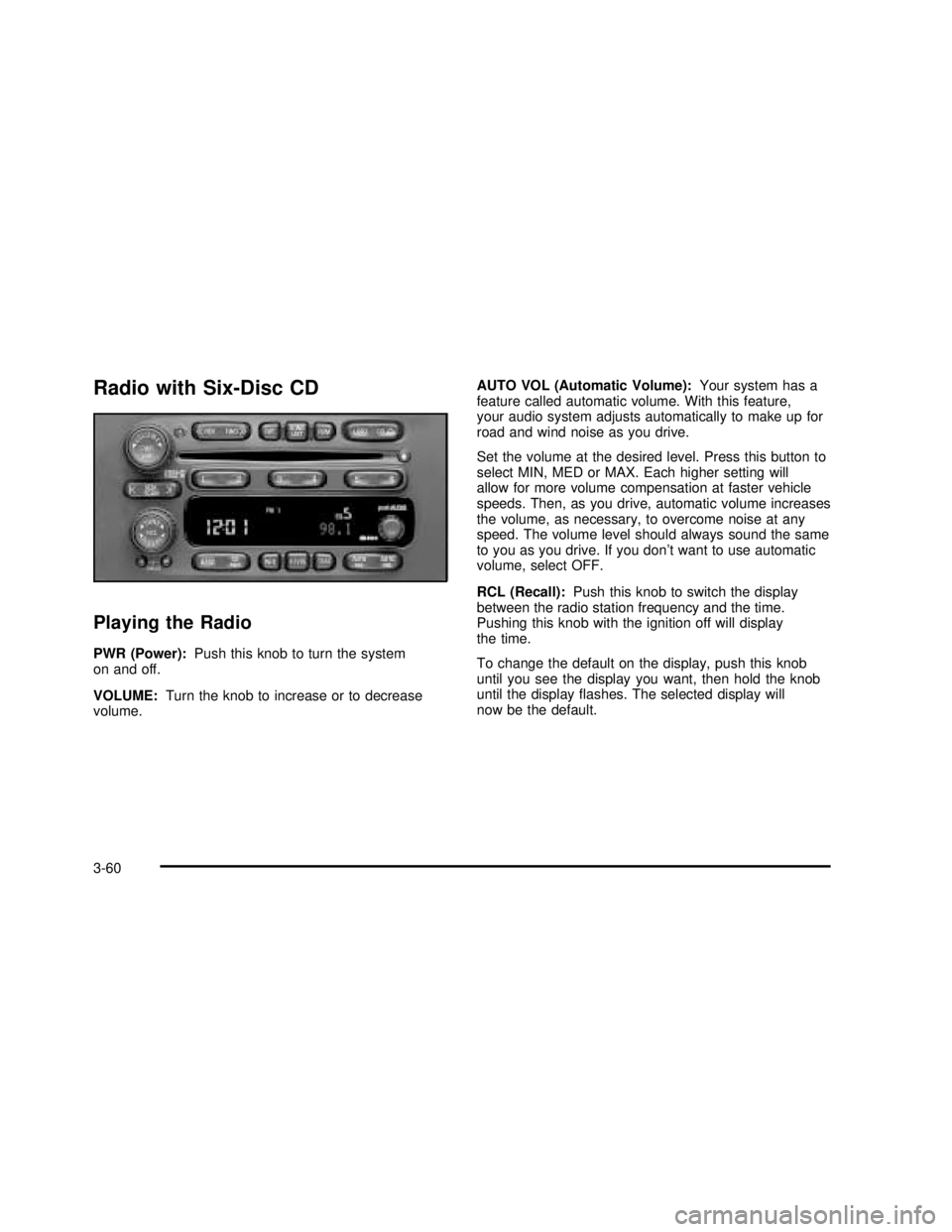
Radio with Six-Disc CD
Playing the Radio
PWR (Power):Push this knob to turn the system
on and off.
VOLUME:Turn the knob to increase or to decrease
volume.AUTO VOL (Automatic Volume):Your system has a
feature called automatic volume. With this feature,
your audio system adjusts automatically to make up for
road and wind noise as you drive.
Set the volume at the desired level. Press this button to
select MIN, MED or MAX. Each higher setting will
allow for more volume compensation at faster vehicle
speeds. Then, as you drive, automatic volume increases
the volume, as necessary, to overcome noise at any
speed. The volume level should always sound the same
to you as you drive. If you don’t want to use automatic
volume, select OFF.
RCL (Recall):Push this knob to switch the display
between the radio station frequency and the time.
Pushing this knob with the ignition off will display
the time.
To change the default on the display, push this knob
until you see the display you want, then hold the knob
until the displayflashes. The selected display will
now be the default.
3-60
2003 - Savana OM
Page 180 of 392

Setting the Tone (Bass/Treble)
AUDIO:Press and release the AUDIO knob until
BASS, MID, or TREB appears on the display. Turn the
knob to increase or to decrease. The display will
show the bass, midrange, or treble level. If a station is
weak or noisy, you may want to decrease the treble.
To adjust the bass, midrange, and treble to the middle
position, push the AUDIO knob. The radio will
produce one beep and adjust the display level to the
middle position.
To adjust all tone and speaker controls to the middle
position, push and hold the AUDIO knob when no tone
or speaker control is displayed. The radio will produce
one beep and display CENTERED.
AUTO EQ (Automatic Equalization):Press this button
to choose bass and treble equalization settings
designed for country/western, jazz, talk, pop, rock and
classical stations.
To return the bass and treble to the custom mode,
press and release the AUDIO knob, until CUSTOM
appears.
Adjusting the Speakers (Balance/Fade)
AUDIO:To adjust the balance to the right and the
left speakers, push and release the AUDIO knob until
BAL appears on the display. Turn the knob to move the
sound toward the right or the left speakers.
To adjust the fade to the front and the rear speakers,
push and release the AUDIO knob until FADE appears
on the display. Turn the knob to move the sound
toward the front or the rear speakers.
To adjust the balance and fade to the middle position,
push and hold the AUDIO knob. The radio will produce
one beep and adjust the display level to the middle
position.
To adjust all tone and speaker controls to the middle
position, push and hold the AUDIO knob when no tone
or speaker control is displayed. The radio will produce
one beep and display CENTERED.
3-62
2003 - Savana OM
Page 181 of 392

Using RDS
Your audio system is equipped with a Radio Data
System (RDS). RDS features are available for use only
on FM stations that broadcast RDS information.
•Seek to stations broadcasting the selected type of
programming,
•receive announcements concerning local and
national emergencies,
•display messages from radio stations, and
•seek to stations with traffic announcements.
This system relies upon receiving specific information
from these stations and will only work when the
information is available. In rare cases, a radio station
may broadcast incorrect information that will cause
the radio features to work improperly. If this happens,
contact the radio station.
While you are tuned to an RDS station, the station name
or the call letters will appear on the display instead of the
frequency. RDS stations may also provide the time of
day, a program type (PTY) for current programming and
the name of the program being broadcast.
Finding a PTY Station
To select andfind a desired PTY perform the following:
1. Press the P-TYPE button. P-TYPE and the last
selected PTY will be displayed on the screen.
2. Select a category by turning the P-TYPE knob.
3. Once the desired category is displayed, press either
SEEK arrow to select the category and take you to
the category’sfirst station.
4. If you want to go to another station within that
category and the category is displayed, press
either SEEK arrow once. If the category is not
displayed, press either SEEK arrow twice to display
the category and then to go to another station.
5. If PTY times out and is no longer on the display,
go back to Step 1.
If both P-TYPE and TRAF are on, the radio will search
for stations with the selected PTY and traffic
announcements.
To use the PTY interrupt feature, press and hold the
P-TYPE button until you hear a beep on the PTY
you want to interrupt with. When selected, an asterick
will appear beside that PTY on the display. You
may select multiple interrupts if desired. When you are
listening to a compact disc, the last selected RDS
station will interrupt play if that selected program type
format is broadcast.
3-63
2003 - Savana OM
Page 189 of 392

Compact Disc Messages
CHECK CD:If this message appears on the radio
display, it could be due to one of the following reasons:
•You’re driving on a very rough road. When the
road becomes smoother, the disc should play.
•The disc is dirty, scratched, wet or upside down.
•The air is very humid. If so, wait about an hour and
try again.
If the CD is not playing correctly, for any other reason,
try a known good CD.
If any error occurs repeatedly or if an error can’tbe
corrected, contact your dealer. If your radio displays an
error message, write it down and provide it to your
dealer when reporting the problem.
Rear Seat Audio (RSA)
This feature allows rear seat passengers to listen to
and control any of the music sources: radio, cassette
tapes and CDs. However, the rear seat passengers
can only control the music sources that the front seat
passengers are not listening to. For example, rear seat
passengers may listen to a cassette tape or CD through
headphones, while the driver listens to the radio through
the front speakers. The rear seat passengers have
control of the volume for each set of headphones.
Be aware that the front seat audio controls always
have priority over the RSA controls. If the front seat
passengers switch the source for the main radio to a
remote source, the RSA will play the same remote
source.
Primary Radio Controls
The following function is controlled by the knob on the
main radio:
PWR (Power):Push this knob twice to turn RSA off.
3-71
2003 - Savana OM
Page 280 of 392
Replacing Brake System Parts
The braking system on a vehicle is complex. Its many
parts have to be of top quality and work well together if
the vehicle is to have really good braking. Your vehicle
was designed and tested with top-quality GM brake parts.
When you replace parts of your braking system—for
example, when your brake linings wear down and you
need new ones put in—be sure you get new approved
GM replacement parts. If you don’t, your brakes may no
longer work properly. For example, if someone puts in
brake linings that are wrong for your vehicle, the balance
between your front and rear brakes can change—for the
worse. The braking performance you’ve come to expect
can change in many other ways if someone puts in the
wrong replacement brake parts.
Battery
Your new vehicle comes with a maintenance free
ACDelco®battery. When it’s time for a new battery, get
one that has the replacement number shown on the
original battery’s label. We recommend an ACDelco
®
battery. SeeEngine Compartment Overview on
page 5-12for battery location.Warning:Battery posts, terminals and related
accessories contain lead and lead compounds,
chemicals known to the State of California to cause
cancer and reproductive harm. Wash hands after
handling.
Vehicle Storage
If you’re not going to drive your vehicle for 25 days
or more, remove the black, negative (−) cable from
the battery. This will help keep your battery from
running down.
{CAUTION:
Batteries have acid that can burn you and gas
that can explode. You can be badly hurt if you
aren’t careful. See“Jump Starting”next for
tips on working around a battery without
getting hurt.
Contact your dealer to learn how to prepare your
vehicle for longer storage periods.
Also, for your audio system, seeTheft-Deterrent
Feature (Non-RDS Radios) on page 3-73or
Theft-Deterrent Feature (RDS Radios) on page 3-73.
5-40
2003 - Savana OM
Page 352 of 392

Part B: Owner Checks and Services
Listed in this part are owner checks and services
which should be performed at the intervals specied to
help ensure the safety, dependability and emission
control performance of your vehicle.
Be sure any necessary repairs are completed at once.
Whenever anyuids or lubricants are added to your
vehicle, make sure they are the proper ones, as shown
in Part D.
At the First 100, 1,000 and 6,000
Miles (160, 1 600 and 10 000km)
For vehicles with dual wheels, check dual wheel nut
torque. For proper torque, seeCapacities and
Specifications on page 5-97.
At Each Fuel Fill
It is important for you or a service station attendant to
perform these underhood checks at each fuelfill.
Engine Oil Level Check
Check the engine oil level and add the proper oil if
necessary. SeeEngine Oil on page 5-13for further
details.
Engine Coolant Level Check
Check the engine coolant level and add DEX-COOL®
coolant mixture if necessary. SeeEngine Coolant
on page 5-22for further details.
Windshield Washer Fluid Level Check
Check the windshield washeruid level in the windshield
washer tank and add the properuid if necessary.
SeeWindshield Washer Fluid on page 5-36for further
details.
At Least Once a Month
Tire Inflation Check
Make sure tires are inated to the correct pressures.
Don’t forget to check your spare tire. SeeTires on
page 5-56for further details.
Cassette Tape Player Service
Clean cassette tape player. Cleaning should be done
every 50 hours of tape play. SeeAudio System(s)
on page 3-41for further details.
6-12
2003 - Savana OM