ignition GMC SAVANA 2005 Service Manual
[x] Cancel search | Manufacturer: GMC, Model Year: 2005, Model line: SAVANA, Model: GMC SAVANA 2005Pages: 384, PDF Size: 2.41 MB
Page 187 of 384
Care of Your Cassette Tape Player
A tape player that is not cleaned regularly can cause
reduced sound quality, ruined cassettes, or a damaged
mechanism. Cassette tapes should be stored in their
cases away from contaminants, direct sunlight, and
extreme heat. If they are not, they may not operate
properly or may cause failure of the tape player.
The tape player should be cleaned regularly after every
50 hours of use. The radio may display CLEAN to
indicate that the tape player has been used for 50 hours
without resetting the tape clean timer. If this message
appears on the display, the cassette tape player
needs to be cleaned. It will still play tapes, but it should
be cleaned as soon as possible to prevent damage
to the tapes and player. If there is a reduction in sound
quality, try a known good cassette to see if the tape
or the tape player is at fault. If this other cassette has no
improvement in sound quality, clean the tape player.
For best results, use a scrubbing action, non-abrasive
cleaning cassette with pads which scrub the tape
head as the hubs of the cleaner cassette turn. The
recommended cleaning cassette is available through
your dealer.
When cleaning the cassette tape player with the
recommended non-abrasive cleaning cassette, it is
possible that the cassette may eject, because the cuttape detection feature on the radio may recognize it as
a broken tape, in error. To prevent the cleaning
cassette from being ejected, use the following steps:
1. Turn the ignition on.
2. Turn the radio off.
3. Press and hold the TAPE DISC button for ve
seconds. READY will appear on the display and
the cassette symbol will ash for ve seconds.
4. Insert the scrubbing action cleaning cassette.
5. Eject the cleaning cassette after the manufacturer’s
recommended cleaning time.
When the cleaning cassette has been ejected, the
cut tape detection feature will be active again.
A non-scrubbing action, wet-type cleaner which uses a
cassette with a fabric belt to clean the tape head
can be used. This type of cleaning cassette will not
eject on its own. A non-scrubbing action cleaner may not
clean as thoroughly as the scrubbing type cleaner.
The use of a non-scrubbing action, dry-type cleaning
cassette is not recommended.
After the player is cleaned, press and hold the eject
button for ve seconds to reset the CLEAN indicator.
The radio will display --- or CLEANED to show the
indicator was reset.
3-73
Page 188 of 384
Cassettes are subject to wear and the sound quality may
degrade over time. Always make sure the cassette tape
is in good condition before the tape player is serviced.
Care of Your CDs
Handle CDs carefully. Store them in their original cases
or other protective cases and away from direct
sunlight and dust. If the surface of a CD is soiled,
dampen a clean, soft cloth in a mild, neutral detergent
solution and clean it, wiping from the center to the edge.
Be sure never to touch the side without writing when
handling CDs. Pick up CDs by grasping the outer edges
or the edge of the hole and the outer edge.
Care of Your CD Player
The use of CD lens cleaners for CD players is not
advised, due to the risk of contaminating the lens of the
CD optics with lubricants internal to the CD mechanism.
Fixed Mast Antenna
The xed mast antenna can withstand most car washes
without being damaged. If the mast should ever become
slightly bent, straighten it out by hand. If the mast is badly
bent, replace it.Check occasionally to make sure the mast is still
tightened to the fender. If tightening is required, tighten by
hand, then with a wrench one quarter turn.
Chime Level Adjustment
The radio is the vehicle chime producer. The chime is
produced from the driver’s side front door speakers. To
change the volume level, press and hold pushbutton 6
with the ignition on and the radio power off. The chime
volume level will change from the normal level to loud,
and LOUD will appear on the radio display. To change
back to the default or normal setting, press and hold
pushbutton 6 again. The chime level will change from the
loud level to normal, and NORMAL will appear on the
radio display. Each time the chime volume is changed,
three chimes will sound to indicate the change. Removing
the radio and not replacing it with a factory radio or chime
module will disable vehicle chimes.
3-74
Page 213 of 384
If you drive regularly in steep country, or if you are
planning to visit there, here are some tips that can make
your trips safer and more enjoyable.
Keep your vehicle in good shape. Check all uid
levels and also the brakes, tires, cooling system,
and transmission. These parts can work hard
on mountain roads.
Know how to go down hills. The most important
thing to know is this: let your engine do some of
the slowing down. Shift to a lower gear when you go
down a steep or long hill.
{CAUTION:
If you do not shift down, your brakes could
get so hot that they would not work well.
You would then have poor braking or even
none going down a hill. You could crash.
Shift down to let your engine assist your
brakes on a steep downhill slope.
{CAUTION:
Coasting downhill in NEUTRAL (N) or with the
ignition off is dangerous. Your brakes will have
to do all the work of slowing down. They could
get so hot that they would not work well. You
would then have poor braking or even none
going down a hill. You could crash. Always have
your engine running and your vehicle in gear
when you go downhill.
Know how to go uphill. You may want to shift down to
a lower gear. The lower gears help cool your engine
and transmission, and you can climb the hill better.
Stay in your own lane when driving on two-lane
roads in hills or mountains. Do not swing wide or cut
across the center of the road. Drive at speeds that
let you stay in your own lane.
As you go over the top of a hill, be alert. There could
be something in your lane, like a stalled car or
an accident.
You may see highway signs on mountains that warn
of special problems. Examples are long grades,
passing or no-passing zones, a falling rocks area,
or winding roads. Be alert to these and take
appropriate action.
4-25
Page 226 of 384
Tow/Haul Mode
Tow/haul is designed to assist while your vehicle is
pulling a large or heavy load or trailer. Tow/haul is most
useful while pulling such a load in rolling terrain, in
stop-and-go traffic, or when you need improved
low-speed control, such as when parking. The purpose
of the tow/haul mode is to:
Reduce the frequency and improve the predictability
of transmission shifts,
provide the same solid shift feel when pulling a
heavy load as when the vehicle is unloaded,
improve control of vehicle speed while requiring
less throttle pedal activity.
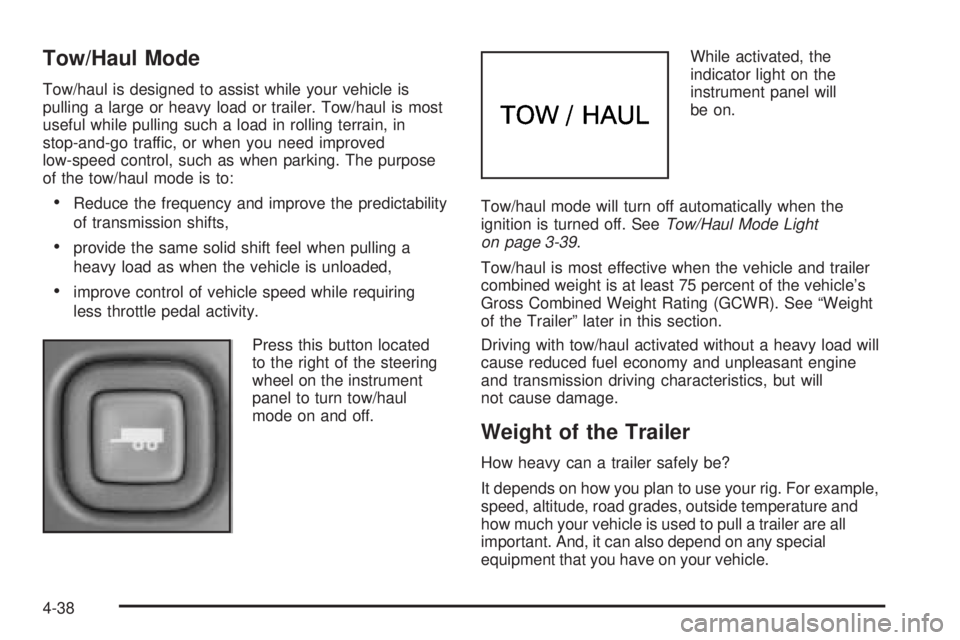
Press this button located
to the right of the steering
wheel on the instrument
panel to turn tow/haul
mode on and off.While activated, the
indicator light on the
instrument panel will
be on.
Tow/haul mode will turn off automatically when the
ignition is turned off. SeeTow/Haul Mode Light
on page 3-39.
Tow/haul is most effective when the vehicle and trailer
combined weight is at least 75 percent of the vehicle’s
Gross Combined Weight Rating (GCWR). See “Weight
of the Trailer” later in this section.
Driving with tow/haul activated without a heavy load will
cause reduced fuel economy and unpleasant engine
and transmission driving characteristics, but will
not cause damage.
Weight of the Trailer
How heavy can a trailer safely be?
It depends on how you plan to use your rig. For example,
speed, altitude, road grades, outside temperature and
how much your vehicle is used to pull a trailer are all
important. And, it can also depend on any special
equipment that you have on your vehicle.
4-38
Page 255 of 384
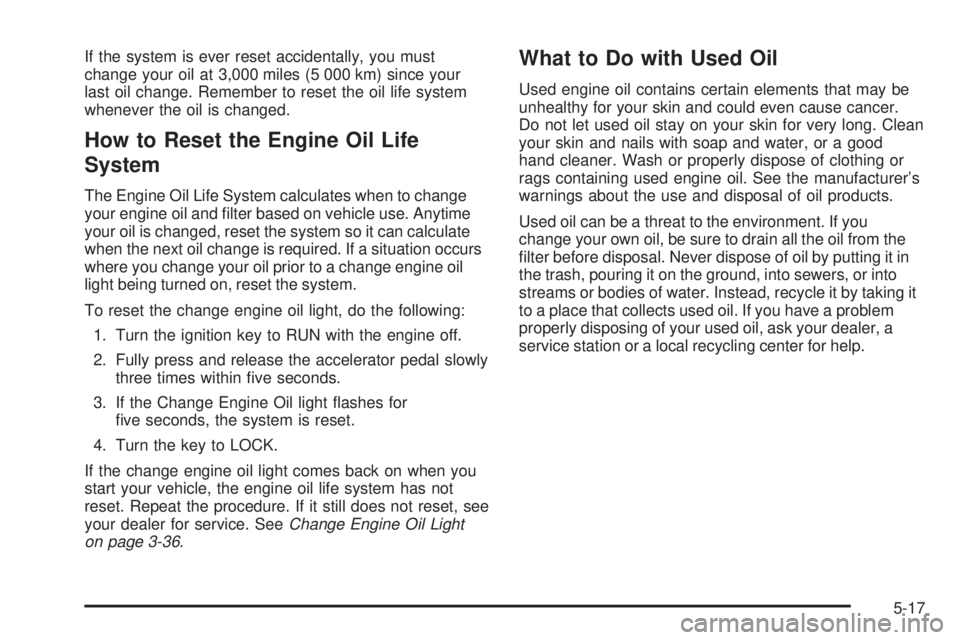
If the system is ever reset accidentally, you must
change your oil at 3,000 miles (5 000 km) since your
last oil change. Remember to reset the oil life system
whenever the oil is changed.
How to Reset the Engine Oil Life
System
The Engine Oil Life System calculates when to change
your engine oil and lter based on vehicle use. Anytime
your oil is changed, reset the system so it can calculate
when the next oil change is required. If a situation occurs
where you change your oil prior to a change engine oil
light being turned on, reset the system.
To reset the change engine oil light, do the following:
1. Turn the ignition key to RUN with the engine off.
2. Fully press and release the accelerator pedal slowly
three times within ve seconds.
3. If the Change Engine Oil light ashes for
ve seconds, the system is reset.
4. Turn the key to LOCK.
If the change engine oil light comes back on when you
start your vehicle, the engine oil life system has not
reset. Repeat the procedure. If it still does not reset, see
your dealer for service. SeeChange Engine Oil Light
on page 3-36.
What to Do with Used Oil
Used engine oil contains certain elements that may be
unhealthy for your skin and could even cause cancer.
Do not let used oil stay on your skin for very long. Clean
your skin and nails with soap and water, or a good
hand cleaner. Wash or properly dispose of clothing or
rags containing used engine oil. See the manufacturer’s
warnings about the use and disposal of oil products.
Used oil can be a threat to the environment. If you
change your own oil, be sure to drain all the oil from the
lter before disposal. Never dispose of oil by putting it in
the trash, pouring it on the ground, into sewers, or into
streams or bodies of water. Instead, recycle it by taking it
to a place that collects used oil. If you have a problem
properly disposing of your used oil, ask your dealer, a
service station or a local recycling center for help.
5-17
Page 277 of 384
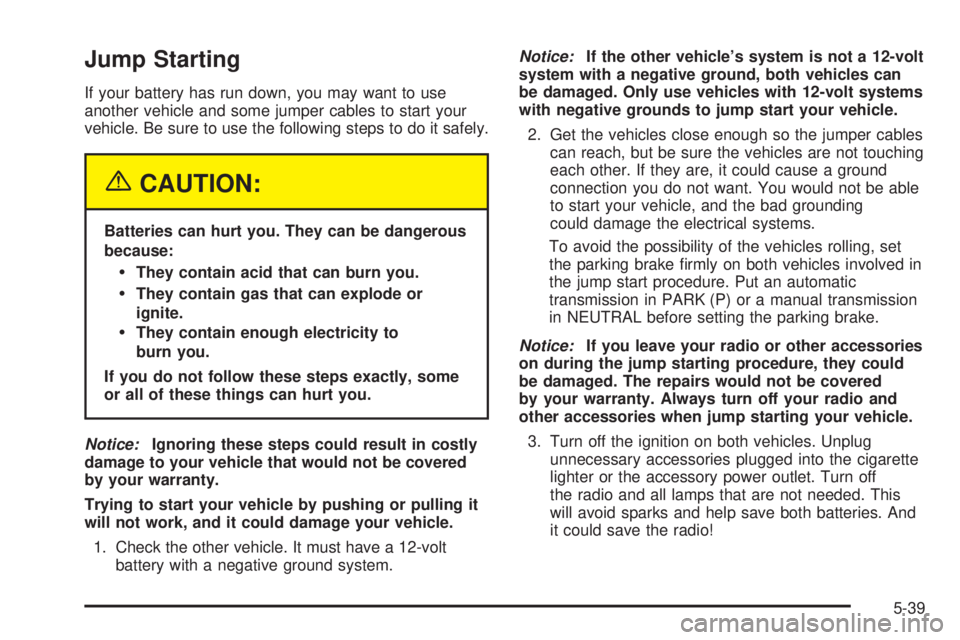
Jump Starting
If your battery has run down, you may want to use
another vehicle and some jumper cables to start your
vehicle. Be sure to use the following steps to do it safely.
{CAUTION:
Batteries can hurt you. They can be dangerous
because:
They contain acid that can burn you.
They contain gas that can explode or
ignite.
They contain enough electricity to
burn you.
If you do not follow these steps exactly, some
or all of these things can hurt you.
Notice:Ignoring these steps could result in costly
damage to your vehicle that would not be covered
by your warranty.
Trying to start your vehicle by pushing or pulling it
will not work, and it could damage your vehicle.
1. Check the other vehicle. It must have a 12-volt
battery with a negative ground system.Notice:If the other vehicle’s system is not a 12-volt
system with a negative ground, both vehicles can
be damaged. Only use vehicles with 12-volt systems
with negative grounds to jump start your vehicle.
2. Get the vehicles close enough so the jumper cables
can reach, but be sure the vehicles are not touching
each other. If they are, it could cause a ground
connection you do not want. You would not be able
to start your vehicle, and the bad grounding
could damage the electrical systems.
To avoid the possibility of the vehicles rolling, set
the parking brake rmly on both vehicles involved in
the jump start procedure. Put an automatic
transmission in PARK (P) or a manual transmission
in NEUTRAL before setting the parking brake.
Notice:If you leave your radio or other accessories
on during the jump starting procedure, they could
be damaged. The repairs would not be covered
by your warranty. Always turn off your radio and
other accessories when jump starting your vehicle.
3. Turn off the ignition on both vehicles. Unplug
unnecessary accessories plugged into the cigarette
lighter or the accessory power outlet. Turn off
the radio and all lamps that are not needed. This
will avoid sparks and help save both batteries. And
it could save the radio!
5-39
Page 334 of 384
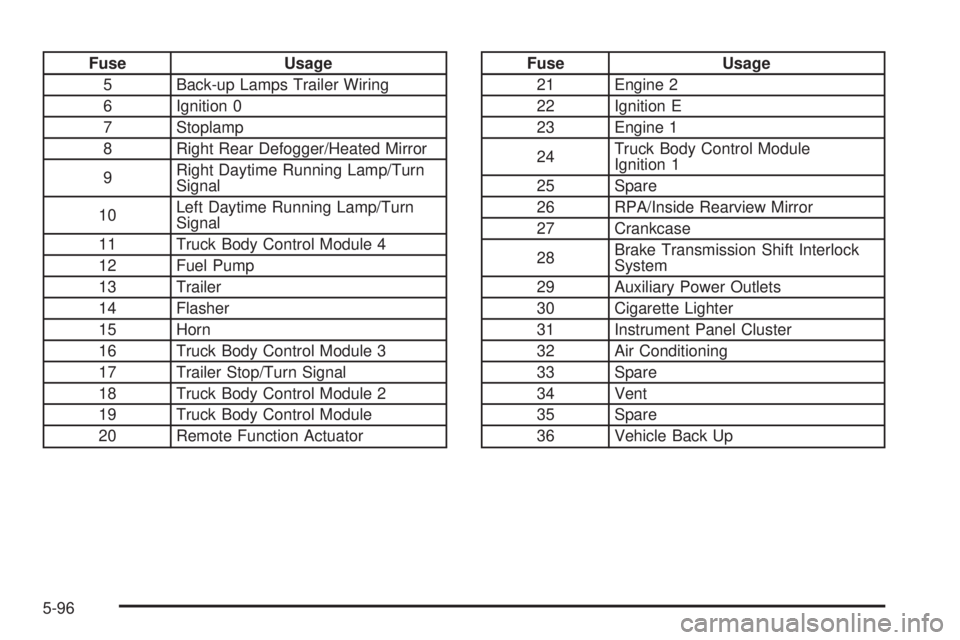
Fuse Usage
5 Back-up Lamps Trailer Wiring
6 Ignition 0
7 Stoplamp
8 Right Rear Defogger/Heated Mirror
9Right Daytime Running Lamp/Turn
Signal
10Left Daytime Running Lamp/Turn
Signal
11 Truck Body Control Module 4
12 Fuel Pump
13 Trailer
14 Flasher
15 Horn
16 Truck Body Control Module 3
17 Trailer Stop/Turn Signal
18 Truck Body Control Module 2
19 Truck Body Control Module
20 Remote Function ActuatorFuse Usage
21 Engine 2
22 Ignition E
23 Engine 1
24Truck Body Control Module
Ignition 1
25 Spare
26 RPA/Inside Rearview Mirror
27 Crankcase
28Brake Transmission Shift Interlock
System
29 Auxiliary Power Outlets
30 Cigarette Lighter
31 Instrument Panel Cluster
32 Air Conditioning
33 Spare
34 Vent
35 Spare
36 Vehicle Back Up
5-96
Page 335 of 384
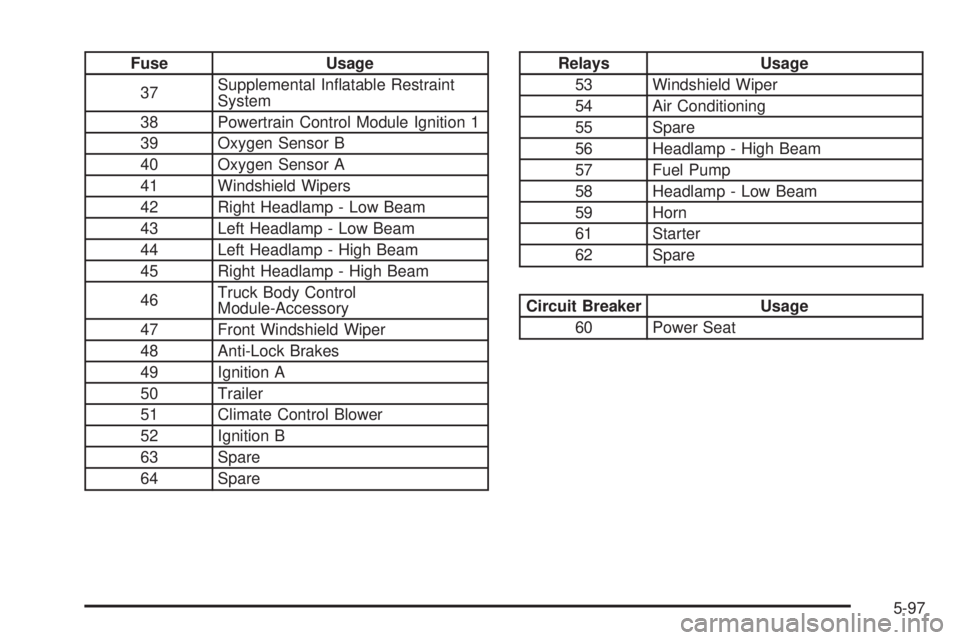
Fuse Usage
37Supplemental Inatable Restraint
System
38 Powertrain Control Module Ignition 1
39 Oxygen Sensor B
40 Oxygen Sensor A
41 Windshield Wipers
42 Right Headlamp - Low Beam
43 Left Headlamp - Low Beam
44 Left Headlamp - High Beam
45 Right Headlamp - High Beam
46Truck Body Control
Module-Accessory
47 Front Windshield Wiper
48 Anti-Lock Brakes
49 Ignition A
50 Trailer
51 Climate Control Blower
52 Ignition B
63 Spare
64 SpareRelays Usage
53 Windshield Wiper
54 Air Conditioning
55 Spare
56 Headlamp - High Beam
57 Fuel Pump
58 Headlamp - Low Beam
59 Horn
61 Starter
62 Spare
Circuit Breaker Usage
60 Power Seat
5-97
Page 350 of 384
Automatic Transmission Shift Lock
Control System Check
{CAUTION:
When you are doing this inspection, the
vehicle could move suddenly. If the vehicle
moves, you or others could be injured.
1. Before you start, be sure you have enough room
around the vehicle. It should be parked on a level
surface.
2. Firmly apply the parking brake. SeeParking Brake
on page 2-25if necessary.
Be ready to apply the regular brake immediately if
the vehicle begins to move.
3. With the engine off, turn the ignition to RUN, but do
not start the engine. Without applying the regular
brake, try to move the shift lever out of PARK (P)
with normal effort. If the shift lever moves out
of PARK (P), contact your GM Goodwrench dealer
for service.
Ignition Transmission Lock Check
While parked, and with the parking brake set, try to turn
the ignition to LOCK in each shift lever position.
The ignition should turn to LOCK only when the
shift lever is in PARK (P).
The key should come out only in LOCK.
Contact your GM Goodwrench dealer if service
is required.
Parking Brake and Automatic
Transmission Park (P) Mechanism Check
{CAUTION:
When you are doing this check, your vehicle
could begin to move. You or others could be
injured and property could be damaged. Make
sure there is room in front of your vehicle in
case it begins to roll. Be ready to apply the
regular brake at once should the vehicle begin
to move.
6-12
Page 377 of 384
I
Ignition Positions.............................................2-20
Infants and Young Children, Restraints...............1-34
Ination -- Tire Pressure..................................5-58
Instrument Panel
Brightness..................................................3-15
Cluster.......................................................3-24
Overview..................................................... 3-4
J
Jump Starting.................................................5-39
K
Keyless Entry System....................................... 2-3
Keys............................................................... 2-2
L
Labelling, Tire Sidewall....................................5-53
Lamps
Battery Run-Down Protection.........................3-16
Dome........................................................3-15
Dome Lamp Override...................................3-15
Exterior......................................................3-13
Reading.....................................................3-16
LATCH System
Child Restraints...........................................1-50
Securing a Child Restraint Designed
for
the LATCH System...................................1-52
Light
Airbag Off..................................................3-27
Airbag Readiness........................................3-26
Anti-Lock Brake System Warning...................3-31
Brake System Warning.................................3-29
7