service GMC SAVANA 2007 Owner's Guide
[x] Cancel search | Manufacturer: GMC, Model Year: 2007, Model line: SAVANA, Model: GMC SAVANA 2007Pages: 452, PDF Size: 2.68 MB
Page 183 of 452
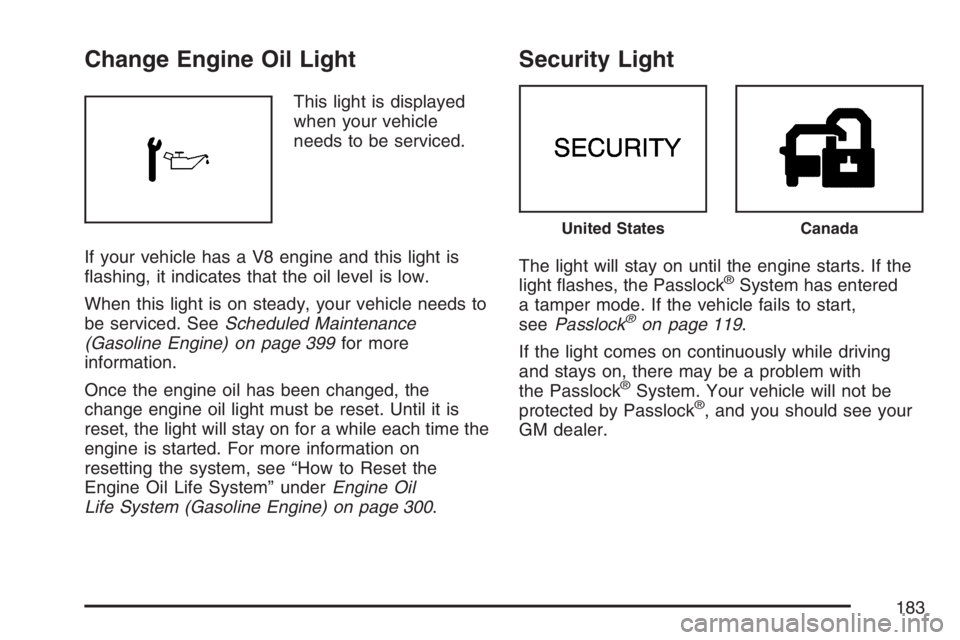
Change Engine Oil Light
This light is displayed
when your vehicle
needs to be serviced.
If your vehicle has a V8 engine and this light is
flashing, it indicates that the oil level is low.
When this light is on steady, your vehicle needs to
be serviced. SeeScheduled Maintenance
(Gasoline Engine) on page 399for more
information.
Once the engine oil has been changed, the
change engine oil light must be reset. Until it is
reset, the light will stay on for a while each time the
engine is started. For more information on
resetting the system, see “How to Reset the
Engine Oil Life System” underEngine Oil
Life System (Gasoline Engine) on page 300.
Security Light
The light will stay on until the engine starts. If the
light flashes, the Passlock®System has entered
a tamper mode. If the vehicle fails to start,
seePasslock
®on page 119.
If the light comes on continuously while driving
and stays on, there may be a problem with
the Passlock
®System. Your vehicle will not be
protected by Passlock®, and you should see your
GM dealer.
United StatesCanada
183
Page 184 of 452
Cruise Control Light
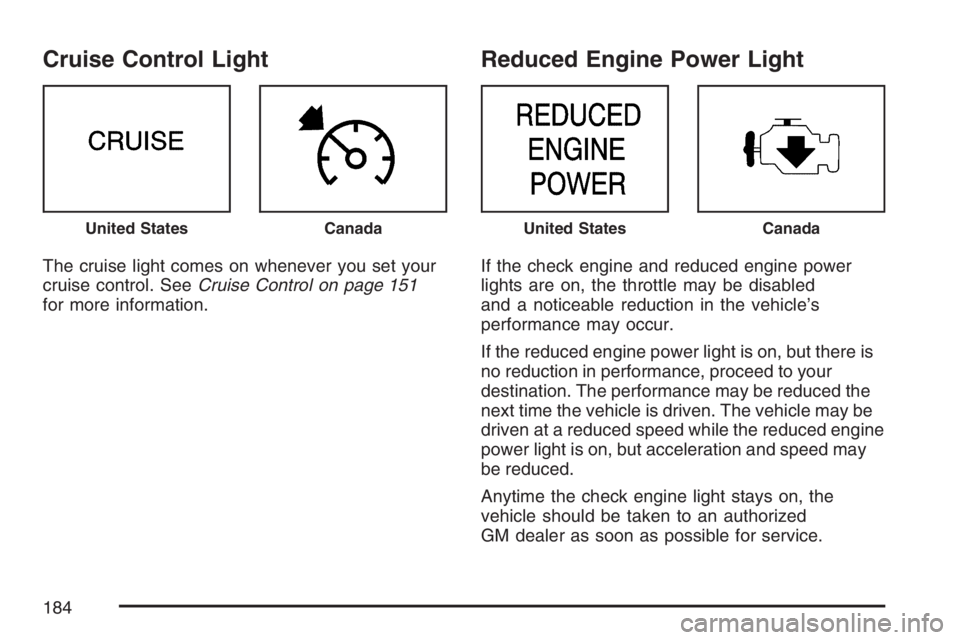
The cruise light comes on whenever you set your
cruise control. SeeCruise Control on page 151
for more information.
Reduced Engine Power Light
If the check engine and reduced engine power
lights are on, the throttle may be disabled
and a noticeable reduction in the vehicle’s
performance may occur.
If the reduced engine power light is on, but there is
no reduction in performance, proceed to your
destination. The performance may be reduced the
next time the vehicle is driven. The vehicle may be
driven at a reduced speed while the reduced engine
power light is on, but acceleration and speed may
be reduced.
Anytime the check engine light stays on, the
vehicle should be taken to an authorized
GM dealer as soon as possible for service.
United StatesCanadaUnited StatesCanada
184
Page 192 of 452
Radio Messages
CAL (Calibration):The audio system has been
calibrated for your vehicle from the factory. If
CAL appears on the display it means that the radio
has not been configured properly for your vehicle
and must be returned to the dealer for service.
LOC (Locked):This message is displayed when
the THEFTLOCK
®system has locked up. Take
the vehicle to the dealer for service.
If any error occurs repeatedly or if an error cannot
be corrected, contact your dealer.
Radio with CD
Playing the Radio
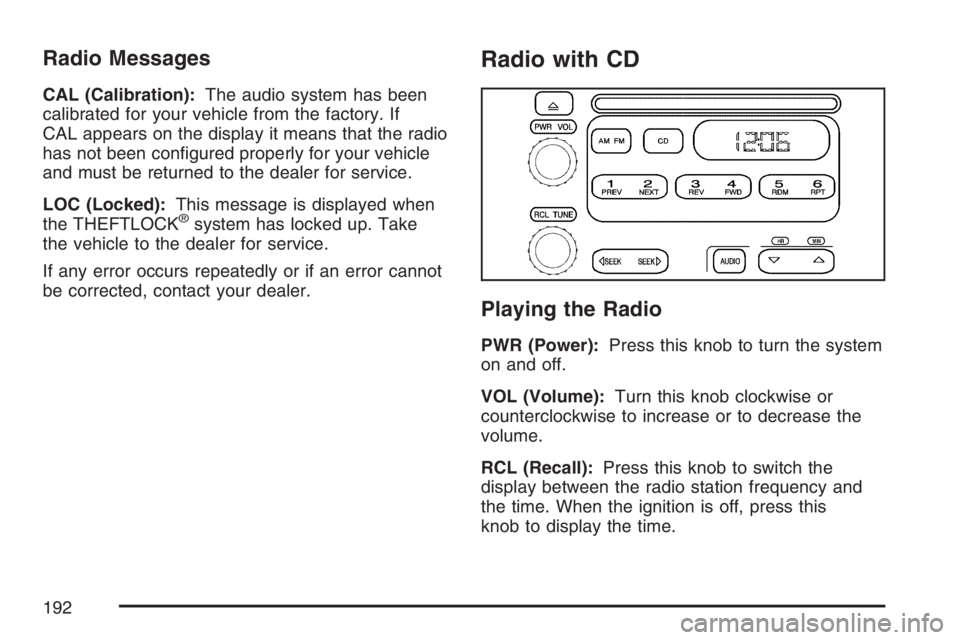
PWR (Power):Press this knob to turn the system
on and off.
VOL (Volume):Turn this knob clockwise or
counterclockwise to increase or to decrease the
volume.
RCL (Recall):Press this knob to switch the
display between the radio station frequency and
the time. When the ignition is off, press this
knob to display the time.
192
Page 195 of 452
Radio Messages
CAL (Calibration):The audio system has been
calibrated for your vehicle from the factory. If
CAL appears on the display it means that the radio
has not been configured properly for your vehicle
and must be returned to the dealer for service.
LOC (Locked):This message is displayed when
the THEFTLOCK
®system has locked up. Take
the vehicle to the dealer for service.
If any error occurs repeatedly or cannot be
corrected, contact your dealer.
Playing a CD
Insert a CD partway into the slot, label side up.
The player pulls it in and the CD should begin
playing. CD appears on the display. If you want to
insert a CD with the ignition off, first press the
eject button or the RCL knob.
If you insert a CD with the radio off and the
ignition on, it starts to play.If the ignition or radio is turned off, with a CD in the
player, it stays in the player. When the ignition or
radio is turned on, the CD starts playing where it
stopped, if it was the last selected audio source.
As each new track starts to play, the track number
appears on the display.
The CD player can play the smaller 3 inch (8 cm)
single CDs with an adapter ring. Full-size CDs and
the smaller CDs are loaded in the same manner.
If playing a CD-R, the sound quality may be
reduced due to CD-R quality, the method of
recording, the quality of the music that has been
recorded, and the way the CD-R has been handled.
There may be an increase in skipping, difficulty in
finding tracks, and/or difficulty in loading and
ejecting. If these problems occur, check the bottom
surface of the CD. If the surface of the CD is
damaged, such as cracked, broken, or scratched,
the CD will not play properly. If the surface of the
CD is soiled, seeCare of Your CDs on page 226for
more information.
195
Page 204 of 452
RDS Messages
INFO (Information):If the current station has a
message, the information symbol appears on
the display. Press this button to see the message.
The message may display the artist, song title,
call in phone numbers, etc.
If the entire message is not displayed, parts of the
message appears every three seconds. To
scroll through the message, press and release the
INFO button. A new group of words appears on
the display after every press of the button.
Once the complete message has displayed, the
information symbol disappears from the display
until another new message is received. The
last message can be displayed by pressing the
INFO button. You can view the last message until
a new message is received or a different station
is tuned to.
Radio Messages
CAL ERR (Calibration Error):The audio system
has been calibrated for your vehicle from the
factory. If CAL ERR appears on the display, it
means that the radio has not been configured
properly for the vehicle and must be returned to
your dealer for service.
LOCKED:This message is displayed when the
THEFTLOCK
®system has locked up. Take
the vehicle to your dealer for service.
If any error occurs repeatedly, or if an error cannot
be corrected, contact your dealer.
204
Page 217 of 452
Radio Messages
CAL ERR (Calibration Error):The audio system
has been calibrated for your vehicle from the
factory. If CAL ERR appears on the display, it
means that the radio has not been configured
properly for the vehicle and must be returned to
your dealer for service.
LOCKED:This message is displayed when the
THEFTLOCK
®system has locked up. Take
the vehicle to your dealer for service.
If any error occurs repeatedly, or if an error cannot
be corrected, contact your dealer.
Playing a CD
If the ignition or radio is turned off, with a CD in the
player, it stays in the player. When the ignition or
radio is turned on, the CD starts playing where it
stopped, if it was the last selected audio source.
When a CD is inserted, the CD symbol appears on
the display. As each new track starts to play,
the track number appears on the display.
The CD player can play the smaller 3 inch (8 cm)
single CDs with an adapter ring. Full-size CDs and
the smaller CDs are loaded in the same manner.
If playing a CD-R, the sound quality may be
reduced due to CD-R quality, the method of
recording, the quality of the music that has been
recorded, and the way the CD-R has been handled.
There may be an increase in skipping, difficulty in
finding tracks, and/or difficulty in loading and
ejecting. If these problems occur, check the bottom
surface of the CD. If the surface of the CD is
damaged, such as cracked, broken, or scratched,
the CD will not play properly. If the surface of the
CD is soiled, seeCare of Your CDs on page 226for
more information.
If there is no apparent damage, try a known
good CD.
217
Page 225 of 452
For best results, use a scrubbing action,
non-abrasive cleaning cassette with pads which
scrub the tape head as the hubs of the cleaner
cassette turn. The recommended cleaning cassette
is available through your dealer.
When cleaning the cassette tape player with the
recommended non-abrasive cleaning cassette, it is
possible that the cassette may eject, because
the cut tape detection feature on the radio
may recognize it as a broken tape, in error.
To prevent the cleaning cassette from being
ejected, use the following steps:
1. Turn the ignition on.
2. Turn the radio off.
3. Press and hold the TAPE DISC button for
five seconds. READY will appear on the
display and the cassette symbol will flash for
five seconds.
4. Insert the scrubbing action cleaning cassette.5. Eject the cleaning cassette after the
manufacturer’s recommended cleaning time.
When the cleaning cassette has been ejected,
the cut tape detection feature will be active
again.
A non-scrubbing action, wet-type cleaner which
uses a cassette with a fabric belt to clean the tape
head can be used. This type of cleaning cassette
will not eject on its own. A non-scrubbing
action cleaner may not clean as thoroughly as the
scrubbing type cleaner. The use of a
non-scrubbing action, dry-type cleaning cassette is
not recommended.
After the player is cleaned, press and hold the
eject button for five seconds to reset the CLEAN
indicator. The radio will display --- or CLEANED to
show the indicator was reset.
Cassettes are subject to wear and the sound
quality may degrade over time. Always make sure
the cassette tape is in good condition before
the tape player is serviced.
225
Page 236 of 452
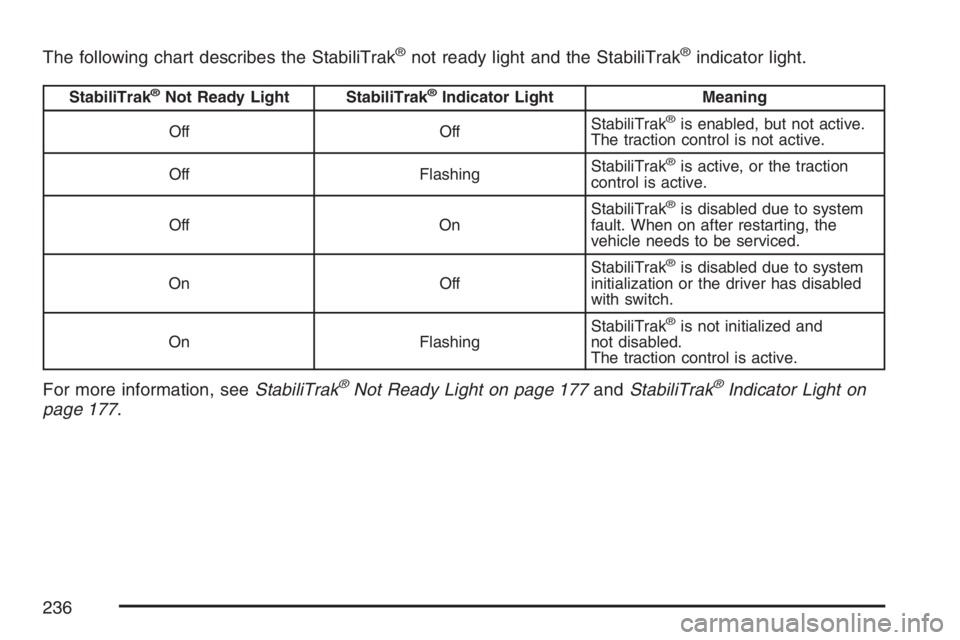
The following chart describes the StabiliTrak®not ready light and the StabiliTrak®indicator light.
StabiliTrak®Not Ready Light StabiliTrak®Indicator Light Meaning
Off OffStabiliTrak
®is enabled, but not active.
The traction control is not active.
Off FlashingStabiliTrak
®is active, or the traction
control is active.
Off OnStabiliTrak
®is disabled due to system
fault. When on after restarting, the
vehicle needs to be serviced.
On OffStabiliTrak
®is disabled due to system
initialization or the driver has disabled
with switch.
On FlashingStabiliTrak
®is not initialized and
not disabled.
The traction control is active.
For more information, seeStabiliTrak®Not Ready Light on page 177andStabiliTrak®Indicator Light on
page 177.
236
Page 238 of 452
The StabiliTrak®system may also turn off
automatically if it determines that a problem exists
with the system. If the problem does not clear
itself after restarting the vehicle, you should see
your dealer for service.
Traction Control Operation
The traction control system is part of the
StabiliTrak®system. Traction control limits wheel
spin by reducing engine power to the wheels
(engine speed management) and by applying
brakes to each individual wheel (brake-traction
control) as necessary.
If the brake-traction control system activates
constantly or if the brakes have heated up due to
high speed braking, the brake-traction control
will be automatically disabled. The system
will come back on after the brakes have cooled.
This can take up to two minutes or longer
depending on brake usage.
The traction control system may activate on dry or
rough roads or under conditions such as heavy
acceleration while turning or abrupt upshifts/
downshifts of the transmission.When this happens you may notice a reduction in
acceleration, or may hear a noise or vibration.
This is normal.
Adding non-GM accessories can affect your
vehicle’s performance. SeeAccessories and
Modications on page 286for more information.All-Wheel Drive (AWD) System
If your vehicle has all-wheel drive, your engine’s
driving power is sent to all four wheels for
extra traction when needed.
This is like four-wheel drive, but there is no
separate lever or switch to engage or disengage
the front axle. It is fully automatic, and adjusts itself
as needed for road conditions.
You may experience a brief vehicle vibration upon
acceleration when driving in slippery conditions.
This is normal and is an indication that the
all-wheel drive system is functioning properly.
238
Page 250 of 452
Before changing lanes, check your mirrors.
Then use your turn signal.
Just before you leave the lane, glance quickly
over your shoulder to make sure there is not
another vehicle in your blind spot.
Once you are moving on the freeway, make
certain you allow a reasonable following distance.
Expect to move slightly slower at night.
When you want to leave the freeway, move to the
proper lane well in advance. If you miss your
exit, do not, under any circumstances, stop and
back up. Drive on to the next exit.
The exit ramp can be curved, sometimes quite
sharply. The exit speed is usually posted.
Reduce your speed according to your
speedometer, not to your sense of motion.
After driving for any distance at higher speeds,
you may tend to think you are going slower than
you actually are.Before Leaving on a Long Trip
Make sure you are ready. Try to be well rested.
If you must start when you are not fresh — such
as after a day’s work — do not plan to make
too many miles that first part of the journey.
Wear comfortable clothing and shoes you can
easily drive in.
Is your vehicle ready for a long trip? If you keep it
serviced and maintained, it is ready to go. If it
needs service, have it done before starting out.
Of course, you will find experienced and able
service experts in GM dealerships all across
North America. They will be ready and willing to
help if you need it.
Here are some things you can check before a trip:
•Windshield Washer Fluid:Is the reservoir
full? Are all windows clean inside and outside?
•Wiper Blades:Are they in good shape?
•Fuel, Engine Oil, Other Fluids:Have you
checked all levels?
250