battery GMC SAVANA 2007 Owner's Manual
[x] Cancel search | Manufacturer: GMC, Model Year: 2007, Model line: SAVANA, Model: GMC SAVANA 2007Pages: 452, PDF Size: 2.68 MB
Page 96 of 452

Servicing Your Airbag-Equipped
Vehicle
Airbags affect how your vehicle should be
serviced. There are parts of the airbag system
in several places around your vehicle. You do
not want the system to inflate while someone is
working on your vehicle. Your dealer and the
service manual have information about servicing
your vehicle and the airbag system. To purchase
a service manual, seeService Publications
Ordering Information on page 437.
{CAUTION:
For up to 10 seconds, after the ignition is
turned off and the battery is disconnected,
an airbag can still inate during improper
service. You can be injured if you are
close to an airbag when it inates. Avoid
yellow connectors. They are probably part
of the airbag system. Be sure to follow
proper service procedures, and make sure
the person performing work for you is
qualied to do so.
The airbag system does not need regular
maintenance.
96
Page 104 of 452

Remote Keyless Entry (RKE)
System
If the vehicle has a Remote Keyless Entry (RKE)
system operates on a radio frequency subject
to Federal Communications Commission (FCC)
Rules and with Industry Canada.
This device complies with Part 15 of the FCC
Rules. Operation is subject to the following
two conditions:
1. This device may not cause interference, and
2. This device must accept any interference
received, including interference that may
cause undesired operation of the device.
This device complies with RSS-210 of Industry
Canada. Operation is subject to the following
two conditions:
1. This device may not cause interference, and
2. This device must accept any interference
received, including interference that may
cause undesired operation of the device.Changes or modifications to this system by other
than an authorized service facility could void
authorization to use this equipment.
At times you may notice a decrease in range. This
is normal for any RKE system. If the transmitter
does not work or if you have to stand closer
to your vehicle for the transmitter to work, try this:
•Check the distance. You may be too far
from your vehicle. You may need to stand
closer during rainy or snowy weather.
•Check the location. Other vehicles or objects
may be blocking the signal. Take a few steps
to the left or right, hold the transmitter
higher, and try again.
•Check to determine if battery replacement or
resynchronization is necessary. See “Battery
Replacement” and “Resynchronization”
underRemote Keyless Entry (RKE) System
Operation on page 105.
•If you are still having trouble, see your dealer
or a qualified technician for service.
104
Page 106 of 452
Resynchronization
Resynchronization may be necessary due to the
security method used by this system. The
transmitter does not send the same signal twice to
the receiver. The receiver will not respond to a
signal that has been sent previously. This prevents
anyone from recording and playing back the
signal from the transmitter.
To resynchronize your transmitter, stand close to
your vehicle and press and hold the lock and
unlock buttons on the transmitter at the same time
for seven seconds. The door locks should cycle
to confirm synchronization. If the locks do not
cycle, see your dealer for service.
Battery Replacement
Under normal use, the battery in your remote
keyless entry transmitter should last about
four years.
You can tell the battery is weak if the transmitter
won’t work at the normal range in any location.
If you have to get close to your vehicle before the
transmitter works, it’s probably time to change
the battery.
Notice:When replacing the battery, use care
not to touch any of the circuitry. Static
from your body transferred to these surfaces
may damage the transmitter.
106
Page 107 of 452
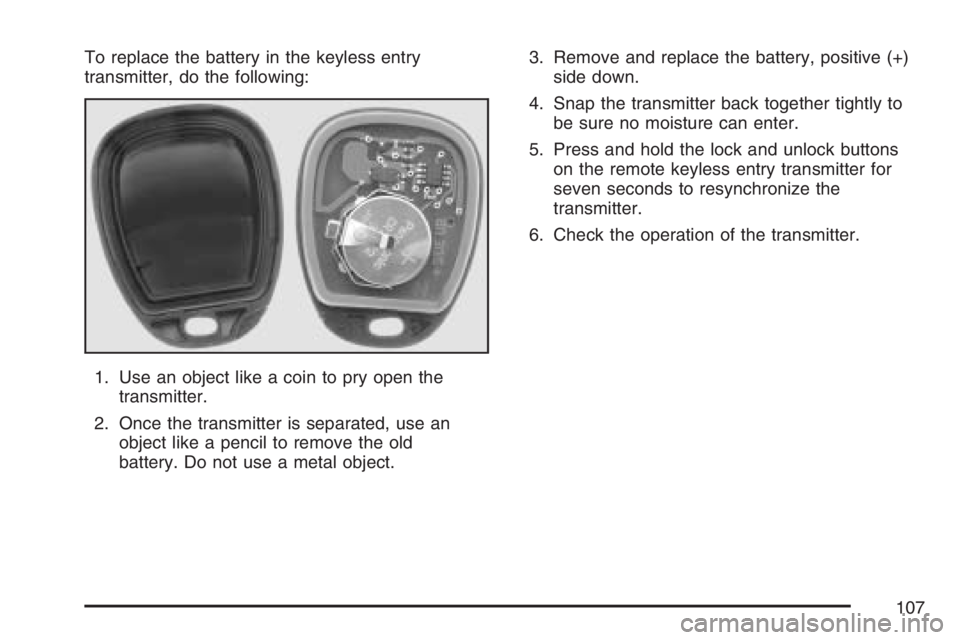
To replace the battery in the keyless entry
transmitter, do the following:
1. Use an object like a coin to pry open the
transmitter.
2. Once the transmitter is separated, use an
object like a pencil to remove the old
battery. Do not use a metal object.3. Remove and replace the battery, positive (+)
side down.
4. Snap the transmitter back together tightly to
be sure no moisture can enter.
5. Press and hold the lock and unlock buttons
on the remote keyless entry transmitter for
seven seconds to resynchronize the
transmitter.
6. Check the operation of the transmitter.
107
Page 121 of 452
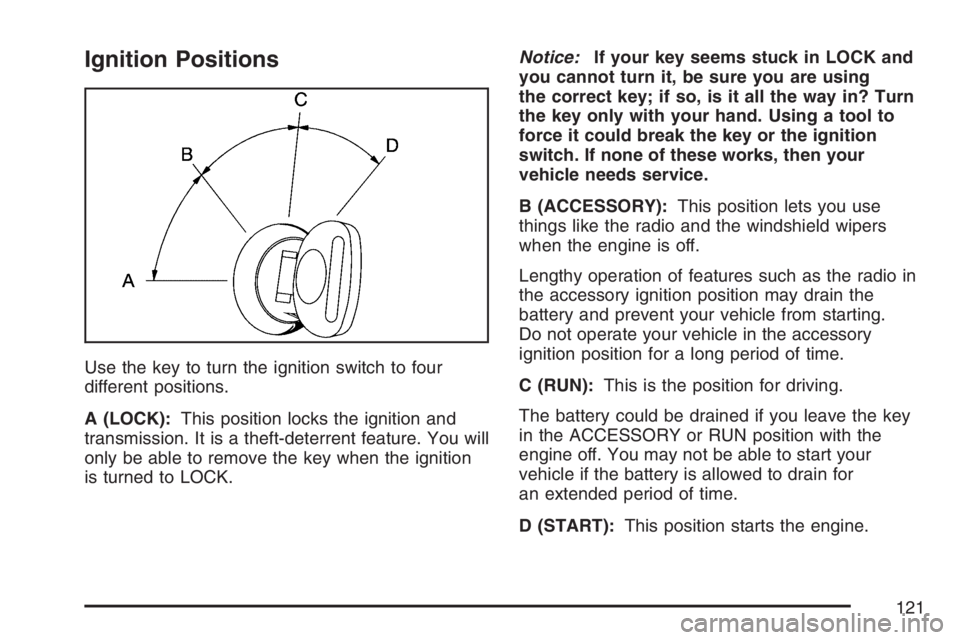
Ignition Positions
Use the key to turn the ignition switch to four
different positions.
A (LOCK):This position locks the ignition and
transmission. It is a theft-deterrent feature. You will
only be able to remove the key when the ignition
is turned to LOCK.Notice:If your key seems stuck in LOCK and
you cannot turn it, be sure you are using
the correct key; if so, is it all the way in? Turn
the key only with your hand. Using a tool to
force it could break the key or the ignition
switch. If none of these works, then your
vehicle needs service.
B (ACCESSORY):This position lets you use
things like the radio and the windshield wipers
when the engine is off.
Lengthy operation of features such as the radio in
the accessory ignition position may drain the
battery and prevent your vehicle from starting.
Do not operate your vehicle in the accessory
ignition position for a long period of time.
C (RUN):This is the position for driving.
The battery could be drained if you leave the key
in the ACCESSORY or RUN position with the
engine off. You may not be able to start your
vehicle if the battery is allowed to drain for
an extended period of time.
D (START):This position starts the engine.
121
Page 122 of 452
Key In the Ignition
Never leave your vehicle with the keys inside, as it
is an easy target for joy riders or thieves. If you
leave the key in the ignition and park your vehicle,
a chime will sound, when you open the driver’s
door. Always remember to remove your key from
the ignition and take it with you. This will lock
your ignition and transaxle. Also, always remember
to lock the doors.
The battery could be drained if you leave the key
in the ignition while your vehicle is parked.
You may not be able to start your vehicle after it
has been parked for an extended period of time.
Retained Accessory Power (RAP)
The Retained Accessory Power (RAP) feature will
allow certain features on your vehicle to continue
to work for up to 10 minutes after the ignition key is
turned to LOCK or until one of the doors is
opened.
Starting the Engine
Place the transmission in the proper gear.
Move your shift lever to PARK (P) or
NEUTRAL (N). Your engine will not start in
any other position -- this is a safety feature.
To restart when you are already moving, use
NEUTRAL (N) only.
Notice:Do not try to shift to PARK (P) if your
vehicle is moving. If you do, you could
damage the transmission. Shift to PARK (P)
only when your vehicle is stopped.
Starting Procedure
1. With your foot off the accelerator pedal, turn
the ignition key to START. When the engine
starts, let go of the key. The idle speed will go
down as your engine gets warm. Do not
race the engine immediately after starting it.
Operate the engine and transmission gently to
allow the oil to warm up and lubricate all
moving parts.
122
Page 123 of 452
Your vehicle has a Computer-Controlled
Cranking System. This feature assists in
starting the engine and protects components.
If the ignition key is turned to the START
position, and then released when the engine
begins cranking, the engine will continue
cranking for a few seconds or until the vehicle
starts. If the engine does not start and the
key is held in START for many seconds,
cranking will be stopped after 15 seconds to
prevent cranking motor damage. To prevent
gear damage, this system also prevents
cranking if the engine is already running.
Engine cranking can be stopped by turning the
ignition switch to the ACCESSORY or LOCK
position.
Notice:Cranking the engine for long periods
of time, by returning the key to the START
position immediately after cranking has ended,
can overheat and damage the cranking
motor, and drain the battery. Wait at least
15 seconds between each try, to allow
the cranking motor to cool down.2. If the engine does not start after 5-10 seconds,
especially in very cold weather (below 0°F
or−18°C), it could be flooded with too much
gasoline. Try pushing the accelerator
pedal all the way to the floor and holding it
there as you hold the key in START for up to
a maximum of 15 seconds. Wait at least
15 seconds between each try, to allow the
cranking motor to cool down. When the engine
starts, let go of the key and accelerator.
If the vehicle starts briefly but then stops
again, do the same thing. This clears the extra
gasoline from the engine. Do not race the
engine immediately after starting it. Operate
the engine and transmission gently until the oil
warms up and lubricates all moving parts.
Notice:Your engine is designed to work with
the electronics in your vehicle. If you add
electrical parts or accessories, you could
change the way the engine operates. Before
adding electrical equipment, check with
your dealer. If you do not, your engine might
not perform properly. Any resulting damage
would not be covered by your vehicle’s
warranty.
123
Page 141 of 452
Instrument Panel Overview........................ 144
Hazard Warning Flashers.......................... 146
Other Warning Devices............................. 146
Horn.......................................................... 146
Tilt Wheel.................................................. 147
Turn Signal/Multifunction Lever.................. 147
Turn and Lane-Change Signals................. 148
Headlamp High/Low-Beam Changer.......... 149
Flash-to-Pass............................................ 149
Windshield Wipers..................................... 149
Windshield Washer.................................... 150
Cruise Control........................................... 151
Exterior Lamps.......................................... 154
Headlamps on Reminder........................... 155
Daytime Running Lamps (DRL)................. 156
Instrument Panel Brightness...................... 156
Dome Lamps............................................. 156
Dome Lamp Override................................ 157
Entry Lighting............................................ 157
Exit Lighting.............................................. 157Reading Lamps......................................... 157
Battery Run-Down Protection..................... 158
Accessory Power Outlet(s)........................ 158
Ashtray(s) and Cigarette Lighter................ 159
Climate Controls......................................... 159
Climate Control System............................. 159
Outlet Adjustment...................................... 162
Rear Heating System................................ 163
Rear Air Conditioning and Heating
System.................................................. 164
Warning Lights, Gages, and Indicators..... 166
Instrument Panel Cluster........................... 167
Speedometer and Odometer...................... 168
Trip Odometer........................................... 168
Safety Belt Reminder Light........................ 168
Passenger Safety Belt Reminder Light....... 169
Airbag Readiness Light............................. 169
Airbag Off Light......................................... 170
Passenger Airbag Status Indicator............. 172
Charging System Light.............................. 174
Section 3 Instrument Panel
141
Page 158 of 452
Battery Run-Down Protection
This feature shuts off the exterior and interior lamps
if they are left on after the ignition is turned off.
All exterior lamps will shut off after 10 minutes.
Interior cargo lamps will shut down after 20 minutes
and all other interior lamps after 10 minutes.
Accessory Power Outlet(s)
With accessory power outlets you can plug in
auxiliary electrical equipment such as a cellular
telephone or CB radio.
Your vehicle may have two accessory power
outlets. If your vehicle has a cigarette lighter/
accessory power outlet, it is located on the driver’s
side of the front storage compartment. The
other accessory power outlet is located on the
passenger’s side of the front storage compartment.
To use the outlet, lift the cover. When not using
it, always close the cover.Certain power accessory plugs may not be
compatible to the accessory power outlet and
could result in blown vehicle or adapter fuses.
If you experience a problem, see your dealer
for additional information on the accessory
power plugs.
Notice:Adding any electrical equipment to
your vehicle may damage it or keep other
components from working as they should.
The repairs would not be covered by your
warranty. Do not use equipment exceeding
maximum amperage rating of 20 amperes.
Check with your dealer before adding electrical
equipment.
When adding electrical equipment, be sure to
follow the proper installation instructions included
with the equipment.
Notice:Improper use of the power outlet can
cause damage not covered by your warranty.
Do not hang any type of accessory or
accessory bracket from the plug because the
power outlets are designed for accessory
power plugs only.
158
Page 174 of 452
SeePassenger Sensing System on page 89for
more on this, including important safety information.
If, after several seconds, all status indicator lights
remain on, or if there are no lights at all, there
may be a problem with the lights or the passenger
sensing system. See your dealer for service.
{CAUTION:
If the off indicator and the airbag
readiness light ever come on together, it
means that something may be wrong with
the airbag system. If this ever happens,
have the vehicle serviced promptly,
because an adult-size person sitting in the
right front passenger seat may not have
the protection of the frontal airbag. See
Airbag Readiness Light on page 169.
Charging System Light
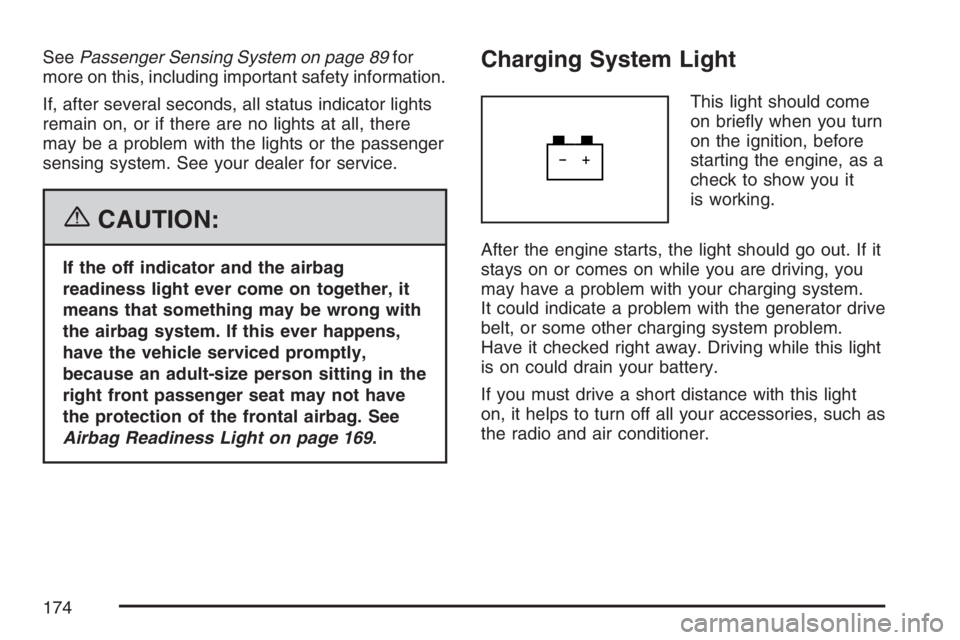
This light should come
on briefly when you turn
on the ignition, before
starting the engine, as a
check to show you it
is working.
After the engine starts, the light should go out. If it
stays on or comes on while you are driving, you
may have a problem with your charging system.
It could indicate a problem with the generator drive
belt, or some other charging system problem.
Have it checked right away. Driving while this light
is on could drain your battery.
If you must drive a short distance with this light
on, it helps to turn off all your accessories, such as
the radio and air conditioner.
174