lock GMC SAVANA 2007 Workshop Manual
[x] Cancel search | Manufacturer: GMC, Model Year: 2007, Model line: SAVANA, Model: GMC SAVANA 2007Pages: 452, PDF Size: 2.68 MB
Page 183 of 452
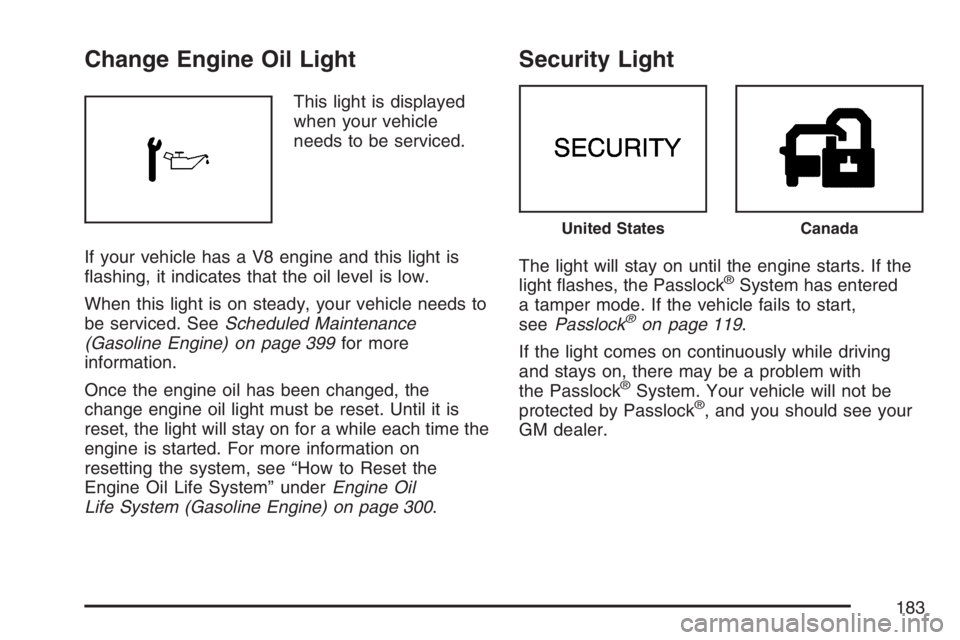
Change Engine Oil Light
This light is displayed
when your vehicle
needs to be serviced.
If your vehicle has a V8 engine and this light is
flashing, it indicates that the oil level is low.
When this light is on steady, your vehicle needs to
be serviced. SeeScheduled Maintenance
(Gasoline Engine) on page 399for more
information.
Once the engine oil has been changed, the
change engine oil light must be reset. Until it is
reset, the light will stay on for a while each time the
engine is started. For more information on
resetting the system, see “How to Reset the
Engine Oil Life System” underEngine Oil
Life System (Gasoline Engine) on page 300.
Security Light
The light will stay on until the engine starts. If the
light flashes, the Passlock®System has entered
a tamper mode. If the vehicle fails to start,
seePasslock
®on page 119.
If the light comes on continuously while driving
and stays on, there may be a problem with
the Passlock
®System. Your vehicle will not be
protected by Passlock®, and you should see your
GM dealer.
United StatesCanada
183
Page 189 of 452
Setting the Time for Radios with
Radio Data Systems (RDS)
The radio may have a button marked with an H or
HR to represent hours and an M or MN to
represent minutes.
Press and hold the hour button until the correct
hour appears on the display. Press and hold
the minute button until the correct minute appears
on the display. The time can be set with the
ignition on or off.
To synchronize the time with an FM station
broadcasting Radio Data System (RDS)
information, press and hold the hour and minute
buttons at the same time until RDS TIME appears
on the display. To accept this time, press and
hold the hour and minute buttons, at the same
time, for another two seconds. If the time is
not available from the station, NO UPDAT (update)
will appear on the display.
RDS time is broadcast once a minute. After tuning
to an RDS broadcast station, it may take a
few minutes for the time to update.
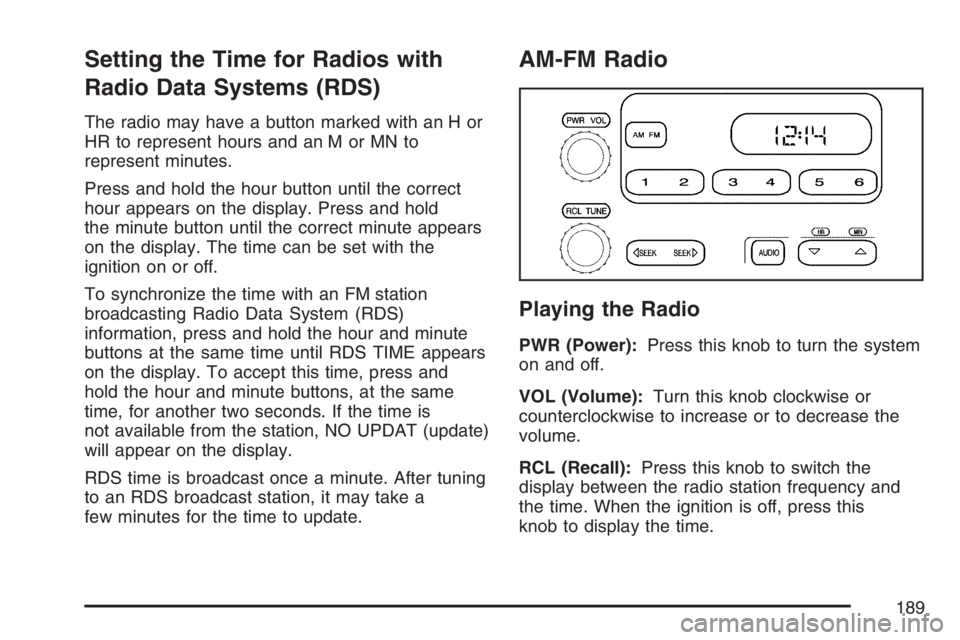
AM-FM Radio
Playing the Radio
PWR (Power):Press this knob to turn the system
on and off.
VOL (Volume):Turn this knob clockwise or
counterclockwise to increase or to decrease the
volume.
RCL (Recall):Press this knob to switch the
display between the radio station frequency and
the time. When the ignition is off, press this
knob to display the time.
189
Page 192 of 452
Radio Messages
CAL (Calibration):The audio system has been
calibrated for your vehicle from the factory. If
CAL appears on the display it means that the radio
has not been configured properly for your vehicle
and must be returned to the dealer for service.
LOC (Locked):This message is displayed when
the THEFTLOCK
®system has locked up. Take
the vehicle to the dealer for service.
If any error occurs repeatedly or if an error cannot
be corrected, contact your dealer.
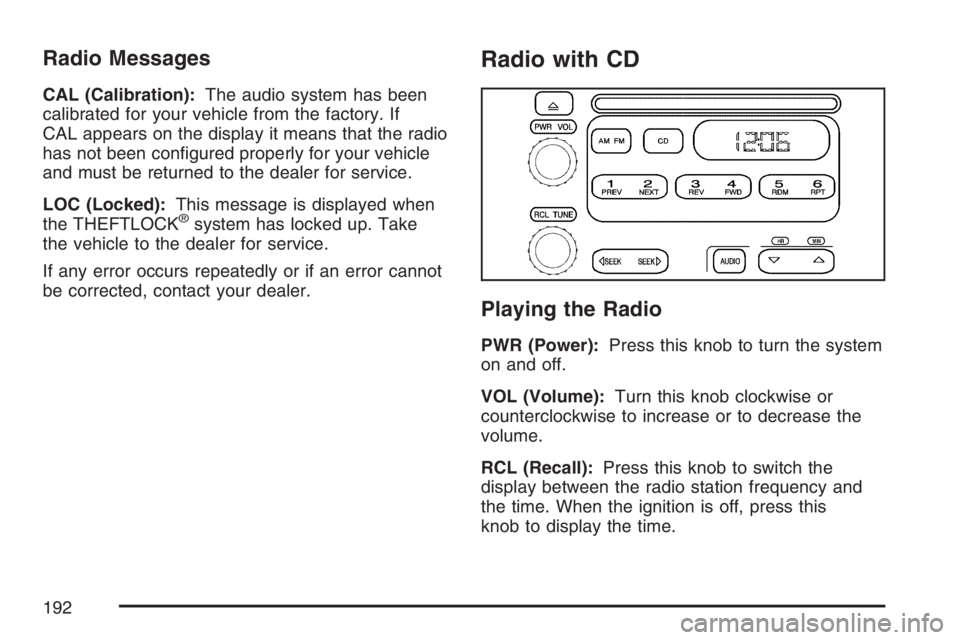
Radio with CD
Playing the Radio
PWR (Power):Press this knob to turn the system
on and off.
VOL (Volume):Turn this knob clockwise or
counterclockwise to increase or to decrease the
volume.
RCL (Recall):Press this knob to switch the
display between the radio station frequency and
the time. When the ignition is off, press this
knob to display the time.
192
Page 195 of 452
Radio Messages
CAL (Calibration):The audio system has been
calibrated for your vehicle from the factory. If
CAL appears on the display it means that the radio
has not been configured properly for your vehicle
and must be returned to the dealer for service.
LOC (Locked):This message is displayed when
the THEFTLOCK
®system has locked up. Take
the vehicle to the dealer for service.
If any error occurs repeatedly or cannot be
corrected, contact your dealer.
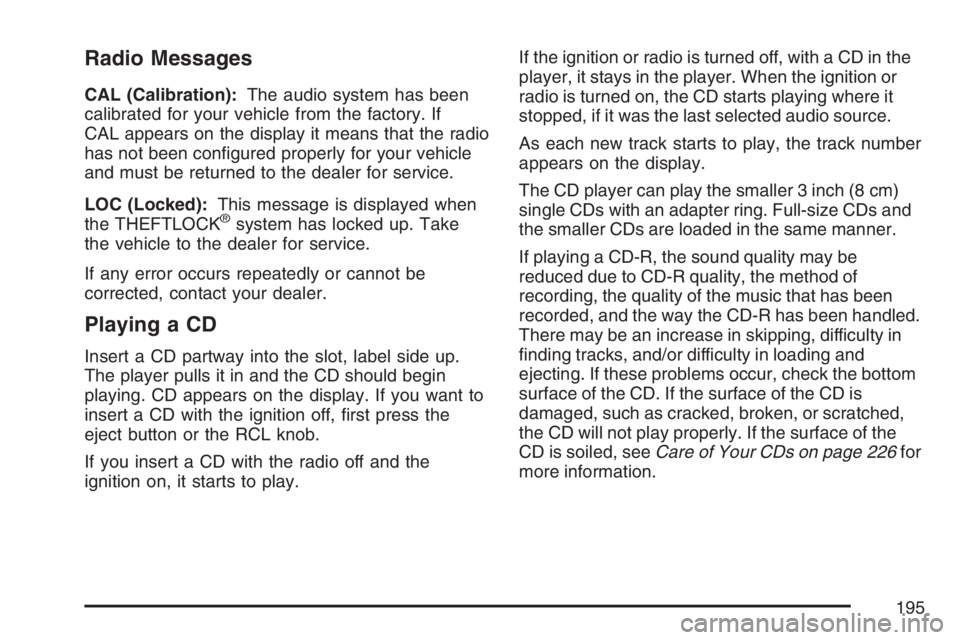
Playing a CD
Insert a CD partway into the slot, label side up.
The player pulls it in and the CD should begin
playing. CD appears on the display. If you want to
insert a CD with the ignition off, first press the
eject button or the RCL knob.
If you insert a CD with the radio off and the
ignition on, it starts to play.If the ignition or radio is turned off, with a CD in the
player, it stays in the player. When the ignition or
radio is turned on, the CD starts playing where it
stopped, if it was the last selected audio source.
As each new track starts to play, the track number
appears on the display.
The CD player can play the smaller 3 inch (8 cm)
single CDs with an adapter ring. Full-size CDs and
the smaller CDs are loaded in the same manner.
If playing a CD-R, the sound quality may be
reduced due to CD-R quality, the method of
recording, the quality of the music that has been
recorded, and the way the CD-R has been handled.
There may be an increase in skipping, difficulty in
finding tracks, and/or difficulty in loading and
ejecting. If these problems occur, check the bottom
surface of the CD. If the surface of the CD is
damaged, such as cracked, broken, or scratched,
the CD will not play properly. If the surface of the
CD is soiled, seeCare of Your CDs on page 226for
more information.
195
Page 199 of 452
Radio Data System (RDS)
The audio system has a Radio Data System
(RDS). RDS features are available for use only on
FM stations that broadcast RDS information.
With RDS, the radio can do the following:
•Seek to stations broadcasting the selected
type of programming
•Receive announcements concerning local and
national emergencies
•Display messages from radio stations
This system relies upon receiving specific
information from these stations and only works
when the information is available. In rare cases, a
radio station may broadcast incorrect information
that causes the radio features to work improperly.
If this happens, contact the radio station.
While the radio is tuned to an RDS station, the
station name or call letters appear on the display
instead of the frequency. RDS stations may
also provide the time of day, a program type (PTY)
for current programming, and the name of the
program being broadcast.
Playing the Radio
PWR (Power):Press this knob to turn the system
on and off.
oVOLp(Volume):Turn this knob clockwise or
counterclockwise to increase or to decrease the
volume.
INFO (Information):Press this knob to switch the
display between the radio station frequency and
the time. When the ignition is off, press this
knob to display the time.
For RDS, press the INFO knob to change what
appears on the display while using RDS. The
display options are station name, RDS station
frequency, PTY, and the name of the program
(if available).
To change the default on the display, press the
INFO knob until you see the desired display, then
hold the knob until you hear a beep. The
selected display is now the default.
199
Page 204 of 452
RDS Messages
INFO (Information):If the current station has a
message, the information symbol appears on
the display. Press this button to see the message.
The message may display the artist, song title,
call in phone numbers, etc.
If the entire message is not displayed, parts of the
message appears every three seconds. To
scroll through the message, press and release the
INFO button. A new group of words appears on
the display after every press of the button.
Once the complete message has displayed, the
information symbol disappears from the display
until another new message is received. The
last message can be displayed by pressing the
INFO button. You can view the last message until
a new message is received or a different station
is tuned to.
Radio Messages
CAL ERR (Calibration Error):The audio system
has been calibrated for your vehicle from the
factory. If CAL ERR appears on the display, it
means that the radio has not been configured
properly for the vehicle and must be returned to
your dealer for service.
LOCKED:This message is displayed when the
THEFTLOCK
®system has locked up. Take
the vehicle to your dealer for service.
If any error occurs repeatedly, or if an error cannot
be corrected, contact your dealer.
204
Page 207 of 452
Cassette Tape Messages
CHK TAPE (Check Tape):If this message
appears on the display, the tape does not play
due to one of the following errors:
•The tape is tight and the player cannot turn the
tape hubs. Remove the tape. Hold the tape with
the open end down and try to turn the right hub
counterclockwise with a pencil. Turn the tape
over and repeat. If the hubs do not turn easily,
the tape may be damaged and should not be
used in the player. Try a new tape to make sure
your player is working properly.
•The tape is broken. Try a new tape.
•The tape is wrapped around the tape head.
Attempt to get the cassette out. Try a new tape.
CLEAN:If this message appears on the display,
the cassette tape player needs to be cleaned.
It still plays tapes, but it should be cleaned as soon
as possible to prevent damage to the tapes and
player. SeeCare of the Cassette Tape Player
on page 224.
If the cassette tape is not playing correctly, for any
other reason, try a known good cassette.If any error occurs repeatedly or if an error cannot
be corrected, contact your dealer. If the radio
displays an error message, write it down and
provide it to your dealer when reporting the
problem.
CD Adapter Kits
It is possible to use a portable CD player with the
cassette tape player after activating the bypass
feature on your tape player.
To activate the bypass feature, perform the
following steps:
1. Turn the ignition on.
2. Turn the radio off.
3. Press and hold the TAPE DISC button for
five seconds. READY appears on the
display and the tape symbol on the display
flashes, indicating the feature is active.
4. Insert the adapter into the cassette tape slot.
It powers up the radio and begins playing.
The override feature remains active until the eject
button is pressed.
207
Page 211 of 452
CD Messages
If the CD comes out, it could be for one of the
following reasons:
•It is very hot. When the temperature returns to
normal, the CD should play.
•You are driving on a very rough road. When the
road becomes smoother, the CD should play.
•The CD is dirty, scratched, wet, or
upside down.
•The air is very humid. If so, wait about an hour
and try again.
•There may have been a problem while burning
the CD.
•The label may be caught in the CD player.
If the CD is not playing correctly, for any other
reason, try a known good CD.
If any error occurs repeatedly or if an error cannot
be corrected, contact your dealer. If the radio
displays an error message, write it down
and provide it to your dealer when reporting the
problem.
Radio with Six-Disc CD
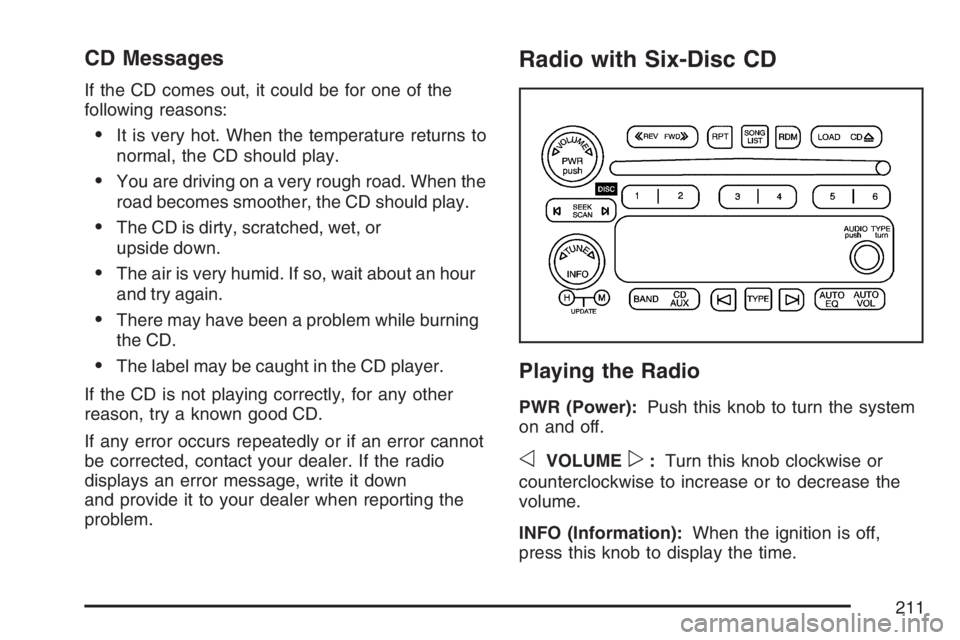
Playing the Radio
PWR (Power):Push this knob to turn the system
on and off.
oVOLUMEp:Turn this knob clockwise or
counterclockwise to increase or to decrease the
volume.
INFO (Information):When the ignition is off,
press this knob to display the time.
211
Page 217 of 452
Radio Messages
CAL ERR (Calibration Error):The audio system
has been calibrated for your vehicle from the
factory. If CAL ERR appears on the display, it
means that the radio has not been configured
properly for the vehicle and must be returned to
your dealer for service.
LOCKED:This message is displayed when the
THEFTLOCK
®system has locked up. Take
the vehicle to your dealer for service.
If any error occurs repeatedly, or if an error cannot
be corrected, contact your dealer.
Playing a CD
If the ignition or radio is turned off, with a CD in the
player, it stays in the player. When the ignition or
radio is turned on, the CD starts playing where it
stopped, if it was the last selected audio source.
When a CD is inserted, the CD symbol appears on
the display. As each new track starts to play,
the track number appears on the display.
The CD player can play the smaller 3 inch (8 cm)
single CDs with an adapter ring. Full-size CDs and
the smaller CDs are loaded in the same manner.
If playing a CD-R, the sound quality may be
reduced due to CD-R quality, the method of
recording, the quality of the music that has been
recorded, and the way the CD-R has been handled.
There may be an increase in skipping, difficulty in
finding tracks, and/or difficulty in loading and
ejecting. If these problems occur, check the bottom
surface of the CD. If the surface of the CD is
damaged, such as cracked, broken, or scratched,
the CD will not play properly. If the surface of the
CD is soiled, seeCare of Your CDs on page 226for
more information.
If there is no apparent damage, try a known
good CD.
217
Page 223 of 452
CD Messages
CHECK CD:If this message appears on the
display and/or the CD comes out, it could be for
one of the following reasons:
•It is very hot. When the temperature returns to
normal, the CD should play.
•You are driving on a very rough road. When the
road becomes smoother, the CD should play.
•The CD is dirty, scratched, wet, or
upside down.
•The air is very humid. If so, wait about an hour
and try again.
•There may have been a problem while burning
the CD.
•The label may be caught in the CD player.
If the CD is not playing correctly, for any other
reason, try a known good CD.
If any error occurs repeatedly or if an error cannot
be corrected, contact your dealer. If the radio
displays an error message, write it down
and provide it to your dealer when reporting the
problem.
Theft-Deterrent Feature
(Non-RDS Radios)
THEFTLOCK®is designed to discourage theft
of your vehicle’s radio. The feature works
automatically by learning a portion of the Vehicle
Identification Number (VIN). If the radio is moved to
a different vehicle, it will not operate and LOC will
appear on the display.
With THEFTLOCK
®activated, the radio will not
operate if stolen.
Theft-Deterrent Feature
(RDS Radios)
THEFTLOCK®is designed to discourage theft
of your vehicle’s radio. The feature works
automatically by learning a portion of the Vehicle
Identification Number (VIN). If the radio is moved to
a different vehicle, it will not operate and LOCKED
will appear on the display.
When the radio and vehicle are turned off, the
blinking red light indicates that THEFTLOCK
®is
armed.
With THEFTLOCK
®activated, the radio will not
operate if stolen.
223