cruise control GMC SAVANA 2009 Owner's Manual
[x] Cancel search | Manufacturer: GMC, Model Year: 2009, Model line: SAVANA, Model: GMC SAVANA 2009Pages: 404, PDF Size: 2.35 MB
Page 4 of 404
Vehicle Symbols
The vehicle has components and labels that use
symbols instead of text. Symbols are shown along with
the text describing the operation or information
relating to a specific component, control, message,
gage, or indicator.
M:This symbol is shown when you need to see your
owner manual for additional instructions or information.
*:This symbol is shown when you need to see a
service manual for additional instructions or information.
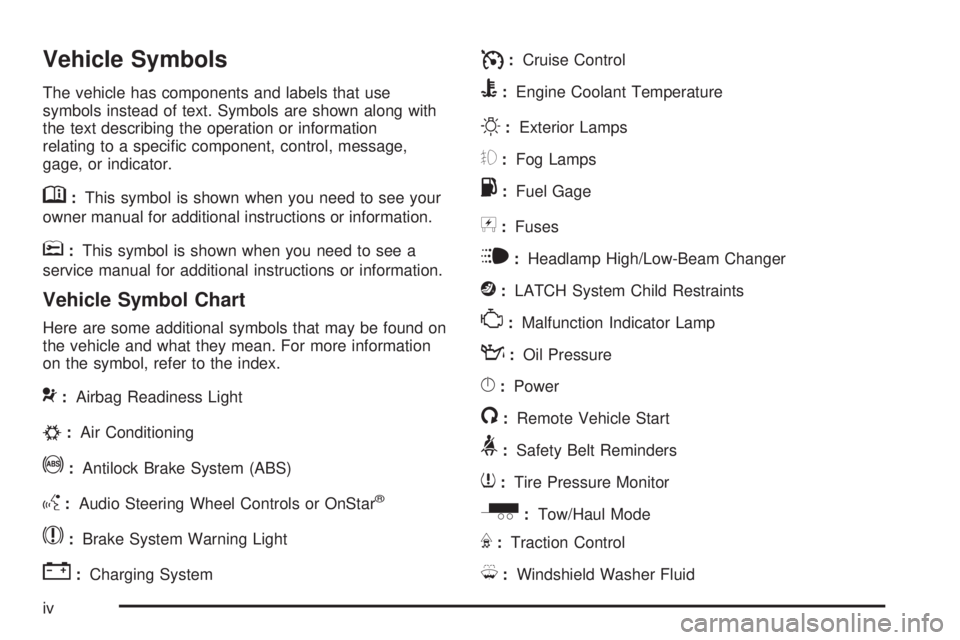
Vehicle Symbol Chart
Here are some additional symbols that may be found on
the vehicle and what they mean. For more information
on the symbol, refer to the index.
9:Airbag Readiness Light
#:Air Conditioning
!:Antilock Brake System (ABS)
g:Audio Steering Wheel Controls or OnStar®
$:Brake System Warning Light
":Charging System
I:Cruise Control
B:Engine Coolant Temperature
O:Exterior Lamps
#:Fog Lamps
.:Fuel Gage
+:Fuses
i:Headlamp High/Low-Beam Changer
j:LATCH System Child Restraints
*:Malfunction Indicator Lamp
::Oil Pressure
}:Power
/:Remote Vehicle Start
>:Safety Belt Reminders
7:Tire Pressure Monitor
_:Tow/Haul Mode
F:Traction Control
M:Windshield Washer Fluid
iv
Page 119 of 404
Instrument Panel Overview...............................3-4
Hazard Warning Flashers................................3-6
Horn .............................................................3-6
Tilt Wheel.....................................................3-6
Turn Signal/Multifunction Lever.........................3-7
Turn and Lane-Change Signals........................3-7
Headlamp High/Low-Beam Changer..................3-8
Flash-to-Pass.................................................3-8
Windshield Wipers..........................................3-8
Windshield Washer.........................................3-9
Cruise Control..............................................3-10
Exterior Lamps.............................................3-13
Headlamps on Reminder................................3-14
Daytime Running Lamps (DRL).......................3-15
Automatic Headlamp System..........................3-15
Instrument Panel Brightness...........................3-16
Dome Lamps ...............................................3-16
Dome Lamp Override....................................3-16
Entry/Exit Lighting.........................................3-17
Reading Lamps............................................3-17
Electric Power Management...........................3-17
Battery Run-Down Protection..........................3-18
Accessory Power Outlet(s).............................3-18
Ashtray(s) and Cigarette Lighter......................3-19Climate Controls............................................3-19
Climate Control System.................................3-19
Outlet Adjustment.........................................3-21
Rear Heating System....................................3-22
Rear Air Conditioning and Heating
System....................................................3-23
Warning Lights, Gages, and Indicators............3-24
Instrument Panel Cluster................................3-25
Speedometer and Odometer...........................3-26
Trip Odometer..............................................3-26
Safety Belt Reminders...................................3-27
Airbag Readiness Light..................................3-27
Airbag Off Light............................................3-28
Passenger Airbag Status Indicator...................3-30
Charging System Light..................................3-31
Voltmeter Gage............................................3-32
Brake System Warning Light..........................3-33
Antilock Brake System (ABS) Warning
Light........................................................3-34
StabiliTrak
®Indicator Light.............................3-34
Engine Coolant Temperature Gage..................3-35
Tire Pressure Light.......................................3-35
Malfunction Indicator Lamp.............................3-36
Oil Pressure Gage........................................3-39
Section 3 Instrument Panel
3-1
Page 120 of 404
Oil Pressure Light.........................................3-40
Security Light...............................................3-41
Cruise Control Light......................................3-41
Highbeam On Light.......................................3-41
Tow/Haul Mode Light....................................3-41
Fuel Gage...................................................3-42
Driver Information Center (DIC).......................3-43
DIC Operation and Displays...........................3-43
DIC Compass..............................................3-48
DIC Warnings and Messages.........................3-50
DIC Vehicle Customization.............................3-59Audio System(s).............................................3-65
Setting the Clock..........................................3-66
Radio(s)......................................................3-68
Using an MP3..............................................3-79
Theft-Deterrent Feature..................................3-84
Audio Steering Wheel Controls.......................3-85
Radio Reception...........................................3-86
Fixed Mast Antenna......................................3-86
Section 3 Instrument Panel
3-2
Page 123 of 404
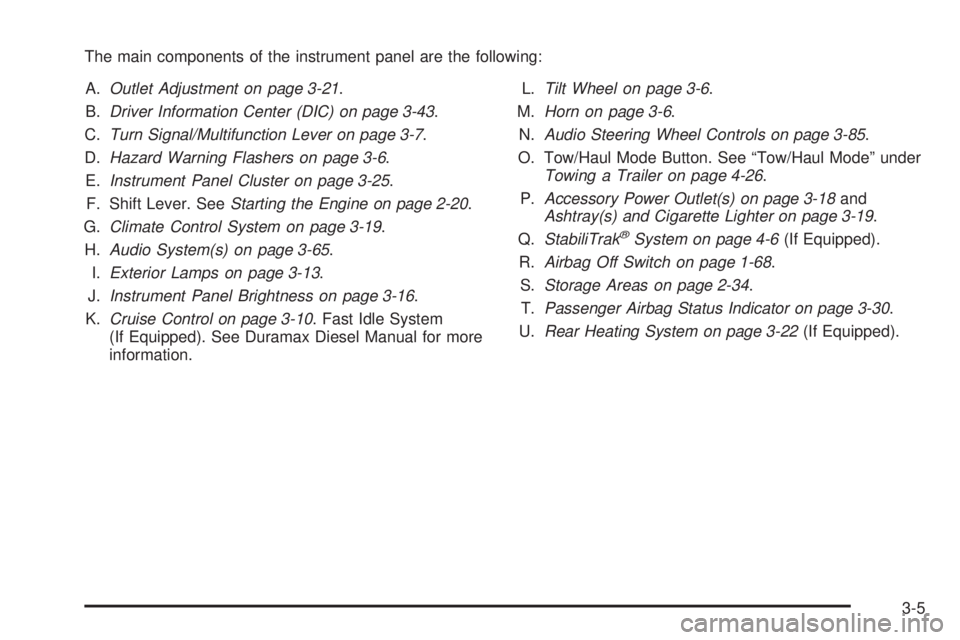
The main components of the instrument panel are the following:
A.Outlet Adjustment on page 3-21.
B.Driver Information Center (DIC) on page 3-43.
C.Turn Signal/Multifunction Lever on page 3-7.
D.Hazard Warning Flashers on page 3-6.
E.Instrument Panel Cluster on page 3-25.
F. Shift Lever. SeeStarting the Engine on page 2-20.
G.Climate Control System on page 3-19.
H.Audio System(s) on page 3-65.
I.Exterior Lamps on page 3-13.
J.Instrument Panel Brightness on page 3-16.
K.Cruise Control on page 3-10. Fast Idle System
(If Equipped). See Duramax Diesel Manual for more
information.L.Tilt Wheel on page 3-6.
M.Horn on page 3-6.
N.Audio Steering Wheel Controls on page 3-85.
O. Tow/Haul Mode Button. See “Tow/Haul Mode” under
Towing a Trailer on page 4-26.
P.Accessory Power Outlet(s) on page 3-18and
Ashtray(s) and Cigarette Lighter on page 3-19.
Q.StabiliTrak
®System on page 4-6(If Equipped).
R.Airbag Off Switch on page 1-68.
S.Storage Areas on page 2-34.
T.Passenger Airbag Status Indicator on page 3-30.
U.Rear Heating System on page 3-22(If Equipped).
3-5
Page 128 of 404
Cruise Control
{CAUTION:
Cruise control can be dangerous where you cannot
drive safely at a steady speed. So, do not use the
cruise control on winding roads or in heavy traffic.
Cruise control can be dangerous on slippery roads.
On such roads, fast changes in tire traction can
cause excessive wheel slip, and you could lose
control. Do not use cruise control on slippery roads.
With cruise control, a speed of about 25 mph (40 km/h)
or more can be maintained without keeping your foot
on the accelerator. Cruise control does not work
at speeds below about 25 mph (40 km/h).
When the brakes are applied, cruise control is
turned off.
If the vehicle has StabiliTrak
®, and the system begins
to limit wheel spin, cruise control will automatically
disengage. SeeStabiliTrak
®System on page 4-6.
When road conditions allow the cruise control to be
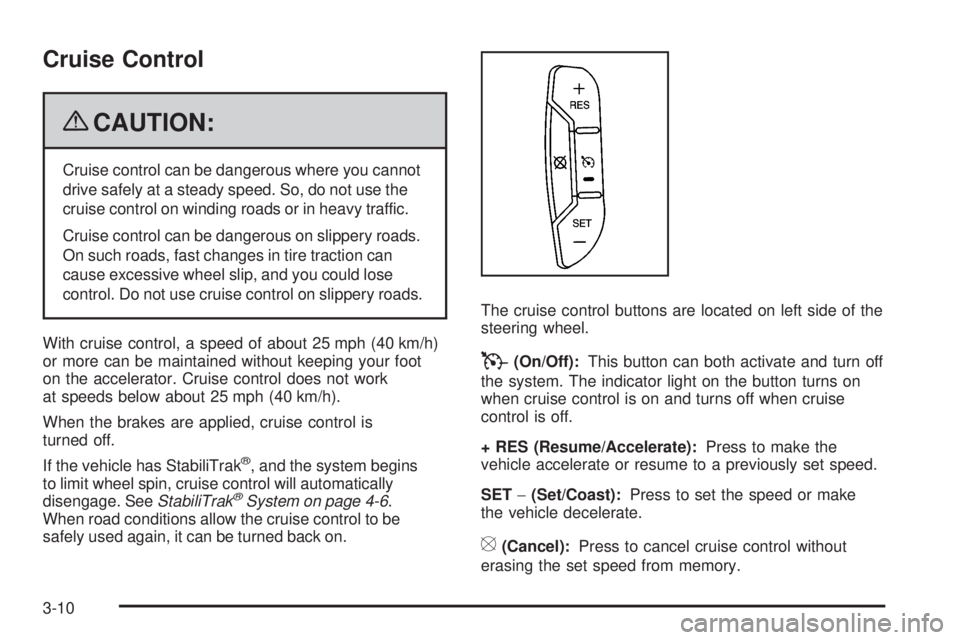
safely used again, it can be turned back on.The cruise control buttons are located on left side of the
steering wheel.
T(On/Off):This button can both activate and turn off
the system. The indicator light on the button turns on
when cruise control is on and turns off when cruise
control is off.
+ RES (Resume/Accelerate):Press to make the
vehicle accelerate or resume to a previously set speed.
SET−(Set/Coast):Press to set the speed or make
the vehicle decelerate.
[(Cancel):Press to cancel cruise control without
erasing the set speed from memory.
3-10
Page 129 of 404
Setting Cruise Control
Cruise control will not work if the parking brake is set, or
if the master cylinder brake fluid level is low.
The cruise control light on the instrument panel cluster
comes on after the cruise control has been set to the
desired speed.
{CAUTION:
If you leave your cruise control on when you are not
using cruise, you might hit a button and go into
cruise when you do not want to. You could be
startled and even lose control. Keep the cruise
control switch off until you want to use cruise
control.
1. Press the
Ibutton.
2. Get up to the desired speed.
3. Press the SET−button located on the steering
wheel and release it.
4. Take your foot off the accelerator.
Resuming a Set Speed
If the cruise control is set at a desired speed and then the
brakes are applied, this shuts off the cruise control. But it
does not need to be reset.
Once the vehicle speed reaches about 25 mph (40 km/h)
or more, press the +RES button on the steering wheel.
The vehicle returns to the previously set speed and
stays there.
Increasing Speed While Using Cruise
Control
To increase the cruise speed while using cruise control:
•Press and hold the +RES button on the steering
wheel until the desired speed is reached, then
release it.
•To increase vehicle speed in small increments,
press the +RES button. Each time this is done,
the vehicle goes about 1 mph (1.6 km/h) faster.
3-11
Page 130 of 404
Reducing Speed While Using Cruise
Control
To reduce the vehicle speed while using cruise control:
•Press and hold the SET– button on the steering
wheel until the desired lower speed is reached,
then release it.
•To slow down in very small amounts, press
the SET– button on the steering wheel briefly.
Each time this is done, the vehicle goes about
1 mph (1.6 km/h) slower.
Passing Another Vehicle While Using
Cruise Control
Use the accelerator pedal to increase the vehicle speed.
When you take your foot off the pedal, the vehicle will
slow down to the previous set cruise speed.
Using Cruise Control on Hills
How well the cruise control will work on hills depends
upon the vehicle speed, load, and the steepness of the
hills. When going up steep hills, you might have to step
on the accelerator pedal to maintain the vehicle’s speed.
When going downhill, you might have to brake or shift to
a lower gear to keep the vehicle’s speed down. When the
brakes are applied the cruise control turns off.
Ending Cruise Control
There are three ways to end cruise control:
•Step lightly on the brake pedal.
•Press the[button on the steering wheel.
•Press theIbutton on the steering wheel.
Erasing Speed Memory
The cruise control set speed memory is erased when
the cruise control or the ignition is turned off.
3-12
Page 159 of 404
Security Light
For information regarding
this light and the vehicle’s
security system, see
PASS-Key
®III+ Electronic
Immobilizer Operation
on page 2-17.
Cruise Control Light
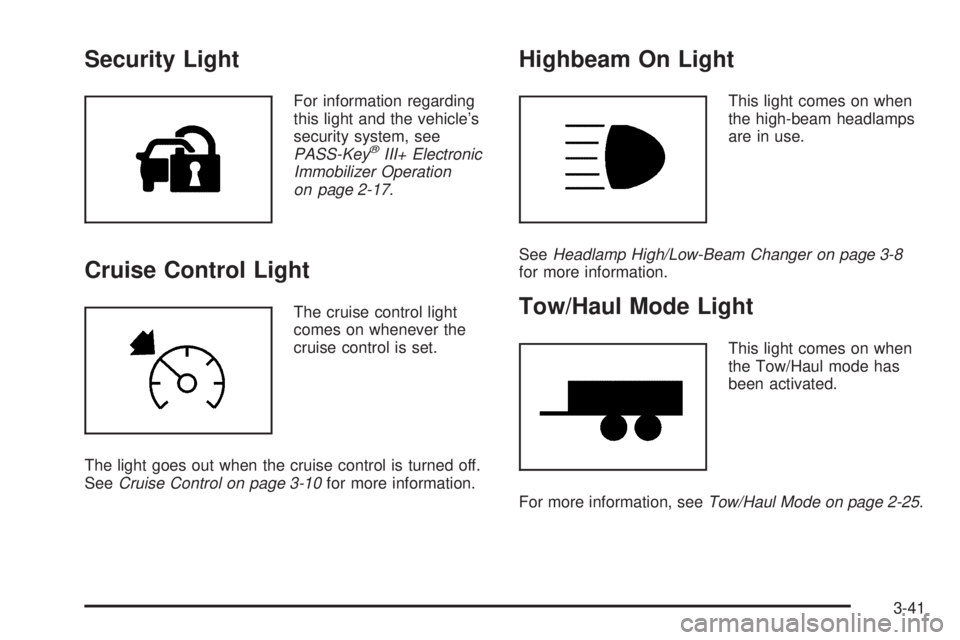
The cruise control light
comes on whenever the
cruise control is set.
The light goes out when the cruise control is turned off.
SeeCruise Control on page 3-10for more information.
Highbeam On Light
This light comes on when
the high-beam headlamps
are in use.
SeeHeadlamp High/Low-Beam Changer on page 3-8
for more information.
Tow/Haul Mode Light
This light comes on when
the Tow/Haul mode has
been activated.
For more information, seeTow/Haul Mode on page 2-25.
3-41
Page 211 of 404
For your safety, the system can only be disabled when
the vehicle speed is less than 20 mph (32 km/h).
Three chimes will be heard and the StabiliTrak light
comes on.
To turn on the StabiliTrak system, press the StabiliTrak
button again. StabiliTrak will automatically turn back on
when the vehicle speed exceeds 20 mph (32 km/h).
One chime is heard and the StabiliTrak light will turn off.
When the StabiliTrak system has been turned off,
system noises may still be heard as a result of the
brake-traction control coming on.
It is recommended to leave the system on for normal
driving conditions, but it may be necessary to turn the
system off if the vehicle is stuck in sand, mud, ice or
snow, and you want to “rock” the vehicle to attempt to
free it. SeeIf Your Vehicle is Stuck in Sand, Mud, Ice, or
Snow on page 4-17.
StabiliTrak System Operation
The StabiliTrak system is normally on, except when
the system is initializing or has been disabled with
the StabiliTrak button. The StabiliTrak system will
automatically activate to assist the driver in maintaining
vehicle directional control in most driving conditions.When activated, the StabiliTrak system may reduce
engine power to the wheels and apply braking to
individual wheels as necessary to assist the driver
with vehicle directional control. If cruise control is being
used when StabiliTrak activates, the cruise control
automatically disengages. The cruise control can be
re-engaged when road conditions allow. SeeCruise
Control on page 3-10.
The StabiliTrak system may also turn off automatically
if it determines that a problem exists with the system.
If the problem does not clear itself after restarting
the vehicle, see your dealer/retailer for service.
Traction Control Operation
The traction control system is part of the StabiliTrak
system. Traction control limits wheel spin by reducing
engine power to the wheels and by applying brakes
to each individual wheel as necessary.
If the brake-traction control system activates constantly
or if the brakes have heated up due to high speed
braking, the brake-traction control will be automatically
disabled. The system will come back on after the
brakes have cooled. This can take up to two minutes
or longer depending on brake usage.
4-7
Page 217 of 404
Hydroplaning
Hydroplaning is dangerous. Water can build up under
your vehicle’s tires so they actually ride on the water.
This can happen if the road is wet enough and you are
going fast enough. When your vehicle is hydroplaning, it
has little or no contact with the road.
There is no hard and fast rule about hydroplaning.
The best advice is to slow down when the road is wet.
Other Rainy Weather Tips
Besides slowing down, other wet weather driving tips
include:
•Allow extra following distance.
•Pass with caution.
•Keep windshield wiping equipment in good shape.
•Keep the windshield washer fluid reservoir filled.
•Have good tires with proper tread depth. SeeTires
on page 5-54.
•Turn off cruise control.
Before Leaving on a Long Trip
To prepare your vehicle for a long trip, consider having
it serviced by your dealer/retailer before departing.
Things to check on your own include:
•Windshield Washer Fluid:Reservoir full? Windows
clean — inside and outside?
•Wiper Blades:In good shape?
•Fuel, Engine Oil, Other Fluids:All levels checked?
•Lamps:Do they all work and are lenses clean?
•Tires:Are treads good? Are tires inflated to
recommended pressure?
•Weather and Maps:Safe to travel? Have
up-to-date maps?
4-13