ECU GMC SAVANA 2010 Owner's Guide
[x] Cancel search | Manufacturer: GMC, Model Year: 2010, Model line: SAVANA, Model: GMC SAVANA 2010Pages: 424, PDF Size: 2.4 MB
Page 102 of 424
Adding Equipment to Your
Airbag-Equipped Vehicle
Q:Is there anything I might add to or change
about the vehicle that could keep the airbags
from working properly?
A:Yes. If you add things that change the vehicle’s
frame, bumper system, height, front end or side
sheet metal, they may keep the airbag system from
working properly. Changing or moving any parts
of the front seats, safety belts, the airbag sensing
and diagnostic module, steering wheel, instrument
panel, roof-rail airbag modules, ceiling headliner
or pillar garnish trim, front sensors, or airbag wiring
can affect the operation of the airbag system.
In addition, the vehicle may have a passenger
sensing system for the right front passenger
position, which includes sensors that are part of the
passenger seat. The passenger sensing system
may not operate properly if the original seat trim is
replaced with non-GM covers, upholstery or
trim, or with GM covers, upholstery or trim designed
for a different vehicle. Any object, such as an
aftermarket seat heater or a comfort enhancing pad
or device, installed under or on top of the seat
fabric, could also interfere with the operation of thepassenger sensing system. This could either
prevent proper deployment of the passenger
airbag(s) or prevent the passenger sensing system
from properly turning off the passenger airbag(s).
SeePassenger Sensing System on page 2-72.
If you have any questions about this, you should
contact Customer Assistance before you modify the
vehicle. The phone numbers and addresses for
Customer Assistance are in Step Two of the
Customer Satisfaction Procedure in this manual.
SeeCustomer Satisfaction Procedure on page 8-2.
If the vehicle has rollover roof-rail airbags, see
Different Size Tires and Wheels on page 6-74for
additional important information.
Q:Because I have a disability, I have to get my
vehicle modied. How can I nd out whether
this will affect my airbag system?
A:If you have questions, call Customer Assistance.
The phone numbers and addresses for Customer
Assistance are in Step Two of the Customer
Satisfaction Procedure in this manual. See
Customer Satisfaction Procedure on page 8-2.
In addition, your dealer/retailer and the service manual
have information about the location of the airbag sensors,
sensing and diagnostic module and airbag wiring.
2-78
Page 105 of 424
Keys...............................................................3-3
Remote Keyless Entry (RKE) System................3-4
Remote Keyless Entry (RKE) System
Operation...................................................3-4
Remote Vehicle Start......................................3-6
Doors and Locks.............................................3-8
Door Locks....................................................3-8
Power Door Locks..........................................3-9
Cargo Door Relocking.....................................3-9
Delayed Locking.............................................3-9
Programmable Automatic Door Locks..............3-10
Automatic Door Lock.....................................3-10
Automatic Door Unlock..................................3-10
Rear Door Security Locks..............................3-11
Lockout Protection........................................3-12
Sliding Side Door..........................................3-12
60/40 Swing-Out Side Door............................3-13
Rear Doors..................................................3-15
Windows........................................................3-16
Manual Windows..........................................3-17
Power Windows............................................3-17
Swing-Out Windows......................................3-18
Enhanced Technology Glass..........................3-19
Sun Visors...................................................3-20Theft-Deterrent Systems..................................3-20
PASS-Key®III+ Electronic Immobilizer.............3-20
PASS-Key®III+ Electronic Immobilizer
Operation.................................................3-20
Starting and Operating Your Vehicle................3-22
New Vehicle Break-In....................................3-22
Ignition Positions..........................................3-22
Retained Accessory Power (RAP)...................3-23
Starting the Engine.......................................3-23
Fast Idle System..........................................3-25
Engine Coolant Heater..................................3-25
Automatic Transmission Operation
(Six Speed Automatic Transmission)............3-26
Automatic Transmission Operation
(Four Speed Automatic Transmission)..........3-31
Tow/Haul Mode............................................3-33
Parking Brake..............................................3-35
Shifting Into Park..........................................3-36
Shifting Out of Park......................................3-37
Parking Over Things That Burn.......................3-38
Engine Exhaust............................................3-38
Running the Vehicle While Parked..................3-39
Section 3 Features and Controls
3-1
Page 115 of 424
Rear Door Security Locks
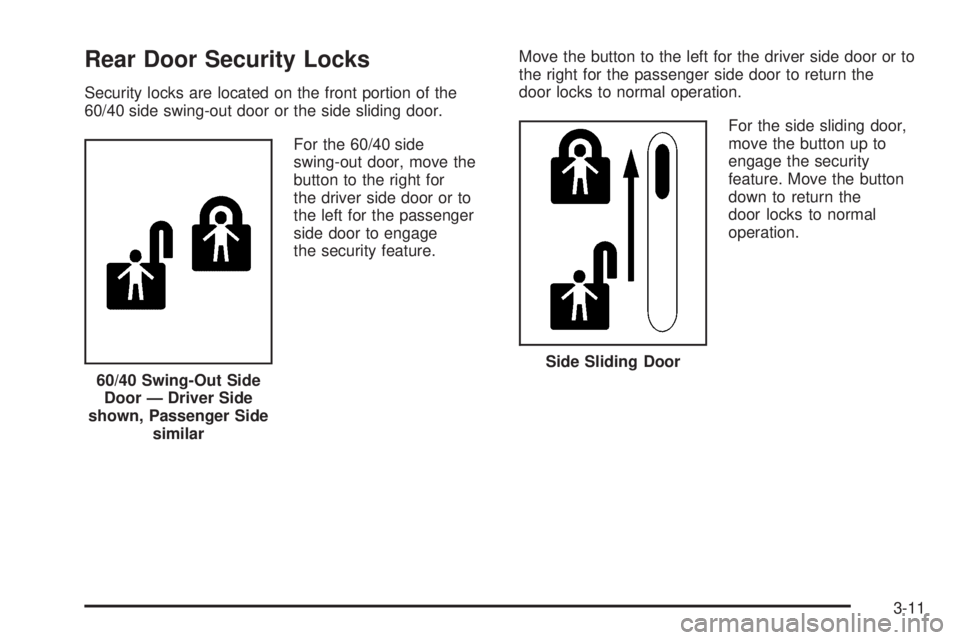
Security locks are located on the front portion of the
60/40 side swing-out door or the side sliding door.
For the 60/40 side
swing-out door, move the
button to the right for
the driver side door or to
the left for the passenger
side door to engage
the security feature.Move the button to the left for the driver side door or to
the right for the passenger side door to return the
door locks to normal operation.
For the side sliding door,
move the button up to
engage the security
feature. Move the button
down to return the
door locks to normal
operation.
60/40 Swing-Out Side
Door — Driver Side
shown, Passenger Side
similar
Side Sliding Door
3-11
Page 124 of 424
Sun Visors
To block out glare, swing down the sun visors. You can
also swing them to the side.
Visor Vanity Mirror
The vehicle may have visor vanity mirrors, with or
without lamps. Lift the mirror cover to turn the lamps
on, if equipped.
Theft-Deterrent Systems
Vehicle theft is big business, especially in some cities.
This vehicle has theft-deterrent features, however,
they do not make it impossible to steal.
PASS-Key®III+ Electronic
Immobilizer
SeeRadio Frequency Statement on page 8-18for
information regarding Part 15 of the Federal
Communications Commission (FCC) Rules and
RSS-210/211 of Industry and Science Canada.
PASS-Key®III+ Electronic
Immobilizer Operation
Your vehicle is equipped with the PASS-Key®III+
(Personalized Automotive Security System)
theft-deterrent system. PASS-Key
®III+ is a passive
theft deterrent system.
The system is automatically armed when the key is
removed from the ignition.
You do not have to manually arm or disarm the system.
The security light will come on if there is a problem
with arming or disarming the theft-deterrent system.
When the PASS-Key
®III+ system senses that someone
is using the wrong key, it shuts down the vehicle’s
starter and fuel systems. The starter will not work and
fuel will stop being delivered to the engine. Anyone
using a trial-and-error method to start the vehicle will be
discouraged because of the high number of electrical
key codes.
If the engine does not start and the security message
comes on, the key may have a damaged transponder.
Turn the ignition off and try again.
3-20
Page 125 of 424
If the engine still does not start, and the key appears to
be undamaged, try another ignition key. At this time,
you may also want to check the instrument panel PASS
KEY fuse. If the engine still does not start with the
other key, your vehicle needs service. If your vehicle
does start, the first key may be faulty. See your
dealer/retailer or a locksmith who can service the
PASS-Key
®III+ to have a new key made. SeeFuses
and Circuit Breakers on page 6-104.
It is possible for the PASS-Key
®III+ decoder to learn
the transponder value of a new or replacement key.
Up to 10 keys may be programmed for the vehicle.
This procedure is for learning additional keys only.
If all the currently programmed keys are lost or do not
operate, you must see your dealer/retailer or a locksmith
who can service PASS-Key
®III+ to have keys made
and programmed to the system.
See your dealer/retailer or a locksmith who can service
PASS-Key
®III+ to get a new key blank that is cut
exactly as the ignition key that operates the system.To program the new key:
1. Verify the new key has
1stamped on it.
2. Insert the original, already programmed key into
the ignition lock cylinder and start the engine.
If the engine will not start, see your dealer/retailer
for service.
3. After the engine has started, turn the key to
LOCK/OFF and remove the key.
4. Insert the key to be programmed and turn it to
ON/RUN within 10 seconds of removing the
previous key.
The security message will turn off once the key has
been programmed. It may not be apparent that
the security message went on due to how quickly
the key is programmed.
5. Repeat Steps 1 through 4 if additional keys are to
be programmed.
If you lose or damage a PASS-Key
®III+ key, see
your dealer/retailer or a locksmith who can service
PASS-Key
®III+ to have a new key made.
Do not leave the key or device that disarms or
deactivates the theft deterrent system in the vehicle.
3-21
Page 148 of 424
Brake System Warning Light..........................4-28
Antilock Brake System (ABS) Warning Light.....4-29
StabiliTrak
®Indicator Light.............................4-29
Engine Coolant Temperature Gage..................4-30
Tire Pressure Light.......................................4-30
Malfunction Indicator Lamp.............................4-31
Oil Pressure Gage........................................4-34
Oil Pressure Light.........................................4-35
Security Light...............................................4-35
Cruise Control Light......................................4-36
Highbeam On Light.......................................4-36
Tow/Haul Mode Light....................................4-36
Fuel Gage...................................................4-36Driver Information Center (DIC).......................4-37
DIC Operation and Displays...........................4-38
DIC Compass..............................................4-43
DIC Warnings and Messages.........................4-44
DIC Vehicle Customization.............................4-52
Audio System(s).............................................4-59
Setting the Clock..........................................4-60
Radio(s)......................................................4-62
Using an MP3..............................................4-72
Theft-Deterrent Feature..................................4-76
Audio Steering Wheel Controls.......................4-77
Radio Reception...........................................4-77
Fixed Mast Antenna......................................4-78
Section 4 Instrument Panel
4-2
Page 181 of 424
Oil Pressure Light
{WARNING:
Do not keep driving if the oil pressure is low. The
engine can become so hot that it catches fire.
Someone could be burned. Check the oil as soon
as possible and have the vehicle serviced.
Notice:Lack of proper engine oil maintenance can
damage the engine. The repairs would not be
covered by the vehicle warranty. Always follow the
maintenance schedule in this manual for changing
engine oil.This light comes on briefly while starting the engine. If it
does not, have the vehicle serviced by your dealer/
retailer. If the system is working normally the indicator
light then goes off.
If the light comes on and stays on, it means that oil is
not flowing through the engine properly. The vehicle
could be low on oil and it might have some other system
problem.
Security Light
For information regarding
this light and the vehicle’s
security system, see
PASS-Key
®III+ Electronic
Immobilizer Operation
on page 3-20.
4-35
Page 224 of 424
AM
The range for most AM stations is greater than for FM,
especially at night. The longer range can cause
station frequencies to interfere with each other. For
better radio reception, most AM radio stations boost the
power levels during the day, and then reduce these
levels during the night. Static can also occur when things
like storms and power lines interfere with radio
reception. When this happens, try reducing the treble on
your radio.
FM Stereo
FM stereo gives the best sound, but FM signals reach
only about 10 to 40 miles (16 to 65 km). Tall buildings or
hills can interfere with FM signals, causing the sound
to fade in and out.
Cellular Phone Usage
Cellular phone usage may cause interference with the
vehicle’s radio. This interference may occur when
making or receiving phone calls, charging the phone’s
battery, or simply having the phone on. This interference
causes an increased level of static while listening to
the radio. If static is received while listening to the radio,
unplug the cellular phone and turn it off.
Fixed Mast Antenna
The fixed mast antenna can withstand most car washes
without being damaged as long as it is securely
attached to the base. If the mast becomes slightly bent,
straighten it out by hand. If the mast is badly bent,
replace it.
Occasionally check to make sure the antenna is
tightened to its base. If tightening is required, tighten
by hand.
4-78
Page 245 of 424
This is called Gross Vehicle Weight Rating
(GVWR). The GVWR includes the weight of the
vehicle, all occupants, fuel, and cargo.
The Certification/Tire label also tells you the
maximum weights for the front and rear axles,
called Gross Axle Weight Rating (GAWR). To find
out the actual loads on your front and rear
axles, you need to go to a weigh station and
weigh your vehicle. Your dealer can help you with
this. Be sure to spread out your load equally on
both sides of the centerline.
Never exceed the GVWR for your vehicle, or the
GAWR for either the front or rear axle.
If there is a heavy load, it should be spread out.
{WARNING:
Do not load the vehicle any heavier than the
Gross Vehicle Weight Rating (GVWR), or
either the maximum front or rear Gross Axle
Weight Rating (GAWR). If you do, parts on the
vehicle can break, and it can change the way
your vehicle handles. These could cause you
to lose control and crash. Also, overloading
can shorten the life of the vehicle.
{WARNING:
Things you put inside your vehicle can strike
and injure people in a sudden stop or turn, or
in a crash.
•Put things in the cargo area of your
vehicle. Try to spread the weight evenly.
•Never stack heavier things, like
suitcases, inside the vehicle so that some
of them are above the tops of the seats.
•Do not leave an unsecured child restraint
in your vehicle.
•When you carry something inside the
vehicle, secure it whenever you can.
•Do not leave a seat folded down unless
you need to.
Add-On Equipment
When you carry removable items, you may need
to put a limit on how many people you carry
inside your vehicle. Be sure to weigh your vehicle
before you buy and install the new equipment.
5-21
Page 249 of 424
Use the following procedure to tow the vehicle from
the rear:
1. Attach the dolly to the tow vehicle following the
dolly manufacturer’s instructions.
2. Drive the rear wheels onto the dolly.
3. Firmly set the parking brake. SeeParking Brake on
page 3-35for more information.
4. Put the transmission in P (Park).
5. Secure the vehicle to the dolly following the
manufacturer’s instructions.
6. Use an adequate clamping device designed for
towing to ensure that the front wheels are locked
into the straight position.
7. Turn the ignition to LOCK/OFF.
If the tow vehicle will not be started or driven for
six weeks or more, remove the battery cable
from the negative terminal (post) of the battery to
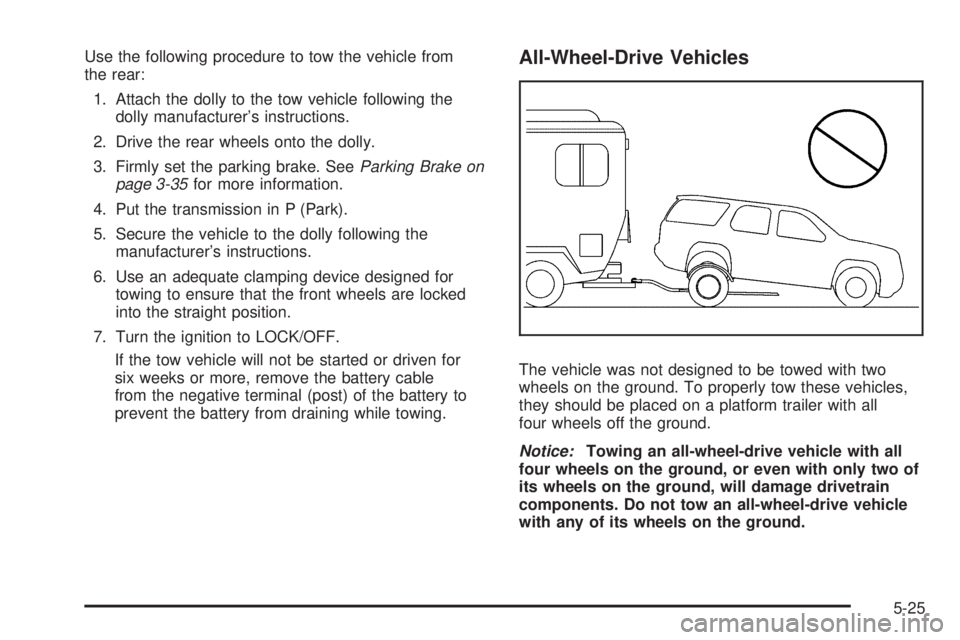
prevent the battery from draining while towing.All-Wheel-Drive Vehicles
The vehicle was not designed to be towed with two
wheels on the ground. To properly tow these vehicles,
they should be placed on a platform trailer with all
four wheels off the ground.
Notice:Towing an all-wheel-drive vehicle with all
four wheels on the ground, or even with only two of
its wheels on the ground, will damage drivetrain
components. Do not tow an all-wheel-drive vehicle
with any of its wheels on the ground.
5-25