clock GMC SAVANA 2012 Owner's Manual
[x] Cancel search | Manufacturer: GMC, Model Year: 2012, Model line: SAVANA, Model: GMC SAVANA 2012Pages: 424, PDF Size: 5.15 MB
Page 15 of 424
Black plate (9,1)GMC Savana Owner Manual - 2012 - 2nd - 11/11/11
In Brief 1-9
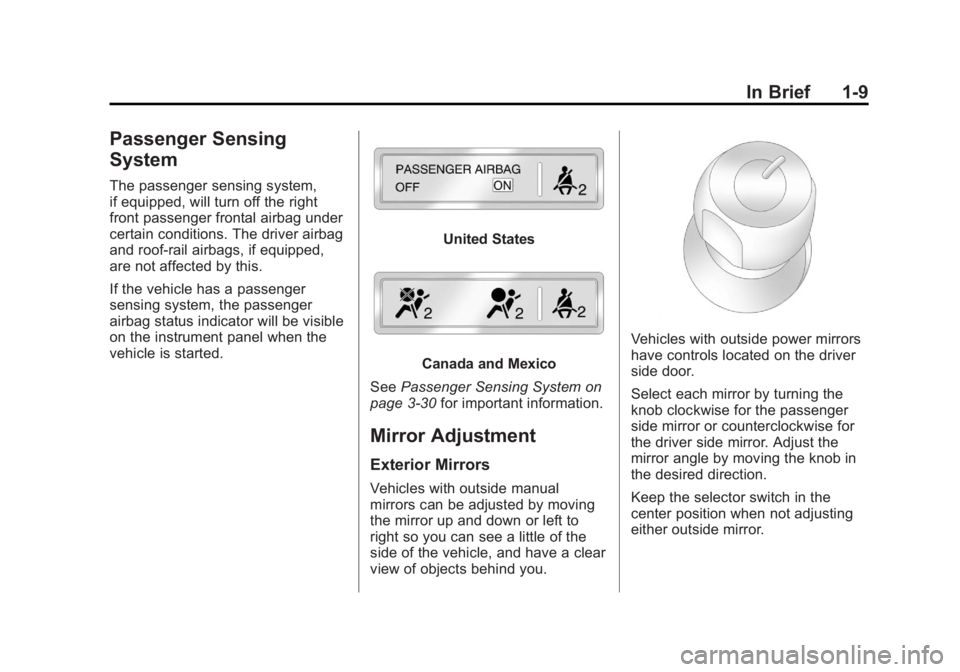
Passenger Sensing
System
The passenger sensing system,
if equipped, will turn off the right
front passenger frontal airbag under
certain conditions. The driver airbag
and roof‐rail airbags, if equipped,
are not affected by this.
If the vehicle has a passenger
sensing system, the passenger
airbag status indicator will be visible
on the instrument panel when the
vehicle is started.
United States
Canada and Mexico
See Passenger Sensing System on
page 3‑30 for important information.
Mirror Adjustment
Exterior Mirrors
Vehicles with outside manual
mirrors can be adjusted by moving
the mirror up and down or left to
right so you can see a little of the
side of the vehicle, and have a clear
view of objects behind you.
Vehicles with outside power mirrors
have controls located on the driver
side door.
Select each mirror by turning the
knob clockwise for the passenger
side mirror or counterclockwise for
the driver side mirror. Adjust the
mirror angle by moving the knob in
the desired direction.
Keep the selector switch in the
center position when not adjusting
either outside mirror.
Page 17 of 424
Black plate (11,1)GMC Savana Owner Manual - 2012 - 2nd - 11/11/11
In Brief 1-11
Interior Lighting
Dome Lamp
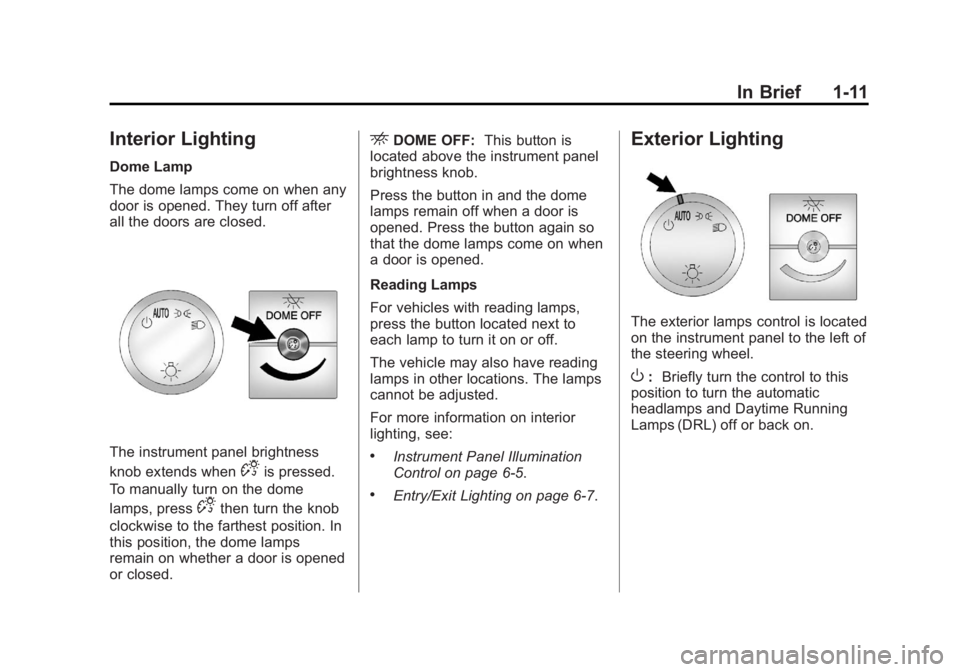
The dome lamps come on when any
door is opened. They turn off after
all the doors are closed.
The instrument panel brightness
knob extends when
Dis pressed.
To manually turn on the dome
lamps, press
Dthen turn the knob
clockwise to the farthest position. In
this position, the dome lamps
remain on whether a door is opened
or closed.
EDOME OFF: This button is
located above the instrument panel
brightness knob.
Press the button in and the dome
lamps remain off when a door is
opened. Press the button again so
that the dome lamps come on when
a door is opened.
Reading Lamps
For vehicles with reading lamps,
press the button located next to
each lamp to turn it on or off.
The vehicle may also have reading
lamps in other locations. The lamps
cannot be adjusted.
For more information on interior
lighting, see:
.Instrument Panel Illumination
Control on page 6‑5.
.Entry/Exit Lighting on page 6‑7.
Exterior Lighting
The exterior lamps control is located
on the instrument panel to the left of
the steering wheel.
O: Briefly turn the control to this
position to turn the automatic
headlamps and Daytime Running
Lamps (DRL) off or back on.
Page 22 of 424
Black plate (16,1)GMC Savana Owner Manual - 2012 - 2nd - 11/11/11
1-16 In Brief
©SEEK or¨SEEK:Seek or scan
stations.
4: Press to switch the display
between the radio station frequency
and the time. While the ignition is
off, press this button to display the
time. Press to display additional text
information related to the current
FM-RDS station or MP3 song.
A choice of additional information
such as Channel, Song, Artist, and
CAT (category) can display.
Continue pressing to highlight the
desired tab, or press the softkey
located under any one of the tabs
and the information about that tab
displays.
For more information about these
and other radio features, see
Infotainment on page 7‑1.
Storing a Favorite Station
Depending on which radio the
vehicle has, radio stations are
stored as either favorites or presets.
For vehicles with a FAV button, a
maximum of 36 stations can be
stored as favorites using the six
softkeys located below the radio
station frequency tabs and by using
the radio FAV button. Press FAV to
go through up to six pages of
favorites, each having six favorite
stations available per page. Each
page of favorites can contain any
combination of AM and FM stations.
If the radio does not have a FAV
button, up to 18 stations (six FM1,
six FM2, and six AM), can be
programmed on the six numbered
buttons.
For more information on storing a
favorite station, see Operation on
page 7‑3.
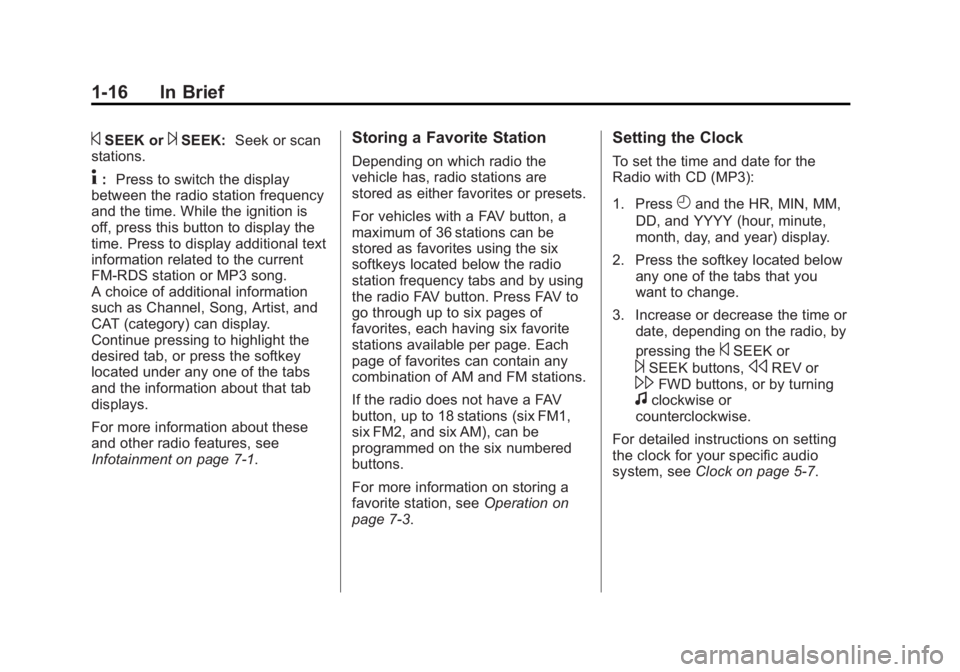
Setting the Clock
To set the time and date for the
Radio with CD (MP3):
1. Press
Hand the HR, MIN, MM,
DD, and YYYY (hour, minute,
month, day, and year) display.
2. Press the softkey located below any one of the tabs that you
want to change.
3. Increase or decrease the time or date, depending on the radio, by
pressing the
©SEEK or
¨SEEK buttons,sREV or\FWD buttons, or by turningfclockwise or
counterclockwise.
For detailed instructions on setting
the clock for your specific audio
system, see Clock on page 5‑7.
Page 43 of 424

Black plate (15,1)GMC Savana Owner Manual - 2012 - 2nd - 11/11/11
Keys, Doors, and Windows 2-15
Manual Mirrors
Adjust the mirrors by pressing the
mirror up and down and left and
right.
The mirrors can be manually folded
in or out.
On the lower portion of each mirror
is an auxiliary convex mirror.
A convex mirror's surface is curved
so you can see more from the driver
seat. The auxiliary convex mirrors
can be adjusted manually by
pressing the mirror.
Trailer-Tow Mirrors
Vehicles with towing mirrors can be
adjusted manually for a clear view
of the objects behind you.
On the lower portion of each mirror
there is an auxiliary convex mirror
that can be adjusted manually to
provide an extended field of view.
The mirrors can be manually folded
in or out.
Power Mirrors
Vehicles with outside power mirrors
have controls located on the driver
side door.
Select each mirror by turning the
knob clockwise for the passenger
side mirror or counterclockwise for
the driver side mirror. The center
position is neutral.
Then, adjust the mirror angle by
moving the knob in the desired
direction. The auxiliary convex
mirrors can only be adjusted
manually.
Page 115 of 424
Black plate (1,1)GMC Savana Owner Manual - 2012 - 2nd - 11/11/11
Instruments and Controls 5-1
Instruments and
Controls
Controls
Steering Wheel Adjustment . . . 5-2
Steering Wheel Controls . . . . . . 5-2
Horn . . . . . . . . . . . . . . . . . . . . . . . . . . 5-3
Windshield Wiper/Washer . . . . . 5-4
Compass . . . . . . . . . . . . . . . . . . . . . 5-5
Clock . . . . . . . . . . . . . . . . . . . . . . . . . 5-7
Power Outlets . . . . . . . . . . . . . . . . . 5-9
Cigarette Lighter . . . . . . . . . . . . . . 5-9
Ashtrays . . . . . . . . . . . . . . . . . . . . . 5-10
Warning Lights, Gauges, and
Indicators
Warning Lights, Gauges, andIndicators . . . . . . . . . . . . . . . . . . 5-10
Instrument Cluster . . . . . . . . . . . 5-11
Speedometer . . . . . . . . . . . . . . . . 5-12
Odometer . . . . . . . . . . . . . . . . . . . . 5-12
Trip Odometer . . . . . . . . . . . . . . . 5-12
Fuel Gauge . . . . . . . . . . . . . . . . . . 5-12
Engine Oil Pressure Gauge . . . . . . . . . . . . . . . . . . . . . . 5-13
Engine Coolant Temperature Gauge . . . . . . . . . . . . . . . . . . . . . . 5-14 Voltmeter Gauge . . . . . . . . . . . . . 5-15
Safety Belt Reminders . . . . . . . 5-16
Airbag Readiness Light . . . . . . 5-16
Airbag On-Off Light . . . . . . . . . . 5-17
Passenger Airbag Status
Indicator . . . . . . . . . . . . . . . . . . . . 5-19
Charging System Light . . . . . . 5-20
Malfunction Indicator Lamp . . . . . . . . . . . . . 5-20
Brake System Warning Light . . . . . . . . . . . . . . . . . . . . . . . 5-23
Antilock Brake System (ABS) Warning Light . . . . . . . . . . . . . . 5-24
Tow/Haul Mode Light . . . . . . . . 5-24
StabiliTrak
®OFF Light . . . . . . . 5-25
Traction Control System (TCS)/StabiliTrak
®Light . . . . 5-25
Tire Pressure Light . . . . . . . . . . 5-26
Engine Oil Pressure Light . . . . 5-26
Low Fuel Warning Light . . . . . . 5-27
Security Light . . . . . . . . . . . . . . . . 5-27
High-Beam On Light . . . . . . . . . 5-27
Cruise Control Light . . . . . . . . . 5-28
Information Displays
Driver Information Center (DIC) . . . . . . . . . . . . . . . 5-28
Vehicle Messages
Vehicle Messages . . . . . . . . . . . 5-33
Battery Voltage and ChargingMessages . . . . . . . . . . . . . . . . . . 5-34
Brake System Messages . . . . 5-34
Compass Messages . . . . . . . . . 5-34
Door Ajar Messages . . . . . . . . . 5-34
Engine Cooling System Messages . . . . . . . . . . . . . . . . . . 5-35
Engine Oil Messages . . . . . . . . 5-36
Engine Power Messages . . . . 5-37
Fuel System Messages . . . . . . 5-37
Key and Lock Messages . . . . . 5-37
Lamp Messages . . . . . . . . . . . . . 5-37
Ride Control System Messages . . . . . . . . . . . . . . . . . . 5-38
Airbag System Messages . . . . 5-39
Anti-theft Alarm System Messages . . . . . . . . . . . . . . . . . . 5-39
Service Vehicle Messages . . . 5-39
Tire Messages . . . . . . . . . . . . . . . 5-40
Transmission Messages . . . . . 5-41
Vehicle Reminder Messages . . . . . . . . . . . . . . . . . . 5-41
Vehicle Personalization
Vehicle Personalization . . . . . . 5-42
Page 121 of 424

Black plate (7,1)GMC Savana Owner Manual - 2012 - 2nd - 11/11/11
Instruments and Controls 5-7
Clock
AM/FM Radio with Optional
CD Player
If the vehicle has an AM/FM radio
with an optional CD player, it has a
Hbutton for setting the time. With
these types of radios, the clock can
be set with either the radio turned
on or off.
Set the time by following these
steps:
1. Press
Huntil the hour begins
flashing on display. Press this
button a second time and the
minutes begin flashing on
display.
Press
Ha third time and the
12HR or 24HR time format
begins flashing. 2. While either the hour or the
minutes are flashing, turn the
fknob, located on the upper
right side of the radio, clockwise
or counterclockwise to increase
or decrease the time. While the
12HR or 24HR time format is
flashing, turn the
fknob
clockwise or counterclockwise to
select the default time settings.
3. Press
Hagain until the clock
display stops flashing to set the
currently displayed time;
otherwise, the flashing stops
after five seconds and the
current time displayed is
automatically set.
MP3 Radio with a Single CD
Player
If the vehicle has a radio with a
single CD (MP3) player, the radio
has a
Hbutton for setting the time
and date. To set the time and date, follow the
instructions:
1. Press
Hand the HR, MIN, MM,
DD, YYYY (hour, minute, month,
day, and year) displays.
2. Press the softkey located under any one of the tabs that you
want to change. Every time the
softkey is pressed again, the
time or the date if selected,
increases by one.
Another way to increase the time
or date, is to press
¨SEEK or
\FWD (forward).
3. To decrease, press
©SEEK or
sREV. You can also turn thefknob, located on the upper
right side of the radio, to adjust
the selected setting.
Page 167 of 424
Black plate (5,1)GMC Savana Owner Manual - 2012 - 2nd - 11/11/11
Lighting 6-5
Turn and Lane-Change
Signals
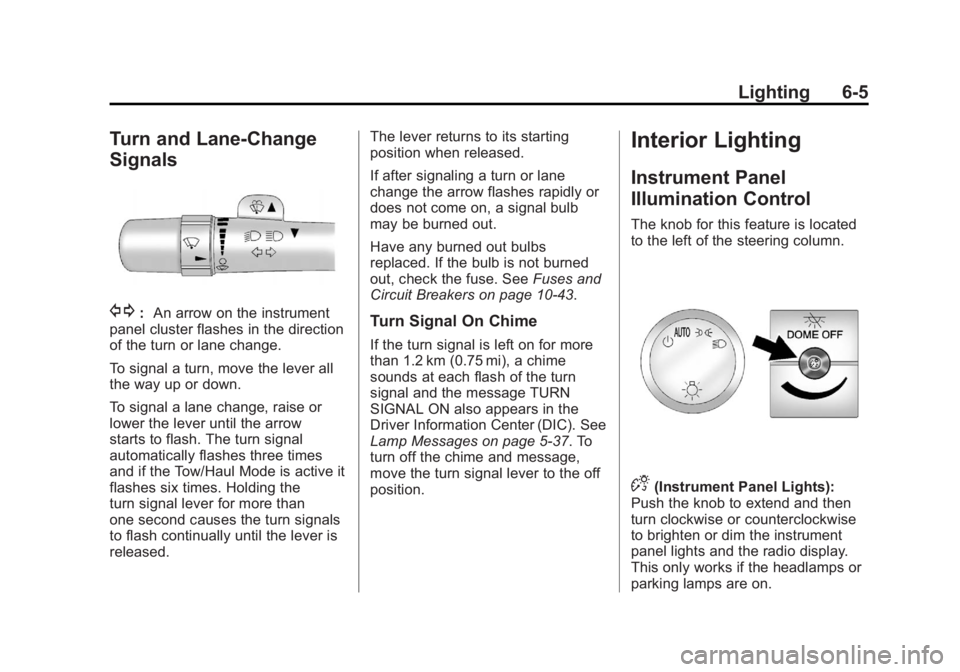
G:An arrow on the instrument
panel cluster flashes in the direction
of the turn or lane change.
To signal a turn, move the lever all
the way up or down.
To signal a lane change, raise or
lower the lever until the arrow
starts to flash. The turn signal
automatically flashes three times
and if the Tow/Haul Mode is active it
flashes six times. Holding the
turn signal lever for more than
one second causes the turn signals
to flash continually until the lever is
released. The lever returns to its starting
position when released.
If after signaling a turn or lane
change the arrow flashes rapidly or
does not come on, a signal bulb
may be burned out.
Have any burned out bulbs
replaced. If the bulb is not burned
out, check the fuse. See
Fuses and
Circuit Breakers on page 10‑43.Turn Signal On Chime
If the turn signal is left on for more
than 1.2 km (0.75 mi), a chime
sounds at each flash of the turn
signal and the message TURN
SIGNAL ON also appears in the
Driver Information Center (DIC). See
Lamp Messages on page 5‑37. To
turn off the chime and message,
move the turn signal lever to the off
position.
Interior Lighting
Instrument Panel
Illumination Control
The knob for this feature is located
to the left of the steering column.
D(Instrument Panel Lights):
Push the knob to extend and then
turn clockwise or counterclockwise
to brighten or dim the instrument
panel lights and the radio display.
This only works if the headlamps or
parking lamps are on.
Page 168 of 424

Black plate (6,1)GMC Savana Owner Manual - 2012 - 2nd - 11/11/11
6-6 Lighting
Dome Lamps
The dome lamps come on when any
door is opened. They turn off after
all the doors are closed.
The instrument panel brightness
knob extends when
Dis pressed.
To manually turn on the dome
lamps, press
Dthen turn the knob
clockwise to the farthest position. In
this position, the dome lamps
remain on whether a door is opened
or closed.
Dome Lamp Override
TheEDOME OFF button is
located above the instrument panel
brightness knob.
The dome lamp override sets the
dome lamps to remain off or come
on automatically when a door is
opened.
EDOME OFF: Press this button
in and the dome lamps remain off
when a door is opened. Press the
button again to return it to the
extended position so that the dome
lamps come on when a door is
opened.
Reading Lamps
For vehicles with reading lamps,
press the button located next to
each lamp to turn it on or off.
The vehicle may also have reading
lamps in other locations. The lamps
cannot be adjusted.
Page 174 of 424
Black plate (4,1)GMC Savana Owner Manual - 2012 - 2nd - 11/15/11
7-4 Infotainment System
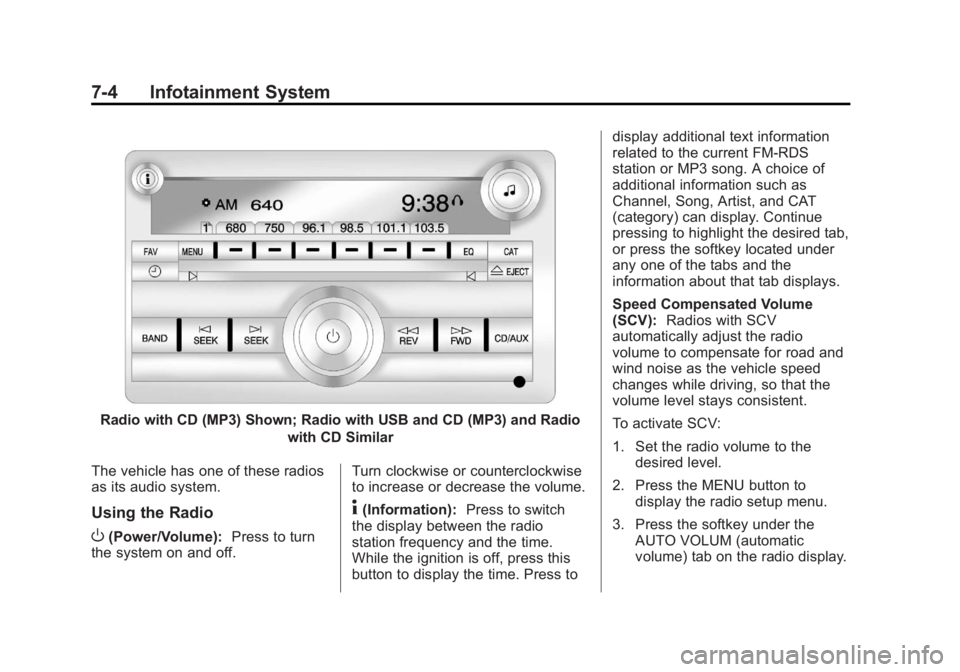
Radio with CD (MP3) Shown; Radio with USB and CD (MP3) and Radiowith CD Similar
The vehicle has one of these radios
as its audio system.
Using the Radio
O(Power/Volume): Press to turn
the system on and off. Turn clockwise or counterclockwise
to increase or decrease the volume.
4(Information):
Press to switch
the display between the radio
station frequency and the time.
While the ignition is off, press this
button to display the time. Press to display additional text information
related to the current FM-RDS
station or MP3 song. A choice of
additional information such as
Channel, Song, Artist, and CAT
(category) can display. Continue
pressing to highlight the desired tab,
or press the softkey located under
any one of the tabs and the
information about that tab displays.
Speed Compensated Volume
(SCV):
Radios with SCV
automatically adjust the radio
volume to compensate for road and
wind noise as the vehicle speed
changes while driving, so that the
volume level stays consistent.
To activate SCV:
1. Set the radio volume to the desired level.
2. Press the MENU button to display the radio setup menu.
3. Press the softkey under the AUTO VOLUM (automatic
volume) tab on the radio display.
Page 175 of 424
Black plate (5,1)GMC Savana Owner Manual - 2012 - 2nd - 11/15/11
Infotainment System 7-5
4. Press the softkey under thedesired Speed Compensated
Volume setting (OFF, Low, Med,
or High) to select the level of
radio volume compensation.
The display times out after
approximately 10 seconds. Each
higher setting allows for more
radio volume compensation at
faster vehicle speeds.
Setting the Tone (Bass/Treble)
(AM-FM Radio and AM-FM
Radio with CD)
To adjust the bass or treble:
1. Press the
fknob until Bass or
Treble displays.
2. To adjust the setting, do one of the following:
.Turn thefknob.
.Press either¨SEEK,
or
©SEEK. EQ (Equalization):
Press this
button to choose bass and treble
equalization settings designed for
different types of music. Selecting
MANUAL, or changing bass or
treble, returns the EQ to the manual
bass and treble settings.
Unique EQ settings can be saved
for each source.
Setting the Tone (Bass/
Midrange/Treble) (All Except
AM-FM Radio and AM-FM
Radio with CD)
BASS/MID/TREB (Bass, Midrange,
or Treble): To adjust the bass,
midrange, or treble:
1. Press the
fknob until the tone
control tabs display.
2. Highlight the desired tone control tab by doing one of the
following:
.Press thefknob.
.Press the softkey under the
desired tab. 3. Adjust the setting by doing one
of the following:
.Turn thefknob clockwise
or counterclockwise.
.Press¨SEEK or©SEEK.
.Press\FWD orsREV.
If a station's frequency is weak or if
there is static, decrease the treble.
To quickly adjust bass, midrange,
or treble to the middle position,
press the softkey positioned under
the BASS, MID, or TREB tab for
more than two seconds. A beep
sounds and the level adjusts to the
middle position.
To quickly adjust all tone and
speaker controls to the middle
position, press the
fknob for more
than two seconds until a beep
sounds.