towing GMC SAVANA 2012 Owner's Manual
[x] Cancel search | Manufacturer: GMC, Model Year: 2012, Model line: SAVANA, Model: GMC SAVANA 2012Pages: 424, PDF Size: 5.15 MB
Page 1 of 424
Black plate (1,1)GMC Savana Owner Manual - 2012 - 2nd - 11/11/11
2012 GMC Savana Owner ManualM
In Brief. . . . . . . . . . . . . . . . . . . . . . . . 1-1
Instrument Panel . . . . . . . . . . . . . . 1-2
Initial Drive Information . . . . . . . . 1-4
Vehicle Features . . . . . . . . . . . . . 1-15
Performance and Maintenance . . . . . . . . . . . . . . . . 1-19
Keys, Doors, and Windows . . . . . . . . . . . . . . . . . . . . 2-1
Keys and Locks . . . . . . . . . . . . . . . 2-2
Doors . . . . . . . . . . . . . . . . . . . . . . . . 2-10
Vehicle Security . . . . . . . . . . . . . . 2-13
Exterior Mirrors . . . . . . . . . . . . . . . 2-14
Interior Mirrors . . . . . . . . . . . . . . . . 2-16
Windows . . . . . . . . . . . . . . . . . . . . . 2-16
Seats and Restraints . . . . . . . . . 3-1
Head Restraints . . . . . . . . . . . . . . . 3-2
Front Seats . . . . . . . . . . . . . . . . . . . . 3-2
Rear Seats . . . . . . . . . . . . . . . . . . . . 3-5
Safety Belts . . . . . . . . . . . . . . . . . . . . 3-9
Airbag System . . . . . . . . . . . . . . . . 3-19
Child Restraints . . . . . . . . . . . . . . 3-38 Storage
. . . . . . . . . . . . . . . . . . . . . . . 4-1
Storage Compartments . . . . . . . . 4-1
Instruments and Controls . . . . 5-1
Controls . . . . . . . . . . . . . . . . . . . . . . . 5-2
Warning Lights, Gauges, and Indicators . . . . . . . . . . . . . . . . . . . 5-10
Information Displays . . . . . . . . . . 5-28
Vehicle Messages . . . . . . . . . . . . 5-33
Vehicle Personalization . . . . . . . 5-42
Lighting . . . . . . . . . . . . . . . . . . . . . . . 6-1
Exterior Lighting . . . . . . . . . . . . . . . 6-1
Interior Lighting . . . . . . . . . . . . . . . . 6-5
Lighting Features . . . . . . . . . . . . . . 6-7
Infotainment System . . . . . . . . . 7-1
Introduction . . . . . . . . . . . . . . . . . . . . 7-1
Radio . . . . . . . . . . . . . . . . . . . . . . . . . . 7-7
Audio Players . . . . . . . . . . . . . . . . 7-12
Phone . . . . . . . . . . . . . . . . . . . . . . . . 7-22
Climate Controls . . . . . . . . . . . . . 8-1
Climate Control Systems . . . . . . 8-1
Air Vents . . . . . . . . . . . . . . . . . . . . . . . 8-7 Driving and Operating
. . . . . . . . 9-1
Driving Information . . . . . . . . . . . . . 9-2
Starting and Operating . . . . . . . 9-16
Engine Exhaust . . . . . . . . . . . . . . 9-24
Automatic Transmission . . . . . . 9-25
Drive Systems . . . . . . . . . . . . . . . . 9-33
Brakes . . . . . . . . . . . . . . . . . . . . . . . 9-33
Ride Control Systems . . . . . . . . 9-35
Cruise Control . . . . . . . . . . . . . . . . 9-37
Fuel . . . . . . . . . . . . . . . . . . . . . . . . . . 9-40
Towing . . . . . . . . . . . . . . . . . . . . . . . 9-45
Conversions and Add-Ons . . . 9-58
Vehicle Care . . . . . . . . . . . . . . . . . 10-1
General Information . . . . . . . . . . 10-2
Vehicle Checks . . . . . . . . . . . . . . . 10-4
Bulb Replacement . . . . . . . . . . 10-37
Electrical System . . . . . . . . . . . . 10-42
Wheels and Tires . . . . . . . . . . . 10-50
Jump Starting . . . . . . . . . . . . . . . 10-84
Towing . . . . . . . . . . . . . . . . . . . . . . 10-89
Appearance Care . . . . . . . . . . . 10-92
Page 9 of 424
Black plate (3,1)GMC Savana Owner Manual - 2012 - 2nd - 11/11/11
In Brief 1-3
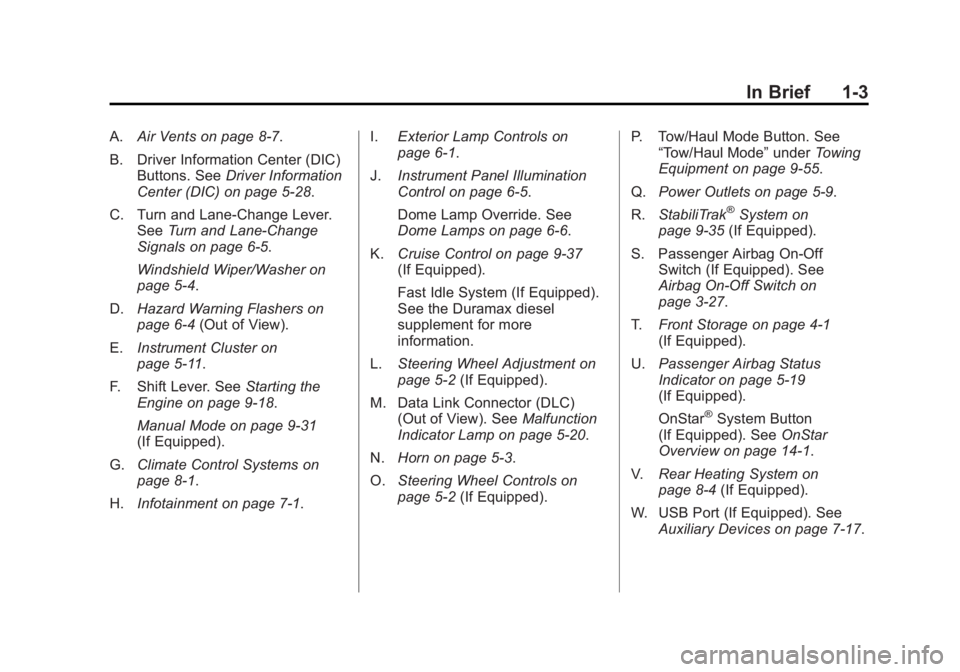
A.Air Vents on page 8‑7.
B. Driver Information Center (DIC) Buttons. See Driver Information
Center (DIC) on page 5‑28.
C. Turn and Lane‐Change Lever. See Turn and Lane-Change
Signals on page 6‑5.
Windshield Wiper/Washer on
page 5‑4.
D. Hazard Warning Flashers on
page 6‑4 (Out of View).
E. Instrument Cluster on
page 5‑11.
F. Shift Lever. See Starting the
Engine on page 9‑18.
Manual Mode on page 9‑31
(If Equipped).
G. Climate Control Systems on
page 8‑1.
H. Infotainment on page 7‑1. I.
Exterior Lamp Controls on
page 6‑1.
J. Instrument Panel Illumination
Control on page 6‑5.
Dome Lamp Override. See
Dome Lamps on page 6‑6.
K. Cruise Control on page 9‑37
(If Equipped).
Fast Idle System (If Equipped).
See the Duramax diesel
supplement for more
information.
L. Steering Wheel Adjustment on
page 5‑2 (If Equipped).
M. Data Link Connector (DLC) (Out of View). See Malfunction
Indicator Lamp on page 5‑20.
N. Horn on page 5‑3.
O. Steering Wheel Controls on
page 5‑2 (If Equipped). P. Tow/Haul Mode Button. See
“Tow/Haul Mode” underTowing
Equipment on page 9‑55.
Q. Power Outlets on page 5‑9.
R. StabiliTrak
®System on
page 9‑35 (If Equipped).
S. Passenger Airbag On‐Off Switch (If Equipped). See
Airbag On-Off Switch on
page 3‑27.
T. Front Storage on page 4‑1
(If Equipped).
U. Passenger Airbag Status
Indicator on page 5‑19
(If Equipped).
OnStar
®System Button
(If Equipped). See OnStar
Overview on page 14‑1.
V. Rear Heating System on
page 8‑4 (If Equipped).
W. USB Port (If Equipped). See Auxiliary Devices on page 7‑17.
Page 16 of 424
Black plate (10,1)GMC Savana Owner Manual - 2012 - 2nd - 11/11/11
1-10 In Brief
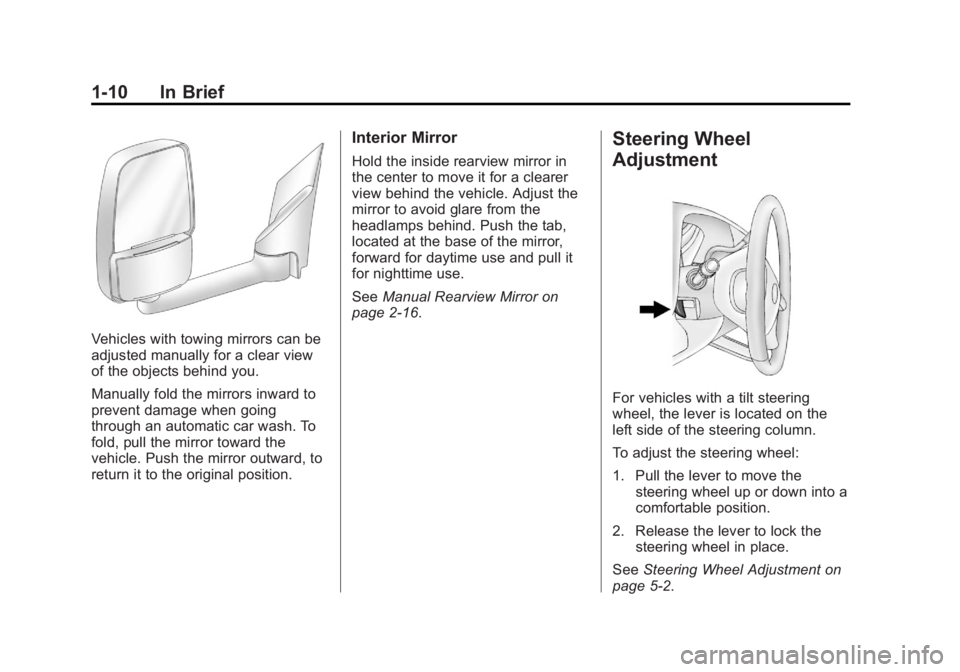
Vehicles with towing mirrors can be
adjusted manually for a clear view
of the objects behind you.
Manually fold the mirrors inward to
prevent damage when going
through an automatic car wash. To
fold, pull the mirror toward the
vehicle. Push the mirror outward, to
return it to the original position.
Interior Mirror
Hold the inside rearview mirror in
the center to move it for a clearer
view behind the vehicle. Adjust the
mirror to avoid glare from the
headlamps behind. Push the tab,
located at the base of the mirror,
forward for daytime use and pull it
for nighttime use.
SeeManual Rearview Mirror on
page 2‑16.
Steering Wheel
Adjustment
For vehicles with a tilt steering
wheel, the lever is located on the
left side of the steering column.
To adjust the steering wheel:
1. Pull the lever to move the
steering wheel up or down into a
comfortable position.
2. Release the lever to lock the steering wheel in place.
See Steering Wheel Adjustment on
page 5‑2.
Page 20 of 424
Black plate (14,1)GMC Savana Owner Manual - 2012 - 2nd - 11/11/11
1-14 In Brief
Vehicles with Air Conditioning
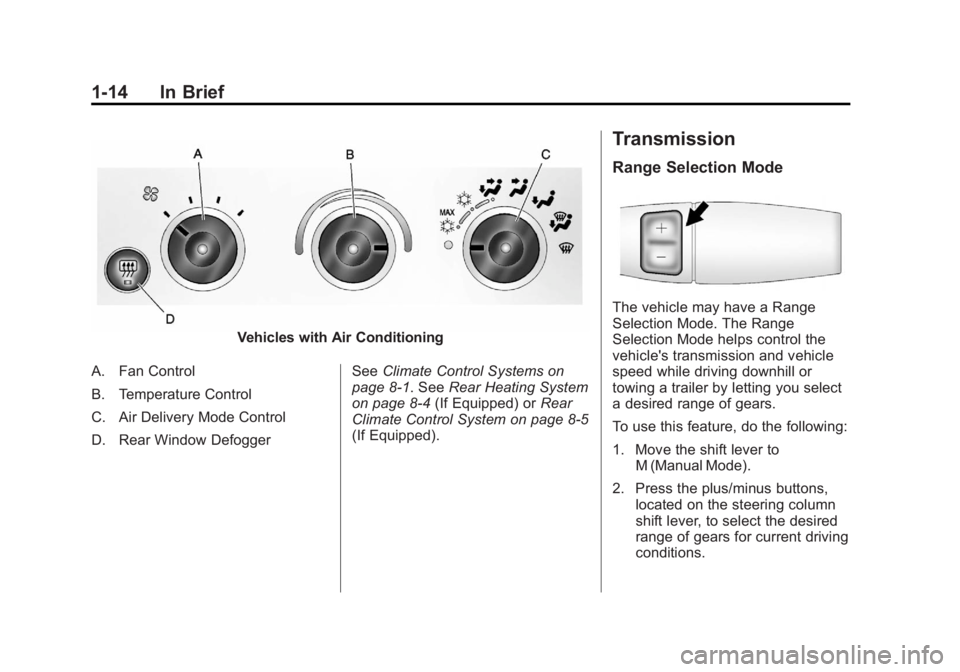
A. Fan Control
B. Temperature Control
C. Air Delivery Mode Control
D. Rear Window Defogger See
Climate Control Systems on
page 8‑1. See Rear Heating System
on page 8‑4 (If Equipped) or Rear
Climate Control System on page 8‑5
(If Equipped).
Transmission
Range Selection Mode
The vehicle may have a Range
Selection Mode. The Range
Selection Mode helps control the
vehicle's transmission and vehicle
speed while driving downhill or
towing a trailer by letting you select
a desired range of gears.
To use this feature, do the following:
1. Move the shift lever to M (Manual Mode).
2. Press the plus/minus buttons, located on the steering column
shift lever, to select the desired
range of gears for current driving
conditions.
Page 43 of 424

Black plate (15,1)GMC Savana Owner Manual - 2012 - 2nd - 11/11/11
Keys, Doors, and Windows 2-15
Manual Mirrors
Adjust the mirrors by pressing the
mirror up and down and left and
right.
The mirrors can be manually folded
in or out.
On the lower portion of each mirror
is an auxiliary convex mirror.
A convex mirror's surface is curved
so you can see more from the driver
seat. The auxiliary convex mirrors
can be adjusted manually by
pressing the mirror.
Trailer-Tow Mirrors
Vehicles with towing mirrors can be
adjusted manually for a clear view
of the objects behind you.
On the lower portion of each mirror
there is an auxiliary convex mirror
that can be adjusted manually to
provide an extended field of view.
The mirrors can be manually folded
in or out.
Power Mirrors
Vehicles with outside power mirrors
have controls located on the driver
side door.
Select each mirror by turning the
knob clockwise for the passenger
side mirror or counterclockwise for
the driver side mirror. The center
position is neutral.
Then, adjust the mirror angle by
moving the knob in the desired
direction. The auxiliary convex
mirrors can only be adjusted
manually.
Page 83 of 424

Black plate (35,1)GMC Savana Owner Manual - 2012 - 2nd - 11/15/11
Seats and Restraints 3-35
Additional Factors Affecting
System Operation
Safety belts help keep the
passenger in position on the seat
during vehicle maneuvers and
braking, which helps the passenger
sensing system maintain the
passenger airbag status. See
“Safety Belts”and“Child Restraints”
in the Index for additional
information about the importance
of proper restraint use.
A thick layer of additional material,
such as a blanket or cushion,
or aftermarket equipment such as
seat covers, seat heaters, and seat
massagers can affect how well the
passenger sensing system
operates. We recommend that you
not use seat covers or other
aftermarket equipment except when
approved by GM for your specific
vehicle. See Adding Equipment to
the Airbag-Equipped Vehicle on
page 3‑36 for more information
about modifications that can affect
how the system operates. The on indicator may be lit if an
object, such as a briefcase,
handbag, grocery bag, laptop or
other electronic device, is put on an
unoccupied seat. If this is not
desired remove the object from
the seat.
{WARNING
Stowing of articles under the
passenger seat or between the
passenger seat cushion and
seatback may interfere with the
proper operation of the passenger
sensing system.
Servicing the
Airbag-Equipped Vehicle
Airbags affect how the vehicle
should be serviced. There are parts
of the airbag system in several
places around the vehicle. Your
dealer and the service manual have
information about servicing the
vehicle and the airbag system.
To purchase a service manual, see
Service Publications Ordering
Information on page 13‑12.
{WARNING
For up to 10 seconds after the
vehicle is turned off and the
battery is disconnected, an airbag
can still inflate during improper
service. You can be injured if you
are close to an airbag when it
inflates. Avoid yellow connectors.
They are probably part of the
airbag system. Be sure to follow
proper service procedures, and
make sure the person performing
work for you is qualified to do so.
Page 135 of 424
Black plate (21,1)GMC Savana Owner Manual - 2012 - 2nd - 11/11/11
Instruments and Controls 5-21
Notice:Modifications made to the
engine, transmission, exhaust,
intake, or fuel system of the
vehicle or the replacement
of the original tires with other
than those of the same Tire
Performance Criteria (TPC) can
affect the vehicle's emission
controls and can cause this light
to come on. Modifications to
these systems could lead to
costly repairs not covered by the
vehicle warranty. This could also
result in a failure to pass a
required Emission Inspection/
Maintenance test. See
Accessories and Modifications on
page 10‑3.
This light comes on during a
malfunction in one of two ways:
Light Flashing: A misfire condition
has been detected. A misfire
increases vehicle emissions and
could damage the emission control
system on the vehicle. Diagnosis
and service might be required. To prevent more serious damage to
the vehicle:
.Reduce vehicle speed.
.Avoid hard accelerations.
.Avoid steep uphill grades.
.If towing a trailer, reduce the
amount of cargo being hauled as
soon as it is possible.
If the light continues to flash, stop
and park the vehicle. Turn the
vehicle off, wait at least 10 seconds,
and restart the engine. If the light is
still flashing, follow the previous
steps and see your dealer for
service as soon as possible.
Light On Steady: An emission
control system malfunction has
been detected on the vehicle.
Diagnosis and service might be
required. The following may correct an
emission system malfunction:
.Check that the fuel cap is fully
installed. See
Filling the Tank on
page 9‑43. The diagnostic
system can determine if the fuel
cap has been left off or
improperly installed. A loose or
missing fuel cap allows fuel to
evaporate into the atmosphere.
A few driving trips with the cap
properly installed should turn the
light off.
.Check that good quality fuel is
used. Poor fuel quality causes
the engine not to run as
efficiently as designed and may
cause stalling after start-up,
stalling when the vehicle is
changed into gear, misfiring,
hesitation on acceleration,
or stumbling on acceleration.
These conditions might go away
once the engine is warmed up.
Page 137 of 424
Black plate (23,1)GMC Savana Owner Manual - 2012 - 2nd - 11/11/11
Instruments and Controls 5-23
Brake System Warning
Light
The vehicle brake system consists
of two hydraulic circuits. If one
circuit is not working, the remaining
circuit can still work to stop the
vehicle. For normal braking
performance, both circuits need to
be working.
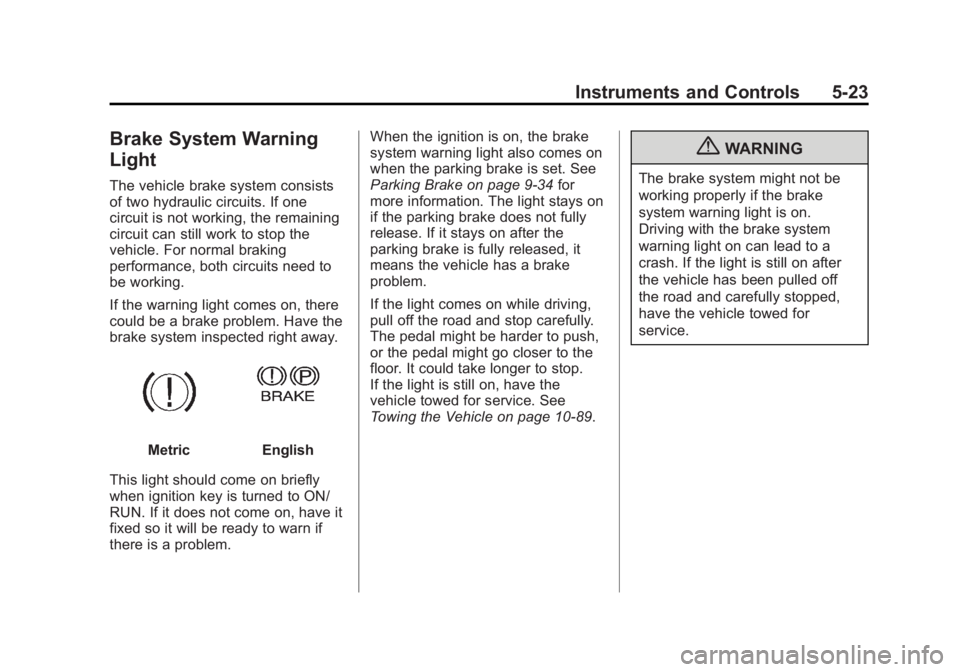
If the warning light comes on, there
could be a brake problem. Have the
brake system inspected right away.
MetricEnglish
This light should come on briefly
when ignition key is turned to ON/
RUN. If it does not come on, have it
fixed so it will be ready to warn if
there is a problem. When the ignition is on, the brake
system warning light also comes on
when the parking brake is set. See
Parking Brake on page 9‑34
for
more information. The light stays on
if the parking brake does not fully
release. If it stays on after the
parking brake is fully released, it
means the vehicle has a brake
problem.
If the light comes on while driving,
pull off the road and stop carefully.
The pedal might be harder to push,
or the pedal might go closer to the
floor. It could take longer to stop.
If the light is still on, have the
vehicle towed for service. See
Towing the Vehicle on page 10‑89.
{WARNING
The brake system might not be
working properly if the brake
system warning light is on.
Driving with the brake system
warning light on can lead to a
crash. If the light is still on after
the vehicle has been pulled off
the road and carefully stopped,
have the vehicle towed for
service.
Page 210 of 424
Black plate (2,1)GMC Savana Owner Manual - 2012 - 2nd - 11/11/11
9-2 Driving and Operating
Towing
General TowingInformation . . . . . . . . . . . . . . . . . 9-45
Driving Characteristics and Towing Tips . . . . . . . . . . . . . . . . 9-46
Trailer Towing . . . . . . . . . . . . . . . . 9-50
Towing Equipment . . . . . . . . . . . 9-55
Conversions and Add-Ons
Add-On Electrical
Equipment . . . . . . . . . . . . . . . . . 9-58
Driving Information
Distracted Driving
Distraction comes in many forms
and can take your focus from the
task of driving. Exercise good
judgment and do not let other
activities divert your attention away
from the road. Many local
governments have enacted laws
regarding driver distraction. Become
familiar with the local laws in
your area.
To avoid distracted driving, always
keep your eyes on the road, hands
on the wheel, and mind on the drive.
.Do not use a phone in
demanding driving situations.
Use a hands-free method to
place or receive necessary
phone calls.
.Watch the road. Do not read,
take notes, or look up
information on phones or other
electronic devices.
.Designate a front seat
passenger to handle potential
distractions.
.Become familiar with vehicle
features before driving, such as
programming favorite radio
stations and adjusting climate
control and seat settings.
Program all trip information into
any navigation device prior to
driving.
.Wait until the vehicle is parked
to retrieve items that have fallen
to the floor.
.Stop or park the vehicle to tend
to children.
.Keep pets in an appropriate
carrier or restraint.
.Avoid stressful conversations
while driving, whether with a
passenger or on a cell phone.
Page 218 of 424

Black plate (10,1)GMC Savana Owner Manual - 2012 - 2nd - 11/11/11
9-10 Driving and Operating
If it takes some time for help to
arrive, now and then when you run
the engine, push the accelerator
pedal slightly so the engine runs
faster than the idle speed. This
keeps the battery charged to restart
the vehicle and to signal for help
with the headlamps. Do this as little
as possible to save fuel.
If the Vehicle Is Stuck
Slowly and cautiously spin the
wheels to free the vehicle when
stuck in sand, mud, ice, or snow.
If the vehicle has a traction system,
it can often help to free a stuck
vehicle. Refer to the vehicle's
traction system in the Index. If stuck
too severely for the traction system
to free the vehicle, turn the traction
system off and use the rocking
method.
{WARNING
If the vehicle's tires spin at high
speed, they can explode, and you
or others could be injured. The
vehicle can overheat, causing an
engine compartment fire or other
damage. Spin the wheels as little
as possible and avoid going
above 56 km/h (35 mph).
See Tire Chains on page 10‑71.
Rocking the Vehicle to Get
It Out
Turn the steering wheel left and
right to clear the area around the
front wheels. Turn off any traction or
stability system. Shift back and forth
between R (Reverse) and a forward
gear, spinning the wheels as little as
possible. To prevent transmission
wear, wait until the wheels stop
spinning before shifting gears.
Release the accelerator pedal while
shifting, and press lightly on the
accelerator pedal when the transmission is in gear. Slowly
spinning the wheels in the forward
and reverse directions causes a
rocking motion that could free the
vehicle. If that does not get the
vehicle out after a few tries, it might
need to be towed out. See
Towing
the Vehicle on page 10‑89.
Vehicle Load Limits
It is very important to know how
much weight the vehicle can
carry. This weight is called the
vehicle capacity weight and
includes the weight of all
occupants, cargo, and all
nonfactory-installed options.
Two labels on the vehicle show
how much weight it was
designed to carry, the Tire and
Loading Information label and
the Certification/Tire label.