display GMC SAVANA 2018 Owner's Guide
[x] Cancel search | Manufacturer: GMC, Model Year: 2018, Model line: SAVANA, Model: GMC SAVANA 2018Pages: 354, PDF Size: 5.09 MB
Page 114 of 354
GMC Savana Owner Manual (GMNA-Localizing-U.S./Canada-11374214) -
2018 - CRC - 2/2/18
Instruments and Controls 113
display allows the system to be
turned on or off. Once in this
display, press to select between ON
or OFF. The RPA system
automatically turns back on after
each vehicle start. When the RPA
system is turned off and the vehicle
is shifted out of P (Park), the DIC
will display the PARK ASSIST OFF
message as a reminder that the
system has been turned off. See
Parking Assist0192.
Units
Press
Tuntil UNITS displays. This
display allows you to select between
metric or English units of
measurement. Once in this display,
press
Vto select between METRIC
or ENGLISH units.
Tire Pressure
If the vehicle has the Tire Pressure
Monitor System (TPMS), the
pressure for each tire can be viewed
in the DIC. The tire pressure will be shown in either kilopascals (kPa) or
pounds per square inch (psi).
Press
Tuntil the DIC displays
FRONT TIRES PSI (kPa) LEFT ##
RIGHT ##. Press
Tagain until the
DIC displays REAR TIRES
PSI (kPa) LEFT ## RIGHT ##.
If a low tire pressure condition is
detected by the system while
driving, a message advising you to
check the pressure in a specific tire
will appear in the display. See Tire
Pressure 0261.
If the tire pressure display shows
dashes instead of a value, there
may be a problem with the vehicle.
If this consistently occurs, see your
dealer for service.
Engine Hours
Press
Tuntil ENGINE HOURS
displays. This display shows the
total number of hours the engine
has run. Relearn Tire Positions
The vehicle may have this display.
To access this display, the vehicle
must be in P (Park). If the vehicle
has the Tire Pressure Monitor
System (TPMS), after rotating the
tires or after replacing a tire or
sensor, the system must re-learn the
tire positions. To re-learn the tire
positions, see
Tire Pressure Monitor
System 0262. See Tire Inspection
0 266 andTire Rotation 0266.
Change Compass Zone
The vehicle may have this feature.
To change the compass zone
through the DIC, see Compass
0 92.
Calibrate Compass
The vehicle may have this feature.
The compass can be manually
calibrated. To calibrate the compass
through the DIC, see Compass
0 92.
Blank Display
This display shows no information.
Page 115 of 354

GMC Savana Owner Manual (GMNA-Localizing-U.S./Canada-11374214) -
2018 - CRC - 2/2/18
114 Instruments and Controls
Vehicle Messages
Messages displayed on the DIC
indicate the status of the vehicle or
some action that may be needed to
correct a condition. Multiple
messages may appear one after
another.
The messages that do not require
immediate action can be
acknowledged and cleared by
pressing
V. The messages that
require immediate action cannot be
cleared until that action is
performed.
All messages should be taken
seriously; clearing the message
does not correct the problem.
If a SERVICE message appears,
see your dealer.
Follow the instructions given in the
messages. The system displays
messages regarding the following
topics:
. Service Messages
. Fluid Levels
. Vehicle Security .
Brakes
. Ride Control Systems
. Driver Assistance Systems
. Cruise Control
. Lighting and Bulb Replacement
. Wiper/Washer Systems
. Doors and Windows
. Seat Belts
. Airbag Systems
. Engine and Transmission
. Tire Pressure
. Battery
Engine Power Messages
ENGINE POWER IS REDUCED
This message displays when the
vehicle's propulsion power is
reduced. Reduced propulsion power
can affect the vehicle's ability to
accelerate. If this message is on, but there is no observed reduction
in performance, proceed to your
destination. The performance may
be reduced the next time the vehicle
is driven. The vehicle may be driven
while this message is on, but
maximum acceleration and speed
may be reduced. Anytime this
message stays on, or displays
repeatedly, the vehicle should be
taken to your dealer for service as
soon as possible.
Vehicle Speed Messages
SPEED LIMITED TO
XXX KM/H (MPH)
This message shows that the
vehicle speed has been limited to
the speed displayed. The limited
speed is a protection for various
propulsion and vehicle systems,
such as lubrication, thermal,
suspension, Teen Driver if
equipped, or tires.
Page 116 of 354
GMC Savana Owner Manual (GMNA-Localizing-U.S./Canada-11374214) -
2018 - CRC - 2/2/18
Instruments and Controls 115
Vehicle
Personalization
This vehicle may have
customization capabilities that allow
you to program certain features to
one preferred setting. Customization
features can only be programmed to
one setting on the vehicle and
cannot be programmed to a
preferred setting for two different
drivers.
All of the customization options may
not be available on your vehicle.
Only the options available will be
displayed on the DIC.
The default settings for the
customization features were set
when the vehicle left the factory, but
may have been changed from their
default state since then.
The customization preferences are
automatically recalled.
To change customization
preferences, use the following
procedure.
Entering the Feature
Settings Menu
1. Turn the ignition on and placethe vehicle in P (Park).
To avoid excessive drain on
the battery, it is recommended
that the headlamps are
turned off.
2. Press
Uto enter the feature
settings menu.
If the menu is not available,
FEATURE SETTINGS
AVAILABLE IN PARK will
display. Before entering the
menu, make sure the vehicle is
in P (Park).
Feature Settings Menu Items
The following are customization
features that allow you to program
settings to the vehicle:
DISPLAY IN ENGLISH
This feature will only display if a
language other than English has
been set. This feature allows you to
change the language in which the
DIC messages appear to English. Press
Uuntil the PRESSVTO
DISPLAY IN ENGLISH screen
appears on the DIC display. Press
the set/reset button once to display
all DIC messages in English.
LANGUAGE
This feature allows you to select the
language in which the DIC
messages will appear.
Press
Uuntil the LANGUAGE
screen appears on the DIC display.
Press
Vonce to access the settings
for this feature. Then press
Uto
scroll through the following settings:
ENGLISH (default) : All messages
will appear in English.
FRANCAIS : All messages will
appear in French.
ESPANOL : All messages will
appear in Spanish.
ARABIC : All messages will appear
in Arabic.
NO CHANGE : No change will be
made to this feature. The current
setting will remain.
Page 117 of 354
GMC Savana Owner Manual (GMNA-Localizing-U.S./Canada-11374214) -
2018 - CRC - 2/2/18
116 Instruments and Controls
To select a setting, pressVwhile
the desired setting is displayed on
the DIC. A beep will sound once a
language has been selected.
AUTO DOOR LOCK
This feature allows you to select
when the doors will
automatically lock.
Press
Uuntil AUTO DOOR LOCK
appears on the DIC display.
Press
Vonce to access the settings
for this feature. Then press
Uto
scroll through the following settings:
SHIFT OUT OF PARK (default) :
The doors will automatically lock
when the vehicle is shifted out of
P (Park).
AT VEHICLE SPEED : The doors
will automatically lock when the
vehicle speed is above 13 km/h
(8 mph) for three seconds.
NO CHANGE : No change will be
made to this feature. The current
setting will remain. To select a setting, press
Vwhile
the desired setting is displayed on
the DIC.
AUTO DOOR UNLOCK
This feature allows you to select
whether or not to turn off the
automatic door unlocking feature.
It also allows you to select which
doors and when the doors will
automatically unlock.
Press
Uuntil AUTO DOOR
UNLOCK appears on the DIC
display. Press
Vonce to access the
settings for this feature. Then press
Uto scroll through the following
settings:
OFF : None of the doors will
automatically unlock.
DRIVER AT KEY OUT : Only the
driver door will unlock when the key
is taken out of the ignition.
DRIVER IN PARK : Only the driver
door will unlock when the vehicle is
shifted into P (Park). ALL AT KEY OUT :
All of the doors
will unlock when the key is taken
out of the ignition.
ALL IN PARK (default) : All of the
doors will unlock when the vehicle is
shifted into P (Park).
NO CHANGE : No change will be
made to this feature. The current
setting will remain.
To select a setting, press
Vwhile
the desired setting is displayed on
the DIC.
REMOTE DOOR LOCK
This feature allows you to select the
type of feedback you will receive
when locking the vehicle with the
Remote Keyless Entry (RKE)
transmitter. You will not receive
feedback when locking the vehicle
with the RKE transmitter if the doors
are open. See Remote Keyless
Entry (RKE) System Operation 026.
Page 118 of 354
GMC Savana Owner Manual (GMNA-Localizing-U.S./Canada-11374214) -
2018 - CRC - 2/2/18
Instruments and Controls 117
PressUuntil REMOTE DOOR
LOCK appears on the DIC display.
Press
Vonce to access the settings
for this feature. Then press
Uto
scroll through the following settings:
OFF : There will be no feedback
when you press
Qon the RKE
transmitter.
LIGHTS ONLY : The exterior lamps
will flash when you press
Qon the
RKE transmitter.
HORN ONLY : The horn will sound
on the second press of
Qon the
RKE transmitter.
HORN & LIGHTS (default) : The
exterior lamps will flash when you
press
Qon the RKE transmitter, and
the horn will sound when
Qis
pressed again within five seconds of
the previous command.
NO CHANGE : No change will be
made to this feature. The current
setting will remain. To select a setting, press
Vwhile
the desired setting is displayed on
the DIC.
REMOTE DOOR UNLOCK
This feature allows you to select the
type of feedback you will receive
when unlocking the vehicle with the
Remote Keyless Entry (RKE)
transmitter. You will not receive
feedback when unlocking the
vehicle with the RKE transmitter if
the doors are open. See Remote
Keyless Entry (RKE) System
Operation 026.
Press
Uuntil REMOTE DOOR
UNLOCK appears on the DIC
display. Press
Vonce to access the
settings for this feature. Then press
Uto scroll through the following
settings:
LIGHTS OFF : The exterior lamps
will not flash when you press
Kon
the RKE transmitter.
LIGHTS ON (default) : The exterior
lamps will flash when you press
K
on the RKE transmitter. NO CHANGE :
No change will be
made to this feature. The current
setting will remain.
To select a setting, press
Vwhile
the desired setting is displayed on
the DIC.
DELAY DOOR LOCK
This feature allows you to select
whether or not the locking of the
doors will be delayed. When locking
the doors with the power door lock
switch and a door is open, this
feature will delay locking the doors
until five seconds after the last door
is closed. You will hear three chimes
to signal that the delayed locking
feature is in use. The key must be
out of the ignition for this feature to
work. You can temporarily override
delayed locking by pressing the
power door lock switch twice or
Q
on the RKE transmitter twice. See
Delayed Locking 030.
Page 119 of 354
GMC Savana Owner Manual (GMNA-Localizing-U.S./Canada-11374214) -
2018 - CRC - 2/2/18
118 Instruments and Controls
PressUuntil DELAY DOOR LOCK
appears on the DIC display.
Press
Vonce to access the settings
for this feature. Then press
Uto
scroll through the following settings:
OFF : There will be no delayed
locking of the vehicle's doors.
ON (default) : The doors will not
lock until five seconds after the last
door is closed.
NO CHANGE : No change will be
made to this feature. The current
setting will remain.
To select a setting, press
Vwhile
the desired setting is displayed on
the DIC.
EXIT LIGHTING
This feature allows you to select the
amount of time you want the
exterior lamps to remain on when it
is dark enough outside. This
happens after the key is turned from
on to off. Press
Uuntil EXIT LIGHTING
appears on the DIC display.
Press
Vonce to access the settings
for this feature. Then press
Uto
scroll through the following settings:
OFF : The exterior lamps will not
turn on.
10 SECONDS (default) : The
exterior lamps will stay on for
10 seconds.
1 MINUTE : The exterior lamps will
stay on for one minute.
2 MINUTES : The exterior lamps will
stay on for two minutes.
NO CHANGE : No change will be
made to this feature. The current
setting will remain.
To select a setting, press
Vwhile
the desired setting is displayed on
the DIC.
APPROACH LIGHTING
This feature allows you to select
whether or not to have the exterior
lamps turn on briefly during low light periods after unlocking the vehicle
using the Remote Keyless
Entry (RKE) transmitter.
Press
Uuntil APPROACH
LIGHTING appears on the DIC
display. Press
Vonce to access the
settings for this feature. Then press
Uto scroll through the following
settings:
OFF : The exterior lamps will not
turn on when you unlock the vehicle
with the RKE transmitter.
ON (default) : If it is dark enough
outside, the exterior lamps will turn
on briefly when you unlock the
vehicle with the RKE transmitter.
The lamps will remain on for
20 seconds or until
Qon the RKE
transmitter is pressed, or the vehicle
is no longer off. See Remote
Keyless Entry (RKE) System
Operation 026.
NO CHANGE : No change will be
made to this feature. The current
setting will remain.
Page 120 of 354
GMC Savana Owner Manual (GMNA-Localizing-U.S./Canada-11374214) -
2018 - CRC - 2/2/18
Instruments and Controls 119
To select a setting, pressVwhile
the desired setting is displayed on
the DIC.
CHIME VOLUME
This feature allows you to select the
volume level of the chime.
Press
Uuntil CHIME VOLUME
appears on the DIC display.
Press
Vonce to access the settings
for this feature. Then press
Uto
scroll through the following settings:
NORMAL : The chime volume will
be set to a normal level.
LOUD : The chime volume will be
set to a loud level.
NO CHANGE : No change will be
made to this feature. The current
setting will remain.
There is no default for chime
volume. The volume will stay at the
last known setting.
To select a setting, press
Vwhile
the desired setting is displayed on
the DIC. FACTORY SETTINGS
This feature allows you to set all of
the customization features back to
their factory default settings.
Press
Uuntil FACTORY SETTINGS
appears on the DIC display.
Press
Vonce to access the settings
for this feature. Then press
Uto
scroll through the following settings:
RESTORE ALL (default) : The
customization features will be set to
their factory default settings.
DO NOT RESTORE : The
customization features will not be
set to their factory default settings.
To select a setting, press
Vwhile
the desired setting is displayed on
the DIC.
EXIT FEATURE SETTINGS
This feature allows you to exit the
feature settings menu. Press
Uuntil FEATURE SETTINGS
PRESS
VTO EXIT appears in the
DIC display. Press
Vonce to exit
the menu.
If you do not exit, pressing
Uwill
return you to the beginning of the
feature settings menu.
Exiting the Feature
Settings Menu
The feature settings menu will be
exited when any of the following
occurs:
. The vehicle is no longer on.
. The
3orTDIC buttons are
pressed.
. The end of the feature settings
menu is reached and exited.
. A 40–second time period has
elapsed with no selection made.
Page 125 of 354
GMC Savana Owner Manual (GMNA-Localizing-U.S./Canada-11374214) -
2018 - CRC - 2/2/18
124 Lighting
Interior Lighting
Instrument Panel
Illumination Control
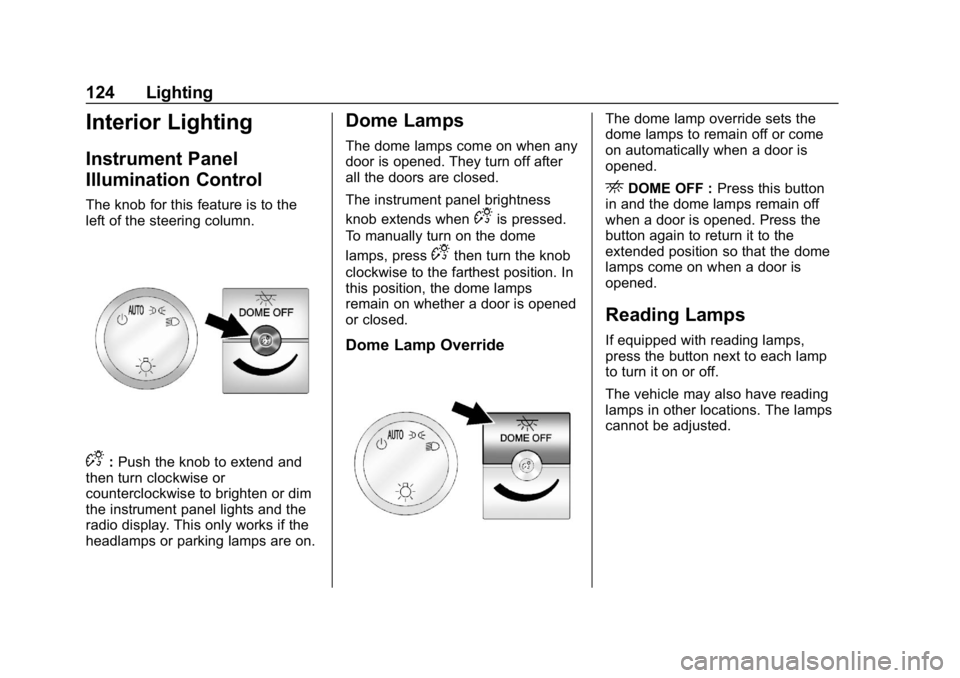
The knob for this feature is to the
left of the steering column.
D:Push the knob to extend and
then turn clockwise or
counterclockwise to brighten or dim
the instrument panel lights and the
radio display. This only works if the
headlamps or parking lamps are on.
Dome Lamps
The dome lamps come on when any
door is opened. They turn off after
all the doors are closed.
The instrument panel brightness
knob extends when
Dis pressed.
To manually turn on the dome
lamps, press
Dthen turn the knob
clockwise to the farthest position. In
this position, the dome lamps
remain on whether a door is opened
or closed.
Dome Lamp Override
The dome lamp override sets the
dome lamps to remain off or come
on automatically when a door is
opened.
EDOME OFF : Press this button
in and the dome lamps remain off
when a door is opened. Press the
button again to return it to the
extended position so that the dome
lamps come on when a door is
opened.
Reading Lamps
If equipped with reading lamps,
press the button next to each lamp
to turn it on or off.
The vehicle may also have reading
lamps in other locations. The lamps
cannot be adjusted.
Page 126 of 354
GMC Savana Owner Manual (GMNA-Localizing-U.S./Canada-11374214) -
2018 - CRC - 2/2/18
Lighting 125
Lighting Features
Entry/Exit Lighting
The vehicle has an illuminated
entry/exit feature.
The dome lamps come on if
the
EDOME OFF button is in the
extended position, when a door is
opened, or the key is removed from
the ignition.
Battery Load
Management
The vehicle may have Electric
Power Management (EPM) that
estimates the battery's temperature
and state of charge. It then adjusts
the voltage for best performance
and extended life of the battery.
When the battery's state of charge
is low, the voltage is raised slightly
to quickly bring the charge back up.
When the state of charge is high,
the voltage is lowered slightly to
prevent overcharging. If the vehicle
has a voltmeter gauge or a voltage
display on the Driver Information Center (DIC), you may see the
voltage move up or down. This is
normal. If there is a problem, an
alert will be displayed.
The battery can be discharged at
idle if the electrical loads are very
high. This is true for all vehicles.
This is because the generator
(alternator) may not be spinning fast
enough at idle to produce all the
power that is needed for very high
electrical loads.
A high electrical load occurs when
several of the following are on, such
as: headlamps, high beams, fog
lamps, rear window defogger,
climate control fan at high speed,
heated seats, engine cooling fans,
trailer loads, and loads plugged into
accessory power outlets.
EPM works to prevent excessive
discharge of the battery. It does this
by balancing the generator's output
and the vehicle's electrical needs.
It can increase engine idle speed to
generate more power, whenever
needed. It can temporarily reduce
the power demands of some
accessories.Normally, these actions occur in
steps or levels, without being
noticeable. In rare cases at the
highest levels of corrective action,
this action may be noticeable to the
driver. If so, a Driver Information
Center (DIC) message might be
displayed, such as SERVICE
BATTERY CHARGING SYSTEM.
If this messages displays, it is
recommended that the driver reduce
the electrical loads as much as
possible.
Battery Power Protection
This feature shuts off the dome
lamps if they are left on for more
than 10 minutes when the ignition is
off. This helps to prevent the battery
from running down.
Exterior Lighting Battery
Saver
The exterior lamps turn off about
10 minutes after the ignition is
turned off, if the parking lamps or
headlamps have been manually left
on. This protects against draining
Page 128 of 354
GMC Savana Owner Manual (GMNA-Localizing-U.S./Canada-11374214) -
2018 - CRC - 2/2/18
Infotainment System 127
Infotainment
System
Introduction
Infotainment . . . . . . . . . . . . . . . . . . 127
Theft-Deterrent Feature . . . . . . 128
Overview (AM-FM Radio) . . . . . 128
Overview (Radio withCD/MP3) . . . . . . . . . . . . . . . . . . . . 130
Operation . . . . . . . . . . . . . . . . . . . . . 131
Radio
AM-FM Radio . . . . . . . . . . . . . . . . 133
Satellite Radio . . . . . . . . . . . . . . . . 134
Radio Reception . . . . . . . . . . . . . . 135
Fixed Mast Antenna . . . . . . . . . . 136
Multi-Band Antenna . . . . . . . . . . 136
Audio Players
Avoiding Untrusted Media Devices . . . . . . . . . . . . . . . . . . . . . 136
CD Player . . . . . . . . . . . . . . . . . . . . 136
Auxiliary Devices . . . . . . . . . . . . . 141
OnStar System
OnStar System . . . . . . . . . . . . . . . 146
Phone
Bluetooth . . . . . . . . . . . . . . . . . . . . . 146
Introduction
Infotainment
Base radio information is included in
this manual. See the infotainment
manual for information on other
available infotainment systems.
Read the following pages to
become familiar with the features.
{Warning
Taking your eyes off the road for
too long or too often while using
any infotainment feature can
cause a crash. You or others
could be injured or killed. Do not
give extended attention to
infotainment tasks while driving.
Limit your glances at the vehicle
displays and focus your attention
on driving. Use voice commands
whenever possible.
The infotainment system has built-in
features intended to help avoid
distraction by disabling some functions when driving. These
functions may gray out when they
are unavailable. Many infotainment
features are also available through
the instrument cluster and steering
wheel controls.
Before driving:
.
Become familiar with the
operation, center stack controls,
and infotainment display
controls.
. Set up the audio by presetting
favorite stations, setting the
tone, and adjusting the
speakers.
. Set up phone numbers in
advance so they can be called
easily by pressing a single
control or by using a single voice
command if equipped with
Bluetooth phone capability.
See Defensive Driving 0161.
To play the infotainment system with
the ignition off, see Retained
Accessory Power (RAP) 0175.