steering GMC SAVANA 2021 User Guide
[x] Cancel search | Manufacturer: GMC, Model Year: 2021, Model line: SAVANA, Model: GMC SAVANA 2021Pages: 292, PDF Size: 6.38 MB
Page 68 of 292
GMC Savana Owner Manual (GMNA-Localizing-U.S./Canada-14583543) -
2021 - crc - 7/10/20
Instruments and Controls 67
While listening to a CD, press and hold¨to
quickly move forward through the tracks.
Release to stop on the desired track.
+
e: Press to increase volume.
−
e: Press to decrease volume.
Horn
Press the horn symbol on the steering
wheel to sound the horn.
Windshield Wiper/Washer
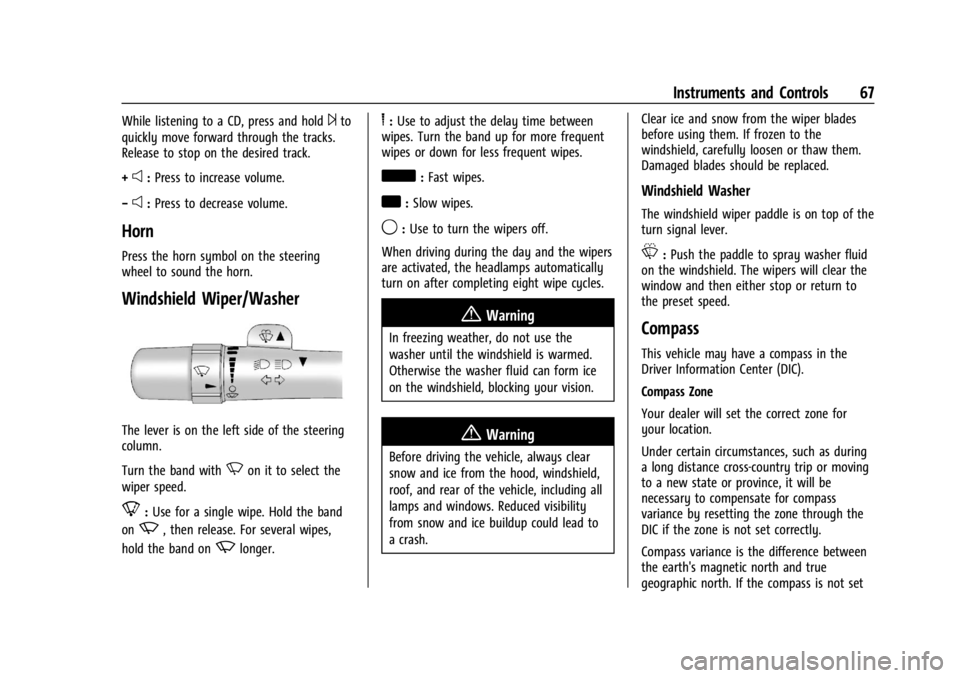
The lever is on the left side of the steering
column.
Turn the band with
Non it to select the
wiper speed.
8: Use for a single wipe. Hold the band
on
z, then release. For several wipes,
hold the band on
zlonger.
6: Use to adjust the delay time between
wipes. Turn the band up for more frequent
wipes or down for less frequent wipes.
d: Fast wipes.
a:Slow wipes.
9:Use to turn the wipers off.
When driving during the day and the wipers
are activated, the headlamps automatically
turn on after completing eight wipe cycles.
{Warning
In freezing weather, do not use the
washer until the windshield is warmed.
Otherwise the washer fluid can form ice
on the windshield, blocking your vision.
{Warning
Before driving the vehicle, always clear
snow and ice from the hood, windshield,
roof, and rear of the vehicle, including all
lamps and windows. Reduced visibility
from snow and ice buildup could lead to
a crash. Clear ice and snow from the wiper blades
before using them. If frozen to the
windshield, carefully loosen or thaw them.
Damaged blades should be replaced.
Windshield Washer
The windshield wiper paddle is on top of the
turn signal lever.
L:
Push the paddle to spray washer fluid
on the windshield. The wipers will clear the
window and then either stop or return to
the preset speed.
Compass
This vehicle may have a compass in the
Driver Information Center (DIC).
Compass Zone
Your dealer will set the correct zone for
your location.
Under certain circumstances, such as during
a long distance cross-country trip or moving
to a new state or province, it will be
necessary to compensate for compass
variance by resetting the zone through the
DIC if the zone is not set correctly.
Compass variance is the difference between
the earth's magnetic north and true
geographic north. If the compass is not set
Page 78 of 292
GMC Savana Owner Manual (GMNA-Localizing-U.S./Canada-14583543) -
2021 - crc - 7/10/20
Instruments and Controls 77
If the light continues to flash, find a safe
place to park. Turn the vehicle off and wait
at least 10 seconds before restarting the
engine. If the light is still flashing, follow
the previous guidelines and see your dealer
for service as soon as possible.
If the light is on steady :A malfunction has
been detected. Diagnosis and service may be
required.
Check the following:
.A loose or missing fuel cap may cause
the light to come on. See Filling the Tank
0 158. A few driving trips with the cap
properly installed may turn the light off.
.Poor fuel quality can cause inefficient
engine operation and poor driveability,
which may go away once the engine is
warmed up. If this occurs, change the fuel
brand. It may require at least one full
tank of the proper fuel to turn the light
off. See Recommended Fuel 0158.
If the light remains on, see your dealer.
Emissions Inspection and Maintenance
Programs
If the vehicle requires an Emissions
Inspection/Maintenance test, the test
equipment will likely connect to the
vehicle's Data Link Connector (DLC).
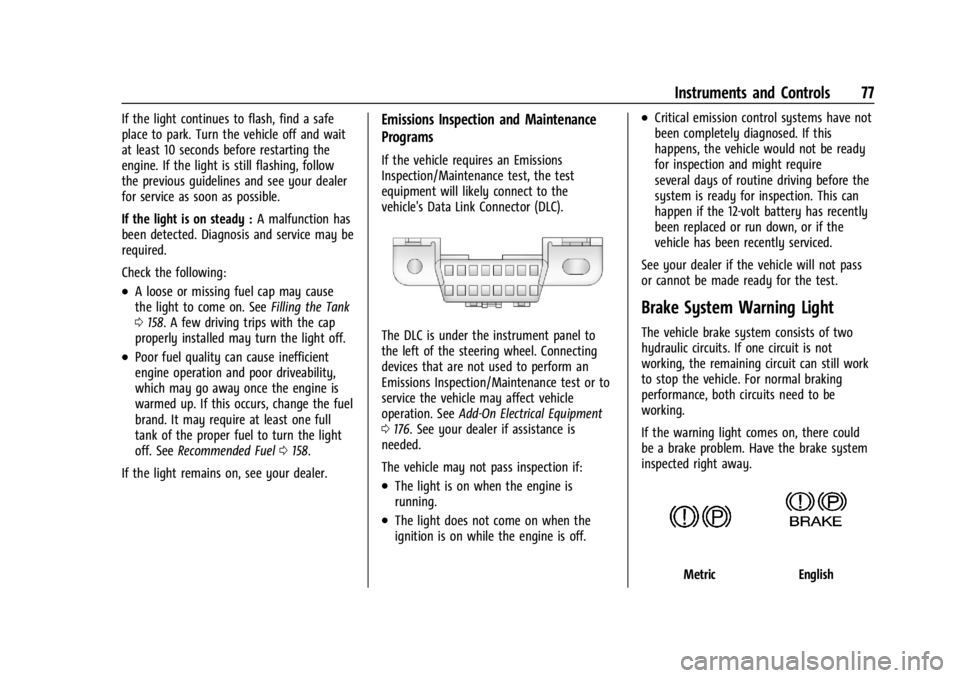
The DLC is under the instrument panel to
the left of the steering wheel. Connecting
devices that are not used to perform an
Emissions Inspection/Maintenance test or to
service the vehicle may affect vehicle
operation. See Add-On Electrical Equipment
0 176. See your dealer if assistance is
needed.
The vehicle may not pass inspection if:
.The light is on when the engine is
running.
.The light does not come on when the
ignition is on while the engine is off.
.Critical emission control systems have not
been completely diagnosed. If this
happens, the vehicle would not be ready
for inspection and might require
several days of routine driving before the
system is ready for inspection. This can
happen if the 12-volt battery has recently
been replaced or run down, or if the
vehicle has been recently serviced.
See your dealer if the vehicle will not pass
or cannot be made ready for the test.
Brake System Warning Light
The vehicle brake system consists of two
hydraulic circuits. If one circuit is not
working, the remaining circuit can still work
to stop the vehicle. For normal braking
performance, both circuits need to be
working.
If the warning light comes on, there could
be a brake problem. Have the brake system
inspected right away.
MetricEnglish
Page 86 of 292
GMC Savana Owner Manual (GMNA-Localizing-U.S./Canada-14583543) -
2021 - crc - 7/10/20
Instruments and Controls 85
the tire positions, seeTire Pressure Monitor
System 0217. See Tire Inspection 0220 and
Tire Rotation 0220.
Change Compass Zone
The vehicle may have this feature. To
change the compass zone through the DIC,
see Compass 067.
Calibrate Compass
The vehicle may have this feature. The
compass can be manually calibrated. To
calibrate the compass through the DIC, see
Compass 067.
Blank Display
This display shows no information.
Vehicle Messages
Messages displayed on the DIC indicate the
status of the vehicle or some action that
may be needed to correct a condition.
Multiple messages may appear one after
another.
The messages that do not require
immediate action can be acknowledged and
cleared by pressing
V. The messages that
require immediate action cannot be cleared
until that action is performed. All messages should be taken seriously;
clearing the message does not correct the
problem.
If a SERVICE message appears, see your
dealer.
Follow the instructions given in the
messages. The system displays messages
regarding the following topics:
.Service Messages
.Fluid Levels
.Vehicle Security
.Brakes
.Steering
.Ride Control Systems
.Driver Assistance Systems
.Cruise Control
.Lighting and Bulb Replacement
.Wiper/Washer Systems
.Doors and Windows
.Seat Belts
.Airbag Systems
.Engine and Transmission
.Tire Pressure
.Battery
Engine Power Messages
ENGINE POWER IS REDUCED
This message displays when the vehicle's
propulsion power is reduced. A reduction in
propulsion power can affect the vehicle's
ability to accelerate. If this message is on,
but there is no observed reduction in
performance, proceed to your destination.
Under certain conditions the performance
may be reduced the next time the vehicle is
driven. The vehicle may be driven while this
message is on, but maximum acceleration
and speed may be reduced. Anytime this
message stays on, or displays repeatedly,
the vehicle should be taken to your dealer
for service as soon as possible.
Under certain operating conditions,
propulsion will be disabled. Try restarting
after the ignition has been off for
30 seconds.
Page 91 of 292
GMC Savana Owner Manual (GMNA-Localizing-U.S./Canada-14583543) -
2021 - crc - 7/10/20
90 Lighting
Lighting
Exterior Lighting
Exterior Lamp Controls . . . . . . . . . . . . . . . . . 90
Exterior Lamps Off Reminder . . . . . . . . . . . 90
Headlamp High/Low-Beam Changer . . . . . 91
Flash-to-Pass . . . . . . . . . . . . . . . . . . . . . . . . . . . . 91
Daytime Running Lamps (DRL) . . . . . . . . . . 91
Automatic Headlamp System . . . . . . . . . . . 91
Hazard Warning Flashers . . . . . . . . . . . . . . . 92
Turn and Lane-Change Signals . . . . . . . . . . 92
Interior Lighting
Instrument Panel IlluminationControl . . . . . . . . . . . . . . . . . . . . . . . . . . . . . . . 93
Dome Lamps . . . . . . . . . . . . . . . . . . . . . . . . . . . 93
Reading Lamps . . . . . . . . . . . . . . . . . . . . . . . . . 94
Lighting Features
Entry Lighting . . . . . . . . . . . . . . . . . . . . . . . . . . 94
Exit Lighting . . . . . . . . . . . . . . . . . . . . . . . . . . . . 94
Battery Load Management . . . . . . . . . . . . . 94
Battery Power Protection . . . . . . . . . . . . . . . 95
Exterior Lighting Battery Saver . . . . . . . . . 95
Exterior Lighting
Exterior Lamp Controls
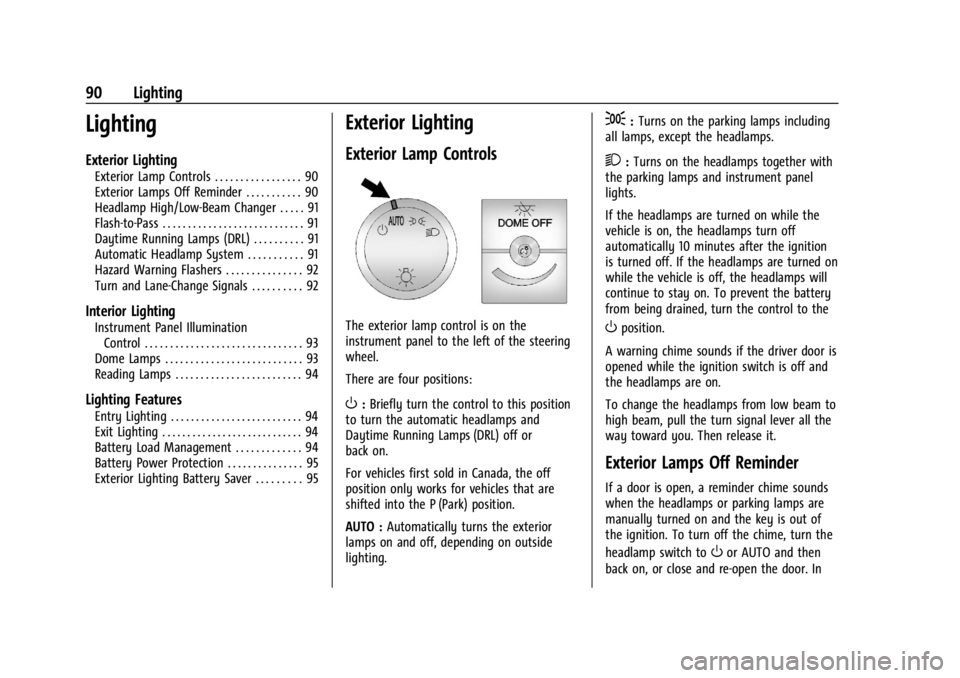
The exterior lamp control is on the
instrument panel to the left of the steering
wheel.
There are four positions:
O: Briefly turn the control to this position
to turn the automatic headlamps and
Daytime Running Lamps (DRL) off or
back on.
For vehicles first sold in Canada, the off
position only works for vehicles that are
shifted into the P (Park) position.
AUTO : Automatically turns the exterior
lamps on and off, depending on outside
lighting.
;: Turns on the parking lamps including
all lamps, except the headlamps.
2: Turns on the headlamps together with
the parking lamps and instrument panel
lights.
If the headlamps are turned on while the
vehicle is on, the headlamps turn off
automatically 10 minutes after the ignition
is turned off. If the headlamps are turned on
while the vehicle is off, the headlamps will
continue to stay on. To prevent the battery
from being drained, turn the control to the
Oposition.
A warning chime sounds if the driver door is
opened while the ignition switch is off and
the headlamps are on.
To change the headlamps from low beam to
high beam, pull the turn signal lever all the
way toward you. Then release it.
Exterior Lamps Off Reminder
If a door is open, a reminder chime sounds
when the headlamps or parking lamps are
manually turned on and the key is out of
the ignition. To turn off the chime, turn the
headlamp switch to
Oor AUTO and then
back on, or close and re-open the door. In
Page 97 of 292
GMC Savana Owner Manual (GMNA-Localizing-U.S./Canada-14583543) -
2021 - crc - 7/10/20
96 Infotainment System
Infotainment System
Introduction
Infotainment . . . . . . . . . . . . . . . . . . . . . . . . . . . 96
Theft-Deterrent Feature . . . . . . . . . . . . . . . . 97
Overview (AM-FM Radio) . . . . . . . . . . . . . . . 97
Overview (Radio with CD/MP3) . . . . . . . . . 99
Operation . . . . . . . . . . . . . . . . . . . . . . . . . . . . . 100
Radio
AM-FM Radio . . . . . . . . . . . . . . . . . . . . . . . . . . 101
Satellite Radio . . . . . . . . . . . . . . . . . . . . . . . . . 102
Radio Reception . . . . . . . . . . . . . . . . . . . . . . . 103
Fixed Mast Antenna . . . . . . . . . . . . . . . . . . . 103
Multi-Band Antenna . . . . . . . . . . . . . . . . . . . 104
Audio Players
Avoiding Untrusted Media Devices . . . . 104
CD Player . . . . . . . . . . . . . . . . . . . . . . . . . . . . . 104
Auxiliary Devices . . . . . . . . . . . . . . . . . . . . . . 108
OnStar System
OnStar System . . . . . . . . . . . . . . . . . . . . . . . . . 112
Phone
Bluetooth . . . . . . . . . . . . . . . . . . . . . . . . . . . . . . 112
Trademarks and License Agreements
Trademarks and License Agreements . . . 117
Introduction
Infotainment
Read the following pages to become familiar
with the features.
{Warning
Taking your eyes off the road for too
long or too often while using any
infotainment feature can cause a crash.
You or others could be injured or killed.
Do not give extended attention to
infotainment tasks while driving. Limit
your glances at the vehicle displays and
focus your attention on driving. Use voice
commands whenever possible.
The infotainment system has built-in
features intended to help avoid distraction
by disabling some functions when driving.
Many infotainment features are also
available through the instrument cluster and
steering wheel controls. Before driving:
.Become familiar with the operation,
center stack controls, and infotainment
controls.
.Set up the audio by presetting favorite
stations, setting the tone, and adjusting
the speakers.
.Set up phone numbers in advance so they
can be called easily by pressing a single
control or by using a single voice
command if equipped with Bluetooth
phone capability.
See Defensive Driving 0126.
To play the infotainment system with the
ignition off, see Retained Accessory Power
(RAP) 0138.
Active Noise Cancellation (ANC)
If equipped, ANC reduces engine noise in the
vehicle’s interior. ANC requires the
factory-installed audio system, radio,
speakers, amplifier (if equipped), induction
system, and exhaust system to work
properly. Deactivation is required by your
dealer if related aftermarket equipment is
installed.
Page 102 of 292
GMC Savana Owner Manual (GMNA-Localizing-U.S./Canada-14583543) -
2021 - crc - 7/10/20
Infotainment System 101
3. Adjust the setting by doing one of thefollowing:
.Turn thefknob clockwise or
counterclockwise.
.Press¨SEEK or©SEEK.
.Press\FWD orsREV.
To quickly adjust all speaker and tone
controls to the middle position, press the
f
knob for more than two seconds.
If the Rear Seat Audio (RSA) is turned on,
the radio disables FADE and mutes the rear
speakers.
Radio Messages
Calibration Error : The audio system has
been calibrated for the vehicle from the
factory. If Calibration Error displays, it
means that the radio has not been
configured properly for the vehicle and it
must be returned to your dealer for service.
VIN or NO VIN : One of these messages will
display when the TheftLock system has
locked up the radio. Take the vehicle to your
dealer for service.
If any error occurs repeatedly or if an error
cannot be corrected, contact your dealer.
Radio
AM-FM Radio
Radio Data System (RDS)
The radio may have an RDS. The RDS feature
is available for use only on FM stations that
broadcast RDS information. This system
relies upon receiving specific information
from these stations and only works when
the information is available. While the radio
is tuned to an FM-RDS station, the station
name or call letters display. In rare cases, a
radio station could broadcast incorrect
information that causes the radio features
to work improperly. If this happens, contact
the radio station.
Finding a Station
BAND or SRCE : Press to switch between
FM1, FM2, AM, and SXM if equipped. The
selection displays.
f: Turn clockwise or counterclockwise to
increase or decrease the station frequency.
©SEEK or¨SEEK : Press©SEEK to go to
the previous or
¨SEEK to go to the next
station and stay there. To scan stations, press and hold either
button for two seconds until a beep sounds.
The radio goes to a station, plays for a few
seconds, then goes to the next station. For
AM-FM Radio and Radio with CD, the station
frequency flashes while the radio is in the
scan mode. Press either button again to stop
scanning.
The radio seeks and scans stations only with
a strong signal that are in the
selected band.
Scan presets within the current selected
band by pressing and holding either SEEK
button for four seconds until a double beep
sounds. The radio goes to a stored preset,
plays for a few seconds if a strong signal is
present, then goes to the next stored preset.
The station frequency flashes while the
radio is in the scan mode.
Storing a Radio Station as a Favorite
You are encouraged to set up radio station
favorites while the vehicle is parked. Tune to
favorite stations using the presets, favorites
button, and steering wheel controls,
if equipped. See
Defensive Driving 0126.
FAV : If equipped with a FAV button, a
maximum of 36 stations can be programmed
as favorites by using the six softkeys below
Page 103 of 292
GMC Savana Owner Manual (GMNA-Localizing-U.S./Canada-14583543) -
2021 - crc - 7/10/20
102 Infotainment System
the radio station frequency tabs and by
using the radio favorites page button (FAV
button). Press FAV to go through up to
six pages of favorites, each having
six favorite stations available per page. Each
page of favorites can contain any
combination of AM and FM stations.
The balance/fade and tone settings that
were previously adjusted are stored with the
favorite stations.
To store a station as a favorite:1. Tune to the desired radio station.
2. Press FAV to display the page where the station is to be stored.
3. Press and hold one of the six softkeys until a beep sounds. When that softkey
is pressed and released, the station that
was set returns.
4. Repeat the steps for each softkey radio station to be stored as a favorite.
The number of favorites pages can be set up
using the MENU button. To set up the
number of favorites pages: 1. Press MENU to display the radio setup menu.
2. Press the softkey below the FAV 1-6 tab. 3. Select the desired number of favorites
pages by pressing the softkey below the
displayed page numbers.
4. Press FAV, or let the menu time out, to return to the original main radio screen
showing the radio station frequency tabs
and to begin the process of
programming favorites for the chosen
number of numbered pages.
Satellite Radio
SiriusXM, if equipped, is a satellite radio
service based in the United States and
Canada only.
Finding a Category (CAT) Station
CAT : The CAT button is used to find SXM
channels (if equipped) while the radio is in
the SXM mode.
Finding a Channel
BAND or SRCE : Press to switch between
FM1, FM2, AM, and SXM if equipped. The
selection displays.
f: Turn clockwise or counterclockwise to
increase or decrease the station frequency.
©SEEK or¨SEEK : Press©SEEK to go to
the previous or
¨SEEK to go to the next
station and stay there.
To scan stations, press and hold either
button for two seconds until a beep sounds.
The radio goes to a station, plays for a few
seconds, then goes to the next station. The
station frequency flashes while the radio is
in the scan mode. Press either button again
to stop scanning.
The radio seeks and scans stations only with
a strong signal that are in the
selected band.
To scan presets within the current selected
band, press and hold either SEEK button for
four seconds until a double beep sounds. The
radio goes to a stored preset, plays for a
few seconds if a strong signal is present,
then goes to the next stored preset. The
station frequency flashes while the radio is
in the scan mode.
Storing a Radio Station as a Favorite
You are encouraged to set up radio station
favorites while the vehicle is parked. Tune to
favorite stations using the presets, favorites
button, and steering wheel controls,
if equipped. See Defensive Driving 0126.
Page 114 of 292
GMC Savana Owner Manual (GMNA-Localizing-U.S./Canada-14583543) -
2021 - crc - 7/10/20
Infotainment System 113
Voice Recognition
The Bluetooth system uses voice recognition
to interpret voice commands to dial phone
numbers and name tags.
For additional information, say“Help”while
you are in a voice recognition menu.
Noise : Keep interior noise levels to a
minimum. The system may not recognize
voice commands if there is too much
background noise.
When to Speak : A short tone sounds after
the system responds indicating when it is
waiting for a voice command. Wait until the
tone and then speak.
How to Speak : Speak clearly in a calm and
natural voice.
Audio System
When using the in-vehicle Bluetooth system,
sound comes through the vehicle's front
audio system speakers and overrides the
audio system. Use the audio system volume
knob, during a call, to change the volume
level. The adjusted volume level remains in
memory for later calls. To prevent missed
calls, a minimum volume level is used if the
volume is turned down too low.
Bluetooth Controls
Use the buttons on the steering wheel to
operate the in-vehicle Bluetooth system. See
Steering Wheel Controls 066.
b/g:Press to answer incoming calls,
confirm system information, and start
speech recognition.
c/x: Press to end a call, reject a call,
or cancel an operation.
Pairing
A Bluetooth-enabled cell phone must be
paired to the Bluetooth system and then
connected to the vehicle before it can be
used. See the cell phone manufacturer's user
guide for Bluetooth functions before pairing
the cell phone.
Pairing Information
.A Bluetooth phone with MP3 capability
cannot be paired to the vehicle as a
phone and an MP3 player at the
same time.
.Up to five cell phones can be paired to
the Bluetooth system.
.The pairing process is disabled when the
vehicle is moving.
.Pairing only needs to be completed once,
unless the pairing information on the cell
phone changes or the cell phone is
deleted from the system.
.Only one paired cell phone can be
connected to the Bluetooth system at
a time.
.If multiple paired cell phones are within
range of the system, the system connects
to the first available paired cell phone in
the order that they were first paired to
the system. To connect to a different
paired phone, see “Connecting to a
Different Phone” later in this section.
Pairing a Phone
1. Press and hold
b/gfor two seconds.
2. Say “Bluetooth.” This command can be
skipped.
3. Say “Pair.”The system responds with
instructions and a four-digit Personal
Identification Number (PIN). The PIN is
used in Step 5.
4. Start the pairing process on the cell phone that you want to pair. For help
with this process, see the cell phone
manufacturer's user guide.
Page 126 of 292
GMC Savana Owner Manual (GMNA-Localizing-U.S./Canada-14583543) -
2021 - crc - 7/10/20
Driving and Operating 125
Driving and Operating
Driving Information
Driving for Better Fuel Economy . . . . . . . 126
Distracted Driving . . . . . . . . . . . . . . . . . . . . . 126
Defensive Driving . . . . . . . . . . . . . . . . . . . . . . 126
Impaired Driving . . . . . . . . . . . . . . . . . . . . . . . 127
Control of a Vehicle . . . . . . . . . . . . . . . . . . . . 127
Braking . . . . . . . . . . . . . . . . . . . . . . . . . . . . . . . . 127
Steering . . . . . . . . . . . . . . . . . . . . . . . . . . . . . . . 127
Off-Road Recovery . . . . . . . . . . . . . . . . . . . . . 128
Loss of Control . . . . . . . . . . . . . . . . . . . . . . . . 128
Driving on Wet Roads . . . . . . . . . . . . . . . . . 129
Hill and Mountain Roads . . . . . . . . . . . . . . 129
Winter Driving . . . . . . . . . . . . . . . . . . . . . . . . . 130
If the Vehicle Is Stuck . . . . . . . . . . . . . . . . . . 131
Vehicle Load Limits . . . . . . . . . . . . . . . . . . . . . 131
Starting and Operating
New Vehicle Break-In . . . . . . . . . . . . . . . . . . 134
Ignition Positions . . . . . . . . . . . . . . . . . . . . . . 135
Starting the Engine . . . . . . . . . . . . . . . . . . . . 136
Fast Idle System . . . . . . . . . . . . . . . . . . . . . . . 138
Retained Accessory Power (RAP) . . . . . . . 138
Engine Coolant Heater . . . . . . . . . . . . . . . . . 138
Shifting Into Park . . . . . . . . . . . . . . . . . . . . . 140
Shifting out of Park . . . . . . . . . . . . . . . . . . . 140
Parking over Things That Burn . . . . . . . . . 141
Engine Exhaust
Engine Exhaust . . . . . . . . . . . . . . . . . . . . . . . . 141
Running the Vehicle While Parked . . . . . 141
Automatic Transmission
Automatic Transmission . . . . . . . . . . . . . . . 142
Manual Mode . . . . . . . . . . . . . . . . . . . . . . . . . 144
Tow/Haul Mode . . . . . . . . . . . . . . . . . . . . . . . 145
Brakes
Antilock Brake System (ABS) . . . . . . . . . . . 145
Parking Brake . . . . . . . . . . . . . . . . . . . . . . . . . 146
Brake Assist . . . . . . . . . . . . . . . . . . . . . . . . . . . 146
Hill Start Assist (HSA) . . . . . . . . . . . . . . . . . 146
Ride Control Systems
Traction Control/Electronic StabilityControl . . . . . . . . . . . . . . . . . . . . . . . . . . . . . . 147
Locking Rear Axle . . . . . . . . . . . . . . . . . . . . . . 148
Cruise Control
Cruise Control . . . . . . . . . . . . . . . . . . . . . . . . . 149
Driver Assistance Systems
Driver Assistance Systems . . . . . . . . . . . . . 150
Rear Vision Camera (RVC) . . . . . . . . . . . . . . 152
Park Assist . . . . . . . . . . . . . . . . . . . . . . . . . . . . . 153
Forward Collision Alert (FCA) System . . . . . . . . . . . . . . . . . . . . . . . . . . . . . . 154
Side Blind Zone Alert (SBZA) . . . . . . . . . . . 155
Lane Departure Warning (LDW) . . . . . . . . 157
Fuel
Top Tier Fuel . . . . . . . . . . . . . . . . . . . . . . . . . . . 157
Recommended Fuel . . . . . . . . . . . . . . . . . . . . 158
Prohibited Fuels . . . . . . . . . . . . . . . . . . . . . . . 158
Fuels in Foreign Countries . . . . . . . . . . . . . 158
Fuel Additives . . . . . . . . . . . . . . . . . . . . . . . . . 158
Filling the Tank . . . . . . . . . . . . . . . . . . . . . . . . 158
Filling a Portable Fuel Container . . . . . . . 160
Trailer Towing
General Towing Information . . . . . . . . . . . 160
Driving Characteristics and Towing Tips . . . . . . . . . . . . . . . . . . . . . . . . . 160
Trailer Towing . . . . . . . . . . . . . . . . . . . . . . . . . 164
Towing Equipment . . . . . . . . . . . . . . . . . . . . . 172
Trailer Sway Control (TSC) . . . . . . . . . . . . . 175
Conversions and Add-Ons
Add-On Electrical Equipment . . . . . . . . . . . 176
Page 127 of 292
GMC Savana Owner Manual (GMNA-Localizing-U.S./Canada-14583543) -
2021 - crc - 7/10/20
126 Driving and Operating
Driving Information
Driving for Better Fuel Economy
Driving habits can affect fuel mileage. Here
are some driving tips to get the best fuel
economy possible:
.Set the climate controls to the desired
temperature after the engine is started,
or turn them off when not required.
.Avoid fast starts and accelerate smoothly.
.Brake gradually and avoid abrupt stops.
.Avoid idling the engine for long periods
of time.
.When road and weather conditions are
appropriate, use cruise control.
.Always follow posted speed limits or
drive more slowly when conditions
require.
.Keep vehicle tires properly inflated.
.Combine several trips into a single trip.
.Replace the vehicle's tires with the same
TPC Spec number molded into the tire's
sidewall near the size.
.Follow recommended scheduled
maintenance.
Distracted Driving
Distraction comes in many forms and can
take your focus from the task of driving.
Exercise good judgment and do not let other
activities divert your attention away from
the road. Many local governments have
enacted laws regarding driver distraction.
Become familiar with the local laws in
your area.
To avoid distracted driving, keep your eyes
on the road, keep your hands on the
steering wheel, and focus your attention on
driving.
.Do not use a phone in demanding driving
situations. Use a hands-free method to
place or receive necessary phone calls.
.Watch the road. Do not read, take notes,
or look up information on phones or
other electronic devices.
.Designate a front seat passenger to
handle potential distractions.
.Become familiar with vehicle features
before driving, such as programming
favorite radio stations and adjusting
climate control and seat settings. Program
all trip information into any navigation
device prior to driving.
.Wait until the vehicle is parked to
retrieve items that have fallen to the
floor.
.Stop or park the vehicle to tend to
children.
.Keep pets in an appropriate carrier or
restraint.
.Avoid stressful conversations while
driving, whether with a passenger or on a
cell phone.
{Warning
Taking your eyes off the road too long or
too often could cause a crash resulting in
injury or death. Focus your attention on
driving.
Refer to the infotainment section for more
information on using that system and the
navigation system, if equipped, including
pairing and using a cell phone.
Defensive Driving
Defensive driving means “always expect the
unexpected.” The first step in driving
defensively is to wear the seat belt. See
Seat Belts 028.