ECO mode GMC SAVANA 2021 Owner's Guide
[x] Cancel search | Manufacturer: GMC, Model Year: 2021, Model line: SAVANA, Model: GMC SAVANA 2021Pages: 292, PDF Size: 6.38 MB
Page 220 of 292
GMC Savana Owner Manual (GMNA-Localizing-U.S./Canada-14583543) -
2021 - crc - 7/10/20
Vehicle Care 219
.One or more TPMS sensors are missing or
damaged. The malfunction light and the
DIC message should go off when the
TPMS sensors are installed and the sensor
matching process is performed
successfully. See your dealer for service.
.Replacement tires or wheels do not match
the original equipment tires or wheels.
Tires and wheels other than those
recommended could prevent the TPMS
from functioning properly. SeeBuying
New Tires 0222.
.Operating electronic devices or being near
facilities using radio wave frequencies
similar to the TPMS could cause the TPMS
sensors to malfunction.
If the TPMS is not functioning properly, it
cannot detect or signal a low tire pressure
condition. See your dealer for service if the
TPMS malfunction light and DIC message
come on and stay on.
TPMS Sensor Matching Process
Each TPMS sensor has a unique
identification code. The identification code
needs to be matched to a new tire/wheel
position after rotating the vehicle’s tires or
replacing one or more of the TPMS sensors.
Also, the TPMS sensor matching process should be performed after replacing a spare
tire with a road tire containing the TPMS
sensor. The malfunction light and the DIC
message should go off at the next ignition
cycle. The sensors are matched to the tire/
wheel positions, using a TPMS relearn tool,
in the following order: driver side front tire,
passenger side front tire, passenger side rear
tire, and driver side rear. See your dealer for
service or to purchase a relearn tool.
A TPMS relearn tool can also be purchased.
See Tire Pressure Monitor Sensor Activation
Tool at www.gmtoolsandequipment.com or
call 1-800-GM TOOLS (1-800-468-6657).
There are two minutes to match the first
tire/wheel position, and five minutes overall
to match all four tire/wheel positions. If it
takes longer, the matching process stops
and must be restarted.
The TPMS sensor matching process is:
1. Set the parking brake.
2. Turn the ignition on without starting the vehicle. See Ignition Positions 0135.
3. Press the Remote Keyless Entry (RKE) transmitter's
QandKbuttons at the
same time for approximately
five seconds. The horn sounds twice to signal the receiver is in relearn mode
and TIRE LEARNING ACTIVE message
displays on the DIC screen.
If the vehicle does not have RKE, press
the Driver Information Center (DIC)
vehicle information button until the
PRESS
VTO RELEARN TIRE POSITIONS
message displays. The horn sounds twice
to signal the receiver is in relearn mode
and TIRE LEARNING ACTIVE message
displays on the DIC screen.
4. Start with the driver side front tire.
5. Place the relearn tool against the tire sidewall, near the valve stem. Then press
the button to activate the TPMS sensor.
A horn chirp confirms that the sensor
identification code has been matched to
this tire and wheel position.
6. Proceed to the passenger side front tire, and repeat the procedure in Step 5.
7. Proceed to the passenger side rear tire, and repeat the procedure in Step 5.
8. Proceed to the driver side rear tire, and repeat the procedure in Step 5. The horn
sounds two times to indicate the sensor
identification code has been matched to
the driver side rear tire, and the TPMS
sensor matching process is no longer
Page 227 of 292

GMC Savana Owner Manual (GMNA-Localizing-U.S./Canada-14583543) -
2021 - crc - 7/10/20
226 Vehicle Care
{Warning
Using the wrong replacement wheels,
wheel bolts, or wheel nuts can be
dangerous. It could affect the braking and
handling of the vehicle. Tires can lose air,
and cause loss of control, causing a crash.
Always use the correct wheel, wheel
bolts, and wheel nuts for replacement.
Caution
The wrong wheel can also cause
problems with bearing life, brake cooling,
speedometer or odometer calibration,
headlamp aim, bumper height, vehicle
ground clearance, and tire or tire chain
clearance to the body and chassis.
Used Replacement Wheels
{Warning
Replacing a wheel with a used one is
dangerous. How it has been used or how
far it has been driven may be unknown.
It could fail suddenly and cause a crash.
When replacing wheels, use a new GM
original equipment wheel.
Tire Chains
{Warning
Tire chains or other traction devices used
on a vehicle without the proper amount
of clearance can cause damage to the
brakes, suspension, or other vehicle parts.
Use tire chains or traction devices only if
the equipment manufacturer recommends
them for the vehicle tire size combination
and road conditions. Follow the
equipment manfacturer’s instructions. The
area damaged by the tire chains could
cause you to lose control of the vehicle
and you or others may be injured in a
crash. To help avoid damage to the
vehicle, drive slowly, readjust, or remove
the device if it is contacting the vehicle.
Do not spin the vehicle's tires.
Caution
Use tire chains only where legal and only
when necessary. Use chains that are the
proper size for the tires. Install them on
the tires of the rear axle. Do not use
chains on the tires of the front axle.
(Continued)
Caution (Continued)
Tighten them as tightly as possible with
the ends securely fastened. Drive slowly
and follow the chain manufacturer's
instructions. If the chains contact the
vehicle, stop and retighten them. If the
contact continues, slow down until it
stops. Driving too fast or spinning the
wheels with chains on will damage the
vehicle.
For Cutaway models with LT245/75R16 or
LT225/75R16 size single or dual rear tires, use
Low Profile Z-Chain or SAE Class S cables.
For Cargo or Passenger models with LT225/
75R16 or LT245/75R16 size tires, use Low
Profile Z-Chain cables. SAE Class S chains are
not recommended.
If the vehicle has dual rear tires, do not use
individual tire chains. Use tire chains that fit
across both dual tires.
If a Tire Goes Flat
It is unusual for a tire to blow out while
driving, especially if the tires are maintained
properly. See Tires0211. If air goes out of a
tire, it is much more likely to leak out
Page 259 of 292
GMC Savana Owner Manual (GMNA-Localizing-U.S./Canada-14583543) -
2021 - crc - 7/10/20
258 Technical Data
Technical Data
Vehicle Identification
Vehicle Identification Number (VIN) . . . 258
Service Parts Identification . . . . . . . . . . . . 258
Vehicle Data
Capacities and Specifications . . . . . . . . . . 258
Engine Drive Belt Routing . . . . . . . . . . . . . 261
Vehicle Identification
Vehicle Identification
Number (VIN)
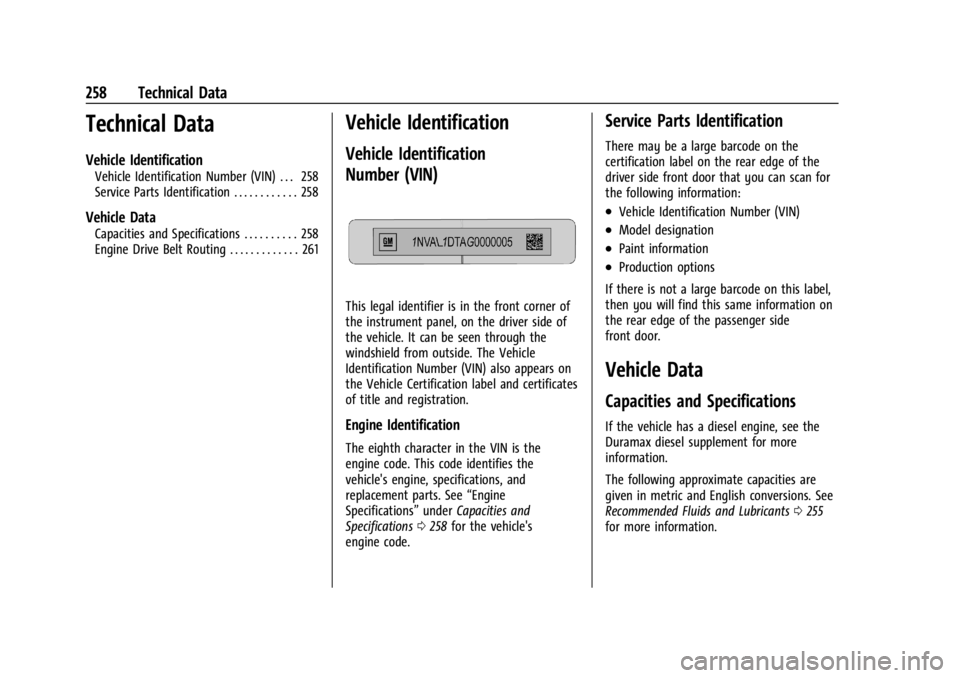
This legal identifier is in the front corner of
the instrument panel, on the driver side of
the vehicle. It can be seen through the
windshield from outside. The Vehicle
Identification Number (VIN) also appears on
the Vehicle Certification label and certificates
of title and registration.
Engine Identification
The eighth character in the VIN is the
engine code. This code identifies the
vehicle's engine, specifications, and
replacement parts. See“Engine
Specifications” underCapacities and
Specifications 0258 for the vehicle's
engine code.
Service Parts Identification
There may be a large barcode on the
certification label on the rear edge of the
driver side front door that you can scan for
the following information:
.Vehicle Identification Number (VIN)
.Model designation
.Paint information
.Production options
If there is not a large barcode on this label,
then you will find this same information on
the rear edge of the passenger side
front door.
Vehicle Data
Capacities and Specifications
If the vehicle has a diesel engine, see the
Duramax diesel supplement for more
information.
The following approximate capacities are
given in metric and English conversions. See
Recommended Fluids and Lubricants 0255
for more information.
Page 270 of 292
GMC Savana Owner Manual (GMNA-Localizing-U.S./Canada-14583543) -
2021 - crc - 7/10/20
Customer Information 269
If a Crash Occurs
If there has been an injury, call emergency
services for help. Do not leave the scene of
a crash until all matters have been taken
care of. Move the vehicle only if its position
puts you in danger, or you are instructed to
move it by a police officer.
Give only the necessary information to
police and other parties involved in the
crash.
For emergency towing seeRoadside
Assistance Program 0265.
Gather the following information:
.Driver name, address, and telephone
number
.Driver license number
.Owner name, address, and telephone
number
.Vehicle license plate number
.Vehicle make, model, and model year
.Vehicle Identification Number (VIN)
.Insurance company and policy number
.General description of the damage to the
other vehicle Choose a reputable repair facility that uses
quality replacement parts. See
“Collision
Parts” earlier in this section.
If the airbag has inflated, see What Will You
See after an Airbag Inflates? 041.
Managing the Vehicle Damage Repair
Process
In the event that the vehicle requires
damage repairs, GM recommends that you
take an active role in its repair. If you have
a pre-determined repair facility of choice,
take the vehicle there, or have it towed
there. Specify to the facility that any
required replacement collision parts be
original equipment parts, either new
Genuine GM parts or recycled original GM
parts. Remember, recycled parts will not be
covered by the GM vehicle warranty.
Insurance pays the bill for the repair, but
you must live with the repair. Depending on
your policy limits, your insurance company
may initially value the repair using
aftermarket parts. Discuss this with the
repair professional, and insist on Genuine
GM parts. Remember, if the vehicle is
leased, you may be obligated to have the vehicle repaired with Genuine GM parts,
even if your insurance coverage does not
pay the full cost.
If another party's insurance company is
paying for the repairs, you are not obligated
to accept a repair valuation based on that
insurance company's collision policy repair
limits, as you have no contractual limits
with that company. In such cases, you can
have control of the repair and parts choices
as long as the cost stays within reasonable
limits.
Publication Ordering Information
Service Manuals
Service manuals have the diagnosis and
repair information on the engine,
transmission, axle, suspension, brakes,
electrical system, steering system, body, etc.
Customer Literature
Owner’s manuals are written specifically for
owners and are intended to provide basic
operational information about the vehicle.
The owner’s manual includes the
Maintenance Schedule for all models.
Page 271 of 292
GMC Savana Owner Manual (GMNA-Localizing-U.S./Canada-14583543) -
2021 - crc - 7/10/20
270 Customer Information
Customer literature publications available for
purchase include owner’s manuals, warranty
manuals, and portfolios. Portfolios include an
owner’s manual, warranty manual,
if applicable, and zip lock bag or pouch.
Current and Past Models
Service manuals and customer literature are
available for many current and past model
year GM vehicles.
To order, call 1-800-551-4123 Monday–Friday,
8:00 a.m.–6:00 p.m. eastern time
For credit card orders only (VISA,
MasterCard, or Discover), see Helm, Inc. at:
www.helminc.com.
To order by mail, write to:
Helm, Incorporated
Attention: Customer Service
47911 Halyard Drive
Plymouth, MI 48170
Make checks payable in U.S. funds.
Radio Frequency Statement
This vehicle uses license-exempt transmitters
/ receivers / systems that operate on a
radio frequency that complies with Part 15/
Part 18 of the Federal Communications
Commission (FCC) rules and with Innovation,Science and Economic Development (ISED)
Canada's license-exempt RSS(s) / RSP-100 /
ICES-GEN.
Operation is subject to the following two
conditions:
1. The device may not cause harmful interference.
2. The device must accept any interference received, including interference that may
cause undesired operation of the device.
Changes or modifications to any of these
systems by other than an authorized service
facility could void authorization to use this
equipment.
Reporting Safety Defects
Reporting Safety Defects to the
United States Government
If you believe that your vehicle has a
defect which could cause a crash or
could cause injury or death, you should
immediately inform the National
Highway Traffic Safety Administration
(NHTSA) in addition to notifying General
Motors. If NHTSA receives similar complaints, it
may open an investigation, and if it
finds that a safety defect exists in a
group of vehicles, it may order a recall
and remedy campaign. However, NHTSA
cannot become involved in individual
problems between you, your dealer,
or General Motors.
To contact NHTSA, you may call the
Vehicle Safety Hotline toll-free at
1-888-327-4236 (TTY: 1-800-424-9153); go
to
http://www.safercar.gov; or
write to:
Administrator, NHTSA
1200 New Jersey Avenue, S.E.
Washington, D.C. 20590
You can also obtain other information
about motor vehicle safety from
http://www.safercar.gov.
Reporting Safety Defects to the
Canadian Government
If you live in Canada, and you believe
that the vehicle has a safety defect,
notify Transport Canada immediately,
Page 276 of 292
GMC Savana Owner Manual (GMNA-Localizing-U.S./Canada-14583543) -
2021 - crc - 7/10/20
OnStar 275
Reactivation for Subsequent Owners
PressQand follow the prompts to speak to
an Advisor as soon as possible. The Advisor
will update vehicle records and explain
OnStar or connected service options.
How OnStar Service Works
Automatic Crash Response, Emergency
Services, Crisis Assist, Stolen Vehicle
Assistance, Remote Services, and Roadside
Assistance are available on most vehicles.
Not all OnStar services are available
everywhere or on all vehicles. For more
information, a full description of OnStar
services, system limitations, and OnStar User
Terms, Privacy Statement, and Software
Terms:
.Call 1-888-4ONSTAR (1-888-466-7827).
.See www.onstar.com (U.S.).
.See www.onstar.ca (Canada).
.Call TTY 1-877-248-2080.
.PressQto speak with an Advisor.
OnStar or connected services cannot work
unless the vehicle is in a place where OnStar
has an agreement with a wireless service
provider for service in that area. The
wireless service provider must also have
coverage, network capacity, reception, and technology compatible with OnStar or
connected services. Service involving location
information about the vehicle cannot work
unless GPS signals are available,
unobstructed, and compatible with the
OnStar hardware. OnStar or connected
services may not work if the OnStar
equipment is not properly installed or it has
not been properly maintained. If equipment
or software is added, connected,
or modified, OnStar or connected services
may not work. Other problems beyond the
control of OnStar
—such as hills, tall
buildings, tunnels, weather, electrical system
design and architecture of the vehicle,
damage to the vehicle in a crash, or wireless
phone network congestion or jamming —
may prevent service.
See Radio Frequency Statement 0270.
Services for People with Disabilities
Advisors provide services to help with
physical disabilities and medical conditions.
Press
Qto help:
.Locate a gas station with an attendant to
pump gas.
.Find a hotel, restaurant, etc., that meets
accessibility needs.
.Provide directions to the closest hospital
or pharmacy in urgent situations.
TTY Users
OnStar has the ability to communicate to
deaf, hard-of-hearing, or speech-impaired
customers while in the vehicle. The available
dealer-installed TTY system can provide
in-vehicle access to all OnStar services,
except Virtual Advisor and OnStar
Turn-by-Turn Navigation. If equipped, TTY
mode can be turned on or off by touching
Settings, then Apps, and then Phone. When
TTY mode is on, phone calls can be made or
received with OnStar using the infotainment
display.
OnStar Personal Identification
Number (PIN)
A PIN is needed to access some OnStar
services. The PIN will need to be changed
the first time when speaking with an
Advisor. To change the OnStar PIN, contact
an OnStar Advisor by pressing
Qor calling
1-888-4ONSTAR.
Warranty
OnStar equipment may be warranted as part
of the vehicle warranty.
Page 287 of 292

GMC Savana Owner Manual (GMNA-Localizing-U.S./Canada-14583543) -
2021 - crc - 7/10/20
286 Index
Lights (cont'd)Antilock Brake System (ABS)
Warning . . . . . . . . . . . . . . . . . . . . . . . . . . . . . . 78
Brake System Warning . . . . . . . . . . . . . . . . . 77
Charging System . . . . . . . . . . . . . . . . . . . . . . . 76
Check Engine (Malfunction Indicator) . . . . . . . . . . . . . . . . . . . . . . . . . . . . . 76
Cruise Control . . . . . . . . . . . . . . . . . . . . . . . . . . 81
Engine Oil Pressure . . . . . . . . . . . . . . . . . . . . . 80
Flash-to-Pass . . . . . . . . . . . . . . . . . . . . . . . . . . . . 91
High-Beam On . . . . . . . . . . . . . . . . . . . . . . . . . . 81
High/Low Beam Changer . . . . . . . . . . . . . . . 91
Lane Departure Warning . . . . . . . . . . . . . . . . 79
Low Fuel Warning . . . . . . . . . . . . . . . . . . . . . . 80
Seat Belt Reminders . . . . . . . . . . . . . . . . . . . . 74
Security . . . . . . . . . . . . . . . . . . . . . . . . . . . . . . . . . 81
StabiliTrak OFF . . . . . . . . . . . . . . . . . . . . . . . . . . 79
Tire Pressure . . . . . . . . . . . . . . . . . . . . . . . . . . . . 80
Tow/Haul Mode . . . . . . . . . . . . . . . . . . . . . . . . 78
Traction Control System (TCS)/StabiliTrak . . . . . . . . . . . . . . . . . . . . . . 79
Locking Rear Axle . . . . . . . . . . . . . . . . . . . . . . . . 148
Locks Automatic Door . . . . . . . . . . . . . . . . . . . . . . . . . . 12
Cargo Door Relocking . . . . . . . . . . . . . . . . . . . . 11
Delayed Locking . . . . . . . . . . . . . . . . . . . . . . . . . 12
Door . . . . . . . . . . . . . . . . . . . . . . . . . . . . . . . . . . . . . 11
Lockout Protection . . . . . . . . . . . . . . . . . . . . . . . 12 Locks (cont'd)
Power Door . . . . . . . . . . . . . . . . . . . . . . . . . . . . . . 11
Safety . . . . . . . . . . . . . . . . . . . . . . . . . . . . . . . . . . . 12
Loss of Control . . . . . . . . . . . . . . . . . . . . . . . . . . .128
Low Fuel Warning Light . . . . . . . . . . . . . . . . . . 80
Lower Anchors and Tethers for Children (LATCH System) . . . . . . . . . . . . . . . . .52
M
Maintenance
Records . . . . . . . . . . . . . . . . . . . . . . . . . . . . . . . . 257
Maintenance and Care
Additional . . . . . . . . . . . . . . . . . . . . . . . . . . . . . 253
Maintenance Schedule . . . . . . . . . . . . . . . . . . . 249 Recommended Fluids andLubricants . . . . . . . . . . . . . . . . . . . . . . . . . . . . 255
Malfunction Indicator Lamp . . . . . . . . . . . . . . . 76
Manual Mirrors . . . . . . . . . . . . . . . . . . . . . . . . . . . .18
Manual Mode . . . . . . . . . . . . . . . . . . . . . . . . . . . 144
Manual Windows . . . . . . . . . . . . . . . . . . . . . . . . . .19
Media Avoiding Untrusted Devices . . . . . . . . . . . . 104
Messages Engine Power . . . . . . . . . . . . . . . . . . . . . . . . . . . 85
Vehicle . . . . . . . . . . . . . . . . . . . . . . . . . . . . . . . . . 85
Vehicle Speed . . . . . . . . . . . . . . . . . . . . . . . . . . . 86
Mirrors Convex . . . . . . . . . . . . . . . . . . . . . . . . . . . . . . . . . . 17 Mirrors (cont'd)
Folding . . . . . . . . . . . . . . . . . . . . . . . . . . . . . . . . . 18
Heated . . . . . . . . . . . . . . . . . . . . . . . . . . . . . . . . . 18
Manual . . . . . . . . . . . . . . . . . . . . . . . . . . . . . . . . . 18
Manual Rearview . . . . . . . . . . . . . . . . . . . . . . . 19
Power . . . . . . . . . . . . . . . . . . . . . . . . . . . . . . . . . . 18
Trailer Tow . . . . . . . . . . . . . . . . . . . . . . . . . . . . . 18
Mirrors, Interior Rearview . . . . . . . . . . . . . . . . . .19
Monitor System, Tire Pressure . . . . . . . . . . . . 217
Multi-band Antenna . . . . . . . . . . . . . . . . . . . . . 104
N
Navigation Connected Services . . . . . . . . . . . . . . . . . . . . 278
New Vehicle Break-In . . . . . . . . . . . . . . . . . . . . .134
Noise Control System . . . . . . . . . . . . . . . . . . . . 199
O
Odometer . . . . . . . . . . . . . . . . . . . . . . . . . . . . . . . . . 71 Trip . . . . . . . . . . . . . . . . . . . . . . . . . . . . . . . . . . . . . . 71
Off-Road Recovery . . . . . . . . . . . . . . . . . . . . . . . . . . . . . . . 128
Oil Engine . . . . . . . . . . . . . . . . . . . . . . . . . . . . . . . . . 184
Engine Oil Life System . . . . . . . . . . . . . . . . . 186
Engine Oil Pressure Gauge . . . . . . . . . . . . . . 72
Pressure Light . . . . . . . . . . . . . . . . . . . . . . . . . . 80
Older Children, Restraints . . . . . . . . . . . . . . . . . 46
Online Owner Center . . . . . . . . . . . . . . . . . . . . 264